Key Takeaways
- HunyuanImage-3.0 is Tencent’s open-source AI image generation model with 80B parameters (13B active), using a Mixture of Experts (MoE) architecture.
- The Instruct version adds reasoning, image-to-image editing, multi-image fusion, and prompt self-rewriting.
- It ranks #6 globally on LMArena’s image-edit leaderboard — ahead of many paid-only tools.
- You can use it free right now via the Hunyuan website or Tencent Yuanbao app.
- A distilled version (Instruct-Distil) supports fast 8-step sampling for efficient deployment.
Table of Contents
What Is HunyuanImage-3.0?
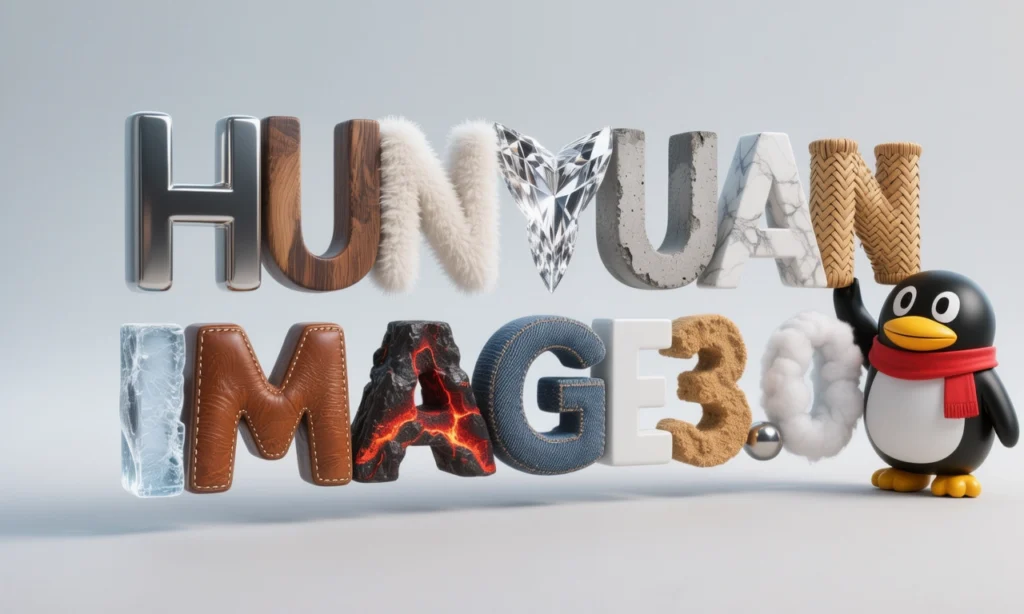
HunyuanImage-3.0 is Tencent’s open-source, multimodal AI image generation model released in September 2025, with its Instruct variant (supporting reasoning and image editing) launched January 26, 2026.
hunyuanimage 3.0 framework
Unlike most image generators built on Diffusion Transformer (DiT) architectures, HunyuanImage-3.0 uses a unified autoregressive framework — the same type of architecture powering large language models. This gives it a fundamentally different way of understanding and generating images: it treats text and image tokens together, rather than encoding prompts separately.
hunyuanimage 3.0 online
The result is a model that doesn’t just follow prompts — it understands them, reasons about them, and fills in the gaps you didn’t think to specify.
Why HunyuanImage-3.0 Is Getting Attention
Here’s the core reason this model stands out in a crowded field: it’s the largest open-source image generation model in existence, and it’s free.
The models ranked above it on LMArena’s image-edit leaderboard — tools like Nano-banner-pro and GPT-Image-1.5 — are either closed, expensive, or heavily rate-limited. HunyuanImage-3.0 is available through Tencent’s Hunyuan platform at no cost, with no API key required for casual use.
For content creators, developers, and designers, this changes the value equation entirely.
HunyuanImage-3.0 Key Features
1. Unified Multimodal Architecture
HunyuanImage-3.0 moves beyond the standard DiT pipeline by using an autoregressive framework that models text and image modalities in a single unified space. This architecture enables richer contextual understanding — the model doesn’t just match keywords, it interprets intent.
2. The Largest Open-Source Image MoE Model
The model uses a Mixture of Experts (MoE) design with:
- 64 experts
- 80 billion total parameters
- 13 billion parameters activated per token
This means massive capacity without the inference cost of activating all parameters for every generation.
3. Intelligent Prompt Understanding and CoT Reasoning
When you give HunyuanImage-3.0-Instruct a sparse or vague prompt, it doesn’t guess blindly. It uses Chain-of-Thought (CoT) reasoning to:
- Analyze your input image and text
- Break down the editing task into structured components (subject, composition, lighting, color, style)
- Rewrite and expand the prompt internally before generating
This is the “think_recaption” mode — and it’s what separates this model from basic text-to-image tools.
4. Image-to-Image Editing (TI2I)
The Instruct model supports true image-to-image generation:
- Add or remove elements from an existing image
- Change styles while preserving composition
- Replace backgrounds seamlessly
- Modify clothing, expressions, or props without affecting other areas
5. Multi-Image Fusion
You can input up to 3 reference images and instruct the model to combine elements from each. This opens up workflows like:
- Swapping outfits from a product photo onto a model photo
- Merging a logo from one image with the material style of another
- Creating character mashups and creative composites
6. Prompt Self-Rewrite
Even without the CoT reasoning path, HunyuanImage-3.0-Instruct can automatically enhance your prompt before generating — turning a rough description into a detailed, professional-grade prompt that captures your intent more accurately.
HunyuanImage-3.0 Model Variants: Which One Should You Use?
| Model | Parameters | Key Capabilities | Recommended VRAM |
| HunyuanImage-3.0 | 80B (13B active) | Text-to-image | ≥ 3 × 80 GB |
| HunyuanImage-3.0-Instruct | 80B (13B active) | T2I + Image editing + CoT reasoning | ≥ 8 × 80 GB |
| HunyuanImage-3.0-Instruct-Distil | 80B (13B active) | Same as Instruct, 8-step sampling | ≥ 8 × 80 GB |
Which should you choose?
- For casual use via the web UI: HunyuanImage-3.0-Instruct (available free on Hunyuan platform)
- For fast local deployment: HunyuanImage-3.0-Instruct-Distil (8 steps instead of 50)
- For pure text-to-image without the reasoning overhead: HunyuanImage-3.0 base
How to Use HunyuanImage-3.0 Without Any Setup
The fastest way to use HunyuanImage-3.0 is through the official Hunyuan web platform — no installation, no API key, no cost.
Steps:
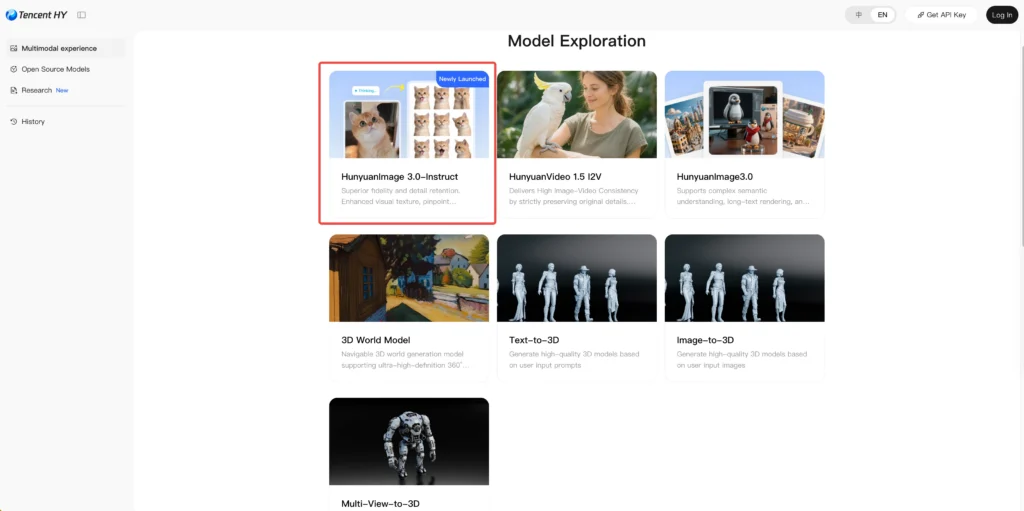
- Go to https://hunyuan.tencent.com
- Select the HunyuanImage-3.0-Instruct model in the top-left dropdown
- Upload your reference image(s)
- Choose an aspect ratio (9:16 works well for social media content)
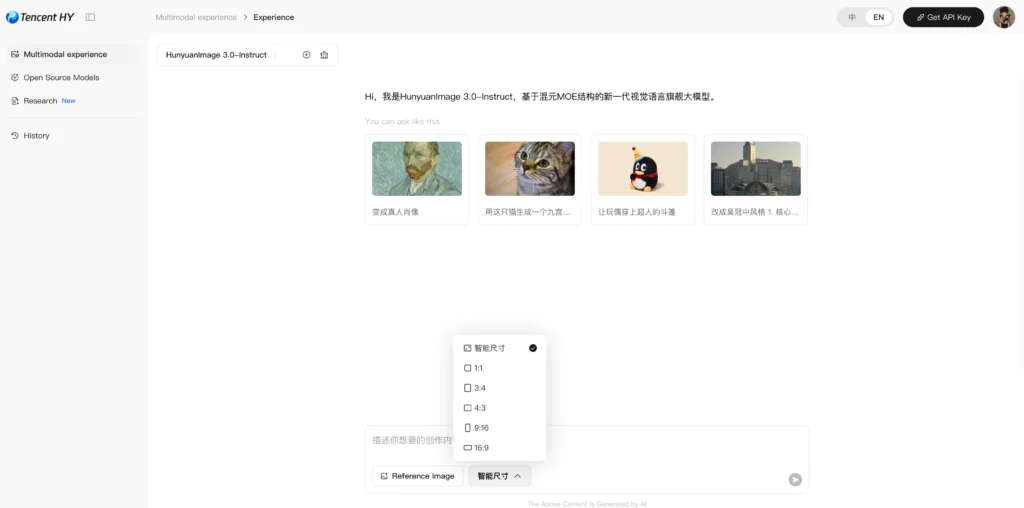
- Type your prompt in Chinese or English
- Click generate and wait 1–2 minutes
The Tencent Yuanbao app offers the same capability on mobile.
How to Run HunyuanImage-3.0 Locally
Environment Requirements
- Python 3.12+
- CUDA 12.8
- GCC 9+ (for compiling FlashAttention and FlashInfer)
Step 1: Install Dependencies
| # Install PyTorch with CUDA 12.8pip install torch==2.8.0 torchvision==0.23.0 torchaudio==2.8.0 \ –index-url https://download.pytorch.org/whl/cu128 # Install FlashInfer for up to 3x faster MoE inferencepip install flashinfer-python==0.5.0 # Install remaining requirementspip install -r requirements.txt |
Note: CUDA version used by PyTorch must match your system’s CUDA version. The first inference after enabling FlashInfer may take ~10 minutes for kernel compilation. Subsequent runs are much faster.
Step 2: Download the Model
| # For the Instruct modelhf download tencent/HunyuanImage-3.0-Instruct \ –local-dir ./HunyuanImage-3-Instruct # For the distilled fast-inference versionhf download tencent/HunyuanImage-3.0-Instruct-Distil \ –local-dir ./HunyuanImage-3-Instruct-Distil |
Important: The local directory name must not contain dots. Use HunyuanImage-3-Instruct, not HunyuanImage-3.0-Instruct.
Step 3: Run Image Generation
Quick start with HuggingFace Transformers:
| from transformers import AutoModelForCausalLM model_id = “./HunyuanImage-3-Instruct” kwargs = dict( attn_implementation=”sdpa”, trust_remote_code=True, torch_dtype=”auto”, device_map=”auto”, moe_impl=”flashinfer”, # Use “eager” if FlashInfer not installed moe_drop_tokens=True, ) model = AutoModelForCausalLM.from_pretrained(model_id, **kwargs) model.load_tokenizer(model_id) # Image-to-image editing with multiple references cot_text, samples = model.generate_image( prompt=”Based on image 1’s logo, apply the material style from image 2 to create a new fridge magnet”, image=[“./ref1.png”, “./ref2.png”], seed=42, image_size=”auto”, use_system_prompt=”en_unified”, bot_task=”think_recaption”, infer_align_image_size=True, diff_infer_steps=50, verbose=2 ) samples[0].save(“output.png”) |
Step 4: Launch the Gradio Web Interface (Optional)
| pip install gradio>=4.21.0export MODEL_ID=”./HunyuanImage-3-Instruct”sh run_app.sh –moe-impl flashinfer –attn-impl flash_attention_2# Access at http://localhost:443 |
Key Command-Line Arguments
| Argument | Description | Recommended Value |
| –bot-task | Generation mode: image, recaption, or think_recaption | think_recaption |
| –diff-infer-steps | Number of diffusion steps | 50 (or 8 for Distil) |
| –image-size | Output resolution or ratio | auto |
| –use-system-prompt | Prompt enhancement mode | en_unified |
| –moe-impl | MoE backend: eager or flashinfer | flashinfer |
| –infer-align-image-size | Match output size to input image | True |
HunyuanImage-3.0 Performance Benchmarks
Human Evaluation (GSB Method)
Tencent used the GSB (Good/Same/Bad) method with 100+ professional evaluators comparing HunyuanImage-3.0 against leading models. The evaluation used 1,000+ single- and multi-image editing cases, with a single inference pass per prompt — no cherry-picking.
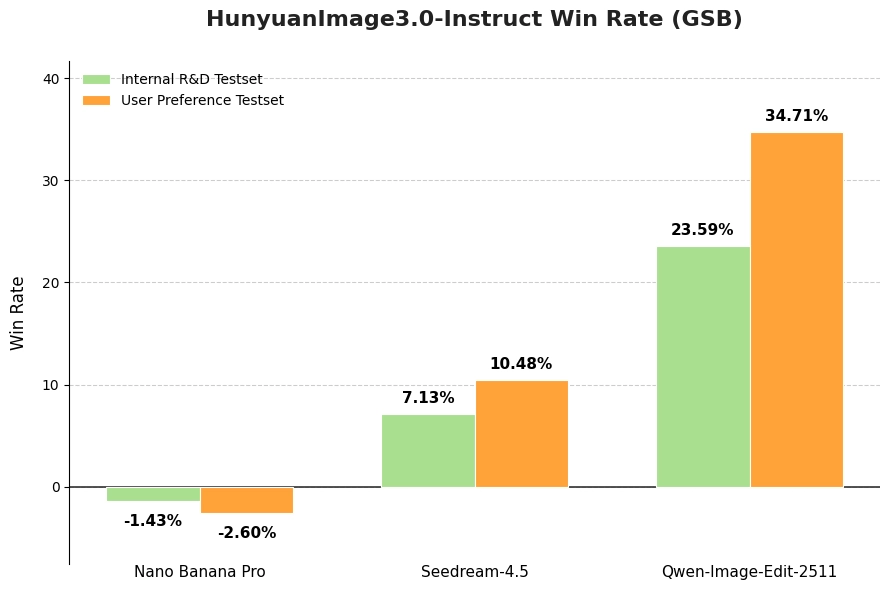
HunyuanImage-3.0-Instruct consistently outperformed baseline models in overall image perception quality.
Machine Evaluation (SSAE)
The Structured Semantic Alignment Evaluation (SSAE) tests prompt-following accuracy using multimodal LLMs as judges. The benchmark covers 3,500 key points across 12 categories, scoring both image-level and global alignment.
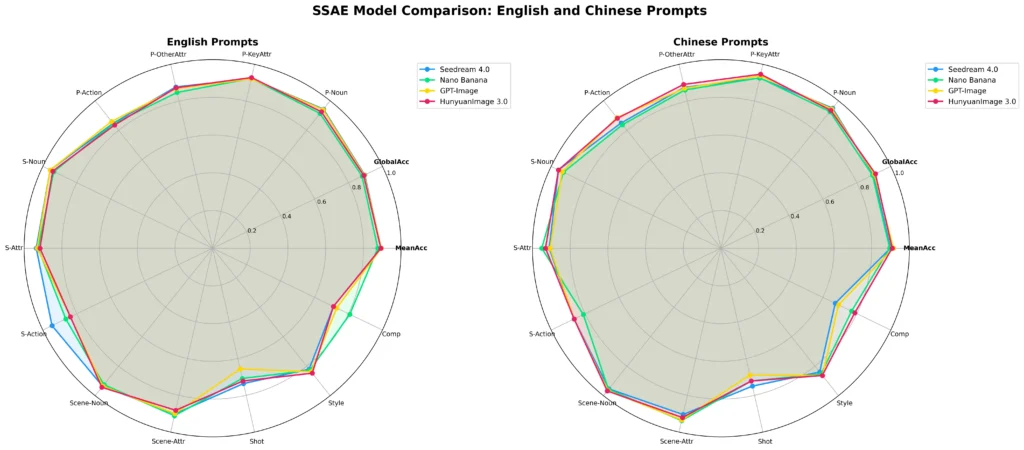
HunyuanImage-3.0 achieves competitive performance against closed-source models including GPT-Image and Midjourney on both Mean Image Accuracy and Global Accuracy.
What HunyuanImage-3.0 Can Actually Do: Real Use Cases
1. Content Creation and Social Media
The model excels at tasks that are time-consuming for human designers:
- Converting anime characters to photorealistic renders
- Adding fictional characters (cartoon, film, game) into real photos
- Generating stylized profile photos and creative portraits
- Creating 9-grid social media posts with consistent character identity
2. E-Commerce and Product Photography
Virtual try-on is one of HunyuanImage-3.0’s most practical applications. Upload a clothing item and a model photo, and the model swaps the outfit while preserving pose and facial features. While current output still benefits from light post-editing, the workflow dramatically reduces studio photography costs for product teams.
3. Animation and Manga Production
For creators working on AI-assisted manga or webtoons, HunyuanImage-3.0-Instruct supports storyboard generation from a single reference image — maintaining consistent art style, character appearance, and narrative continuity across multiple panels.
4. Game and Concept Design
The model handles complex scene generation for game designers: UI mockups, character concepts, environment art. A test prompt combining Apple Vision Pro’s visionOS interface with Honor of Kings battle effects produced a photorealistic concept that would take a senior designer hours to produce manually.
HunyuanImage-3.0 vs. Competitors
| Feature | HunyuanImage-3.0 | Midjourney | DALL-E 3 / GPT-Image |
| Open source | ✅ Yes | ❌ No | ❌ No |
| Free to use | ✅ Yes (web UI) | ❌ Subscription | ❌ Rate-limited |
| Image-to-image | ✅ Instruct version | ✅ Limited | ✅ Yes |
| Multi-image input | ✅ Up to 3 images | ❌ No | ❌ No |
| CoT reasoning | ✅ Yes | ❌ No | ❌ No |
| Local deployment | ✅ Yes | ❌ No | ❌ No |
| Parameters | 80B MoE | Unknown | Unknown |
The most significant differentiator is the combination of open weights + free web access + multi-image fusion + reasoning. No other model at this capability level offers all four simultaneously.
Bonus: Gaga AI — A No-Code Alternative for AI Video and Content Creation
If HunyuanImage-3.0’s image capabilities have you thinking about video, Gaga AI is worth knowing about. It’s a web-based AI video generator designed for creators who want to go from image to video without any technical setup.

What Gaga AI offers:
- Image-to-Video AI — Turn a static image into a short cinematic video clip. Feed it a portrait, a product shot, or a scene and animate it with realistic motion.
- Video and Audio Infusion — Combine video clips with AI-generated audio, music, or sound effects in a unified workflow.
- AI Avatar — Generate a talking AI avatar from a photo. Useful for presenting content without being on camera.
- AI Voice Clone — Clone a voice from a short audio sample and use it for narration, dubbing, or dialogue.
- Text-to-Speech (TTS) — Generate natural-sounding voiceovers in multiple languages and styles for videos, ads, or social content.
For creators already using HunyuanImage-3.0 to generate high-quality images, Gaga AI serves as a natural next step in the production pipeline — turning those images into animated video content ready for platforms like TikTok, YouTube Shorts, and Instagram Reels.
FAQ
What is HunyuanImage-3.0?
HunyuanImage-3.0 is Tencent’s open-source AI image generation model. It uses a unified autoregressive architecture with 80 billion parameters (MoE design, 13B active), supporting text-to-image generation, image editing, multi-image fusion, and reasoning-enhanced prompt handling.
Is HunyuanImage-3.0 free to use?
Yes. The model weights are freely available on HuggingFace, and the web interface on hunyuan.tencent.com and the Yuanbao app offer free access without requiring API credentials or subscriptions.
What’s the difference between HunyuanImage-3.0 and HunyuanImage-3.0-Instruct?
The base model handles text-to-image generation only. The Instruct model adds image-to-image editing, multi-image fusion, Chain-of-Thought reasoning, and prompt self-rewriting. The Instruct-Distil variant supports fast 8-step sampling for efficient deployment.
How much VRAM does HunyuanImage-3.0 need?
The base model requires at least 3 × 80 GB VRAM. The Instruct and Instruct-Distil models require at least 8 × 80 GB VRAM. Multi-GPU inference is recommended.
What is the “think_recaption” mode?
It’s the model’s Chain-of-Thought reasoning pipeline. When selected, the model first analyzes your prompt and input images, breaks down the task into structured visual components, rewrites the prompt in detail, and then generates the image. It typically produces more accurate, contextually rich outputs than direct generation.
Can HunyuanImage-3.0 edit existing photos?
Yes, through the Instruct model’s image-to-image (TI2I) capability. You can change clothing, swap backgrounds, add or remove objects, alter styles, and merge elements from multiple source images — while preserving specified elements like facial features.
How many images can I input at once?
HunyuanImage-3.0-Instruct supports up to 3 reference images simultaneously for multi-image fusion tasks.
Where can I download HunyuanImage-3.0?
The model weights are available on HuggingFace under tencent/HunyuanImage-3.0 and tencent/HunyuanImage-3.0-Instruct. The source code is on GitHub at Tencent-Hunyuan/HunyuanImage-3.0.
Does HunyuanImage-3.0 support faster inference?
Yes. Install FlashInfer (flashinfer-python==0.5.0) for up to 3x faster MoE inference. Alternatively, use the Instruct-Distil model with –diff-infer-steps 8 for dramatically faster generation with minimal quality loss.
How does HunyuanImage-3.0 compare to Midjourney?
HunyuanImage-3.0 is open-source, free, and supports multi-image fusion and CoT reasoning — features Midjourney lacks. Midjourney has a more polished consumer interface and a broader aesthetic range in its defaults. For developers, researchers, and power users, HunyuanImage-3.0 offers substantially more flexibility and zero cost.