Key Takeaways
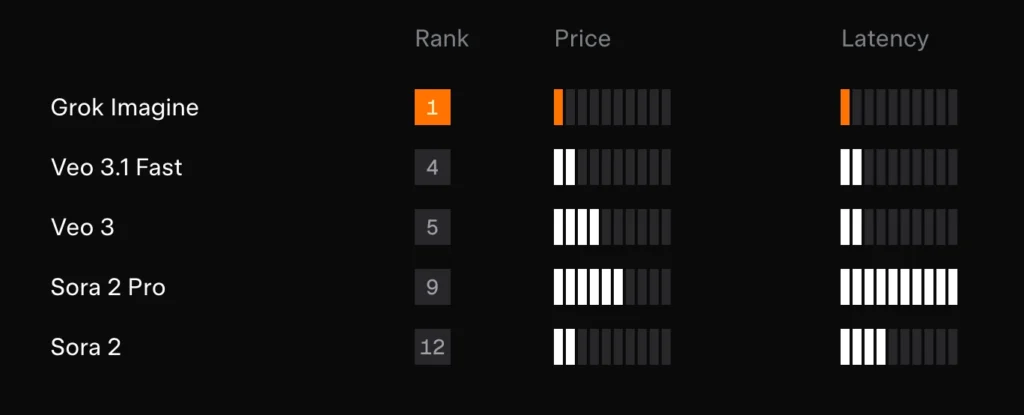
- Grok Imagine 1.0 ranks #1 on Artificial Analysis for text-to-video and image-to-video generation
- Generates up to 10 seconds of video at 720p resolution with native audio
- Priced at $4.20 per minute (71% cheaper than Veo 3.1, 86% cheaper than Sora 2 Pro)
- Advanced editing capabilities: object replacement, scene transformation, character animation
- Generated 1.245 billion videos in 30 days, demonstrating massive scale and reliability
- Available through xAI’s API and partner platforms for developer integration
Table of Contents
What Is Grok Imagine 1.0?
Grok Imagine 1.0 is xAI’s latest video-audio generative AI model that converts text prompts or images into high-quality videos with synchronized audio. Released in early 2026, it represents a significant leap in AI video generation, combining industry-leading quality with unprecedented cost efficiency.
The model excels at three core functions:
- Text-to-video generation: Create videos from written descriptions
- Image-to-video conversion: Animate static images with realistic motion
- Video editing: Modify existing footage through AI-powered transformations

Unlike previous AI video tools that sacrifice quality for speed or affordability for features, Grok Imagine 1.0 achieves balance across all three dimensions—making professional-grade video generation accessible to creators, developers, and enterprises.
Why Grok Imagine 1.0 Tops Video AI Rankings
Benchmark Performance
Grok Imagine currently holds the #1 position on Artificial Analysis benchmarks for both text-to-video and image-to-video generation. This independent ranking evaluates models based on visual quality, motion coherence, prompt adherence, and output consistency.
In Arena video competitions, Grok Imagine ranks just behind Google Veo 3 and Sora Pro—but at a fraction of their cost. This positioning makes it the optimal choice for production workflows where budget and iteration speed matter.
Key Differentiators
Superior instruction following: The model demonstrates exceptional ability to interpret complex, multi-layered prompts and translate them into accurate visual sequences.
Native audio integration: Unlike competitors requiring separate audio generation steps, Grok Imagine produces synchronized soundtracks, dialogue, and ambient audio in a single pass.
Editing precision: The video editing capabilities allow granular control over specific elements without regenerating entire sequences—a feature absent in most competing platforms.
Grok Imagine 1.0 Core Capabilities
Video Generation Features
1. Output Specifications
- Video length: Up to 10 seconds per generation
- Resolution: 720p (1280×720 pixels)
- Aspect ratios: Portrait (9:16), landscape (16:9), and square (1:1)
- Audio: Native soundtrack with character voices and background music
- Generation speed: Optimized for low latency with high concurrency support
2. Cinematic Motion Understanding
Grok Imagine excels at realistic motion simulation. When animating a static image, the model analyzes: Zoom Out, Zoom In, Timelapse, Pull Back, Tilt Up, Pan Right
- Object physics and natural movement patterns
- Spatial relationships between elements
- Environmental context (lighting, weather, time of day)
- Character interactions and gaze direction
This produces videos where objects move believably through space, avoiding the “morphing” artifacts common in earlier AI video models.
3. Advanced Video Editing Tools
Object Manipulation
- Add objects: Insert new elements into existing scenes with proper lighting and perspective
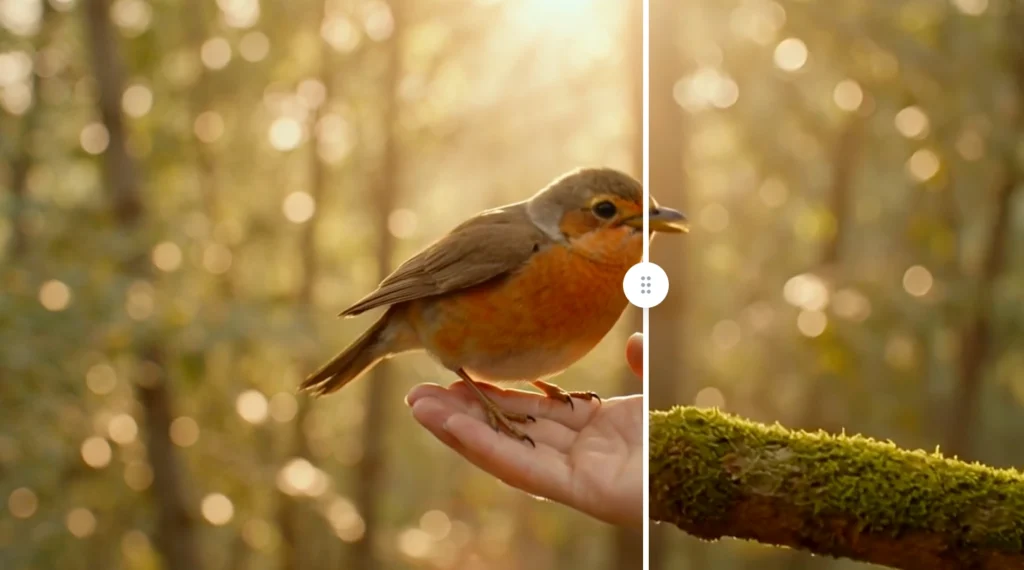
- Remove objects: Cleanly eliminate unwanted items while intelligently filling the background
- Swap objects: Replace props or elements while maintaining scene consistency
Scene Control
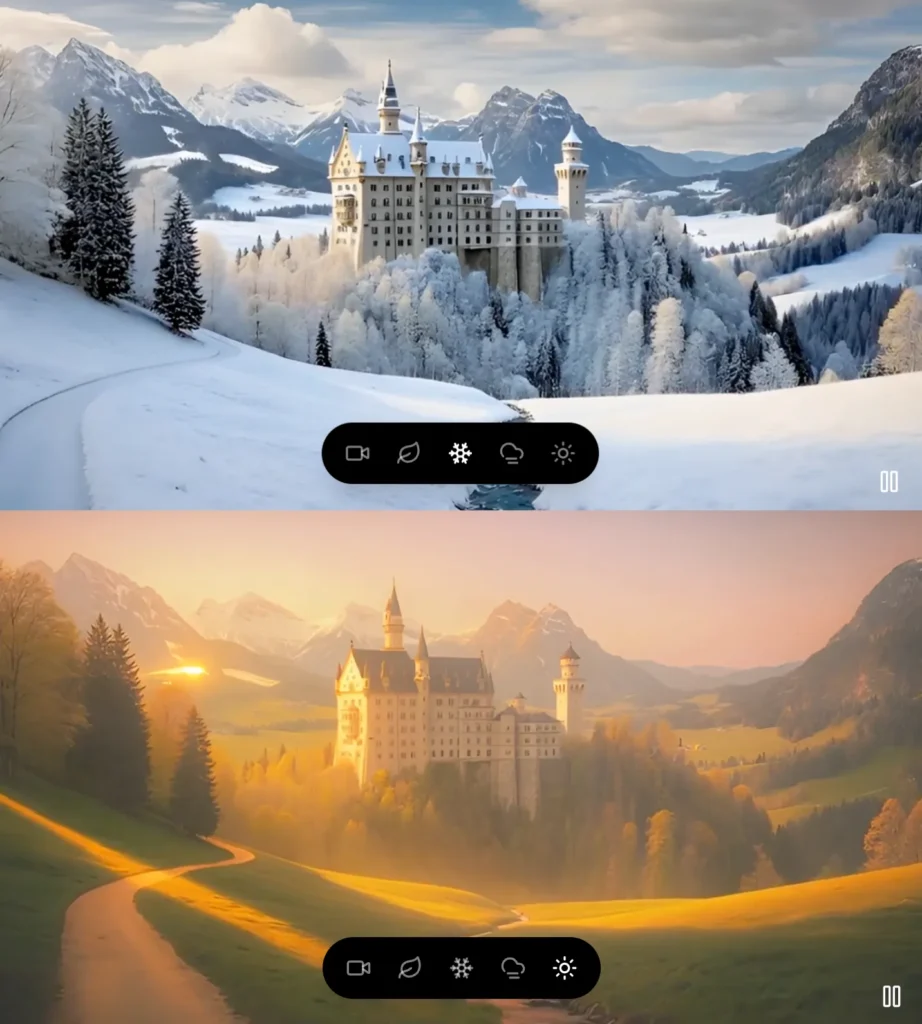
Transform environmental conditions instantly:
- Weather transitions (sunny to rainy, clear to foggy)
- Seasonal changes (summer to autumn, winter to spring)
- Time-of-day shifts (morning to sunset, day to night)
- Lighting adjustments (golden hour, blue hour, dramatic shadows)
Character Animation
Add custom performances to any character in your footage. Upload reference movements or describe actions in text, and Grok Imagine applies them while preserving the character’s appearance and scene context.
Style Transfer
Apply visual aesthetics across entire videos:
- Block, Cyberpunk, Anime, Retro, Origami, Watercolor, Mosaic
- Artistic styles (watercolor, oil painting, sketch)
- Cinematic looks (noir, vintage film, cyberpunk)
- Animation styles (3D render, 2D animation, stop-motion)
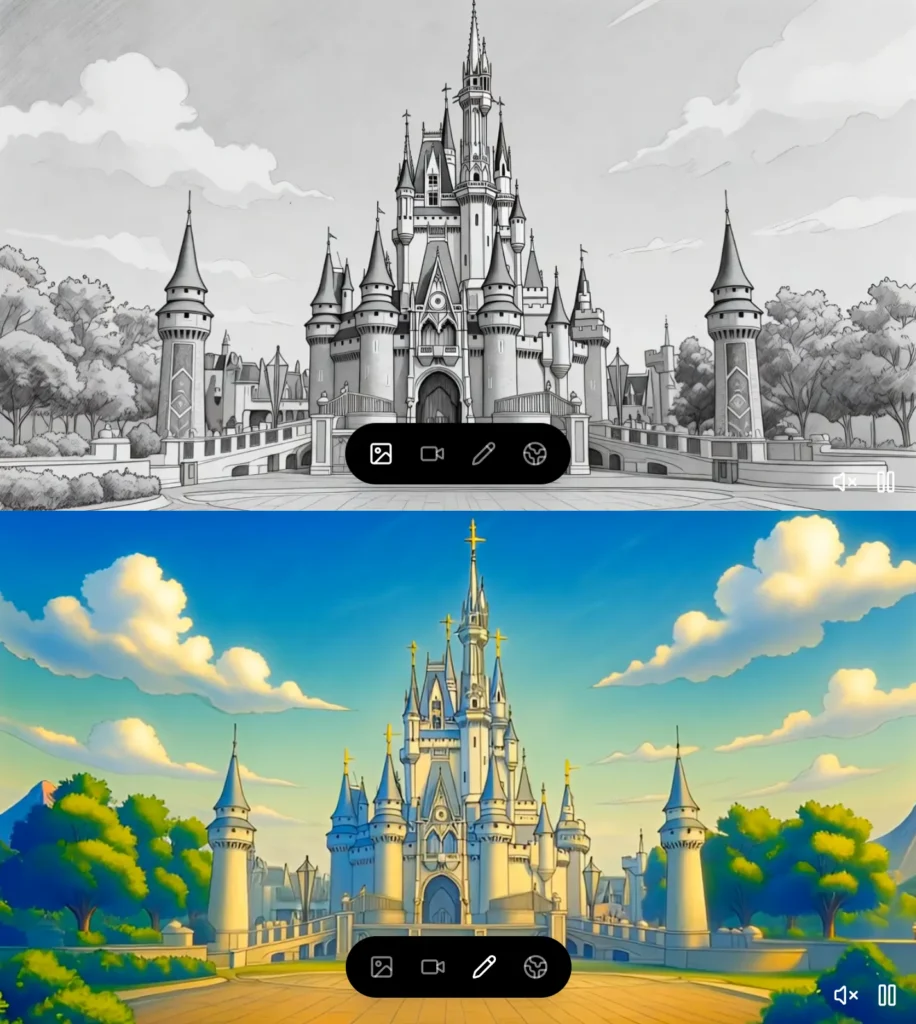
Sketch-to-Video
Convert static line drawings or storyboards into fully animated, colored sequences—ideal for rapid prototyping and concept visualization.
How to Use Grok Imagine 1.0: Step-by-Step
Text-to-Video Generation
Step 1: Craft Your Prompt
Write a clear, detailed description of your desired video. Effective prompts include:
- Main subject and action
- Setting and environment details
- Camera movement or perspective
- Mood and lighting
- Specific style or aesthetic
Example: “A golden retriever puppy playing with a red ball in a sunlit park, slow-motion close-up, warm afternoon lighting, cinematic depth of field”
Step 2: Specify Technical Parameters
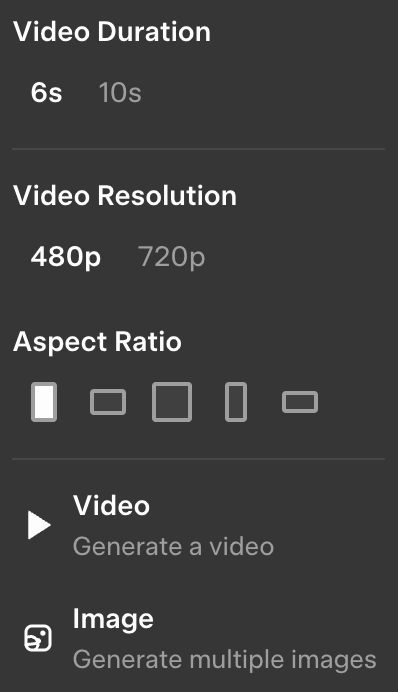
- Choose aspect ratio based on platform (9:16 for mobile, 16:9 for YouTube)
- Set video duration (up to 10 seconds)
- Enable audio generation if needed
Step 3: Generate and Iterate
Submit your prompt and review the output. Use follow-up prompts to refine specific elements without starting over.
Image-to-Video Conversion
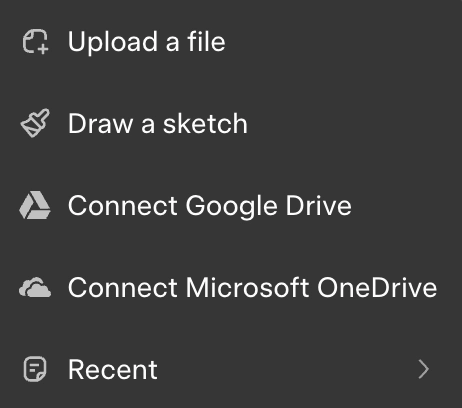
Step 1: Upload Source Image
Provide a static image (JPG, PNG) at minimum 720p resolution for best results.
Step 2: Define Motion Intent
Describe how you want the image to animate:
- “Camera slowly zooms out revealing the full landscape”
- “The person turns their head and smiles at the camera”
- “Leaves gently fall from trees in the background”
Step 3: Adjust and Refine
Review the generated video and use editing features to fine-tune motion, lighting, or add additional elements.
Grok Imagine API: Developer Integration
API Access and Pricing
Grok Imagine API provides programmatic access to all video generation and editing features through RESTful endpoints.
Pricing Structure
- Base rate: $4.20 per minute of generated video with audio
- Significantly lower than competitors:
- Google Veo 3.1: $12.00/minute (186% more expensive)
- Sora 2 Pro: $30.00/minute (614% more expensive)
This pricing enables cost-effective iteration during development and makes large-scale deployment economically viable.
Integration Options
The xAI Grok Imagine API is available through:
1. Direct xAI API: Full access with custom rate limits and enterprise support
2. Partner platforms: Integrated into existing creative tools and workflows
3. SDK support: Official libraries for Python, JavaScript, and additional languages
Best Grok Imagine Alternatives: Complete Comparison
Choosing the right AI video generator depends on your specific workflow requirements, budget constraints, and output quality needs. While Grok Imagine 1.0 leads in cost-performance balance, several alternatives excel in specialized use cases. Understanding each platform’s strengths helps you select the optimal tool—or build a multi-platform strategy.
#1 – Gaga AI: The All-in-One Creative Suite
Best for: Character-driven content, virtual influencers, and multimedia storytelling
Gaga AI differentiates itself by bundling video generation with comprehensive creative tools that extend beyond standard text-to-video capabilities.

Core Strengths
- Image-to-video conversion: Transform static images into dynamic sequences with controllable motion paths
- Video and audio infusion: Merge separate audio tracks with generated video, offering precise soundtrack control
- AI avatar creation: Generate and customize digital characters with consistent appearance across multiple videos
- Voice cloning: Replicate specific voices for character dialogue or narration with high fidelity
- Multi-modal integration: Seamlessly combine image, video, and audio workflows in unified projects
When to Choose Gaga AI
- Creating digital influencers or virtual brand ambassadors requiring consistent character appearance
- Producing narrative content where specific voice characteristics matter
- Building educational content with recurring AI-generated hosts
- Developing interactive experiences with custom avatars
#2 – Google Veo 3: The Premium Quality Option
Best for: High-resolution deliverables, broadcast-quality output, and enterprise budgets
Google Veo 3 represents the premium tier of AI video generation, prioritizing maximum visual fidelity over cost efficiency.
Core Strengths
- 1080p resolution: Full HD output suitable for professional broadcasting and large-screen display
- Superior motion quality: Ranks #2 in Arena video competitions with exceptional cinematic motion
- Google Cloud integration: Native compatibility with Google Workspace, Vertex AI, and enterprise tooling
- Extended generation options: Longer clip support compared to most competitors
- Enterprise-grade reliability: Built on Google’s infrastructure with SLA guarantees
When to Choose Veo 3
- Final deliverables require 1080p or higher resolution (festivals, broadcast, large displays)
- Working within Google Cloud ecosystem with existing infrastructure
- Enterprise projects where budget accommodates premium pricing for maximum quality
- Client requirements explicitly specify Google-powered solutions
Pricing Consideration: At $12.00 per minute, Veo 3 costs 186% more than Grok Imagine. Calculate whether the resolution increase justifies the cost—upscaling 720p footage often produces acceptable results at fraction of the price.
Limitation: Limited editing capabilities compared to Grok Imagine. Modifications typically require full regeneration rather than targeted edits.
#3 – Vidu: The Speed Specialist
Best for: Rapid prototyping, social media content, and high-volume production
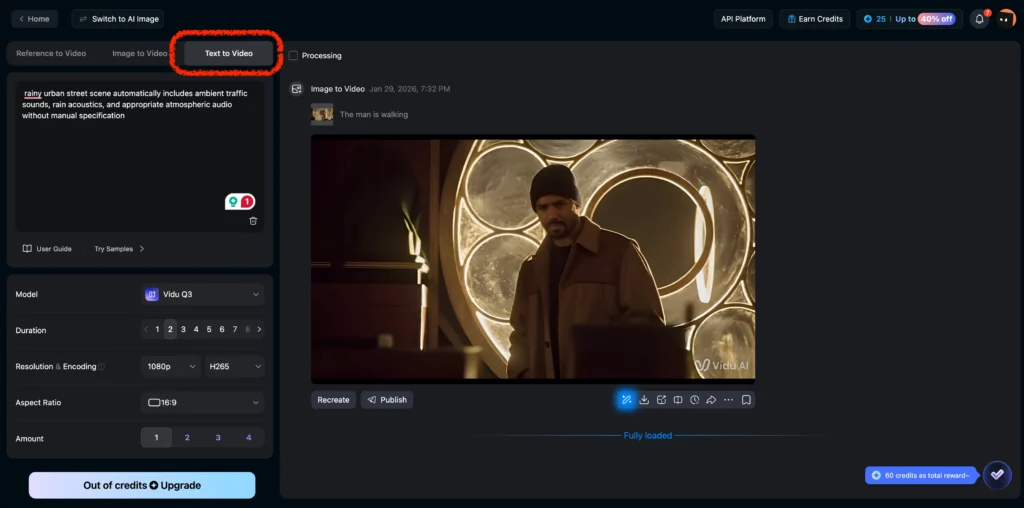
Vidu optimizes for generation speed and turnaround time, making it ideal for workflows where quantity and velocity matter more than maximum quality.
Core Strengths
- Fast generation times: Produces 5-second clips significantly faster than competitors
- Social-first optimization: Output formats tailored for TikTok, Instagram Reels, YouTube Shorts
- Bulk generation: Efficient batch processing for creating multiple variations simultaneously
- Lower latency: Minimal wait times enable real-time creative experimentation
- Simplified interface: Reduced complexity speeds up workflow for non-technical users
When to Choose Vidu
- Producing high volumes of short-form social media content
- A/B testing multiple creative concepts before investing in longer production
- News or trending content requiring same-day turnaround
- Projects where 5-second clips sufficiently communicate the message
Pricing Consideration: Vidu typically offers competitive per-clip pricing, though per-minute costs may exceed Grok Imagine when normalized. Best value comes from leveraging speed for iteration.
Limitation: 5-second maximum length restricts storytelling depth. Video quality ranks mid-tier—sufficient for mobile viewing but less suitable for desktop or large-screen display.
#4 – Vheer: The Budget-Friendly Entry Point
Best for: Casual users, learning projects, and low-stakes experimentation
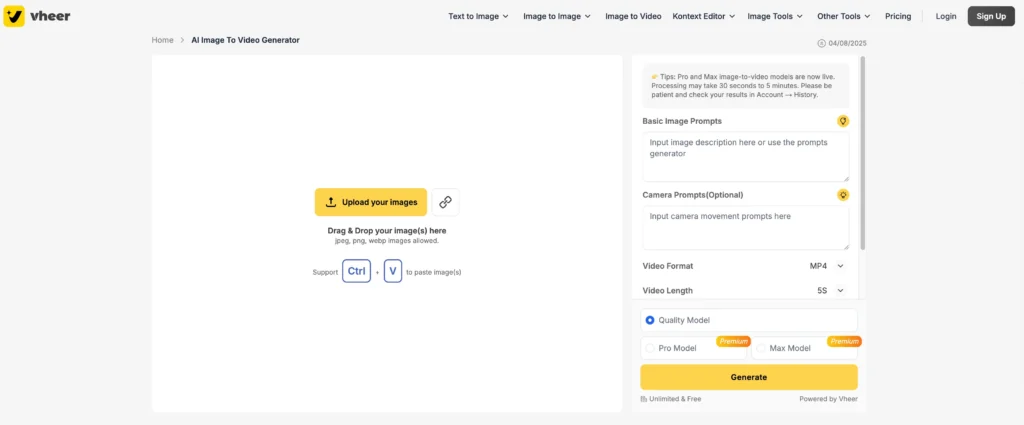
Vheer serves the budget-conscious segment, offering basic AI video generation at accessible price points for users exploring the technology.
Core Strengths
- Low cost: Entry-level pricing makes experimentation affordable
- Simple workflow: Minimal learning curve for first-time users
- Basic text-to-video: Functional generation for straightforward prompts
- No specialized knowledge required: Accessible to complete beginners
When to Choose Vheer
- Personal projects where professional quality isn’t required
- Learning AI video generation without significant financial commitment
- Creating quick mockups or proof-of-concept demonstrations
- Budget constraints eliminate higher-tier options
Pricing Consideration: While per-generation costs stay low, the limited output quality and features mean you may outgrow Vheer quickly as needs evolve.
Limitation: 480p resolution, 4-second maximum length, and no editing capabilities significantly restrict use cases. Output quality falls well below Grok Imagine and lacks native audio generation.
#5 – Hybrid Strategies: Combining Platforms
Advanced users often employ multiple platforms strategically:
Prototyping Pipeline
1. Use Vidu for rapid concept testing (fast, low-cost iterations)
2. Refine with Grok Imagine for quality output with editing
3. Upscale final selects through Veo 3 if 1080p required
Character-Based Workflow
1. Build avatars and clone voices in Gaga AI
2. Generate video sequences with Grok Imagine for cost efficiency
3. Import Gaga AI assets into Grok Imagine scenes for consistency
Budget Optimization
1. Develop rough cuts with Vheer for client review
2. Produce approved concepts with Grok Imagine at final quality
3. Reserve Veo 3 exclusively for hero shots requiring maximum resolution
Grok Imagine vs. Competitors
Quality Comparison
| Model | Ranking | Resolution | Max Length | Audio | Editing |
| Grok Imagine 1.0 | #1 (AA) | 720p | 10s | Native | Advanced |
| Google Veo 3 | #2 (Arena) | 1080p | 8s | Optional | Limited |
| Sora 2 Pro | #3 (Arena) | 1080p | 20s | Separate | Minimal |
| Vidu | Mid-tier | 720p | 5s | None | None |
| Vheer | Mid-tier | 480p | 4s | None | None |
Cost-Performance Analysis
Grok Imagine delivers the best cost-per-quality ratio:
- 86% cheaper than Sora 2 Pro with comparable output quality
- 71% cheaper than Veo 3.1 while ranking higher on benchmarks
- Substantially faster iteration cycles due to lower cost per attempt
Real-World Applications
| Category | Primary Applications | Key Benefits |
| Content Creators & Influencers | • Animate family photos• Meme generation• Story enhancement | Transforms static memories into “living” content and speeds up the trend-response cycle. |
| Educators & Trainers | • Concept visualization• Historical reconstruction• Procedural demonstrations | Makes abstract ideas concrete and brings history to life through visual storytelling. |
| Designers & Marketers | • Product showcases• Campaign iterations• Personalization at scale | Allows for rapid testing of creative angles and localized content without high production costs. |
| Developers & Enterprises | • Automated content pipelines• Prototyping/Pre-visualization• Market localization | Enables programmatic video creation and helps “pre-viz” concepts before major capital investment. |
Technical Considerations
Quality Optimization Tips
Prompt Engineering
- Front-load important details (model prioritizes early prompt elements)
- Use specific adjectives rather than vague terms
- Reference cinematic techniques (“Dutch angle,” “rack focus”) for precise camera work
- Include lighting descriptions for mood consistency
Image Source Quality
When converting images to video, start with:
- High-resolution images (minimum 720p, preferably higher)
- Well-lit subjects with clear detail
- Uncluttered compositions that allow room for motion
Iterative Refinement
Rather than requesting major changes in single prompts, make incremental adjustments:
1. Generate base video
2. Refine one element (lighting, motion, etc.)
3. Add or modify objects
4. Apply final style adjustments
Limitations and Workarounds
Current Constraints
- Maximum video length: 10 seconds (chain multiple clips for longer sequences)
- Resolution cap: 720p (use AI upscaling for 1080p+ if needed)
- Complex multi-character interactions may require multiple generations and editing passes
Common Issues
- Motion artifacts: Reduce complexity in prompt, focus on single primary movement
- Audio sync problems: Regenerate with more specific audio descriptions
- Object consistency: Use editing features to correct rather than full regeneration
Frequently Asked Questions
What is Grok Imagine used for?
Grok Imagine generates videos from text descriptions or static images, with applications in content creation, marketing, education, and entertainment. It also offers advanced editing to modify existing videos by changing objects, scenes, or visual styles.
How much does Grok Imagine API cost?
The Grok Imagine API costs $4.20 per minute of generated video with native audio. This is 71% cheaper than Google Veo 3.1 ($12/minute) and 86% cheaper than Sora 2 Pro ($30/minute).
What makes Grok Imagine different from other AI video generators?
Grok Imagine combines three advantages: (1) #1 ranking on quality benchmarks, (2) native audio generation eliminating separate soundtrack workflows, and (3) advanced editing capabilities allowing precise modifications without full regeneration.
How long are videos generated by Grok Imagine 1.0?
Grok Imagine 1.0 generates videos up to 10 seconds in length at 720p resolution. For longer content, create multiple clips and sequence them together.
Does Grok Imagine work with uploaded videos or only images?
Grok Imagine supports both image-to-video conversion and video editing. Upload existing footage to apply edits like object replacement, scene transformation, or style changes.
What aspect ratios does Grok Imagine support?
Grok Imagine supports portrait (9:16), landscape (16:9), and square (1:1) aspect ratios—optimized for social media platforms, YouTube, and traditional video formats.
Final Words
Grok Imagine 1.0 represents a significant advancement in AI video generation, achieving the rare combination of superior quality, powerful editing capabilities, and accessible pricing. By topping industry benchmarks while undercutting competitors by 71-86% on cost, xAI has created the most practical solution for developers, creators, and enterprises requiring professional video generation at scale.
The model’s 1.245 billion videos generated in 30 days proves its production readiness, while the comprehensive API enables seamless integration into existing workflows. Whether you’re animating family photos, building a content automation pipeline, or prototyping marketing campaigns, Grok Imagine provides the tools to bring visual ideas to life efficiently.
As the AI video landscape continues evolving, Grok Imagine’s focus on the complete creative workflow—from initial generation through iterative editing—positions it as the practical choice for real-world applications where both quality and economics matter.