
Key Takeaways
- Qwen3-TTS is Alibaba’s open-source text-to-speech model family released January 2026, featuring 0.6B and 1.7B parameter versions
- End-to-end synthesis latency reaches 97 milliseconds, enabling real-time conversational applications
- Voice cloning requires only 3 seconds of reference audio to replicate any speaker’s voice with 0.95 similarity
- The model supports 10 languages (Chinese, English, Japanese, Korean, German, French, Russian, Portuguese, Spanish, Italian) plus regional dialects
- Natural language prompts can design entirely new voice personas without pre-recorded samples
- All models are Apache 2.0 licensed and available on GitHub, Hugging Face, and ModelScope
Table of Contents
What Is Qwen3-TTS?
Qwen3-TTS is an open-source text-to-speech model series developed by Alibaba’s Qwen team. The models convert written text into natural-sounding speech with support for voice cloning, voice design, and multilingual synthesis.
Unlike single-model TTS solutions, Qwen3-TTS is a family of specialized models. The 1.7B parameter version delivers maximum quality and control capabilities, while the 0.6B version balances performance with computational efficiency for edge deployment scenarios.
The architecture uses a discrete multi-codebook language model approach. This end-to-end design eliminates information loss that occurs in traditional TTS pipelines combining separate language and acoustic models.
Core Capabilities of Qwen3-TTS
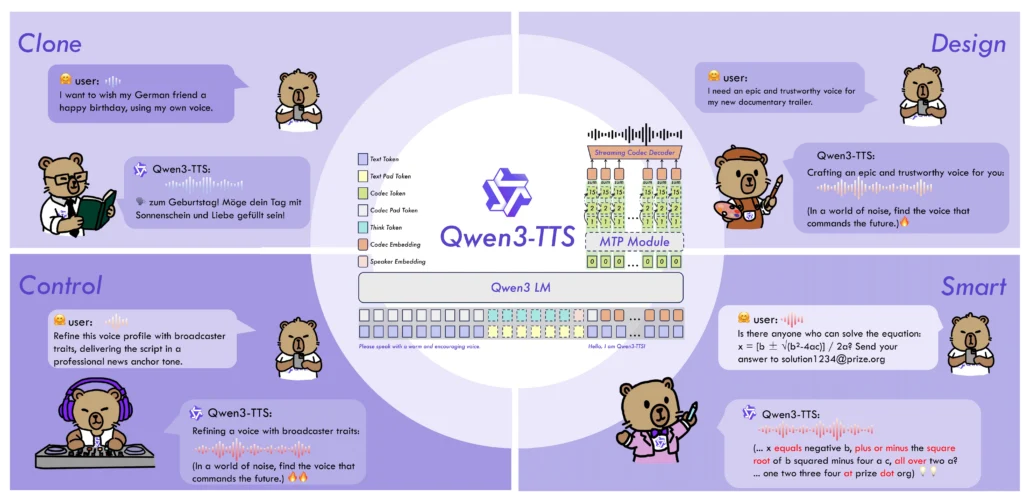
Ultra-Low Latency Streaming
Qwen3-TTS achieves 97-millisecond first-packet latency using a dual-track hybrid architecture. The system outputs audio immediately after receiving a single character input. Even under concurrent load with 6 simultaneous users, first-packet latency stays below 300 milliseconds.
This performance level makes Qwen3-TTS suitable for:
- Real-time voice assistants
- Live streaming interactions
- Online meeting translation
- Voice navigation systems
3-Second Voice Cloning
The voice cloning capability requires just 3 seconds of reference audio. The system captures not only the speaker’s voice characteristics but also preserves speech patterns, rhythm, and emotional nuances. Cloned voices transfer seamlessly across all 10 supported languages.
Speaker similarity scores reach 0.95, approaching human-level reproduction quality. This outperforms commercial alternatives including MiniMax and ElevenLabs on standardized benchmarks.
Natural Language Voice Design
Qwen3-TTS accepts natural language descriptions to generate entirely new voice personas. Instead of selecting from preset voice libraries, users describe the desired voice characteristics in plain text.
Example prompts that work:
- “A confident 17-year-old male with a tenor range, gaining confidence”
- “Warm, gentle young female voice with rich emotion”
- “Middle-aged authority figure with a low, commanding timbre”
The VoiceDesign model interprets these descriptions and synthesizes matching voices without requiring any audio samples.
Multilingual and Dialect Support
The model natively supports 10 languages: Chinese, English, Japanese, Korean, German, French, Russian, Portuguese, Spanish, and Italian. It also handles Chinese regional dialects including Sichuan dialect and Beijing dialect.
Cross-lingual synthesis maintains voice consistency when switching languages. The Chinese-to-Korean error rate drops to 4.82%, compared to 20%+ error rates in competing models.
Long-Form Audio Generation
Qwen3-TTS processes up to 32,768 tokens, generating continuous audio exceeding 10 minutes. Word error rates remain low: 2.36% for Chinese and 2.81% for English. The system avoids common long-form synthesis problems like repetition, omission, and rhythm inconsistency.
Technical Architecture Explained
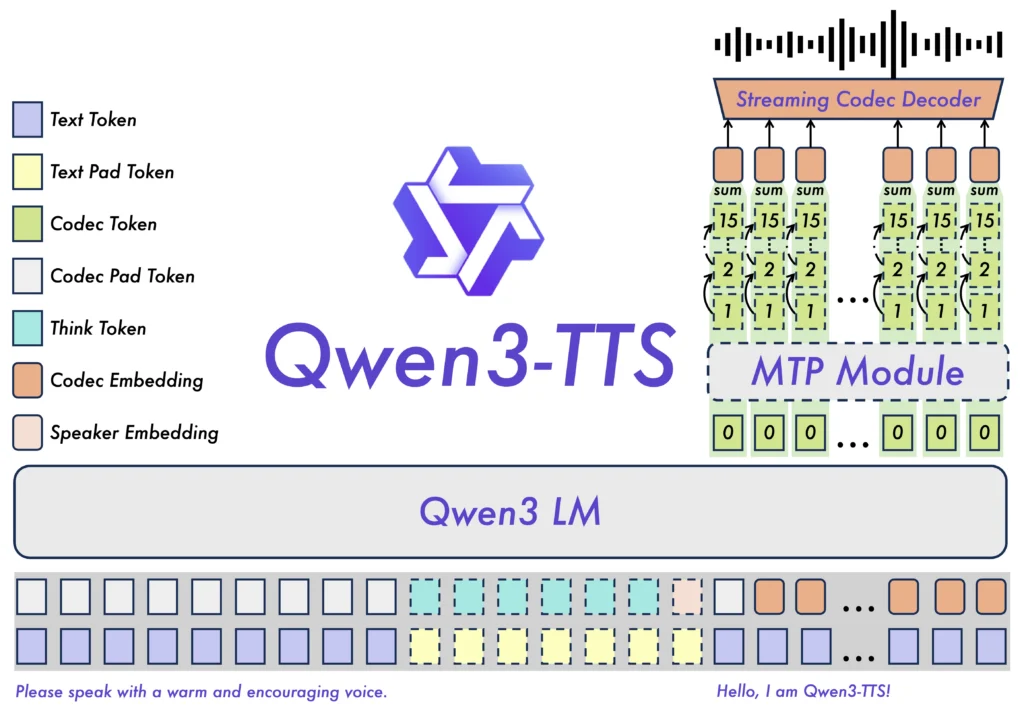
Dual-Track Streaming Design
The dual-track architecture enables simultaneous streaming and non-streaming generation within a single model. One track plans overall speech prosody while the second track outputs audio in real-time as text arrives. This parallels how human speakers organize thoughts while speaking.
End-to-End Multi-Codebook LM
Traditional TTS systems chain separate language models and acoustic models, creating information bottlenecks at each stage. Qwen3-TTS uses a unified discrete multi-codebook language model architecture that directly maps text to speech without intermediate representations.
Qwen3-TTS-Tokenizer-12Hz
The proprietary speech encoder operates at 12 frames per second, achieving 5-8x compression while preserving paralinguistic information including emotion, speaking environment, and acoustic characteristics. This tokenizer enables the lightweight non-DiT decoder to reconstruct high-fidelity audio.
Training Pipeline
Pre-training uses over 50 million hours of multilingual speech data. Post-training incorporates human feedback optimization and rule-based reward enhancement to improve practical performance. This staged approach balances long-form stability, low latency, and audio fidelity.
How to Try the Qwen3-TTS Demo
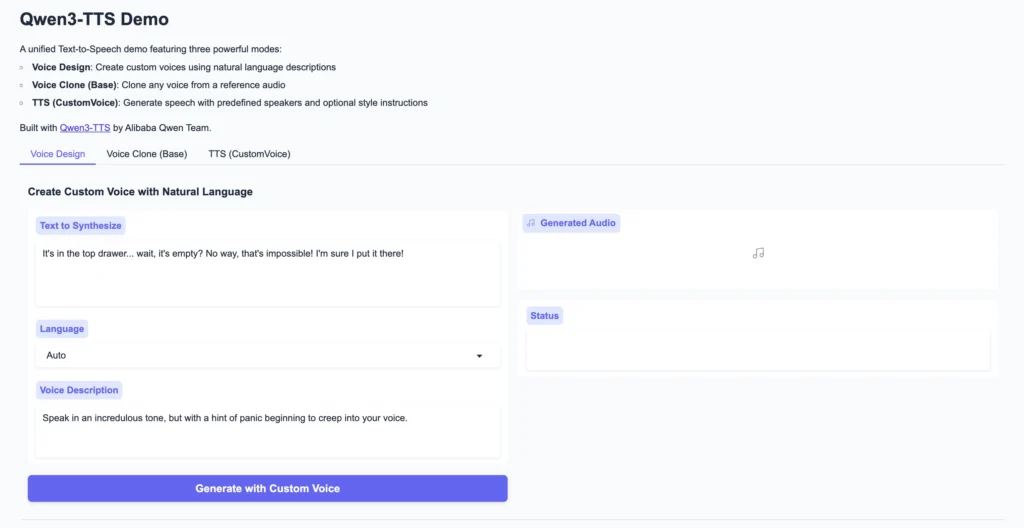
Online Demo (No Installation Required)
Two hosted demo interfaces provide immediate access:
- Hugging Face Spaces: https://huggingface.co/spaces/Qwen/Qwen3-TTS
- ModelScope Studios: https://modelscope.cn/studios/Qwen/Qwen3-TTS
Both interfaces support all three generation modes: CustomVoice with preset timbres, VoiceDesign with natural language descriptions, and Base model voice cloning.
Local Installation
Step 1: Create Environment
| conda create -n qwen3-tts python=3.12 -yconda activate qwen3-tts |
Step 2: Install Package
| pip install -U qwen-tts |
Step 3: Optional FlashAttention 2
| pip install -U flash-attn –no-build-isolation |
For systems with limited RAM:
| MAX_JOBS=4 pip install -U flash-attn –no-build-isolation |
Step 4: Launch Web Interface
| qwen-tts-demo Qwen/Qwen3-TTS-12Hz-1.7B-CustomVoice –ip 0.0.0.0 –port 8000 |
Access the interface at http://localhost:8000.
Python Code Examples
Basic Custom Voice Generation
| import torchimport soundfile as sffrom qwen_tts import Qwen3TTSModel |
| model = Qwen3TTSModel.from_pretrained( “Qwen/Qwen3-TTS-12Hz-1.7B-CustomVoice”, device_map=”cuda:0″, dtype=torch.bfloat16, attn_implementation=”flash_attention_2″,) |
| wavs, sr = model.generate_custom_voice( text=”Welcome to the future of speech synthesis.”, language=”English”, speaker=”Ryan”, instruct=”Speak with enthusiasm and energy.”,)sf.write(“output.wav”, wavs[0], sr) |
Voice Cloning from Reference Audio
| model = Qwen3TTSModel.from_pretrained( “Qwen/Qwen3-TTS-12Hz-1.7B-Base”, device_map=”cuda:0″, dtype=torch.bfloat16,) |
| ref_audio = “path/to/reference.wav”ref_text = “This is the reference transcript.” wavs, sr = model.generate_voice_clone( text=”New content in the cloned voice.”, language=”English”, ref_audio=ref_audio, ref_text=ref_text,)sf.write(“cloned_output.wav”, wavs[0], sr) |
Voice Design from Text Description
| model = Qwen3TTSModel.from_pretrained( “Qwen/Qwen3-TTS-12Hz-1.7B-VoiceDesign”, device_map=”cuda:0″, dtype=torch.bfloat16,) |
| wavs, sr = model.generate_voice_design( text=”This technology changes everything.”, language=”English”, instruct=”Male voice, mid-30s, professional broadcast quality, calm and authoritative.”,)sf.write(“designed_voice.wav”, wavs[0], sr) |
Available Models and Download Links
| Model | Parameters | Features | Download |
| Qwen3-TTS-12Hz-1.7B-VoiceDesign | 1.7B | Natural language voice creation | Hugging Face |
| Qwen3-TTS-12Hz-1.7B-CustomVoice | 1.7B | 9 preset voices + style control | Hugging Face |
| Qwen3-TTS-12Hz-1.7B-Base | 1.7B | Voice cloning + fine-tuning base | Hugging Face |
| Qwen3-TTS-12Hz-0.6B-CustomVoice | 0.6B | Lightweight preset voices | Hugging Face |
| Qwen3-TTS-12Hz-0.6B-Base | 0.6B | Lightweight voice cloning | Hugging Face |
Manual Download Commands:
# Via Hugging Face
| huggingface-cli download Qwen/Qwen3-TTS-12Hz-1.7B-CustomVoice –local-dir ./Qwen3-TTS-12Hz-1.7B-CustomVoice |
# Via ModelScope (recommended for users in China)
| modelscope download –model Qwen/Qwen3-TTS-12Hz-1.7B-CustomVoice –local_dir ./Qwen3-TTS-12Hz-1.7B-CustomVoice |
Using Qwen3-TTS with Ollama
Qwen3-TTS does not currently have official Ollama integration. The model uses a specialized architecture requiring the qwen-tts Python package or vLLM deployment.
For local deployment alternatives:
- Use the qwen-tts Python package directly
- Deploy via vLLM-Omni for optimized inference
- Access the DashScope API for cloud-based usage
The Qwen team continues expanding deployment options, so Ollama support may arrive in future releases.
Qwen3-TTS in ComfyUI
ComfyUI integration for Qwen3-TTS enables visual workflow-based audio generation within creative pipelines. Community-developed nodes connect Qwen3-TTS to ComfyUI’s node graph system.
To integrate Qwen3-TTS with ComfyUI:
1. Install the qwen-tts package in your ComfyUI Python environment
2. Search ComfyUI-Manager for Qwen3-TTS custom nodes
3. Connect text inputs to the TTS node, route audio outputs to downstream processing
This workflow suits creators building automated video production pipelines, AI avatar systems, or batch audio generation workflows.
Real-World Application Scenarios
Live Interaction Systems
The 97ms latency enables natural back-and-forth conversation. Digital human systems, AI customer service, and voice assistants benefit from response times that feel immediate rather than delayed.
Content Production
Video creators use Qwen3-TTS for dubbing, audiobook narration, podcast generation, and game character voices. Multi-voice and multi-emotion control eliminates the need for professional voice actors in many scenarios.
Enterprise Communications
Automated phone systems, voice notifications, and IVR systems gain natural-sounding speech. Custom corporate voice profiles maintain brand consistency across all audio touchpoints.
Accessibility
Screen reader applications receive higher quality voice output. The natural prosody and emotion control improve comprehension for users relying on audio interfaces.
Multilingual Services
Cross-border e-commerce, international customer support, and language learning applications leverage the 10-language support with consistent voice quality across languages.
Benchmark Performance
Voice Cloning Quality (Seed-TTS Test Set)
| Model | Chinese WER | English WER |
| Qwen3-TTS-12Hz-1.7B-Base | 0.77% | 1.24% |
| CosyVoice 3 | 0.71% | 1.45% |
| MiniMax-Speech | 0.83% | 1.65% |
| F5-TTS | 1.56% | 1.83% |
Speaker Similarity (10-Language Average)
| Model | Similarity Score |
| Qwen3-TTS-12Hz-1.7B-Base | 0.789 |
| MiniMax | 0.748 |
| ElevenLabs | 0.646 |
Long-Form Generation (10+ Minutes)
| Model | Chinese WER | English WER |
| Qwen3-TTS-25Hz-1.7B-CustomVoice | 1.52% | 1.23% |
| Qwen3-TTS-12Hz-1.7B-CustomVoice | 2.36% | 2.81% |
Bonus: Gaga AI for Video and Voice Creation
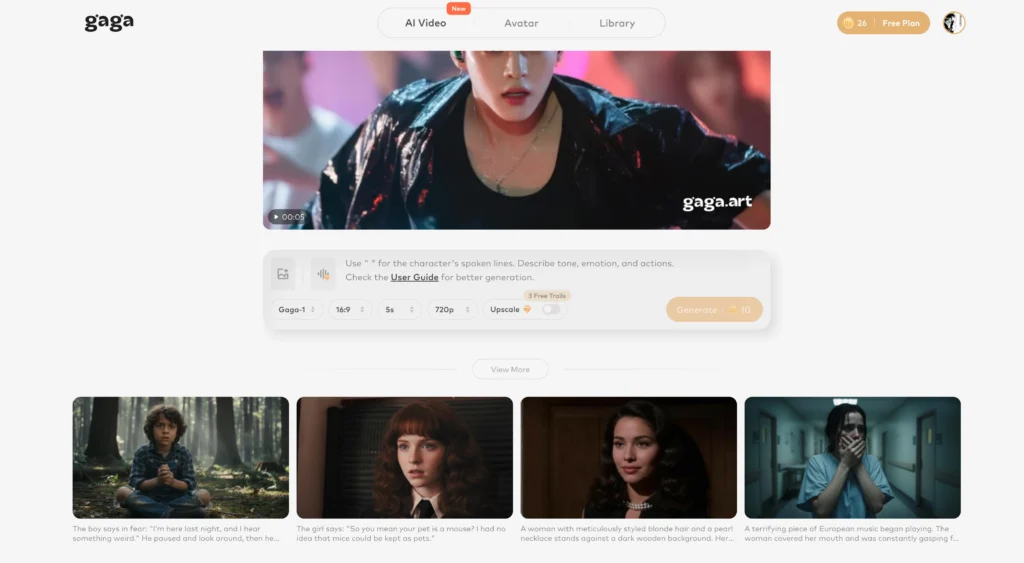
For users seeking an all-in-one solution combining TTS with video generation, Gaga AI offers integrated capabilities:
Image-to-Video AI: Transform static images into animated video content with AI-powered motion synthesis. The platform handles lip-sync, expression generation, and natural movement without manual animation.
Text-to-Speech Features: Built-in TTS converts scripts to spoken audio with multiple voice options and emotional control. This pairs directly with video generation for complete content workflows.
AI Avatar Creation: Generate realistic digital avatars from reference images. These avatars lip-sync to TTS output or uploaded audio, creating presenter-style videos without filming.
Voice Clone Capability: Upload voice samples to create custom voice profiles. Cloned voices apply to any text input, maintaining speaker identity across unlimited content generation.
Gaga AI combines these features into a unified platform, eliminating the need to integrate separate tools for video, voice, and avatar generation.
Official Resources
- GitHub Repository: https://github.com/QwenLM/Qwen3-TTS
- Hugging Face Collection: https://huggingface.co/collections/Qwen/qwen3-tts
- ModelScope Collection: https://www.modelscope.cn/collections/Qwen/Qwen3-TTS
- Technical Paper: https://github.com/QwenLM/Qwen3-TTS/blob/main/assets/Qwen3_TTS.pdf
- API Documentation: https://www.alibabacloud.com/help/en/model-studio/qwen-tts-voice-design
- Qwen Blog Post: https://qwen.ai/blog?id=qwen3tts-0115
Frequently Asked Questions
What is Qwen3-TTS?
Qwen3-TTS is an open-source text-to-speech model family from Alibaba’s Qwen team, released in January 2026. It converts text to natural speech with support for voice cloning (replicating any voice from 3 seconds of audio), voice design (creating new voices from text descriptions), and multilingual synthesis across 10 languages.
Is Qwen3-TTS free to use?
Yes. All Qwen3-TTS models are released under the Apache 2.0 license, allowing free commercial and personal use. You can download models from Hugging Face or ModelScope and run them locally without fees. Cloud API access through Alibaba’s DashScope platform may have usage-based pricing.
What languages does Qwen3-TTS support?
Qwen3-TTS supports 10 languages: Chinese, English, Japanese, Korean, German, French, Russian, Portuguese, Spanish, and Italian. It also handles Chinese dialects including Sichuan dialect and Beijing dialect. The model maintains voice consistency when switching between languages.
How much VRAM does Qwen3-TTS require?
The 1.7B parameter model requires approximately 8-12GB VRAM when running in bfloat16 precision with FlashAttention 2. The 0.6B model runs on less capable hardware. CPU inference is possible but significantly slower than GPU execution.
Can Qwen3-TTS clone any voice?
Qwen3-TTS clones voices from just 3 seconds of reference audio. The system achieves 0.95 similarity scores to reference speakers. Quality depends on reference audio clarity. The cloned voice transfers across all 10 supported languages while maintaining speaker characteristics.
How does Qwen3-TTS compare to ElevenLabs?
Qwen3-TTS outperforms ElevenLabs on speaker similarity benchmarks across 10 languages (0.789 vs 0.646 average similarity). Qwen3-TTS is open-source and runs locally, while ElevenLabs requires API access with usage fees. ElevenLabs offers a polished commercial interface, while Qwen3-TTS requires technical setup.
Does Qwen3-TTS work with Ollama?
No official Ollama integration exists for Qwen3-TTS currently. The model requires the dedicated qwen-tts Python package or vLLM-Omni deployment. Local users should use the Python package directly rather than expecting Ollama compatibility.
What is the difference between VoiceDesign and CustomVoice models?
VoiceDesign creates entirely new voices from natural language descriptions without any audio samples. CustomVoice uses 9 pre-trained premium voices with instruction-based style control. VoiceDesign offers unlimited voice creation flexibility, while CustomVoice provides consistent, tested voice profiles.
Can I fine-tune Qwen3-TTS on my own data?
Yes. The Base models (1.7B-Base and 0.6B-Base) support full parameter fine-tuning. The GitHub repository includes fine-tuning documentation. This enables training custom voices or adapting the model to specific domains or speaking styles.
How fast is Qwen3-TTS inference?
First-packet latency reaches 97 milliseconds for streaming output. The dual-track architecture begins audio output after receiving a single input character. Under concurrent load with 6 users, first-packet latency stays below 300 milliseconds.
Related Posts:
 Google Veo 3: The Complete Guide to Features, Pricing, and the Best Alternative – Gaga AI & Sora 2
 MiniMax Music 2.5: Complete Guide to AI Music Generation
 AI Podcast Generator: Turn Text Into Professional Audio Content in Minutes
 CoDance: The Breakthrough AI Framework for Multi-Subject Character Animation