Key Takeaways
- Wan 2.6 generates up to 15-second videos from text prompts or reference videos, supporting multi-shot storytelling and consistent character details across scenes.
- Native audio-visual synchronization ensures dialogue, music, and sound effects align with character movements and lip-sync at 1080p/24fps.
- Four-step workflow: Describe your concept, configure settings (aspect ratio, duration, audio), generate and refine, then export in standard formats.
- Real-world applications span social media content, performance marketing, educational videos, and product demos—reducing production time from weeks to hours.
- Wan AI’s model family includes Wan 2.5, Wan 2.6, and related tools like Kling AI and Gaga AI for diverse video generation needs.
Table of Contents
What Is Wan 2.6?
Wan 2.6 is an AI-powered video generation model that transforms text descriptions or reference videos into high-quality, multi-shot video content up to 15 seconds long. Developed as part of the Wan AI product suite, this text-to-video AI model addresses the core challenge facing content creators, marketers, and educators: producing engaging video content quickly without traditional filming, editing, or motion graphics expertise.
Unlike earlier text-to-video AI systems that produced short, single-shot clips with limited coherence, Wan 2.6 delivers extended narratives by maintaining visual consistency across multiple shots, synchronizing audio with on-screen action, and rendering at broadcast-ready 1080p resolution.
How Wan 2.6 Fits Into the AI Video Model Landscape
The Wan AI platform includes several iterations:
- Wan 2.5: The predecessor model with foundational text-to-video capabilities and shorter duration limits.
- Wan 2.6: The current flagship, offering extended 15-second generation, multi-shot sequencing, video reference modes, and enhanced audio synchronization.
- Related ecosystem tools: Kling AI and Gaga AI (including the Gaga-1 model) provide complementary video generation capabilities for specific use cases.
Wan 2.6 is positioned as an image-to-video AI and text-to-video AI hybrid, accepting both written prompts and visual reference materials to guide output.
Wan 2.6 Core Features: What Makes It Different
1. Multi-Shot Storytelling for Narrative Coherence
Wan 2.6 automatically generates sequential shots that maintain character appearance, costume details, and environmental consistency across scene transitions. This multi-shot capability allows creators to express complete story arcs—introducing a character, showing conflict, and delivering resolution—within a single 15-second generation.
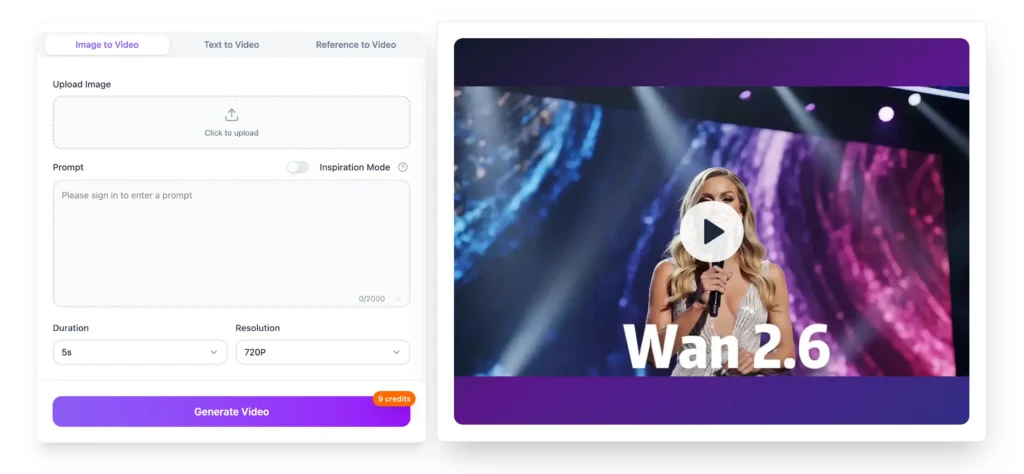
How it works: You provide a simple prompt like “A chef discovers a secret ingredient, tastes it, and celebrates in her kitchen.” Wan 2.6 interprets this as three distinct shots (discovery, tasting, celebration), auto-plans camera angles and transitions, and ensures the chef’s appearance and kitchen setting remain consistent throughout.
Why this matters: Previous AI video models required separate generations for each shot, forcing creators to manually stitch clips and accept visual inconsistencies. Wan 2.6 handles scene planning and continuity automatically.
2. Video Reference Generation for Style Transfer
Wan 2.6 accepts a reference video to extract visual style, character appearance, or voice characteristics, then applies these attributes to new content based on your text prompt. This feature supports any subject type and handles one- or two-person shot compositions.
Practical use case: Upload a 5-second clip of your company spokesperson, then prompt “Explain our Q4 product roadmap in a conference room setting.” Wan 2.6 recreates the spokesperson’s appearance and speaking style while generating entirely new dialogue and environment according to your prompt.
Technical limitation: Video reference works best with clear, well-lit source material. Extreme camera angles, rapid motion, or low-resolution reference videos may produce inconsistent results.
3. Extended 15-Second Video Generation
Wan 2.6 creates videos up to 15 seconds in length, tripling the temporal capacity of many competing text-to-video AI platforms. This duration increase provides sufficient time to establish context, develop action, and deliver a complete message—critical for social media hooks, product demonstrations, and educational explanations.
Comparison to alternatives: Standard AI video generators typically cap at 4-6 seconds, forcing creators to script extremely condensed narratives or chain multiple short clips. Wan 2.6’s 15-second output delivers complete thoughts in a single generation.
4. High-Quality Rendering with Audio-Visual Synchronization
Wan 2.6 outputs 1080p video at 24 frames per second with native audio-visual sync, ensuring dialogue matches lip movements, background music aligns with scene pacing, and sound effects trigger at visually appropriate moments.
Technical specifications:
- Resolution: 1920×1080 (Full HD)
- Frame rate: 24fps (cinematic standard)
- Audio sync: Character lip movements synchronized to dialogue tracks
- Format support: Accepts uploaded voiceovers, music beds, and ambient audio
Quality considerations: While 1080p is suitable for social media, web content, and most digital applications, traditional broadcast or cinema production may require additional upscaling or finishing in professional video editing software.
How to Use Wan 2.6: Step-by-Step Workflow
Step 1: Describe Your Idea to Wan 2.6
Write a structured prompt that specifies who appears on screen, what action occurs, where the scene takes place, and the desired emotional tone. Include any essential dialogue, on-screen text, or specific visual details.
[CHARACTER] + [ACTION] + [SETTING] + [TONE] + [DIALOGUE/TEXT]
Example: “A confident startup founder presents a mobile app prototype in a modern co-working space with natural light. Tone: energetic and optimistic. She says, ‘This changes everything for remote teams.’”
Prompt writing tips:
- Use concrete visual descriptions rather than abstract concepts (“sunlit kitchen” instead of “warm atmosphere”)
- Specify camera movement if important (“slowly zoom in on the product” or “wide shot establishing the cityscape”)
- Include precise timing cues for multi-shot sequences (“First, she opens the box. Then, she examines the contents. Finally, she smiles at the camera”)
Step 2: Configure Your Wan 2.6 Settings
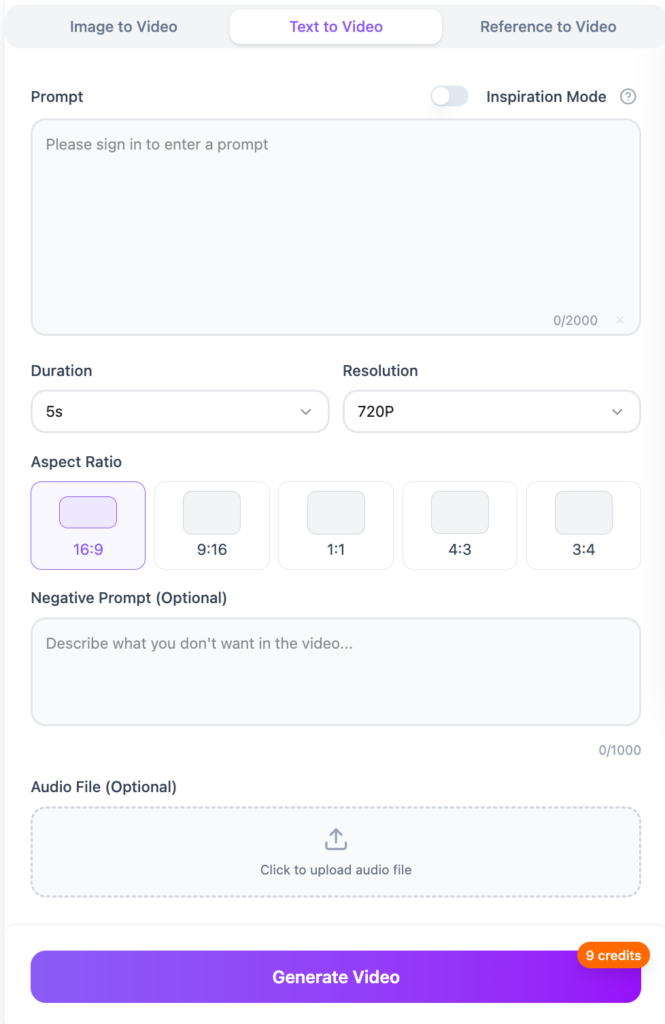
Access the Wan 2.6 dashboard and select your generation mode, aspect ratio, duration, and resolution parameters. Upload optional audio files if you want specific voiceover, music, or sound design synchronized with the generated video.
Configuration options:
- Generation mode: Text-to-video (prompt-only) or video reference (style transfer)
- Aspect ratio: 16:9 (landscape), 9:16 (vertical/mobile), 1:1 (square)
- Duration: 3s, 6s, 10s, or 15s (longer durations use more compute credits)
- Resolution: 720p, 1080p, or adaptive (matches source material)
- Audio upload: MP3, WAV, or M4A files for voiceover/music integration
Pro tip: For social media content, start with 9:16 vertical format and 6-10 second duration to match platform preferences. For website hero videos or YouTube content, use 16:9 landscape at full 15-second length.
Step 3: Generate and Refine with Wan 2.6
Click the generate button and allow Wan 2.6 to process your request (typically 2-8 minutes depending on duration and complexity). Review the initial output, identify areas for improvement, and iterate by adjusting your prompt or settings.
Refinement workflow:
1. First generation: Evaluate overall composition, character appearance, and scene coherence
2. Identify issues: Note problems with lighting, camera angle, pacing, or visual consistency
3. Revise prompt: Add specific corrections (“brighter lighting,” “closer camera angle,” “slower pacing between shots”)
4. Regenerate: Process a new version with updated parameters
5. Compare versions: Place outputs side-by-side to select the strongest option
Common refinement scenarios:
- Character appearance differs from your mental image → Add detailed physical descriptions (age, clothing, hair color)
- Scene feels rushed → Increase duration or simplify action into fewer beats
- Audio doesn’t match visual rhythm → Adjust uploaded music timing or regenerate without audio for manual sync later
Step 4: Export and Publish Your Wan 2.6 Video
When satisfied with the output, export your video in MP4, MOV, or WebM format and distribute through your chosen channels. Wan 2.6 exports maintain full 1080p quality with embedded audio.
Distribution pathways:
- Social media schedulers: Upload to Buffer, Hootsuite, Later, or native platform schedulers
- Advertising platforms: Deploy directly to Meta Ads Manager, Google Ads, TikTok Ads
- Learning management systems: Embed in Canvas, Moodle, Teachable, or Thinkific courses
- Internal communication: Share via Slack, Microsoft Teams, or company intranets
- Website integration: Host on Vimeo, Wistia, or YouTube and embed on landing pages
File size considerations: 15-second 1080p exports typically range from 8-25MB depending on motion complexity. Use WebM format for smallest file sizes or MP4 for maximum compatibility.
Wan 2.6 Real-World Application Scenarios
Social Media and Creator Content
Social media creators and brand social teams use Wan 2.6 to convert hooks, scripts, and trending formats into platform-native vertical videos for TikTok, Instagram Reels, and YouTube Shorts. This approach allows rapid concept testing without filming equipment or on-camera talent.
Example workflow: A creator identifies a trending “day in the life” format, writes a script showing “A day as an AI researcher: morning coffee → debugging models → eureka moment,” generates three variations in Wan 2.6 with different visual styles, and publishes the highest-performing version within hours.
Metrics impact: Teams report 3-5x faster content production cycles, enabling daily posting cadences that were previously impossible without dedicated video production staff.
Performance Marketing and Paid Media
Growth marketers and media buyers rely on Wan 2.6 to maintain fresh ad creative in paid social and search campaigns. The platform converts campaign briefs and offer frameworks into UGC-style product demos, testimonial-inspired spots, and explainer clips without booking studios, hiring actors, or organizing reshoots.
Example workflow: An e-commerce brand needs 20 ad variations to combat creative fatigue in their Meta campaigns. The performance team writes 20 prompt variations highlighting different product benefits, generates all videos in Wan 2.6, launches them in split tests, and scales the top 3 performers—completing the entire cycle in one day versus the typical two-week production timeline.
Cost comparison: Traditional UGC content costs $200-800 per video asset. Wan 2.6 reduces this to platform subscription costs (typically $30-100/month), enabling 10-50x more creative testing for the same budget.
Education, Training, and Onboarding
Course creators, instructional designers, and L&D departments convert written lesson plans into engaging video modules using Wan 2.6. This transformation makes text-heavy training materials more accessible and increases completion rates in asynchronous learning programs.
Example workflow: A corporate training manager has a 50-slide PowerPoint on “Effective Customer Discovery Interviews.” Instead of recording a screen share, they extract key concepts, write prompts showing realistic interview scenarios (“A product manager asks open-ended questions and actively listens to customer pain points”), generate visual examples in Wan 2.6, and assemble a 10-module course where each concept includes a demonstration video.
Learning outcome improvements: Organizations report 40-60% higher course completion rates and improved knowledge retention when replacing text-only materials with AI-generated scenario videos.
Product Launches and SaaS Storytelling
Product marketers and SaaS teams use Wan 2.6 to visualize product features, user flows, and use cases during launch campaigns. Generated videos replace static screenshots with guided tours, animated explainers, and in-app success stories that help prospects understand product value quickly.
Example workflow: A B2B software company launches a new analytics dashboard. The product marketing lead writes prompts showing “A data analyst discovers an insight, shares it with their team, and makes a confident decision,” generates the video in Wan 2.6, and embeds it on the product landing page, in sales decks, and in automated email sequences—all completed days before launch rather than weeks after.
Conversion impact: Product teams observe 15-30% increases in demo request rates when replacing text descriptions with video walkthroughs on landing pages.
Wan 2.6 vs. Wan 2.5: What’s New?
Wan 2.6 introduces four major improvements over its predecessor, Wan 2.5:
1. Extended duration: 15 seconds (up from 6-8 seconds in Wan 2.5)
2. Multi-shot capability: Automatic scene planning and shot sequencing (Wan 2.5 produced single continuous shots)
3. Video reference mode: Style transfer from uploaded reference clips (new feature)
4. Enhanced audio sync: Native lip-sync and music alignment (improved from basic audio overlay in Wan 2.5)
When to use Wan 2.5: For projects requiring only short, single-shot clips where extended duration and multi-shot narratives aren’t necessary. Wan 2.5 may offer faster generation times for simple use cases.
When to use Wan 2.6: For any project requiring complete narratives, character consistency across shots, or audio-visual synchronization. Wan 2.6 is the recommended default for most professional applications.
Limitations and Considerations
1. Complex Physics and Realistic Motion
Wan 2.6 occasionally struggles with complex physical interactions, such as liquid pouring, fabric draping, or multi-person choreography. Outputs may show minor physics inconsistencies (objects passing through each other, unnatural motion trajectories).
Mitigation: Simplify prompts to focus on upper-body actions, face-to-camera dialogue, or static environments where complex physics aren’t required.
2. Text Rendering and On-Screen Graphics
Generated text within the video (signs, product labels, UI elements) may appear distorted or illegible. Wan 2.6 is optimized for visual storytelling rather than precise typography.
Mitigation: Add text overlays, captions, and graphics in post-production using video editing software rather than relying on AI-generated text elements.
3. Brand-Specific Visual Assets
Wan 2.6 cannot directly access proprietary brand assets (specific logos, color schemes, product designs) unless trained on custom data or provided through video reference mode.
Mitigation: Use video reference to establish brand visual style, or add brand elements in post-production. For repeated use of specific brand assets, explore custom model training options if available.
4. Iteration and Generation Time
Each generation takes 2-8 minutes, meaning rapid iteration requires patience. Projects requiring 10-15 refinements may take several hours.
Mitigation: Write detailed, specific prompts on the first attempt to reduce iteration cycles. Use batch generation features if available to test multiple variations simultaneously.
Frequently Asked Questions (FAQ)
What is the difference between Wan AI and other AI video generators?
Wan AI emphasizes multi-shot storytelling and extended duration capabilities. While competitors like Runway Gen-2, Pika Labs, and Stable Video focus on short clips or special effects, Wan 2.6 prioritizes narrative coherence across longer sequences, making it better suited for complete stories versus abstract visuals or brief motion graphics.
Can Wan 2.6 generate videos longer than 15 seconds?
No, Wan 2.6 currently caps at 15-second generations. For longer content, create multiple 15-second segments with consistent prompting and stitch them together in video editing software like Adobe Premiere, DaVinci Resolve, or CapCut.
Does Wan 2.6 support custom voice cloning or specific actor likenesses?
Wan 2.6 supports video reference mode to match visual style and general appearance, but does not offer explicit voice cloning or celebrity likeness features due to ethical and legal considerations. For custom voice, record separate voiceover audio and upload it during the configuration step.
How much does Wan 2.6 cost to use?
Pricing typically follows a credit-based subscription model where longer videos and higher resolutions consume more credits. Exact pricing varies by region and usage tier—check the official Wan AI website for current rates. Educational and nonprofit discounts may be available.
Can I use Wan 2.6 videos for commercial purposes?
Most Wan AI subscription tiers include commercial usage rights for generated content, but you should verify the specific terms of service for your account. Always ensure your prompts don’t request copyrighted characters, trademarked products, or recognizable public figures without appropriate permissions.
What file formats does Wan 2.6 export?
Wan 2.6 exports in MP4, MOV, and WebM formats. MP4 offers maximum compatibility across platforms, MOV provides higher quality for editing workflows, and WebM delivers smallest file sizes for web deployment.
Is Wan 2.6 available in languages other than English?
Prompt input language support varies by version. Check the current Wan AI documentation for supported languages—many AI video models prioritize English but are expanding multilingual capabilities.
How does Wan 2.6 compare to Kling AI and Gaga AI?
Wan 2.6, Kling AI, and Gaga AI are related tools in the broader ecosystem. Wan 2.6 focuses on narrative video generation with multi-shot capabilities. Kling AI and Gaga AI (including the Gaga-1 model) may offer specialized features like specific art styles, animation techniques, or alternative generation approaches. Choose based on your specific creative requirements.
Can Wan 2.6 create animated or cartoon-style videos?
Yes, Wan 2.6 can generate various visual styles including photorealistic, illustrated, animated, and stylized content. Specify your desired style in the prompt: “3D animated,” “hand-drawn illustration style,” “anime aesthetic,” or “realistic documentary footage.”
What happens if Wan 2.6 generates inappropriate or biased content?
Wan AI implements content moderation systems to prevent harmful outputs. If you encounter inappropriate results, use the platform’s reporting tools. Most AI video generators continuously improve their safety systems based on user feedback.
Final Thoughts: When to Choose Wan 2.6 for Your Video Projects
Wan 2.6 is optimized for teams and creators who need to produce narrative video content at speed without traditional production infrastructure. It excels in scenarios where concept testing, rapid iteration, and volume matter more than cinema-grade perfection.
Best use cases: Social media content, ad creative testing, educational modules, product demos, internal communications, and proof-of-concept presentations.
Not ideal for: Feature films, high-budget commercials requiring precise brand matching, content with complex physics or choreography, or projects where traditional filming offers equivalent speed and cost.
As text-to-video AI models continue evolving, Wan 2.6 represents the current frontier of accessible, multi-shot storytelling technology—democratizing video production for creators who previously lacked access to expensive equipment, talent, or post-production expertise.