Key Takeaways
- Seedance 2.0 is ByteDance’s newest AI video generator that transforms text, images, videos, and audio into cinema-quality videos with automatic camera movements and scene transitions
- Industry-leading consistency: 90%+ usable output rate versus 20% industry average, reducing production costs by 80%
- Multimodal powerhouse: Supports up to 12 reference files (9 images, 3 videos, 3 audio clips) for unprecedented creative control
- Auto-cinematography: AI automatically handles shot composition, camera movements, and scene transitions based on narrative description
- Available now: Accessible through Jimeng platform (premium membership required, starting at ¥69) and Xiaoyunque app (free trial available)
Table of Contents
What is Seedance 2.0?
Seedance 2.0 is ByteDance’s advanced AI video generator that converts text prompts, images, videos, and audio into professional-quality video content. Released in February 2026, this text to video AI represents a significant leap in generative video technology by offering “director-level” control without requiring technical video editing expertise.
Unlike previous AI video tools that simply generate footage, Seedance 2.0 functions as a virtual cinematographer—it interprets your creative vision, automatically plans camera angles, orchestrates smooth transitions between scenes, and maintains visual consistency across multiple shots.
How Seedance 2.0 Works
The AI video generator processes multiple input types simultaneously:
- Text descriptions of scenes, actions, and narrative flow
- Reference images (up to 9) for character appearance, visual style, and composition
- Video clips (up to 3, each 15 seconds max) for movement patterns, effects, and cinematography
- Audio files (up to 3, each 15 seconds max) for rhythm synchronization and sound design
The model analyzes these inputs, understands the underlying creative intent, and generates 5-15 second video segments that maintain character consistency, follow physical laws, and deliver emotionally coherent storytelling.
What Makes Seedance 2.0 Different From Other AI Video Generators
1. Automatic Shot Planning and Camera Movement
Seedance 2.0’s most transformative capability is autonomous cinematography. Traditional AI video tools require users to specify every camera movement (“pan left,” “zoom to close-up,” “tracking shot”). Seedance 2.0 interprets narrative descriptions and automatically selects appropriate shot types, camera angles, and movements.
Example prompt: “A black-suited man frantically escapes through crowded streets, pursued by a mob. Camera follows from the side as he crashes into a fruit stand, scrambles to his feet, and continues running.”
The AI automatically generates:
- Establishing wide shot showing the chase
- Dynamic side-tracking shot following the runner
- Impact close-up when hitting the fruit stand
- Over-the-shoulder perspective from pursuers
- Multiple angle cuts to build tension
This eliminates the need for technical cinematography knowledge while producing results that match professional director decisions.
2. Unprecedented Multimodal Reference System
Most image to video AI tools accept a single image or text prompt. Seedance 2.0 supports 12 simultaneous reference inputs that work together:
- Upload a character design sheet (image reference)
- Add a video clip showing the desired fighting choreography
- Include an audio track for rhythm synchronization
- Write a text description tying everything together
The AI video generator intelligently combines these references, maintaining character appearance from images while replicating movement dynamics from video and matching pacing to audio beats.
3. Industry-Leading Generation Success Rate
A critical but rarely discussed metric in AI video generation is usable output percentage. Most tools produce acceptable results only 15-20% of the time, forcing creators to generate the same clip 5-10 times.
According to creator testing and industry feedback, Seedance 2.0 achieves 90%+ first-try success rates. This transforms production economics:
- Traditional AI workflow: Generate 15-second clip 6 times @ $5 = $30 actual cost
- Seedance 2.0 workflow: Generate 15-second clip 1.1 times @ $5 = $5.50 actual cost
For a 90-minute production, this reduces costs from $10,800 to approximately $2,000—an 80% cost reduction while maintaining quality.
4. Continuous Multi-Shot Narrative Capability
Seedance 2.0 maintains character and scene consistency across multiple camera angles within a single generation. When creating a 15-second fight sequence, the AI automatically:
- Switches between wide, medium, and close-up shots
- Maintains identical character facial features and clothing across all angles
- Preserves spatial relationships and scene lighting
- Creates natural transitions between perspectives
This capability, previously requiring manual editing of separately generated clips, now happens automatically within a single generation.
How to Use Seedance 2.0: Step-by-Step Guide
Getting Access
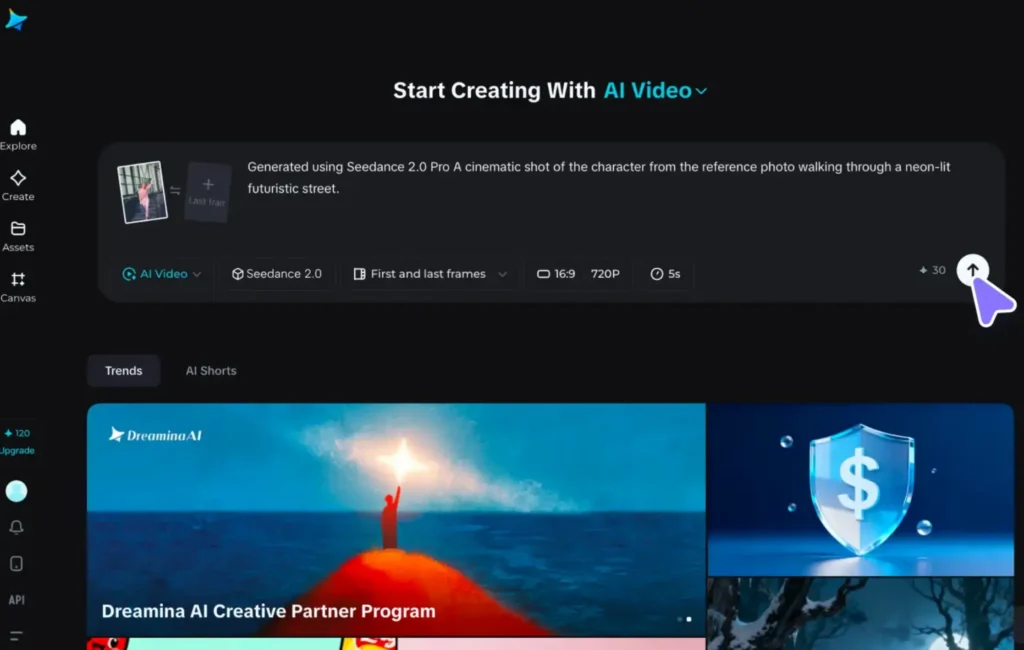
Platform 1: Dreamina
- Visit the Dreamina platform
- Subscribe to premium membership (minimum ¥69/month)
- Select “Seedance 2.0” from video generation tools
- Seedance 2.0 appears as the primary text to video AI option
Platform 2: Xiaoyunque (小云雀)
- Download Xiaoyunque mobile app
- Update to latest version (critical—older versions don’t show Seedance 2.0)
- Access 2 free generation credits upon first use
- Seedance 2.0 integrated into standard video creation workflow
Basic Text to Video Generation
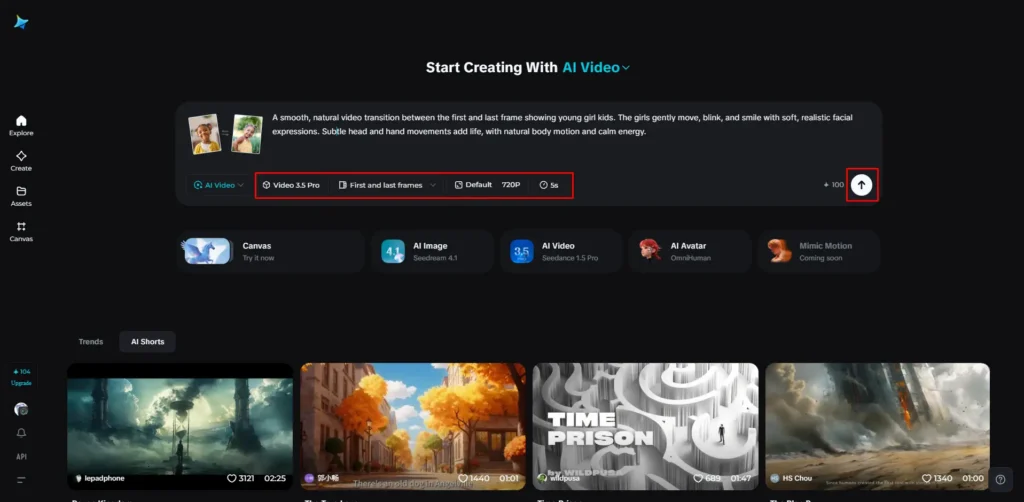
Simplest approach:
- Write a clear narrative description
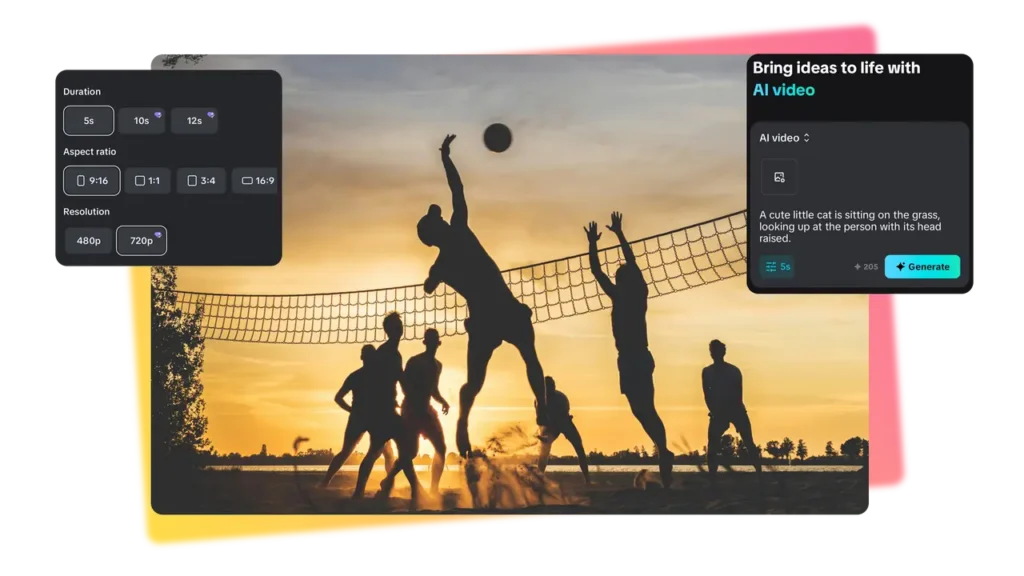
- Specify duration (5-15 seconds)
- Select aspect ratio (16:9, 9:16, 1:1, 4:3, 3:4)
- Generate
Example prompt: “Under cherry blossom trees, a girl turns to look at a cat in her arms. Petals drift down as wind gently moves her hair. She pets the cat’s head and says, ‘Hello, little one.’ Camera focuses on her face.”
Advanced Multimodal Creation
Using reference materials:
- Upload reference images using @ symbol (@image1, @image2)
- Upload reference videos for movement/cinematography (@video1)
- Upload audio for rhythm synchronization (@audio1)
- Write prompt that connects all references
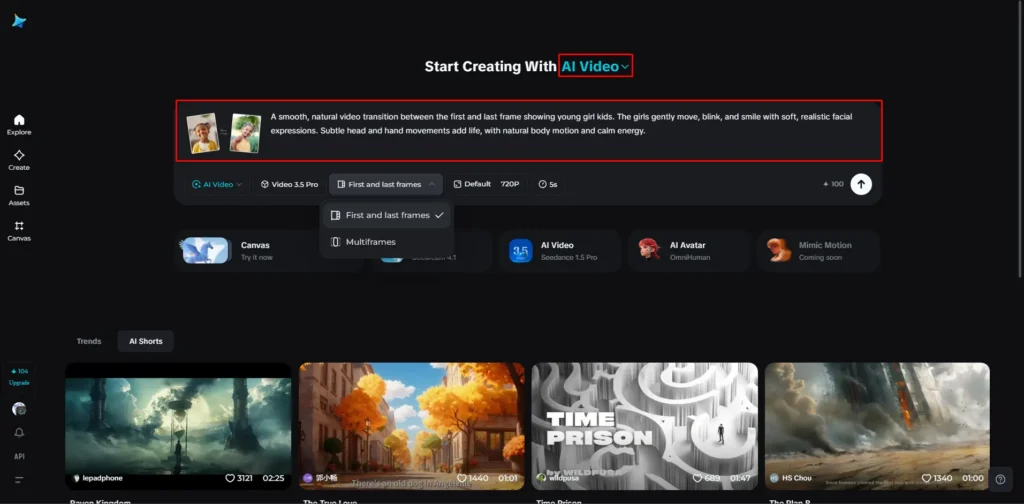
Example prompt: “Character from @image1 and character from @image2 engage in martial arts combat on @image3 bridge location. Reference @video1 for fighting choreography style. @image1 character wins after intense exchange.”
Pro tip: Clearly specify whether references are for character appearance, movement style, scene location, or effects. The AI interprets based on context, but explicit instructions improve accuracy.
Video Extension and Continuation
To extend existing footage:
- Upload the video you want to continue
- Describe what happens next
- Set generation length to match desired extension (if extending 5 seconds, select 5-second generation)
Example: “Extend @video1 by 5 seconds. The character continues walking forward, then turns to look behind them before entering the building.”
Character Consistency Across Multiple Shots
For serialized content or multi-scene productions:
- Generate initial character reference using image to video AI
- Save the first generated video frame as character reference image
- Upload this image to subsequent generations
- Maintain consistent @character_reference tag across all prompts
This workflow ensures the same character appearance across an entire production.
Seedance 2.0 vs Alternatives: Honest Comparison
Seedance 2.0 vs Kling 3.0
| Feature | Kling 3.0 | Seedance 2.0 |
| Core Strengths | Intelligent storyboarding, character/prop locking, and high-fidelity text rendering. | Multimodal flexibility, precise movement replication (dance/action), and creative VFX. |
| Input Style | Structured planning; auto-generates shot breakdowns from scripts. | Free-form; mix text, images, video, and audio references. |
| Best For | Long-form narratives, serialized content, and commercials with text overlays. | Action sequences, dance videos, and quick iterations with varied references. |
| Weaknesses | Less flexible multimodal input; requires more structured pre-planning. | Less emphasis on industry-standard “locking” for long-term consistency. |
Seedance 2.0 vs Vidu Q3
| Feature | Vidu Q3 | Seedance 2.0 |
| Core Strengths | 16s audio-visual co-generation, cinematic camera control, and multi-language lip sync. | Reference-based movement copying and one-click visual effect replication. |
| Camera/Motion | Advanced manual controls (push/pull/pan/tilt) and continuous long takes. | Automated movement replication based on reference video clips. |
| Best For | Dialogue-heavy dramas and cinematic shorts requiring technical camera work. | Creative effect replication and projects using specific style/movement references. |
| Weaknesses | Steeper learning curve; limited to 16-second bursts; less input flexibility. | Lacks the native “cinematic language” tools found in Vidu’s camera engine. |
Real-World Use Case Comparison
Scenario 1: Anime Fight Sequence
- Seedance 2.0: Upload character designs + reference fight choreography video → Generate in one click with auto-cinematography
- Kling 3.0: Create detailed storyboard → Generate each angle separately → Manually ensure consistency
- Winner: Seedance 2.0 (faster, automatic multi-angle)
Scenario 2: Product Commercial with Text
- Kling 3.0: Native text rendering + product locking = consistent branding across shots
- Seedance 2.0: Less reliable text rendering, may require multiple attempts
- Winner: Kling 3.0 (specialized text capability)
Scenario 3: Dialogue-Driven Drama
- Vidu Q3: 16-second dialogue generation with perfect lip-sync + cinematic framing
- Seedance 2.0: 15-second limit, requires audio reference upload for best lip-sync
- Winner: Vidu Q3 (purpose-built for dialogue)
Bonus: Gaga AI Video Generator Tools
While Seedance 2.0 excels at complete video generation, some workflows benefit from specialized tools. Gaga AI offers complementary capabilities:

Image to Video AI
Convert static images into animated sequences with customizable motion profiles. Particularly useful for bringing storyboard frames or concept art to life before full video production.
Video and Audio Infusion
Merge separately generated video and audio tracks with automatic synchronization adjustment. Solves the “I have great visuals but need better sound” or vice versa problem.
AI Avatar Creation
Generate consistent digital humans for serialized content, product demonstrations, or educational videos. Maintains facial features and expressions across unlimited videos.
AI Voice Clone + TTS
Create custom voice profiles from short audio samples, then generate unlimited script readings in that voice. Enables consistent narration across multi-part series without repeated recording sessions.
Seedance 2.0 Real-World Testing Results
Test 1: Cinematic Single-Shot Scene
Prompt: “Cherry blossom tree setting. Girl turns to look at cat in her arms. Petals fall, wind moves her hair. She pets the cat and says ‘Hello, little one.’ Camera ends on her face.”
Results:
- Realistic petal physics (varying sizes, natural fall trajectories)
- Cat ear micro-movements add life
- Hair movement synchronized with petal direction (consistent wind physics)
- Cinematic color grading (not oversaturated AI look)
- First-try success: Usable output without regeneration
Key insight: Seedance 2.0 understands physical relationships (wind affects both petals and hair equally) rather than just visual patterns.
Test 2: Anime Action Sequence
Prompt: “Anime hero knocked down in battle. Friends’ voices trigger power awakening. Golden aura erupts around body, hair changes color and stands up, eyes shift to heterochromatic. Character charges enemy at super-speed, unleashing massive energy slash that cuts across the sky.”
Results:
- Clear emotional arc (defeat → awakening → attack)
- Synchronized transformation effects (aura, hair, eyes change together)
- Fluid action transition (charge → slash → impact)
- Proper attack wind-up before release
- Energy slash with convincing screen impact
Key insight: Complex multi-stage sequences with cause-and-effect relationships (awakening triggers power release triggers attack) are handled in single generation without breaking narrative logic.
Test 3: 60-Second AI Anime Short (Multi-Clip Production)
Workflow:
- Generated consistent character and background reference images
- Created 4 separate 15-second clips using consistent character references
- Assembled in CapCut with simple transitions
- Total production time: Under 15 minutes
- Regenerations needed: Zero
Results:
- Character appearance consistent across all 4 segments
- Smooth narrative progression
- Natural transitions between scenes
- Production quality viable for social media distribution
Key insight: Seedance 2.0’s consistency allows multi-segment production without character drift, enabling longer-form content through simple assembly rather than complex agent workflows.
Advanced Techniques for Professional Results
Technique 1: Action Choreography Replication
To replicate specific movements (dance, fight sequences, stunts):
- Find reference video of exact movement you want
- Upload reference video + target character image
- Prompt structure: “Character from @image1 performs the exact movements shown in @video1. Maintain @image1’s appearance while precisely copying @video1’s choreography.”
Result: Near-perfect movement transfer to your character while maintaining their visual design.
Technique 2: Music Video Synchronization
For rhythm-matched content:
- Upload audio track as reference (@audio1)
- Upload visual style reference images
- Prompt: “Create dynamic visuals synchronized to @audio1 rhythm. Character from @image1 moves and transforms matching the music’s beat. Style from @image2.”
The AI analyzes audio tempo and creates action beats matching musical structure.
Technique 3: Seamless Scene Extension
To create longer continuous shots:
- Generate initial 15-second clip
- Use last frame as next generation’s starting image
- Prompt: “Continue from @image1. [Describe next action]”
- Repeat for additional extensions
Maintains spatial continuity and character consistency across extended sequences.
Technique 4: Effect Style Transfer
To replicate specific visual effects or transitions:
- Upload reference video with desired effect
- Upload your content images/video
- Prompt: “Apply the transition/effect style from @video_reference to the content in @my_video. Preserve @my_video’s characters and story while adopting @video_reference’s visual treatment.”
Separates “what happens” (your content) from “how it looks” (reference style).
Industry Impact: What Seedance 2.0 Changes
Impact on AI Video Agents
The AI video agent business model relied on:
- Bulk API access to video generation models at wholesale rates
- Workflow automation to compensate for model limitations
- Markup on per-video pricing for end users
Seedance 2.0 disrupts this by:
- Eliminating most workflow complexity through built-in multi-shot capability
- Achieving such high success rates that “workflow optimization” provides minimal value
- Offering direct access through consumer platforms, bypassing agent services
Survival strategy for agents: Shift from general workflow automation to Seedance 2.0-specific expertise—becoming consulting services that teach optimal prompting, reference organization, and advanced techniques rather than just API resellers.
Impact on Traditional Video Production
Cost comparison for special effects shot:
Traditional pipeline:
- 1 senior VFX artist × 1 month = ~$3,000-5,000
- Does not include pre-production, project management, revisions
Seedance 2.0 pipeline:
- 1 creator × 2 minutes × $3 API cost = $3
- Includes multiple iteration attempts
Result: 1,000x cost reduction, 10,000x time reduction for certain shot types.
What this means:
- Not a replacement for high-end feature films (yet)
- Complete disruption of mid-tier commercial production (product videos, social ads, educational content)
- Democratization of effects previously requiring specialized teams
Impact on Short Drama Industry
Short drama production costs typically allocate:
- 40% to actors
- 30% to location/set
- 20% to crew
- 10% to post-production
AI video generation impact:
- Actors: Potential 80%+ reduction through AI avatars
- Locations: 100% reduction (AI-generated environments)
- Crew: 70% reduction (no cinematographer, lighting team, or grips needed)
- Post: 50% reduction (integrated effects)
More importantly: Enables A/B testing through rapid iteration. Generate 3 versions of a scene with different emotional tones, release all variants, optimize based on viewer data. Traditional shooting makes this economically impossible.
When Seedance 2.0 Falls Short
Current Limitations
1. Text rendering inconsistency
Unlike Kling 3.0’s native text support, Seedance 2.0 struggles with on-screen text (signage, subtitles, overlays). Text may be blurry, incorrectly spelled, or poorly positioned.
Workaround: Add text in post-production rather than generating it.
2. 15-second maximum length
Longer continuous shots require manual extension workflows.
Workaround: Generate overlapping segments and stitch in editing software, or use the continuation technique described above.
3. Physics inconsistencies in complex interactions
While basic physics (gravity, momentum) are modeled well, complex multi-object interactions (liquid dynamics, cloth simulation with obstacles) occasionally violate realism.
Workaround: Simplify complex physical interactions in prompts or use reference videos showing desired physics.
4. Precise lip-sync requires audio reference
Unlike Vidu Q3’s native dialogue generation, Seedance 2.0 needs uploaded audio to achieve accurate lip synchronization.
Workaround: Generate dialogue audio first using AI voice tools, then upload as reference for video generation.
When to Use Alternatives
Use Kling 3.0 instead when:
- Project requires on-screen text/typography
- Absolute character face consistency across 50+ shots is critical
- Serialized content with recurring brand mascots/characters
Use Vidu Q3 instead when:
- Dialogue is the primary content focus
- Need precise control over specific camera movements
- Producing content in multiple languages with dialect-specific lip-sync
Use traditional production when:
- Budget exceeds $50,000 and quality differentiation justifies cost
- Legal requirements mandate real human performances
- Brand safety requires absolute control over all visual elements
Getting Started: Practical Next Steps
For Content Creators
Week 1: Experimentation Phase
- Generate 10-15 simple single-shot videos testing different prompt styles
- Identify which types of prompts yield best results for your content niche
- Build a reference library of images/videos that match your brand aesthetic
Week 2: Workflow Integration
- Create your first multi-shot sequence (4 clips = 1 minute total)
- Experiment with reference images to lock character consistency
- Test audio synchronization for music-driven content
Week 3: Production
- Produce first complete piece using Seedance 2.0 as primary tool
- Document time savings compared to previous workflow
- Analyze viewer response to identify quality gaps
For Businesses
Evaluation checklist:
- [ ] Test generation with brand-specific style guides and references
- [ ] Compare cost per finished minute vs. traditional video production
- [ ] Assess whether output quality meets brand standards for intended distribution channel
- [ ] Calculate ROI based on increased production volume vs. subscription cost
- [ ] Identify which video types benefit most (product demos, social ads, training content)
For Filmmakers/Directors
Creative exploration:
- Use Seedance 2.0 for previs and storyboarding—generate scene concepts quickly to test visual ideas
- Create proof-of-concept sequences for pitch materials without expensive production
- Experiment with impossible shots (complex camera moves, dangerous stunts) risk-free
- Test multiple visual approaches to same scene before committing to production design
Note: Current quality suits online distribution and previsualization but may not yet meet theatrical feature film standards for most shot types.
Frequently Asked Questions
Is Seedance 2.0 better than Sora 2?
Based on available testing, Seedance 2.0 demonstrates superior multi-shot narrative capability, higher first-attempt success rates, and more flexible multimodal input handling. However, Sora 2 from OpenAI may excel in other dimensions not yet comprehensively compared. Direct comparisons are limited by Sora 2’s restricted access.
How much does Seedance 2.0 cost?
Seedance 2.0 is accessible through Jimeng platform with premium membership starting at ¥69/month. Xiaoyunque app offers limited free credits. Actual per-video cost varies based on generation length and platform pricing structure.
Can I use Seedance 2.0 commercially?
Commercial usage rights depend on the specific platform terms of service (Jimeng or Xiaoyunque). Review platform licensing agreements before using generated content for commercial purposes. ByteDance has not publicly specified blanket commercial usage policies for Seedance 2.0 outputs as of February 2026.
What video formats and resolutions does Seedance 2.0 support?
Seedance 2.0 generates videos in multiple aspect ratios (16:9, 9:16, 1:1, 4:3, 3:4) with resolution up to 1080p. Duration ranges from 5-15 seconds per generation. Format is typically MP4 H.264.
How do I maintain character consistency across multiple videos?
Use the multimodal reference system: Generate your first video, extract a clear frame showing the character, upload this image as @character_reference in subsequent generations, and explicitly reference it in prompts (“Character from @character_reference performs…”).
Can Seedance 2.0 generate realistic human faces?
Yes, Seedance 2.0 generates realistic human faces, though like all AI video generators, occasional artifacts may appear. Using reference images of real people improves consistency and realism. Be aware of ethical and legal considerations when generating content featuring specific individuals.
What’s the difference between text to video and image to video in Seedance 2.0?
Text to video generates completely new content from written descriptions. Image to video AI uses uploaded images as starting points, animating them or using them as style/character references. Seedance 2.0 excels at combining both—use images for visual anchors while text describes the action.
How long does video generation take?
Generation time varies based on platform load and requested duration. Typical wait times range from 1-5 minutes for a 15-second clip. This is significantly faster than traditional production but slower than real-time rendering.
Can I edit videos after generation?
Seedance 2.0 includes native editing capabilities—you can extend videos, replace characters, modify backgrounds, and adjust elements. Additionally, export videos to standard editing software for conventional post-production.
What makes Seedance 2.0’s “auto-cinematography” special?
Unlike tools requiring technical camera instructions (“dolly in,” “pan right”), Seedance 2.0 interprets narrative intent and selects appropriate cinematography automatically. Describe the story; the AI handles shot selection, framing, and movement.
Is Seedance 2.0 available globally?
As of February 2026, access is primarily through Chinese platforms (Jimeng, Xiaoyunque). International availability has not been officially announced by ByteDance. Platform interfaces are primarily in Chinese.
What are the best prompting strategies?
Effective prompts include:
- Clear action descriptions (what happens)
- Emotional context (how it feels)
- Reference tags for uploaded materials (@image1, @video1)
- Specific character/scene details when consistency matters
- Natural narrative flow rather than technical camera jargon
Avoid:
- Overly technical camera terminology (unless you have specific shot preference)
- Conflicting instructions across multiple references
- Extremely long prompts (focus on key details)
Conclusion: The New Creative Paradigm
Seedance 2.0 represents a fundamental shift in video creation—from “can the AI do this?” to “what story do I want to tell?” When tools become powerful enough, they stop being the focus of attention and become the invisible infrastructure supporting creativity.
The most valuable skill is no longer technical proficiency with complicated software. The most valuable skill is creative vision—knowing what story to tell, what emotional impact to create, what aesthetic choices serve your message.
Seedance 2.0 has reached the threshold where technology recedes and authorship emerges. The AI video generator handles the technical execution; creators focus on the creative direction.
For anyone interested in AI video creation, this is the inflection point. The technology is now capable enough to support serious creative work. What matters is not access to the tool—it’s having something worth creating.