Key Takeaways
- Kling 2.6 delivers native audio-visual generation, eliminating separate audio post-production workflows
- Kling AI Voice Control clones custom voices from 5-30 second samples with cross-language capabilities
- Motion Control outperforms competitors by 404-1667%, handling complex choreography and hand gestures
- The platform supports text-to-audio-visual and image-to-audio-visual in single generations
- Gaga AI offers superior talking head alternatives with performer-level lip sync
- Both platforms serve different creative needs: Kling 2.6 for full-body motion, Gaga AI for dialogue-focused content
Table of Contents
What Is Kling 2.6?
Kling 2.6 is an AI video generation platform that simultaneously produces synchronized video and audio from text prompts or images. Unlike traditional video generators requiring separate audio editing, Kling 2.6 integrates voice, sound effects, and ambient audio directly into the generation process, creating complete audio-visual experiences in one workflow.
The release addresses three critical pain points in AI video generation: audio-visual synchronization, voice consistency across scenes, and motion accuracy for complex movements. This positions Kling video 2.6 as a comprehensive solution for creators seeking professional-grade output without extensive post-production.
What Makes Kling AI 2.6 Different?
Kling 2.6 eliminates the fragmented “separate visuals and sounds” experience through deep alignment between visual motion and sound rhythms. Speech pacing, ambient sounds, and character actions coordinate in real-time, completely removing the uncanny valley effect common in AI-generated content.
The platform introduces three revolutionary workflows:
1. Text-to-Audio-Visual: Generate complete videos with voice, sound effects, and ambient sounds from a single text prompt
2. Image-to-Audio-Visual: Transform static images into dynamic videos with synchronized audio
3. Motion Control: Transfer movements from reference videos to custom characters with precision
These capabilities represent a fundamental shift from traditional AI video tools that treat audio and video as separate components requiring manual synchronization.
Kling 2.6 Features: Core Capabilities
Native Audio-Visual Synchronization
Kling 2.6 achieves deep alignment between visual motion and sound rhythms, coordinating speech pacing, ambient sounds, and visual actions simultaneously. This native integration means creators no longer need separate audio editing software or post-production synchronization work.
Audio types supported:
- Human voices (dialogue, narration, singing, rap)
- Sound effects (footsteps, doors, objects)
- Ambient sounds (crowds, nature, environments)
- Music performances (instruments, rhythm coordination)
Audio quality features:
- Clean, professional-grade sound generation
- Rich, layered audio mixing
- Real-world mixing standards
- Professional detail level for demanding creators
Enhanced Semantic Understanding
The model significantly improves interpretation of complex inputs across textual descriptions, spoken language, and intricate storylines. This advancement allows Kling AI 2.6 to accurately grasp creator intent and produce content that’s logically cohesive and aligned with user needs.
Semantic capabilities include:
- Multi-character scenario understanding
- Complex narrative flow recognition
- Context-aware scene generation
- Intent-based audio-visual matching
Creative Workflow Expansion
Kling 2.6 supports advanced creative scenarios previously impossible in AI video generation:
- Solo monologues and narration
- Multi-character dialogue with distinct voices
- Music performances with synchronized movements
- Creative scenes with environmental audio
- Singing and rap performances with accurate lip sync
Kling 2.6 Voice Control: Custom Voice Cloning
Kling 2.6 voice control extracts unique vocal characteristics from uploaded audio and encodes them into a Voice Embedding for instant, high-fidelity recall. This technology enables consistent voice output across multiple videos, ideal for brand personas, IP characters, and recurring roles.
How Kling 2.6 Voice Control Works
The system uses advanced AI acoustic modeling to create stable, reusable voice profiles from short audio samples.
Voice creation process:
1. Click [+ Create New Voice] in the voice panel
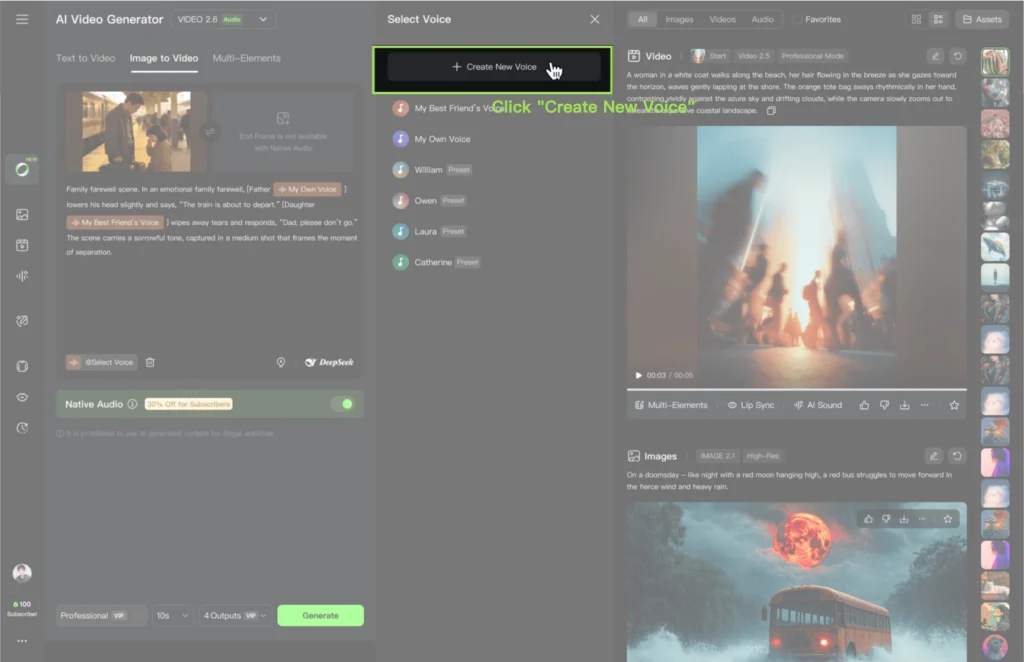
2. Upload a local audio file or select from generation history
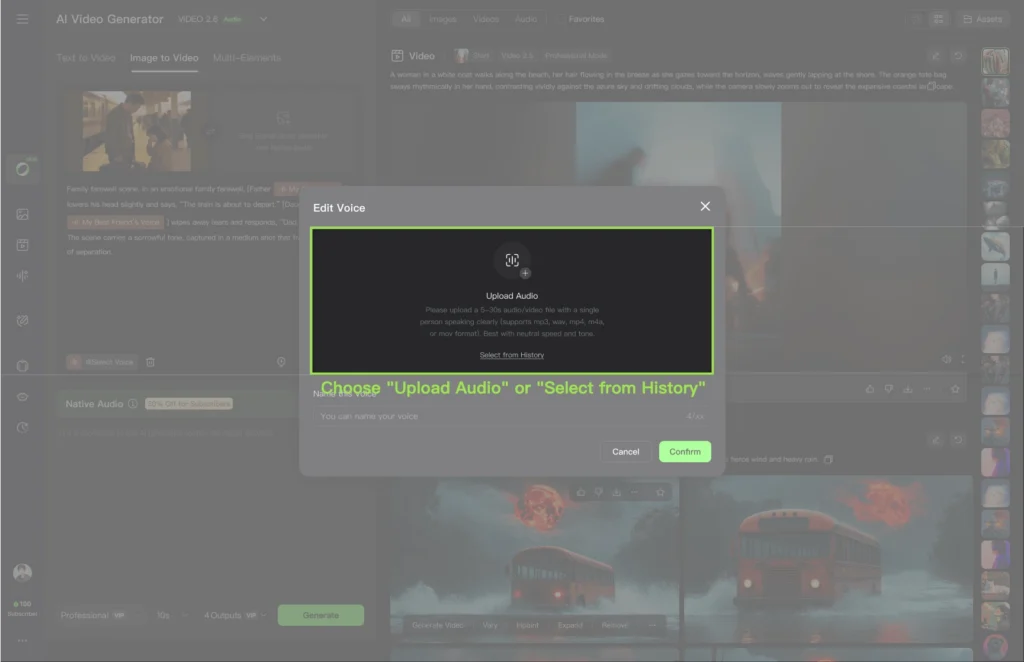
3. Use a 5-30 second clip with these specifications:
- Single speaker only
- Neutral emotion (not overly dramatic)
- Minimal background noise
- Clear pronunciation
4. Name your voice for easy identification
5. Voice saves to your library (supports up to 200 voices total)
Voice Control Key Features
Stable, High-Fidelity Voice Output
The voice remains consistent throughout entire videos, accurately preserving target timbre across all generations. This consistency is critical for:
- Long-term IP character development
- Brand voice standardization
- Recurring role continuity
- Multi-video campaign coherence
Flexible Style Adaptation
A single voice seamlessly adapts to multiple scenarios without additional training. The system automatically adjusts tone, rhythm, and delivery style based on context:
- Formal narration
- Casual conversation
- Professional speeches
- Emotional dialogue
Natural Cross-Language Performance
Voices trained in one language naturally perform dialogue in another without configuration. Currently supports bidirectional Chinese-English adaptation with smooth pronunciation and expressive consistency.
Example: A voice created from Chinese audio can deliver English dialogue naturally, maintaining the same vocal characteristics and emotional range.
How to Use Kling 2.6 Voice Control
Two methods for voice assignment:
Method 1: Quick Start with “@” Symbol
Use the “@” syntax after character names in prompts:
[Character Name] @Voice Name: “Dialogue content”
Single character example:
[Livestream Host] @Sweet Female Voice: “This top is a trending must-have!”
Multi-character example:
[Teacher] @Intellectual Female Voice: “Turn to page 20.”
[Student] @Teen Male Voice: “Okay, teacher!”
Method 2: Manual Selection from Voice List
1. Enable “Native Audio” in generation settings
2. Enter your prompt
3. Select voices from the dropdown voice list
4. Assign voices to specific characters manually
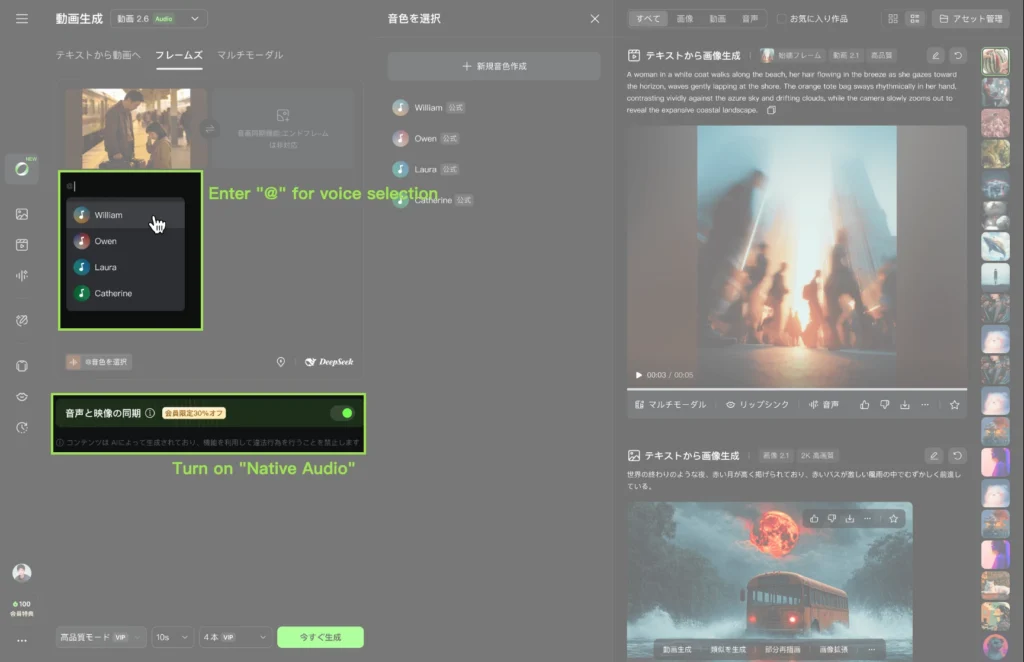
Important: Each @VoiceName works independently, allowing different voices for different characters in the same generation.
Voice Control Best Practices
For optimal voice quality:
- Record in a quiet environment with quality audio equipment
- Speak clearly with neutral, natural delivery
- Avoid extreme emotions or stylized performances
- Use mono audio (single channel) for better results
- Test voice quality with short generations before committing to long projects
- Name voices descriptively (e.g., “Professional Male Deep” not “Voice1”)
Current limitations:
- Voice creation and usage support Chinese and English only
- 5-30 second duration requirement (too short or long reduces quality)
- Single speaker per voice file (multiple speakers confuse the model)
Kling 2.6 Motion Control: Precision Movement Transfer
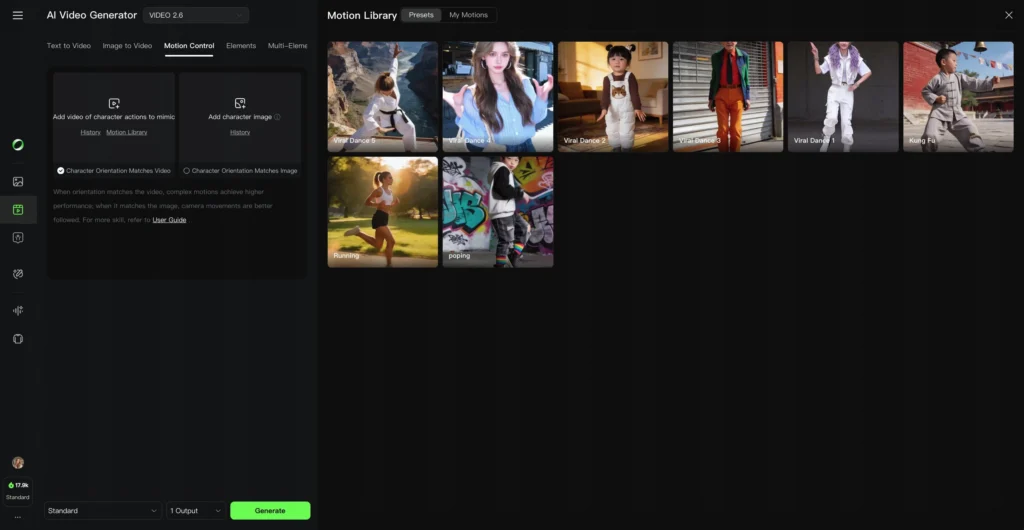
Kling AI 2.6 motion control captures body movements, facial expressions, and lip sync with professional-level accuracy, supporting 3-30 second motion references for complete action sequences. This feature represents the platform’s most significant technical achievement, outperforming all major competitors in motion accuracy.
Kling 2.6 Motion Control Performance Benchmarks
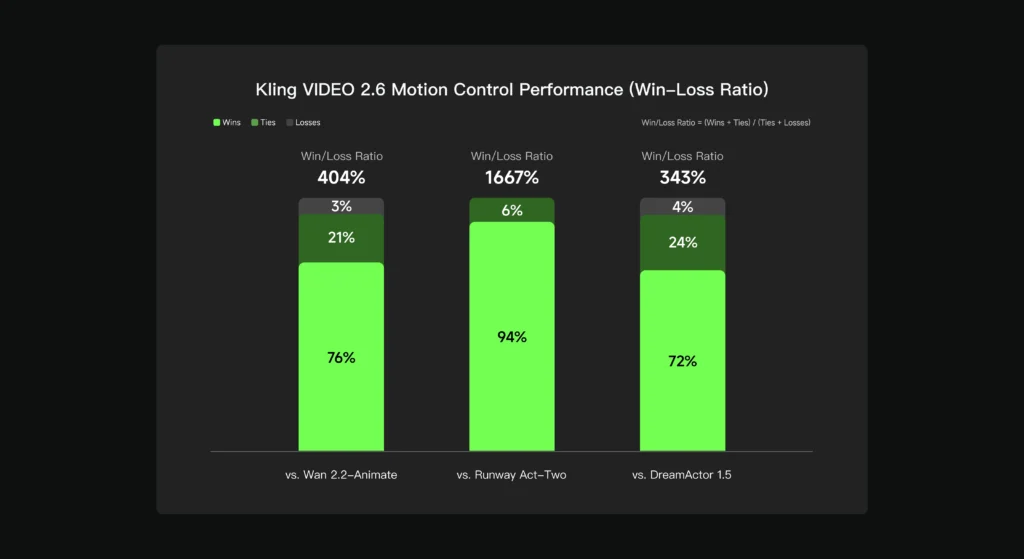
Based on internal evaluation datasets:
- 404% better performance than Wan 2.2-Animate
- 1667% superiority over Runway Act-Two
- 343% advantage over DreamActor 1.5
These benchmarks position Kling video 2.6 motion control as the industry leader in AI-driven motion transfer technology.
Motion Control Key Features
Perfectly Synchronized Movements, Expressions, and Lip Sync
The system captures every detail of body movement, facial expressions, and lip synchronization, seamlessly coordinating with background sounds. This comprehensive approach ensures:
- Natural character performance
- Emotional coherence across face and body
- Audio-visual harmony
- Professional-grade output quality
Masterful Performance of Complex Motions
Significantly enhanced responsiveness for fast, complex actions enables accurate capture of high-difficulty movements:
- Popular dance choreography (TikTok dances, ballet, hip-hop)
- Sports movements (basketball, tennis, martial arts)
- Acrobatic sequences
- Fight choreography
- Athletic performances
Precision in Hand Performances
Epic-level enhancement of hand algorithms perfectly replicates intricate hand movements. This breakthrough addresses one of AI video generation’s biggest challenges:
- Detailed finger gestures
- Dance hand choreography
- Martial arts mudras
- Sign language
- Musical instrument playing
- Precise pointing and manipulation
Previous AI video generators consistently struggled with hands, producing distorted fingers or unnatural movements. Kling 2.6 motion control solves this completely.
30-Second One-Shot Action
Upload motion references ranging from 3 to 30 seconds for uninterrupted, complete motion sequences. This extended duration support enables:
- Full dance routines
- Extended dialogue scenes
- Complete action sequences
- Complex multi-step movements
Scene Details at Your Command
Control not only video movements but also fine-tune scene details through text descriptions. While motion comes from the reference video, you can specify:
- Background environments
- Lighting conditions
- Atmospheric effects
- Additional scene elements
- Camera angles (with “Character Orientation Matches Image” mode)
How to Use Kling 2.6: Complete Guide
Kling 2.6 Text-to-Audio-Visual Workflow
Generate complete audio-visual content from a single text prompt.
Step-by-step process:
1. Enable Native Audio
- Open generation settings
- Toggle “Native Audio” to ON
Structure Your Prompt
[Character Name] @Voice Name: “Dialogue”
Scene description
Action description
2. Assign Voices (if using custom voices)
- Use “@” syntax for voice binding
- Assign different voices to different characters
3. Add Scene Details
- Describe background setting
- Specify lighting and atmosphere
- Include desired actions and expressions
4. Generate
- Click generate button
- Wait for processing (longer for complex scenes)
Example prompt:
[Sales Representative] @Energetic Female Voice: “Check out these incredible features! This product will change your life.”
Modern office setting, bright natural lighting, professional atmosphere
Enthusiastic gestures, pointing to product displays, confident smile
Output: Video with synchronized voice, appropriate gestures, expressions, and ambient office sounds.
Kling 2.6 Image-to-Audio-Visual Workflow
Transform static images into dynamic videos with voice and sound.
Step-by-step process:
1. Upload Reference Image
- Click image upload area
- Select your character or scene image
- Ensure high resolution for best results
2. Add Text Prompt
- Describe desired action
- Include dialogue with voice assignments
- Specify scene modifications
Assign Voices
[Character in Image] @Voice Name: “Spoken dialogue”
3. Generate Audio-Visual
- System animates the image
- Adds synchronized audio
- Creates scene ambiance
Best use cases:
- Product demonstrations (bring product photos to life)
- Character animation (animate artwork with voice)
- Marketing materials (add narration to static ads)
- Educational content (make diagrams speak and move)
Kling 2.6 Motion Control Workflow
Transfer movements from reference videos to custom characters with precision.
Complete step-by-step guide:
Step 1: Add Motion Reference
- Click “Add Motion” or similar button
- Upload video from local resources (3-30 seconds)
- OR select from Motion Library (pre-tested references)
Step 2: Add Character Image
- Upload your character image
- Critical: Ensure proportions match the motion reference video
- Check that pose orientation is similar
- Verify aspect ratio compatibility
Step 3: Choose Orientation Mode
Option A: “Character Orientation Matches Video” (Default)
- Character follows exact orientation from motion video
- Best for precise motion replication
- Limited camera movement
- Use when motion accuracy is priority
Option B: “Character Orientation Matches Image”
- Character maintains orientation from uploaded image
- Supports camera movement and angles
- More flexible scene composition
- Use when camera control is needed
Step 4: Enter Text Prompt
- Control background elements
- Specify lighting and atmosphere
- Add environmental details
- Include context information
Example prompt:
Urban street background, golden hour lighting, bustling city atmosphere, modern architecture
Step 5: Generate Motion-Controlled Video
- Click generate
- System processes motion transfer
- Applies character to movements
- Integrates scene details from prompt
Kling 2.6 Motion Control Tips
For optimal results:
Proportion Matching Is Critical
- Compare character image dimensions to motion video
- Ensure similar height-to-width ratios
- Match body proportions (tall/short, slim/broad)
- Align pose angles (front-facing, side view, etc.)
Mismatched proportions cause:
- Distorted body parts
- Unnatural stretched movements
- Failed generations
- Uncanny visual results
Start with Motion Library
- Pre-tested motion references work reliably
- Reduces trial and error
- Optimized for system performance
- Cover common use cases
Test Before Committing
- Generate short clips first (3-5 seconds)
- Verify motion quality
- Check proportion compatibility
- Adjust before long generations
Enhance with Detailed Prompts
- Add specific background details
- Include lighting direction
- Specify atmospheric effects
- Control scene mood and tone
Kling 2.6 Best Alternative Tool: Gaga AI
Gaga AI is the premier alternative to Kling 2.6 for dialogue-focused, talking head content with exceptional voice quality and emotional performance. While Kling 2.6 excels at full-body motion and complex action sequences, Gaga AI specializes in creating professional-grade speaking characters with performer-level expressions.

What Is Gaga AI Video Generator?
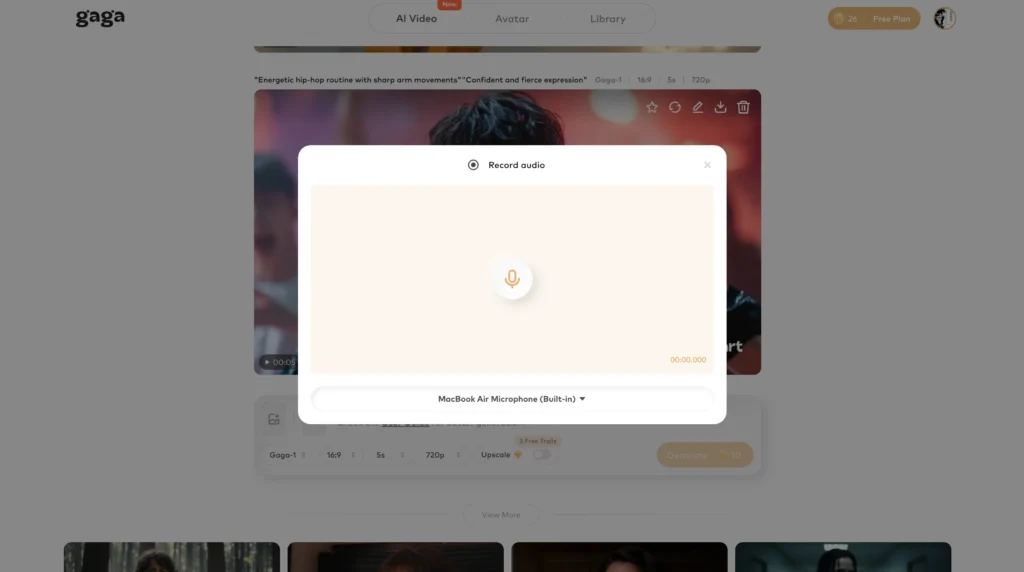
Gaga AI transforms text into audio-visual experiences featuring highly realistic talking characters powered by advanced text-to-speech technology. The platform uses gaga-2 and gaga-1 models to generate videos where characters speak, narrate, or perform with natural voice-face coordination.
Tagline: “More than talking, we act.”
Gaga AI Core Strengths
Best-in-Class Text-to-Speech
Gaga AI delivers superior voice quality with exceptional timbre-character matching:
- Voice characteristics perfectly align with character appearance
- Natural, lifelike sound effects
- Rich emotional fullness
- Professional-grade audio clarity
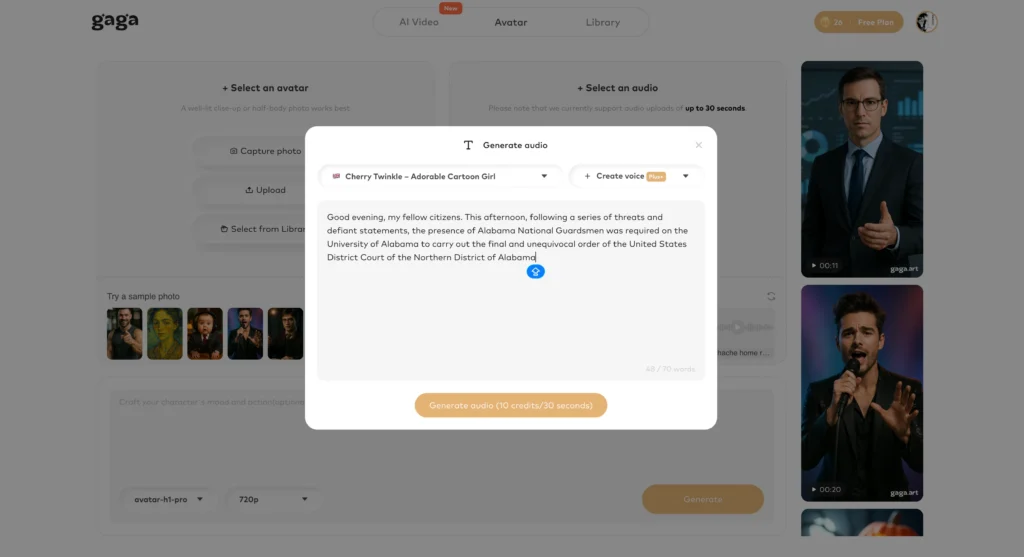
Performer-Level Lip Sync
Gaga AI achieves “actor/actress-grade” facial expressions and lip synchronization. The system captures subtle emotional nuances through:
- Precise mouth movements matching phonetics
- Natural micro-expressions
- Emotionally appropriate facial changes
- Believable character performances
Multi-Person Dialogue Excellence
Gaga AI handles multi-character conversations with distinct voices and natural turn-taking. This makes it ideal for:
- Dialogue scenes
- Interviews
- Debates
- Multi-narrator content
Voice Tone Control
Adjust emotional delivery, pitch, and tone to match content requirements:
- Professional and authoritative
- Warm and friendly
- Excited and energetic
- Calm and soothing
Multilingual Support
Generate content in multiple languages with natural pronunciation and cultural-appropriate delivery. This expands reach for international audiences.
Flexible Duration
Create content of varying lengths without rigid time constraints, allowing both short social media clips and longer-form content.
Gaga AI vs Kling 2.6: Direct Comparison
| Feature | Kling 2.6 | Gaga AI |
| Primary Strength | Full-body motion control | Talking head dialogue |
| Voice Quality | Good, customizable | Exceptional, TTS optimized |
| Lip Sync | Excellent with native audio | Performer-level precision |
| Body Movement | Complex choreography, sports | Limited to upper body |
| Hand Gestures | Epic-level precision | Basic gestures |
| Motion Transfer | 3-30s reference videos | Not available |
| Multi-Character | Yes, with voice control | Yes, specialized for dialogue |
| Emotion | Context-aware | Rich, nuanced performance |
| Best Use Case | Action, dance, sports content | Dialogue, narration, presentations |
When to Choose Gaga AI Over Kling 2.6
Select Gaga AI when your project requires:
1. Dialogue-Heavy Content
- Interviews and conversations
- Educational narration
- Podcast-style videos
- Character discussions
2. Emotional Vocal Performance
- Dramatic readings
- Storytelling with nuance
- Persuasive presentations
- Character-driven narratives
3. Quick Talking Head Videos
- Social media explainers
- News-style reporting
- Testimonial-style content
- Talking avatar videos
4. Minimal Body Movement Needed
- Head and shoulder shots
- Corporate communications
- Professional presentations
- Direct-to-camera content
When to Choose Kling 2.6 Over Gaga AI
Select Kling 2.6 when your project requires:
1. Full-Body Action
- Dance choreography
- Sports demonstrations
- Martial arts sequences
- Physical comedy
2. Complex Motion Transfer
- Replicating specific movements
- Custom character animation
- Precise hand gestures
- Athletic performances
3. Scene-Level Control
- Dynamic backgrounds
- Camera movement
- Environmental integration
- Complete scene composition
4. Image-to-Video Animation
- Bringing static art to life
- Product demonstrations
- Character art animation
- Illustration movement
Complementary Use: Combining Both Platforms
Many professional creators use both platforms for different content needs:
- Gaga AI for quick dialogue scenes, talking head content, and voice-focused videos
- Kling 2.6 for action sequences, motion-heavy content, and complex scene generation
This dual-platform approach maximizes creative flexibility while leveraging each tool’s unique strengths.
Kling 2.6 Best Alternative Models
Gaga-2 Model: Next-Generation Performance
Gaga-2 represents the latest advancement in Gaga AI’s text-to-speech and talking head technology. This model delivers enhanced emotional range, improved lip sync accuracy, and more natural character performances compared to its predecessor.
Gaga-2 model improvements:
Enhanced Voice-Character Matching
- More accurate timbre alignment with character appearance
- Better age-appropriate voice selection
- Improved gender-voice coherence
- Natural vocal aging effects
Superior Emotional Intelligence
- Richer emotional nuance in delivery
- Context-aware tone adaptation
- Subtle emotional transitions
- Believable performance range
Advanced Lip Sync Technology
- Frame-perfect mouth movement synchronization
- Accurate phoneme-to-viseme mapping
- Natural co-articulation (sound blending)
- Reduced uncanny valley effects
Professional Audio Quality
- Cleaner voice generation
- Reduced artifacts and glitches
- Better breath control simulation
- Natural speech rhythm
Best use cases for Gaga-2:
- High-quality commercial content
- Professional presentations
- Branded video content
- Premium educational materials
- Character-driven storytelling
Gaga-1 Model: Reliable Foundation
Gaga-1 serves as Gaga AI’s stable, reliable foundation model for talking head video generation. While not as advanced as Gaga-2, it offers consistent performance for standard dialogue and narration needs.
Gaga-1 model characteristics:
Stable Performance
- Predictable output quality
- Fast generation times
- Lower computational requirements
- Reliable for batch production
Solid Voice Quality
- Natural-sounding speech
- Clear pronunciation
- Good emotional range
- Professional-grade audio
Effective Lip Sync
- Accurate basic synchronization
- Natural mouth movements
- Appropriate facial expressions
- Suitable for most applications
Cost-Effective
- Lower resource consumption
- Faster processing
- Good value for volume production
- Suitable for testing and prototyping
Best use cases for Gaga-1:
- Standard narration videos
- Educational content
- Social media posts
- High-volume content production
- Budget-conscious projects
Choosing Between Gaga-2 and Gaga-1
Select Gaga-2 when:
- Premium quality is essential
- Emotional performance matters
- Commercial/branded content
- Close-up character shots
- High-stakes presentations
Select Gaga-1 when:
- Standard quality suffices
- Fast turnaround needed
- High-volume production
- Budget constraints exist
- Simple narration content
Frequently Asked Questions
What is Kling 2.6?
Kling 2.6 is an AI video generation platform that simultaneously creates synchronized video and audio from text prompts or images, featuring native audio-visual generation, voice cloning, and motion control capabilities.
How does Kling video 2.6 motion control work?
Kling video 2.6 motion control transfers movements from a 3-30 second reference video to your custom character image. The system captures body movements, facial expressions, hand gestures, and lip sync, then applies them to your character while maintaining control over scene details through text prompts.
Can I use custom voices in Kling AI 2.6?
Yes. Upload a 5-30 second audio clip with clean sound, single speaker, and neutral emotion. Kling AI 2.6 extracts the voice characteristics and creates a Voice Embedding that you can apply to characters using the “@VoiceName” syntax in prompts. The system supports up to 200 custom voices.
What’s better for talking head videos, Kling 2.6 or Gaga AI?
Gaga AI is better for talking head videos and dialogue-focused content. It offers superior text-to-speech quality, performer-level lip sync, and exceptional voice-character matching. Choose Kling 2.6 when you need full-body motion control, complex action sequences, or motion transfer capabilities.
How long can Kling 2.6 motion control videos be?
Kling 2.6 motion control supports motion references from 3 to 30 seconds for uninterrupted motion sequences. This allows complete action transfers including full dance routines, extended dialogue scenes, and complex multi-step movements.
Does Kling 2.6 support multiple languages?
Voice creation and usage in Kling 2.6 currently support Chinese and English. The cross-language feature allows voices trained in one language to perform dialogue in another (bidirectional Chinese-English adaptation) without additional configuration.
What makes Gaga-2 better than Gaga-1?
Gaga-2 offers enhanced emotional intelligence, superior voice-character matching, advanced lip sync technology, and professional audio quality improvements over Gaga-1. Choose Gaga-2 for premium content where emotional performance and quality are critical; choose Gaga-1 for cost-effective, high-volume production.
How accurate is Kling AI 2.6 motion control compared to competitors?
Based on internal evaluations, Kling AI 2.6 motion control achieves 404% better performance than Wan 2.2-Animate, 1667% superiority over Runway Act-Two, and 343% advantage over DreamActor 1.5 in overall motion accuracy.
Can Kling 2.6 generate multi-character dialogue scenes?
Yes. Assign different voices to different characters using the “@” syntax in your prompts. Example: [Teacher] @Voice1: “Hello.” [Student] @Voice2: “Hi!” Each voice works independently within the same generation, creating natural multi-character conversations.
What’s the difference between text-to-audio-visual and image-to-audio-visual in Kling 2.6?
Text-to-audio-visual generates both the character and scene from text prompts alone. Image-to-audio-visual animates a static image you provide, adding voice, movement, and audio. Use text-to-audio-visual for complete scene creation; use image-to-audio-visual to bring existing images to life.
Related Posts:
 Sora 2: OpenAI’s Next-Generation Video + Audio Model Explained
 Google Veo 3: The Complete Guide to Features, Pricing, and the Best Alternative – Gaga AI & Sora 2
 Waver 1.0: ByteDance’s Revolutionary AI Video Generator Explained
 Kling O1: Complete Guide to the World’s First Unified Multimodal Video Generation Model (2026)