Key Takeaways
- FlashLabs Chroma 1.0 is the world’s first open-source, end-to-end real-time speech-to-speech AI model
- Achieves sub-150ms time-to-first-token (TTFT), eliminating the traditional ASR → LLM → TTS pipeline delays
- Features few-second voice cloning with 0.817 speaker similarity score (10.96% above human baseline)
- Uses compact 4B-parameter architecture optimized for edge deployment and real-time applications
- Released under Apache 2.0 license with full model weights, inference code, and benchmarks
- Supports natural conversational turn-taking with emotional and prosodic control
Table of Contents
What Is FlashLabs Chroma 1.0?
FlashLabs Chroma 1.0 is a multimodal AI voice model that processes and generates speech in real-time without converting audio to text first. Released in January 2026 by FlashLabs, an applied AI research lab, Chroma removes latency bottlenecks that plague traditional voice AI systems by operating natively in the audio domain.
Unlike conventional systems that chain together automatic speech recognition (ASR), language models (LLM), and text-to-speech (TTS) components, Chroma performs end-to-end speech-to-speech processing. This architectural choice enables natural, immediate conversations that feel genuinely human-like rather than robotic or delayed.
Core Architecture
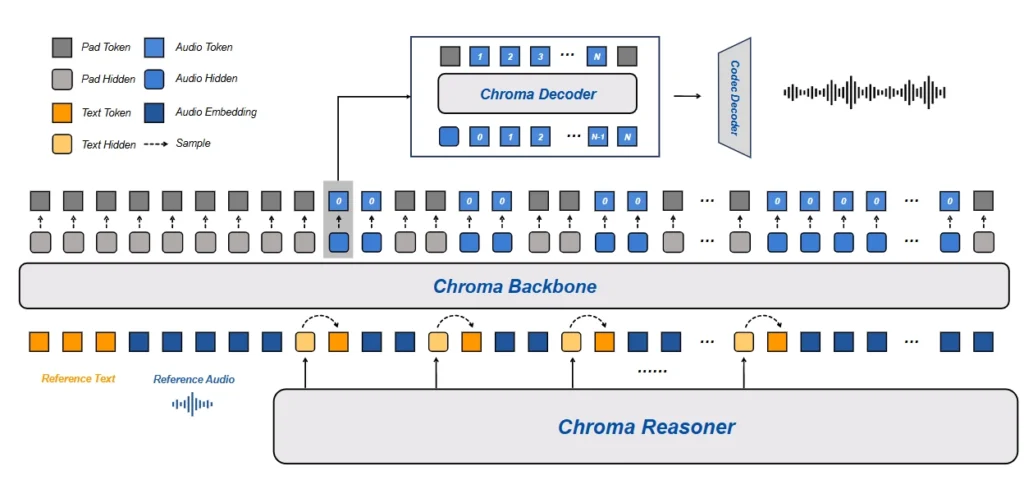
Chroma 1.0 uses a modular multimodal causal language model with four key components:
- Reasoner: Based on Qwen2.5-Omni-3B for understanding and response generation
- Backbone: Llama3-based (16 layers, 2048 hidden size) for core processing
- Decoder: Llama3-based (4 layers, 1024 hidden size) for output generation
- Codec: Mimi encoder-decoder (24kHz sampling rate) for audio processing
This architecture balances reasoning capability with computational efficiency, making Chroma suitable for deployment on consumer hardware and edge devices.
Why Chroma 1.0 Matters: The Latency Problem in Voice AI
Traditional voice AI systems suffer from cascading delays. When you speak to most voice assistants, your audio travels through multiple processing stages:
1. ASR converts speech to text (200-500ms)
2. LLM processes text and generates response (500-2000ms)
3. TTS converts text back to speech (300-800ms)
Total latency can exceed 3 seconds, creating unnatural pauses that break conversational flow. Humans expect responses within 200-300ms during natural conversation.
Chroma solves this by processing speech directly, achieving approximately 135ms TTFT with SGLang optimization. This represents a 20-30x improvement over traditional pipelines, enabling truly conversational AI interactions.
Key Capabilities of Chroma 1.0
1. Real-Time Speech Understanding
Chroma processes audio input directly without transcription. The model understands:
- Natural speech patterns and prosody
- Emotional tone and context
- Multiple speakers in conversation
- Background audio context
This direct audio processing preserves nuances that text transcription typically loses, such as sarcasm, emphasis, and emotional state.
2. AI Voice Cloning in Seconds
Chroma achieves high-fidelity voice cloning using only 3-5 seconds of reference audio. The AI voice clone feature delivers:
- Speaker similarity score of 0.817 (internal evaluation)
- 10.96% improvement over human baseline (0.73 score)
- Best-in-class performance compared to both open-source and proprietary alternatives
- No fine-tuning or large dataset requirements
To clone a voice, you provide a short audio sample with corresponding text. Chroma extracts voice characteristics—including pitch, timbre, accent, and speaking style—then generates new speech in that voice for any content.
3. Multimodal Generation
Chroma generates both text and speech simultaneously, enabling:
- Coherent responses across modalities
- Real-time streaming audio output
- Natural conversational turn-taking
- Emotional and prosodic control during generation
This multimodal capability means Chroma can participate in conversations that seamlessly blend voice, text, and context awareness.
How to Use FlashLabs Chroma 1.0
Installation Requirements
Before installing Chroma, ensure your system meets these specifications:
- Python 3.11 or higher
- CUDA 12.6 or compatible version (for GPU acceleration)
- 8GB+ VRAM recommended for inference
Step-by-Step Setup
Step 1: Clone the Repository
| it clone https://github.com/FlashLabs-AI-Corp/FlashLabs-Chroma.gitcd FlashLabs-Chromag |
Step 2: Create Environment (Optional but Recommended)
| conda create -n chroma python=3.11 -yconda activate chroma |
Step 3: Install Dependencies
| pip install -r requirements.txt |
Important: Install PyTorch and torchvision before transformers to avoid initialization errors.
Loading the Model
| import torch from transformers import AutoModelForCausalLM, AutoProcessor model_id = “FlashLabs/Chroma-4B” # Load model with automatic device mapping model = AutoModelForCausalLM.from_pretrained( model_id, trust_remote_code=True, device_map=”auto” ) # Load processor for audio/text handling processor = AutoProcessor.from_pretrained( model_id, trust_remote_code=True ) |
Running Voice Conversations
Here’s how to create a simple voice interaction with AI voice clone capabilities:
| from IPython.display import Audio # Define system prompt system_prompt = ( “You are Chroma, an advanced virtual human created by FlashLabs. “ “You possess the ability to understand auditory inputs and generate both text and speech.” ) # Create conversation with audio input conversation = [[ { “role”: “system”, “content”: [{“type”: “text”, “text”: system_prompt}] }, { “role”: “user”, “content”: [{“type”: “audio”, “audio”: “path/to/input.wav”}] } ]] # Load voice cloning reference (3-5 second sample) prompt_text = [“Your reference text here”] prompt_audio = [“path/to/reference_voice.wav”] # Process and generate response inputs = processor( conversation, add_generation_prompt=True, tokenize=False, prompt_audio=prompt_audio, prompt_text=prompt_text ) inputs = {k: v.to(model.device) for k, v in inputs.items()} output = model.generate( **inputs, max_new_tokens=100, do_sample=True, temperature=0.7, top_p=0.9, use_cache=True ) # Decode audio output audio_values = model.codec_model.decode( output.permute(0, 2, 1) ).audio_values # Play or save the generated speech Audio(audio_values[0].cpu().detach().numpy(), rate=24_000) |
Common Troubleshooting Issues
TypeError: ‘NoneType’ is not iterable
Cause: This occurs when transformers loads before torchvision is properly detected.
Solution:
| pip uninstall transformers torchvision torch -y pip install torch==2.7.1 torchvision==0.22.1 –index-url https://download.pytorch.org/whl/cu126 pip install transformers==5.0.0rc0 |
Restart your Python kernel after reinstalling.
CUDA Out of Memory
Cause: The 4B parameter model requires significant VRAM.
Solution: Use mixed precision and automatic device mapping:
| model = AutoModelForCausalLM.from_pretrained( model_id, trust_remote_code=True, device_map=”auto”, torch_dtype=torch.bfloat16 ) |
Slow Inference Speed
Solution: Enable SGLang support for optimized throughput:
- Achieves ~135ms TTFT
- Improves real-time factor for live deployment
- Reduces memory overhead during generation
Chroma 1.0 vs Competing AI Voice Models
Performance Comparison
| Feature | Chroma 1.0 | Runway AI | Sora | Kling AI | Vidu AI | Veo 3.1 |
| Open Source | Yes (Apache 2.0) | No | No | No | No | No |
| Voice Cloning | 3-5 sec samples | Limited | N/A | Limited | N/A | N/A |
| TTFT Latency | 135-150ms | >500ms | N/A | >300ms | N/A | N/A |
| Real-Time | Native | Pipeline | N/A | Pipeline | N/A | Pipeline |
| Speaker SIM | 0.817 | ~0.75 | N/A | ~0.78 | N/A | ~0.76 |
Note: Sora, Veo 3.1, Runway, Kling, and Vidu focus primarily on video generation, not voice-specific AI tasks.
Why Choose Chroma 1.0?
Chroma 1.0 excels when you need:
- Open-source deployment with full control over model and data
- Minimal latency for real-time conversational applications
- Voice cloning without extensive audio datasets
- Edge deployment on consumer hardware (4B parameters)
- Cost efficiency compared to API-based solutions
Choose proprietary alternatives when you need enterprise support contracts or aren’t comfortable with self-hosting requirements.
Real-World Applications
1. Autonomous Voice Agents
Deploy Chroma as the voice layer for AI agents that handle customer service, sales, or support autonomously. The sub-150ms response time creates natural conversations that customers prefer over traditional IVR systems.
2. AI Call Centers
Replace expensive human call center operations with AI voice agents powered by Chroma. The AI voice model handles routine inquiries, schedules appointments, and escalates complex issues—all while maintaining natural conversation flow.
3. Real-Time Translation
Chroma’s speech-to-speech architecture enables low-latency translation systems that preserve speaker voice characteristics. Users speak in one language and hear responses in another, maintaining their vocal identity.
4. Interactive NPCs and Characters
Game developers can create believable NPCs with unique voices using AI voice clone technology. Each character maintains consistent voice identity across all generated dialogue.
5. Accessibility Tools
Build voice interfaces for users with motor impairments or visual disabilities. Chroma’s real-time processing enables responsive systems that don’t frustrate users with delays.
Technical Specifications
Model Details
- Parameter Count: ~4 billion
- Context Length: Multimodal (audio + text)
- Audio Sampling Rate: 24kHz
- Supported Languages: English (additional languages in development)
- License: Apache 2.0 (permissive commercial use)
- Model Format: PyTorch-compatible, Hugging Face transformers
System Requirements
Minimum:
- GPU: 8GB VRAM (RTX 3070 or equivalent)
- RAM: 16GB
- Storage: 20GB for model + dependencies
Recommended:
- GPU: 16GB+ VRAM (RTX 4080 or A100)
- RAM: 32GB
- Storage: 50GB for multiple voice profiles
Access and Resources
- Model Weights: HuggingFace – FlashLabs/Chroma-4B
- Source Code: GitHub Repository
- Research Paper: arXiv:2601.11141
- Live Demo: FlashAI Voice Agents platform
Bonus: Gaga AI as an Alternative Solution
While Chroma 1.0 specializes in real-time voice AI and AI voice clone capabilities, Gaga AI offers a broader multimodal platform covering:

Gaga AI Capabilities
- AI Voice Clone & TTS: High-quality text-to-speech with voice cloning similar to Chroma
- Image to Video: Transform static images into animated video content
- Multilingual Support: Generate content across dozens of languages
- Text-to-Video: Create video from text descriptions
- Video Editing: AI-powered editing and enhancement tools
When to choose Gaga AI: If your project requires voice capabilities plus video generation, image animation, or multilingual content creation, Gaga AI’s all-in-one platform may reduce technical complexity compared to combining multiple specialized models.
When to choose Chroma 1.0: If real-time voice interaction, ultra-low latency, or open-source deployment control are priorities, Chroma’s specialized architecture delivers superior performance in voice-specific tasks.
Frequently Asked Questions
What makes FlashLabs Chroma 1.0 different from other AI voice models?
Chroma 1.0 is the first open-source, end-to-end real-time voice AI model. Unlike traditional systems that convert speech to text and back, Chroma processes audio directly, achieving 135-150ms latency—10-20x faster than pipeline-based alternatives. It combines this speed with high-quality voice cloning from 3-5 second samples.
Can I use Chroma 1.0 commercially?
Yes. Chroma 1.0 is released under the Apache 2.0 license, which permits commercial use, modification, and distribution. You can deploy Chroma in commercial products without licensing fees or revenue sharing.
How much audio is needed for AI voice cloning in Chroma?
Chroma requires only 3-5 seconds of reference audio to clone a voice. The model analyzes this short sample to extract voice characteristics including pitch, timbre, accent, and speaking style, then generates new speech matching that voice profile.
What hardware do I need to run Chroma 1.0?
Minimum requirements include an NVIDIA GPU with 8GB VRAM (RTX 3070 equivalent), 16GB system RAM, and CUDA 12.6. For optimal performance, use 16GB+ VRAM GPUs. The compact 4B-parameter size makes Chroma more accessible than larger models requiring 40GB+ VRAM.
Does Chroma support languages other than English?
The current release (v1.0) focuses on English. FlashLabs has indicated that multilingual support is under development, but no specific timeline has been announced. For immediate multilingual needs, consider supplementary tools or services like Gaga AI.
How does Chroma’s voice quality compare to services like ElevenLabs?
Internal benchmarks show Chroma achieves a speaker similarity score of 0.817, surpassing human baseline (0.73) by 10.96%. This places it competitively with leading commercial services, though subjective preferences vary. Chroma’s advantage lies in real-time performance and open-source availability rather than absolute quality differences.
Can Chroma handle multiple speakers in a conversation?
Yes. Chroma’s speech understanding capability processes audio input directly, including multi-speaker scenarios. The model maintains context across turns and can differentiate between speakers, though voice cloning currently focuses on single-target voice replication.
What’s the difference between Chroma and video AI models like Runway or Sora?
Chroma specializes in real-time voice AI and speech processing. Models like Runway AI, Sora, Kling AI, Vidu AI, and Veo 3.1 focus on video generation and editing. While there may be some voice features in video tools, they don’t prioritize the ultra-low latency and real-time conversational capabilities that define Chroma’s architecture.
How do I troubleshoot installation errors?
The most common error (“TypeError: NoneType is not iterable”) occurs when packages install in the wrong order. Always install PyTorch and torchvision before transformers. For CUDA memory errors, use torch_dtype=torch.bfloat16 when loading the model. See the Troubleshooting section above for detailed solutions.
Is there enterprise support available for Chroma?
As an open-source project, Chroma doesn’t include formal enterprise support from FlashLabs. However, the community provides assistance through GitHub issues, and third-party consultants offer integration services. Organizations requiring SLAs should evaluate commercial alternatives or build internal support capabilities.