Table of Contents
Key Takeaways
- Spark TTS is an efficient, LLM-based text-to-speech system that generates natural-sounding voices using the Qwen2.5 large language model without requiring separate acoustic generation models.
- Zero-shot voice cloning capability allows you to replicate any speaker’s voice from a short audio sample without specific training.
- Bilingual support (Chinese/English) with seamless cross-lingual and code-switching abilities.
- Open-source and accessible with multiple deployment options including CLI, Web UI, ComfyUI integration, and Nvidia Triton for production.
- Ideal for content creators, developers, and researchers seeking high-quality voice synthesis without expensive cloud API subscriptions.
What Is Spark TTS?
Spark TTS is an open-source text-to-speech model that leverages large language model architecture to convert written text into natural-sounding speech. Unlike traditional TTS systems that require multiple models for different processing stages, Spark TTS uses a single-stream approach built entirely on Qwen2.5, which directly reconstructs audio from LLM-predicted codes. This architectural simplicity delivers both efficiency and quality in voice synthesis.
The system excels at voice cloning, meaning you can provide a short audio sample of any speaker, and Spark TTS will generate new speech in that person’s voice—even in languages the original speaker never spoke.
Core Features of Spark TTS
1. Zero-Shot Voice Cloning
Spark TTS can replicate a speaker’s voice characteristics from a single audio reference without requiring hours of training data. This zero-shot capability makes it practical for:
- Creating personalized voice assistants
- Dubbing content in multiple languages while maintaining the original speaker’s tone
- Generating character voices for games or audiobooks
- Rapid prototyping of voice interfaces

2. Bilingual and Cross-Lingual Support
The model handles both Chinese and English natively, with strong performance in code-switching scenarios where languages mix within the same sentence. This makes Spark TTS particularly valuable for multilingual content creators and international applications.
3. Simplified Architecture
By eliminating flow matching and separate acoustic models, Spark TTS reduces computational overhead. The direct audio reconstruction from LLM codes means:
- Faster inference times (Real-Time Factor of 0.0704 at 4x concurrency on L20 GPU)
- Lower memory requirements
- Easier deployment and maintenance
4. Controllable Speech Parameters
Users can adjust virtual speaker characteristics including:
- Gender presentation
- Pitch range
- Speaking rate
- Emotional tone

This flexibility enables fine-tuned control over generated speech without requiring new training data.
How to Use Spark TTS: Step-by-Step Setup
Installation Requirements
System Requirements:
- Linux or Windows operating system
- Python 3.12
- Conda package manager
- Git with Git LFS
- 4GB+ GPU memory (recommended)
Complete Installation Process
Step 1: Clone the Repository
| git clone https://github.com/SparkAudio/Spark-TTS.gitcd Spark-TTS |
Step 2: Create Python Environment
| conda create -n sparktts -y python=3.12conda activate sparkttspip install -r requirements.txt |
For users in mainland China, use the mirror:
| pip install -r requirements.txt -i https://mirrors.aliyun.com/pypi/simple/ –trusted-host=mirrors.aliyun.com |
Step 3: Download Pre-trained Model
Option A – Using Python:
| from huggingface_hub import snapshot_downloadsnapshot_download(“SparkAudio/Spark-TTS-0.5B”, local_dir=”pretrained_models/Spark-TTS-0.5B”) |
Option B – Using Git:
| mkdir -p pretrained_modelsgit lfs installgit clone https://huggingface.co/SparkAudio/Spark-TTS-0.5B pretrained_models/Spark-TTS-0.5B |
Step 4: Run Your First Synthesis
| python -m cli.inference \ –text “Hello, this is a test of Spark TTS voice synthesis.” \ –device 0 \ –save_dir “output/audio” \ –model_dir pretrained_models/Spark-TTS-0.5B \ –prompt_text “transcript of your reference audio” \ –prompt_speech_path “path/to/reference.wav” |
Using the Web UI
For non-technical users, Spark TTS provides a graphical interface:
| python webui.py –device 0 |
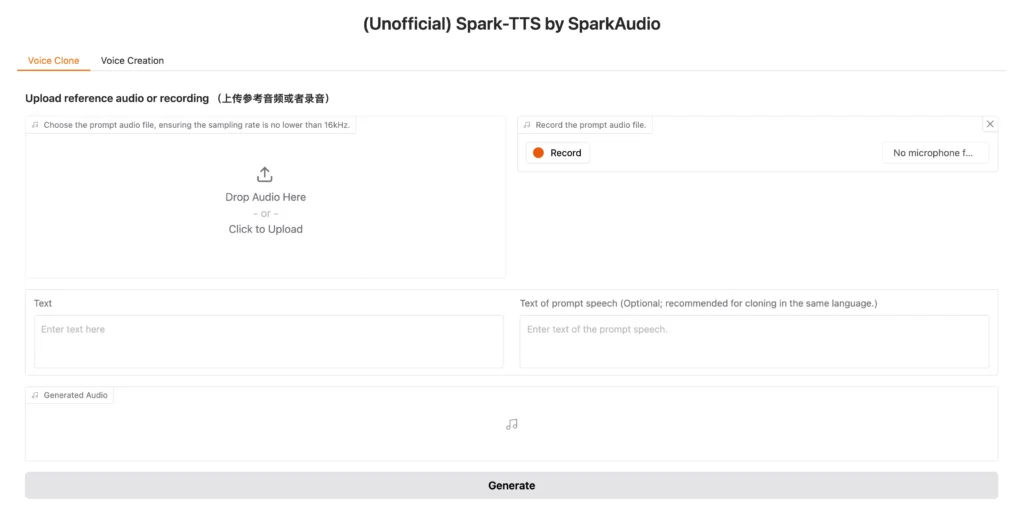
1. The Web UI offers two primary modes:Voice Cloning Mode: Upload a reference audio file or record directly through your microphone, then input the target text to generate speech in the cloned voice.
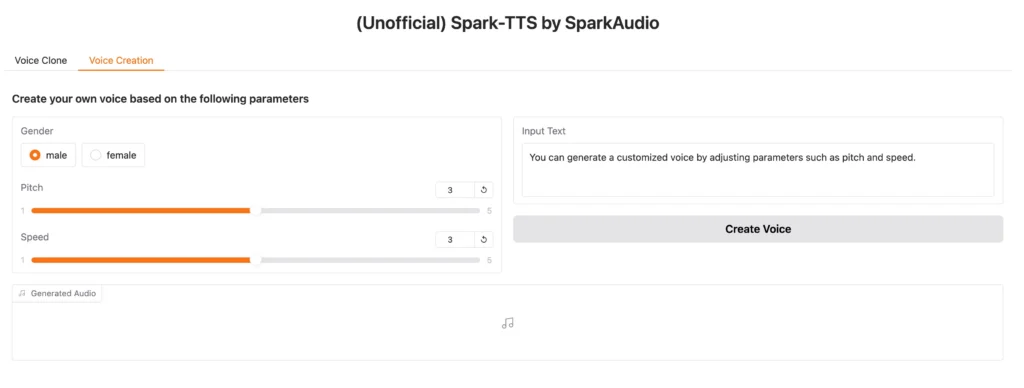
2. Voice Creation Mode: Design custom virtual speakers by adjusting parameters like gender, pitch, and speaking rate without requiring reference audio.
Spark TTS ComfyUI Integration
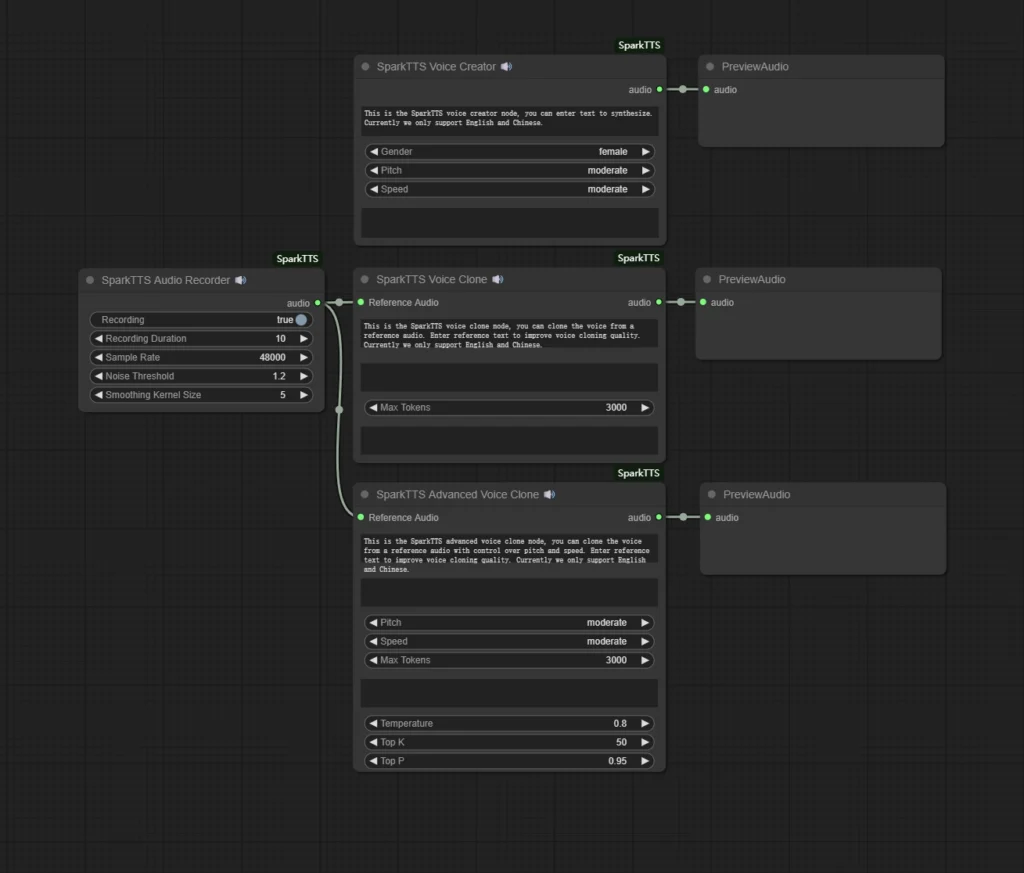
ComfyUI users can integrate Spark TTS into their node-based workflows for automated audio generation pipelines. The ComfyUI integration enables:
- Visual workflow design for TTS tasks
- Batch processing of multiple text inputs
- Seamless combination with other audio processing nodes
- Automated voice generation for video production workflows
To use Spark TTS with ComfyUI, you’ll need to install the appropriate custom nodes and configure the model path to your downloaded Spark-TTS-0.5B checkpoint. This integration is particularly valuable for content creators building automated video production pipelines that require synchronized voiceovers.
Spark TTS Voice Cloning Performance
Quality Assessment
Spark TTS delivers natural-sounding voice cloning that captures:
- Speaker identity and timbre
- Natural prosody and rhythm
- Emotional characteristics
- Speaking style nuances
The zero-shot approach means you can achieve high-quality results with as little as 5-10 seconds of reference audio, though longer samples (15-30 seconds) typically produce more accurate voice matches.
Speed and Efficiency Benchmarks
Testing on Nvidia L20 GPU with 169 seconds of target audio:
- Single request: 876ms average latency, RTF 0.1362
- 2x concurrency: 920ms average latency, RTF 0.0737
- 4x concurrency: 1611ms average latency, RTF 0.0704
These Real-Time Factor (RTF) values below 1.0 mean the system generates audio faster than real-time playback, enabling responsive applications.
Spark TTS vs. Alternatives: Comparison
Spark TTS vs. ElevenLabs
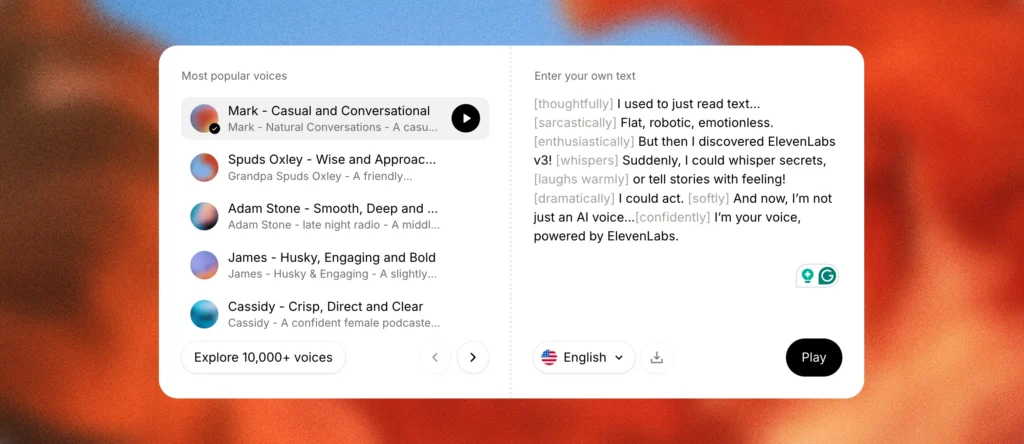
ElevenLabs is a leading cloud-based text-to-speech platform known for its ultra-realistic voice synthesis and extensive voice library. Founded in 2022, it has become one of the most popular commercial TTS solutions, offering professional-grade voice cloning, multi-language support, and advanced audio editing tools through an intuitive web interface.
ElevenLabs Advantages:
- More polished user interface
- Extensive pre-built voice library
- Advanced emotional controls
- Cloud-based (no local setup required)
- Professional voice design tools
- Superior customer support and documentation
Spark TTS Advantages:
- Completely free and open-source
- No usage limits or subscription costs
- Full control over data privacy (runs locally)
- Customizable architecture for research
- Better for bilingual Chinese/English applications
- No internet connection required after setup
Best for: Spark TTS suits developers, researchers, and users requiring unlimited generations or data privacy. ElevenLabs fits content creators who prefer plug-and-play solutions with premium support.
Spark TTS vs. Gaga AI
Gaga AI is a comprehensive AI-powered multimedia platform that goes beyond simple text-to-speech. It combines voice cloning, text-to-speech, AI lip sync, and audio-to-video generation in a unified ecosystem, making it a one-stop solution for content creators who need to produce complete talking-head videos, dubbed content, and multimedia presentations with minimal technical expertise.
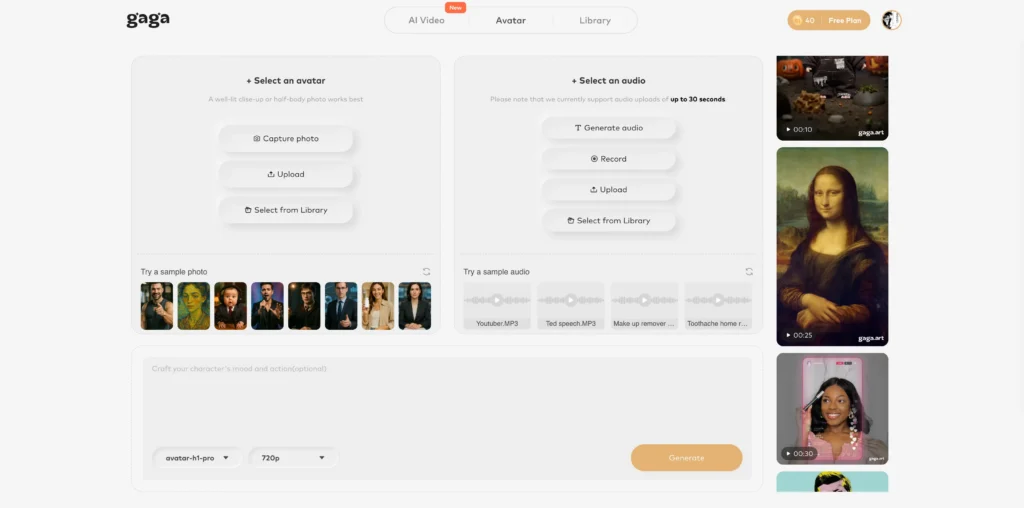
Gaga AI Advantages:
- All-in-one platform (voice cloning + lip sync + audio-to-video)
- Integrated video generation capabilities
- Simplified workflow for multimedia projects
- Automated lip-sync synchronization
- Template-based video creation
- Streamlined content production pipeline
Spark TTS Advantages:
- Focused TTS performance
- Lower computational requirements
- More flexible deployment options
- Open-source transparency
- Better integration with custom pipelines
- No vendor lock-in or platform dependencies
Best for: Choose Gaga AI for complete multimedia production workflows. Select Spark TTS when you need specialized, high-performance text-to-speech capabilities with maximum flexibility.
Production Deployment with Nvidia Triton
For enterprises requiring scalable, production-grade deployment, Spark TTS supports Nvidia Triton Inference Server with TensorRT-LLM optimization. This setup provides:
- Load balancing across multiple requests
- Dynamic batching for improved throughput
- Model versioning and A/B testing
- Monitoring and metrics collection
- REST and gRPC API endpoints
The Triton deployment achieves RTF as low as 0.0704, making it suitable for real-time applications like:
- Voice assistants and chatbots
- Live dubbing systems
- Interactive voice response (IVR) systems
- Real-time translation services
Detailed deployment instructions are available in the runtime/triton_trtllm/README.md directory of the repository.
Common Use Cases for Spark TTS
Content Creation and Media Production
- Podcast production: Generate multiple character voices for storytelling
- YouTube videos: Create consistent voiceovers without recording sessions
- Audiobook narration: Clone author voices for authentic audiobook experiences
- Game development: Rapidly prototype dialogue with diverse character voices
Business Applications
- Customer service: Build multilingual IVR systems with localized voices
- E-learning: Create engaging educational content with consistent narrator voices
- Accessibility: Convert written documentation to audio for visually impaired users
- Marketing: Generate voice content for ads in multiple regional accents
Research and Development
- Linguistic studies: Analyze speech patterns across different voices
- Voice conversion research: Experiment with voice transformation techniques
- Accessibility technology: Develop custom TTS solutions for specialized needs
- AI safety: Test voice synthesis detection systems
Limitations and Considerations
Current Constraints
Audio Quality Dependencies: Voice cloning quality depends heavily on reference audio quality. Background noise, compression artifacts, or poor recording conditions will degrade results.
Language Limitations: While excellent for Chinese and English, Spark TTS currently lacks native support for other languages, though cross-lingual synthesis shows promise.
Computational Requirements: Despite efficiency improvements, running Spark TTS locally still requires a capable GPU for real-time performance. CPU inference is possible but significantly slower.
Voice Similarity Variance: Some speakers’ voices are harder to clone accurately than others, particularly those with unique vocal characteristics or rare accents.
Ethical Considerations
Voice cloning technology raises important ethical questions:
- Consent: Always obtain permission before cloning someone’s voice
- Deepfakes: Be aware of potential misuse for impersonation or fraud
- Attribution: Clearly disclose when content uses synthetic voices
- Privacy: Consider data privacy when processing voice samples
Responsible use requires implementing verification systems, user consent protocols, and transparency in synthetic voice applications.
Troubleshooting Common Issues
| Category | Common Issue | Recommended Solution |
| Installation | Git LFS not downloading model files properly | Run git lfs install and re-clone the repository to ensure large binary files are pulled. |
| Installation | CUDA “Out of Memory” (OOM) errors | Lower the batch size, use a smaller model variant, or ensure you have at least 4GB VRAM for single requests. |
| Installation | Dependency conflicts during pip install | Create a fresh Conda environment specifically using Python 3.12 to ensure package compatibility. |
| Voice Quality | Cloned voice sounds robotic/unnatural | Use 15–30 seconds of high-quality reference audio (16kHz+) with no background noise. |
| Voice Quality | Inconsistent voice characteristics | Provide samples with a steady pace and tone; avoid music, background chatter, or extreme emotions. |
| Voice Quality | Poor results during language mixing | Ensure clear pronunciation in both languages; use separate reference samples for each language if the tool supports it. |
Frequently Asked Questions
What is Spark TTS used for?
Spark TTS is used for converting text to natural-sounding speech with voice cloning capabilities. Primary applications include content creation, audiobook production, voice assistants, multilingual dubbing, accessibility tools, and research in speech synthesis.
Is Spark TTS free to use?
Yes, Spark TTS is completely free and open-source under the project’s license. You can download, modify, and deploy it without subscription fees or usage limits, making it cost-effective for both personal and commercial projects.
How accurate is Spark TTS voice cloning?
Spark TTS voice cloning achieves high accuracy in capturing speaker identity, timbre, and speaking style with zero-shot learning from short audio samples. Quality depends on reference audio clarity—clean, 15-30 second samples typically produce the most accurate voice matches.
Can Spark TTS work with languages other than Chinese and English?
Spark TTS is primarily trained for Chinese and English, but its cross-lingual capabilities show promise for other languages. However, performance on languages outside the training data may be inconsistent. The community is exploring fine-tuning approaches for additional language support.
What hardware do I need to run Spark TTS?
Minimum requirements include a GPU with 4GB+ VRAM for acceptable performance. The system runs on Linux and Windows with Python 3.12. For real-time applications, a modern Nvidia GPU (RTX 3060 or better) is recommended. CPU-only inference is possible but significantly slower.
How does Spark TTS compare to commercial alternatives like ElevenLabs?
Spark TTS offers comparable voice quality with advantages in cost (free), privacy (runs locally), and customization (open-source). Commercial alternatives like ElevenLabs provide easier setup, broader voice libraries, and premium support, but require subscriptions and process data in the cloud.
Can I integrate Spark TTS into ComfyUI workflows?
Yes, Spark TTS supports ComfyUI integration through custom nodes, enabling visual workflow design for automated TTS pipelines. This is particularly useful for content creators building video production workflows that require synchronized voiceovers with other media processing tasks.
What’s the difference between voice cloning and voice creation in Spark TTS?
Voice cloning replicates an existing speaker’s voice from reference audio, capturing their unique vocal characteristics. Voice creation generates entirely new virtual speakers by adjusting parameters like gender, pitch, and speaking rate without requiring reference audio—useful for fictional characters or privacy-sensitive applications.
How long does it take to generate speech with Spark TTS?
Generation speed depends on hardware and text length. On an Nvidia L20 GPU, Spark TTS achieves Real-Time Factors between 0.07-0.14, meaning it generates audio 7-14 times faster than real-time playback. A 10-second audio clip might take 0.7-1.4 seconds to synthesize.
Is Spark TTS suitable for commercial projects?
Yes, Spark TTS can be used in commercial projects subject to its license terms. The open-source nature, production-ready Triton deployment options, and lack of usage fees make it attractive for businesses. However, always review the specific license and implement proper consent protocols for voice cloning applications.