Key Takeaways
- AI podcast generators transform written content into professional audio episodes using text-to-speech technology and voice cloning
- Leading platforms include Google NotebookLM (free Audio Overview), Wondercraft AI, and Monica AI for various use cases
- Most tools require no recording equipment, voice talent, or editing expertise
- Free tiers exist for testing, with paid plans starting around $20-30/month for advanced features
- Best for content creators, educators, marketers, and businesses seeking to repurpose written content into audio format
Table of Contents
What Is an AI Podcast Generator?
An AI podcast generator is a software tool that automatically creates podcast episodes from text input, documents, or notes using artificial intelligence. These platforms synthesize natural-sounding voices, add appropriate pacing and intonation, and can even simulate multi-host conversations without requiring any human recording.
Unlike traditional podcast production that demands microphones, audio engineering skills, and hours of editing, an AI podcast maker handles the entire workflow: scriptwriting assistance, voice generation, background music, and final production. The technology has advanced to where AI-generated voices sound remarkably human, complete with emotional inflection and conversational flow.
6 Best AI Podcast Generator Tools Compared
Gaga AI
Gaga AI specializes in voice-focused AI podcast creation with advanced customization.
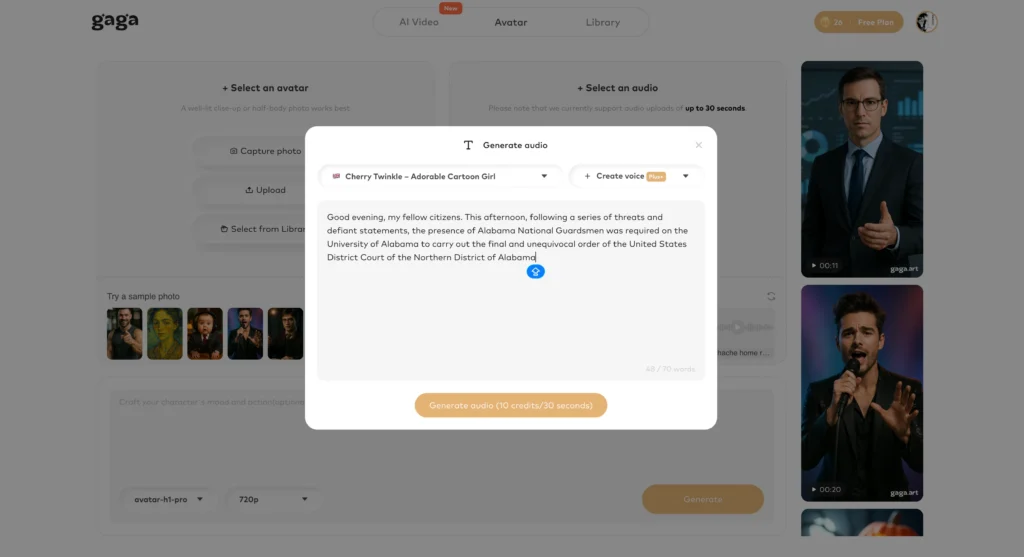
Primary capabilities:
- High-quality text-to-speech with emotional range control
- Voice cloning technology for personalized host creation
- Custom voice parameter adjustment (pitch, speed, tone)
- Image-to-video AI for visual podcast content
- Multi-language support for global content distribution
- Cross-language voice generation capabilities
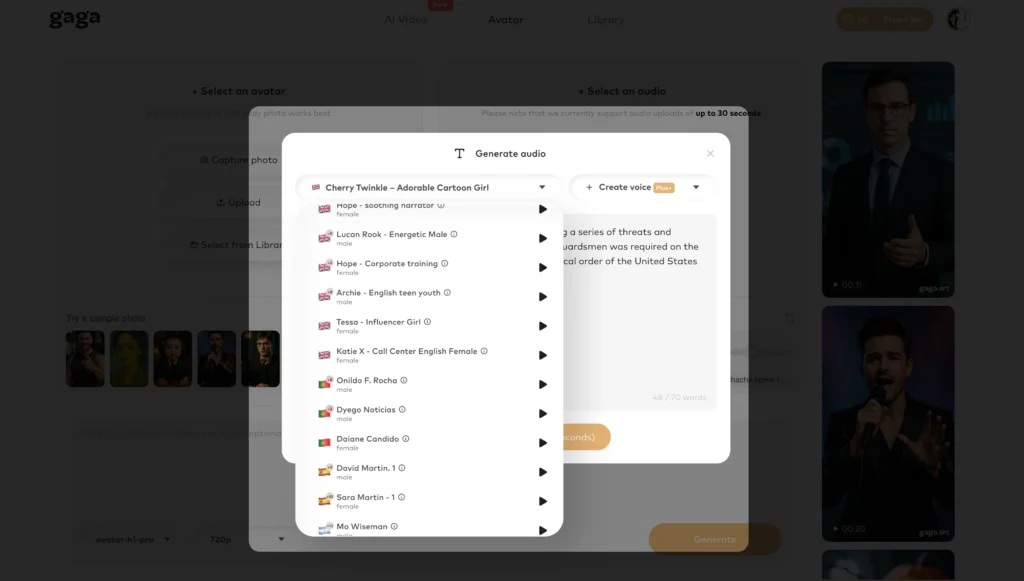
Best for: Creators who prioritize voice quality and need multilingual content or video podcast formats.
ElevenLabs
ElevenLabs stands out as a premium AI podcast production platform offering professional-grade voice generation and comprehensive editing capabilities.
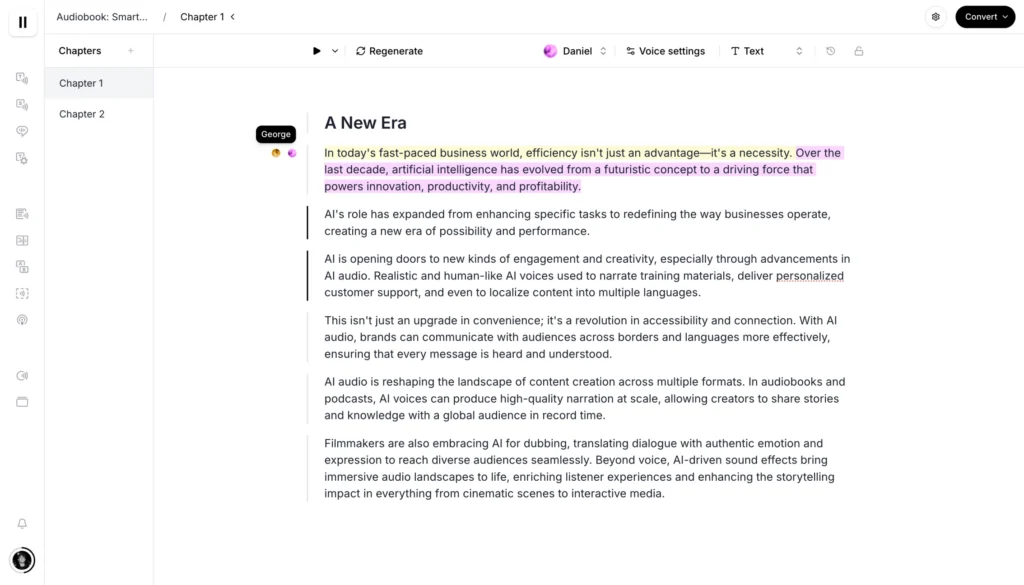
Key features:
- Browser-based timeline editor for precise audio segment control without complex software
- Professional Voice Cloning that preserves tone, inflection, and emotional range
- Voice Library with thousands of voices plus custom voice design capabilities
- Multilingual support across 32 languages with voice cloning capabilities
- AI dubbing for seamless podcast localization into 29 languages while preserving original voices
- Advanced voice control with adjustable stability, clarity, and style parameters
- Security protocols including proprietary Voice Captcha mechanism for voice data protection
- High audio quality up to 192 kbps at 44.1kHz
Pricing structure:
- Free tier: 10,000 monthly credits with basic audio quality (128 kbps)
- Starter: 30,000 credits
- Creator: 100,000 credits with enhanced formats
- Pro: 500,000 credits at $0.24/1000 additional
- Scale: 2,000,000 credits at $0.18/1000 additional
- Enterprise: Custom pricing as low as $0.03/1000 credits
Workflow:
1. Convert scripts into natural-sounding audio through text-to-speech
2. Edit and refine episodes using the timeline editor
3. Clone your voice for consistent narration or choose from Voice Library
4. Localize content into multiple languages while maintaining voice characteristics
5. Export high-quality audio ready for distribution
Best for: Professional podcasters and content creators who prioritize voice quality, need multilingual content, and require precise editorial control. Particularly valuable for brands seeking consistent voice identity across global markets.
Google AI Podcast Generator (NotebookLM)
Google’s NotebookLM offers a standout feature called Audio Overview that transforms documents into engaging podcast-style discussions. This google ai podcast generator is completely free and remarkably powerful.
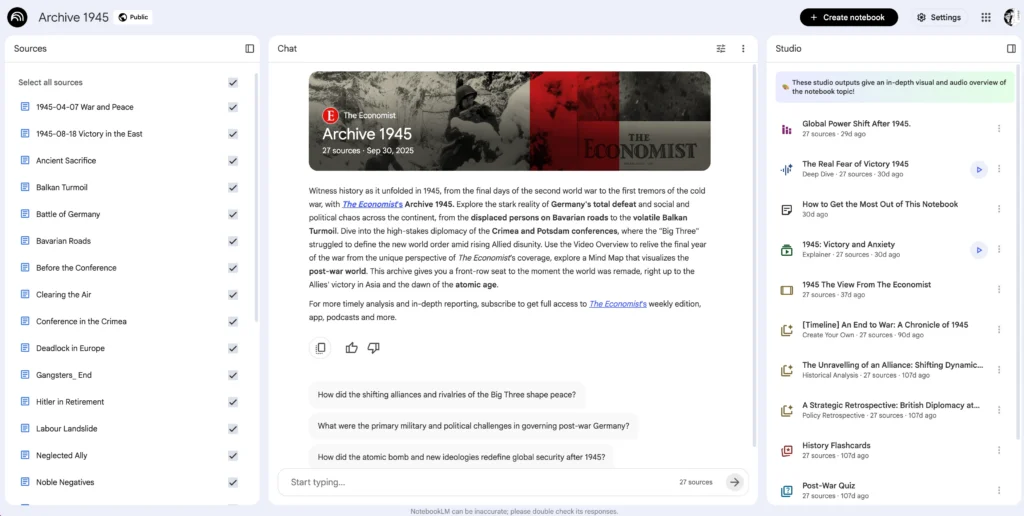
Core capabilities:
- Upload PDFs, websites, YouTube videos, Google Docs, and audio files as source material
- Generates “Deep Dive” conversations between two AI hosts discussing your content
- Provides clear citations linking audio segments back to source material
- Powered by Gemini’s multimodal understanding for accurate content interpretation
Best for: Researchers, students, and professionals who need to convert dense written material into digestible audio summaries. The citation feature makes it ideal for academic or technical content where accuracy tracking matters.
Limitation: Less customization than dedicated podcast platforms. You cannot control voice selection, script editing, or detailed audio production elements.
Wondercraft AI Podcast Generator
Wondercraft AI podcast generator is a comprehensive platform designed specifically for podcast creation from concept to publication.

Key features:
- Type a prompt and receive a complete podcast conversation in approximately 10 seconds
- Full studio editor with timeline-based mixing capabilities
- Library of 1,000+ ultra-realistic AI voices with voice cloning options
- Multi-host podcast configuration with customizable personalities
- AI scriptwriting from notes, links, or document attachments
- Royalty-free music library and sound effects collection
- One-click publishing to major podcast platforms
Workflow:
1. Input your topic or paste existing content
2. AI generates a conversational script with multiple speakers
3. Refine the script or adjust host personalities in the studio
4. Add music, adjust pacing, and mix the final episode
5. Export or publish directly to podcast directories
Best for: Content creators and marketers who need brand-consistent, recurring podcast content with professional production quality.
Monica AI Podcast Generator
Monica AI podcast generator provides similar capabilities to Wondercraft with a focus on rapid content generation.
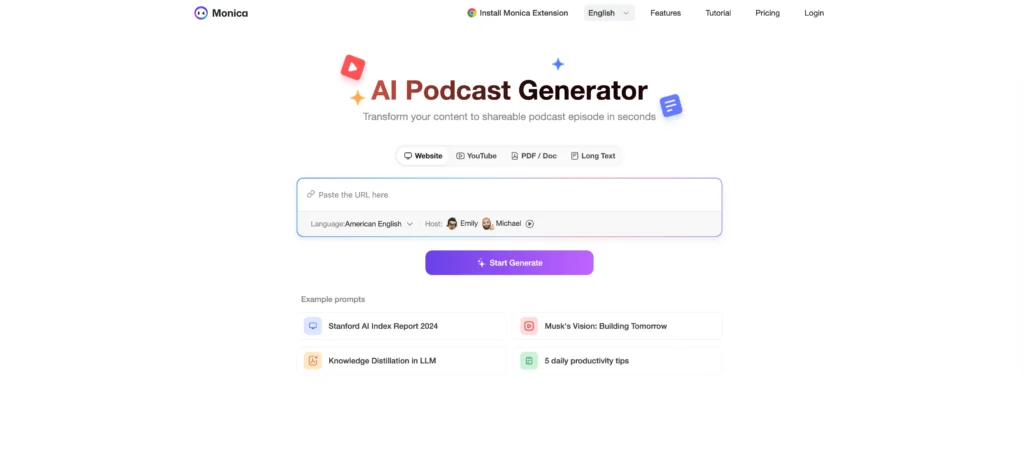
Distinguishing features:
- Quick generation from minimal input (topic, headline, or brief)
- Multiple AI host configurations for varied conversation styles
- Voice cloning for personal brand consistency
- Integrated editing timeline for post-generation refinement
- Music and sound effect integration
Best for: Entrepreneurs and small businesses seeking efficient podcast production without extensive content preparation time.
Otter AI Podcast Transcription
While not a generator in the traditional sense, Otter AI podcast transcription is essential for the podcast production workflow.
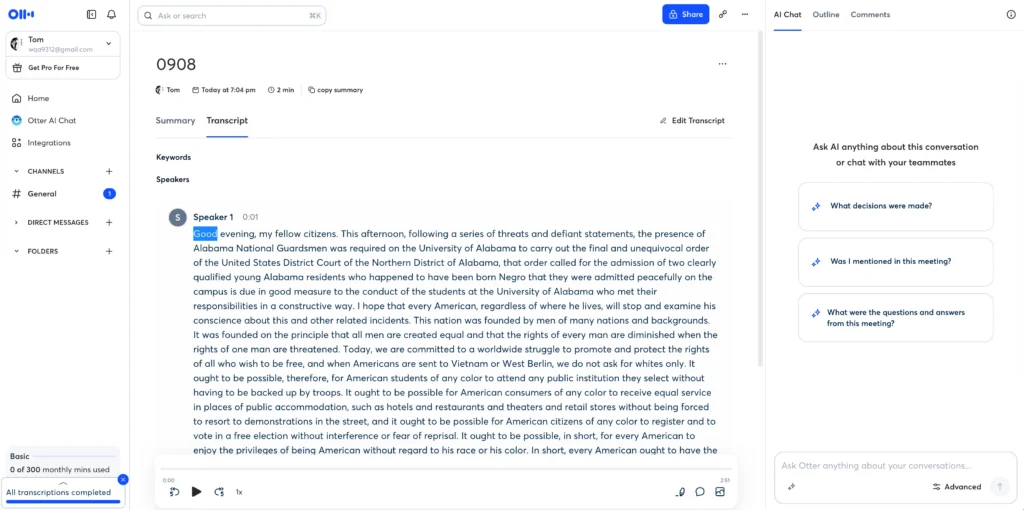
Core functions:
- High-accuracy transcription with multi-speaker identification
- Timestamped transcripts for easy navigation
- Supports MP3 and MP4 file formats
- Searchable, editable, and shareable output
- Otter AI Chat for content summarization and quote extraction
- 300 free transcription minutes monthly
- SOC 2 Type 2 compliance for data security
Best for: Podcasters who need to repurpose audio content into blog posts, social media quotes, show notes, or create accessible captions.
How AI Podcast Technology Works
AI podcast generators operate through three core technologies working in concert:
Natural Language Processing (NLP): The system analyzes your input text to understand context, tone, and conversational structure. It identifies where to place emphasis, pauses, and emotional coloring.
Text-to-Speech (TTS) Synthesis: Advanced neural networks convert written words into spoken audio. Modern TTS engines like those used in Wondercraft AI and Google’s technology produce voices that capture subtle human speech patterns, including breathing, hesitations, and natural rhythm.
Audio Production Automation: The AI handles mixing, mastering, background music selection, and sound effects placement. This eliminates the technical barrier that stops many content creators from launching podcasts.
How to Create an AI Podcast from Notes
Creating an AI podcast from your existing notes or documents follows a straightforward process:
Step 1: Organize Your Source Material
Compile your notes, outlines, or documents into a clear structure. Most AI podcast makers work best with organized information rather than scattered thoughts. If you have bullet points, expand them into complete sentences for better AI interpretation.
Step 2: Choose Your Platform and Input Method
- For quick conversational summaries: Use Google NotebookLM’s Audio Overview
- For scripted, branded content: Choose Wondercraft or Monica AI
- For technical or educational content: Consider platforms with citation capabilities
Step 3: Input Your Content
Upload documents directly or paste text into the generator. Some platforms allow you to provide URLs, PDFs, or link multiple sources for comprehensive coverage.
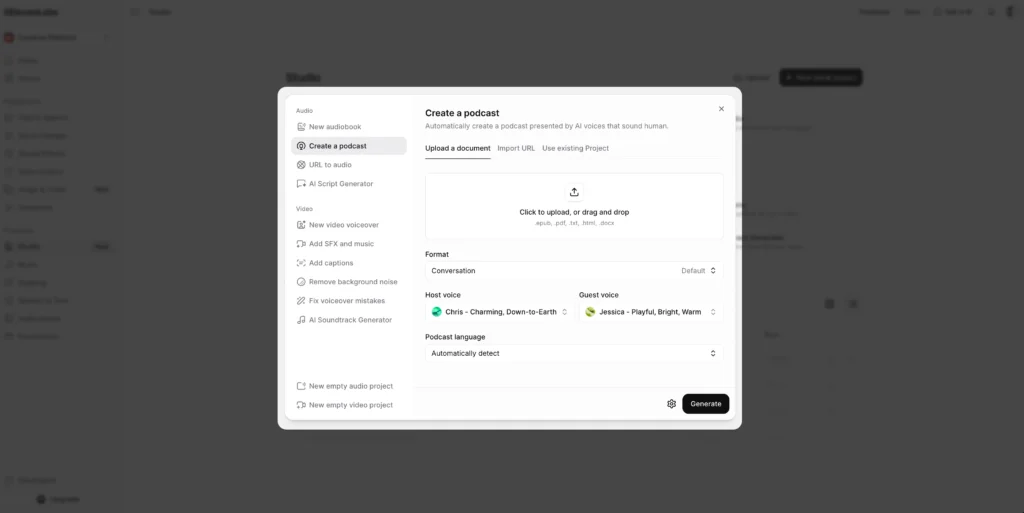
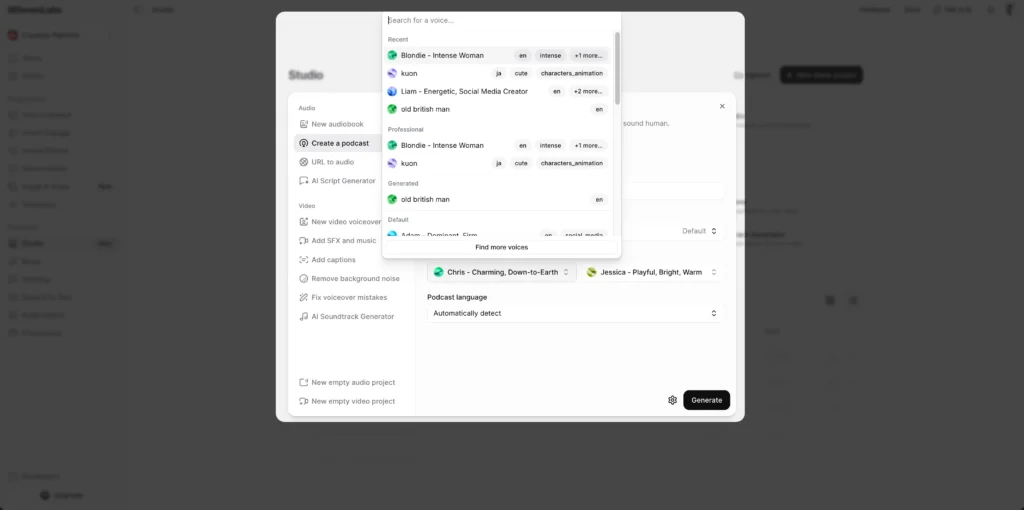
Step 4: Configure Voice and Style Settings
Select host voices, conversation tone (casual, professional, enthusiastic), and episode length. If creating a series, maintain consistency in voice selection for brand recognition.
Step 5: Review and Refine
Most AI podcast generators provide an initial draft within seconds to minutes. Listen through completely, noting areas that need adjustment. Common refinements include:
- Pacing adjustments where content feels rushed or dragging
- Fact corrections if the AI misinterpreted source material
- Transition improvements between topics
- Addition of intro/outro segments
Step 6: Add Production Elements
Enhance the episode with background music, sound effects, or jingles. Ensure music doesn’t overpower dialogue. Most platforms offer royalty-free libraries to avoid licensing issues.
Step 7: Export and Publish
Download your final episode in podcast-standard formats (typically MP3) or publish directly to podcast hosting platforms if your tool offers integration.
Free AI Podcast Generator Options
Several platforms offer free tiers or completely free access to AI podcast generation:
Google NotebookLM provides unlimited Audio Overview generation at no cost. This remains the best ai podcast generator free option for users who need basic podcast-style content without customization requirements.
Wondercraft AI Podcast Generator offers a free trial allowing you to test the full platform capabilities. While ongoing use requires a subscription, the trial provides enough functionality to create several episodes and determine if the tool fits your needs.
Otter AI gives 300 transcription minutes per month free, making it viable for small-scale podcast transcription and repurposing needs.
When evaluating ai podcast generator free options, consider these limitations:
- Voice selection may be restricted to basic options
- Episode length caps (often 10-15 minutes maximum)
- Watermarks or platform attribution in audio
- Limited or no access to royalty-free music libraries
- Basic editing capabilities compared to paid tiers
For testing concepts or creating occasional content, free tiers suffice. Regular podcast production typically requires paid subscriptions for full feature access and higher quality output.
Best AI Podcast Use Cases by Industry
Education & E-Learning: Convert lecture notes, textbooks, or study guides into audio format using tools like Google NotebookLM. Students can listen while commuting, exercising, or performing other tasks. The conversational format improves retention compared to monotone readings.
Content Marketing: Repurpose blog posts, whitepapers, or case studies into podcast episodes. This extends content reach to audio-preferred audiences and improves SEO through multimedia content signals. Wondercraft AI excels here with its brand consistency features.
Internal Communications: Transform company updates, training materials, or policy documents into easily digestible audio briefings. Employees can consume information during commutes rather than reading lengthy documents.
Research & Academia: Summarize research papers, literature reviews, or thesis content into accessible audio discussions. Google’s citation capability makes this particularly valuable for maintaining academic rigor.
Newsletter Creators: Offer subscribers an audio version of written newsletters. This accommodates different consumption preferences and increases engagement with your content.
Technical Considerations for AI Podcast Quality
Voice Selection Strategy: Choose voices that match your content tone. Professional business content benefits from clear, authoritative voices. Entertainment or lifestyle content works well with more expressive, conversational voices. Test multiple options before committing to a series.
Script Optimization for AI: AI systems interpret content literally. Optimize your scripts by:
- Writing in conversational language rather than formal prose
- Breaking long sentences into shorter, punchier statements
- Adding explicit pauses with punctuation or tags
- Including phonetic spellings for unusual terms or names
- Specifying emotional tone when necessary (parenthetical stage directions)
Audio Quality Standards: Export at minimum 128 kbps for podcast distribution, though 192 kbps or higher is preferable. Most platforms default to appropriate settings, but verify before publishing.
Episode Length Optimization: AI podcast data suggests optimal engagement at 15-30 minutes for most topics. Shorter episodes (5-10 minutes) work for news briefings or quick tips. Educational content can extend to 40-50 minutes if information density justifies it.
Frequently Asked Questions (FAQ)
What is the best AI podcast generator?
The best AI podcast generator depends on your specific needs. Google NotebookLM excels for free, citation-based content summarization. Wondercraft AI podcast generator leads for branded, professional podcast production with full editorial control. Monica AI offers rapid generation for time-constrained creators. For transcription and repurposing, Otter AI provides the most comprehensive solution.
Can I create an AI podcast for free?
Yes, Google NotebookLM offers completely free AI podcast generation through its Audio Overview feature. Wondercraft and Monica provide free trials for testing. Otter AI includes 300 monthly transcription minutes at no cost. However, professional, ongoing production typically requires paid subscriptions for access to premium voices, longer episodes, and advanced editing features.
How long does it take to generate an AI podcast?
Most AI podcast generators create initial drafts in 10 seconds to 2 minutes, depending on episode length and complexity. Wondercraft AI advertises 10-second generation for standard episodes. Google NotebookLM typically processes documents into Audio Overviews within 1-2 minutes. Additional time for reviewing, editing, and adding production elements varies based on quality requirements, usually adding 15-30 minutes per episode.
Do AI-generated podcasts sound robotic?
Modern AI podcast technology produces remarkably natural-sounding audio. Leading platforms like Wondercraft, Google NotebookLM, and Gaga AI use advanced neural text-to-speech that captures human speech patterns, including natural pauses, emphasis, and conversational flow. While trained listeners might detect subtle differences from human recordings, most audiences find the quality acceptable for informational content. Quality varies significantly between platforms and voice selections.
Can I use my own voice in an AI podcast?
Yes, platforms like Wondercraft AI, Monica AI, and Gaga AI offer voice cloning capabilities. You typically record 5-30 minutes of sample audio, which the AI analyzes to replicate your vocal characteristics. The system can then generate new content in your voice without additional recording. This feature is valuable for maintaining brand consistency and personal connection while scaling podcast production.
How do I convert notes to an AI podcast?
Converting notes to an AI podcast involves uploading or pasting your written content into an AI podcast generator like Google NotebookLM, Wondercraft, or Monica. The platform processes your notes, structures them conversationally, and generates audio with AI voices. For best results, organize notes with clear headings, expand abbreviations, and provide context. Most platforms complete this conversion in under 2 minutes.
What’s the difference between Wondercraft and Google AI podcast generator?
Google NotebookLM (the google ai podcast generator) specializes in automatically converting documents into conversational audio summaries with citations. It’s completely free but offers limited customization. Wondercraft AI podcast generator provides full podcast production capabilities including script editing, multiple voice options, music integration, and publishing tools. Wondercraft suits creators needing branded, recurring content, while NotebookLM works best for quick document summarization.
Can AI podcasts be monetized?
Yes, AI-generated podcasts can be monetized through the same methods as traditional podcasts: sponsorships, advertising, premium subscriptions, and affiliate marketing. However, transparency about AI generation is recommended for audience trust. Some advertising networks or sponsors may have specific policies regarding AI-generated content, so verify requirements before pursuing monetization partnerships.
Are there AI podcast generators for specific languages?
Most leading AI podcast generators support multiple languages, though quality varies by language. Gaga AI specifically emphasizes multilingual capabilities. Google NotebookLM supports numerous languages with varying voice quality. When selecting a platform for non-English content, test the specific language thoroughly, as some languages have more developed AI voice models than others.
How accurate is Otter AI podcast transcription?
Otter AI claims high accuracy rates, typically 85-95% for clear audio with good recording quality. Accuracy improves with multi-speaker identification technology that attributes dialogue to specific speakers. Factors affecting accuracy include audio quality, background noise, accents, technical jargon, and multiple overlapping speakers. The platform allows manual editing to correct errors, and accuracy generally exceeds manual transcription speed by 10-15x.