Key Takeaways
- Zopia AI is a full-pipeline video agent: script → storyboard → footage → edit, in one workspace.
- It cuts short-drama production time by more than 50%, letting one person do what once required a 10-person team.
- Built-in screenplay formatting, character/scene extraction, continuous shot generation, and auto review set it apart from clip-only tools.
- Currently in beta at zopia.ai — approved users receive 2,000 daily credits.
- Bonus: Gaga AI rounds out your workflow with image-to-video, AI avatars, voice cloning, and TTS.
Table of Contents
What Is Zopia AI?
Zopia AI is a video agent that takes a story idea and delivers a finished, watchable short drama — without a production crew.
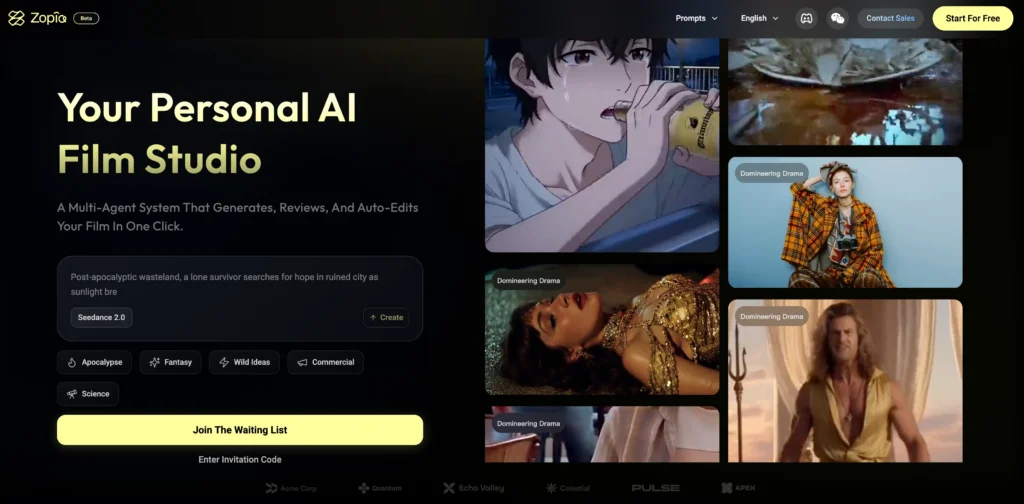
Most AI video tools stop at the clip level. They help you generate raw footage faster, but everything that makes a story work — structure, pacing, shot logic, editing rhythm, visual consistency — still lands on the creator’s plate.
Zopia is designed around a different premise: the pipeline itself should be intelligent. Its internal agents handle screenwriting, asset generation, storyboarding, shot continuity, self-review, and timeline editing as a connected sequence, not a disconnected set of features. The result is a tool that feels less like software and more like a production assistant who understands narrative.
Why the AI Video Landscape Needed Zopia
The hidden labor problem in AI content creation
Even with powerful AI tools available, most solo creators report the same exhaustion: generating footage is fast, but finishing a video is not. The invisible work — rewriting prompts for consistency, trimming dead shots, checking whether scene five still makes sense after you changed scene two — consumes hours that no image generator saves.
Zopia addresses this by keeping the entire creative process inside one context. When you change a character’s description, every subsequent shot reflects that change. When you ask the system to redo a fight sequence, it knows which shots contain a fight without you telling it. This is the difference between a generation tool and an agent.
How Zopia compares to OiiOii
A fair comparison to understand Zopia’s positioning is OiiOii, another AI short-form video platform that has picked up momentum. The key differences:
| Dimension | Zopia AI | OiiOii |
| Primary style | Live-action / realistic | Animation-first |
| Pipeline scope | Script → final cut | Clip generation focus |
| Story structure | Full screenplay format | Scene-level |
| Target creator | Solo drama producers | Animated content teams |
| Shot editing | Individual shot regeneration | Less granular control |
If your goal is premium live-action-style drama, Zopia is the more natural fit. OiiOii excels in stylized animation contexts. The two tools are not rivals so much as they serve adjacent markets.
How Zopia AI Works: A Full Walkthrough
Step 1 — Narrative input
Zopia accepts everything from a one-sentence logline to a fully formatted screenplay. You can describe a mood, a genre, a character, or paste in a detailed shot-by-shot breakdown. The system reads your intent rather than pattern-matching keywords.
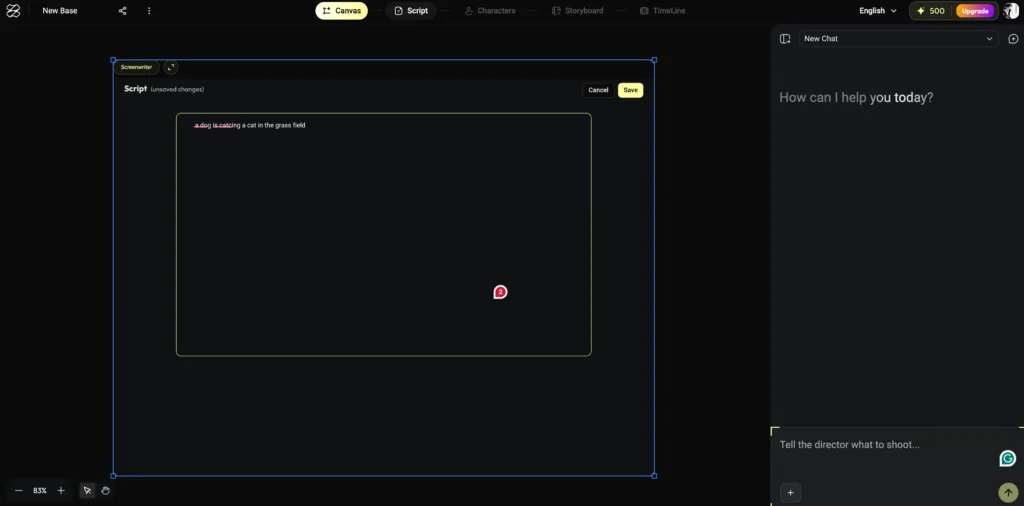
Within seconds of submission, Zopia returns a structural analysis: identified acts, core characters, tonal register, and a suggested visual style palette.
Supported visual styles include:
- Realistic live-action
- Dark fantasy / Wuxia
- Korean drama
- 3D CG (a recently added style)
- Animated short
After confirming your language, aspect ratio, and style, the system moves automatically to the next stage.
Step 2 — Automated scriptwriting
Zopia’s screenwriting agent takes your input and produces a properly formatted screenplay — scene headings, action lines, dialogue, and character cues. This matters more than it sounds.
Professional script readers reject submissions on formatting before they evaluate plot. Zopia generates industry-standard format by default, which is useful whether you’re working alone or eventually handing material to collaborators.
A 60-second concept becomes a six-scene script with a clear story structure in under a minute.
Step 3 — Asset extraction and generation
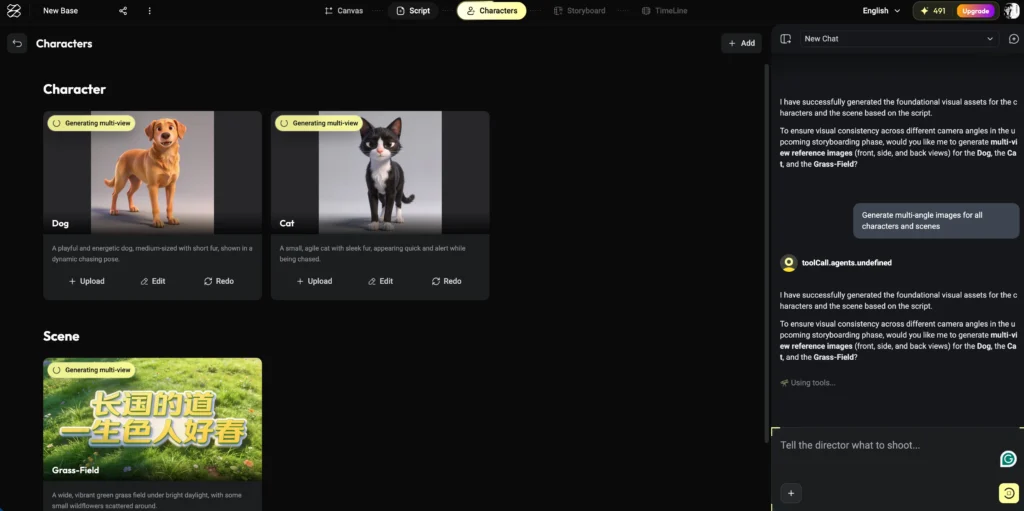
Once the script exists, Zopia parses it automatically to identify:
- All named characters (with visual descriptions derived from script context)
- All distinct locations
- Key props and visual motifs
This inventory, which would take a human production assistant considerable time to compile and format into a spreadsheet, appears instantly. Each character and location is then used as a consistent anchor for image generation throughout the project.
Three image generation models are available at this stage — all production-grade options commonly used in professional AI workflows.
If a generated image doesn’t match your vision, you can either regenerate it or upload a reference image to steer the output.
Step 4 — Continuous storyboarding
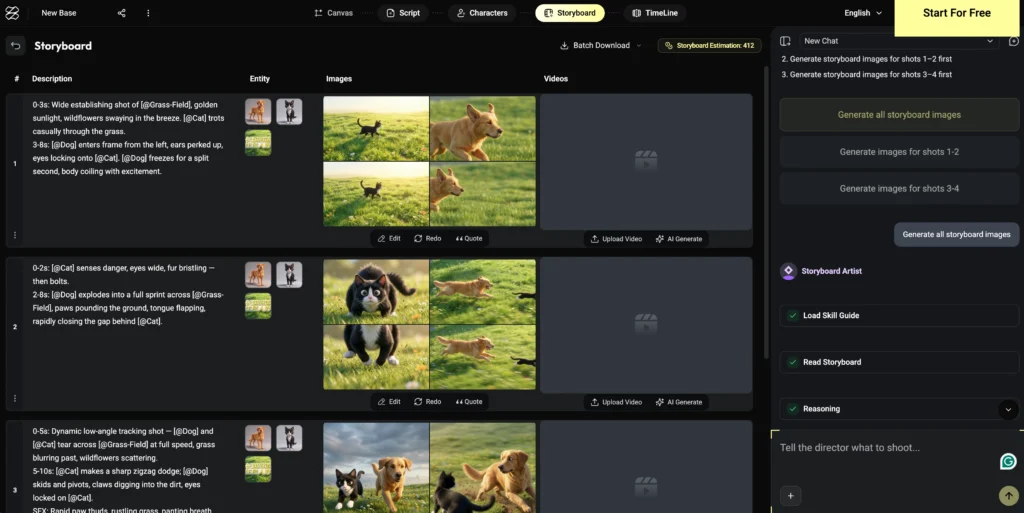
This is where Zopia’s continuity advantage becomes most visible.
After confirming assets, Zopia generates storyboard frames scene by scene. Each frame inherits the character and environment references established in the previous step, so the protagonist’s face, outfit, and body language remain consistent across 30+ shots — something that normally requires manual ControlNet workflows or repeated prompt engineering.
You can review each scene’s storyboard before proceeding, regenerate individual frames, or insert transitional shots between two frames if pacing feels off. The system accepts freeform conversation: “add a beat where she notices him before the confrontation” is a valid instruction.
Step 5 — Video generation with shot preview
Images are converted to video clips while maintaining the narrative sequence. A notable UI choice: next to each storyboard shot sits a preview of the corresponding video clip. You can review the full sequence as a rough cut before the system finalizes anything.
Shot coherence — the sense that one clip flows into the next — is consistently strong. The absence of jarring jump cuts between AI-generated clips is one of the more impressive technical achievements in the current build.
Step 6 — Automated self-review
After all shots are generated, Zopia runs a review pass over the complete sequence. It surfaces inconsistencies proactively: costume details that shifted between scenes, props that changed appearance, action sequences that could benefit from an additional beat.
You can accept or reject each suggestion, or raise your own. Telling the system “regenerate all fight shots” triggers an automatic detection of which clips qualify — you don’t enumerate them manually.
Step 7 — Timeline editing
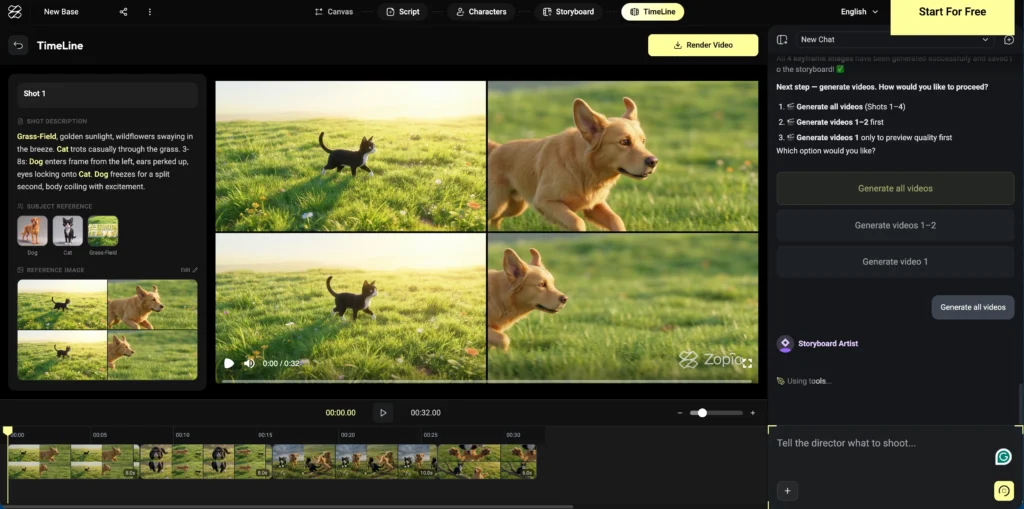
Zopia includes a built-in timeline editor. All generated clips populate the timeline automatically; you adjust clip duration, reorder shots, and render the final video from within the same interface.
Current limitations: direct audio integration (music, sound effects) is not yet available inside the editor. For final sound design, exporting to a tool like CapCut is the current recommended workflow. This is a gap the team is likely to address in future updates.
Real-World Results: What You Can Make With Zopia AI
Premium Wuxia drama
A 60-second dark fantasy piece in the style of classic Chinese martial arts cinema — complete with rain-soaked cityscapes, masked antagonists, and a token prop as a narrative device — was generated with minimal prompt revision and essentially no shot regeneration.
Korean apocalypse drama
An original concept (a convenience store that survives the apocalypse) produced visually consistent character designs, atmospheric location shots, and emotionally coherent scene progressions across multiple episodes.
3D CG xianxia romance
A three-lifetime love story using the new 3D CG style demonstrated strong performance on the format’s most difficult requirement: maintaining character recognition across radically different settings (divine realm, rainy village street, collapsing battlefield).
One-sentence animated short
A single-prompt input (“a little girl’s day in the countryside”) produced a complete short-form animated piece with scene variety and narrative arc — no additional instruction required.
Who Should Use Zopia AI?
Zopia AI is best suited for solo creators, small production teams, and content entrepreneurs building short-drama series for social platforms.
Specific use cases where Zopia delivers measurable value:
- Commentary-style drama channels — One person can produce multiple episodes per day.
- IP development — Rapid prototyping of original story concepts before committing to full production.
- Micro-studios — Two-person teams replacing what previously required ten.
- First-time creators — The guided pipeline reduces the skill barrier; new users report productive workflows within ten minutes.
Zopia is less suited for:
- Long-form feature production (current pipeline is optimized for short-form)
- Creators who need full in-app audio post-production
Zopia AI Pricing and Access
Zopia AI is currently in closed beta. Access is by application.
- Credits: Approved users receive 2,000 daily credits
- Capacity: 2,000 credits comfortably covers 4–5 short-drama sequences per day
- Official site: zopia.ai
An AI Film Festival is planned post-beta, with prizes for community submissions.
Bonus: Gaga AI — Complete Your Short-Drama Toolkit
Zopia handles the narrative pipeline. Gaga AI fills the remaining gaps — particularly for creators who need more flexible video generation, avatar-based content, and professional voiceover capabilities.
Image to Video AI
Gaga AI converts static images into fluid video clips with cinematic motion. Where Zopia uses its own asset system, Gaga AI accepts any source image — giving you flexibility when you want to bring external character designs or reference art into motion.
Video and Audio Infusion
Gaga AI can synchronize audio (dialogue, ambient sound, music) directly to video clips, adjusting timing and lip movement to match. This directly addresses the gap left by Zopia’s current timeline editor, making the two tools natural complements.
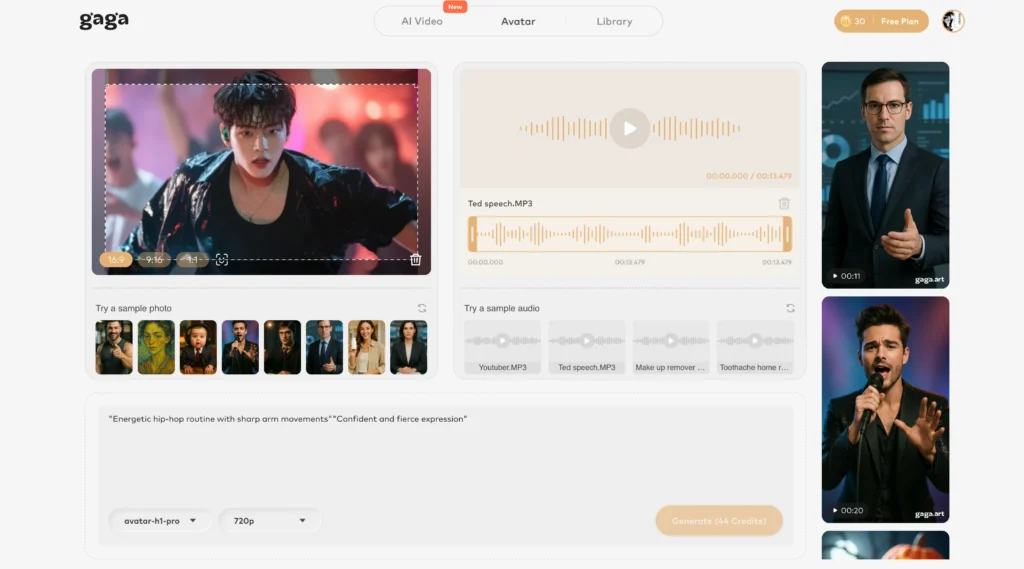
AI Avatar
Create a speaking, expressive digital presenter from a photo. Useful for adding on-camera narration to drama content, building a channel persona, or producing educational explainer segments without filming.
AI Voice Clone
Upload a sample of a voice — yours or a consented voice actor’s — and Gaga AI generates new dialogue in that voice. Combine with Zopia’s scripting output for fully original, consistent character voiceover across an entire series.
Text-to-Speech (TTS)
For creators who prefer not to clone a specific voice, Gaga AI’s TTS engine supports multiple languages, emotional tones, and speaking styles. High-quality narration from your Zopia-generated script is a single step.
Workflow integration: Write and visualize in Zopia → generate final video assets → bring into Gaga AI for audio infusion and avatar narration → export a broadcast-ready episode.
Frequently Asked Questions
What is Zopia AI?
Zopia AI is a video production agent that guides users from a story concept through scriptwriting, storyboarding, video generation, and timeline editing — all within a single conversational interface.
How is Zopia AI different from other AI video tools?
Most AI video tools generate individual clips. Zopia maintains story context, character consistency, and narrative structure across an entire production, then provides tools to review and edit the result as a coherent sequence rather than a collection of unrelated clips.
Can one person really produce a full short drama with Zopia AI?
Yes. Zopia is specifically designed to consolidate the roles of screenwriter, director, storyboard artist, editor, and quality reviewer into a single AI-assisted workflow. A single creator can produce multiple complete episodes per day once familiar with the pipeline.
How do I get access to Zopia AI?
Zopia is in closed beta. Apply at the official registration form linked from zopia.ai. Approved applicants receive 2,000 daily credits.
What visual styles does Zopia AI support?
Current supported styles include realistic live-action, dark fantasy / Wuxia, Korean drama, 3D CG (new), and animated short. The team continues to add styles.
Does Zopia AI support audio editing?
Not currently within the native editor. The recommended workflow is to render the video from Zopia and complete audio post-production in an external tool. Gaga AI’s Video and Audio Infusion feature is a strong complement for this step.
What is the difference between Zopia AI and Gaga AI?
Zopia AI focuses on narrative-driven video production: scriptwriting, storyboarding, shot generation, and editing. Gaga AI focuses on media transformation and voice: image to video, audio synchronization, AI avatars, voice cloning, and TTS. Together they cover a complete solo production pipeline.
Is Zopia AI suitable for beginners?
Yes. The guided pipeline and conversational interface lower the barrier significantly. New users report productive first sessions within ten minutes, with no prior filmmaking or AI prompting experience required.
What content formats work best with Zopia AI?
Short-form drama (under five minutes per episode) is the primary use case. The tool is optimized for social platform formats: vertical or square aspect ratios, episodic pacing, and high visual quality per frame.
How accurate is character consistency across scenes in Zopia AI?
Character consistency is notably strong compared to clip-by-clip generation workflows. The asset anchoring system maintains facial features, costume details, and body proportions across scenes. Some variation may occur in realistic human styles and can be addressed by regenerating specific shots.