Key Takeaways
- Vibe Motion by Higgsfield is a conversational AI tool that generates motion graphics from text prompts, specializing in infographics, presentations, and brand animations
- Chat-based workflow eliminates traditional timeline editing—describe your vision and refine through conversation
- Real-time editing allows instant adjustments to text, colors, motion speed, and layout without re-rendering
- Template library provides pre-built motion structures for common formats, reducing setup time
- Credit-based pricing starts at $9 for ~150 credits, with generations costing 8-60 credits each
- Best for: Data visualization, corporate presentations, logo animations, and structured visual content
Table of Contents
What is Vibe Motion Higgsfield?
Vibe Motion Higgsfield is an AI-powered motion graphics generator that creates animated visual content through conversational prompts rather than manual timeline editing. Built in partnership with Anthropic and leveraging technologies like Remotion, it transforms static assets—logos, data, text, images—into polished motion graphics designed for presentations, social media, and brand content.
vibe motion higgsfield
Unlike traditional AI video generators that focus on cinematic or photorealistic scenes, Vibe Motion specializes in structured motion: the precise timing, hierarchy, and flow required for infographics, typography animations, and data-driven visuals. This makes it particularly valuable for business users, marketers, and content creators who need professional motion graphics without advanced design skills.
Core Use Cases: Where Higgsfield Vibe Motion Excels
1. Animated Infographics and Data Visualization
Infographics represent the strongest application for AI motion design. Raw data, metrics, and statistics transform into engaging visual narratives where:
- Numbers count up smoothly with easing effects
- Chart segments appear in logical sequence
- Emphasis shifts between key data points automatically
- Color coding remains consistent across related metrics
The conversational interface allows you to describe the data story: “Show quarterly revenue growth with bars animating left to right, highlighting Q3’s 47% increase.” The system structures the motion, handles timing, and maintains visual hierarchy without manual keyframing.
Crucially, updating data doesn’t require rebuilding the entire animation. Change the numbers through chat, and the motion structure adapts while preserving the original design intent.
2. Corporate Presentations and Pitch Decks
Static slides lose audience attention. Vibe Motion transforms presentations into engaging visual experiences without the time investment of traditional motion design.
Key advantages for presentation work:
- Headings and bullet points animate with purpose, directing focus to each point as you speak
- Charts and graphs build progressively, revealing insights at the right moment
- Brand elements remain consistent across all slides through reusable motion templates
- Last-minute content changes are simple—edit text or swap images through chat
This approach works exceptionally well for:
- Investor pitch decks requiring polish and professionalism
- Sales presentations where engagement drives conversion
- Product launch announcements and walkthroughs
- Conference keynotes and webinar content
3. Logo Animations and Brand Identity
Brand motion demands subtlety and repeatability. Vibe Motion generates clean logo animations that maintain brand guidelines while adding professional polish.
Upload your logo (SVG, PNG, or PDF), describe the desired motion (“subtle fade-in with gentle rotation”), and receive an animation that:
- Keeps typography sharp and colors accurate
- Scales across formats (social posts, video intros, presentations)
- Maintains consistent brand feel through preset motion styles
- Exports in standard formats for reuse across platforms
The ability to generate multiple variations quickly makes it practical to create platform-specific versions: a 3-second Instagram intro, a 5-second YouTube opener, and a 10-second presentation header—all from one conversational session.
4. Text Animation and Kinetic Typography
Kinetic typography—animated text that moves with rhythm and emphasis—becomes accessible to non-designers through natural language description.
Describe the emotional tone and pacing: “Energetic tech startup vibe with words bouncing in from different angles” or “Elegant, smooth fade with subtle letter spacing expansion.” The system interprets style direction and applies appropriate motion physics.
Common applications include:
- Social media quote cards and announcement posts
- Video title sequences and chapter markers
- Educational content where text reinforces narration
- Promotional teasers and event countdowns
Step-by-Step Guide: Creating Your First Motion Graphic
Step 1: Define Your Project Type
Start by selecting a project category or building from scratch:
- Infographics: Data-heavy content with charts and metrics
- Presentation: Slide-based content with progressive reveals
- Text Animation: Typography-focused motion graphics
- Posters: Static designs brought to life with subtle motion
- From Scratch: Complete creative freedom for custom projects
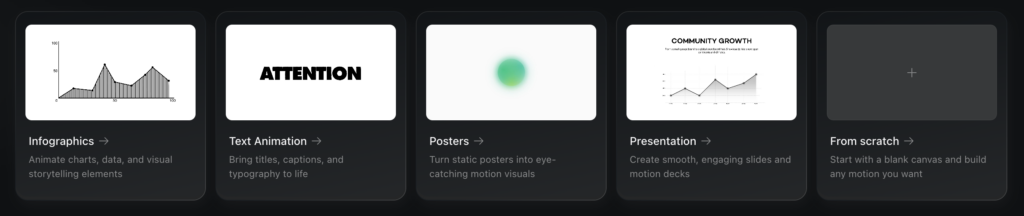
Each category provides contextual templates and motion presets appropriate to that format.
Step 2: Engage the Conversational Interface
Describe your vision in natural language: “Create a 15-second animation showing our company’s three core values—Innovation, Quality, Partnership—with each word appearing in sequence against a dark gradient background.”
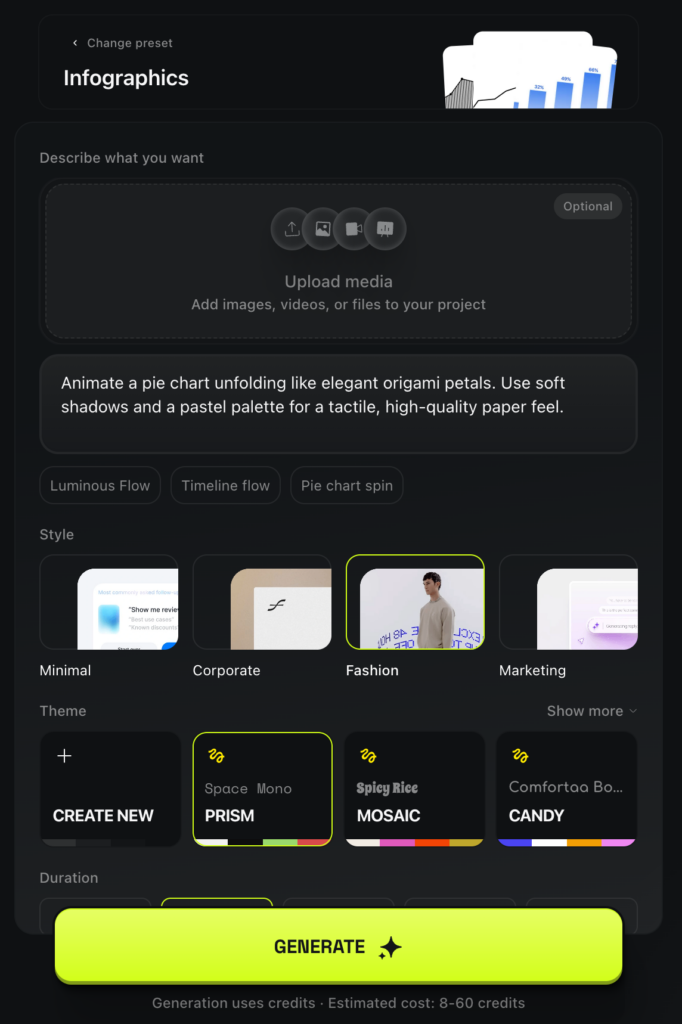
Upload relevant assets immediately: your actual logo, brand colors (hex codes), product images, or reference PDFs. The system builds motion around your specific files rather than generic placeholders, ensuring the output matches your brand identity.
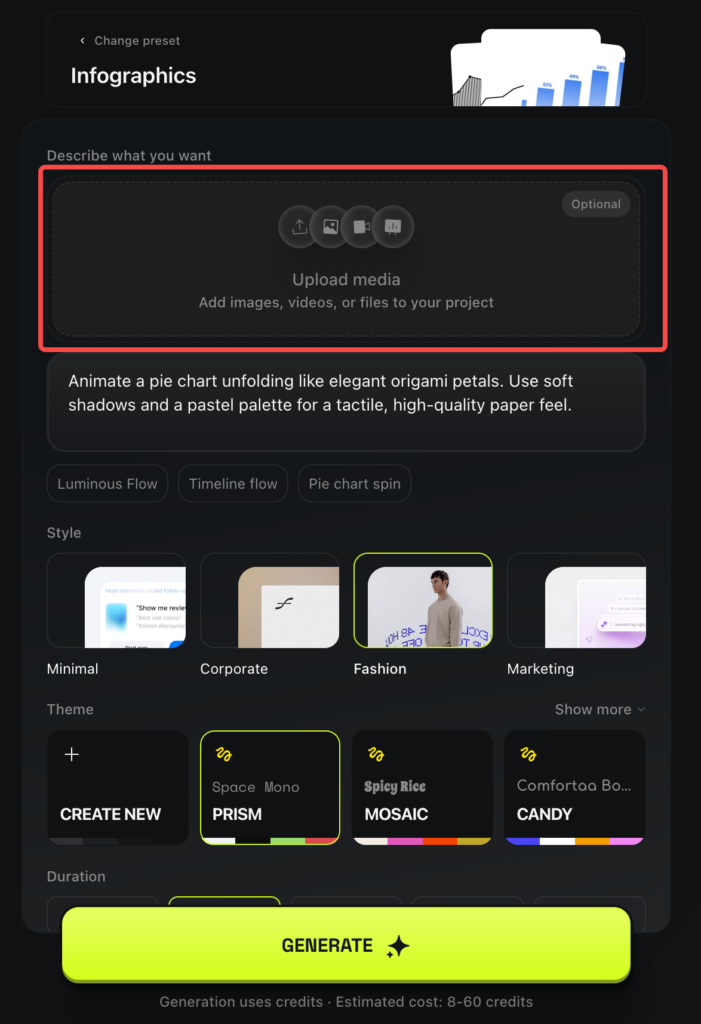
Refine through conversation: “Make the text larger,” “Use our brand blue (#0052CC) instead,” “Add a subtle particle effect in the background.”
Step 3: Apply Motion Templates (Optional)
Browse the template library for pre-built motion structures. Templates include:
- Professional business presentation flows
- Dynamic social media graphic patterns
- Data visualization animation sequences
- Minimalist brand reveal styles
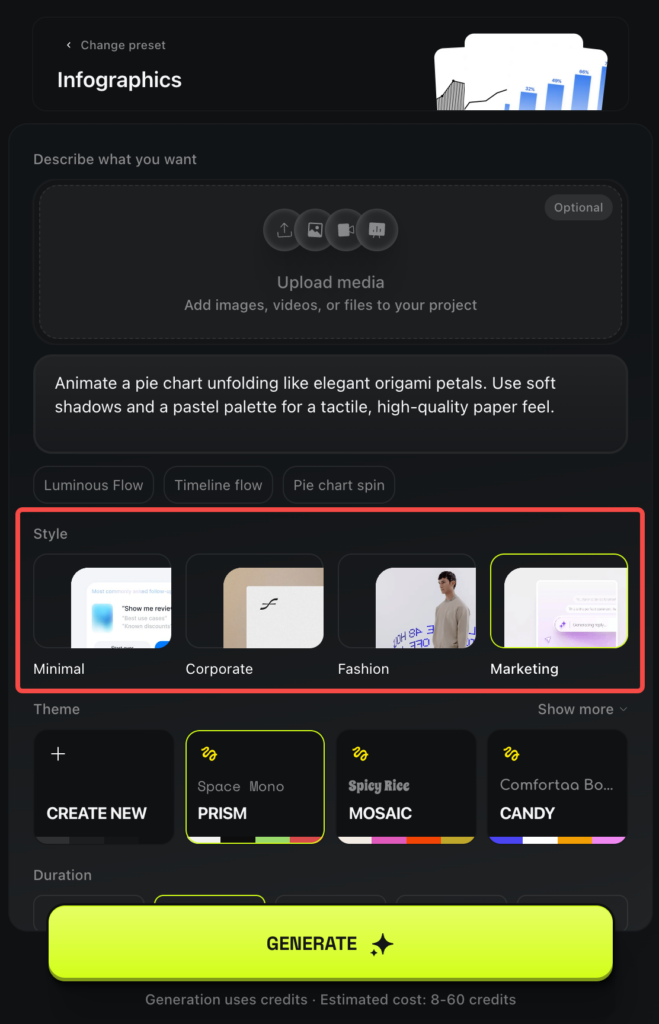
Templates provide sophisticated motion logic—easing curves, coordinated timing, layered effects—that would require significant manual work in traditional tools. You supply the content; the template handles the motion choreography.
Step 4: Refine with Direct UI Controls
Once generated, click any text element to manually adjust:
- Font Family: Choose from available typefaces
- Text Color: Precise color picker or hex code input
- Font Size: Scale typography for emphasis
- Background Color: Set scene or element backgrounds
These controls complement the chat interface, offering quick tweaks without requiring new prompts.
Step 5: Adjust Motion Physics
Step 6: Export and Iterate
Preview the complete animation, then export in your required format. If revisions are needed, the conversational history remains available—pick up where you left off and request specific changes without starting over.
Bonus: Expanding Your AI Video Toolkit Beyond Motion Graphics
While Vibe Motion excels at structured motion, complete video projects often require additional AI capabilities. Consider complementing Vibe Motion with:
Gaga AI Video Generator

Gaga AI offers several features that pair well with motion graphics:
Image to Video AI: Transform static product photos or brand imagery into smooth video clips. Upload your product shot, and generate dynamic footage showing it from multiple angles or in motion.
Video and Audio Infusion: Combine your Vibe Motion graphics with background music, voiceovers, or sound effects through AI-powered audio synchronization.
AI Avatar Presenters: Add virtual presenters to explain your animated data or present your motion graphics in educational contexts. Avatars speak scripted content naturally, eliminating the need for on-camera talent.
AI Voice Clone and Text-to-Speech: Generate professional narration in your own voice or select from AI voice libraries. Synchronize voiceovers with your motion graphics automatically.
This combination allows you to create complete video content: Vibe Motion handles data visualization and text animation while Gaga AI adds cinematic elements, narration, and presentation polish.
Vibe Motion Higgsfield Pricing and Credits
Credit-Based System
Vibe Motion operates on a consumption model where each generation costs credits based on complexity:
- Simple text animations: 8-15 credits
- Standard presentations: 20-35 credits
- Complex infographics with multiple data sets: 40-60 credits
The basic Higgsfield plan ($9/month) provides approximately 150 credits. This allows for 3-10 complete projects depending on complexity and iteration count.
Cost Considerations for Iteration
Since refinement requires re-generation, frequent iterations consume credits quickly. To optimize:
- Develop clear creative direction before first generation
- Use UI controls for simple changes (text, colors) that don’t require credit spending
- Batch multiple changes into single prompts rather than iterating one element at a time
Professional users creating multiple projects weekly may need higher-tier plans. The credit system reflects the computational cost of generating motion code and rendering high-quality video output.
How Vibe Motion Differs from Standard AI Video Generators
The Motion Graphics vs. Video Generation Divide
Most AI video generators excel at creating narrative content—scenes with characters, environments, and cinematic qualities. Tools like Runway, Pika, and standard Higgsfield models prioritize visual richness and storytelling.
Vibe Motion takes a different approach. It focuses on:
- Typography and text animations that remain sharp and readable
- Data visualization where numbers and charts animate with precision
- Brand consistency across multiple assets and formats
- Structural hierarchy that guides viewer attention deliberately
The underlying technology generates actual motion code rather than purely pixel-based animations, ensuring text never distorts and elements maintain mathematical precision throughout the animation.
When to Choose Motion Graphics Over Video
Select Vibe Motion for projects requiring:
- Animated charts, graphs, and statistical data
- Corporate presentations with dynamic slides
- Logo reveals and brand identity animations
- Educational content with step-by-step visual explanations
- Social media graphics where text readability is critical
Choose traditional text to video AI or image to video AI tools for:
- Narrative storytelling with characters and environments
- Photorealistic scene generation
- Cinematic b-roll and stock footage alternatives
- Complex visual effects and atmospheric content
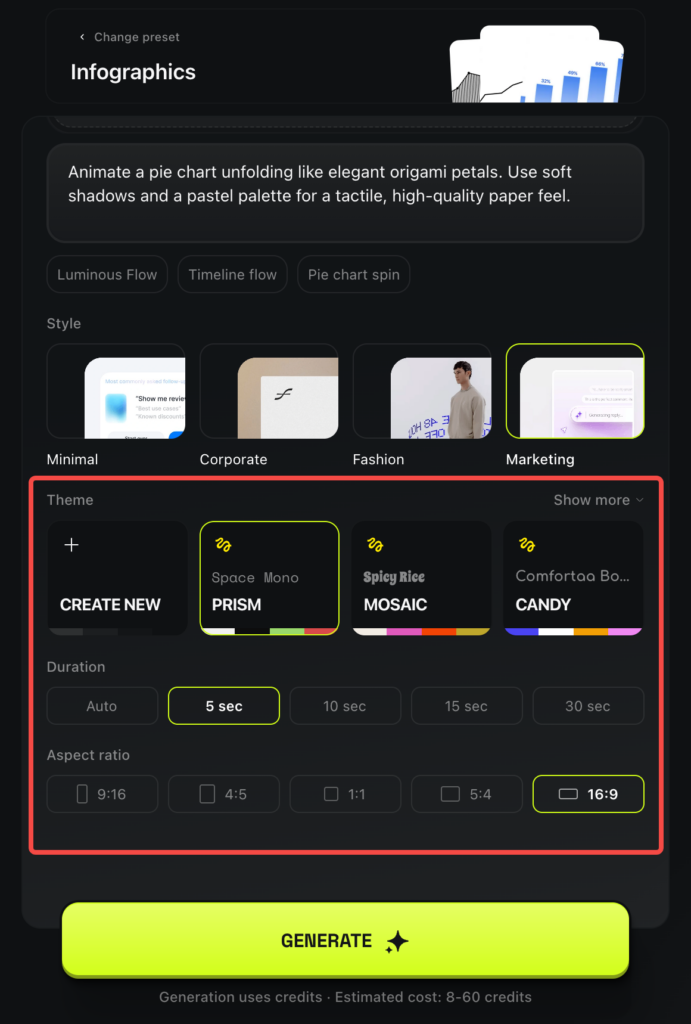
Motion Control and Style Options
Pre-built Motion Presets
Vibe Motion includes a curated library of motion behaviors defining how elements enter, exit, and transition. Presets function as starting points rather than rigid constraints:
- Fade + Scale: Gentle growth from center point
- Slide + Bounce: Energetic entrance with soft landing
- Rotate + Reveal: Attention-grabbing circular motion
- Sequential Build: Layer-by-layer progressive disclosure
- Particle Background: Subtle animated atmosphere
Preview different presets instantly and combine them within a single project. This approach makes professional motion accessible to users without animation training while still offering customization depth.
Color Palette Systems
Choose from preset color schemes aligned with popular design trends:
- Mosaic: Vibrant, multi-hued gradients
- Prism: Bright, saturated primary colors
- Candy: Playful pastels with soft contrasts
- Corporate: Professional blues, grays, and neutral tones
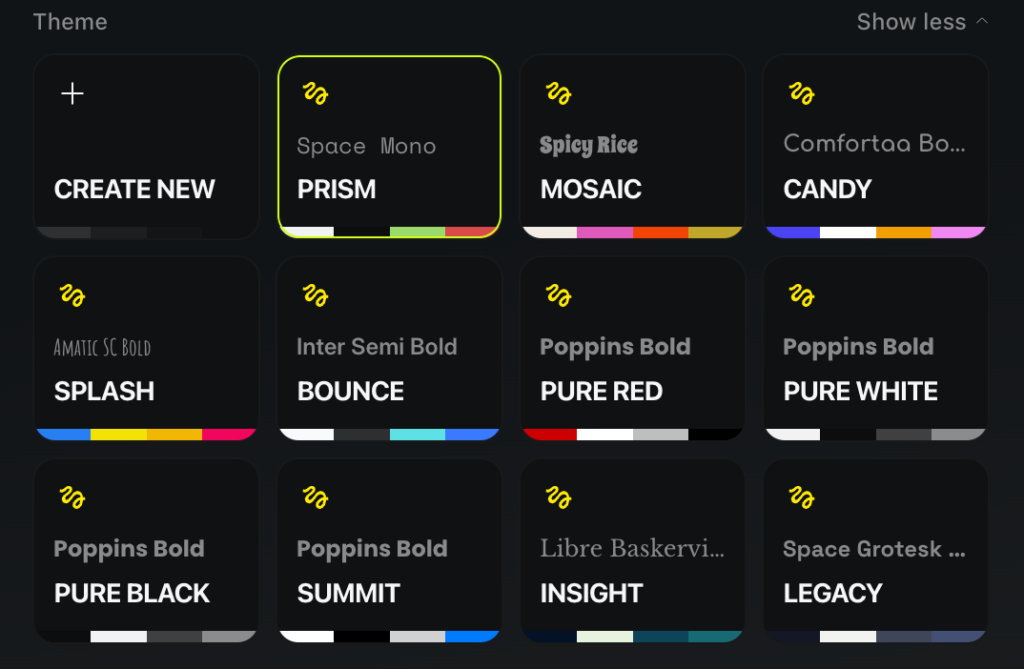
Alternatively, define custom brand colors by uploading style guides or entering specific hex codes. The system applies your palette consistently across all elements, maintaining brand coherence automatically.
Realistic Performance Expectations (Early 2026)
Generation Speed
Current generation times range from 3-8 minutes for standard projects. “Real-time” refers to the editing experience after initial generation, not the first render.
This timing reflects:
- The complexity of generating motion code rather than simple pixel rendering
- Server load during the initial launch period
- The precision required for text clarity and motion physics
For comparison, traditional motion graphics work in After Effects might take hours for a skilled designer. Vibe Motion compresses this to minutes, though not yet to the instant gratification of some image generators.
Output Quality
Generated motion graphics achieve professional quality with appropriate prompting and iteration. Initial outputs often require refinement:
- Text clarity and typography: Excellent—text remains sharp and readable
- Motion timing and easing: Good—smooth but may need speed adjustments
- Visual sophistication: Fair to Good—functional but may lack nuanced design touches
- Brand alignment: Good—improves significantly when assets are uploaded
Users reporting exceptional results typically invest 30-60 minutes refining prompts and exploring variations. This represents significant time savings compared to manual design, but it’s not a single-prompt solution for most professional applications.
Comparison to Alternative Tools
vs. Canva Motion: Canva offers faster preset-based motion but less customization. Vibe Motion provides deeper control through conversational refinement.
vs. Adobe After Effects: After Effects offers unlimited creative control but requires specialized skills and hours of work. Vibe Motion trades some flexibility for accessibility and speed.
vs. Other AI Video Generators: Traditional AI video tools create photorealistic scenes but struggle with precise text and data visualization. Vibe Motion specializes in these structured formats.
Frequently Asked Questions
What makes Higgsfield Vibe Motion different from other AI video generators?
Vibe Motion specializes in structured motion graphics rather than photorealistic video generation. It focuses on typography, data visualization, and brand animations where precision and consistency matter more than cinematic realism. The tool generates motion code rather than purely rendering pixels, ensuring text remains sharp and elements maintain mathematical accuracy throughout animations.
Can I use Vibe Motion for social media content creation?
Yes, Vibe Motion works well for social media graphics including animated quotes, data posts, announcement cards, and branded intros/outros. The template system includes social-optimized formats, and you can adjust aspect ratios for different platforms (Instagram square, TikTok vertical, LinkedIn landscape).
How long does it take to generate a motion graphic with Vibe Motion?
Current generation times range from 3-8 minutes depending on project complexity. Simple text animations render faster, while complex infographics with multiple data layers take longer. After initial generation, UI-based edits (changing text, colors) happen instantly without re-rendering.
Do I need design experience to use Higgsfield Vibe Motion?
No. The conversational interface allows you to describe desired outcomes in plain language: “Make the title bounce in energetically” or “Show three statistics appearing one by one.” Templates provide professional motion structures, and presets handle timing and easing automatically. However, basic design sensibility helps refine results effectively.
Can I upload my own brand assets and logos?
Yes, uploading your actual assets is recommended. Vibe Motion builds animations around your specific files—logos, color palettes, fonts, images—rather than generic placeholders. This ensures outputs match your brand identity. Supported formats include PNG, SVG, PDF, and JPG.
How much does Vibe Motion cost?
Vibe Motion uses a credit system. The basic Higgsfield plan costs $9/month for ~150 credits. Each generation costs 8-60 credits depending on complexity. Simple projects might cost 10-15 credits, while sophisticated infographics may use 40-60 credits. Factor in iteration costs when budgeting.
Can I export Vibe Motion animations to use in other tools?
Yes, animations export as standard video files compatible with presentation software (PowerPoint, Keynote), video editors (Premiere, Final Cut), and social media platforms. The motion code structure ensures consistent quality across exports.
Is Vibe Motion suitable for professional client work?
Yes, with appropriate iteration and refinement. Many users report professional-quality results after investing time in prompt refinement and exploring variations. However, expect to spend 30-60 minutes perfecting complex projects rather than relying on single-prompt outputs. Review work carefully before client delivery.
What’s the difference between Vibe Motion and traditional image to video AI tools?
Image to video AI tools (like Runway or Pika) animate still images by adding camera movement, subject motion, or environmental effects—creating photorealistic video clips. Vibe Motion creates structured motion graphics with typography, data, and designed elements. Choose image to video for cinematic content; choose Vibe Motion for presentations, infographics, and brand animations.
Can Vibe Motion handle complex data visualizations?
Yes, animated data visualization represents a core strength. You can describe multi-layered charts, comparative statistics, and sequential data reveals. The system handles timing coordination between elements automatically. However, extremely complex dashboards with dozens of simultaneous metrics may require breaking into multiple simpler animations.