Key Takeaways
- SongGeneration 2 (also called LeVo 2) is an open-source AI music model by Tencent AI Lab, released on March 1, 2026.
- It uses a hybrid LLM-Diffusion architecture with 4 billion parameters and generates complete songs up to 4 minutes 30 seconds long.
- It achieves a Phoneme Error Rate (PER) of 8.55% — outperforming Suno v5 (12.4%) and Mureka v8 (9.96%) on lyric accuracy.
- It supports multilingual input: Chinese, English, Spanish, Japanese, and more.
- It can generate vocals + accompaniment, pure instrumentals, a cappella vocals, or dual-track separated outputs.
- It runs locally with as little as 10GB of GPU memory (without audio prompt) or 16GB (with prompt audio).
- Available on GitHub, Hugging Face, and third-party APIs like WaveSpeed ($0.05/run).
Table of Contents
What Is SongGeneration 2?
SongGeneration 2 is an open-source, commercial-grade AI music generation model developed by Tencent AI Lab that turns structured lyrics and optional style prompts into complete, high-quality songs.
It is the official second generation of the LeVo framework — short for “Leverage Vocals.” The model was publicly released on March 1, 2026, under the code name SongGeneration-v2-large on Hugging Face and GitHub.
Unlike closed-source tools like Suno or Udio, SongGeneration 2 is fully open-weight. Developers, researchers, and creators can download it, run it locally, and build products on top of it — at zero licensing cost.
What Makes SongGeneration 2 Different?
Most AI music tools generate audio from vague text descriptions. SongGeneration 2 takes a more structured, precise approach:
- You provide formatted lyrics with section labels (verse, chorus, bridge)
- You optionally add a text description (genre, gender, instrument, emotion, BPM)
- Or you provide a 10-second reference audio clip for style transfer
- The model produces a complete song that follows your input accurately
This level of control — combined with commercial-grade output quality — is what sets SongGeneration 2 apart from every other open-source music model.
Who Built SongGeneration 2?
SongGeneration 2 was developed by Tencent AI Lab, the research division of Tencent (the company behind WeChat, QQ, and Tencent Music). The core research team includes Shun Lei, Yaoxun Xu, Zhiwei Lin, and others. The technical foundation is described in the paper “LeVo: High-Quality Song Generation with Multi-Preference Alignment” (arXiv:2506.07520).
The project is hosted at:
- GitHub: tencent-ailab/SongGeneration
- Hugging Face: tencent/SongGeneration
- Demo: levo-demo.github.io
How Does SongGeneration 2 Work?
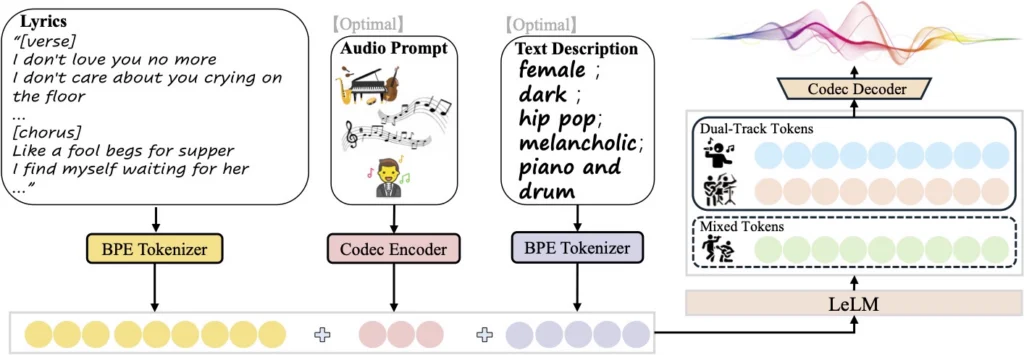
SongGeneration 2 works by combining a language model (for musical structure) with a diffusion model (for audio fidelity) in a unified hybrid architecture.
The Architecture: Hybrid LLM-Diffusion
This is the core technical innovation of SongGeneration 2, and it directly explains why it sounds better than previous open-source models:
LeLM — “The Composer Brain” The language model component handles the musical intelligence:
- Global song structure (how verses lead to choruses)
- Melodic patterns and harmonic progressions
- Lyric alignment with the beat and rhythm
Diffusion — “The Hi-Fi Renderer” Guided by the language model output, the diffusion component handles:
- Fine acoustic details (timbre, room sound, reverb)
- High-fidelity audio synthesis
- Instrument texture and vocal nuance
The Token System: Hierarchical Language Model
SongGeneration 2 models two types of tokens in parallel:
- Mixed Tokens — capture high-level musical semantics (melody, structure, vocal-instrument harmony)
- Dual-Track Tokens — separately encode vocals and accompaniment, enabling clean separation at output
This dual-track approach is why SongGeneration 2 can output isolated vocal tracks or instrumental-only versions — features absent in most competing models.
Training: 3-Stage DPO Alignment
The model solves the notorious “lyrical hallucination” problem (where AI sings garbled or wrong words) through a rigorous multi-stage training pipeline:
- Stage 1 — SFT (Supervised Fine-Tuning): Trains on high-quality songs to build a strong baseline.
- Stage 2 — Large-Scale Offline DPO: Uses ~200,000 positive/negative lyric pairs to eliminate hallucinations and improve controllability.
- Stage 3 — Semi-Online DPO: Continuously updates the model based on automated aesthetic scoring to push musicality higher.
SongGeneration 2 vs. Competitors
SongGeneration 2 is the first open-source model to challenge commercial-grade AI music tools head-to-head across both lyric accuracy and musicality.
Lyric Accuracy Comparison (Phoneme Error Rate — lower is better)
| Model | PER (%) | Type |
| SongGeneration 2 (LeVo 2) | 8.55% | Open-source ✅ |
| Mureka v8 | 9.96% | Commercial ❌ |
| Suno v5 | 12.4% | Commercial ❌ |
A lower PER means the model sings the actual lyrics more accurately. At 8.55%, SongGeneration 2 sings your words better than the paid tools that dominate the market.
Overall Quality Comparison
| Feature | SongGeneration 2 | Suno v5 | YuE | ACE-Step |
| Open-source | ✅ | ❌ | ✅ | ✅ |
| Max song length | 4m30s | ~4m | ~4m | Varies |
| Multilingual | ✅ zh/en/es/ja+ | ✅ | ✅ | ✅ |
| Audio style prompt | ✅ | ❌ | ✅ | ✅ |
| Dual-track output | ✅ | ❌ | ❌ | ✅ |
| Min GPU memory | 10GB | Cloud only | 16GB+ | 16GB+ |
| Commercial use | ✅ (check license) | Paid license | ✅ | ✅ |
Available Model Versions
SongGeneration 2 offers multiple model variants, letting you choose between quality and speed depending on your hardware.
| Model | Max Length | Languages | GPU Memory | Speed (RTF) |
| SongGeneration-base | 2m30s | Chinese | 10G / 16G | 0.67 |
| SongGeneration-base-new | 2m30s | Chinese, English | 10G / 16G | 0.67 |
| SongGeneration-base-full | 4m30s | Chinese, English | 12G / 18G | 0.69 |
| SongGeneration-large | 4m30s | Chinese, English | 22G / 28G | 0.82 |
| SongGeneration-v2-large | 4m30s | zh, en, es, ja+ | 22G / 28G | 0.82 |
| SongGeneration-v2-medium | 4m30s | zh, en, es, ja+ | 12G / 18G | Coming soon |
| SongGeneration-v2-fast | 4m30s | zh, en, es, ja+ | TBD | Coming soon |
RTF = Real-Time Factor. An RTF of 0.82 means the model generates 1 minute of audio in ~49 seconds (excluding model load time). The v2-fast version on Hugging Face Space generates a full song in under 1 minute.
How to Run SongGeneration 2: Step-by-Step
SongGeneration 2 requires a Linux machine with at least 10GB GPU memory (NVIDIA), Python 3.8+, and CUDA 11.8+.
Option A: Run It in the Cloud (No Setup)
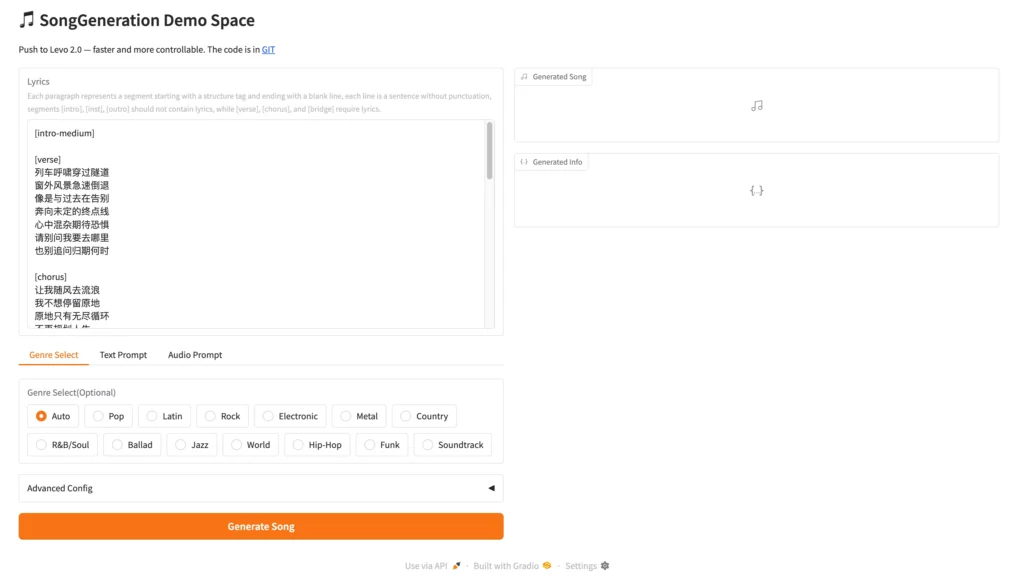
The easiest way is the Hugging Face Space demo:
- Go to huggingface.co/spaces/tencent/SongGeneration
- Enter formatted lyrics and optional description
- Click Generate and wait 1–3 minutes for your song
For API access with faster inference, use WaveSpeed at $0.05 per generation.
Option B: Run It Locally
Step 1: Clone the Repository
git clone https://github.com/tencent-ailab/SongGeneration
cd SongGeneration
Step 2: Install Dependencies
pip install -r requirements.txt
pip install -r requirements_nodeps.txt –no-deps
Step 3: Download Model Weights
# For the latest v2-large model (recommended)
huggingface-cli download lglg666/SongGeneration-v2-large –local-dir ./songgeneration_v2_large
# Also download the runtime folder
huggingface-cli download lglg666/SongGeneration-Runtime –local-dir ./runtime
mv runtime/ckpt ckpt
mv runtime/third_party third_party
Step 4: Prepare Your Lyrics Input
Create a .jsonl file. Each line is one song request:
{
“idx”: “my_song_001”,
“gt_lyric”: “[intro-medium] ; [verse] Streetlights flicker in the night. I wander through familiar corners. ; [chorus] The warmth of memories still remains. But you are gone. ; [outro-short]”,
“descriptions”: “female, dark, pop, sad, piano and drums”,
“prompt_audio_path”: null
}
Step 5: Run Generation
sh generate.sh songgeneration_v2_large sample/lyrics.jsonl sample/output
Optional Flags
–bgm # Generate instrumental only (no vocals)
–vocal # Generate vocals only (a cappella)
–separate # Output vocals and accompaniment as separate tracks
–low_mem # Enable if you’re hitting GPU memory limits
How to Write Good Lyrics for SongGeneration 2
Lyric formatting is critical — poorly formatted input is the single most common reason for bad output quality.
The Required Format
[structure-tag] ; [lyrics line 1]. [lyrics line 2]. ; [next-section]
Structure Tags Reference
Instrumental sections (no lyrics):
- [intro-short] — 0–10 second intro
- [intro-medium] — 10–20 second intro
- [inst-short] / [inst-medium] — instrumental break
- [outro-short] / [outro-medium] — ending
Lyrical sections (require lyrics):
- [verse] — verse
- [chorus] — chorus/hook
- [bridge] — bridge
A Complete Lyrics Example
[intro-medium] ; [verse] Trails wind through the forest. Trees stand tall and honest. Moss covers the logs. Sunlight starts to fondest. ; [chorus] Forest is the sanctuary where the promise does fondest. Is the tree that stands through the storm’s honest. Is the peace that makes the restless heart honest. ; [inst-medium] ; [verse] Squirrels scamper by. Nuts hide in the sky. Streams trickle through. ; [chorus] Forest is the sanctuary where the promise does fondest. Is the peace that makes the restless heart honest. ; [outro-medium]
Description Tags (Optional but Powerful)
Use comma-separated keywords — never full sentences:
✅ Valid:
female, dark, pop, sad, piano and drums, the bpm is 125
male, bright, rock, inspirational, bass and drums
❌ Invalid:
Please make a sad pop song with piano.
A melancholic female voice over slow drums.
Supported dimensions:
- Gender: male, female
- Timbre: dark, bright, soft, warm, loud, magnetic
- Genre: pop, rock, jazz, R&B, folk, electronic, country, hip-hop, blues
- Emotion: sad, energetic, romantic, melancholic, mysterious, inspirational
- Instrument: piano, guitar, drums, bass, synthesizer, electric guitar
- BPM: “the bpm is 120”
Common Issues and How to Fix Them
“The model is singing the wrong words”
Solution: This is a lyric formatting error. Check that sections are separated by semicolons (;), sentences within sections end with periods (.), and you’re using English punctuation only. Review your .jsonl formatting carefully.
“Out of memory (OOM) error”
Solution: Add the –low_mem flag to your generation command. Also try using SongGeneration-base-new (10GB) instead of the large or v2-large variant.
“Generation is very slow”
Solution: Use the SongGeneration-v2-fast version on Hugging Face Space, or use the WaveSpeed API which has no cold starts. Local inference RTF of 0.82 means a 4-minute song takes ~3.3 minutes of compute time (excluding model load).
“The style doesn’t match my description”
Solution: Don’t provide both prompt_audio_path AND descriptions simultaneously — they will conflict. Choose one. If using audio prompts, use the chorus section of the reference track for best results.
“Flash Attention errors”
Solution: Add –not_use_flash_attn to your command if your GPU doesn’t support Flash Attention, or if you haven’t installed the Flash Attention package.
Use Cases: What Can You Build With SongGeneration 2?
SongGeneration 2 is suitable for any workflow that requires controllable, high-quality song generation at scale.
- Content creators — Generate original background music with custom lyrics for YouTube, Podcasts, or social media
- Game developers — Produce adaptive soundtrack variations without licensing costs
- Music educators — Demonstrate songwriting structure with generated examples
- Indie artists — Create demo tracks and full arrangements from lyrics drafts
- App developers — Build music generation products using the open weights or WaveSpeed API
- Researchers — Study lyric-to-audio alignment, vocal synthesis, and multi-track generation
BONUS: Turn AI Music Into Full Video Content with Gaga AI
SongGeneration 2 gives you the song. Gaga AI gives you the complete production.
Once you have a high-quality AI-generated track from SongGeneration 2, the next bottleneck is visual content. A great song without a video, a presenter, or a visual identity is invisible on platforms like YouTube, TikTok, and Instagram.
Gaga AI is an all-in-one AI video creation platform that bridges the gap between your SongGeneration 2 audio and a publication-ready video asset.
What Gaga AI Offers
Image to Video AI
Convert any static image into a dynamic animated video clip — perfectly timed to your AI-generated music. Use cases include:
- Animating album cover art to match your SongGeneration 2 track
- Creating lyric-video style animations from illustrated artwork
- Building short-form video content for TikTok or Instagram Reels
Video and Audio Infusion
Gaga AI doesn’t just pair audio and video — it synchronizes them intelligently:
- Overlay your SongGeneration 2 track as the primary audio layer
- Add ambient sounds, SFX, and sound design on top
- Auto-sync visual transitions to beat detection
- Balance music, voiceover, and effects at the mixing stage
This turns a SongGeneration 2 audio file into a broadcast-ready video in minutes.
AI Avatar
Create a photorealistic AI avatar that presents your content — talking, reacting, and delivering your message — without you ever appearing on camera. Use cases:
- Music video “artists” with consistent visual identity
- Talking-head presenter for lyric breakdowns or music commentary
- Brand spokesperson for music app promotions
- Educational explainer presenting SongGeneration 2 tutorial walkthroughs
Avatars are fully customizable: appearance, expression, language, and movement.
AI Voice Clone
Record a short voice sample and Gaga AI creates a digital clone of your voice. This enables:
- Narration over your AI music video in your own voice
- Consistent artist voice identity across multiple releases
- Rapid multilingual content — clone once, speak in multiple languages
- Podcast-style music commentary without re-recording sessions
Text-to-Speech (TTS)
Don’t want to record your voice at all? Gaga AI’s TTS engine delivers:
- Natural-sounding voices in multiple languages and accents
- Emotional tone control: neutral, warm, energetic, authoritative
- Adjustable speaking speed and emphasis
- SSML support for precise prosody control
The SongGeneration 2 + Gaga AI Workflow
- Compose your lyrics and run SongGeneration 2 to produce a full song (vocals + accompaniment)
- Design album or lyric artwork (or use Craiyon AI for free concept images)
- Animate your artwork into a video clip with Gaga AI’s image-to-video feature
- Infuse your SongGeneration 2 audio track into the video with Gaga AI’s audio layer
- Add a presenter using Gaga AI’s AI Avatar to introduce or comment on the track
- Voice it with Gaga AI’s TTS or voice clone for narration
- Publish to YouTube, TikTok, Instagram, or Spotify Canvas
This full-stack pipeline lets a solo creator go from a lyric draft to a published music video — without a studio, band, camera, or mixing engineer.
Frequently Asked Questions (FAQ)
What is SongGeneration 2?
SongGeneration 2 (also called LeVo 2) is an open-source AI music generation model built by Tencent AI Lab. It takes formatted lyrics and optional style prompts and generates complete, high-quality songs up to 4 minutes 30 seconds long. It was released in March 2026 and is available free on GitHub and Hugging Face.
Is SongGeneration 2 free?
Yes. SongGeneration 2 is fully open-source and free to download and run locally. A Hugging Face Space demo is also free to use. Third-party API providers like WaveSpeed charge approximately $0.05 per generation.
How is SongGeneration 2 different from Suno?
SongGeneration 2 is open-source and runs locally; Suno is a closed, subscription-based commercial service. SongGeneration 2 achieves a lower Phoneme Error Rate (8.55%) than Suno v5 (12.4%), meaning it sings lyrics more accurately. Suno has a more polished consumer interface; SongGeneration 2 requires technical setup for local use.
What GPU do I need to run SongGeneration 2?
The base models require a minimum of 10GB VRAM (without audio prompts) or 16GB VRAM (with audio prompts). The large and v2-large models require 22GB / 28GB VRAM respectively. Use the –low_mem flag to reduce memory usage on lower-end hardware.
What languages does SongGeneration 2 support?
SongGeneration 2 (v2-large) supports multiple languages including Chinese (Mandarin), English, Spanish, Japanese, and others. Earlier base models support Chinese and English only.
Can SongGeneration 2 generate instrumental music without vocals?
Yes. Use the –bgm flag to generate pure background music (no vocals), the –vocal flag for a cappella vocals only, or –separate for dual-track output with vocals and accompaniment as separate audio files.
How do I fix lyric hallucination in SongGeneration 2?
Lyric hallucination (the model singing wrong words) is almost always caused by incorrect lyric formatting. Ensure sections are semicolon-separated, sentences within lyrical sections end with periods, and all punctuation is English half-width. Refer to the official formatting guide in the GitHub repository.
How long does SongGeneration 2 take to generate a song?
At a Real-Time Factor of 0.82 (for the large model), a 4-minute song takes approximately 3.3 minutes of computation, not counting model loading time. The v2-fast variant on Hugging Face Space can generate a full song in under 1 minute, with a slight quality trade-off.
Can I use SongGeneration 2 for commercial projects?
Review the LICENSE file in the official GitHub repository before commercial use. The weights and code have specific licensing terms that govern commercial applications. Always check the latest license before deploying in a product.
Where can I try SongGeneration 2 without installing anything?
Use the official Hugging Face Space demo at huggingface.co/spaces/tencent/SongGeneration, or use the WaveSpeed API playground at wavespeed.ai for a no-code inference experience at $0.05/run.