Key Takeaways
- Fliki AI is a web-based text-to-video and text-to-speech platform with 2,500+ AI voices across 80+ languages
- It converts scripts, blog URLs, or simple ideas into polished videos — no editing skills needed
- Paid plans start at $21/month (billed annually); a free tier gives 5 minutes of content per month
- Best for: content creators, marketers, educators, and businesses scaling video output
- Limitations include occasional text artifacts in AI visuals and a credit-based usage system that can deplete quickly
- Bonus at the end: Gaga AI — a rising all-in-one alternative with image-to-video, AI avatars, voice cloning, and TTS
Table of Contents
What Is Fliki AI? (The Direct Answer)
Fliki AI is an all-in-one text-to-video and text-to-speech platform that uses artificial intelligence to turn written content into professional videos — in under a minute.
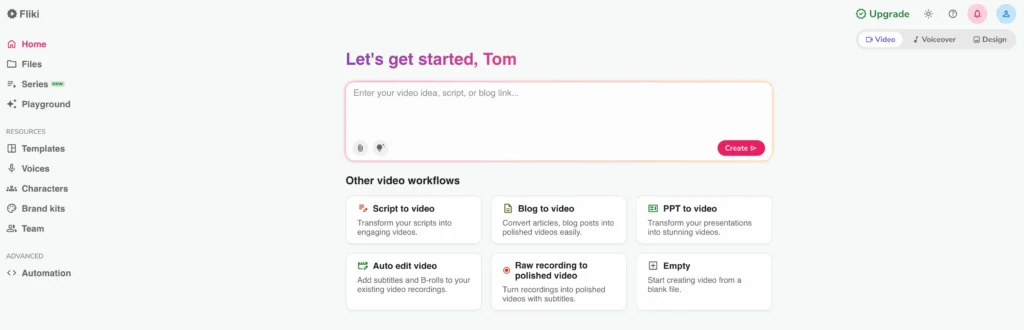
You type a prompt, paste a script, or drop in a blog URL. Fliki handles the rest: script generation, voiceover, stock visuals, subtitles, transitions, and music. No camera. No recording booth. No video editing software.
Since launching, Fliki has grown to serve 73% of Fortune 500 companies and has earned over 5,500 reviews on G2 and Capterra. It’s fully web-based and GDPR & CCPA compliant — meaning you can create and publish from any browser, anywhere.
Who Is Fliki AI For?
Fliki is purpose-built for people who need video output at scale but don’t have a production team. That includes:
- YouTubers and faceless channel creators who want to automate content without being on camera
- Content marketers repurposing blog posts into video for SEO and social platforms
- Educators and trainers converting lesson plans into multilingual video modules
- E-commerce brands producing product demos and ad creatives quickly
- Agencies that need to deliver client videos faster and at lower cost
If you’ve ever stared at a blank video timeline and felt overwhelmed, Fliki is built to close that gap.
How Does the Fliki AI Video Generator Work?
The Fliki AI video generator works by taking your text input — a prompt, script, blog post, or URL — and automatically generating a full video with voiceover, visuals, subtitles, and music.
Here’s a simplified view of the workflow:
- Choose your input type — Idea (prompt), Script, Blog URL, or Presentation upload
- Select your style — tone, audience, and video length
- Review the AI-generated script — edit any scenes before generating
- Pick your AI voice — from 2,500+ options across 80+ languages
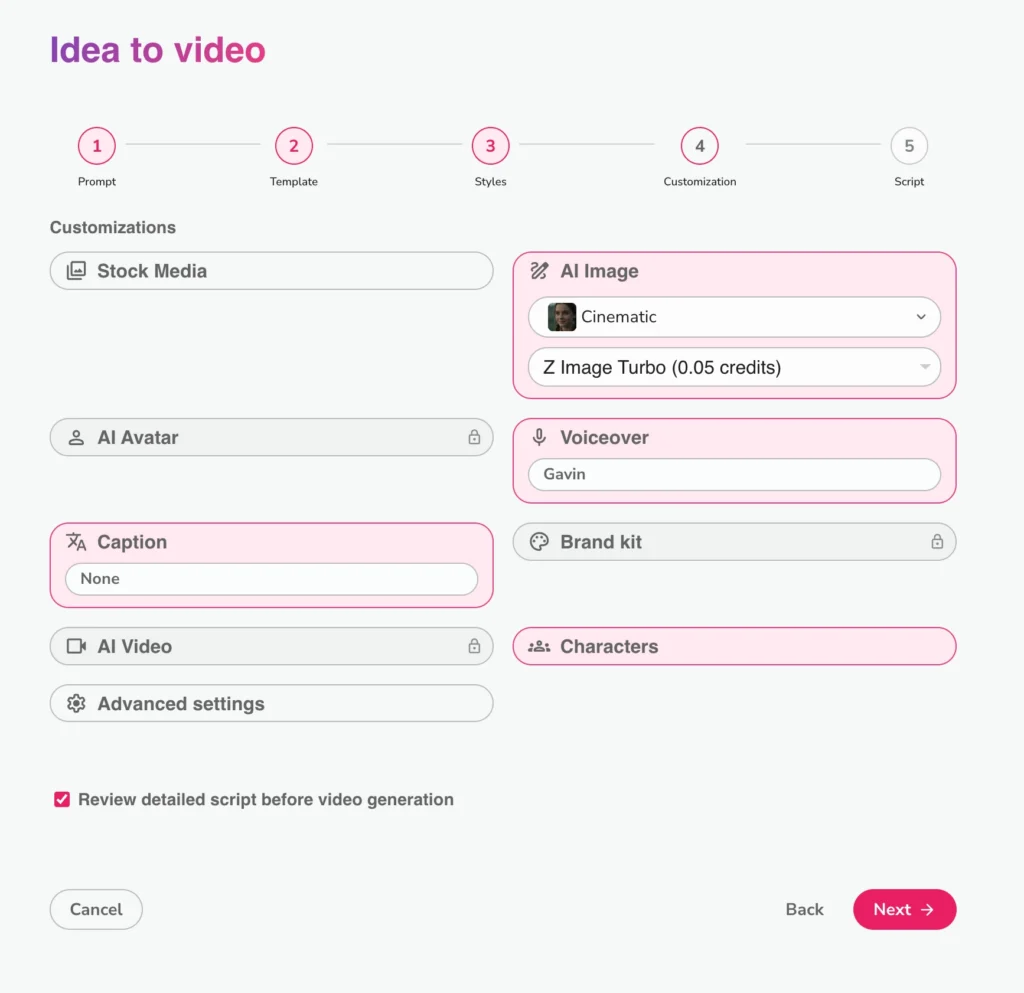
- Customize visuals — choose AI-generated clips, stock footage, or upload your own
- Export — download as MP4 or MOV, ready to publish
The entire process typically takes under 10 minutes for a 1–2 minute video. For users who need even less involvement, the Idea to Video feature generates both script and footage from a single sentence of input.
Fliki AI Review: Core Features Breakdown
Text-to-Video AI
Fliki’s flagship feature turns any written content into a fully produced video. The AI analyzes your script for context, selects matching visuals from a library of 10 million+ premium assets, adds auto-generated subtitles, and syncs everything to a voiceover.
What makes this stand out from basic tools is contextual awareness — Fliki doesn’t just randomly pair stock footage with text. It reads the meaning of your script and selects imagery that reinforces your message.
Best use cases: YouTube explainers, social media reels, product walkthroughs, marketing campaigns
AI Voices and Text-to-Speech
Fliki offers 2,500+ ultra-realistic AI voices in 80+ languages and 100+ accents — making it one of the largest voice libraries in the industry.
These aren’t the robotic voices you may remember from early TTS tools. Fliki’s voice engine mimics natural pacing, tonal variation, and expressive delivery. You can filter voices by gender, age, accent, and emotional tone to match your content’s feel.
For most professional use cases — tutorials, explainers, product demos — the voices are convincing enough to replace a hired voice actor. Premium voices score particularly high in user reviews for their natural quality.
AI Voice Cloning
Fliki’s voice cloning feature lets you record a 2-minute audio sample and generate a synthetic replica of your own voice for unlimited future use.
This is powerful for creators and brands who want consistent narration across a library of videos without re-recording every time. It also helps maintain personal branding on YouTube channels or podcast-style content — your voice, your style, your identity, at scale.
Voice cloning is available on the Premium plan and Enterprise tier.
AI Avatars
Fliki includes 70+ high-quality AI avatars that act as on-screen presenters, so you never need to appear on camera yourself.
You can also build a personalized avatar — a digital version of yourself — by uploading a photo or short video clip. The avatar syncs to your chosen voice (including a cloned voice), adds facial expressions, and delivers your script with natural body language.
Best use cases: Corporate training videos, faceless YouTube channels, product demo presenters, onboarding modules
Blog-to-Video and URL Import
Drop in a blog post URL and Fliki automatically extracts the key content, breaks it into scenes, and pairs each section with relevant visuals and a voiceover. This is one of the most practical features for content repurposing — transforming a written article into a shareable video in minutes.
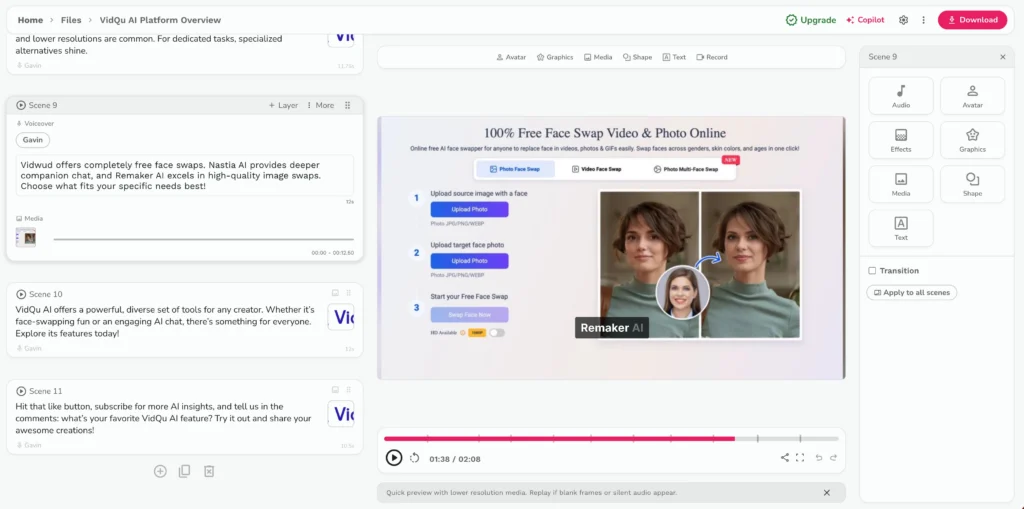
This feature works well for SEO-driven content strategies, where turning text content into video boosts on-page engagement and drives traffic from video platforms.
Idea-to-Video (Prompt to Video)
Type a one-sentence concept and Fliki generates the script, selects the media, applies the voiceover, and produces a finished video — all from a single input.
This is Fliki’s most beginner-friendly entry point. It works best for social media content, trending topics, and short educational videos. For technical or niche subjects, adding supporting documents (PDFs, notes) improves the AI’s output quality significantly.
Supported Video Types
Fliki can generate:
- YouTube videos and YouTube Shorts
- Instagram Reels and TikTok videos
- Product demo videos
- Educational explainers
- Training and onboarding content
- Blog-to-video repurposing
- Marketing ads
- Presentations converted to video
- Podcast-style audio content
- Meme videos
Fliki AI Pricing: What Do You Actually Pay?
Fliki offers a free plan plus three paid tiers. Paid plans start at $21/month (billed annually).
| Plan | Price (Annual) | Monthly Credits | Key Features |
| Free | $0 | 5 minutes | Basic voices, watermarked output |
| Standard | $21/month | 180 minutes | 2,000+ voices, 75+ languages, premium media |
| Premium | $66/month | 600 minutes | 1,800+ voices, voice cloning, AI avatar, API access, priority support |
| Enterprise | Custom | Custom | Custom credits, branded templates, dedicated account manager |
Credit note: Credits are consumed based on the length of audio or video generated. A 1.5-minute video typically uses approximately 6 credits. Heavy users have flagged this as an area to monitor carefully when choosing a plan.
Fliki offers a 15% discount for nonprofits and educational institutions. All paid plans include a commercial license — meaning you can publish and monetize content on YouTube and other platforms.
How to Create Your First Video on Fliki: Step-by-Step
Getting started takes less than 5 minutes. Here’s exactly how to do it:
Step 1: Sign up at fliki.ai
No credit card required for the free plan. Use your email and confirm via link.
Step 2: Go to the Video section on your dashboard
Click “New File” and select your preferred input type (Idea, Script, Blog URL, or Presentation).
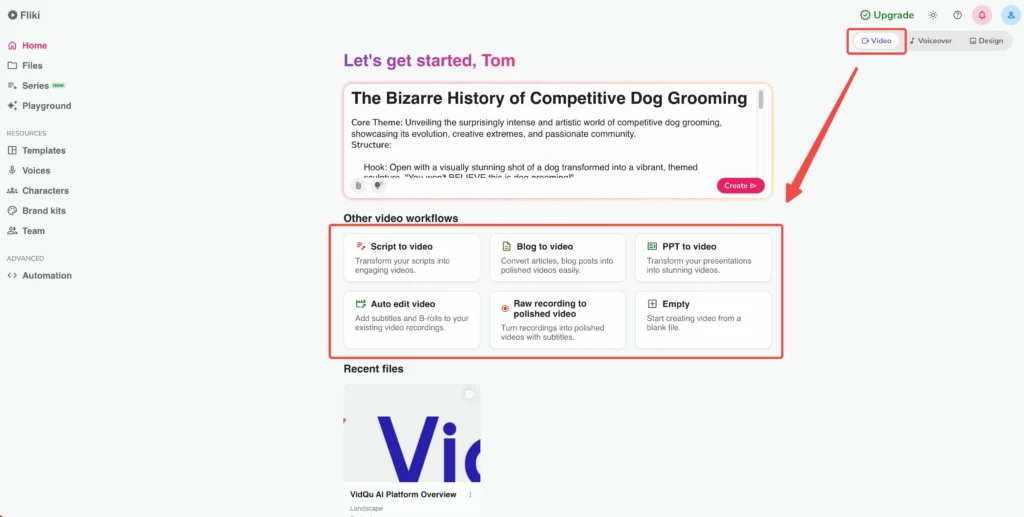
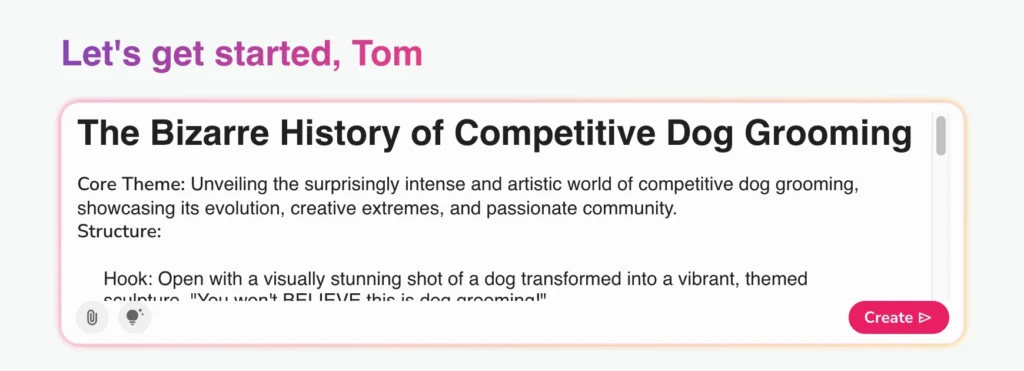
Step 3: Enter your content
For Idea mode: type a one-sentence concept (e.g., “5 benefits of morning exercise for busy professionals”). Set your video duration using the slider.
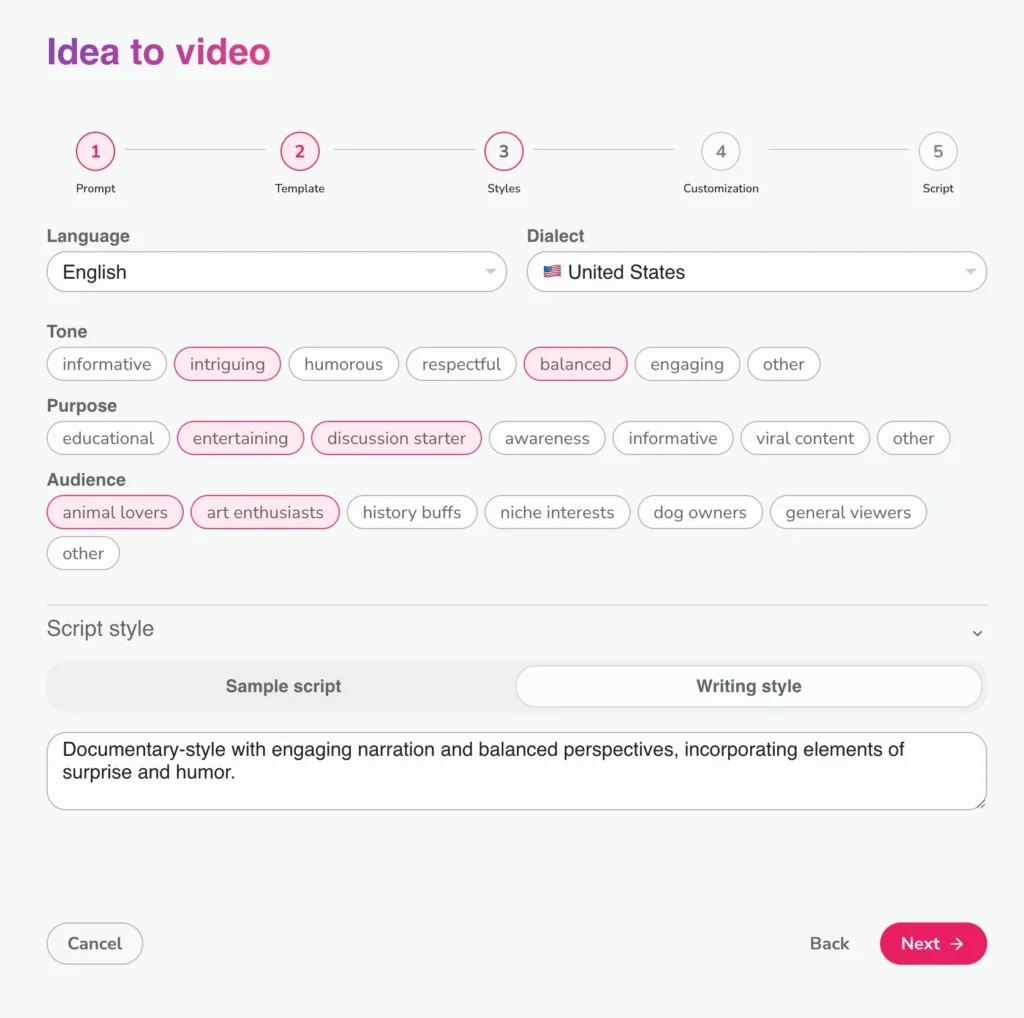
Step 4: Set your tone and audience
Fliki will prompt you to select the purpose (educational, promotional, inspirational), tone (professional, casual, energetic), and target audience. This shapes the AI’s script output.
Step 5: Review the generated script
The AI writes a scene-by-scene script. Read through it, adjust any wording, and remove or reorder scenes.
Step 6: Choose your AI voice
Browse by language, gender, accent, or style. Play previews before selecting. You can also apply a voice clone here if you’ve set one up.
Step 7: Customize visuals (optional)
Replace auto-selected clips with your own media, choose AI-generated visuals, or adjust transitions, fonts, and colors to match your brand.
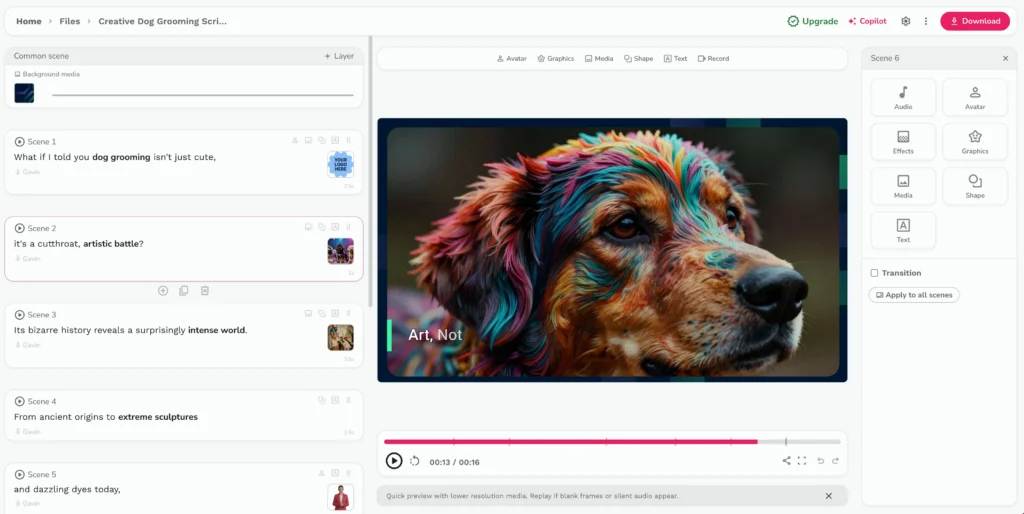
Step 8: Preview and export
Use the live preview to check your video. Once satisfied, export as MP4 or MOV.
Pro tip: For the best results on niche or technical topics, upload a supporting PDF or reference document in the “Additional Resources” field. This significantly improves the AI’s contextual accuracy.
Fliki vs. Competitors: Where It Stands
Fliki’s main advantage over alternatives is its combination of voiceover quality, multilingual support, and all-in-one workflow — all at a competitive price point.
| Feature | Fliki | Pictory | InVideo | Synthesia |
| Text-to-video | ✅ | ✅ | ✅ | ✅ |
| AI voice library | 2,500+ voices | Limited | Limited | Avatar-only |
| Voice cloning | ✅ (Premium) | ❌ | ❌ | ✅ (Enterprise) |
| AI avatars | ✅ | ❌ | Limited | ✅ (core feature) |
| Languages | 80+ | Limited | Limited | 120+ |
| Free plan | ✅ (5 min/mo) | ✅ | ✅ | ❌ |
| Starting price | $21/mo | $19/mo | $20/mo | $22/mo |
Fliki hits the sweet spot between voice quality, ease of use, and pricing for most independent creators and small teams. Synthesia is stronger for enterprise avatar-first video, while Pictory edges ahead for pure blog-to-video repurposing simplicity.
Bonus: Gaga AI — The All-in-One Alternative Worth Knowing
If you’re exploring AI video tools beyond Fliki, Gaga AI (gaga.art) is one of the most talked-about emerging platforms in 2025–2026. Developed by Sand.ai, it’s positioned as a character-driven video creation platform with a free tier and an impressive breadth of tools under one roof.

Here’s what makes Gaga AI stand out:
Image-to-Video AI
Gaga AI’s core innovation is its ability to animate still images into expressive, cinematic video clips. Upload a photo — portrait, product shot, or illustration — and Gaga’s GAGA-1 model generates smooth character movement, emotional expressions, and natural body language. Most 10-second videos render in 3–4 minutes. Output resolution is 720p, optimized for social media platforms.
Video and Audio Infusion
Gaga AI’s video and audio infusion layer lets you sync custom soundtracks, ambient audio, or AI-generated music directly to your video timeline. The AI analyzes visual motion and beats to match audio timing automatically — eliminating the manual sync work that slows down most creators.
AI Avatar
Gaga’s avatar engine generates hyper-realistic AI presenters from a single photo. The avatar supports multiple visual styles, emotional expressions, lip-sync, and multilingual speech output. It’s a strong option for training videos, product demos, and faceless content channels that want an on-screen presence without filming anyone.
AI Voice Clone
Gaga AI’s voice cloning requires as little as 15 seconds of sample audio — significantly lower than most competitors. The resulting clone preserves your pitch, accent, and cadence. Once created, the voice can be reused across unlimited projects, making it ideal for creators who want every video to sound authentically personal.
Text-to-Speech (TTS)
For users without a voice sample, Gaga’s TTS engine offers a library of pre-built voices across genders, accents, and emotional tones. It supports SSML-style controls so you can add pauses, emphasize words, and adjust speaking rate directly in the script editor — giving fine-grained control over how your content sounds.
Who is Gaga AI best for? Short-form video creators, storytellers, educators, and marketers who want character-driven, emotionally expressive AI video with a free starting point. It’s particularly strong for animated social content and avatar-based presentations.
Gaga AI is free to try at gaga.art, with premium plans available for watermark-free commercial exports.
Frequently Asked Questions About Fliki AI
What is Fliki AI used for?
Fliki AI is used to create text-to-video content, AI voiceovers, and audio files for YouTube, Instagram, TikTok, training videos, marketing, and more — without video editing skills.
Is Fliki AI free?
Yes, Fliki has a free plan that allows 5 minutes of audio and video content per month. Advanced features like voice cloning and AI avatars require a paid subscription starting at $21/month.
How does Fliki AI generate videos?
Fliki’s AI analyzes your text input — a prompt, script, or URL — and automatically generates a script, selects matching visuals from its media library, applies an AI voiceover, adds subtitles and music, and produces an exportable video file.
Is Fliki AI good for YouTube automation?
Yes. Fliki is widely used for faceless YouTube channel automation. It supports all content formats, generates scripts from prompts, and produces voiceovers without the creator needing to record audio or appear on screen.
Can I use Fliki AI content commercially?
Yes. All paid plans include a commercial license. You can publish and monetize Fliki-created content on YouTube and other platforms, provided your original text content doesn’t violate copyright.
What languages does Fliki support?
Fliki supports 80+ languages with 100+ regional dialects. It also allows one-click translation of entire video scripts.
What is the difference between Fliki’s Standard and Premium plans?
The Standard plan ($21/month) gives 180 minutes of monthly credits and access to the core voice and video library. The Premium plan ($66/month) adds 600 minutes, voice cloning, AI avatar creation, API access, and priority support.
Does Fliki have a voice cloning feature?
Yes. Fliki’s voice cloning requires a 2-minute audio recording sample. The cloned voice can then be used across unlimited projects on the Premium plan.
Can I upload my own images or videos into Fliki?
Yes. You can upload custom images and video clips to use alongside Fliki’s stock media library. This is useful for branded content and product-specific videos.
Final Verdict: Is Fliki AI Worth It?
Fliki AI is worth it for content creators, marketers, and educators who need a reliable, fast, and scalable way to produce professional-quality videos from text — without technical expertise.
Its combination of a large voice library, multilingual support, blog-to-video repurposing, and AI avatar tools makes it one of the most complete text-to-video platforms available. The free plan is a genuine entry point, and the $21/month Standard plan offers strong value for regular creators.
The main caveats are the AI visual artifact issue reported in early 2026 and a credit system that requires careful management. For most use cases — faceless YouTube content, marketing videos, training materials, and social media reels — Fliki delivers on its promise.
If you need more flexibility on the visual generation side or want a strong image-to-video workflow, bookmark Gaga AI as a complementary or alternative tool.