Key Takeaways
- Claude Opus 4.6 is Anthropic’s most advanced AI model, achieving industry-leading scores across coding, reasoning, and agentic tasks
- 1M token context window (first for Opus series) enables handling massive codebases without context degradation
- 65.4% Terminal-Bench 2.0 score surpasses GPT-5.2 (64.7%) and all competing models
- Pricing remains unchanged at $5/$25 per million tokens (input/output)
- Agent Teams feature in Claude Code allows parallel autonomous collaboration
- Available now on claude.ai, API (claude-opus-4-6), and major cloud platforms
Table of Contents
What is Claude Opus 4.6?
Claude Opus 4.6 is Anthropic’s flagship AI model released in February 2026, representing a major upgrade to the Opus 4.5 architecture. The model achieves state-of-the-art performance in agentic coding, sustained long-context reasoning, and autonomous task execution while maintaining industry-leading safety alignment.
Unlike incremental updates, Opus 4.6 introduces qualitative improvements: it plans more deliberately, catches its own errors through enhanced self-review, and sustains productivity across extended sessions without the “context rot” that plagues other models.
How Does Claude Opus 4.6 Differ from Previous Versions?
Core improvements over Opus 4.5:
- 5x larger context window: 1M tokens (beta) vs 200K tokens
- Enhanced reasoning depth: Adaptive thinking automatically applies extended reasoning when beneficial
- 76% vs 18.5% on MRCR v2 needle-in-haystack test: Dramatically better long-context retrieval
- 190 Elo point improvement on GDPval-AA knowledge work evaluation
- 80.8% SWE-bench Verified score: Nearly double the industry average for GitHub issue resolution
Claude Opus 4.6 Performance Benchmarks
Terminal-Bench 2.0: Industry-Leading Coding Performance
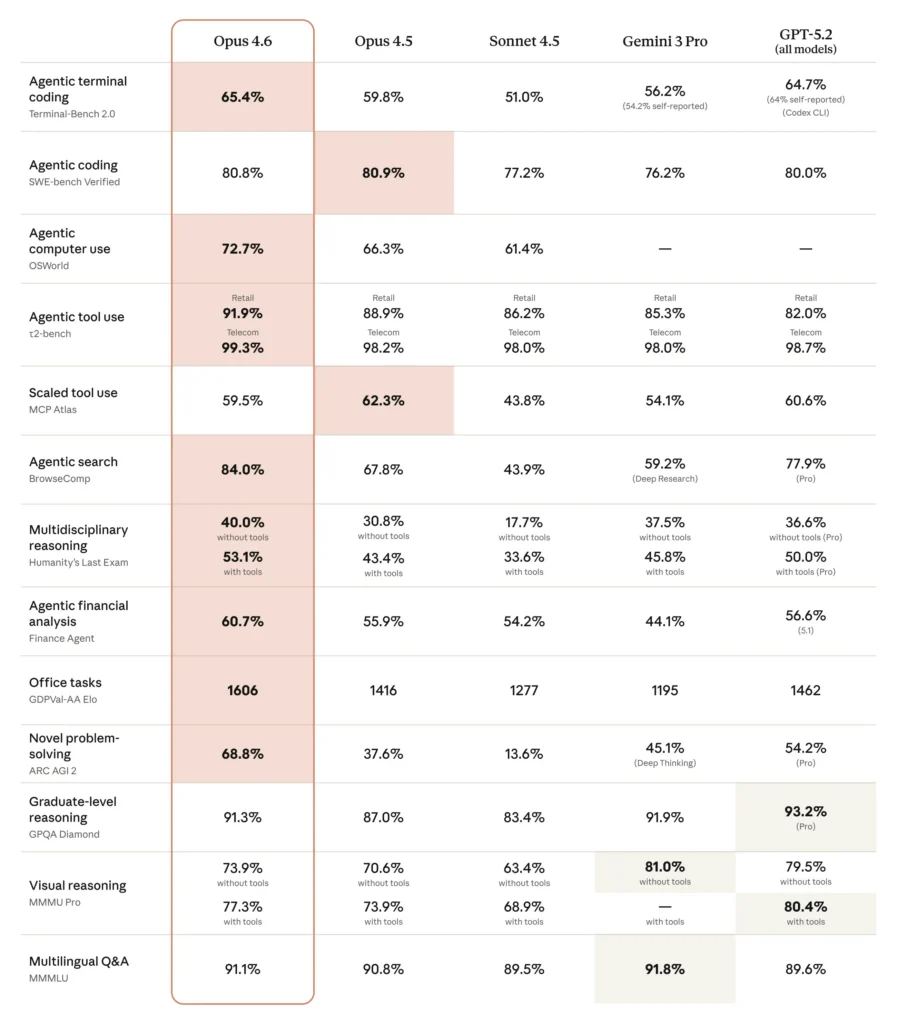
Direct Answer: Claude Opus 4.6 scored 65.4% on Terminal-Bench 2.0, the highest among all evaluated models, surpassing GPT-5.2’s 64.7% and Gemini 3 Pro’s 56.2%.
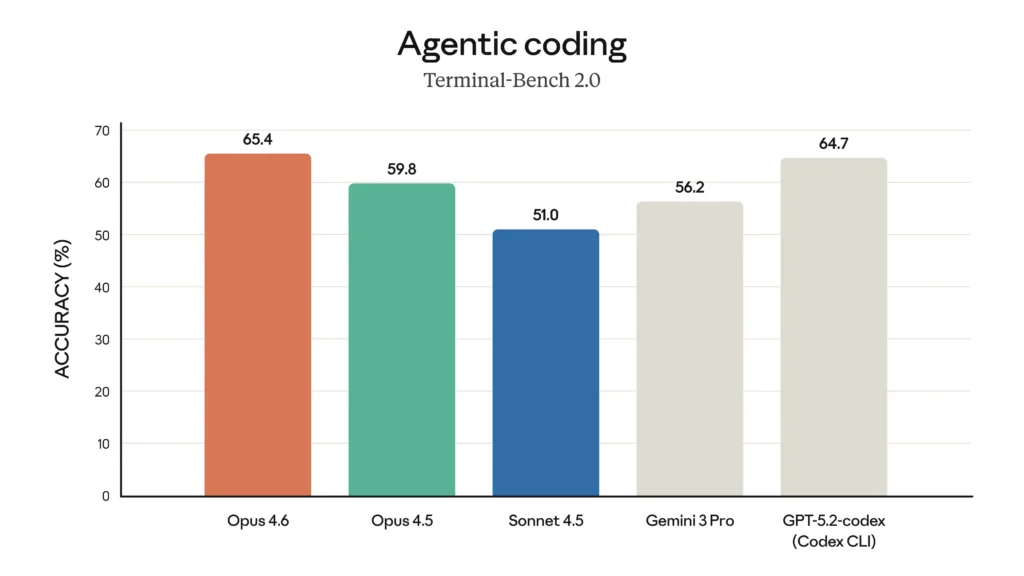
Terminal-Bench 2.0 evaluates AI models on 89 complex real-world tasks executed in terminal environments. Each task runs in an isolated Docker container, testing the model’s ability to:
- Navigate file systems autonomously
- Execute multi-step debugging workflows
- Manage dependencies and configurations
- Handle ambiguous requirements
This benchmark directly correlates with real-world coding productivity, making Opus 4.6’s leadership significant for developers.
ARC AGI 2: Breakthrough in Fluid Intelligence
Claude Opus 4.6 achieved 68.8% on ARC AGI 2, nearly doubling its predecessor’s 37.6% score. This evaluation measures “fluid intelligence”—the ability to solve novel problems without relying on pre-trained knowledge.
What this means practically: Opus 4.6 can tackle completely unfamiliar problem patterns, identify hidden logical structures, and generalize from minimal examples—capabilities that approach human-level abstract reasoning.
GDPval-AA: Economic Value Performance
The bottom line: Opus 4.6 scored 1606 Elo on GDPval-AA, approximately 70% win rate against GPT-5.2 (1462 Elo) on real-world knowledge work tasks.
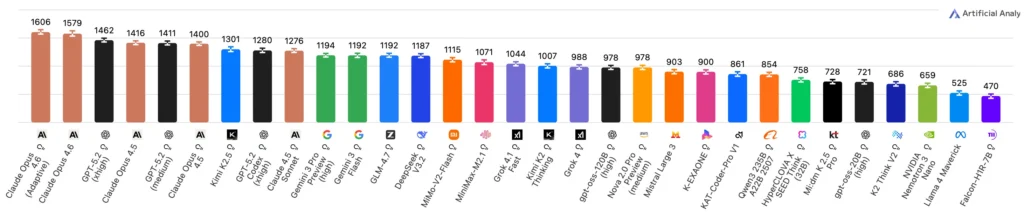
This evaluation covers:
- Financial analysis and modeling
- Legal document review
- Technical documentation
- Research synthesis
- Strategic planning
Each task represents approximately 7 hours of expert human work, making this benchmark directly relevant to professional productivity.
BrowseComp: Superior Information Retrieval
With an 84.0% score on BrowseComp (86.8% with multi-agent framework), Opus 4.6 excels at locating hard-to-find information online—a critical capability for research and fact-checking workflows.
Opus 4.6 vs 4.5: What Changed?
Performance Comparison Table
| Benchmark | Opus 4.6 | Opus 4.5 | Improvement |
| Terminal-Bench 2.0 | 65.4% | 59.8% | +5.6pp |
| ARC AGI 2 | 68.8% | 37.6% | +83% |
| GDPval-AA (Elo) | 1606 | 1416 | +190 |
| MRCR v2 (8-needle, 1M) | 76% | 18.5%* | +311% |
| SWE-bench Verified | 80.8% | ~65%** | +24% |
*Comparing to Sonnet 4.5 as direct Opus 4.5 data unavailable
**Industry estimate
Context Window Breakthrough
The most impactful upgrade: Opus 4.6 supports 1M token context (beta), compared to 200K in Opus 4.5.
Real-world implications:
- Analyze entire codebases (hundreds of files) in a single session
- Review multi-hundred-page legal documents without chunking
- Maintain conversation quality across extended debugging sessions
- Process year-long chat histories for comprehensive analysis
Critical distinction: Large context windows alone don’t guarantee performance. Opus 4.6’s 76% MRCR v2 score demonstrates it actually uses this extended context effectively, avoiding the “context rot” where models lose track of earlier information.
Output Capacity Doubled
Opus 4.6 supports 128K output tokens, double the previous 64K limit. This enables:
- Generating complete application codebases
- Producing comprehensive technical documentation
- Creating detailed research reports without pagination
- Refactoring large code sections in single operations
Claude Opus 4.6 Pricing
API Pricing Structure
Standard pricing (unchanged from Opus 4.5):
- Input tokens: $5 per million tokens
- Output tokens: $25 per million tokens
Premium pricing (prompts exceeding 200K tokens):
- Input tokens: $10 per million tokens
- Output tokens: $37.50 per million tokens
US-only inference: Available at 1.1× standard pricing for workloads requiring US data residency.
Cost Comparison: Opus 4.6 vs Competitors
For a typical 10,000 token input / 2,000 token output request:
| Model | Input Cost | Output Cost | Total |
| Claude Opus 4.6 | $0.05 | $0.05 | $0.10 |
| GPT-5.2 | $0.05 | $0.06 | $0.11 |
| Gemini 3 Pro | $0.035 | $0.04 | $0.075 |
Value proposition: Despite higher per-token costs, Opus 4.6’s efficiency often results in lower total cost due to:
- Fewer retry attempts due to higher accuracy
- Single-pass task completion vs multi-turn corrections
- Reduced context usage through better comprehension
Claude Code Opus 4.6: Enhanced Developer Experience
What is Claude Code?
Claude Code is Anthropic’s command-line tool that integrates Claude directly into developer workflows. With Opus 4.6, it gains substantial capabilities.
Agent Teams (Research Preview)
Direct answer: Agent Teams allow you to spawn multiple Claude agents that work in parallel, coordinate autonomously, and communicate directly without routing through a central coordinator.
How it works:
1. Team lead agent receives your high-level task
2. Automatically spawns specialized agents for subtasks (e.g., frontend review, backend testing, documentation)
3. Agents work in parallel with independent context windows
4. Direct inter-agent communication for dependency coordination
5. Results synthesized by team lead for final delivery
When to use Agent Teams vs Subagents:
- Subagents: Single session, fast focused tasks, report-only to main agent
- Agent Teams: Parallel work, mutual coordination, complex multi-domain tasks
Example workflow: Code review across 6 repositories
# Team lead coordinates 6 specialized agents
Agent 1: Frontend TypeScript review
Agent 2: Backend Python review
Agent 3: Database schema validation
Agent 4: API contract verification
Agent 5: Security audit
Agent 6: Documentation accuracy check
# Agents communicate findings directly
Agent 2 → Agent 1: “API endpoint changed, check frontend calls”
Agent 3 → Agent 2: “Schema migration needed for new field”
Opus 4.6 in Claude Code: Setup Guide
Installation (if not already installed):
npm install -g @anthropic/claude-code
Select Opus 4.6 as default model:
claude-code config set model claude-opus-4-6
Enable Agent Teams (research preview):
claude-code config set features.agent-teams true
Example usage:
# Initiate multi-agent code review
claude-code review –agent-teams –repos “frontend,backend,mobile”
# Monitor individual agents
claude-code agents list
# Take control of specific agent
# Shift+Up/Down or tmux commands
New API Features in Opus 4.6
1. Adaptive Thinking
What it solves: Previous models required manually enabling/disabling extended thinking—a binary choice that wasted resources on simple tasks or underperformed on complex ones.
How it works: At the default effort: high setting, Opus 4.6 automatically detects when deeper reasoning would improve results and activates extended thinking accordingly.
Implementation:
| import anthropic client = anthropic.Anthropic(api_key=”YOUR_KEY”) response = client.messages.create( model=”claude-opus-4-6″, max_tokens=1024, thinking={ “type”: “adaptive”, “effort”: “high” # Default; also: low, medium, max }, messages=[{ “role”: “user”, “content”: “Debug this complex race condition…” }] ) |
2. Effort Level Controls
Four granular settings:
- Low: Minimal thinking, fastest responses, lowest cost
- Medium: Selective thinking, balanced performance
- High (default): Adaptive thinking, general-purpose
- Max: Maximum reasoning depth, premium quality
When to adjust:
| # Simple data transformation → use low effort = “low” # Code review with edge cases → use high (default) effort = “high” # Novel algorithm design → use max effort = “max” |
3. Context Compaction (Beta)
The problem: Long-running agents and extended conversations eventually exceed context windows, causing task failure or quality degradation.
The solution: Context compaction automatically summarizes and replaces older context when approaching configurable thresholds, enabling unlimited task duration.
Configuration:
| response = client.messages.create( model=”claude-opus-4-6″, max_tokens=1024, context_compaction={ “enabled”: True, “threshold_tokens”: 900000, # Trigger at 900K of 1M “max_total_tokens”: 3000000 # Allow up to 3M through compaction }, messages=[…] ) |
Use cases:
- Multi-hour debugging sessions
- Iterative codebase refactoring
- Extended research synthesis
- Long-form content creation with multiple revision cycles
Claude in Excel and PowerPoint Integration
Claude in Excel: Major Capability Upgrade
New capabilities in Opus 4.6:
- Conditional formatting: Apply complex rules based on data patterns
- Data validation: Create dynamic validation rules
- Multi-step operations: Complete complex transformations in single pass
- Structure inference: Process unstructured data without explicit schema
- Pivot table editing: Modify and create pivot analyses
- Chart modifications: Update visualizations intelligently
Example workflow:
User: “Analyze Q4 sales data, identify underperforming regions,
apply red conditional formatting to <80% quota,
create pivot showing rep performance by product category”
Claude in Excel:
1. Calculates quota attainment
2. Applies conditional formatting rules
3. Creates pivot table with correct aggregations
4. Suggests actionable insights
Claude in PowerPoint (Research Preview)
Key features:
- Brand consistency: Reads existing layouts, fonts, and slide masters
- Template-based generation: Builds presentations matching corporate templates
- Text-to-deck: Creates full presentations from descriptions
- Targeted edits: Modifies specific slides while maintaining design coherence
Integrated workflow example:
Excel → Analyze financial data, generate summary tables
↓
PowerPoint → Create executive presentation with:
– Title slide matching brand guidelines
– Data visualization slides from Excel analysis
– Conclusion slides with strategic recommendations
Availability: Max, Team, and Enterprise plans
Safety and Alignment Improvements
Most Comprehensive Safety Evaluation Ever
Anthropic conducted expanded safety testing for Opus 4.6:
- User wellbeing evaluations: New assessments for mental health impact
- Complex refusal testing: Enhanced detection of dangerous request variations
- Covert behavior detection: Monitoring for models attempting to hide harmful actions
- Interpretability methods: Understanding why the model makes certain decisions
Safety Performance Results
Overall alignment: Equal to Opus 4.5 (Anthropic’s previous best-aligned model)
Over-refusal rate: Lowest among recent Claude models—fewer false rejections of benign queries
Cybersecurity safeguards: Six new probes developed specifically for Opus 4.6’s enhanced security capabilities to detect:
- Malware generation attempts
- Exploit development
- Social engineering content
- Credential harvesting techniques
- Network intrusion guidance
- Data exfiltration methods
Cyberdefense Applications
Anthropic is actively deploying Opus 4.6 for defensive cybersecurity:
- Automated vulnerability discovery in open-source projects
- Patch generation for identified security flaws
- Security code review at scale
- Threat modeling and analysis
Philosophy: Accelerate defender capabilities to maintain security balance as offensive AI capabilities advance.
Real-World Use Cases and Partner Feedback
Software Development
Cursor (IDE integration):
“Claude Opus 4.6 excels on harder problems. More resilient, better code reviews, keeps going on long tasks where other models drop off.”
Bolt.new (AI development platform):
“Generated a complete working physics engine in one pass. Handles large multi-scope tasks in single completion.”
Practical application: Full-stack application development
- Frontend component generation
- Backend API implementation
- Database schema design
- Test suite creation
- Documentation writing All in cohesive single session with maintained context.
Enterprise Knowledge Work
Notion (productivity platform):
“Opus 4.6 is the strongest model Anthropic has released. It actually follows through on complex requests, breaking tasks into concrete steps and completing them without hand-holding.”
Use case: Automated documentation systems
- Ingests meeting transcripts, Slack threads, email chains
- Synthesizes comprehensive project documentation
- Maintains consistency across multiple document types
- Updates documentation as projects evolve
Financial Services
NBIM (Norwegian Central Bank Investment Management):
“In 40 cybersecurity investigations, Claude Opus 4.6 ranked first in 38 blind evaluations. Each model ran the same agent framework with up to 9 subagents and 100+ tool calls.”
Application: Risk analysis automation
- Parse regulatory filings across multiple jurisdictions
- Identify compliance gaps
- Generate risk assessment reports
- Flag portfolio exposure concerns
DevOps and Site Reliability
SentinelOne (cybersecurity):
“Opus 4.6 handled million-line codebase migrations like a senior engineer—planning ahead, learning and adjusting strategy, completing in half the expected time.”
Workflow example: Legacy system modernization
1. Analyzes deprecated framework dependencies
2. Creates migration plan with risk assessment
3. Implements incremental refactoring
4. Generates comprehensive test coverage
5. Documents architectural changes
Team Coordination
Rakuten (e-commerce):
“Opus 4.6 autonomously closed 13 issues in one day, assigned 12 issues to correct team members, managing ~50-person organization with 6 code repositories. It handles product and organizational decisions and knows when to escalate to humans.”
Capability demonstrated: AI-augmented project management
- Triages incoming issues based on content analysis
- Routes to appropriate team members by expertise
- Closes resolved issues with verification
- Escalates ambiguous cases requiring human judgment
How to Get Started with Claude Opus 4.6
For Web Users (claude.ai)
1. Navigate to claude.ai
2. Select model: Click model selector dropdown
3. Choose “Claude Opus 4.6”
4. Start conversing: Model is immediately available
Pro tip: Use /effort command to adjust reasoning depth mid-conversation.
For Developers (API)
Quick start code:
| import anthropic client = anthropic.Anthropic( api_key=”YOUR_API_KEY” ) message = client.messages.create( model=”claude-opus-4-6″, max_tokens=4096, messages=[ { “role”: “user”, “content”: “Refactor this Python function for better performance…” } ] ) print(message.content) |
Enable advanced features:
| message = client.messages.create( model=”claude-opus-4-6″, max_tokens=128000, # Use full output capacity thinking={ “type”: “adaptive”, “effort”: “high” }, context_compaction={ “enabled”: True, “threshold_tokens”: 900000 }, messages=[…] ) |
For Cloud Platform Users
Amazon Bedrock:
| import boto3 bedrock = boto3.client(‘bedrock-runtime’) response = bedrock.invoke_model( modelId=’anthropic.claude-opus-4-6′, body=json.dumps({ “messages”: […], “max_tokens”: 4096 }) ) |
Google Cloud Vertex AI:
| from google.cloud import aiplatform model = aiplatform.Model(“claude-opus-4-6”) response = model.predict(instances=[…]) |
Azure OpenAI (via partner integration): Contact Microsoft Azure support for Anthropic model access configuration.
Common Issues and Troubleshooting
Problem: “Model Overthinking Simple Tasks”
Symptom: Opus 4.6 takes too long or uses excessive tokens on straightforward requests.
Solution: Reduce effort level
thinking={
“type”: “adaptive”,
“effort”: “medium” # or “low” for very simple tasks
}
Problem: “Context Window Exceeded Despite 1M Limit”
Symptom: Receiving context limit errors with long conversations.
Solution 1: Enable context compaction
context_compaction={
“enabled”: True,
“threshold_tokens”: 950000
}
Solution 2: Use premium pricing tier for 1M context (prompts >200K trigger automatically)
Problem: “Agent Teams Not Coordinating Effectively”
Symptom: Agents working in silos or duplicating effort.
Solution: Refine task decomposition in initial prompt
# Instead of: “Review the codebase”
# Use: “Coordinate review:
# Agent 1 handles auth module,
# Agent 2 handles payment processing,
# Agent 3 handles user management.
# Share findings about shared utilities.”
Problem: “High API Costs”
Symptom: Opus 4.6 costs exceeding budget.
Solutions:
1. Use Sonnet 4.5 for simpler tasks: Reserve Opus 4.6 for complex reasoning
2. Optimize prompts: Reduce unnecessary context in requests
3. Set max_tokens conservatively: Prevent runaway generations
4. Monitor effort levels: Use “medium” or “low” when appropriate
Opus 4.6 vs GPT-5.2 vs Gemini 3 Pro
Head-to-Head Comparison
| Capability | Opus 4.6 | GPT-5.2 | Gemini 3 Pro |
| Context Window | 1M tokens | 128K tokens | 2M tokens |
| Terminal-Bench 2.0 | 65.4% | 64.7% | 56.2% |
| GDPval-AA (Elo) | 1606 | 1462 | ~1380* |
| Long-Context Retrieval | Excellent (76%) | Good | Excellent |
| Code Generation | Excellent | Excellent | Very Good |
| Multimodal | Image + Doc | Image + Audio | Image + Video |
| Price (Input) | $5/M | $5/M | $2.50/M |
| Price (Output) | $25/M | $20/M | $10/M |
*Estimated based on public benchmarks
When to Choose Each Model
Choose Claude Opus 4.6 when:
- Maximum code quality and reliability required
- Working with large codebases or documents
- Long-running autonomous tasks
- Complex multi-step reasoning
- Safety and alignment are priorities
Choose GPT-5.2 when:
- Multimodal needs (audio processing)
- Real-time applications (faster response)
- Lower output costs critical
- Integration with Microsoft ecosystem
Choose Gemini 3 Pro when:
- Budget constraints (lowest cost)
- Video understanding required
- Google Workspace integration
- Extremely long context (>1M tokens)
Future Roadmap and Expectations
What’s Coming for Opus Series
Near-term (Q1-Q2 2026):
- Agent Teams general availability (exit research preview)
- Claude in PowerPoint full release
- Extended platform integrations (VS Code, IntelliJ)
- Improved context compaction algorithms
Medium-term (2026):
- Multi-modal expansion (audio, video understanding)
- Real-time streaming improvements
- Enhanced collaborative agent workflows
- Industry-specific fine-tuned variants
Community Speculation: Opus 4.7 or Sonnet 5?
Current signals suggest:
- Anthropic may prioritize Sonnet 5 for broader accessibility
- Opus line may move to 6-month major update cycle
- Focus on efficiency improvements to reduce costs
- Potential specialized variants (Opus-Medical, Opus-Legal)
Frequently Asked Questions (FAQ)
Is Claude Opus 4.6 better than GPT-5.2?
Claude Opus 4.6 outperforms GPT-5.2 on most coding and agentic benchmarks, particularly Terminal-Bench 2.0 (65.4% vs 64.7%) and knowledge work tasks on GDPval-AA (1606 vs 1462 Elo). However, GPT-5.2 may have advantages in specific domains like audio processing and real-time applications. The best choice depends on your specific use case.
How much does Claude Opus 4.6 cost compared to Opus 4.5?
Pricing is identical: $5 per million input tokens and $25 per million output tokens. Premium pricing ($10/$37.50) applies when prompts exceed 200K tokens to access the 1M context window. There is no price increase despite significant capability improvements.
Can I use Claude Opus 4.6 in Claude Code?
Yes. Claude Opus 4.6 is fully integrated into Claude Code and is the recommended model for complex development tasks. You can set it as default with claude-code config set model claude-opus-4-6. The new Agent Teams feature is particularly powerful in Claude Code workflows.
What is the 1M token context window good for?
The 1M token context window enables:
- Analyzing entire large codebases (hundreds of files) in one session
- Processing comprehensive legal documents without chunking
- Maintaining conversation quality across extended debugging sessions
- Reviewing complete project histories
- Synthesizing year-long communication threads
Critically, Opus 4.6 scores 76% on MRCR v2 long-context retrieval, proving it actually uses this context effectively unlike models that “forget” earlier information.
How do Agent Teams differ from regular Claude conversations?
Agent Teams allow multiple Claude instances to work in parallel, each with independent context windows, while coordinating directly with each other. Unlike sequential conversations, agents can:
- Work simultaneously on different subtasks
- Communicate findings without routing through you
- Specialize in different domains (frontend, backend, security)
- Scale to complex multi-repository workflows
This is ideal for large-scale code reviews, comprehensive audits, and parallel research tasks.
Does Opus 4.6 support images and documents?
Yes. Opus 4.6 accepts image inputs (PNG, JPEG, WebP, GIF) and document formats (PDF). It can analyze diagrams, screenshots, UI mockups, charts, and scanned documents. Maximum file size is 10MB per image and 100MB per document.
How accurate is Claude Opus 4.6 for coding tasks?
Opus 4.6 achieves 80.8% on SWE-bench Verified, meaning it successfully resolves approximately 4 out of 5 real GitHub issues. It scores 65.4% on Terminal-Bench 2.0, the highest among all evaluated models. These benchmarks demonstrate production-ready coding capabilities, though human review is still recommended for critical systems.
Can Claude Opus 4.6 write entire applications from scratch?
Yes, particularly with the 128K output token limit and 1M context window. Users report successful generation of complete games, full-stack web applications, and complex data processing systems in single sessions. However, quality depends on:
- Clear requirements specification
- Proper task decomposition
- Iterative refinement
- Human oversight for critical decisions
What programming languages does Opus 4.6 support best?
Opus 4.6 demonstrates strong performance across:
- Python (strongest based on training data prevalence)
- JavaScript/TypeScript
- Java, C++, C#
- Go, Rust
- Ruby, PHP
- SQL, Shell scripting
Multilingual coding benchmarks show consistent quality across these languages, with slight advantages in Python and JavaScript ecosystems.
Is Claude Opus 4.6 safe for enterprise use?
Yes. Anthropic conducted the most comprehensive safety evaluation in their history, including:
- Enhanced cybersecurity safeguards (6 new probes)
- User wellbeing assessments
- Covert behavior detection
- Compliance with SOC 2 Type II, GDPR, HIPAA
Opus 4.6 shows equal or better alignment than Opus 4.5 (previously the safest model) with the lowest over-refusal rate among recent Claude models.
How do I enable adaptive thinking in my API calls?
Set the thinking parameter with effort level:
| thinking={ “type”: “adaptive”, “effort”: “high” # Options: low, medium, high, max } |
At “high” (default), Claude automatically determines when extended reasoning improves results. Use “max” for maximum quality or “medium”/”low” for faster, lower-cost responses on simpler tasks.
What happens when I exceed the 1M token context limit?
You have two options:
1. Enable context compaction (beta): Claude automatically summarizes older context to free space
| context_compaction={ “enabled”: True, “threshold_tokens”: 900000, “max_total_tokens”: 3000000 } |
2. Manual context management: Split conversations or summarize history yourself
Context compaction allows effectively unlimited task duration by maintaining compressed history.
Can Claude Opus 4.6 access the internet?
Not directly through the API. However:
- Claude.ai web interface: Has web search capabilities built-in
- API developers: Can provide web access via function calling/tools
- Claude Code: Has browser automation capabilities
- Claude in Excel/PowerPoint: Can reference cloud-stored documents
The model itself doesn’t browse independently but can process web content you provide.
How long does Opus 4.6 take to respond?
Response time varies by:
- Effort level: “low” ~2-5 seconds, “high” ~5-15 seconds, “max” ~15-60 seconds
- Task complexity: Simple queries faster, complex reasoning slower
- Output length: Longer generations take proportionally more time
- Context size: Larger contexts add ~1-2 seconds processing time
Adaptive thinking balances speed vs quality automatically.
Does Claude Opus 4.6 support function calling?
Yes. Opus 4.6 fully supports function calling (tool use) with improvements:
- More reliable tool selection
- Better parameter extraction
- Enhanced multi-tool orchestration
- Improved error recovery
Particularly strong for agentic workflows requiring 10+ sequential tool calls.
What’s the difference between Claude Opus 4.6 and Sonnet 4.5?
| Aspect | Opus 4.6 | Sonnet 4.5 |
| Intelligence | Highest | Very High |
| Speed | Slower | Faster (2-3x) |
| Cost | $5/$25 | $3/$15 |
| Context | 1M tokens | 200K tokens |
| Best for | Complex reasoning, coding | Everyday tasks, chat |
| Long-context retrieval | 76% | 18.5% |
Use Opus for maximum capability, Sonnet for balanced cost-performance.
Can I fine-tune Claude Opus 4.6 on my data?
Not currently. Anthropic does not offer fine-tuning for any Claude models. However, you can achieve customization through:
- Prompt engineering: Detailed instructions and examples
- Few-shot learning: Providing examples in context
- System prompts: Setting behavior guidelines
- RAG (Retrieval-Augmented Generation): Providing relevant documents
The 1M context window makes in-context learning highly effective.
How does Claude in Excel compare to ChatGPT plugins?
Claude in Excel is a native integration rather than a plugin, offering:
- Direct spreadsheet manipulation: Modifies cells, formats, formulas
- Multi-step operations: Complex transformations in single command
- Structure inference: Handles messy data without explicit schema
- Context awareness: Understands entire workbook structure
ChatGPT plugins typically require exporting data, processing externally, and reimporting results.
Is there a usage limit for Claude Opus 4.6?
Limits vary by plan:
- Free tier: Not available (use Sonnet or Haiku)
- Pro ($20/month): Rate-limited, daily message cap
- Team ($25/user/month): Higher limits
- Enterprise: Custom limits based on contract
- API: Rate limits by tier, pay-per-token (no message caps)
Check claude.ai/pricing for current limits.
What makes Opus 4.6’s context handling better?
Traditional models suffer “context rot”—performance degradation as conversations grow. Opus 4.6 achieves 76% on MRCR v2 (8-needle, 1M tokens) versus Sonnet 4.5’s 18.5%, demonstrating:
- Consistent retrieval across entire context window
- No attention degradation in later portions
- Better factual grounding from earlier context
- Maintained coherence over extended sessions
This is a qualitative improvement, not just quantitative.
Can Claude Opus 4.6 generate images?
No. Claude models (including Opus 4.6) do not generate images. They can:
- Analyze and describe images
- Provide detailed image generation prompts for other tools
- Modify image-related code (HTML/CSS, canvas, SVG)
- Design UI layouts and wireframes in code
For image generation, use specialized models like DALL-E 3, Midjourney, or Stable Diffusion.
BONUS: Gaga AI Video Generator – Transform Your Content
Create Stunning AI Videos from Static Images
Gaga AI is a cutting-edge AI video generator that brings your visual content to life. Perfect for content creators, marketers, and developers looking to enhance their projects with dynamic video content.

Key Features
Image to Video AI:
- Transform static images into engaging videos
- Add motion, transitions, and effects automatically
- Support for various image formats (JPG, PNG, WebP)
- Batch processing for multiple images
Video and Audio Infusion:
- Seamlessly blend video clips with background music
- Automatic audio synchronization
- Support for multiple audio formats
- Dynamic audio mixing and mastering
AI Avatar Creation:
- Generate realistic AI avatars for video presentations
- Customizable appearance and expressions
- Natural movement and gestures
- Multiple avatar styles (professional, casual, animated)
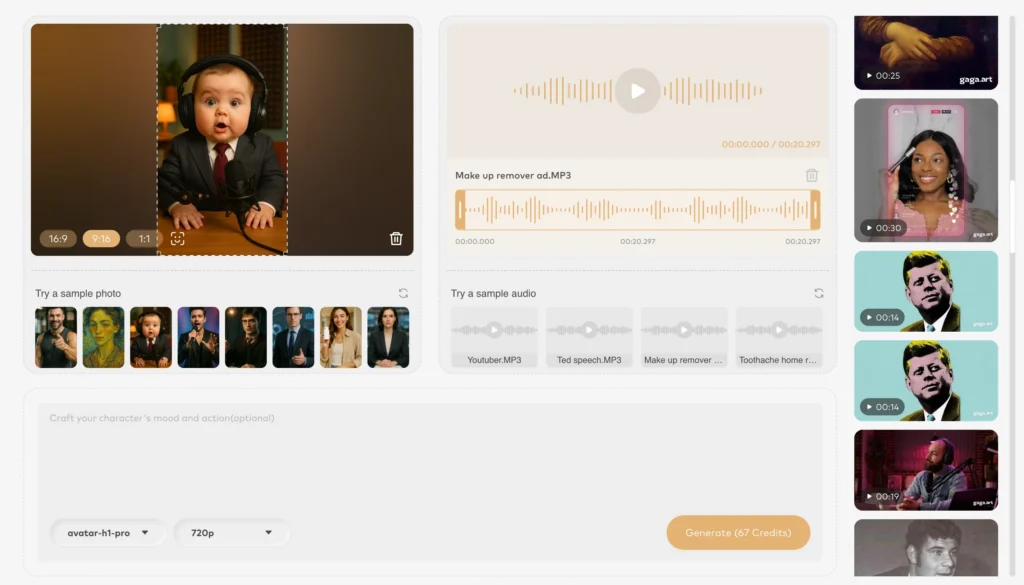
AI Voice Clone:
- Clone your voice or create unique AI voices
- Natural-sounding speech synthesis
- Emotion and tone control
- Multi-language support
Text-to-Speech (TTS):
- Convert written content to natural speech
- 100+ voice options
- Customizable speed, pitch, and emphasis
- SSML support for advanced control
Use Cases
Content Marketing:
- Create product demo videos from screenshots
- Generate social media video content at scale
- Produce explainer videos with AI narration
E-learning:
- Transform course materials into engaging video lessons
- Add AI instructor avatars to educational content
- Create multilingual training videos efficiently
Business Presentations:
- Convert slide decks into dynamic video presentations
- Add professional AI narration
- Create consistent brand video content
Creative Projects:
- Bring artwork to life with subtle animations
- Create music videos from static album art
- Produce animated storytelling content
Getting Started with Gaga AI
Visit gaga.art to start creating AI-powered videos today. Free tier available with generous limits for testing.
Final Words
Claude Opus 4.6 represents a significant leap in AI capability, particularly for coding, long-context reasoning, and autonomous agentic work. With industry-leading benchmarks, unchanged pricing, and powerful new features like Agent Teams and adaptive thinking, it’s positioned as the premier choice for developers and knowledge workers tackling complex tasks.
Key advantages:
- Unmatched coding performance (65.4% Terminal-Bench 2.0)
- Revolutionary 1M context window with 76% retrieval accuracy
- Cost-effective pricing despite capability improvements
- Enhanced safety and alignment
- Comprehensive tool ecosystem (Code, Excel, PowerPoint)
Whether you’re building production applications, conducting research, or automating knowledge work, Claude Opus 4.6 delivers the intelligence, reliability, and scalability required for demanding professional workflows.
Get started today: Visit claude.ai or access via API with model name claude-opus-4-6.
Related Posts:
 Kling 2.6 Review: The Complete AI Video Generation Guide
 Surpassing Qwen3-VL and Rivaling Gemini 3 Pro: Ai2 Releases Molmo2 – The Most Powerful Open-Source Multimodal Model Family
 Remotion Skills: The Complete Guide to AI-Powered Video Creation
 CoDance: The Breakthrough AI Framework for Multi-Subject Character Animation