Key Takeaways
- HunyuanVideo-Avatar is an open-source, audio-driven human animation model from Tencent Hunyuan + Tencent Music Entertainment Lyra Lab, published on arXiv May 26, 2025 (arXiv:2505.20156).
- It is built on a Multimodal Diffusion Transformer (MM-DiT) architecture and introduces three novel modules: a Character Image Injection Module, an Audio Emotion Module (AEM), and a Face-Aware Audio Adapter (FAA).
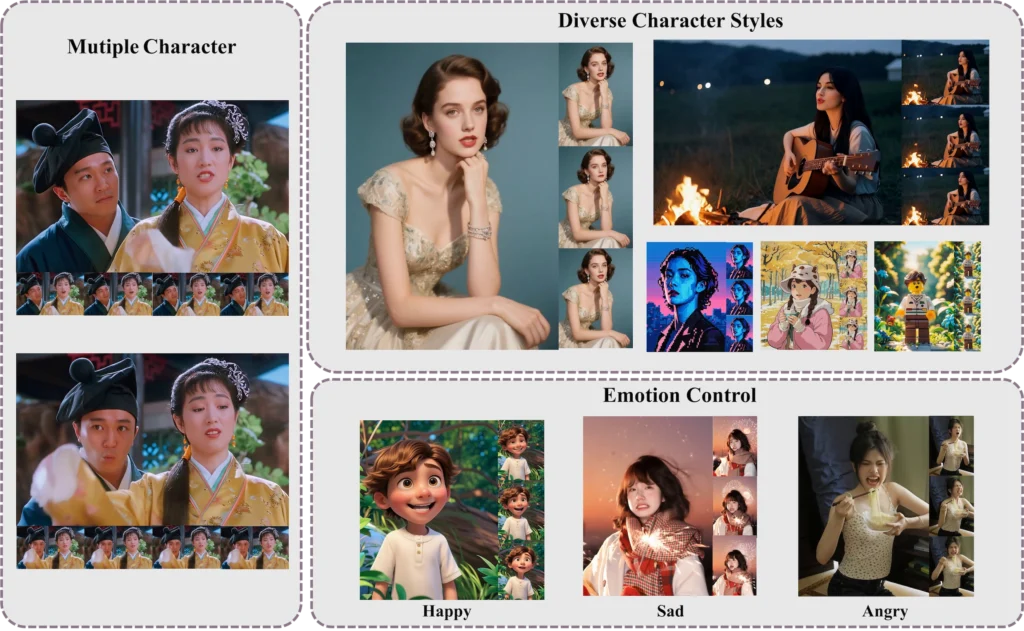
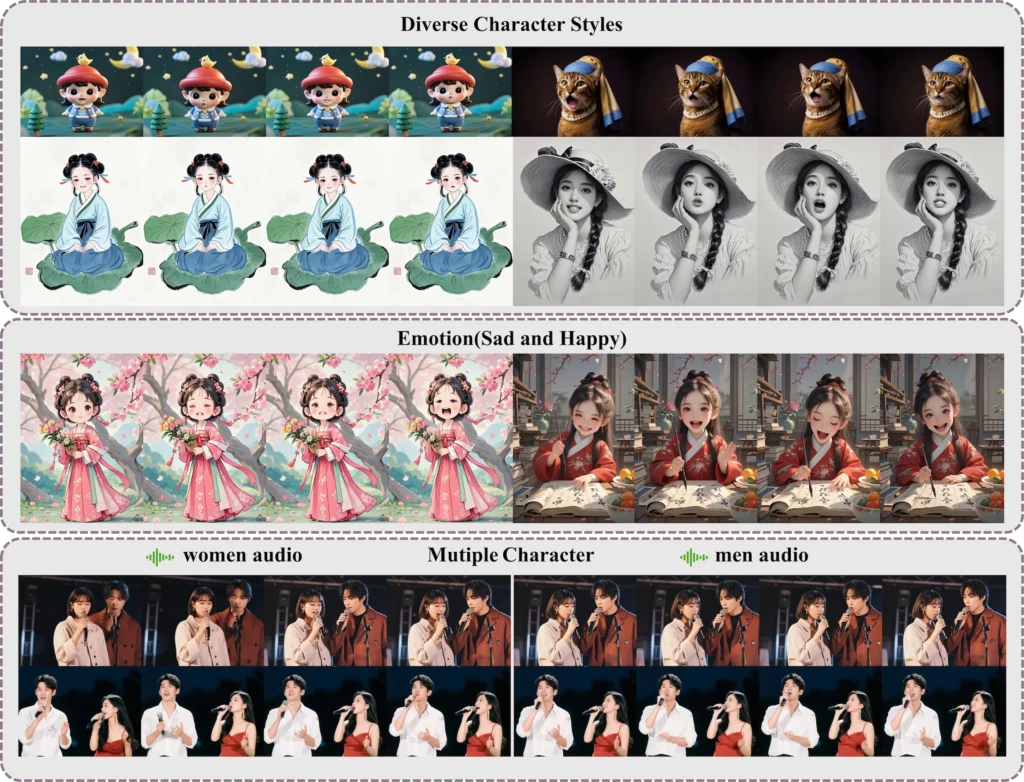
- It supports multi-character dialogue animation — multiple avatars in a single scene driven by independent audio streams, isolated via latent-level face masks.
- Input: any portrait image (photorealistic, cartoon, 3D-rendered, anthropomorphic) at arbitrary resolution + audio. Output: a high-dynamic talking-head video with synced emotion.
- Minimum GPU: 24GB VRAM (slow). Recommended: 80–96GB. Runs on 10GB VRAM via TeaCache (thanks to Wan2GP).
- Available free: GitHub (2K stars, 327 forks) · Hugging Face (324 likes) · Live demo.
- Bonus at the end: How Gaga AI pairs with HunyuanVideo-Avatar for image-to-video, audio infusion, voice cloning, and TTS.
Table of Contents
What Is HunyuanVideo-Avatar?
HunyuanVideo-Avatar is an open-source AI model that animates a single portrait image into a realistic, emotion-controlled talking avatar video — driven entirely by an audio input.
The full title is “HunyuanVideo-Avatar: High-Fidelity Audio-Driven Human Animation for Multiple Characters.” It was jointly developed by Tencent Hunyuan and Tencent Music Entertainment Lyra Lab, submitted to arXiv on May 26, 2025 (v2 revised June 3, 2025).
The model does three things that prior systems struggled with simultaneously:
- Generates highly dynamic video (natural head movement, background motion) while keeping the character identity consistent frame to frame
- Controls facial emotion based on a separate emotion reference image — not just lip sync, but actual expressive emotion transfer
- Animates multiple characters in the same scene, each driven by an independent audio stream, without cross-character bleed
Authors: Yi Chen, Sen Liang, Zixiang Zhou, Ziyao Huang, Yifeng Ma, Junshu Tang, Qin Lin, Yuan Zhou, Qinglin Lu
Where to find it:
- 💻 GitHub: Tencent-Hunyuan/HunyuanVideo-Avatar — 2K stars, 327 forks
- 🤗 Hugging Face: tencent/HunyuanVideo-Avatar — 324 likes
- 🎮 Live demo (Tencent Hunyuan platform)
- 📄 arXiv: 2505.20156
- 🌐 Project page with video demos
Why Audio-Driven Avatar Animation Is Still Hard
Generating a talking avatar that looks and feels real requires solving three problems at once — and most existing models only solve one or two.
Problem 1: Dynamic Motion vs. Character Consistency
Most audio-driven avatar models face a trade-off: the more dynamic the motion (natural head movement, body sway, background life), the more the character’s face drifts from the original image over time. Prior methods used simple “addition-based character conditioning” — adding the reference image feature directly to the noise signal. This creates a mismatch between how the reference is used during training vs. inference, leading to identity drift in long sequences.
Problem 2: Emotion Alignment
Lip sync is solved at a basic level by most models. What isn’t solved: making the character look like they feel what they’re saying. Sad audio should produce a sad expression; excited audio should produce an energetic face. This requires extracting and transferring emotional cues — not just phoneme alignment.
Problem 3: Multi-Character Scenes
When multiple people are in a single frame, each driven by their own audio stream, the model needs to know which audio belongs to which face — and ensure the facial motion of character A doesn’t influence character B. This “audio bleed” problem is not addressed at all in most single-character avatar models.
HunyuanVideo-Avatar was specifically designed to solve all three problems, which is why the architecture introduces three new modules rather than refining an existing one.
The Three Core Innovations in HunyuanVideo-Avatar
HunyuanVideo-Avatar’s architecture is built on MM-DiT (Multimodal Diffusion Transformer) and introduces three new modules — each solving one of the three core problems above.
1. Character Image Injection Module
What it solves: Character identity drift in dynamic video.
What it does: Replaces the conventional addition-based character conditioning with a dedicated injection module. Instead of adding the character image features to the latent noise (which creates a training-inference mismatch), the injection module conditions the diffusion process in a way that’s consistent between training and inference.
Result: The character’s face, proportions, and style remain stable across all frames — even when the background moves dynamically and the head rotates significantly.
2. Audio Emotion Module (AEM)
What it solves: Emotion alignment between audio content and facial expression.
What it does: The AEM extracts emotional cues from a separate emotion reference image provided by the user. It doesn’t interpret emotion from audio waveforms directly (audio emotion recognition is imprecise); instead, it uses a visual reference to define the target emotional style, then transfers that style into the generated video conditioned on the audio.
Result: Fine-grained, accurate emotion control. A user can specify “this character should look sad” by providing a sad reference image — and the generated video will reflect that emotion while still being driven by the audio for lip sync.
3. Face-Aware Audio Adapter (FAA)
What it solves: Multi-character audio bleed.
What it does: The FAA isolates each character using a latent-level face mask — a spatial mask applied in the diffusion model’s latent space that corresponds to each character’s face region. Each character receives their audio signal via an independent cross-attention mechanism, routed through their own face mask. This prevents audio signal for character A from influencing the facial motion of character B.
Result: True multi-character animation — two or more avatars in the same video frame, each with independent lip sync and motion, without interference.
What HunyuanVideo-Avatar Can Generate
HunyuanVideo-Avatar accepts any portrait image style and generates video at multiple scales — portrait, upper-body, or full-body.
Supported Input Styles
- Photorealistic — standard photography portraits
- Cartoon / Illustrated — 2D anime, flat-art, comic styles
- 3D Rendered — CGI characters, game assets
- Anthropomorphic — non-human characters with human-like features
Supported Output Scales
- Portrait — face and neck, tight frame
- Upper-body — shoulders and above
- Full-body — complete figure with environment
Key Generation Characteristics
- High-dynamic foreground and background — not a static background with a moving face
- Arbitrary input resolution and scale (no fixed crop requirement)
- Emotion-controllable via reference image
- Multi-character support via FAA
Use Cases
- E-commerce — product presenters, virtual salespeople
- Online streaming — virtual streamers and VTubers
- Social media content — animated profile videos, scripted short-form
- Video content creation and editing — dialogue scenes with multiple AI characters
- Education and training — AI instructors from any portrait
- Entertainment — animated historical figures, fictional characters
System Requirements
HunyuanVideo-Avatar requires an NVIDIA GPU with CUDA support. The minimum for any inference is 24GB VRAM; the recommended setup for quality output is 80–96GB VRAM.
| Setup | GPU Memory | Speed | Notes |
| Minimum (standard) | 24GB | Very slow | 704×768, 129 frames |
| Recommended | 80–96GB | Production speed | Full quality output |
| Low VRAM (FP8 + CPU offload) | < 24GB | Slow | –cpu-offload flag |
| Ultra-low VRAM (TeaCache) | 10GB | Moderate | Via Wan2GP integration |
Tip: If you experience OOM (out-of-memory) errors on an 80GB GPU, reduce input image resolution. The model was tested on an 8-GPU machine.
Software requirements:
- OS: Linux (tested; Windows not officially supported)
- CUDA: 12.4 (recommended) or 11.8
- Python: 3.10.9
- PyTorch: 2.4.0
- Flash Attention v2.6.3 (for acceleration)
How to Install HunyuanVideo-Avatar: Step-by-Step
HunyuanVideo-Avatar installs via conda + pip on Linux. A Docker image is also available for the fastest path to inference.
Option A: Install from Scratch (Linux)
Step 1 — Clone the repository:
git clone https://github.com/Tencent-Hunyuan/HunyuanVideo-Avatar.git
cd HunyuanVideo-Avatar
Step 2 — Create and activate the conda environment:
conda create -n HunyuanVideo-Avatar python==3.10.9
conda activate HunyuanVideo-Avatar
Step 3 — Install PyTorch:
# For CUDA 12.4 (recommended)
conda install pytorch==2.4.0 torchvision==0.19.0 torchaudio==2.4.0 pytorch-cuda=12.4 -c pytorch -c nvidia
# For CUDA 11.8
conda install pytorch==2.4.0 torchvision==0.19.0 torchaudio==2.4.0 pytorch-cuda=11.8 -c pytorch -c nvidia
Step 4 — Install pip dependencies:
python -m pip install -r requirements.txt
Step 5 — Install Flash Attention (recommended for speed):
python -m pip install ninja
python -m pip install git+https://github.com/Dao-AILab/flash-attention.git@v2.6.3
Option B: Docker (Fastest Setup)
# CUDA 12.4 (recommended — avoids float point exceptions)
docker pull hunyuanvideo/hunyuanvideo:cuda_12
docker run -itd –gpus all –init –net=host –uts=host –ipc=host \
–name hunyuanvideo –security-opt=seccomp=unconfined \
–ulimit=stack=67108864 –ulimit=memlock=-1 –privileged \
hunyuanvideo/hunyuanvideo:cuda_12
# Then install additional packages inside the container:
pip install gradio==3.39.0 diffusers==0.33.0 transformers==4.41.2
For CUDA 11.8, replace cuda_12 with cuda_11 in the pull command.
Step 6 — Download Pretrained Model Weights
Follow the download instructions in the official README weights section. Place the downloaded checkpoints in the ./weights directory as specified.
The checkpoint structure expected:
weights/
└── ckpts/
└── hunyuan-video-t2v-720p/
└── transformers/
├── mp_rank_00_model_states.pt ← full precision
└── mp_rank_00_model_states_fp8.pt ← FP8 (single GPU)
How to Run Inference
Multi-GPU Inference (Recommended for Quality)
8-GPU parallel inference — best output quality:
cd HunyuanVideo-Avatar
export PYTHONPATH=./
export MODEL_BASE=”./weights”
checkpoint_path=${MODEL_BASE}/ckpts/hunyuan-video-t2v-720p/transformers/mp_rank_00_model_states.pt
torchrun –nnodes=1 –nproc_per_node=8 –master_port 29605 hymm_sp/sample_batch.py \
–input ‘assets/test.csv’ \
–ckpt ${checkpoint_path} \
–sample-n-frames 129 \
–seed 128 \
–image-size 704 \
–cfg-scale 7.5 \
–infer-steps 50 \
–use-deepcache 1 \
–flow-shift-eval-video 5.0 \
–save-path ./results
Single-GPU Inference (FP8 Mode)
export PYTHONPATH=./
export MODEL_BASE=./weights
export DISABLE_SP=1
checkpoint_path=${MODEL_BASE}/ckpts/hunyuan-video-t2v-720p/transformers/mp_rank_00_model_states_fp8.pt
CUDA_VISIBLE_DEVICES=0 python3 hymm_sp/sample_gpu_poor.py \
–input ‘assets/test.csv’ \
–ckpt ${checkpoint_path} \
–sample-n-frames 129 \
–seed 128 \
–image-size 704 \
–cfg-scale 7.5 \
–infer-steps 50 \
–use-deepcache 1 \
–flow-shift-eval-video 5.0 \
–save-path ./results-single \
–use-fp8 \
–infer-min
Very Low VRAM Mode (CPU Offload)
export CPU_OFFLOAD=1
CUDA_VISIBLE_DEVICES=0 python3 hymm_sp/sample_gpu_poor.py \
–input ‘assets/test.csv’ \
–ckpt ${checkpoint_path} \
–sample-n-frames 129 \
–seed 128 \
–image-size 704 \
–cfg-scale 7.5 \
–infer-steps 50 \
–use-deepcache 1 \
–flow-shift-eval-video 5.0 \
–save-path ./results-poor \
–use-fp8 \
–cpu-offload \
–infer-min
10GB VRAM Mode (TeaCache via Wan2GP)
HunyuanVideo-Avatar now supports 10GB VRAM single-GPU inference thanks to the Wan2GP integration with TeaCache. Check the Wan2GP repository for the specific launch instructions — no quality degradation reported.
Gradio Web UI
cd HunyuanVideo-Avatar
bash ./scripts/run_gradio.sh
Opens a local browser UI. No .csv file preparation required — you interact directly with the interface.
Input Format
Inference input uses a .csv file (assets/test.csv) specifying:
- Portrait image path
- Audio file path
- (Optional) Emotion reference image path
- Output resolution and frame count settings
Refer to the assets/ folder in the repo for working examples before modifying for your own content.
Common Problems and Fixes
Float Point Exception (Core Dump) on Startup
Cause: cuBLAS / cuDNN version mismatch on certain GPU types.
Fix Option 1 — Update cuBLAS:
pip install nvidia-cublas-cu12==12.4.5.8
export LD_LIBRARY_PATH=/opt/conda/lib/python3.8/site-packages/nvidia/cublas/lib/
Fix Option 2 — Force CUDA 11.8 packages:
pip uninstall -r requirements.txt
pip install torch==2.4.0 –index-url https://download.pytorch.org/whl/cu118
pip install -r requirements.txt
pip install ninja
pip install git+https://github.com/Dao-AILab/flash-attention.git@v2.6.3
Out of Memory (OOM) on 80GB GPU
Cause: Input image resolution is too high for the available VRAM budget.
Fix: Reduce image resolution before passing as input. The model has no fixed minimum resolution, so scaling down the portrait image directly reduces peak VRAM usage.
Character Identity Drifts Mid-Video
Cause: This was the core problem in prior models, which the Character Image Injection Module addresses. If drift still occurs, it likely indicates the reference image has conflicting or ambiguous identity signals (e.g., heavy post-processing, non-frontal poses).
Fix: Use a clean, front-facing, well-lit portrait as the character reference. Avoid heavily filtered or stylized images unless the output style is intentionally artistic.
Multi-Character Audio Bleed
Cause: Incorrect face mask assignment in the input CSV, or face regions overlapping significantly.
Fix: Ensure each character’s face region is correctly defined in the input. The FAA uses latent-level face masks — verify the spatial coordinates match each character’s face position in the frame.
HunyuanVideo-Avatar vs. Other Talking Avatar Models
HunyuanVideo-Avatar is the only open-source model that simultaneously addresses high-dynamic generation, emotion controllability, and multi-character animation in a single framework.
| Feature | HunyuanVideo-Avatar | SadTalker | EMO | AniPortrait |
| Architecture | MM-DiT | 3DMM + diffusion | Diffusion | Diffusion |
| Multi-character support | ✅ Yes (FAA) | ❌ No | ❌ No | ❌ No |
| Emotion reference control | ✅ Yes (AEM) | Limited | Limited | ❌ No |
| Character identity stability | ✅ Strong (injection module) | Moderate | Good | Moderate |
| Input style variety | ✅ Photo/cartoon/3D/anthro | Photo mainly | Photo mainly | Photo mainly |
| Min VRAM | 10GB (TeaCache) | ~6GB | ~16GB | ~8GB |
| Open-source | ✅ Yes | ✅ Yes | ❌ No | ✅ Yes |
| Live demo available | ✅ Yes | Limited | ❌ | ❌ |
The gap is largest on multi-character support — no other open-source model in this space handles it at the architecture level.
Bonus: Go Further with Gaga AI
HunyuanVideo-Avatar animates your portrait with audio. Gaga AI takes that output and builds a full video production around it — adding generated backgrounds, original audio, a cloned voice, and TTS narration.

The four Gaga AI modules that pair most directly with a HunyuanVideo-Avatar workflow:
Image-to-Video AI
Gaga AI’s image-to-video engine generates a cinematic motion sequence from a single still image — including AI-generated backgrounds to composite behind your HunyuanVideo-Avatar character.
Take a background scene image — a studio, an outdoor environment, a branded space — and prompt Gaga AI to animate it: “slow zoom into a softly lit studio interior” or “city skyline at sunset with subtle wind motion.” The result is a moving background that wraps your avatar in a fully dynamic scene.
Best for: Music video backdrops, branded content, social media video series, virtual studio setups.
Video and Audio Infusion
Gaga AI analyzes the combined video output from HunyuanVideo-Avatar and generates or binds synchronized audio — ambient sound, music, or environmental effects matched to the visual scene.
After the avatar animation is rendered, Gaga AI’s audio infusion layer adds the surrounding audio context: the hum of a crowd, background music, or environmental sound. This transforms an audio-driven avatar clip into a complete audiovisual experience.
Best for: Final production assembly, social video publishing, short-form content at scale.
AI Avatar (Gaga AI’s own avatar system)
Gaga AI offers its own avatar generation system — complementary to HunyuanVideo-Avatar — for cases where you need a synthetic presenter generated from scratch rather than animated from a photo.
Where HunyuanVideo-Avatar starts from a real portrait image and animates it, Gaga AI’s avatar system creates the presenter from text or minimal reference, then drives it with audio. The two tools cover different ends of the same workflow spectrum.
Best for: Cases where no source portrait exists, AI influencer creation, scalable presenter content.
AI Voice Clone + TTS
Gaga AI clones a target speaker’s voice from a short audio sample and generates narration, dialogue, or commentary in that voice from any text input.
Workflow with HunyuanVideo-Avatar:
- Record 30–60 seconds of your presenter’s voice
- Clone the voice in Gaga AI
- Write the script as text
- Generate narration in the cloned voice
- Feed that audio into HunyuanVideo-Avatar as the driving audio input
- The avatar’s lips and emotion sync to the cloned voice output
This is the pipeline for creating fully synthetic presenter videos where the speaker never re-records after the initial voice sample — including for multilingual versions.
Best for: Multilingual content production, AI spokesperson series, scalable narration at volume.
The Complete Pipeline
Portrait Image + Script Text
↓
Gaga AI Voice Clone + TTS ── Generate natural narration in cloned voice
↓
HunyuanVideo-Avatar ── Animate portrait with AEM emotion + FAA multi-char
↓
Gaga AI Image-to-Video ── Animate the background scene
↓
Gaga AI Audio Infusion ── Add ambient audio, music, environmental sound
↓
Final Video ── Studio-quality AI presenter content, no studio required
Frequently Asked Questions
What is HunyuanVideo-Avatar?
HunyuanVideo-Avatar is an open-source audio-driven human animation model from Tencent Hunyuan and Tencent Music Entertainment Lyra Lab. It takes a portrait image and an audio clip as input and generates a realistic talking avatar video with emotion control and multi-character support. The paper was submitted to arXiv on May 26, 2025 (arXiv:2505.20156).
What makes HunyuanVideo-Avatar different from other talking avatar models?
HunyuanVideo-Avatar introduces three architectural innovations not found together in any other open-source model: (1) a Character Image Injection Module for stable character identity in dynamic video, (2) an Audio Emotion Module (AEM) for emotion transfer via a reference image, and (3) a Face-Aware Audio Adapter (FAA) that enables true multi-character animation with independent audio streams.
Does HunyuanVideo-Avatar support cartoon or non-photorealistic characters?
Yes. HunyuanVideo-Avatar supports photorealistic, cartoon/illustrated, 3D-rendered, and anthropomorphic character styles at arbitrary input resolutions. It is not limited to realistic photographs.
What GPU do I need to run HunyuanVideo-Avatar?
The minimum is 24GB VRAM, though this is described as “very slow.” The recommended setup is 80–96GB VRAM for quality output. A 10GB VRAM option is available via the Wan2GP TeaCache integration, added June 6, 2025.
Is HunyuanVideo-Avatar free?
Yes. The inference code and model weights are open-source, released May 28, 2025. A live cloud demo is also available on the Tencent Hunyuan platform at no cost for testing.
Does HunyuanVideo-Avatar work on Windows?
The officially tested operating system is Linux. Windows is not officially supported. Users attempting Windows installation should expect unsupported configuration issues.
What is the Audio Emotion Module (AEM)?
The AEM is a component of HunyuanVideo-Avatar that extracts emotional style from a user-provided emotion reference image and transfers it to the generated video. This allows precise control over the character’s facial expressions — independent of the emotional content of the driving audio — enabling fine-grained emotion direction.
What is the Face-Aware Audio Adapter (FAA)?
The FAA is the module that enables multi-character animation. It uses a latent-level face mask to isolate each character’s face region in the diffusion model’s latent space, then routes each character’s audio signal through a dedicated cross-attention mechanism. This prevents audio intended for one character from influencing another character’s facial motion.
Can HunyuanVideo-Avatar generate full-body video?
Yes. The model supports portrait (face/neck), upper-body, and full-body generation scales.
How do I cite HunyuanVideo-Avatar in research?
@misc{chen2025hunyuanvideoavatarhighfidelityaudiodrivenhuman,
title={HunyuanVideo-Avatar: High-Fidelity Audio-Driven Human Animation for Multiple Characters},
author={Yi Chen and Sen Liang and Zixiang Zhou and Ziyao Huang and Yifeng Ma
and Junshu Tang and Qin Lin and Yuan Zhou and Qinglin Lu},
year={2025},
eprint={2505.20156},
archivePrefix={arXiv},
primaryClass={cs.CV},
url={https://arxiv.org/abs/2505.20156},
}
Is ComfyUI support available for HunyuanVideo-Avatar?
ComfyUI support is on the official open-source roadmap but has not been released yet. Check the GitHub repository for current status.
Official Resources
| Resource | Link |
| Project Page (video demos) | hunyuanvideo-avatar.github.io |
| GitHub Repository | Tencent-Hunyuan/HunyuanVideo-Avatar |
| Hugging Face Model | tencent/HunyuanVideo-Avatar |
| Live Cloud Demo | Tencent Hunyuan Platform |
| arXiv Paper | arxiv.org/abs/2505.20156 |
| Wan2GP (10GB VRAM support) | Wan2GP on Hugging Face |