Key Takeaways
- Seedream 5.0 Preview launched February 10, 2026, across CapCut, Jianying, and Dreamina platforms
- Supports 2K direct output and 4K AI-enhanced resolution for professional-grade images
- First ByteDance model with web search integration for knowledge-driven image generation
- Positioned as a cost-effective alternative to Nano Banana Pro with 20 free generations
- Focuses on practical improvements: prompt accuracy, detail rendering, and precise editing controls
Table of Contents
What Is Seedream 5.0?
Seedream 5.0 Preview is ByteDance’s newest text-to-image AI model that generates high-resolution visuals from text prompts. Released in February 2026, it represents an incremental upgrade from Seedream 4.5 (launched December 2024), emphasizing intelligence and practical utility over purely aesthetic improvements.
The model is integrated into multiple ByteDance products: CapCut (international video editor), Jianying (Chinese version), Xiaoyunque (AI creation platform), and Dreamina (dedicated AI image platform). Users can access 20 free generations, with full availability planned for all regions except the U.S. initially.
Core positioning: ByteDance markets Seedream 5.0 as a competitor to DeepMind’s Nano Banana Pro, but at a lower price point with stronger Chinese language capabilities.
How Seedream 5.0 Differs from Previous Versions
Three Major Capability Enhancements
1. Web-Connected Knowledge Integration
Seedream 5.0 introduces real-time web search functionality, allowing the AI to reference current events, trending topics, and domain-specific knowledge when generating images. This addresses a critical limitation in earlier versions that relied solely on training data.
Example use case: When prompted to “generate a poster of 2026 Super Bowl LX,” the model attempts to search for actual announcements rather than creating generic robot imagery.

2. Enhanced Prompt Understanding and Accuracy
The model demonstrates improved comprehension of:
- Abstract concepts (“tranquil tech aesthetic with sunset ambiance”)
- Complex instructions (multi-element scenes with specific spatial arrangements)
- Stylistic nuances (distinguishing between modern, vintage, and cartoon styles)
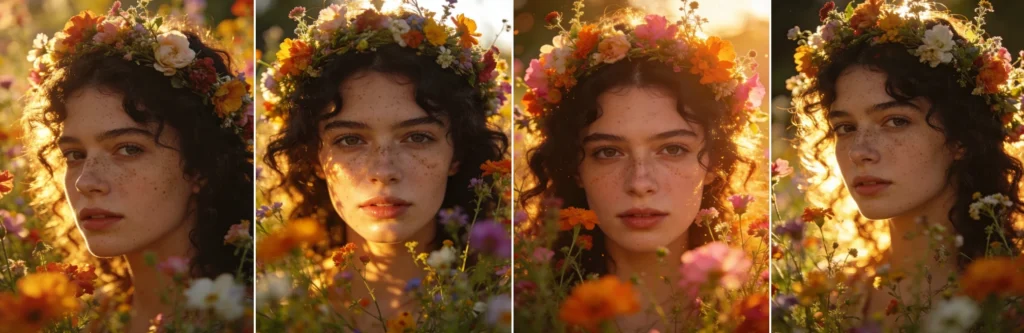
Real-world test: The prompt “close-up cinematic portrait of a young woman with freckles and dark curly hair, surrounded by vibrant wildflowers, wearing a floral crown, shot during golden hour with warm backlighting creating a halo on her hair and skin” produced accurate results including proper backlight rendering, skin glow, and foreground bokeh effects.
3. Precise Control and Editing Features
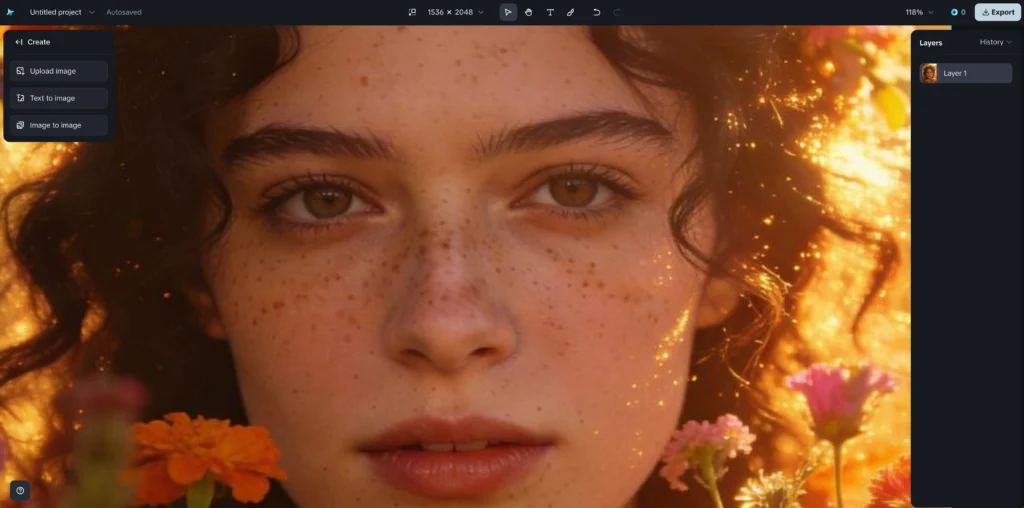
New interactive brush-based editing allows users to:
- Select specific elements within generated images
- Adjust individual components without regenerating the entire image
- Fine-tune textures, lighting, and composition post-generation
The image-to-image functionality now delivers sharper details, refined textures, and balanced lighting compared to Seedream 4.5.
Seedream 5.0 vs. Competing AI Models
Performance Comparison: Nano Banana Pro
Strengths of Seedream 5.0:
- More detailed step-by-step explanations in infographic-style outputs
- Superior Chinese language understanding
- Cost advantage (free tier vs. paid-only competitors)
Where Nano Banana Pro leads:
- Stronger artistic design sensibility
- More consistent handling of complex spatial logic (e.g., “person writing with left hand, analog clock showing 5:25 in background”)
User verdict from X/Twitter feedback: “Seedream 5.0 prioritizes intelligence over aesthetics—better for knowledge-driven tasks than purely creative work.”
Seedream 5.0 vs. Seedream 4.5
When tested with the prompt “generate a cartoon-style recipe card for tomato scrambled eggs,” Seedream 5.0 produced noticeably improved:
- Overall layout design and visual hierarchy
- Compositional balance and spacing
- Color coordination and aesthetic appeal
However, the improvements are incremental. Some users describe the upgrade as “0.09 points of progress” or “essentially Seedream 4.5 with web search added.”
How to Use Seedream 5.0: Step-by-Step Guide
Getting Started (3 Simple Steps)
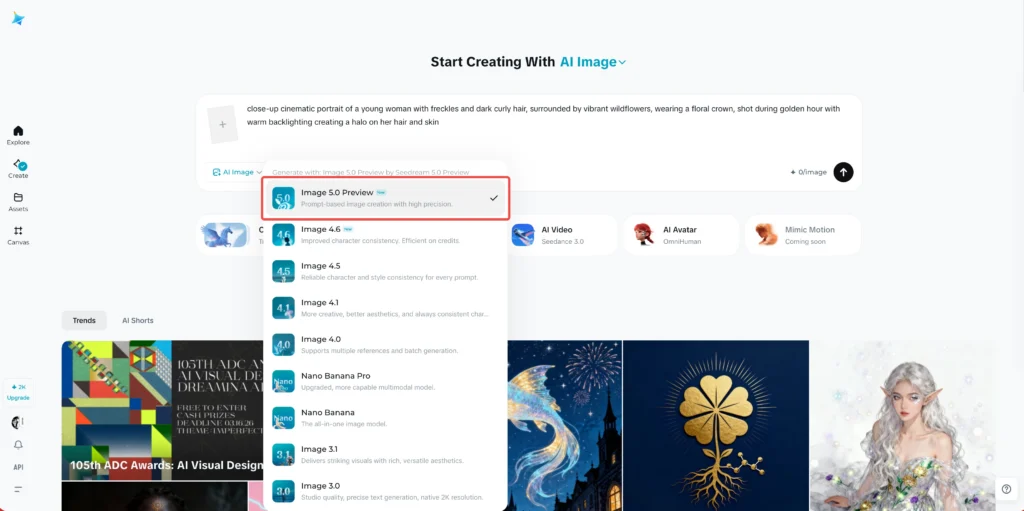
Step 1: Access the Platform
- Open CapCut (international), Jianying (China), or Dreamina platform
- Navigate to AI Image generation section
- Select Image 5.0 model (powered by Seedream 5.0)
- Choose aspect ratio and resolution (2K for direct output, 4K for AI-enhanced)
Step 2: Write Your Prompt
Effective prompting strategies:
- Be specific about style: “photorealistic,” “cartoon,” “minimalist,” “vintage poster”
- Include atmospheric details: lighting conditions, mood, color palette
- Specify composition: “close-up,” “wide-angle,” “bird’s-eye view”
- Add context for web search features: reference current events or trending topics
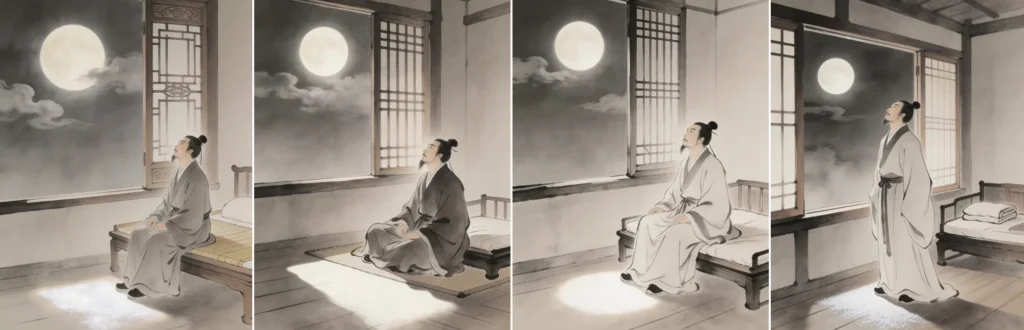
Example prompt: “Generate an ancient Chinese poetry illustration for ‘Quiet Night Thought’ by Li Bai, showing a figure looking up at the bright moon, traditional ink painting style”

Step 3: Refine and Export
- Review the 4-6 variations generated per prompt
- Use brush editing tools to adjust specific elements
- Apply AI upscaling for 4K output if needed
- Download in your preferred format
Pro tip: Seedream 5.0 generates more diverse style variations in a single batch—expect outputs ranging from photorealistic to cartoon interpretations.
Real-World Testing Results
What Seedream 5.0 Handles Well
Abstract concept interpretation: Prompts like “tranquil tech aesthetic with sunset ambiance for an alarm clock design” produced images successfully blending technological minimalism with warm sunset lighting.

Multi-element scene composition: The “Latest Oscar winner red carpet style” prompt generated complete scenes including red carpet, backdrop with Oscar statuettes, and photographers—all contextually accurate.

Reference-based generation: Uploading a photo of Jack Nicholson from “The Shining” with the instruction “generate a Chinese New Year greeting image with this person wearing festive clothing, holding lanterns and couplets” produced face-accurate results with all requested elements.
Current Limitations
Complex spatial logic failures: The challenging prompt “person writing with their left hand, analog clock showing 5:25 in the background” resulted in either incorrect hand positioning or inaccurate clock time—similar to Nano Banana Pro’s performance.
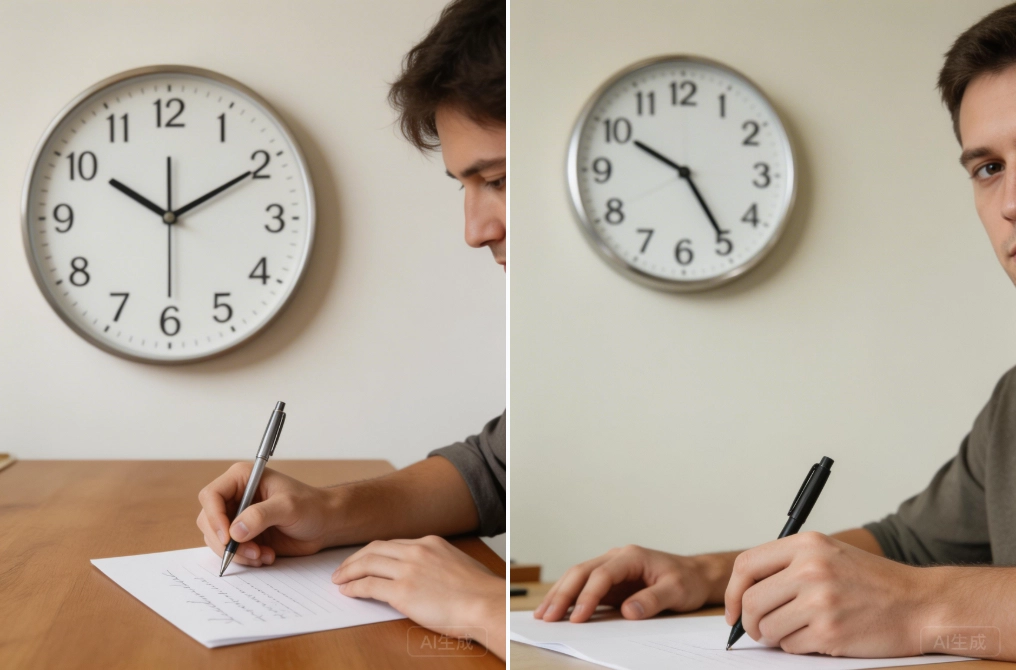
Inconsistent web search integration: When asked to generate images referencing recent events, the model sometimes produces visually appropriate imagery without actually incorporating retrieved information.
Text rendering: While improved from version 4.5, complex multi-language text within images still occasionally shows artifacts or unclear characters.
Seedream 5.0 Pricing and Availability
Free tier: 20 image generations per user (limited-time promotional offer)
Platform access:
- CapCut (international version) – available now
- Jianying – available now
- Xiaoyunque – available now
- Dreamina – gray testing phase
Geographic restrictions: U.S. market access coming later in 2026
Resolution options:
- 2K: Direct generation output
- 4K: AI-enhanced upscaling (requires additional processing time)
Bonus: Gaga AI Video Generator Integration

While Seedream 5.0 focuses on static image generation, ByteDance’s broader ecosystem includes Gaga AI for video creation. Current and upcoming features include:
Image-to-Video AI: Transform Seedream 5.0 generated images into animated sequences with motion presets.
Video and Audio Infusion: Combine generated visuals with custom soundtracks and voiceovers.
AI Avatar Creation: Design and animate custom digital characters for video content.
AI Voice Cloning: Replicate voices for consistent branding across video projects.
Text-to-Speech (TTS): Generate narration in multiple languages and vocal styles.
These tools work seamlessly within the CapCut/Jianying editing environment, allowing creators to move from concept (Seedream 5.0 images) to final video without leaving the ByteDance ecosystem.
FAQ: Common Questions About Seedream 5.0
Is Seedream 5.0 better than Seedream 4.5?
Yes, but the improvements are incremental rather than revolutionary. Seedream 5.0 offers better prompt understanding, enhanced detail rendering, web search capabilities, and improved layout design. However, users report the upgrade feels minor—described as “0.09 points of progress” by some testers.
How does Seedream 5.0 compare to Nano Banana Pro?
Seedream 5.0 is positioned as a more affordable alternative with stronger Chinese language capabilities. While Nano Banana Pro maintains superior artistic design quality, Seedream 5.0 excels at knowledge-driven tasks and provides more detailed explanations in infographic-style outputs. For complex spatial logic tasks, both models show similar limitations.
Can I use Seedream 5.0 for commercial projects?
Check the specific terms of service on each platform (CapCut, Jianying, Dreamina), as commercial usage rights may vary. ByteDance typically allows commercial use of generated content with proper attribution, but verify current licensing terms before using images in paid projects.
What resolution should I choose: 2K or 4K?
Choose 2K for faster generation and social media content where file size matters. Select 4K for print materials, large-format displays, or projects requiring maximum detail. Note that 4K uses AI upscaling rather than native generation, which may introduce minor artifacts upon close inspection.
Why isn’t my web search feature working consistently?
Web search integration is still in preview and shows variable reliability. The model may generate contextually appropriate imagery without actually retrieving current information. For best results, include specific, recent references in your prompt and verify factual accuracy manually.
Does Seedream 5.0 work better in Chinese or English?
Seedream 5.0 demonstrates stronger performance with Chinese prompts, particularly for cultural concepts, traditional aesthetics, and Mandarin text rendering. English prompts work effectively but may show slightly less nuanced understanding of Western cultural references compared to Chinese context.
How many images does Seedream 5.0 generate per prompt?
The model typically generates 4-6 variations per prompt, offering diverse interpretations ranging from photorealistic to stylized cartoon versions. This variety exceeds Seedream 4.5’s output and helps users explore different creative directions quickly.
Can I edit generated images within the platform?
Yes. Seedream 5.0 introduces interactive brush-based editing, allowing you to select and adjust specific elements within generated images. You can modify individual components, adjust textures, refine lighting, and make compositional changes without regenerating the entire image.
Conclusion: Evolution Toward Practical Intelligence
Seedream 5.0 represents the current trajectory of AI image generation: incremental refinements focused on practical utility over dramatic visual breakthroughs. ByteDance’s choice to prioritize prompt understanding, web integration, and editing precision reflects genuine user needs—faster workflows, more accurate outputs, and better control.
The model succeeds as a cost-effective production tool for content creators who need reliable, diverse outputs without constant prompt refinement. Its Chinese language capabilities and knowledge-driven generation make it particularly valuable for localized content creation and educational materials.
However, user expectations for model upgrades are rising. Minor version improvements that would have impressed audiences in 2024 now feel incremental in 2026’s competitive landscape. Seedream 5.0’s true test will be maintaining relevance as users demand both intelligence and aesthetic excellence—not as a trade-off, but as a baseline requirement.