Key Takeaways
- Pika Art (pika.art) is an AI video generator built by Pika Labs that transforms text prompts and images into polished video clips — no editing skills required.
- The latest model is Pika 2.5, supporting resolutions up to 1080p, durations up to 25 seconds, and unique effects like Pikaffects, Pikaswaps, and Pikatwists.
- Pika AI is free to start — the free plan includes 80 monthly video credits and watermark-free downloads.
- Paid plans start at $8/month (Standard, billed yearly), scaling to $76/month for Pro users.
- Pika stands out for its creative effects library — clothing swaps, scene additions, physics-defying transformations — features most competitors don’t offer.
- Bonus: Gaga AI offers a free all-in-one alternative with image-to-video, audio fusion, AI avatar, voice clone, and TTS in one platform.
Table of Contents
What Is Pika Art?
Pika Art is an AI video generation platform developed by Pika Labs, a startup founded by two Stanford dropouts in 2023. Accessible at https://pika.art, it lets anyone create video content from a text prompt or image — without a camera, editing software, or professional crew.
What makes Pika AI different from most text-to-video tools is its suite of creative transformation features. Rather than just generating footage from scratch, Pika lets you manipulate existing images and videos in ways that feel closer to visual effects than simple generation.
Pika Labs AI raised $135M in total funding (including an $80M Series B) and has grown from a Discord-only tool to a full web platform used by millions of creators worldwide.
Pika 2.5: What’s New and What Changed
Pika 2.5 is the current production model at pika.art and represents a significant upgrade over Pika 2.0 and Pika 1.5.
Key upgrades in Pika 2.5:
- Higher resolution: Full 1080p output now available on all paid plans (480p on free)
- Longer clips: Up to 25 seconds per generation via Pikaframes (previously capped at 10s)
- Better motion: More natural physics, smoother camera movement, improved subject consistency
- Improved text rendering: Pika 2.5 handles in-video text more accurately than earlier versions
- Pikaformance: Lip-sync audio up to 30 seconds — animate any portrait to speak or sing
Pika version history at a glance:
| Version | Release | Key Feature |
| Pika 1.0 | 2023 | First public web release |
| Pika 1.5 | 2024 | Improved motion quality |
| Pika 2.0 | 2024 | HD output, longer clips |
| Pika 2.5 | 2025–2026 | 1080p, 25s clips, Pikaformance |
Pika Art Features: What Can It Actually Do?
Pika Art covers far more than basic text-to-video. Here is what each feature does in plain terms:
Text-to-Video
Type a description of the scene you want — setting, subject, action, camera movement, mood. Pika 2.5 generates a video clip matching your prompt. Available at all plan levels.
Image-to-Video
Upload any still image and Pika animates it. Works with photos, illustrations, AI-generated images, and product shots. The starting frame stays true to your original image while adding realistic motion.
Pikaframes (Start/End Frame)
Define both the first and last frame of your video. Pika generates everything in between — ideal for controlled transitions, product reveals, or narrative arcs.
Pikaffects
Apply physics-defying transformation effects to any video or image:
- Melt — subject or scene appears to melt
- Explode — controlled explosive expansion
- Crush — objects compress under pressure
- Squish, deflate, inflate, and more
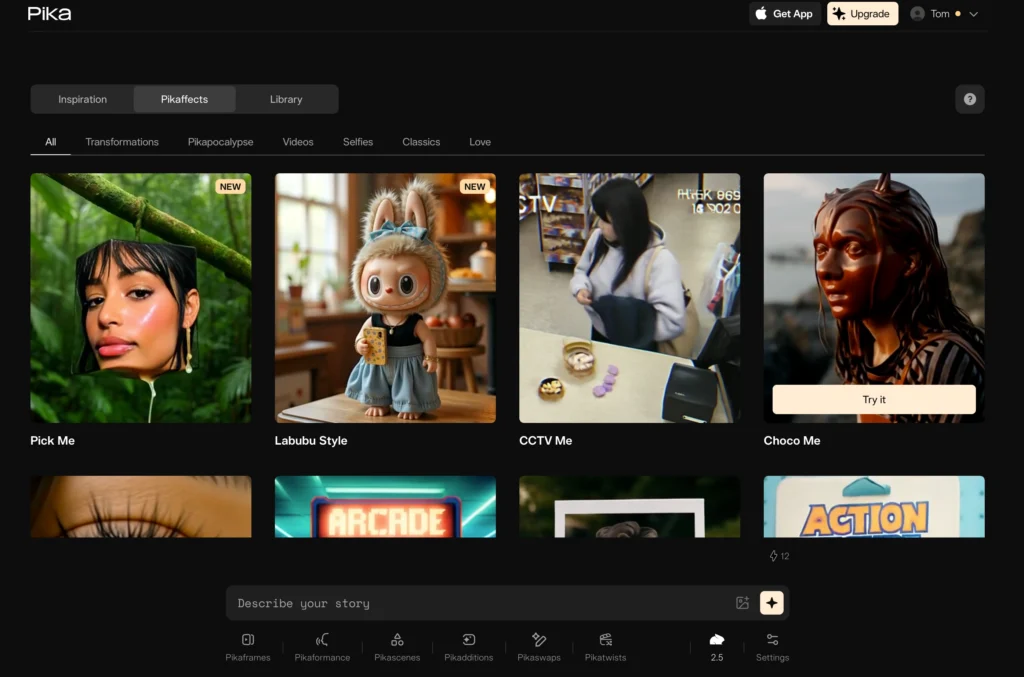
These are viral-ready effects that require no manual VFX work.
Pikaswaps
Swap clothing, objects, or scene elements in any existing video. Upload a video of a person in a red jacket — Pikaswaps can change it to a blue coat without reshooting. This is Pika’s most searched feature, directly tied to the pika clothes keyword surge.
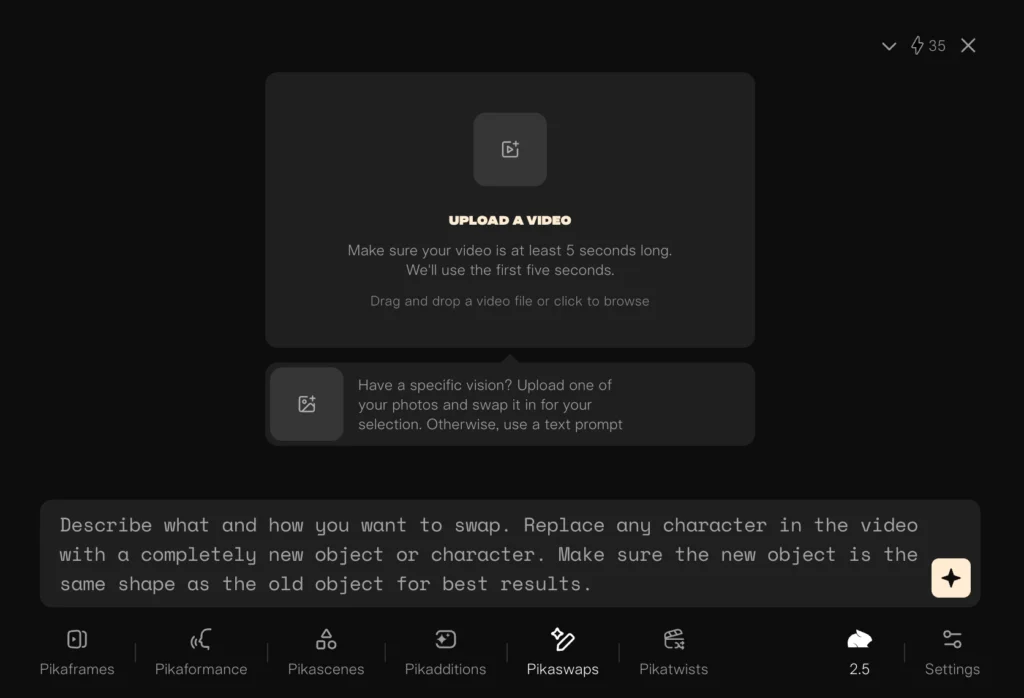
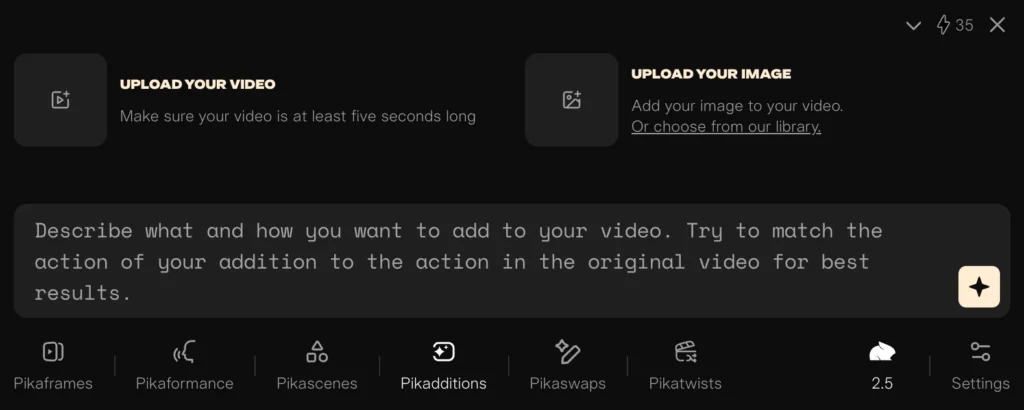
Pikadditions
Add new objects or elements to existing footage that weren’t there during filming. Add a coffee cup to a desk scene, a car to an empty street, or a prop to a product shot.
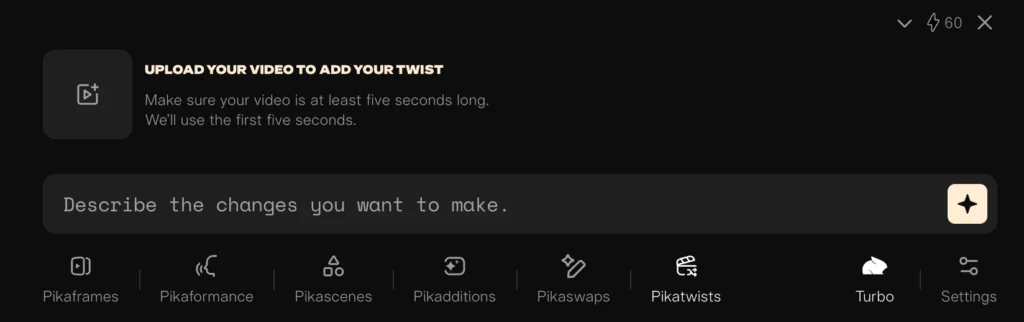
Pikatwists
Change the visual style of any video — from realistic to anime, oil painting, sketch, cinematic, or custom aesthetic. Available in Turbo (720p) and Pro (1080p) modes.
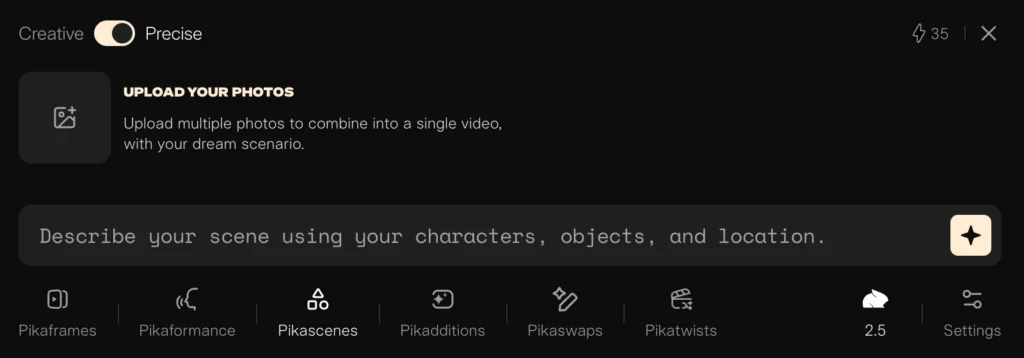
Pikascenes
Extend or change the background/environment of a video while keeping the subject intact. Transport a subject from a studio setting to a forest, beach, or urban street.
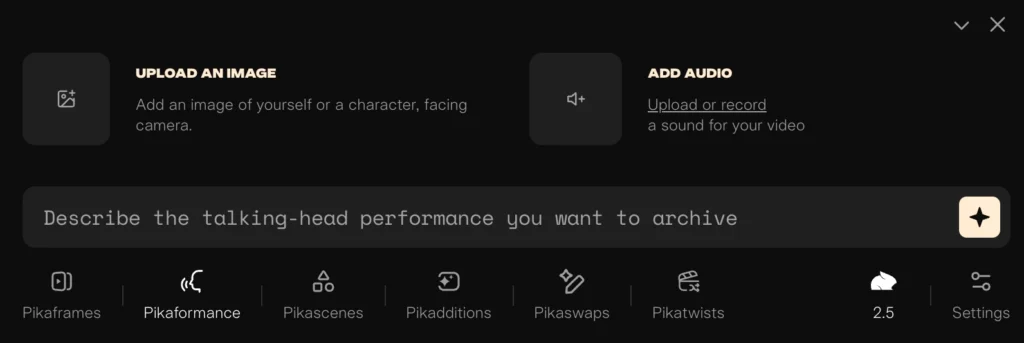
Pikaformance
Lip-sync animation: Upload a portrait photo and an audio clip. Pika generates a realistic video of the subject speaking or singing in sync with the audio — up to 30 seconds. This is the pika edition and pika artificial intelligence feature users ask about most.
How to Use Pika Art: Step-by-Step
Step 1: Go to pika.art and Log In
Navigate to https://pika.art and click Try Pika. Sign in with Google or create an account. The Pika art login process takes under 60 seconds — no credit card required for the free plan.
Step 2: Choose Your Creation Mode
From the dashboard, select the mode that matches your goal:
- Text-to-Video — write a prompt, generate from scratch
- Image-to-Video — upload an image, animate it
- Pikaffects / Pikaswaps / Pikadditions — upload existing video or image to transform
Step 3: Write a Strong Prompt
For text-to-video, be specific about:
- Subject: who or what is in the scene
- Action: what is happening
- Camera: wide shot, close-up, tracking, dolly
- Style: cinematic, photorealistic, animated, lo-fi
- Lighting: golden hour, neon, studio, overcast
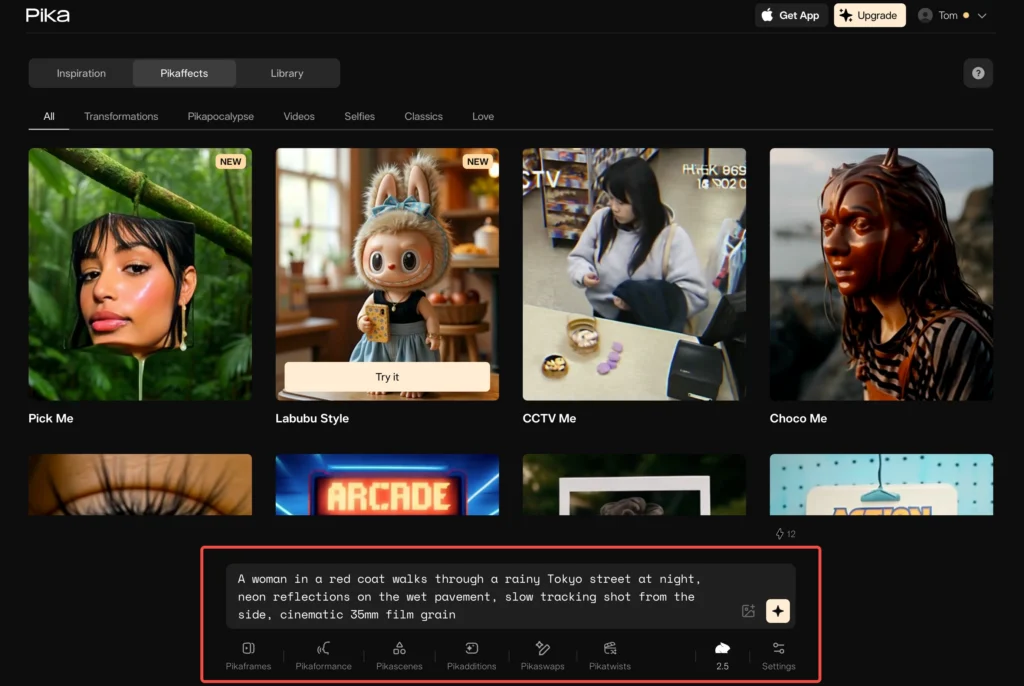
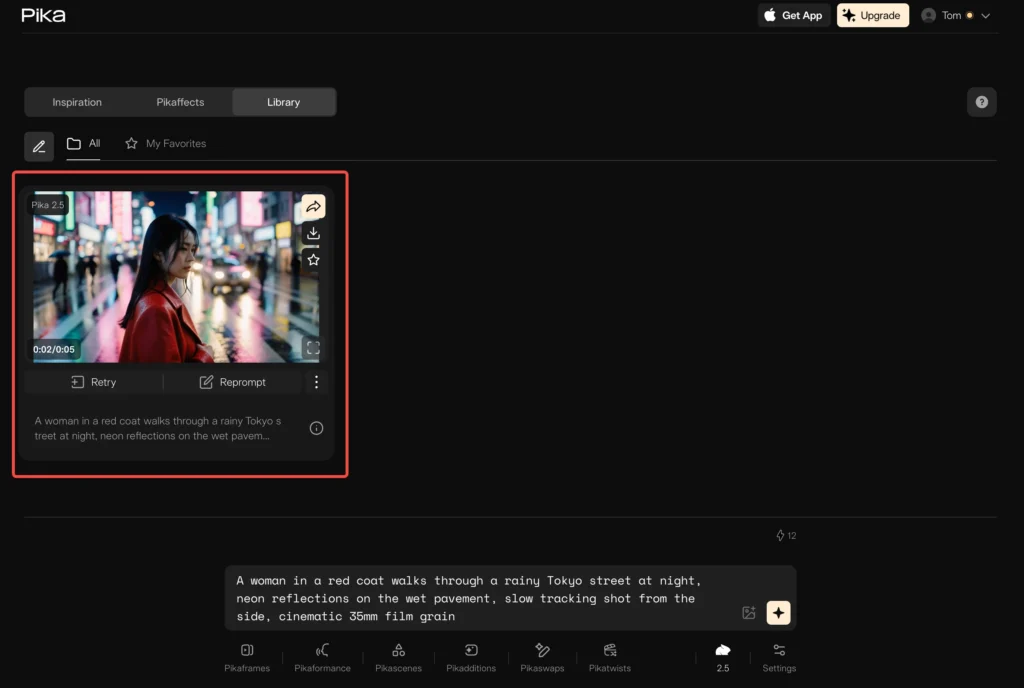
Example prompt: “A woman in a red coat walks through a rainy Tokyo street at night, neon reflections on the wet pavement, slow tracking shot from the side, cinematic 35mm film grain”
Step 4: Generate and Review
Click Generate. Free plan users get standard queue priority; paid users get fast or fastest generation. Preview the result — if it’s close but not perfect, use the Reroll button or adjust your prompt.
Step 6: Download or Share
All plans include watermark-free downloads. Export as MP4 and share directly to TikTok, Reels, YouTube Shorts, or your own platform.
Pika Art Pricing: Full Breakdown
Pika Art is free to use with 80 monthly credits. Paid plans unlock higher resolution, faster generation, and more credits.
| Plan | Price (Yearly) | Monthly Credits | Resolution | Speed |
| Free | $0 | 80 | 480p | Standard |
| Standard | $8/month | 700 | Up to 1080p | Fast |
| Pro | $28/month | 2,300 | Up to 1080p | Faster |
| Fancy | $76/month | 6,000 | Up to 1080p | Fastest |
Credit cost reference (Pika 2.5):
- Text/Image-to-Video 5s at 480p: 12 credits (free) / varies on paid
- Text/Image-to-Video 5s at 1080p: 40 credits
- Pikaffects 5s: 15 credits (free), 18 credits (paid)
- Pikatwists Pro 1080p: 80 credits
- Pikaformance: 3 credits/second
All plans include commercial use rights and no watermark on downloads.
Pika Art vs Competitors: Honest Comparison
| Feature | Pika Art | Sora 2 | Kling 2.6 | Runway Gen-4 | Luma Dream Machine |
| Free tier | ✅ 80 credits | Limited | ✅ | Limited | ✅ |
| Entry price | $8/mo | Via ChatGPT+ | $8/mo | $15/mo | $30/mo |
| Max resolution | 1080p | High | 1080p | 1080p | 1080p |
| Clothing swap | ✅ Pikaswaps | ❌ | ❌ | ❌ | ❌ |
| Physics effects | ✅ Pikaffects | ❌ | ❌ | ❌ | ❌ |
| Lip sync | ✅ Pikaformance | ❌ | Limited | ❌ | ❌ |
| Style transfer | ✅ Pikatwists | ❌ | Limited | ✅ | Limited |
| Background swap | ✅ Pikascenes | ❌ | ❌ | Limited | ❌ |
| Native audio | ❌ | ❌ | Limited | ❌ | ❌ |
| Max clip length | 25s | ~20s | ~10s | ~16s | ~15s |
Pika’s clearest advantage is its transformation feature suite — Pikaswaps, Pikaffects, Pikadditions, Pikascenes. No other mainstream AI video tool offers this level of post-generation editing capability at this price point.
Pika’s clearest gap is native audio — like most AI video tools, Pika generates silent video. For audio-enabled AI video, Veo 3 (Google) or dedicated audio tools are needed.
Common Issues and Fixes
“Pika art login not working”
Fix: Clear browser cache and cookies, then retry at pika.art. If using Google sign-in and getting an error, try a different browser or disable VPN — Pika has known issues with some VPN IP ranges.
“My video doesn’t match my prompt”
Fix: Simplify the prompt. Focus on one key action and one camera movement. Overly long prompts with multiple competing instructions reduce adherence.
“Pikaswaps isn’t replacing the right thing”
Fix: Use a clear, well-lit source video with good contrast between the subject and background. Describe exactly what to swap in your prompt: “swap the red jacket for a dark navy wool coat” — be specific about color, material, and style.
“I’m running out of credits too fast”
Fix: Use 480p for drafts and concept testing. Reserve 1080p credits for final output. Pikaffects are cheaper per credit than full text-to-video, so use them for social content.
“The video quality looks soft or blurry”
Fix: Upgrade to 720p or 1080p — 480p (free plan) naturally produces softer output. If you’re already on a paid plan, check that your source image is high-resolution (at least 1080p input).
Is Pika Art Safe and Legit?
Yes — Pika Art (pika.art) is a legitimate, VC-backed AI video company with $135M in total funding, headquartered in the United States. It has clear Terms of Service, an Acceptable Use Policy, and a Privacy Policy.
Key points:
- Commercial use is permitted on all plans including free
- Content generated with Pika AI can be published, monetized, and used in ads
- Pika does not claim ownership of your generated content
- Deepfake-style content violating the Acceptable Use Policy can result in account termination
Bonus: Gaga AI — The Free All-in-One Alternative
If you need more than video generation — specifically audio, AI avatars, and voice cloning — Gaga AI covers everything Pika doesn’t, for free.

Pika Art is purpose-built for video creativity. Gaga AI is an all-in-one AI media platform that extends into territory Pika doesn’t touch.
Image-to-Video
Like Pika’s image-to-video, Gaga AI animates any still image into a video clip with cinematic motion. No watermark on free-tier generations within the daily quota.
Video + Audio Fusion
This is where Gaga AI directly solves Pika’s biggest gap. Gaga AI generates video and synchronized audio simultaneously — ambient sound, music, and atmospheric effects matched to the visual scene. No separate audio tool needed.
AI Avatar
Generate a speaking AI avatar from a single photo. The avatar delivers scripted content in sync — ideal for product demos, explainer videos, social media presenters, and personalized sales outreach. Pika’s Pikaformance requires you to already have the audio recorded; Gaga AI generates the speech from text automatically.
AI Voice Clone
Upload a short audio sample and Gaga AI replicates that voice. The cloned voice can narrate videos, power avatars, or produce audio content — without the original speaker being present. This capability doesn’t exist anywhere in Pika’s feature set.
Text-to-Speech (TTS)
Convert any written script to natural-sounding speech across multiple voices, languages, and styles. Use it to add voiceover to your Pika-generated clips, or build fully AI-produced content entirely within Gaga AI.
When to Use Gaga AI vs Pika Art
| Need | Pika Art | Gaga AI |
| Clothing/object swap in video | ✅ Pikaswaps | ❌ |
| Physics effects (melt, explode) | ✅ Pikaffects | ❌ |
| Audio synced to video | ❌ | ✅ |
| AI avatar from photo | Limited (Pikaformance) | ✅ Full TTS avatar |
| Voice cloning | ❌ | ✅ |
| Text-to-speech voiceover | ❌ | ✅ |
| Free image-to-video | ✅ (80 credits/mo) | ✅ (daily quota) |
The smart workflow: Use Pika Art for visual creativity — transformations, effects, style changes. Use Gaga AI to add voice, audio, and avatar layers on top. Together, they cover the full AI video production stack at minimal cost.
Frequently Asked Questions
What is Pika Art?
Pika Art is an AI video generation platform at pika.art, developed by Pika Labs AI. It creates video clips from text prompts or images and offers creative transformation tools like Pikaswaps, Pikaffects, Pikatwists, and Pikaframes — all without requiring video editing skills.
Is Pika Art free?
Yes — Pika Art offers a free plan with 80 monthly video credits, watermark-free downloads, and commercial use rights. Access to 480p resolution and Pika 2.5 (limited) is included at no cost. Paid plans start at $8/month for higher resolution and more credits.
How do I log in to Pika Art?
Go to https://pika.art and click “Try Pika” or “Sign In.” Pika art login supports Google authentication and email sign-up. No credit card is required to create a free account.
What is the difference between Pika 1.5, Pika 2.0, and Pika 2.5?
Pika 2.5 is the current and most capable model. Pika 1.5 was an early upgrade with improved motion. Pika 2.0 introduced HD output. Pika 2.5 adds 1080p at all resolutions, clips up to 25 seconds, Pikaformance lip-sync, and significantly better motion realism.
What is Pikaswaps? Can Pika change clothes in a video?
Yes — Pikaswaps is Pika Art’s clothing and object swap feature. Upload a video and describe what you want replaced (e.g., “swap the hoodie for a leather jacket”). The AI replaces the specified element while preserving the rest of the footage. This is the most-searched Pika feature, tracked under the pika clothes keyword.
What is the Pika Art replacement box?
The “replacement box” refers to Pika’s Pikaswaps interface, where users draw a selection box around the object or clothing item they want to replace in their video. It allows targeted swapping of specific elements rather than the full scene.
What are the best pika.art alternatives?
The best Pika Art alternatives in 2026 include:
- Luma Dream Machine — best all-in-one workflow, video modify feature
- Kling 2.6 — strong character consistency, comparable pricing
- Runway Gen-4 — professional-grade, best for filmmakers
- Sora 2 — highest raw quality, via ChatGPT Plus
- Gaga AI — best free alternative with audio and avatar capabilities
Does Pika AI generate video with sound?
No — Pika Art generates silent video. The Pikaformance feature syncs existing audio to a portrait video, but Pika does not generate original audio or ambient sound from scratch. For AI video with audio, consider Veo 3 (Google) or Gaga AI.
Is Pika Labs AI the same as pika.art?
Yes — Pika Labs AI is the company and pika.art is their product. The platform was previously accessible at pikalabs.ai during its early Discord phase. The official URL is now https://pika.art, and pikalabs.ai redirects there.
What is a Pika Edition?
Pika Edition refers to special themed video effects or feature collections released by Pika Labs for specific creative styles or seasonal launches. These are accessed through the standard Pika 2.5 interface under special effect categories.