Key Takeaways
- HeyGen leads for avatar creation and corporate videos with photorealistic talking heads and 40+ language support
- Kling AI excels at multilingual content dubbing with processing capabilities of 5-30 seconds depending on tier (Hedra integration allows 5-10 seconds on free plans)
- Runway provides professional-grade controls for video editors requiring frame-accurate synchronization in 4K
- Pika specializes in image-to-video transformation making it ideal for animating static photos and illustrations
- Free options exist but have limitations: Gaga AI, Hedra, D-ID trial credits, and open-source tools like Wav2Lip require technical expertise
- Pricing ranges from $0 (limited free tiers) to $300+/month for professional subscriptions with unlimited generation
- Selection criteria depend on your use case: avatar creation, video dubbing, real-time streaming, or artistic animation
Table of Contents
What Makes a Lip Sync AI Tool “The Best”?
The best lip sync AI tools deliver accurate phoneme-to-viseme mapping, maintain visual quality without artifacts, and provide user-friendly workflows for non-technical creators. Superior platforms balance synchronization precision with identity preservation—ensuring the subject still looks natural after processing.
Critical Evaluation Criteria
When comparing lip sync AI platforms, assess these factors:
1. Synchronization accuracy: Mouth movements must align within 50 milliseconds of audio for natural perception
2. Visual fidelity: No visible blurriness, warping, or flickering around the mouth region
3. Temporal consistency: Quality remains stable across all frames without sudden degradation
4. Language support: Phonetic models trained on target languages perform significantly better
5. Processing speed: Generation time affects workflow efficiency
6. Ease of use: Intuitive interfaces reduce learning curves
7. Output quality: Resolution, format options, and export flexibility
8. Cost structure: Credit systems vs. subscriptions vs. enterprise licensing
Top Lip Sync AI Tools: Detailed Comparison
1. Gaga AI / Gaga-1: Best for Temporal Consistency
Gaga AI represents next-generation lip sync technology with superior temporal stability, reducing flickering and maintaining quality across extended sequences.
Key Strengths:
- Video and audio infusion
- Image to video AI capability and text to video AI capability
- Voice clone and voice reference provided
- Cinematic avatar expression and emotion performance
- The built-in nano-banana image generator for the first keyframe creation
- Fast generation (in 4 minutes for 10s video)
- Flexible aspect ratio – 16:9, 9:16. 1:1 and resolution – 720p and 1080p
- Free trial available now
- Minimal frame-to-frame inconsistency
- Improved preservation of original video texture
- Reduced computational artifacts
Ideal Use Cases:
- Long-form content requiring extended synchronization
- Scenes with multiple speaking characters
- High-quality archival footage restoration
- Professional broadcasting applications
Pricing:
- Expected commercial pricing: $0-$39/month (projected)
Technical Advantages:
- 20% reduction in visible artifacts compared to previous generation
- 30% faster processing with equivalent quality
- Support for variable frame rates (24-60 fps)
Limitations:
- Limited public availability
- Requires higher computational resources
- Improving multi-speaker scene processing
- Videos with dynamic camera movement needs improve
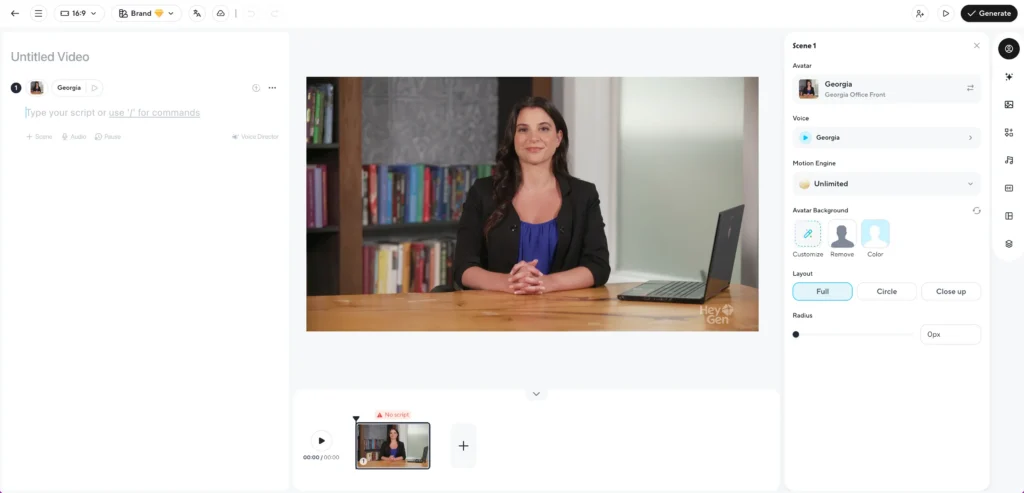
2. HeyGen: Best for Avatar Creation and Business Videos
HeyGen specializes in transforming still photos into photorealistic talking avatars, making it the top choice for corporate communications, training videos, and personalized marketing at scale.
Key Strengths:
- Creates custom avatars from a single reference photo in under 5 minutes
- Supports 40+ languages with automatic text translation
- Includes voice cloning capabilities for consistent brand voice
- Offers pre-built avatar library for quick deployment
- Studio-quality rendering with professional lighting and backgrounds
Ideal Use Cases:
- Sales teams creating personalized video outreach
- HR departments producing multilingual training content
- Marketing agencies scaling video ads across markets
- Educators building course content without on-camera time
- Virtual presenters for automated news or weather updates
Pricing:
- Free tier: 1 credit (approximately 1 minute of video)
- Creator plan: $29/month for 15 credits
- Business plan: $89/month for 30 credits + API access
- Enterprise: Custom pricing for unlimited generation
Limitations:
- Less effective for modifying existing video footage
- Avatar quality depends heavily on input photo resolution
- Voice cloning requires 2+ minutes of audio samples
- Limited control over facial expressions beyond lip sync
Processing Speed: 1-3 minutes for 30-second avatar videos
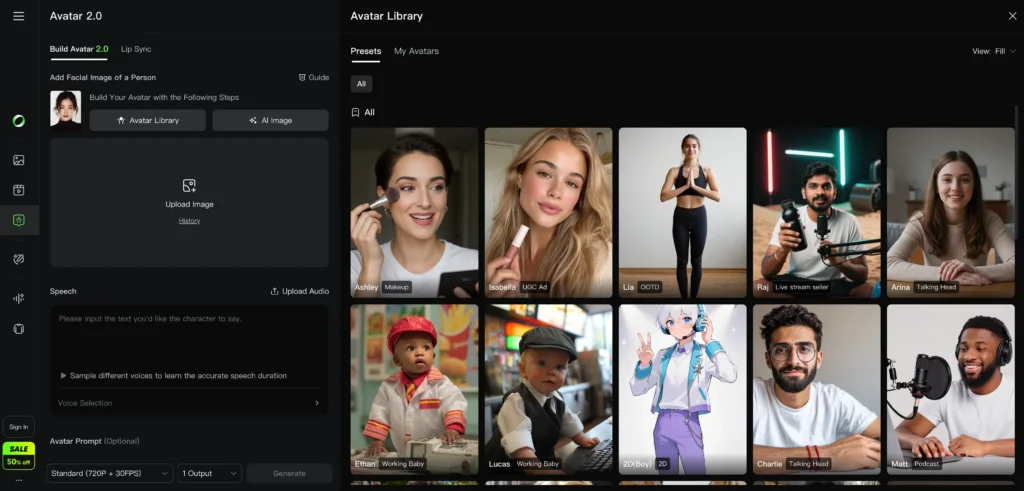
3. Kling AI: Best for Multilingual Video Dubbing
Kling AI delivers professional-quality video-to-video lip synchronization with exceptional multilingual performance, making it the preferred platform for content localization and international distribution.
Key Strengths:
- Maintains original facial expressions while replacing audio
- Handles complex phonetics across 30+ languages
- Preserves head movements and natural body language
- Integrates with Hedra for extended capabilities (5-10 seconds on free tier, up to 30 seconds on paid plans)
- Minimal identity drift compared to competitors
Ideal Use Cases:
- YouTube creators expanding to international audiences
- Film studios dubbing content for global release
- E-learning platforms translating course videos
- Advertising agencies adapting campaigns across regions
- Documentarians replacing voiceovers while maintaining authenticity
Pricing:
- Free tier: 10 credits (varies by video length; typical range 5-10 seconds per generation)
- Standard plan: $49/month for 200 credits
- Pro plan: $149/month for 1,000 credits
- Studio plan: $499/month for unlimited generation
Technical Specifications:
- Maximum input resolution: 4K (3840 x 2160)
- Supported formats: MP4, MOV, AVI
- Processing time: 30 seconds per 10 seconds of video
Limitations:
- Requires clear facial visibility (profile shots struggle)
- Performance decreases with low-light source footage
- Free tier severely limits generation length
How Many Seconds Can You Lip Sync with Kling Using Hedra? When using Hedra’s integration within Kling’s ecosystem, free accounts typically generate 5-10 seconds per request, while paid tiers extend this to 30+ seconds depending on subscription level and video complexity.
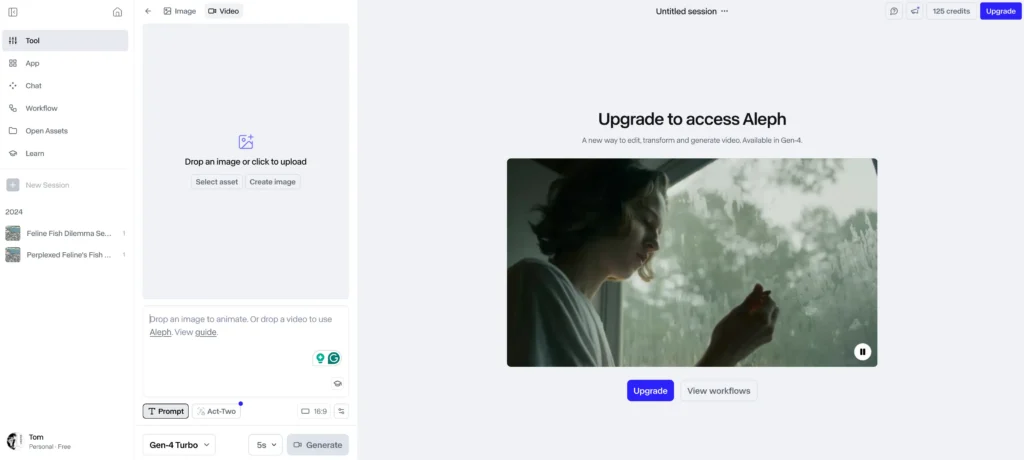
4. Runway: Best for Professional Video Editing Integration
Runway provides frame-accurate lip sync controls within a comprehensive AI video editing suite, making it essential for post-production professionals requiring precision and creative flexibility.
Key Strengths:
- Manual timing adjustment controls for fine-tuning sync
- Integrates with broader video editing workflow (color grading, compositing)
- Supports 4K and 8K video inputs
- Collaboration features for creative teams
- Version control and project management tools
- Real-time preview before final rendering
Ideal Use Cases:
- Post-production studios working on commercial projects
- Film editors replacing ADR (automated dialogue replacement)
- Music video creators synchronizing performance footage
- Documentary editors fixing audio issues
- VFX artists integrating CG characters with live action
Pricing:
- Free trial: 125 credits (approximately 5 minutes of processing)
- Standard plan: $15/month for 625 credits
- Pro plan: $35/month for 2,250 credits
- Unlimited plan: $95/month for unlimited generation
Processing Speed: 1-2 minutes per 10 seconds of 4K video
Limitations:
- Steeper learning curve than simplified avatar tools
- Requires understanding of video editing concepts
- Best results demand manual parameter tuning
- More expensive for high-volume generation
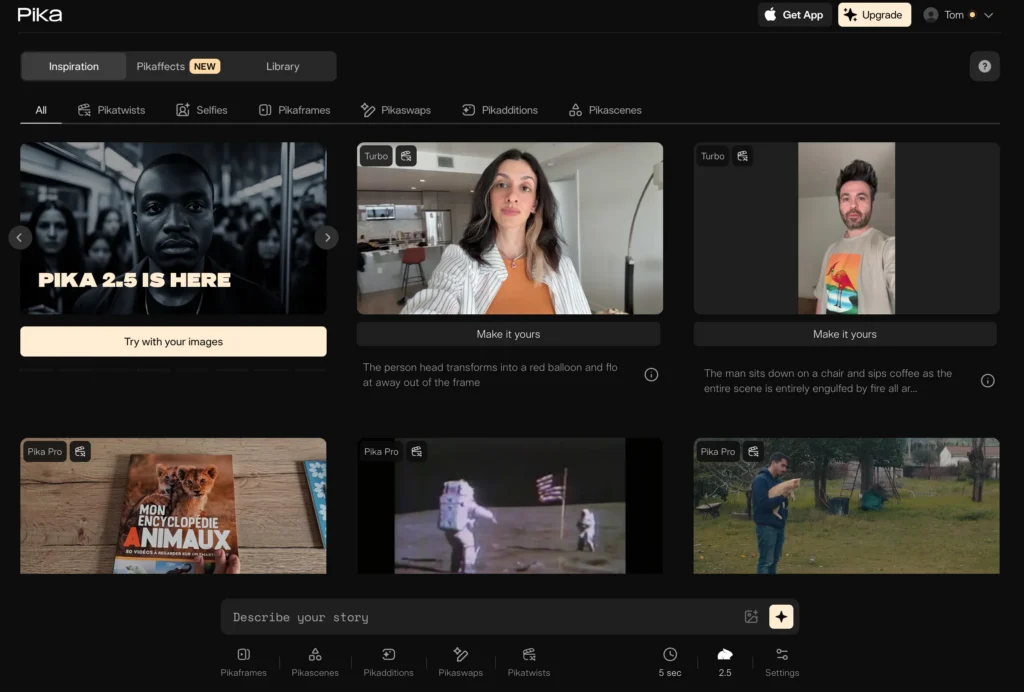
5. Pika: Best for Image-to-Video Animation
Pika transforms static images into animated talking characters, excelling at bringing photos, illustrations, and artwork to life with synchronized speech.
Key Strengths:
- Animates completely static images (no source video required)
- Handles illustrated and non-photorealistic art styles
- Specialized anime lip sync mode for stylized characters
- Creates natural head bobbing and micro-movements
- Supports historical photo animation
Ideal Use Cases:
- Animating family photos for memorial videos
- Bringing historical figures to life for educational content
- Creating talking characters from illustrations
- Anime and cartoon character animation
- Social media content with animated memes
Pricing:
- Free tier: 30 generations per month (3-second videos)
- Standard plan: $10/month for 200 generations
- Pro plan: $35/month for 700 generations
- Unlimited plan: $70/month for unlimited generation
Technical Capabilities:
- Input image resolution: minimum 512×512, recommended 1024×1024
- Output video length: 3-5 seconds per generation
- Processing time: 20-40 seconds per image
Limitations:
- Short output durations require stitching for longer content
- Quality varies with artistic style complexity
- Less photorealistic than video-to-video tools
- Limited control over camera angles
6. Veo 3.1: Best for Text-to-Video with Native Lip Sync
Veo 3.1 generates entirely synthetic videos from text prompts with pre-synchronized dialogue, eliminating the need for source footage.
Key Strengths:
- Creates video and lip sync simultaneously from scripts
- No source footage required
- Consistent quality across generated frames
- Customizable character appearance and environments
- Integrated text-to-speech with multiple voice options
Ideal Use Cases:
- Rapid prototyping for commercials and explainer videos
- Creating placeholder content for pre-visualization
- Generating synthetic training data
- Conceptualizing scenes before production
- Virtual product demonstrations
Pricing:
- Research preview: Limited access through waitlist
- API access: Custom enterprise pricing
Processing Speed: 2-5 minutes for 30-second generated videos
Limitations:
- Still in development; availability limited
- Synthetic look may not suit all applications
- Less control over specific facial features
- Higher cost per generation than modification tools
7. Sora 2: Best for Narrative Video Generation
Sora 2 excels at creating coherent narrative video sequences with natural dialogue and lip synchronization, ideal for storytelling applications.

Key Strengths:
- Maintains character consistency across scenes
- Understands emotional context for appropriate expressions
- Generates longer coherent sequences (up to 60 seconds)
- Integrates lip sync with body language and gestures
- Supports complex scene compositions
Ideal Use Cases:
- Short film and narrative content creation
- Storyboarding and concept visualization
- Educational storytelling
- Advertising narratives
- Creative experimentation
Pricing:
- Limited access: Currently in research phase
- Projected pricing: Credit-based system ($0.20-$0.50 per second)
Limitations:
- Not yet publicly available
- May require significant rendering time
- Uncertain about commercial licensing terms
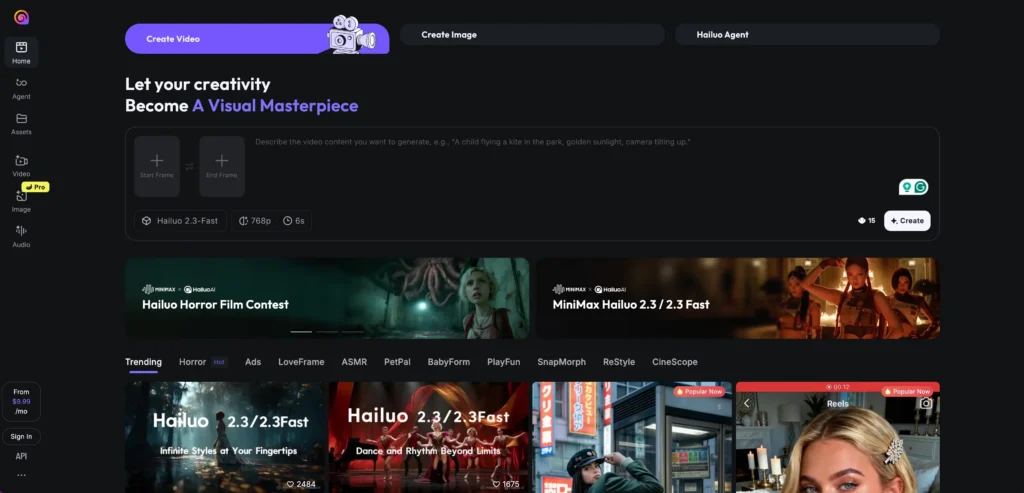
8. Hailuo: Best for Real-Time Streaming Applications
Hailuo optimizes for low-latency lip sync, enabling real-time video translation and avatar animation for live streaming scenarios.
Key Strengths:
- Sub-second processing latency
- Real-time audio stream synchronization
- Optimized for live broadcasting
- Minimal buffering requirements
- Interactive avatar responses
Ideal Use Cases:
- Live stream translation services
- Virtual influencer streaming
- Real-time customer service avatars
- Interactive museum exhibits
- Live event interpretation
Pricing:
- Developer tier: $99/month for API access
- Business tier: $299/month for enhanced performance
- Enterprise: Custom pricing for high-volume streams
Technical Requirements:
- Minimum internet speed: 10 Mbps upload
- GPU-accelerated processing recommended
- Compatible with OBS, StreamYard, and major platforms
Limitations:
- Lower visual quality than offline rendering
- Requires stable internet connection
- Best for controlled lighting environments
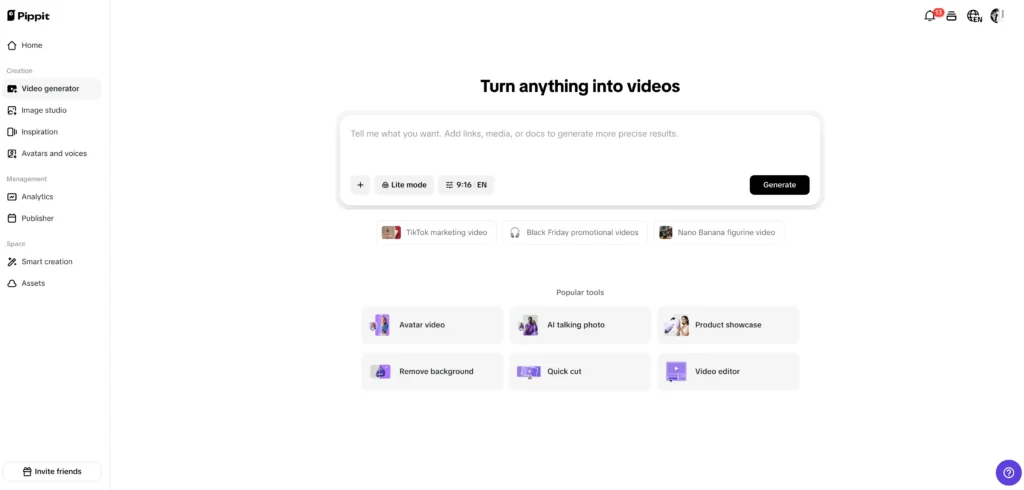
9. Pippit AI: Best for Accessibility Features
Pippit AI focuses on accessibility-driven lip sync, converting subtitles and captions into accurate mouth movements for improved lip reading.
Key Strengths:
- Optimized for deaf and hard-of-hearing accessibility
- Converts subtitle timing to precise lip movements
- Supports multiple caption file formats (SRT, VTT, SCC)
- Emphasizes clarity over hyper-realism
- Integrates with closed captioning workflows
Ideal Use Cases:
- Educational content accessibility enhancement
- Corporate accessibility compliance
- Broadcasting subtitle synchronization
- Public service announcements
- Museum and exhibit audio guides
Pricing:
- Non-profit tier: Free for registered 501(c)(3) organizations
- Standard plan: $39/month for 100 minutes
- Professional plan: $99/month for 500 minutes
Limitations:
- More functional than cinematic quality
- Limited artistic control
- Best suited for informational rather than entertainment content
10. Hunyuan Lip Sync: Best for Chinese Language Content
Hunyuan specializes in Chinese phonetics and tonal languages, delivering superior results for Mandarin, Cantonese, and other Asian language content.
hunyuan lip sync ai
Key Strengths:
- Trained specifically on Chinese phoneme datasets
- Handles tonal variations accurately
- Supports regional dialect differences
- Preserves cultural facial expression norms
- Optimized for Asian facial features
Ideal Use Cases:
- Chinese film and television dubbing
- Cross-border e-commerce product videos
- Educational content for Chinese markets
- Government and public service communications
- Asian diaspora content creation
Pricing:
- Mainland China pricing: ¥199/month (~$28 USD)
- International pricing: $49/month
- Enterprise: Custom bulk licensing
Language Support:
- Mandarin (Standard and regional variants)
- Cantonese
- Taiwanese Hokkien
- Korean
- Japanese
Limitations:
- Limited availability outside Asia-Pacific region
- Less effective for non-Asian languages
- Documentation primarily in Chinese
Free Lip Sync AI Tools: What You Can Actually Get for $0
Truly Free Options (With Limitations)
Free lip sync AI online tools exist but impose significant restrictions on video length, quality, and monthly generation limits.
Hedra (Best Free Option)
- Allocation: 5-10 second generations
- Monthly limit: 3-5 videos
- Quality: 720p maximum
- Watermark: Yes, on free tier
- Best for: Testing workflows before committing to paid tools
D-ID Free Trial
- Allocation: 20 trial credits
- Video length: Up to 5 minutes total
- Quality: 1080p
- Watermark: No
- Limitation: One-time trial only
Runway Free Tier
- Allocation: 125 credits
- Approximate video: 5 minutes of processing
- Quality: Up to 4K
- Watermark: No
- Limitation: Credits don’t renew monthly
Open-Source Alternatives (Technical Expertise Required)
For developers comfortable with Python, command-line interfaces, and GPU configuration:
Wav2Lip
- Installation complexity: Moderate to high
- Requirements: NVIDIA GPU with 6GB+ VRAM, Python 3.7+
- Processing speed: Real-time on high-end GPUs
- Quality: Comparable to early commercial tools
- Setup time: 2-4 hours for first installation
Advantages:
- Complete local control
- No usage limits
- No watermarks
- Can modify source code
Disadvantages:
- No GUI (command-line only)
- Requires technical troubleshooting
- Manual quality tuning needed
- No customer support
Video Retalking (GitHub)
- Recent updates: Active development
- Quality: Improved over Wav2Lip
- Complexity: High
- Best for: Research projects and custom implementations
SadTalker
- Specialty: Image-to-video animation
- Academic origin: Research project from Xi’an Jiaotong University
- Quality: Good for static image animation
- Limitation: Slower processing than commercial alternatives
Maximizing Free Tier Value
Strategic approaches to extend free tool capabilities:
1. Plan content in advance: Script and rehearse to minimize regeneration waste
2. Optimize input quality: Higher quality inputs reduce failed generations
3. Segment long videos: Break into chunks under free tier limits
4. Rotate platforms: Use trial credits across multiple services
5. Time-limited offers: Monitor for promotional free credit increases
6. Educational discounts: Many platforms offer student/teacher pricing
7. Non-profit programs: Organizations may qualify for free access
How to Choose the Right Lip Sync AI Tool
Decision Framework by Use Case
Match your primary objective to the optimal platform:
| Your Primary Goal | Best Tool | Runner-Up | Budget Option |
| Corporate avatar videos | HeyGen | Pippit AI | D-ID trial |
| Multilingual dubbing | Kling AI | Runway | Hedra |
| Professional editing | Runway | Kling AI | Open-source |
| Animating photos | Pika | HeyGen | SadTalker |
| Real-time streaming | Hailuo | HeyGen API | N/A |
| Chinese content | Hunyuan | Kling AI | N/A |
| Accessibility focus | Pippit AI | HeyGen | Open-source |
| Anime/illustration | Pika | Sora 2 (waitlist) | Open-source |
| Long-form content | Gaga-1 | Runway | Wav2Lip |
| Synthetic generation | Veo 3.1 | Sora 2 | N/A |
Budget Considerations
Cost-effective strategies for different budget levels:
$0-$50/month (Hobbyist/Starter)
- Primary: Hedra free tier + D-ID trial
- Stretch: HeyGen Creator ($29) or Pika Standard ($10)
- Strategy: Use free tools for testing, paid for final output
$50-$150/month (Content Creator/Small Business)
- Recommended: Kling AI Standard ($49) + Pika Pro ($35)
- Alternative: HeyGen Business ($89) + Runway Standard ($15)
- Strategy: Choose based on avatar vs. dubbing priority
$150-$500/month (Agency/Production Company)
- Optimal: Kling AI Pro ($149) + Runway Pro ($35) + HeyGen Business ($89)
- Total: $273/month for comprehensive capabilities
- Strategy: Platform specialization for different project types
$500+/month (Enterprise/Studio)
- Solution: Enterprise licensing for primary tool + API access
- Consider: Dedicated account management and custom feature development
- Strategy: Negotiate volume discounts and white-label options
Step-by-Step: Getting Started with Your First Lip Sync Project
Phase 1: Preparation (15-30 minutes)
1. Define your use case clearly
- Avatar creation vs. video dubbing vs. photo animation
- Target audience and platform requirements
- Quality expectations and deadline constraints
2. Gather source materials
- For video dubbing: High-resolution video (1080p+) with clear facial visibility
- For avatar creation: Front-facing photo, 1024×1024 pixels minimum
- For both: Clean audio script or recording without background noise
3. Select your platform
- Review comparison matrix above
- Sign up for free trial or create account
- Verify output format compatibility with your editing software
Phase 2: Initial Generation (5-15 minutes)
4. Upload your materials
- Follow platform-specific file size limits (typically 100-500 MB)
- Use recommended formats: MP4 for video, JPG/PNG for images, MP3/WAV for audio
- Verify upload completion before proceeding
5. Configure basic settings
- Language selection: Choose target language for phonetic model
- Quality preset: Start with “standard” before jumping to “high quality”
- Duration: Limit initial tests to 10-20 seconds
6. Generate and review
- Processing time varies: 30 seconds to 5 minutes depending on platform
- Download immediately (some platforms delete after 24 hours)
- Watch multiple times, focusing on different aspects each viewing
Phase 3: Quality Assessment (10-15 minutes)
7. Evaluate synchronization accuracy
- Play at 0.5x speed to detect timing issues
- Check specific phonemes: “M” (closed lips), “O” (open round), “EE” (wide smile)
- Note any consistent delays or advances
8. Inspect visual quality
- Look for blurriness around mouth edges
- Check for flickering or inconsistent textures
- Verify identity preservation (does person still look like themselves?)
9. Test on target platform
- Upload to YouTube/social media as unlisted
- View on mobile devices (most common consumption method)
- Check at different playback speeds and qualities
Phase 4: Refinement (Optional, 10-30 minutes)
10. Adjust parameters if needed
- Timing offset: Shift audio +/- 50-200ms if sync is consistently off
- Quality preset: Upgrade to “high” or “maximum” if artifacts visible
- Model selection: Try alternative models if available (some platforms offer multiple)
11. Enhance source materials
- For poor results: Re-record audio with better equipment
- For video issues: Improve lighting and re-shoot
- For photos: Use higher resolution or better-lit images
12. Combine with post-production
- Color grade to match original footage
- Add subtle blur to mouth edges if artifacts remain
- Consider slight letterboxing to crop problematic frame edges
Advanced Techniques for Professional Results
Optimizing Input Quality
Video preparation techniques that dramatically improve output:
1. Lighting setup:
- Use three-point lighting to minimize facial shadows
- Avoid harsh direct sunlight creating contrast extremes
- Maintain consistent lighting throughout source footage
2. Camera positioning:
- Position subject at 45° angle maximum from camera
- Keep face occupying 25-40% of frame
- Maintain sharp focus on facial features
3. Audio recording:
- Record in quiet environments with minimal echo
- Use pop filters to reduce plosive sounds
- Normalize audio levels to -3dB to -6dB peak
Handling Challenging Scenarios
Solutions for common problem situations:
Scenario: Fast-paced dialogue
- Issue: Rapid speech creates blurred mouth movements
- Solution: Slow audio by 10-15% before processing, then speed up final video
- Alternative: Use tools with higher frame rate support (60fps vs. 30fps)
Scenario: Multiple speakers in frame
- Issue: Some tools struggle with multi-person scenes
- Solution: Process each speaker separately, then composite
- Best tools: Gaga-1 and Runway handle multiple faces better
Scenario: Profile or 3/4 view faces
- Issue: Algorithms trained primarily on front-facing footage
- Solution: Accept lower quality or re-shoot with better angles
- Workaround: Use rotoscoping to isolate and enhance mouth region
Scenario: Accents and non-standard speech
- Issue: Models trained on standard pronunciations
- Solution: Select tools with diverse training datasets (Kling AI, Hunyuan for Asian languages)
- Alternative: Provide pronunciation guides if platform supports
Platform Integration and Workflow
Incorporating Lip Sync AI into Video Production Pipelines
Professional workflows combine multiple tools for optimal results:
Standard Production Pipeline:
1. Pre-production: Script development and storyboarding
2. Production: Film or create source video/images
3. Post-production audio: Record voiceover or dialogue
4. Lip sync generation: Process through chosen platform
5. Final editing: Color correction, graphics, export
Dubbing Workflow:
1. Source video preparation: Clean original footage
2. Translation: Script translation and cultural adaptation
3. Voice recording: Native speaker records translated dialogue
4. Timing adjustment: Match pacing to original video
5. Lip sync processing: Generate synchronized version
6. Quality control: Review and refine
Software Integration Options
Platforms supporting direct integration with editing software:
- Adobe Premiere Pro: Runway offers plugin for direct export
- Final Cut Pro: Manual import workflow for all platforms
- DaVinci Resolve: Compatible with standard MP4 outputs
- After Effects: Runway and HeyGen support project import
API Integration for Developers:
- Gaga AI API: https://platform.gaga.art/en/docs
- HeyGen API: RESTful interface for programmatic avatar generation
- Kling AI API: Bulk processing for large video libraries
- Runway API: Custom model fine-tuning and batch operations
- Hailuo API: Real-time streaming integration
Common Mistakes and How to Avoid Them
Error 1: Using Low-Quality Source Material
Mistake: Uploading compressed, low-resolution videos expecting professional results
Impact: Artifacts, blurriness, and poor synchronization regardless of platform quality
Solution:
- Use original camera files, not compressed social media downloads
- Maintain minimum 1080p resolution throughout pipeline
- Avoid multiple compression generations
Error 2: Ignoring Audio Pacing
Mistake: Using audio with dramatically different pacing than source video
Impact: Unnatural mouth movements (too fast or unnaturally slow)
Solution:
- Match audio duration to within 10% of original video timing
- Use tools that support time-stretching without pitch changes
- Consider re-recording audio with proper timing
Error 3: Over-Processing
Mistake: Running lip sync output through the same tool multiple times
Impact: Compounding artifacts and quality degradation
Solution:
- Generate once with optimal settings rather than iterating
- If unsatisfied, adjust inputs and regenerate from scratch
- Avoid using AI upscaling on already-processed footage
Error 4: Platform Mismatch
Mistake: Using avatar tools for dubbing tasks or vice versa
Impact: Suboptimal results despite platform capability
Solution:
- Refer to the use case matrix earlier in this guide
- Test multiple platforms before committing to workflows
- Understand platform specializations and limitations
Error 5: Neglecting Disclosure Requirements
Mistake: Failing to label AI-generated or AI-modified content
Impact: Policy violations, removed content, potential legal issues
Solution:
- Add disclaimer text: “This video uses AI-generated lip synchronization”
- Follow platform-specific labeling requirements (YouTube, Meta)
- Consider watermarking for synthetic content
Emerging Trends and Future Developments
What’s Coming in 2026
Industry developments that will reshape lip sync AI:
1. Real-time mobile processing: On-device lip sync for smartphones without cloud processing
2. Emotion-aware synchronization: Models that adjust expressions based on sentiment analysis
3. Full-body animation integration: Expanding beyond facial sync to coordinated gestures
4. Voice clone + lip sync bundles: Integrated platforms handling both audio and video synthesis
5. Interactive AI avatars: Real-time conversation with synchronized responses
Technology Improvements on the Horizon
- Latency reduction: Sub-100ms processing for truly live applications
- Quality parity: AI-generated approaching indistinguishable from original filming
- Democratization: Free tier capabilities matching today’s paid services
- Accessibility focus: Specialized tools for sign language and accessibility enhancement
Frequently Asked Questions (FAQ)
What is the best free lip sync AI tool?
Hedra offers the best free lip sync AI online experience with 5-10 second video generation capabilities and no watermark requirements. D-ID provides 20 trial credits for up to 5 minutes of total video as a one-time free trial. For users with technical expertise, open-source Wav2Lip provides unlimited local processing but requires GPU hardware and command-line proficiency.
Can AI lip sync tools work with any language?
Most major platforms support 20-40 languages, but quality varies significantly based on training data. Kling AI and HeyGen perform well across Romance and Germanic languages. Hunyuan specializes in Chinese and Asian language phonetics. Runway and Pika offer the broadest language support with 50+ languages. For optimal results, select tools explicitly listing your target language in their supported features.
How accurate is lip sync AI compared to human editing?
Modern lip sync AI achieves 85-95% of human editor quality in controlled conditions (clear audio, front-facing video, good lighting). Professional human editors still surpass AI in challenging scenarios: profile views, mumbled speech, multiple overlapping speakers, and artistic lip sync in music videos. The technology excels at repetitive, high-volume tasks where human editing would be cost-prohibitive.
What resolution video do I need for best lip sync results?
Minimum 720p (1280×720) is required for basic functionality. 1080p (1920×1080) is recommended for professional results. 4K (3840×2160) provides maximum quality but increases processing time and cost. Resolution below 720p produces visible artifacts and poor synchronization. Face size matters more than overall resolution—ensure the face occupies at least 20% of the frame.
How long does lip sync AI processing take?
Processing speed varies by platform and video length: Pika processes 3-second image animations in 20-40 seconds. HeyGen generates 30-second avatar videos in 1-3 minutes. Kling AI requires 30 seconds per 10 seconds of video dubbing. Runway takes 1-2 minutes per 10 seconds of 4K footage. Real-time tools like Hailuo operate with sub-second latency for streaming. Batch processing of long-form content may take hours depending on queue times.
Can lip sync AI work on animated characters or cartoons?
Yes, specialized tools handle non-photorealistic content. Pika offers dedicated anime lip sync mode for illustrated characters. Traditional video-to-video tools (Kling AI, Runway) work best with photorealistic footage. For cartoon animation, open-source solutions like SadTalker provide better stylistic flexibility. Character consistency matters—simple, consistent character designs yield better results than highly detailed or constantly changing art styles.
Is deepfake lip sync legal?
Creating deepfake lip sync content is legal in most jurisdictions for personal use, satire, and content you have rights to modify. Illegal applications include: non-consensual intimate imagery, fraud and impersonation for financial gain, political disinformation in many regions, and using someone’s likeness without permission for commercial purposes. Always disclose AI-modified content and obtain consent when using identifiable people’s likenesses. Laws vary significantly by jurisdiction and continue to evolve rapidly.
What’s the difference between video lip sync AI and avatar lip sync AI?
Video lip sync AI modifies existing video footage, replacing or synchronizing audio while maintaining the original visual context (background, lighting, camera movement). Avatar lip sync AI creates new animated videos from static images or 3D models, generating all facial movements from scratch. Video tools (Kling AI, Runway) require source footage but preserve authenticity. Avatar tools (HeyGen, Pippit AI) offer more control and consistency but produce recognizably synthetic results. Choose based on whether you need authenticity or scalability.
Can I use lip sync AI for commercial projects?
Commercial usage rights vary by platform. HeyGen, Kling AI, and Runway explicitly allow commercial use on paid plans. Free tiers typically restrict commercial applications. Open-source tools like Wav2Lip allow commercial use under permissive licenses. Always review each platform’s terms of service. Enterprise licenses often include additional protections, custom licensing, and usage rights for client work. Consider purchasing commercial licenses for any revenue-generating projects.
How do I fix lip sync that’s slightly delayed or early?
Most platforms offer timing offset controls in 25-50 millisecond increments. In Runway, use the “Sync Offset” slider to adjust timing manually. For tools without built-in controls, use video editing software to shift the generated video track slightly. Delay audio by 1-3 frames (30-100ms) to compensate for early lip sync. Advance audio similarly for delayed sync. Test adjustments in 50ms increments. If consistently off by more than 200ms, the issue likely stems from input quality rather than timing.
What’s the best lip sync AI for TikTok and Instagram Reels?
Pika excels for short-form vertical video with its 3-5 second image animation capability. HeyGen works well for avatar-based content optimized for social media dimensions. Both platforms support 9:16 vertical format natively. For dubbing existing content, Kling AI maintains quality in vertical crops. Consider the platform’s mobile preview feature before finalizing—what looks good on desktop may appear different on phones. Keep generations under 15 seconds for maximum engagement on short-form platforms.
Can lip sync AI be detected?
Trained observers can detect AI lip sync through: subtle blurriness around mouth edges, unnatural micro-movements, lighting inconsistencies in the mouth region, and artifacts during rapid head movements. Detection tools exist but aren’t foolproof, often producing false positives on legitimate edited content. Higher-quality platforms (Gaga-1, professional Runway settings) are harder to detect. Full-body indicators (gestures mismatched to speech) often reveal AI content more reliably than facial analysis alone.
What GPU do I need for open-source lip sync tools?
Minimum requirements: NVIDIA GPU with 6GB VRAM (GTX 1060/RTX 2060). Recommended: 8-12GB VRAM (RTX 3060/3070) for smooth operation. Optimal: 16GB+ VRAM (RTX 4080/4090) for 4K processing and faster generation. AMD GPUs work but require additional configuration. Apple Silicon Macs (M1/M2) support some tools through MPS backend with reduced performance. Cloud GPU rental (Google Colab, Paperspace) provides alternatives for users without local hardware. Processing speed scales directly with GPU capability.