
Key Takeaways
- Helios is a 14-billion-parameter autoregressive diffusion model for real-time, long-video generation — developed jointly by Peking University and ByteDance, released March 2026.
- It runs at 19.5 FPS on a single NVIDIA H100 GPU — matching the speed of 1.3B models while delivering 14B-level quality.
- It supports T2V, I2V, and V2V (text-to-video, image-to-video, video-to-video) with videos up to 1452 frames (~60 seconds at 24 FPS).
- It achieves all of this without KV-cache, quantization, sparse attention, or any standard long-video anti-drifting heuristics.
- With Group Offloading, Helios runs on as little as ~6 GB of VRAM.
- All code, weights, and three model variants (Base, Mid, Distilled) are open-source under Apache 2.0.
- Bonus at the end: How Gaga AI pairs with Helios — image-to-video, audio infusion, AI avatar, voice cloning, and TTS.
Table of Contents
What Is Helios?
Helios is the world’s first 14B real-time video generation model, capable of producing minute-long, high-quality videos at 19.5 FPS on a single H100 GPU — without relying on any conventional acceleration or anti-drifting techniques.
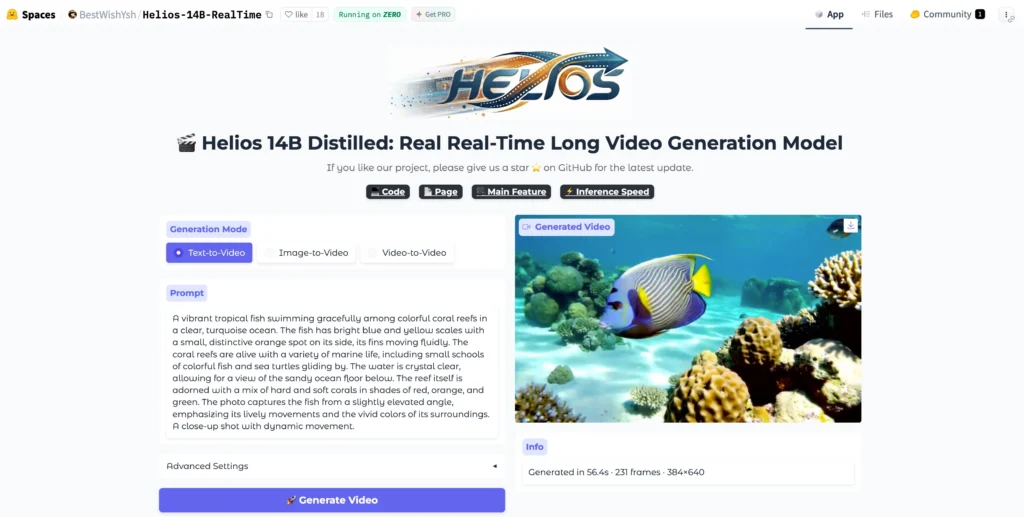
Released on March 4, 2026 (arXiv:2603.04379), Helios was built by a team from Peking University, ByteDance, Canva, and Chengdu Anu Intelligence. Within 24 hours of publication, it ranked #2 Paper of the Day on Hugging Face and accumulated over 1,100 GitHub stars in the first week.
The model’s name is fitting. In Greek mythology, Helios was the god of the Sun — the source of light that moves fast, reaches far, and illuminates everything. The model lives up to the name: it is simultaneously the fastest, the most memory-efficient, and among the highest-quality open-source video generation systems available today.
Where to access Helios:
- 📄 arXiv Paper: 2603.04379
- 💻 GitHub: PKU-YuanGroup/Helios — 1.1K stars, Apache 2.0
- 🤗 Hugging Face Demo: Helios-14B-RealTime
- 🌐 Project Page with Video Demos
- 🎥 Official Demo Video
Why Helios Matters: The Problem It Solves
Before Helios, real-time long-video generation was considered a contradiction in terms — you could have speed or quality or length, but not all three simultaneously.
Existing video generation models faced three hard walls:
Wall 1: Long-Video Drift
The longer a video, the more likely an autoregressive model “drifts” — characters change appearance, motion becomes repetitive, and scene coherence breaks down. Prior solutions (self-forcing, error-banks, keyframe sampling, inverted sampling) added complexity without fully solving the root problem.
Wall 2: Speed vs. Quality
Large models (14B parameters) were painfully slow. Acceleration techniques like KV-cache, sparse attention, and quantization helped, but came with quality trade-offs. Smaller distilled models (1.3B) were fast but couldn’t match the visual fidelity of larger ones.
Wall 3: Memory Constraints
Training and running 14B models required expensive multi-GPU setups with parallelism frameworks (FSDP, Megatron), making experimentation inaccessible to most researchers.
Helios breaks all three walls simultaneously — that’s what makes it a genuine research breakthrough.
How Helios Works: Architecture and Key Innovations
Helios is a 14B autoregressive diffusion model with a unified input representation that natively handles T2V, I2V, and V2V tasks through a three-stage progressive training pipeline.
Core Architecture
| Component | Description |
| Model type | Autoregressive Diffusion Model |
| Parameters | 14 Billion |
| Input representation | Unified — handles text, image, and video prompts in one architecture |
| Context compression | Heavy compression of historical and noisy context |
| Sampling steps (Base) | 50 steps with HeliosScheduler |
| Sampling steps (Distilled) | 3 steps with HeliosDMDScheduler |
| Frame chunk size | 33 frames per autoregressive chunk |
| Max length | 1452 frames (~60s at 24 FPS) |
Innovation 1: Easy Anti-Drifting (No Heuristics Required)
Helios solves long-video drift by explicitly simulating drifting conditions during training itself — rather than patching it with post-hoc strategies.
Instead of applying self-forcing, error-banks, or keyframe sampling at inference, Helios uses:
- Unified History Injection — feeds compressed historical context directly into the model’s forward pass
- Easy Anti-Drifting — trains the model on deliberately degraded context so it learns to recover
- Multi-Term Memory Patchification — encodes long-range temporal relationships without quadratic memory cost
The result: Helios generates 1452-frame videos with strong temporal coherence that competing models can’t match — even with their heuristics enabled.
Innovation 2: Real-Time Speed Without Shortcuts
Helios achieves 19.5 FPS on a single H100 without KV-cache, sparse attention, causal masking, TinyVAE, quantization, or any other standard acceleration trick.
Instead, efficiency comes from:
- Pyramid Unified Predictor Corrector (PUPC) — aggressively reduces the number of noisy tokens per step, cutting compute at the architecture level rather than through approximation
- Context token compression — historical frames are compressed to a fraction of their original token count before being fed back into the model
- Reduced sampling steps — the distilled version uses only 3 steps (vs. 50 for the base), eliminating the need for classifier-free guidance (CFG) entirely
The computational cost ends up comparable to or lower than 1.3B models — at 14B parameter quality.
Innovation 3: Training Without Parallelism Frameworks
Helios trains without FSDP, Megatron, or any tensor/pipeline parallelism — enabling image-diffusion-scale batch sizes while fitting up to four 14B models in 80 GB of GPU memory.
This is achieved through:
- Infrastructure-level memory optimizations specific to autoregressive diffusion
- A three-stage progressive training pipeline that avoids the need for large distributed clusters
- Group Offloading — at inference time, reduces VRAM to approximately 6 GB
The Three Model Variants: Which One Should You Use?
Helios ships as three checkpoints optimised for different use cases.
| Model | Best For | Scheduler | Sampling Steps | Quality |
| Helios-Base | Highest visual quality, research | HeliosScheduler (v-pred + CFG) | 50 | ⭐⭐⭐⭐⭐ |
| Helios-Mid | Intermediate checkpoint | CFG-Zero* + HeliosScheduler | Between Base and Distilled | ⭐⭐⭐⭐ |
| Helios-Distilled | Speed and efficiency priority | HeliosDMDScheduler (x0-pred) | 3 | ⭐⭐⭐⭐ |
💡 All three share the same architecture. Helios-Mid is an intermediate training checkpoint and may not always meet quality expectations. For most users, Helios-Base for quality or Helios-Distilled for speed is the right choice.
Video Length Reference: Frames to Seconds
Helios generates in chunks of 33 frames. Set num_frames to a multiple of 33 for optimal performance.
| Target Length | Num Frames (Adjusted) | At 24 FPS | At 16 FPS |
| ~5 seconds | 132 (33×4) | 5.5s | 8s |
| ~11 seconds | 264 (33×8) | 11s | 16s |
| ~30 seconds | 726 (33×22) | 30s | 45s |
| ~60 seconds | 1452 (33×44) | 60s | 90s |
How to Install and Run Helios: Step-by-Step
Helios runs via a conda environment on CUDA 12.6, 12.8, or 13.0. With Group Offloading, it requires as little as ~6 GB of VRAM.
Requirements
- Python 3.11.2
- PyTorch 2.10.0
- CUDA 12.6 / 12.8 / 13.0
- NVIDIA GPU (H100 recommended; consumer GPUs work with Group Offloading)
Step 1 — Clone the Repository
git clone –depth=1 https://github.com/PKU-YuanGroup/Helios.git
cd Helios
Step 2 — Create the Conda Environment
conda create -n helios python=3.11.2
conda activate helios
Step 3 — Install PyTorch (choose your CUDA version)
# CUDA 12.6
pip install torch==2.10.0 torchvision==0.25.0 torchaudio==2.10.0 \
–index-url https://download.pytorch.org/whl/cu126
# CUDA 12.8
pip install torch==2.10.0 torchvision==0.25.0 torchaudio==2.10.0 \
–index-url https://download.pytorch.org/whl/cu128
Step 4 — Install Dependencies
bash install.sh
Step 5 — Download Model Weights
pip install “huggingface_hub[cli]”
# Download Helios-Base (best quality)
huggingface-cli download BestWishYSH/Helios-Base –local-dir BestWishYSH/Helios-Base
# Download Helios-Distilled (fastest)
huggingface-cli download BestWishYSH/Helios-Distilled –local-dir BestWishYSH/HeliosDistilled
Step 6 — Run Inference
Text-to-Video:
cd scripts/inference
bash helios-base_t2v.sh # Base model
bash helios-distilled_t2v.sh # Distilled model
Image-to-Video:
bash helios-base_i2v.sh
bash helios-distilled_i2v.sh
Video-to-Video:
bash helios-base_v2v.sh
bash helios-distilled_v2v.sh
Step 7 — Low-VRAM Mode (Group Offloading, ~6 GB)
For consumer GPUs or machines with limited memory, enable Group Offloading in your inference script:
# Add this parameter when loading the pipeline
pipe.enable_group_offload()
This drops peak VRAM from ~80 GB to approximately 6 GB, at the cost of slower inference due to CPU⟷GPU data movement.
Step 8 — Multi-GPU with Context Parallelism
Helios supports Ulysses Attention, Ring Attention, Unified Attention, and Ulysses Anything Attention for multi-GPU distribution.
Example for 4 GPUs:
bash scripts/inference/helios-base_cp4gpu.sh
Optional: Use via Diffusers Pipeline
pip install git+https://github.com/huggingface/diffusers.git
Then use the standard DiffusionPipeline interface — Helios has Day-0 Diffusers support.
Optional: Use via vLLM-Omni or SGLang-Diffusion
Both frameworks support Helios natively for production serving at scale:
# vLLM-Omni
pip install git+https://github.com/vllm-project/vllm-omni.git
# SGLang-Diffusion
pip install git+https://github.com/sgl-project/sglang.git
Helios vs. Competing Video Models: Performance Comparison
Helios outperforms all comparable models on both short- and long-video benchmarks while running at speeds previously reserved for sub-2B parameter models.
| Model | Parameters | FPS (Single H100) | Long Video Quality | Anti-Drift Strategy |
| Helios | 14B | 19.5 | ⭐⭐⭐⭐⭐ | Architecture-level |
| SkyReels V2 DF 14B | 14B | Slower | ⭐⭐⭐⭐ | Standard heuristics |
| SkyReels V2 DF 1.3B | 1.3B | ~19 FPS | ⭐⭐⭐ | Standard heuristics |
| CausVid | — | Moderate | ⭐⭐⭐ | Self-forcing |
| Self Forcing | — | Moderate | ⭐⭐⭐ | Self-forcing |
| MAGI-1 | — | Slow | ⭐⭐⭐⭐ | Keyframe sampling |
| Pyramid Flow | — | Slow | ⭐⭐⭐ | Progressive pyramid |
| InfinityStar | — | Slow | ⭐⭐⭐ | Error banks |
The benchmark data is reproducible via HeliosBench — a specialized evaluation framework included in the repository for assessing real-time long-video generation models.
Helios Training Pipeline: How It’s Built
Helios uses a three-stage progressive training pipeline that converts a bidirectional pretrained model into a fully autoregressive, distilled video generator.
Stage 1 — Base (Architectural Adaptation)
- Apply Unified History Injection to enable autoregressive context conditioning
- Apply Easy Anti-Drifting to simulate and correct drift at training time
- Apply Multi-Term Memory Patchification for efficient long-range temporal modeling
- Output: Helios-Base
Stage 2 — Mid (Token Compression)
- Introduce Pyramid Unified Predictor Corrector (PUPC) to aggressively reduce noisy token count
- Reduce computation while preserving output quality
- Apply CFG-Zero* for improved guidance efficiency
- Output: Helios-Mid
Stage 3 — Distilled (Sampling Step Reduction)
- Apply Adversarial Hierarchical Distillation to reduce sampling from 50 steps to 3
- Eliminate classifier-free guidance (CFG) entirely
- Apply dynamic shifting across all timestep-dependent operations
- Output: Helios-Distilled
Ecosystem and Day-0 Integrations
Helios launched with immediate support across all major AI inference and training frameworks.
On March 4, 2026 (Day 0), the following integrations went live:
- ✅ Diffusers (Hugging Face) — full pipeline support
- ✅ SGLang-Diffusion — end-to-end unified pipeline with optimized kernels
- ✅ vLLM-Omni — fully disaggregated serving for production deployment
- ✅ Ascend-NPU (Huawei) — runs at ~10 FPS on Ascend hardware
- ✅ Cache-DiT — hybrid cache acceleration and parallelism (added March 6, 2026)
Additional updates post-launch:
- March 8, 2026: Full Group Offloading (~6 GB VRAM) and Context Parallelism support released
- March 6, 2026: Official Gradio Demo released on Hugging Face Spaces
Common Issues and Fixes
First Chunk Appears Static in I2V Mode
Cause: Image-to-video training is based on text-to-video conditioning, so the first chunk sometimes remains too close to the input frame.
Fix: Enable is_skip_first_chunk=True in the inference config, or increase image_noise_sigma_min and image_noise_sigma_max to inject more diversity into the first generation unit.
Out of Memory (OOM) Errors
Cause: Default inference uses full GPU memory allocation.
Fix: Enable Group Offloading via pipe.enable_group_offload(). This reduces peak VRAM to ~6 GB at the cost of inference speed.
Videos Have Repetitive Motion
Cause: The model’s anti-drifting strategy suppresses error accumulation, but prompt quality affects motion variety significantly.
Fix: Use more specific, dynamic motion descriptions in your text prompt. Avoid vague prompts like “a person walking” — instead use “a person walking briskly through a crowded Tokyo street at rush hour, camera tracking from the side.”
Non-Multiple-of-33 Frame Count
Cause: Helios generates in chunks of exactly 33 frames.
Fix: Always set num_frames to a multiple of 33. Non-multiple values are automatically rounded up, but this wastes compute. Use 132, 264, 726, or 1452 for clean output.
Bonus: Supercharge Helios Outputs with Gaga AI
Helios generates the video. Gaga AI adds the voice, the face, the audio, and the narrative intelligence — turning a raw video generation into a complete production.

Here’s how the two tools pair:
Image-to-Video AI
Gaga AI’s image-to-video engine animates a still image into a motion video clip using a text-directed motion prompt — complementing Helios’s I2V mode with a simpler, browser-based interface that requires no GPU setup.
Use together: Generate a base scene with Helios at cinematic quality, then use Gaga AI’s image-to-video to extend specific frames into focused close-up sequences or alternate camera angles.
Best for: Product demos, portrait animation, social content at scale.
Video and Audio Infusion
Gaga AI analyzes the visual content of a video and generates synchronized audio — ambient sound, music, environmental effects — matched to what the camera sees.
Helios outputs visually rich but silent video. Gaga AI’s audio infusion layer reads the scene and generates a matching soundscape automatically.
Best for: Nature scenes, cinematic shorts, branded content, e-commerce product videos.
AI Avatar
Gaga AI generates a photorealistic, lip-synced talking avatar from a reference photo and any audio input — giving your Helios-generated environments a human presenter without filming anyone.
Pipeline:
- Generate a visually rich background scene with Helios (T2V or I2V)
- Commission a Gaga AI avatar to present in front of that background
- Composite using Gaga AI’s output transparency layer
Best for: Training videos, multilingual content, AI spokesperson series.
AI Voice Clone + TTS
Gaga AI clones a speaker’s voice from a 30-second audio sample and converts any text to speech in that voice — enabling scalable narration in multiple languages without re-recording.
Workflow:
- Record 30–60 seconds of the target voice
- Clone it inside Gaga AI
- Generate narration from a text script
- Layer narration over your Helios video
Best for: Multilingual campaigns, consistent brand voice, AI-driven content pipelines.
The Complete Pipeline: Helios + Gaga AI
Text Prompt / Reference Image
↓
Helios ── Real-time video (T2V / I2V / V2V) at 19.5 FPS
↓
Gaga AI Audio Infusion ── Synchronized ambient sound + music
↓
Gaga AI AI Avatar ── On-screen presenter in front of Helios scene
↓
Gaga AI Voice Clone + TTS ── Multilingual narration in cloned voice
↓
Final Video ── Studio-quality, fully produced, ready to publish
Frequently Asked Questions
What is Helios AI?
Helios is a 14-billion-parameter autoregressive diffusion model for real-time long video generation, jointly developed by Peking University and ByteDance. It runs at 19.5 FPS on a single NVIDIA H100 GPU and supports text-to-video, image-to-video, and video-to-video tasks with videos up to 60 seconds long. The paper was published on arXiv as 2603.04379 on March 4, 2026.
How fast is Helios compared to other video models?
Helios runs at 19.5 FPS end-to-end on a single H100 GPU — matching the speed of 1.3B distilled models while operating at 14B parameter scale. It achieves this without KV-cache, quantization, sparse attention, or any other standard acceleration technique.
Is Helios open source?
Yes. Helios is fully open source under the Apache 2.0 license. The code, three model checkpoints (Base, Mid, Distilled), training scripts, and HeliosBench evaluation framework are all available on GitHub at PKU-YuanGroup/Helios.
What GPU do I need to run Helios?
Helios was tested on NVIDIA H100 GPUs. With Group Offloading enabled, it can run on consumer GPUs with as little as ~6 GB of VRAM. Without Group Offloading, a GPU with 80 GB of memory (H100/A100-class) is required for the full model.
What is the difference between Helios-Base, Helios-Mid, and Helios-Distilled?
Helios-Base uses 50 sampling steps and produces the highest visual quality. Helios-Distilled uses only 3 sampling steps (via adversarial hierarchical distillation) for maximum speed, with only a modest quality trade-off. Helios-Mid is an intermediate training checkpoint that falls between the two in both speed and quality.
How does Helios solve the long-video drift problem?
Helios solves drift at the architecture and training level rather than through inference-time heuristics. It uses Unified History Injection (feeding compressed historical context into the model), Easy Anti-Drifting (training on deliberately degraded context to teach recovery), and Multi-Term Memory Patchification (efficient long-range temporal encoding). This eliminates the need for self-forcing, error-banks, or keyframe sampling.
What tasks does Helios support?
Helios natively supports three video generation tasks through a unified input representation: Text-to-Video (T2V), Image-to-Video (I2V), and Video-to-Video (V2V). An experimental Interactive Video mode is also available in the repository.
How long can videos be in Helios?
Helios can generate videos up to 1452 frames, which equals approximately 60 seconds at 24 FPS or 90 seconds at 16 FPS. Videos are generated in chunks of 33 frames, so the total frame count should be a multiple of 33.
Can I train my own version of Helios?
Yes. The full three-stage training pipeline (Base → Mid → Distilled) is included in the repository along with configuration files, data preparation guides, DDP training scripts, and DeepSpeed training scripts. A toy training dataset is also provided for testing the pipeline.
Who built Helios?
Helios was built by Shenghai Yuan (Peking University / ByteDance), Yuanyang Yin (ByteDance / Chengdu Anu Intelligence), Zongjian Li (Peking University), Xinwei Huang (ByteDance), Xiao Yang (Canva), and Li Yuan (Peking University). The project lead is Li Yuan (†) and Xiao Yang (§).