Key Takeaways
- Colossyan is an AI video platform built mainly for workplace learning, not just generic short-form video creation.
- Colossyan Creator is the core product for making AI-avatar videos, while Colossyan Learn extends that into broader training workflows.
- Colossyan AI stands out for training-focused features like AI avatars, localization, document-to-video workflows, interactivity, SCORM-related learning use cases, and enterprise controls.
- Colossyan pricing is tiered. The public site shows a free trial, Starter, Business, and Enterprise paths, with paid entry pricing starting around the low tens per month and scaling by video minutes.
- Colossyan is strongest for onboarding, compliance, customer education, internal communications, and sales enablement.
- If you want more visual originality than avatar-led training video, Gaga AI is a useful bonus workflow, especially for image to video ai, video and audio infusion, ai avatar, ai voice clone, and tts.
Table of Contents
What is Colossyan?
Colossyan is an AI video platform designed to turn organizational knowledge into video-led training and learning content.
That is the clearest answer to what is Colossyan.
Colossyan does not position itself as a general social-media gimmick tool. Its site focuses on:
- workplace learning
- training content
- AI avatar videos
- localization
- ongoing content updates
- enterprise security
- complete learning workflows
In plain language, Colossyan AI helps teams turn scripts, documents, presentations, and training material into videos without using a traditional studio setup.
That is why searches for colossyan, colossyan ai, and colossyan creator are usually coming from:
- L&D teams
- HR and onboarding leads
- customer education teams
- compliance teams
- internal communications managers
- sales enablement teams
What features matter most in Colossyan?
The most important Colossyan features are AI avatars, training workflows, localization, and enterprise-friendly control.
Here are the features that matter most for actual buying decisions.
1. AI avatars
Colossyan uses AI avatars to turn scripts into presenter-led videos.
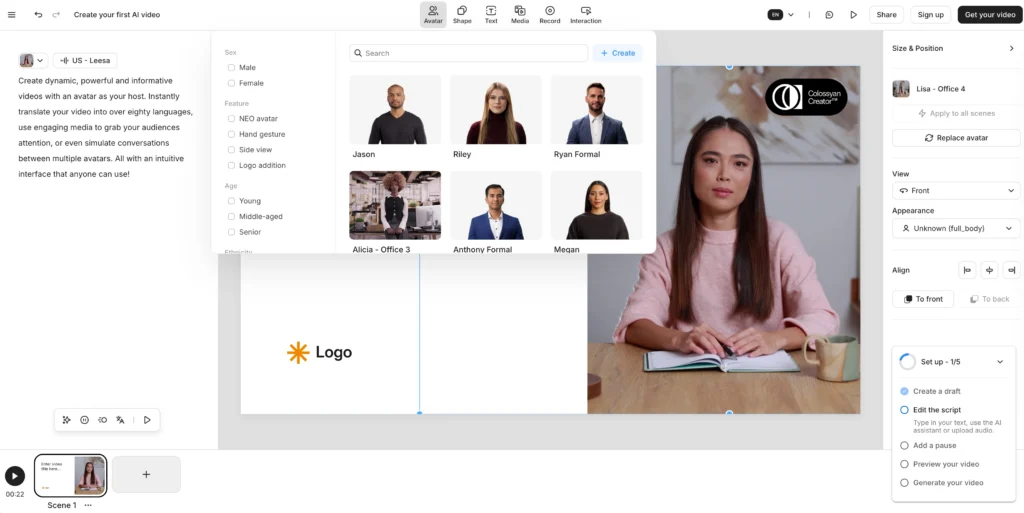
Its avatar page highlights:
- stock avatars
- custom avatars
- global language support
- professional-use design
- avatar realism as a product differentiator
This is the feature most users notice first, and it is the easiest way to create training videos without filming a real presenter.
2. Text-to-video and script-based creation
Colossyan Creator lets teams start from text instead of from a traditional editing timeline.
That reduces production friction for:
- policy explainers
- onboarding scripts
- product walkthroughs
- internal announcements
The site also references:
- text to video
- prompt-to-video assistance
- subtitles
- avatar conversations
That suggests the platform is built to speed up scripted communication at scale.
3. PPT and PDF to video
Colossyan supports document-driven workflows, which is a major advantage for training teams.
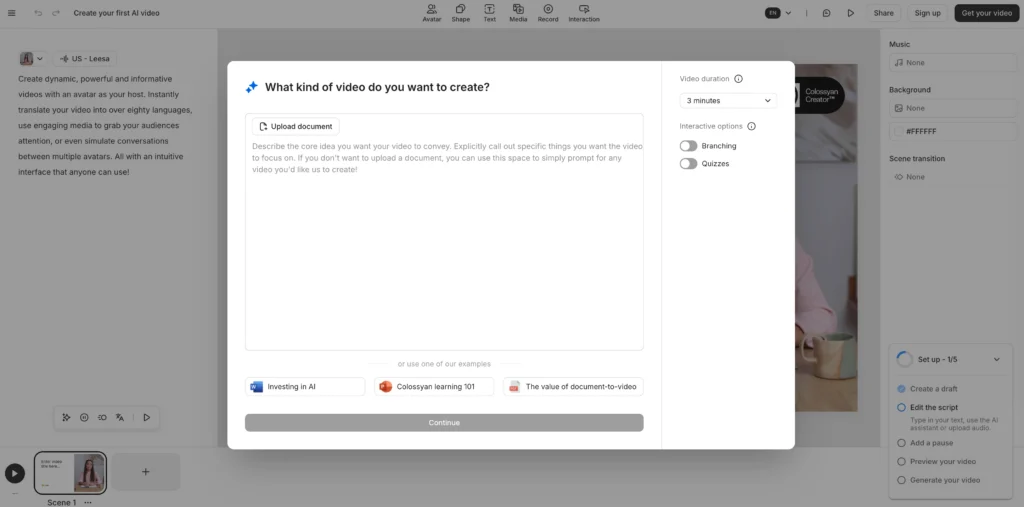
The navigation and product pages reference:
- PPT & PDF to video
- documents
- learning content creation
This matters because many teams already have training content in slide decks or docs. Reusing those assets is often more practical than starting from a blank script.
4. Languages, translation, and localization
Colossyan is built for localization, not only one-language video production.
The site references:
- global language support
- AI voices and languages
- automated translation
- large-scale localization
This is especially useful if you support:
- distributed teams
- regional compliance training
- multilingual onboarding
- global customer education
5. Interactivity and training structure
Colossyan goes beyond video by supporting broader learning use cases.
The site references:
- interactive video
- Colossyan Learn
- SCORM-related learning contexts
- training programs
- use cases like onboarding and compliance
That makes Colossyan more useful than a standard avatar generator for teams that care about completion, learning design, and structured training delivery.
6. Voice and brand consistency
Colossyan includes tools for voice, branding, and presentation consistency.
The official navigation references:
- text to speech
- voice cloning
- brand kit
- collaboration
- API
- enterprise features
That is important for teams creating recurring content across departments or markets.
7. Security and enterprise readiness
Colossyan treats security and legal review as first-class concerns.
The homepage includes messaging around:
- security built into the platform
- explainable AI internally
- fewer tools, fewer risks
- legal readiness
That is a strong buying signal for enterprise teams that cannot adopt consumer-first tools casually.
How is Colossyan AI different from traditional AI video tools?
Colossyan AI is more training-centric than most AI video generators.
This is the most important nuance for users evaluating the platform.
Many AI video tools are built for:
- marketing clips
- social posts
- product promos
- simple spokesperson videos
Colossyan, by contrast, is built around business learning and knowledge transfer.
What makes Colossyan different
Based on the official site, Colossyan emphasizes:
- turning knowledge into training
- complete training programs, not only videos
- AI avatars for professional use
- large-scale localization
- maintainable content
- enterprise security and legal readiness
Why that matters
If your team creates:
- onboarding modules
- policy explanations
- compliance refreshers
- customer tutorials
- internal updates
- multi-language training
then Colossyan is more aligned than a tool designed mainly for ads or creator reels.
Where Colossyan may be less ideal
If your goal is:
- highly cinematic brand storytelling
- image-driven social content
- advanced motion design
- stylized creative editing
- visually unpredictable generative video
then Colossyan may feel more structured than expressive.
That is not a flaw. It is a positioning choice.
What does Colossyan pricing look like?
Colossyan pricing is usage-based and tiered, with a free trial, paid entry plans, business scaling, and custom enterprise pricing.
This is the answer most commercial-intent searchers want.
Colossyan pricing at a glance
| Plan path | What it is for | Public pricing signal |
| Free trial | Testing the editor | 14-day free access, no credit card mentioned on site footer CTA |
| Starter | Lower-volume individual or small-team use | Entry pricing starts around $27/month or about $19/month billed annually |
| Business | Higher monthly minute needs | Public page scripts indicate scaling bands around $88/month and up |
| Enterprise | Large teams, governance, scale, security | Custom quote |
What the public site clearly shows
The official pricing page shows:
- Starter
- Business
- Enterprise
- a pricing FAQ
- a free testing path
The site footer also says users can try AI video free for 14 days with no credit card required.
What the minute-based pricing suggests
At the time of review, public pricing page scripts surfaced these example paid bands:
Entry-level paid usage
- about $27/month for 10 minutes/month
- about $54/month for 20 minutes/month
- about $227/year for 10 minutes/month billed annually
- about $454/year for 20 minutes/month billed annually
Business-level usage
- about $88/month for the first higher-volume tier
- about $132/month
- about $176/month
- annual billing tiers also appear at discounted equivalents
These values can change, so always verify on the live Colossyan pricing page before purchase.
What is not fully transparent publicly
The pricing FAQ references topics like:
- additional minutes
- custom avatars
- cancellation
- annual billing
- free use
- custom avatar cost
That means buyers should expect:
- some usage flexibility
- separate custom-avatar economics
- enterprise pricing handled through sales
The short pricing verdict
Colossyan pricing is reasonable for training teams that will reuse and update content, but it is not the cheapest option if you only need occasional avatar videos.
If you create recurring training assets, the maintenance savings can matter more than the monthly subscription.
How do you create a video in Colossyan Creator?
The fastest way to use Colossyan Creator is to start with a training script, pick an avatar, then localize and export from one workflow.
Here is a practical setup process.
Step 1: Start with a clear business use case
Choose one:
- onboarding
- compliance
- policy update
- product education
- internal announcement
- customer tutorial
Colossyan works best when the outcome is instructional, not vague.
Step 2: Prepare source material
Use one of these:
- a script
- a document
- a slide deck
- a PDF
- existing training notes
If your source material is messy, the video will still need cleanup.
Step 3: Build the video in Colossyan Creator
Choose:
- avatar
- scene structure
- voice
- language
- subtitles
- brand elements
Keep scenes short and sentence-level pacing tight. Training videos perform better when each scene makes one point.
Step 4: Localize after the base version is approved
Colossyan’s localization value shows up when you:
- lock the source version first
- translate after review
- check terminology per region
- export only approved variants
This avoids multiplying errors across languages.
Step 5: Add interaction if the training requires it
If your workflow includes structured learning, use the broader Colossyan training stack where relevant:
- interactive elements
- learning paths
- course-like structures
- SCORM-related delivery workflows
Step 6: Create a maintenance process
This is where Colossyan often beats traditional production.
Instead of re-filming, teams can:
- update script text
- swap scenes
- revise policy lines
- regenerate only affected content
That matters when training content changes frequently.
What are Colossyan’s biggest strengths and limitations?
Colossyan’s biggest strength is efficient training video production, and its biggest limitation is that it is less visually flexible than more design-first AI video tools.
Strengths
- Built for workplace learning: better alignment for L&D than many general AI video tools
- AI avatars: strong for presenter-led explainers
- Localization: useful for global teams
- Document-to-video workflows: practical for existing enterprise content
- Scalability: better than manual filming for recurring training
- Security posture: more enterprise-aware than lightweight creator tools
- Maintenance: easier to update than studio-shot training content
Limitations
- Less cinematic freedom: not the ideal tool for highly artistic visual storytelling
- Minute-based pricing: can feel restrictive if you iterate heavily
- Avatar-led format: useful, but can feel repetitive if every video uses the same presenter style
- Training-first bias: great for structured content, less ideal for creator-first content
- Enterprise fit matters: smaller teams may not use all of the platform depth
Bonus: Why Gaga AI video generator is a smart add-on
Gaga AI video generator is the better bonus tool when you want more visual originality than Colossyan’s training-first avatar workflow provides.

Colossyan is strong for structured business video. Gaga AI is useful when you want to extend that into more expressive media output.
Where Gaga AI fits best
Use Gaga AI when you want:
- more creative motion
- stronger visual transformation
- image-first storytelling
- richer audio-visual syncing
- more stylized digital presenter workflows
The Gaga AI bonus stack
- image to video ai — animate still images into moving scenes
- video and audio infusion — align visuals and sound more tightly
- ai avatar — create presenter-like character outputs
- ai voice clone — keep a consistent branded voice identity
- tts — generate clean narration quickly from script drafts
Best combined workflow
- Use Colossyan Creator for structured training or explainers.
- Use Gaga AI when the same topic needs a more visual, campaign-style, or high-engagement version.
- Keep Colossyan for maintainable learning content and Gaga AI for more dynamic creative assets.
That combination works well for teams that need both clarity and visual range.
FAQ: Colossyan, Colossyan AI, Colossyan Creator, and Pricing
What is Colossyan?
Colossyan is an AI video platform focused on workplace learning, training, and knowledge transfer.
What is Colossyan Creator?
Colossyan Creator is the video-generation part of the platform used to make AI-avatar videos from scripts, documents, or presentations.
What is Colossyan AI best for?
Colossyan AI is best for onboarding, compliance training, customer education, internal communications, and sales enablement.
Is Colossyan only for AI avatars?
No. Colossyan uses AI avatars heavily, but the platform also emphasizes broader training workflows, localization, interactivity, and learning program structure.
How does Colossyan pricing work?
Colossyan pricing is tiered by plan and usage, with free trial access, Starter and Business tiers, and custom Enterprise pricing.
Does Colossyan have a free option?
Yes. The official site promotes a free 14-day trial with no credit card required.
What does Colossyan pricing start at?
At the time of review, public pricing signals showed entry paid access starting around $27/month, or roughly $19/month billed annually for lower monthly minute usage.
Is Colossyan good for enterprise teams?
Yes. Colossyan appears designed for enterprise use cases, especially where security, localization, governance, and recurring training updates matter.
Can Colossyan turn PPT or PDF into video?
Yes. The official site references PPT and PDF to video workflows as part of the product stack.
Does Colossyan support voice cloning?
Yes. The product navigation includes voice cloning as part of the broader platform offering.
Is Colossyan better than a general AI video tool?
Colossyan is better if your main goal is structured training and workplace learning. It is less ideal if your main goal is cinematic or creator-first social content.
Who should not use Colossyan?
Teams that only need occasional promo videos or highly stylized creative video may get more value from a less training-oriented tool.