Key Takeaways
- AI video repurposing is the process of using artificial intelligence to automatically convert long-form video content into multiple short-form clips optimized for different platforms.
- The best AI video repurposing tools — including OpusClip, Munch, Vizard, and Descript — can reduce editing time from hours to minutes per video.
- Top tools achieve 85–90%+ AI accuracy in detecting the most engaging moments from long videos.
- Content creators using AI repurposing tools report saving up to 200 hours per year and producing up to 10x more content output.
- Short-form video now dominates: 82% of all online content is video, with short-form leading the surge, and 90% of consumers engage with short-form video daily.
- Gaga AI (bonus section) extends your workflow with image-to-video, AI avatars, voice cloning, and TTS — taking repurposed clips to full production quality.
Table of Contents
What Is AI Video Repurposing — and Why Does It Matter in 2026?
AI video repurposing is the use of machine learning to automatically detect, extract, reformat, and optimize the best moments from long-form video content for distribution across multiple platforms.
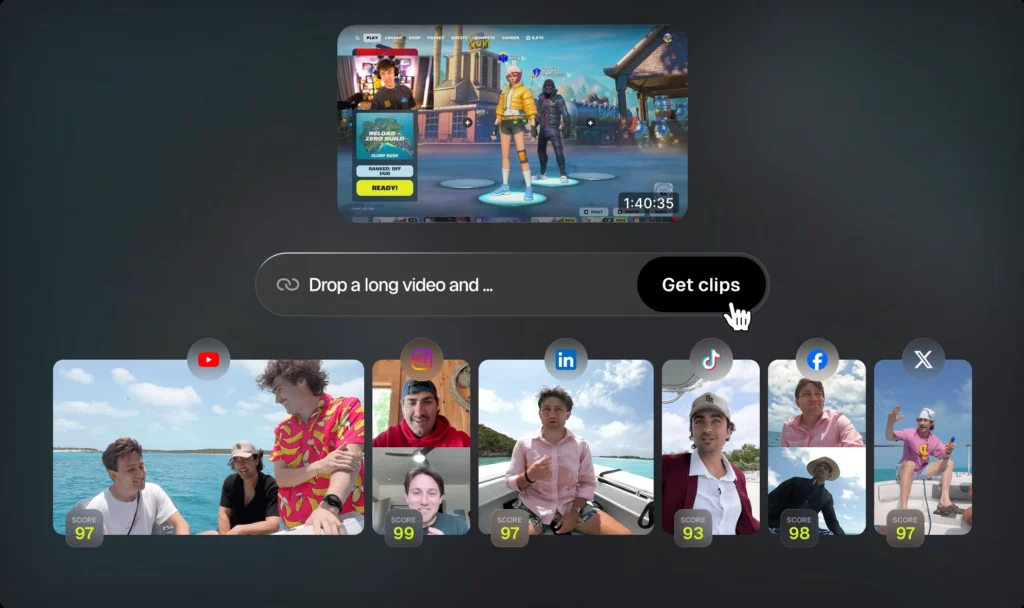
Before AI, turning a one-hour podcast into 15 social clips required a skilled editor and several hours of manual work. Today, the same task takes minutes. You paste a YouTube link, the AI analyzes the full transcript and visual cues, and you get a batch of platform-ready clips — with captions, aspect ratios, and branding already applied.
This shift matters because the content landscape has changed fundamentally:
- The global AI video generation market compounds at 35% annually and is projected to reach nearly $15 billion by 2030.
- 44% of marketers are already using AI for video creation, and AI-powered tools now save content creators up to 200 hours annually.
- Platforms like TikTok, Instagram Reels, and YouTube Shorts dominate digital spaces, with over 90% of consumers watching bite-sized videos on their phones daily.
The core problem AI solves: your long-form content contains enormous value, but most audiences will never sit through an hour-long video. AI video repurposing extracts that value and packages it into formats audiences actually consume.
How Does an AI Video Repurposing Tool Actually Work?
An AI video repurposing tool works by analyzing video content across multiple dimensions — audio, visual, semantic, and emotional — to identify high-engagement segments, then automatically reformats and exports those segments for each target platform.
Here is the typical processing pipeline:
- Ingestion — You upload a video file or paste a public URL (YouTube, Vimeo, etc.).
- Transcription — The AI generates a full transcript using speech recognition, typically achieving 95%+ accuracy for clear English audio.
- Highlight detection — Machine learning models scan for emotional peaks, topic shifts, quotable moments, and high-engagement patterns.
- Clip extraction — The system generates candidate clips, usually between 15 seconds and 3 minutes, with timestamps.
- Reformatting — Each clip is automatically resized and reframed for the target platform (9:16 for TikTok/Reels, 1:1 for LinkedIn, 16:9 for YouTube).
- Caption generation — Animated, synchronized captions are added automatically.
- Review and export — You review, adjust if needed, and publish or schedule directly from the platform.
AI clipping automates the extraction of engaging moments using machine learning to analyze visual cues, audio sentiment, and speech patterns, with top-performing tools achieving 85–90%+ accuracy rates while processing videos 10x faster than manual editing.
The 5 Best AI Video Repurposing Tools in 2026
The best AI video repurposing tools in 2026 are OpusClip, Munch, Vizard AI, Descript, and Quso.ai — each excelling in different use cases from viral clip generation to transcript-based editing.
1. OpusClip — Best for High-Volume Social Clips
OpusClip leads the video repurposing market with 90%+ AI accuracy and one-click automation, powered by its ClipAnything AI that analyzes visual cues, audio sentiment, and engagement patterns simultaneously.
opusclip ai video repurposing tool
What it does well:
- Automated clip generation from long-form video with virality scoring
- Animated, brand-customized captions that sync with speech and emotional peaks
- Multi-platform reformatting in a single workflow
- Free Forever plan with 300 monthly credits (~60 minutes of processing)
Best for: Content creators, YouTube channels, podcasters who need high volume output fast.
OpusClip’s caption system provides animated, stylized captions that automatically sync with speech patterns and emotional peaks, with multiple animation styles that can be customized to match your brand aesthetic.
2. Munch — Best for Marketing-Driven Repurposing
Munch powers its platform using GPT, OCR, and NLP to analyze clip content against social and marketing trends from leading platforms, extracting the most engaging, contextual moments from long-form content.
What it does well:
- Trend-aware clip selection based on platform analytics
- Auto-generated captions, subtitles, and keywords
- Smart reframing to keep action centered in the frame
- Direct publishing to YouTube, TikTok, and Instagram
Best for: Marketing teams and social media managers who need trend-aligned clips at scale.
3. Vizard AI — Best for Speed and Simplicity
Vizard AI can turn the same long video into 30+ clips in a single click, making it superior when you need tasks finished fast and simple.
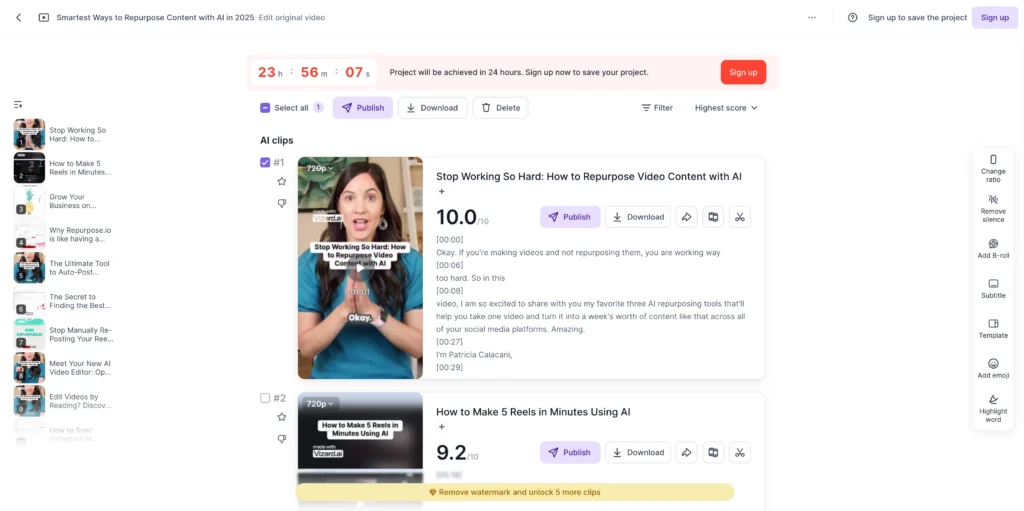
What it does well:
- One-click batch clip generation from any long video
- Transcript + automatic captioning
- Vertical, square, and horizontal aspect ratio reformatting
- Minimal learning curve — no video editing experience required
Best for: Solo creators and educators with a backlog of long content who need to generate micro-content quickly.
4. Descript — Best for Transcript-Based Editing
Descript takes a text-first approach to video editing: you edit your video by editing its transcript. Delete a sentence in the text, and it disappears from the video. This makes it especially powerful for removing filler words, restructuring content, and creating clean clips from interviews.
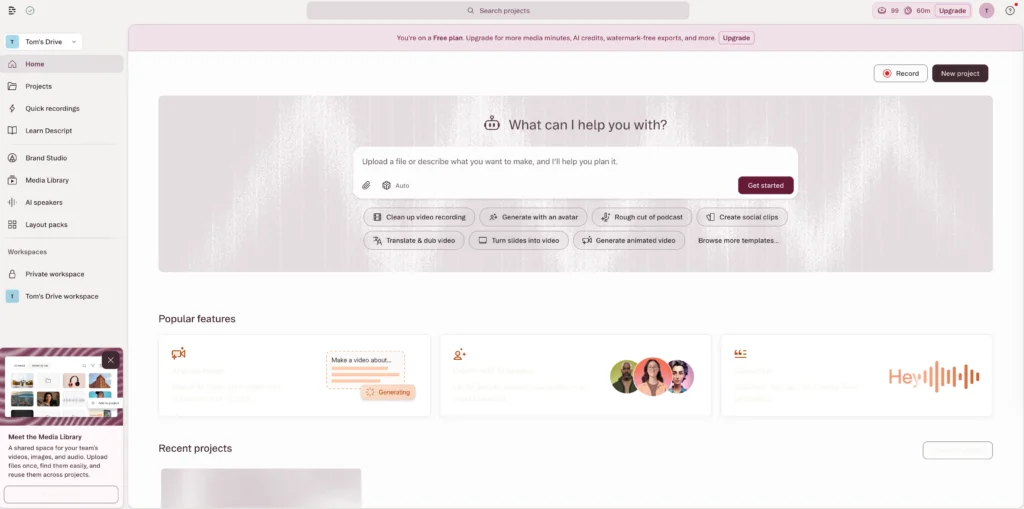
What it does well:
- Full text-based video editing with word-level precision
- Automatic filler word removal (“um,” “like,” “you know”)
- Overdub feature for re-recording individual words with your AI voice
- Strong collaboration features for teams
Best for: Podcasters, interview-based creators, and teams who want editorial control alongside automation.
5. Quso.ai — Best All-in-One Social Suite
Quso.ai is an AI-powered video repurposing and social media scheduling tool trusted by 4M+ coaches, podcasters, business owners, and video creators, combining clip generation, captions, AI avatars, and multi-platform scheduling in one dashboard.
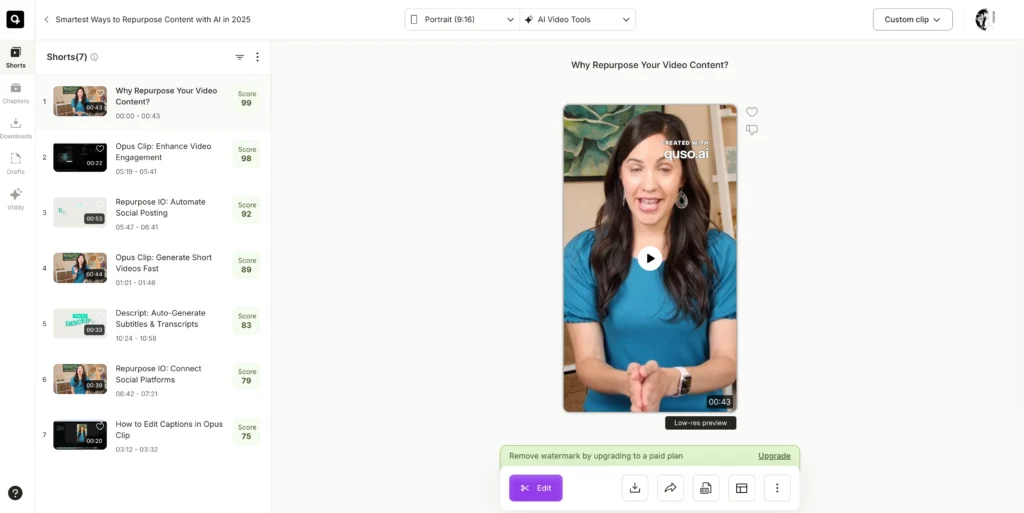
What it does well:
- Long-to-short video clipping with smart scene detection
- Built-in social media scheduler for 7+ platforms
- AI avatars for camera-free content creation
- Analytics integrated into the same dashboard
Best for: Creators who want one tool to handle repurposing, scheduling, and performance tracking.
Quick Comparison: Top AI Video Repurposing Tools
| Tool | Best For | AI Accuracy | Free Plan | Standout Feature |
| OpusClip | High-volume clips | 90%+ | ✅ Yes | ClipAnything AI + virality score |
| Munch | Marketing teams | High | ✅ Trial | Trend-aware clip selection |
| Vizard AI | Speed & volume | High | ✅ Yes | 30+ clips in one click |
| Descript | Transcript editing | Very high | ✅ Yes | Word-level video editing |
| Quso.ai | All-in-one suite | High | ✅ Yes | Social scheduling built in |
How to Repurpose a Video with AI: Step-by-Step
You can repurpose a long-form video into platform-ready short clips in under 10 minutes using an AI video repurposing tool.
Here’s a complete workflow using OpusClip as the example:
- Sign up for a free account at OpusClip (or your chosen tool). No credit card required for the free plan.
- Upload your video or paste a URL. Supported formats include MP4 and MOV. You can also drop in a YouTube, podcast, or webinar link directly.
- Select your target platforms. Choose from TikTok, Instagram Reels, YouTube Shorts, LinkedIn, or all of the above. The tool will auto-adjust aspect ratios.
- Set your clip preferences. Specify desired clip length ranges (15–30 seconds for TikTok, up to 3 minutes for YouTube Shorts) and any keyword topics you want the AI to prioritize.
- Let the AI process the video. Processing typically takes 2–5 minutes for a 60-minute video. The AI analyzes audio, visual cues, and engagement signals.
- Review the AI-generated clips. Most tools provide a virality score or engagement prediction for each clip. Review the top candidates first.
- Edit if needed. Trim clip boundaries, swap captions, adjust reframing, or add your brand logo using the built-in editor.
- Export or schedule. Download the clips directly or schedule them to publish across your connected social accounts.
Pro tip: For best clip quality, use source videos with clear audio, minimal background noise, and a defined speaker. The AI performs significantly better when the primary voice is clean and well-recorded.
What Types of Content Work Best for AI Video Repurposing?
AI video repurposing tools perform best on spoken-word content — interviews, podcasts, webinars, lectures, and long YouTube videos — because the AI relies heavily on transcript analysis to identify key moments.
Content types ranked by repurposing effectiveness:
- Podcasts and long interviews — High quotability, clear speech patterns, natural segment breaks. Ideal for tools like Descript and OpusClip.
- Webinars and online courses — Topic-dense content with natural section breaks. Great for educational short clips.
- YouTube long-form videos — Already audience-tested; high-engagement moments are often predictable. Vizard and OpusClip excel here.
- Conference talks and keynotes — Strong sound bites, emotional moments, and quotable insights.
- Live streams — More variable quality, but AI tools can still extract strong moments. Requires more review.
- Product demos and explainers — Works well when the script is structured clearly.
Content that is harder to repurpose automatically:
- Silent or music-heavy videos (no transcript to analyze)
- Highly visual content with minimal spoken narration
- Raw B-roll footage without a clear narrative
Common Mistakes to Avoid When Using AI Video Repurposing Tools
Even the best AI video repurposing tool can underperform if you make these mistakes:
- Skipping the review step. AI clip selection is highly accurate but not perfect. Always review the top clips before publishing — especially for tone, context accuracy, and brand alignment.
- Using one clip format for all platforms. A 9:16 vertical clip for TikTok will not perform well on LinkedIn as a 16:9 horizontal video. Use platform-specific exports.
- Ignoring caption quality. Auto-captions can misfire on proper nouns, technical terms, or accented speech. A quick proofread pass prevents embarrassing errors.
- Treating AI output as final. The AI’s job is to surface candidates. Your job is to select the best ones and adjust for context. A 90-second clip that starts mid-sentence needs a clean in-point.
- Not setting brand templates upfront. Most tools allow you to pre-set your logo, font, and color scheme. Configure this once and save hours across future batches.
BONUS: Gaga AI — From Repurposed Clip to Polished Production
Gaga AI is the creative production suite that takes your repurposed clips to the next level — adding avatars, cloned voices, animated audio, and text-to-speech to complete the content pipeline.

Where an AI video repurposing tool extracts and formats your existing footage, Gaga AI generates and enhances entirely new visual and audio layers on top of it. Together, they form a complete end-to-end content factory.
Image to Video AI
Gaga AI’s image-to-video engine animates any static image — a product photo, a brand graphic, a headshot — into a dynamic video clip. You provide one frame; Gaga infers natural motion and generates a fluid video continuation.
Practical uses:
- Animate product images for e-commerce ads
- Create motion graphics from brand assets
- Turn illustrated thumbnails into animated intro sequences for repurposed clips
Video and Audio Infusion
Gaga AI layers custom audio directly onto video — synchronizing music, voiceover tracks, and ambient sound to the visual timeline automatically, without manual alignment.
Key capabilities:
- Beat-synchronized cuts that match audio tempo
- Automatic audio-visual alignment across layered tracks
- Multi-track mixing with volume control per layer
This is particularly powerful when you want repurposed short clips to feel broadcast-quality — not like raw extracts.
AI Avatar
Gaga AI generates photorealistic or stylized digital presenters from a single reference image. These avatars can deliver scripted messages, present product pitches, or host explainer content — no camera, crew, or on-location shoot required.
Why this matters for repurposing workflows:
- Add a consistent on-screen host to clips that lack a visible presenter
- Create localized content with the same visual identity across multiple languages
- Produce training or explainer videos without needing on-camera talent
AI Voice Clone
Gaga AI replicates a speaker’s voice from a short audio sample — as little as 10–30 seconds. The cloned voice then delivers any new script with natural intonation and pacing in multiple languages.
How it works:
- Upload a voice sample (any clean 10–30 second recording works)
- Gaga trains a lightweight voice model on that sample
- Submit any script — the cloned voice delivers it instantly
- Adjust tone, speed, and emphasis as needed
This is especially useful for localizing repurposed clips: same clip, same voice identity, new language.
Text-to-Speech (TTS)
For creators who don’t have or want a reference voice, Gaga AI’s built-in TTS library offers a range of expressive, human-like voices across multiple languages, accents, and tones. You can adjust pace, emphasis, and emotional register directly.
The complete Gaga AI + AI Video Repurposing workflow:
| Step | Tool | Output |
| Extract key clips | OpusClip / Munch / Vizard | 15–30 second vertical clips |
| Add avatar presenter | Gaga AI Avatar | Clips with on-screen host |
| Animate product image | Gaga Image-to-Video | Animated product intro |
| Clone / generate voiceover | Gaga Voice Clone / TTS | Natural-sounding narration |
| Fuse audio to video | Gaga Audio Infusion | Broadcast-quality final clip |
| Publish | Social scheduler | Multi-platform distribution |
This pipeline converts a single long-form asset into a fully produced, multi-format content suite — without a production team.
Frequently Asked Questions About AI Video Repurposing
What is an AI video repurposing tool?
An AI video repurposing tool is software that uses machine learning to automatically analyze long-form video content, detect the most engaging segments, reformat those segments for different platforms (TikTok, YouTube Shorts, Instagram Reels), and generate captions — all without manual video editing.
How accurate is AI at picking the best clips?
Top AI video repurposing tools achieve 85–90%+ accuracy in identifying high-engagement moments. OpusClip’s ClipAnything AI analyzes visual cues, audio sentiment, and engagement patterns simultaneously to reach this level. That said, a human review step is always recommended before publishing.
What is OpusClip and how does it work?
OpusClip is a leading AI video repurposing platform that allows users to upload a long video or paste a URL, then automatically generates short-form clips with captions, virality scores, and platform-specific formatting. It offers a Free Forever plan with 300 monthly credits and supports multi-platform export in one workflow.
Can I repurpose someone else’s video using an AI tool?
You can use AI tools to transcribe or analyze publicly available videos for research or accessibility purposes. However, repurposing and publishing someone else’s copyrighted content without permission is a copyright violation regardless of the tool used. Always ensure you own or have rights to the content you’re repurposing for publication.
How long does AI video repurposing take?
Most AI video repurposing tools process a 60-minute video in 2–10 minutes, depending on the platform and processing queue. The overall workflow — including upload, processing, review, and light editing — typically takes 15–30 minutes total to produce a full batch of clips.
Which AI video repurposing tool is best for podcasters?
Podcasters benefit most from transcript-based tools like Descript, which allows word-level editing and filler word removal, or OpusClip, which excels at extracting quotable sound bites from long audio-video content. Both offer free plans to get started.
Do AI video repurposing tools add captions automatically?
Yes. Auto-captioning is a standard feature in all major AI video repurposing tools. Most achieve high accuracy for clear English audio and support multiple languages. OpusClip, Munch, and Vizard all generate animated, synchronized captions that can be customized to match brand fonts and colors.
Is AI video repurposing worth it for small creators?
Yes, especially for small creators with limited editing time or budget. Free plans from OpusClip, Vizard, and Descript make it possible to start without any upfront cost. Even saving 2–3 hours per week translates to 100+ hours annually — time that can go toward creating more content or serving clients.
What video formats do AI repurposing tools support?
Most tools support MP4 and MOV uploads, as well as direct URL input from YouTube, Vimeo, and podcast platforms. Some tools like Repurpose.io also integrate with RSS feeds to automatically process new episodes as they’re published.
Can AI video repurposing work for B2B content?
Yes. AI video repurposing is highly effective for B2B content like webinars, executive interviews, product demos, and conference keynotes. Tools like Munch are particularly strong for B2B because they analyze clips against social and marketing trends to surface the moments most likely to resonate with professional audiences.