Key Takeaways
- Remotion Skills integrates the Remotion video framework with AI agents like Claude Code, enabling video creation through natural language prompts.
- A single command (npx skills add remotion-dev/skills) transforms AI coding assistants into video production tools.
- The technology reduces video creation from hours of manual editing to minutes of conversational iteration.
- Remotion Skills is ideal for batch video generation, data visualizations, and programmatic content—not general-purpose video editing.
- Licensing requires commercial users (companies with 4+ employees) to purchase a license.
Table of Contents
What Are Remotion Skills?
Remotion Skills is an agent capability layer that connects the Remotion video framework to AI coding assistants. Released in January 2026, this feature allows users to generate, modify, and render videos using natural language instead of writing React code manually.
The core mechanism works as follows: you describe what you want in plain English, the AI agent writes the corresponding React/TypeScript code, and Remotion renders it into a video file.
This represents a fundamental shift from “learning to code videos” to “describing videos in conversation.”
How Remotion Skills Works
The Technical Foundation
Remotion itself treats video as a React application. Each frame is a React component, and the final output is rendered to MP4 or WebM. This declarative approach makes video creation programmable—and therefore automatable by AI.
When you install Remotion Skills, you’re essentially giving an AI agent (like Claude Code) a specialized toolkit for:
1. Creating new Remotion projects
2. Writing video component code
3. Configuring animations, transitions, and timing
4. Managing dependencies and rendering
The Three-Layer Architecture
Remotion Skills operates across three distinct layers:
Infrastructure Layer
- Project initialization and configuration
- Dependency management
- Video parameters (resolution, frame rate, duration)
Content Creation Layer
- Component design and animation logic
- Visual styling and color schemes
- Audio synchronization
- Data binding for dynamic content
Rendering Layer
- Real-time preview generation
- Final video export
- Parallel processing for faster output
The AI handles all three layers simultaneously, translating your natural language description into executable code at each level.
How to Install and Set Up Remotion Skills
Prerequisites
Before starting, ensure you have:
- Node.js version 16 or higher
- Claude Code installed and authenticated
- A terminal/command line interface
Step-by-Step Installation
Step 1: Create a New Remotion Project
| npx create-video@latest |
Select a template when prompted. For beginners, “HelloWorld” provides the simplest starting point.
Step 2: Install Remotion Skills
| npx skills add remotion-dev/skills |
This command downloads the skill package and registers it with your AI agent.
Step 3: Start the Development Server
| npm run dev |
Open http://localhost:3000 to access Remotion Studio. The interface displays video preview on the left and timeline controls on the right.
Step 4: Generate Your First Video
Open Claude Code, navigate to your project directory, and enter a prompt:
Create a 10-second title animation. The title reads “Welcome to AI Video”
with large white text on a dark blue background. Add a fade-in effect
where the text slides up from the bottom.
Within seconds, the AI generates the code and your preview updates automatically.
What Can You Create with Remotion Skills?
Ideal Use Cases
Data Visualization Videos
Dynamic charts, graphs, and dashboards that animate as data changes. Particularly effective for sales reports, analytics presentations, and financial summaries.
Product Demonstrations
Template-based videos showcasing features, pricing, or comparisons. Easily batch-generated for multiple products from a single data source.
Educational Content
Explainer videos with synchronized text, diagrams, and voiceover timing. The programmatic approach ensures consistent pacing and formatting.
Social Media Content
Short-form videos optimized for specific platforms. Create hundreds of variations from a single template with different text, colors, or data.
Automated Video Pipelines
Integration with databases, APIs, or spreadsheets to generate videos programmatically. One template can produce hundreds of personalized videos.
What Remotion Skills Does Well
- Precise, pixel-level control over every frame
- Batch generation from structured data
- Version control for video projects (it’s just code)
- Consistent branding across hundreds of videos
- Complex animations that would take hours in traditional editors
Limitations and Challenges
Technical Barriers That Remain
Despite simplifying video creation, Remotion Skills still requires:
- Comfort with terminal/command line interfaces
- Node.js installation and configuration
- Basic understanding of project directory structures
Users unfamiliar with development environments may struggle with initial setup.
Performance Considerations
Remotion renders videos frame-by-frame using headless browsers. This approach is computationally intensive:
- Complex scenes consume significant RAM
- Rendering time scales with video length and complexity
- Parallel rendering requires multi-core processors
For simple, short videos, traditional editing software may actually be faster.
Licensing Requirements
Remotion uses a custom license, not standard open-source terms:
| User Type | License Requirement |
| Individual developers | Free |
| Non-profit organizations | Free |
| Companies with 3 or fewer employees | Free |
| Companies with 4+ employees | Commercial license required |
Organizations planning commercial video generation services must budget for licensing costs.
What It Cannot Do
- Real-time video editing with drag-and-drop interfaces
- Processing existing footage (cutting, trimming, color grading)
- Complex audio mixing and sound design
- Motion capture or live-action integration
Remotion Skills excels at programmatic, template-based video generation—not replacing traditional non-linear editors like Premiere Pro or DaVinci Resolve.
Remotion Skills vs. Traditional Video Editing
When to Use Remotion Skills
Choose Remotion Skills when you need:
- Hundreds of similar videos with different data
- Precise, reproducible animations
- Version-controlled video projects
- Integration with databases or APIs
- Videos that update automatically when source data changes
When to Use Traditional Editors
Choose Premiere Pro, Final Cut, or DaVinci Resolve when you need:
- One-off creative projects
- Complex audio work
- Color grading and visual effects
- Footage-based editing (cuts, transitions, timing)
- Client collaboration with visual timeline feedback
Efficiency Comparison
| Task | Traditional Editor | Remotion Skills |
| Single promotional video | 2-4 hours | 30-60 minutes |
| 500 product videos | 80+ hours | 4-6 hours |
| Data visualization animation | 1-2 hours | 5-15 minutes |
| Template iteration (v1 → v10) | Hours of re-editing | Minutes of prompt refinement |
The efficiency advantage scales with repetition and standardization.
Real-World Performance: What to Expect
Typical Workflow Timeline
A realistic workflow for creating a 30-second data visualization video:
1. Prompt writing (2-3 minutes): Describe the desired video in detail
2. Initial generation (5-10 seconds): AI produces first code version
3. Preview and iteration (5-10 minutes): Refine through 4-6 conversation turns
4. Final render (1-3 minutes): Export to MP4
Total time: approximately 10-15 minutes for a polished result.
Quality Expectations
AI-generated Remotion videos achieve:
- Clean, professional animations
- Accurate color and typography implementation
- Proper timing and pacing for most standard effects
- Reliable rendering without artifacts
However, highly creative or unconventional designs may require more iteration or manual code adjustment.
Advanced Applications
Batch Video Generation from Spreadsheets
The most powerful application of Remotion Skills involves automated pipelines:
Step 1: Prepare a data source (Excel, CSV, or database) containing video parameters:
- Product names
- Image URLs
- Prices
- Feature descriptions
Step 2: Create a template video with variable placeholders
Step 3: Write a script that iterates through data rows, generating one video per entry
Step 4: Run the batch process—500 videos in hours, not weeks
API Integration for Dynamic Content
Remotion can fetch live data during rendering:
- Stock prices for financial videos
- Weather data for location-specific content
- Sports scores for highlight reels
- Social metrics for engagement reports
Each render pulls current data, ensuring videos stay accurate without manual updates.
remotion skills guide video
Bonus: Alternative Tools Worth Considering
Gaga AI
For users seeking AI-powered video creation without coding requirements, Gaga AI offers a browser-based alternative. Key differentiators include:
- No terminal or Node.js installation required
- Visual interface for non-developers
- Cloud-based rendering (no local hardware demands)
- Template library for common video formats
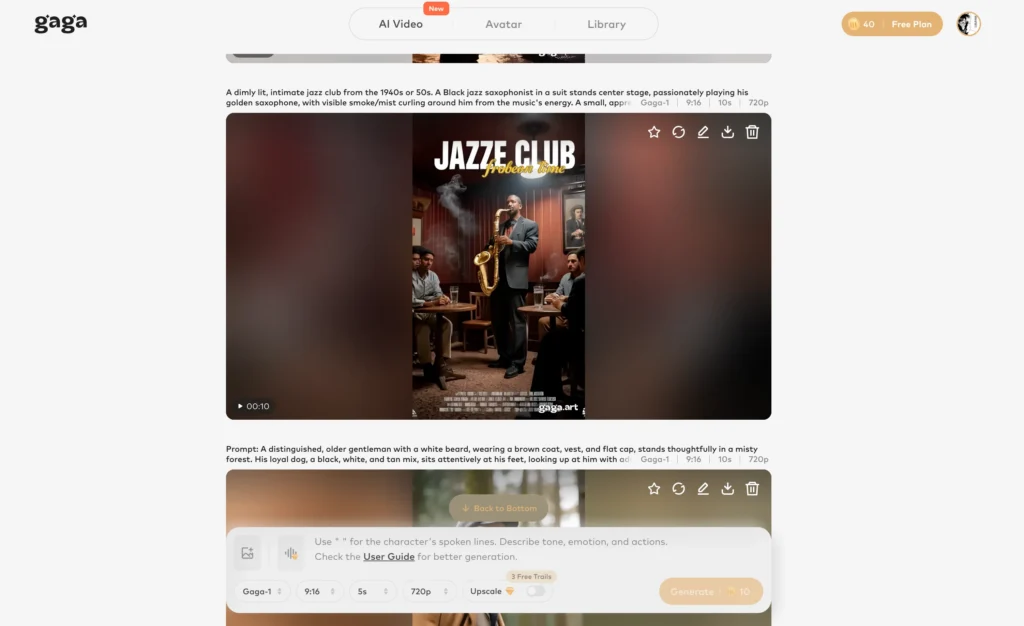
Gaga AI trades the precise control of Remotion for accessibility and ease of use. For teams without development resources, this tradeoff often makes sense.
Consider Gaga AI when:
- Your team lacks coding experience
- You need quick results without setup time
- Cloud-based workflows fit your security requirements
- Visual editing interfaces match your preferred working style
Frequently Asked Questions
What is Remotion Skills used for?
Remotion Skills enables AI-assisted video creation by connecting the Remotion framework to language models like Claude. It allows users to generate videos through natural language prompts rather than writing React code manually. Common applications include data visualizations, product videos, educational content, and batch video generation.
Is Remotion Skills free to use?
Remotion Skills is free for individual developers, non-profit organizations, and companies with three or fewer employees. Companies with four or more employees require a commercial license. The Skills feature itself has no additional cost beyond the base Remotion licensing.
Do I need to know how to code to use Remotion Skills?
You do not need to write code directly, but you need basic comfort with terminal commands and development environments. Installation requires running npm commands, and troubleshooting may occasionally require examining generated code. Complete beginners may find the setup challenging.
How does Remotion Skills compare to Premiere Pro?
Remotion Skills and Premiere Pro serve different purposes. Remotion excels at programmatic, template-based video generation—especially for batch production. Premiere Pro is designed for creative, footage-based editing with visual timelines. Choose Remotion for automation and scale; choose Premiere for one-off creative projects.
Can Remotion Skills edit existing videos?
No. Remotion creates videos from code, not from existing footage. It cannot import MP4 files for trimming, cutting, or effects. For editing existing videos, traditional non-linear editors remain necessary.
What AI models work with Remotion Skills?
Remotion Skills is designed for Claude Code, Anthropic’s AI coding assistant. The integration leverages Claude’s ability to understand natural language and generate structured React code. Other AI agents may work with varying degrees of compatibility.
How long does rendering take?
Rendering time depends on video length, complexity, and hardware. A 30-second video with moderate animation typically renders in 1-3 minutes on a modern computer. Complex scenes with many elements take longer. Remotion supports parallel rendering across CPU cores to improve speed.
Is Remotion Skills suitable for YouTube content creation?
It depends on your content type. Remotion Skills works well for explainer videos, data presentations, and templated formats. It is less suitable for vlog-style content, reaction videos, or footage-heavy productions. Many creators use Remotion for intros, outros, and data segments while editing main content in traditional software.
What happens if the AI generates incorrect code?
If the generated code produces unexpected results, you can describe the problem in natural language and request fixes. The iterative conversation allows refinement without manual coding. For persistent issues, examining the generated code helps identify specific problems.
Can I use Remotion Skills for commercial projects?
Yes, but licensing requirements apply. Individual use and small teams (3 or fewer) can use Remotion commercially under the free license. Larger organizations need a commercial license. Building video generation services for external clients also requires commercial licensing.
Final Thoughts
Remotion is open source—and that matters. It’s not a black-box SaaS platform. It runs locally, supports private deployment, and integrates with any LLM you choose.
The newly launched Agent Skills feature is a critical piece of the puzzle. It transforms “video as code” into “video as natural language.”
For developers, this may be the most efficient path currently available for producing high-quality, maintainable, batch-generated video content.
You don’t need to learn Premiere or After Effects. You don’t need to worry about AI video generators producing unpredictable results. You just need to know React—or simply know how to direct Claude Code.
Resources:
Remotion GitHub: https://github.com/remotion-dev/remotion
Remotion Skills: https://github.com/remotion-dev/skills