Table of Contents
Quick Answer (TL;DR)
| Concept | What It Is | One-Line Definition |
| LLM | The AI brain | A powerful language model (GPT, Claude, Gemini) — brilliant, but context-free by default |
| Prompt | A real-time instruction | Text input that guides an LLM in the moment; temporary and session-bound |
| Agent | An autonomous work mode | An AI that independently breaks down goals, uses tools, and iterates toward results |
| Skill | A reusable AI playbook | Structured SOPs, templates, and reference materials that guide consistent AI behavior |
| MCP | A system access protocol | Model Context Protocol — a standard that lets AI connect to external tools and data sources |
| AI IDE (Cursor, Trae) | A graphical AI workspace | A code editor with AI built in, supporting Agent mode and MCP integrations |
| Claude Code / OpenCode | A terminal-based AI coding agent | Command-line AI that operates directly in your codebase without a GUI |
Why These Terms Are So Confusing (And Why It Matters to Get Them Right)
If you’ve Googled “what’s the difference between MCP and Skill” or “is Claude Code the same as Cursor,” you’re not alone — and you’re not missing something obvious. These concepts genuinely overlap in ways that even experienced developers find muddled.
But getting them right matters. Understanding how Prompts, Agents, Skills, MCP, and AI coding tools fit together is the difference between using AI for one-off tasks and building a system where AI reliably handles complex work end to end.
This guide covers all of it — in one read, with a single analogy that holds throughout.
The Analogy That Ties Everything Together: You Just Started a Company
Rather than dry definitions, we’ll use a story: you’ve just founded a company.
Your company needs people, processes, tools, and a place to work. Each AI concept maps directly to a role or resource you’d encounter when building that company. By the end, the whole system will feel obvious — not abstract.
Here’s the full map:
| AI Concept | Company Equivalent | Core Function |
| LLM (Large Language Model) | A brilliant new hire on Day 1 | Raw intelligence with no company-specific context yet |
| Prompt | Verbal, in-the-moment instructions | Temporary guidance — effective now, gone after this session |
| AI Agent | “Figure-it-out” autonomous mode | Self-directed task execution toward a defined goal |
| Skill | The company SOP handbook | Reusable, structured knowledge that guides consistent output |
| MCP (Model Context Protocol) | An access badge for external systems | Universal protocol connecting AI to tools, APIs, and data |
| AI IDE (Cursor / Trae / Windsurf) | A smart office with AI at every desk | Graphical dev environment with native AI + Agent capability |
| Claude Code / OpenCode | The field operative | Terminal-based AI agent that works directly inside your codebase |
What Is an LLM? The Brilliant New Hire Analogy
A Large Language Model (LLM) is an AI system trained on vast text data to understand and generate human language. Examples include GPT-4o, Claude 3.5, Gemini 1.5, and DeepSeek V3.
Think of an LLM as the most capable new hire you’ve ever brought on board.
They can write strategy documents, debug code, explain complex topics, draft legal-style memos, and compose poetry — often at a professional level. The raw intelligence is extraordinary.
The limitation: they arrived today. They don’t know your workflows, your clients’ preferences, your brand voice, or where anything lives in your systems. Raw intelligence without context produces inconsistent results.
This is the core challenge every other concept in this guide is designed to solve: how do you take a world-class generalist and make them work like an expert insider?
What Is a Prompt? Definition, Examples, and Limitations
A prompt is a text-based instruction given to an AI model to guide its output during a session. Prompts are the most fundamental interface between humans and LLMs.
In the company analogy: a prompt is what you say when you walk to your new hire’s desk and give them a task.
“Write a proposal.” “Keep the tone professional but direct.” “Follow the format we used for the Acme account.” “Fewer adjectives — tighten it up.”
These real-time verbal instructions work. But they share one critical limitation: they don’t persist.
Tell an LLM your preferred formatting rules today; in a new session tomorrow, that context is gone. Prompts are session-scoped, one-time, use-and-discard instructions.
Prompt Engineering in 2026: Still Alive, But Invisible
“Prompt is dead” became a popular take as AI Agents and automated pipelines took over. The claim is directionally right but technically wrong.
Prompt engineering hasn’t disappeared — it’s moved backstage. Every action an Agent takes is powered by an auto-generated prompt. Every Skill is, at its core, engineered prompt logic. The system still runs on prompts; you just don’t write them all by hand anymore.
The analogy: your heartbeat doesn’t stop just because you’re not thinking about it.
What Is an AI Agent? How Agent Mode Works
An AI Agent is an LLM operating in autonomous, goal-directed mode — independently planning tasks, selecting tools, executing steps, and iterating on results without human input at each step.
The distinction from standard LLM usage is fundamental:
| Standard LLM | AI Agent |
| You give one instruction → AI gives one response | You give a goal → AI plans and executes the full path |
| Human-directed at every step | Self-directed between start and finish |
| Reactive | Proactive |
| Stateless | Maintains task state across multiple steps |
Agent Mode in Practice
You say: “Pull together a competitive analysis report on these five companies.”
You leave for two hours. When you return:
- The Agent searched for publicly available competitor data
- Determined that wasn’t sufficient and retrieved two industry research reports
- Organized data into a structured comparison table
- Wrote a first draft, evaluated its own reasoning, and revised it twice
- Delivered a complete, polished report
You gave a goal. It handled everything in between.
What Is NOT an Agent
A common misconception: “Agent” is not a product name or software category you can download. It’s a mode of operation. Cursor, Claude Code, Manus, and Devin all have Agent capability — the differences between them are about how capable and reliable that mode is, not whether it exists.
What Is an AI Skill? How Skills Differ from Prompts
An AI Skill is a reusable, structured knowledge package — including processes, templates, reference materials, and scripts — that guides an AI to perform a specific task consistently and correctly.
If a Prompt is what you say in the moment, a Skill is what you wrote down and filed for permanent reference.
A well-structured Skill typically contains:
- Standard operating procedures — step-by-step task breakdown (e.g., “For competitive analysis: Step 1 gather data, Step 2 build comparison table, Step 3 write findings, Step 4 review and format”)
- Output templates — formatting standards, structure requirements, style guidelines
- Reference materials — examples of high-quality past work for calibration
- Utility scripts or automation hooks — tools that support execution
Prompt vs. Skill: Key Differences
| Prompt | Skill | |
| Persistence | Session-only | Permanent, reusable |
| Scope | One-time instruction | Reusable knowledge system |
| How it’s used | You tell the AI what to do | The AI knows what to do |
| Consistency | Varies with each conversation | Stable across sessions |
| Best for | Quick one-offs | Repeatable, high-quality workflows |
Why Skills Matter for Consistent AI Output
Without Skills, an AI reinvents the wheel on every task — and the outputs vary wildly in quality, format, and tone. With Skills, the AI has an expert playbook to follow.
A well-designed Skill doesn’t dump everything at once. Like an experienced employee who doesn’t re-read the entire policy manual every morning, a good Skill surfaces the right knowledge for the right task at the right time — keeping the AI focused and efficient.
The more Skills you build, the more your AI performs like a veteran rather than a day-one hire.
What Is MCP (Model Context Protocol)? Explained Simply
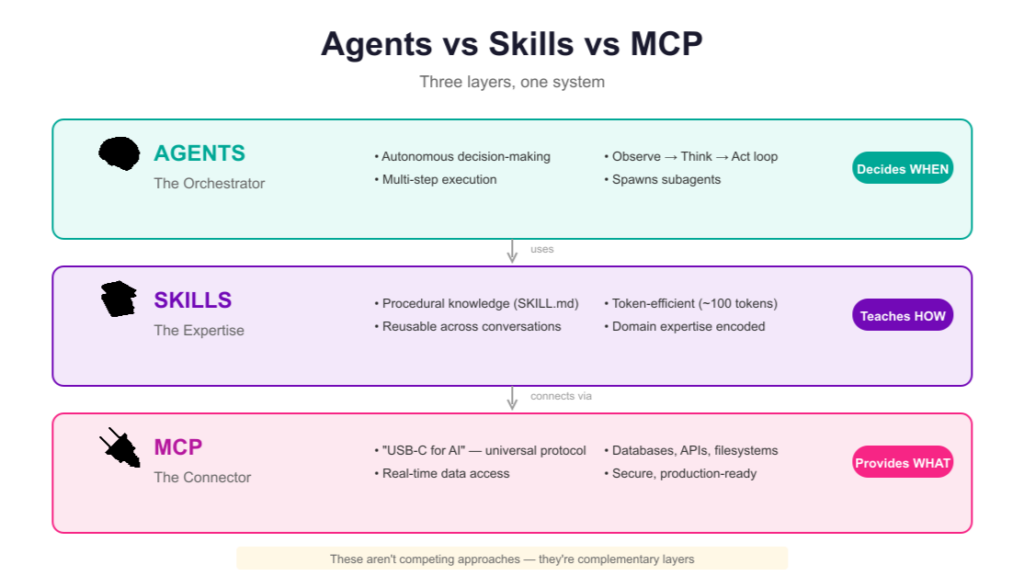
MCP, or Model Context Protocol, is an open standard that enables AI models to connect to external tools, APIs, databases, and services using a consistent, unified interface.
In the company analogy: MCP is the access badge. With it, your AI employee can swipe into every system they need — the CRM, the code repository, the search engine, the database. Without it, they have all the skills in the world but can’t get through the door.
What MCP Enables
- Connect to GitHub — read/write code, pull commit history, check repository stats
- Connect to Slack or Notion — retrieve and update documents, messages, project data
- Connect to web search — access real-time information beyond the model’s training cutoff
- Connect to internal databases — query business data without manual export
- Connect to any MCP-compatible API — as of early 2026, over 1,000 systems support MCP
MCP vs. Skill: What’s the Difference?
This is one of the most commonly searched questions about these two concepts.
| Skill | MCP | |
| What it provides | Methodology — how to do the task | Access — what data and tools to use |
| Analogy | Training and SOPs | Security clearance and access badge |
| Removes the problem of | Inconsistent outputs | Inability to reach external systems |
Skill = competence. MCP = clearance. You need both — one without the other creates a capable AI that either can’t access its inputs or doesn’t know what to do with them.
What Is an AI IDE? Cursor vs. Trae vs. Windsurf Compared
An AI IDE (Integrated Development Environment) is a code editor with AI capabilities built directly into the development workflow, including real-time code completion, natural language editing, debugging assistance, and Agent mode for autonomous task execution.
Classic IDEs — VS Code, IntelliJ — were powerful but passive. You did the work; the tool organized it.
AI IDEs flip this. Open one and there’s already an AI collaborator at the desk beside you.
Top AI IDEs in 2026
Cursor The current market leader. Visually similar to VS Code with a substantially more capable AI layer. Cursor’s Agent mode accepts a plain-language goal and independently reads, modifies, runs tests, and iterates on your codebase. Best for developers who want the most capable out-of-the-box experience.
Trae Built by ByteDance. Strong Agent mode, excellent multilingual support, generous free tier. Increasingly competitive with Cursor for professional use.
Windsurf From the Codeium team. A serious AI IDE with a clean interface and solid Agent capabilities. Good alternative for teams already in the Codeium ecosystem.
What All Modern AI IDEs Share
Every current-generation AI IDE provides: LLM access, Agent mode, Skill loading support, and MCP integration. The “smart office” metaphor fits — these are fully equipped environments where your AI staff is already present.
Buyer’s note: The phrase “AI-powered IDE” is currently being applied to anything with a basic autocomplete feature. The actual test: can the Agent mode accept a plain-language goal, execute it autonomously, and deliver output you’d trust? That’s the real benchmark.
What Is Claude Code? And How Does It Compare to Cursor?
Claude Code is a command-line AI coding agent developed by Anthropic that operates directly in your terminal, enabling autonomous code reading, writing, execution, and debugging without a graphical interface.
Claude Code vs. Cursor: Core Difference
| Cursor (AI IDE) | Claude Code (Terminal Agent) | |
| Interface | Graphical (GUI) | Command-line (terminal) |
| Best for | Day-to-day development with visual context | Complex, large-scale agentic tasks |
| Model support | Multiple models | Claude only |
| How Agent works | Inside a visual editor | Directly in the file system |
| Parallel execution | Limited | Can spawn multiple agents simultaneously |
The intuitive analogy: an IDE Agent is a skilled consultant managing a project from a glass-walled office. A terminal Agent is the one standing on the job site with a hard hat, doing it directly.
Both get the work done. For large-scale or deeply automated projects, terminal-based execution often provides tighter feedback loops and greater flexibility.
Claude Code vs. OpenCode
OpenCode is the open-source community alternative to Claude Code. Both are terminal-based AI coding agents. The key difference is model flexibility:
- Claude Code — Anthropic’s official product. Polished, tightly integrated, Claude-exclusive
- OpenCode — Open-source, supports 75+ models including Claude, GPT-4o, DeepSeek, Gemini, and local models
If Claude is your preferred model: either works well, with Claude Code offering a more refined experience. If you want model flexibility or want to use open-source/local models: OpenCode is the clear choice.
Real-World Example: All Five Concepts Working Together
The best way to understand how these concepts relate is to watch them interact in practice.
The task: produce a complete technical stack comparison report evaluating five frameworks for a new product.
Without the full system: open fifteen browser tabs, read documentation manually, build comparison tables by hand, write and format analysis from scratch. Realistic timeline: 2–3 days.
With the full system:
- Claude Code opens in the terminal — terminal-based Agent ready for deployment
- A single goal is given: “Build a comprehensive technical comparison report for these five frameworks”
- Agent mode activates — the AI independently plans and executes the full task
- MCP → GitHub — pulls latest commit activity, contributor counts, and star trajectory for each framework
- MCP → Web search — retrieves community discussion volume and developer sentiment from the past 90 days
- Skill: “Technical Evaluation” — applies a pre-built methodology: standard comparison criteria, weighting logic, output format
- Result in ~20 minutes: a complete report with data tables, side-by-side comparisons, ranked conclusions, and recommendations
The same report that previously took two and a half days took twenty minutes — not because any single component is magic, but because all four components were working in concert:
LLM capability + Agent autonomy + Skill methodology + MCP connectivity
This is not incremental improvement. It’s a different order of magnitude.
FAQ: Common Questions About AI Terminology
Q: What’s the difference between a Prompt and a Skill?
A Prompt is a temporary, session-bound instruction — it guides the AI right now but doesn’t persist. A Skill is a permanent, reusable knowledge package — structured SOPs, templates, and reference materials the AI can retrieve and apply consistently across sessions. Prompts are one-time instructions; Skills are durable playbooks.
Q: What’s the difference between MCP and a Skill?
Skills define how to do a task (the process, the methodology, the output standard). MCP defines what the AI can access to do that task (external tools, databases, APIs, live data). A Skill without MCP may lack the data it needs. MCP without a Skill may return data the AI doesn’t know how to use. They’re complementary, not interchangeable.
Q: Is an AI Agent a product you can download?
No. “Agent” describes a mode of operation, not a specific product. An AI Agent is any LLM operating in autonomous, goal-directed mode — planning tasks, using tools, and iterating without step-by-step human direction. Cursor, Claude Code, and Manus all have Agent mode; the question is how capable and reliable their implementation is.
Q: Claude Code vs. Cursor — which should I use?
Use Cursor if you prefer a graphical IDE experience for day-to-day development. Use Claude Code if you’re running complex, large-scale agentic tasks and prefer working in the terminal with deeper file system access. They aren’t mutually exclusive — many developers use both depending on the task.
Q: Is Prompt Engineering dead in 2026?
Prompt engineering as a manual, visible practice has declined. But prompts haven’t disappeared — they’ve moved backstage. Every Agent action, every Skill execution, and every automated pipeline step is driven by prompts under the hood. The skill shifted from writing prompts manually to designing systems that generate and use them effectively.
Q: What does MCP stand for?
MCP stands for Model Context Protocol. It’s an open standard (developed by Anthropic) that lets AI models connect to external tools and data sources — GitHub, Slack, Notion, search engines, custom APIs — through a consistent interface. As of 2026, over 1,000 systems support MCP.
Key Takeaways
- LLM = raw AI intelligence; brilliant but context-free without guidance
- Prompt = session-bound instruction; effective now, gone tomorrow
- Agent = autonomous execution mode; give a goal, get a result
- Skill = reusable knowledge package; persistent SOPs that produce consistent outputs
- MCP = access protocol; connects AI to external systems, data, and tools
- AI IDE = graphical workspace with AI built in (Cursor, Trae, Windsurf)
- Claude Code / OpenCode = terminal AI agent; no GUI, works directly in the codebase
None of these replaces the others. The real power emerges when they operate as a system.
The Bottom Line
In 2026, AI fluency isn’t about knowing the most models or writing the cleverest prompts.
It’s about understanding how these building blocks fit together — and knowing which one to reach for at each stage of real work.
You don’t need to master all of them immediately. You need to know what problem each one solves, so that when you need it, you recognize it.
The AI landscape isn’t a single tool. It’s a full stack — and every layer has a distinct job.
Now you know what each layer does.
Related Posts:
 The Ultimate Guide to Creating an AI Avatar for Your Brand in 2025
 Mastering the Prompt: The Ultimate Guide to Gaga AI Video Generation
 Midjourney Video Generator: The Ultimate Guide, Prompts, and the Best AI Alternative
 The Complete Guide to Stable Diffusion AI Video: From Image Generation to Advanced Video Creation