Key Takeaways
- Kling AI is a multimodal AI video platform that generates videos from text, images, and video inputs with synchronized audio
- Kling O1 is the flagship model supporting 3-10 second videos with advanced reference-based generation and consistency control
- Pricing ranges from 30-120 credits per generation depending on resolution (720p/1080p), duration, and complexity
- Video 2.6 adds audio synthesis including voiceovers, sound effects, and ambient audio automatically
- NSFW content is restricted on the platform with content moderation in place
- Free tier available with limited credits; paid plans offer more generation capacity
Table of Contents
What is Kling AI?
Kling AI is an advanced AI-powered video generation platform that transforms text prompts, images, and video references into high-quality video content. Developed as a next-generation creative engine, Kling specializes in multimodal input processing, allowing creators to combine text descriptions with visual references to produce consistent, narrative-driven videos ranging from 3 to 10 seconds.
The platform stands out for its unified architecture that integrates multiple video creation tasks—including text-to-video, image-to-video, video transformation, style transfer, and inpainting—into a single workflow. This eliminates the need to switch between different tools during the creative process.
Core Technology: Multi-modal Visual Language (MVL)
Kling operates on the Multi-modal Visual Language concept, which enables the AI to understand and process combinations of:
- Natural language text prompts
- Reference images (up to 7 images per generation)
- Video clips as contextual references
- Element libraries for character and object consistency
This multimodal approach allows the system to maintain visual consistency across shots while understanding complex creative intentions expressed through conversational prompts.
The Evolution of Kling AI: Version History and Updates
Early Versions: Building the Foundation
Kling 1.6: The Initial Release
Kling 1.6 marked the platform’s entry into the AI video generation market, introducing basic text-to-video and image-to-video capabilities. This version established the foundation for Kling’s approach to multimodal understanding, though with more limited duration and consistency compared to later iterations.
Kling 2.0: Expanding Capabilities
The 2.0 update brought significant improvements in:
- Video quality and resolution options
- Enhanced motion understanding
- Better prompt interpretation
- Improved character consistency across frames
- Extended generation parameters
This version represented Kling’s first major evolution, positioning it as a serious competitor in the AI video generation space.
Kling 2.1: Refinement and Optimization
Version 2.1 focused on incremental improvements:
- Refined visual quality and detail rendering
- Reduced generation artifacts
- Improved processing speed
- Better handling of complex scenes
- Enhanced stability in character features
Major Breakthrough: Kling Video O1
The World’s First Unified Multimodal Video Model
Kling Video O1 represented a paradigm shift in the platform’s architecture. Rather than offering separate tools for different video tasks, O1 unified multiple capabilities into a single model:
Key Innovations in Video O1:
- True multimodal integration: Seamlessly combining text, images, and video inputs
- Extended duration control: Flexible 3-10 second generation windows
- Industrial-grade consistency: Multi-subject tracking and feature preservation
- Conversational editing: Natural language commands for video transformation
- Reference-based generation: Support for 1-7 reference images or elements
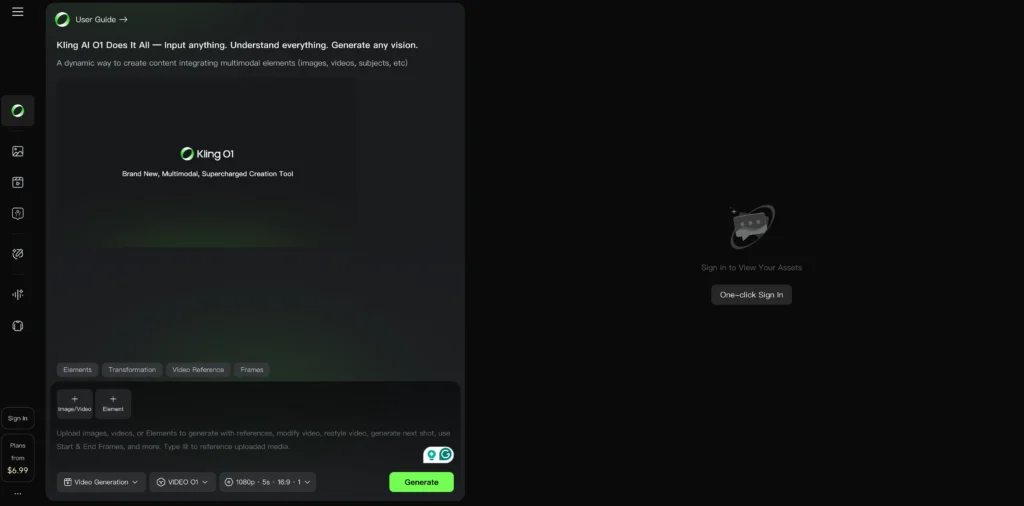
This update fundamentally changed how creators interact with AI video tools, moving from rigid parameter-based workflows to intuitive, conversation-driven creation.
Image Generation Evolution: Omni Image 1.0
Unified Image Creation Experience
Parallel to video model development, Kling launched Omni Image 1.0, bringing the same multimodal philosophy to still image generation:
- Support for up to 10 reference images
- Seamless transition from generation to editing
- Precise detail modification without tool-switching
- Feature retention across iterations
- Style consistency control
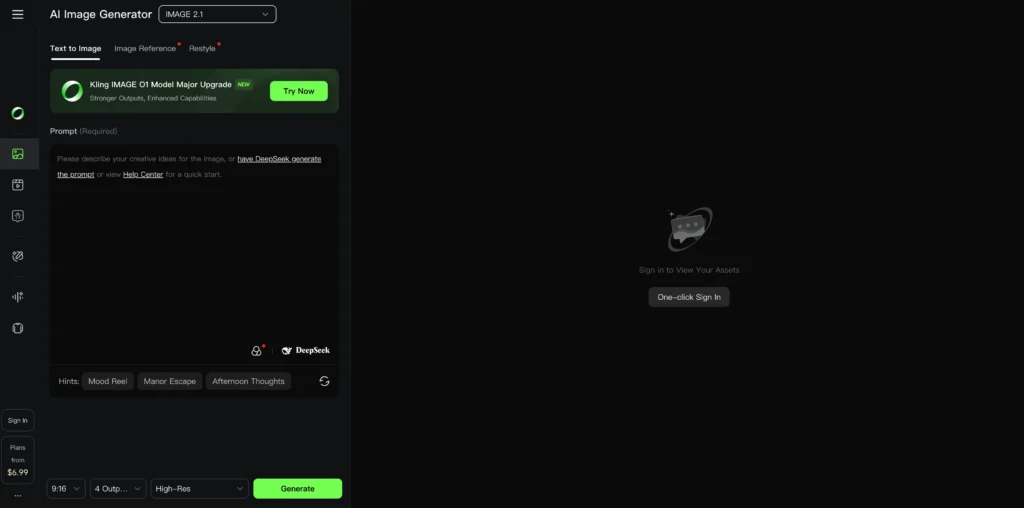
This update eliminated the fragmented workflow of previous image tools, allowing creators to move from ideation to detailed refinement in a single interface.
Avatar Evolution: From 1.0 to Avatar 2.0
Avatar 1.0: Introduction of Character Videos
The initial Avatar feature allowed basic character animation with uploaded images and audio, but was limited in duration and expressiveness.
Avatar 2.0: Professional-Grade Performance
The Avatar 2.0 upgrade delivered transformative improvements:
- Extended duration: Support for up to 5-minute character videos
- Enhanced lifelike quality: Dramatically improved facial expressions and movements
- Better audio synchronization: More natural lip-sync and emotional alignment
- Full scene coverage: Suitable for complete content pieces, not just short clips
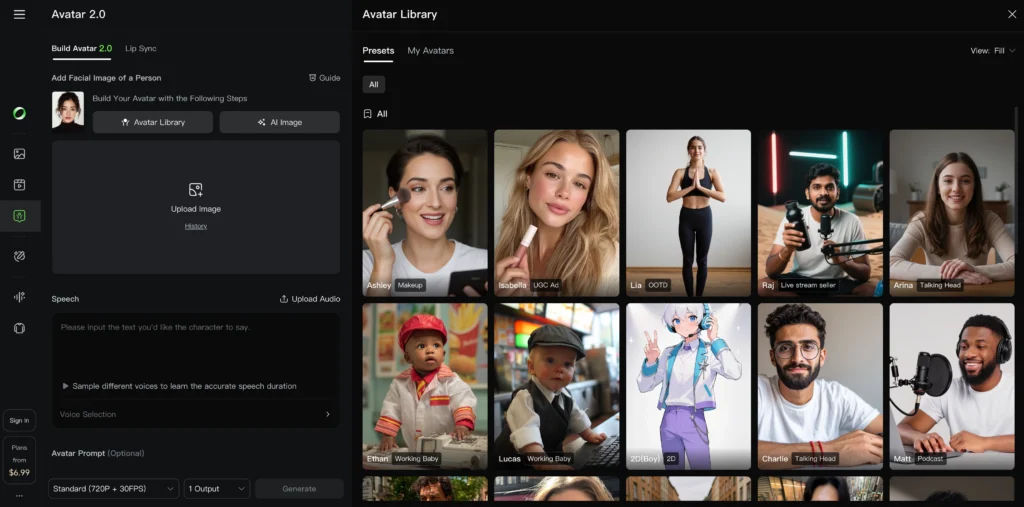
This evolution made Kling AI viable for professional use cases like virtual presenters, educational content, and marketing spokesperson videos.
Current Flagship: Kling Video 2.6
Bridging Sound and Vision
Video 2.6 represents Kling’s most recent major update, addressing the critical limitation of previous “silent film” generation:
Revolutionary Audio Integration:
- Automatic voiceover generation with emotional tone control
- Context-aware sound effects matching on-screen actions
- Ambient atmosphere synthesis
- Rhythm synchronization between audio and visual elements
Why Video 2.6 Matters:
Prior to 2.6, creators had to manually:
- Source or create voiceovers separately
- Find and sync sound effects
- Adjust audio pacing to match visuals
- Mix multiple audio layers
Video 2.6 eliminates this post-production bottleneck, generating complete audiovisual experiences in a single pass. The model understands the relationship between what’s visible and what should be audible, creating immersive content that transitions from “viewable” to “experiential.”
Timeline Summary
- Kling 1.6 → Foundation: Basic text/image-to-video
- Kling 2.0 → Enhancement: Improved quality and consistency
- Kling 2.1 → Refinement: Stability and optimization
- Video O1 → Revolution: Unified multimodal architecture
- Omni Image 1.0 → Image parity: Unified image creation
- Avatar 2.0 → Professional characters: 5-minute lifelike avatars
- Video 2.6 → Complete integration: Audio-visual synthesis
What’s Next for Kling AI?
While Kling AI hasn’t officially announced future updates, the platform’s trajectory suggests potential developments in:
- Longer video duration support (beyond 10 seconds)
- Enhanced real-time editing capabilities
- More granular audio control
- Expanded API functionality
- Additional format and resolution options
The consistent pattern of major updates every few months indicates Kling AI’s commitment to rapid innovation in the competitive AI video generation landscape.
Kling AI Video Models: O1 and 2.6 Explained
Kling Video O1: The Unified Multimodal Model
Kling O1 represents the world’s first unified multimodal video model, consolidating diverse video generation tasks into one architecture. Key capabilities include:
1. Multimodal Input Support
- Upload 1-7 reference images or elements
- Combine characters, props, backgrounds, and scenes
- Use video references for shot continuity
- Specify start and end frames for precise control
2. Video Consistency and Character Persistence
Kling O1 maintains character, prop, and scene consistency across different camera angles and movements. The model can track multiple subjects simultaneously, preserving unique features even in complex ensemble scenes with environmental changes.
3. Flexible Duration Control
Generate videos between 3-10 seconds, allowing creators to control narrative pacing. Shorter durations work for impactful quick cuts, while longer generations support storytelling with narrative arcs.
4. Transformation and Editing Capabilities
Through conversational prompts, you can:
- Remove or add subjects (“remove bystanders”)
- Modify backgrounds and environments
- Change time of day (“change daytime to dusk”)
- Swap character outfits or appearances
- Adjust styles, colors, and weather conditions
- Alter shot composition and camera angles
5. Task Combination
Execute multiple creative operations in a single generation, such as adding a subject while simultaneously modifying the background and changing the overall style.
Kling Video 2.6: Audio-Visual Integration
Video 2.6 introduces synchronized audio generation, moving beyond “silent films” to create complete audiovisual experiences. The model generates:
- Natural voiceovers with emotional tone control
- Sound effects matching on-screen actions
- Ambient atmosphere that complements the visual mood
- Rhythm synchronization between audio and visual elements
This eliminates post-production audio work, allowing creators to produce immersive videos in a single pass from text or image inputs.
Kling AI Pricing: Credits and Cost Structure
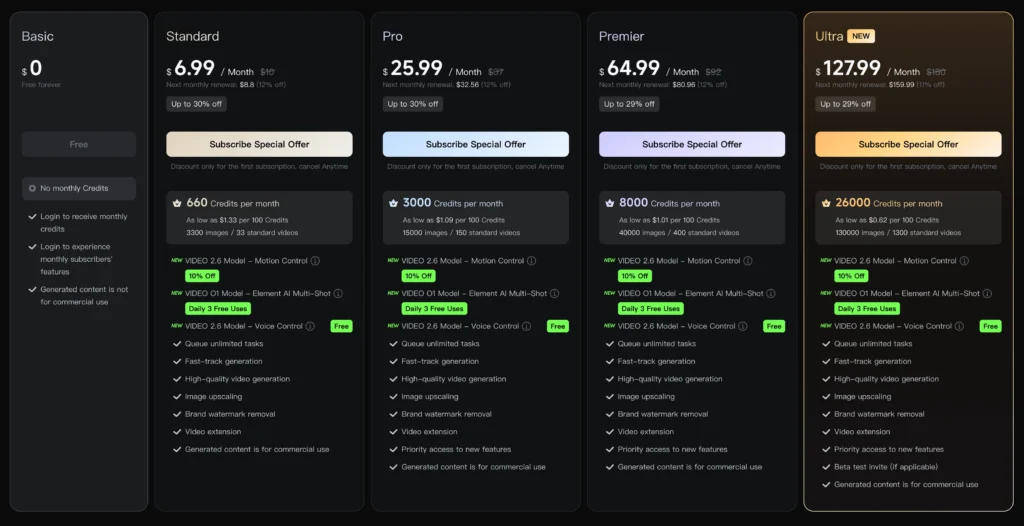
Video O1 Pricing Breakdown
Kling AI uses a credit-based system where costs vary by resolution, video duration, and input complexity:
| Mode & Resolution | Input Type | Credits per Second | 5-Second Clip | 10-Second Clip |
| 1080p (Full HD) | Without Video Input | 8 Credits | 40 Credits | 80 Credits |
| With Video Input | 12 Credits | 60 Credits | 120 Credits | |
| 720p (HD) | Without Video Input | 6 Credits | 30 Credits | 60 Credits |
| With Video Input | 9 Credits | 45 Credits | 90 Credits |
Is Kling AI Free?
Kling AI offers a free tier with limited credits for new users to test the platform. For sustained usage, paid subscription plans provide monthly credit allocations. The exact free credit amount may vary, so check the official Kling AI website for current offerings.
How to Use Kling AI: Step-by-Step Generation Guide
Text-to-Video Generation
For text-to-video without visual references, detailed prompts produce richer results.
Recommended Prompt Structure:
[Subject description] + [Movement/action] + [Scene description] + [Cinematic language/lighting/atmosphere]
Example: “A young woman in a red dress walking through a bustling Tokyo street at night, neon lights reflecting on wet pavement, cinematic shot with shallow depth of field, moody blue and pink lighting”
Image-to-Video Generation
Upload 1-7 reference images or elements to bring static visuals to life.
Workflow:
1. Upload reference images (characters, objects, scenes)
2. Describe interactions between elements
3. Define environment and visual style
4. Generate video
Prompt Structure:
[Detailed description of elements] + [Interactions between elements] + [Environment] + [Visual directions]
Using Start and End Frames
Control the entire video narrative by specifying keyframes.
Method 1 – Start Frame Only: “Take [@Image1] as the start frame, camera slowly zooms out revealing a medieval castle courtyard, characters begin dancing”
Method 2 – Both Frames: “Take [@Image1] as the start frame, take [@Image2] as the end frame, smooth transition from sunrise to sunset over mountain landscape”
Video Reference Generation
Upload a 3-10 second reference video to:
- Generate the previous or next shot in the same context
- Reference specific camera movements
- Replicate action patterns in new scenes
Transformation and Editing
Modify existing videos through conversational prompts:
- “Remove the person in the background”
- “Change the car color from red to blue”
- “Replace the modern city with a medieval village”
- “Adjust the weather from sunny to rainy”
The model performs pixel-level semantic reconstruction automatically without manual masking or keyframing.
Kling AI Image Generation: Omni Image 1.0
Unified Image Creation Workflow
Omni Image 1.0 provides a seamless image generation and editing experience within a single interface, supporting:
- Text-to-image generation with detailed prompts
- Reference-based creation using up to 10 reference images
- Precise editing and modifications on existing images
- Feature integration from multiple reference sources
Four Core Advantages
1. Feature Retention: Main elements remain stable without unwanted variations
2. Precise Detail Modification: Targeted adjustments execute exactly as described
3. Accurate Style Control: Maintains unified atmosphere across the image
4. Rich Imagination: Enhances creative visions with dramatic visual tension
The model uses natural language combined with visual references, interpreting comprehensive creative intentions while maintaining consistency.
Kling AI Avatar 2.0: Dynamic Character Videos
Avatar 2.0 generates lifelike character videos up to 5 minutes long by combining:
- Character reference images
- Voiceover audio (text-to-speech or uploaded audio)
- Expression descriptions
The upgraded system dramatically improves performance for longer content scenarios, making it suitable for virtual presenters, educational content, and marketing videos.
Does Kling AI Allow NSFW Content?
Kling AI implements content moderation policies that restrict NSFW (Not Safe For Work) content. The platform enforces guidelines to prevent the generation of explicit, adult, or inappropriate material. Attempts to generate NSFW content may result in:
- Generation rejection
- Credit forfeiture
- Account warnings or suspension for repeated violations
For creators needing mature content generation, alternative platforms with different content policies may be more appropriate.
Kling AI vs Alternatives: How Does It Compare?
Unique Advantages of Kling AI
Multimodal Unified Architecture: Unlike competitors requiring separate tools for different tasks, Kling O1 handles text-to-video, image-to-video, transformation, and extension in one model.
Extended Duration: 10-second maximum duration exceeds many competitors’ 4-6 second limits, enabling better narrative development.
Audio Integration: Video 2.6’s automatic audio generation (voiceovers, sound effects, ambient sound) is uncommon among AI video generators.
Multi-subject Consistency: Advanced character and object tracking across complex scenes with multiple subjects.
Comparable Alternatives
Gaga AI and other platforms offer similar AI video generation capabilities. When evaluating alternatives, consider:
- Maximum video duration
- Resolution options
- Audio generation capabilities
- Pricing structure
- NSFW policy
- Interface complexity
Frequently Asked Questions
What is Kling AI used for?
Kling AI is used for creating AI-generated videos from text prompts, images, or video references. Common applications include content creation, marketing videos, social media content, concept visualization, storyboarding, and creative experimentation.
How much does Kling AI cost?
Kling AI pricing ranges from 30 credits (720p, 5s without video input) to 120 credits (1080p, 10s with video input) per generation. The platform offers a free tier with limited credits and paid subscription plans for regular use.
What is Kling 1.6, 2.0, and 2.1?
These refer to different version iterations of Kling’s video models. Kling 1.6 was the initial release with basic capabilities. Kling 2.0 brought significant quality improvements and expanded features. Kling 2.1 focused on refinement and optimization. The current flagship models are Video O1 (multimodal unified model) and Video 2.6 (audio-visual integration).
Can I use Kling AI for commercial projects?
Commercial usage rights depend on your subscription tier and Kling AI’s terms of service. Review the licensing agreement for your specific plan to understand commercial usage permissions, attribution requirements, and any restrictions.
How long can Kling AI videos be?
Kling AI Video O1 supports video generation between 3-10 seconds in duration. Avatar 2.0 extends this to up to 5 minutes for character-based videos with voiceover.
What file formats does Kling AI support for input and output?
Kling AI typically accepts common image formats (JPG, PNG) for reference images and MP4 for video references. Output videos are generally delivered in MP4 format. Check the platform documentation for the complete list of supported formats.
How does Kling AI compare to Runway or Pika?
Kling AI differentiates itself through its unified multimodal architecture (handling multiple tasks in one model), 10-second maximum duration, built-in audio generation in Video 2.6, and strong multi-subject consistency. Runway and Pika have different strengths in areas like motion control, resolution options, and specific effect capabilities.
Can I extend videos beyond 10 seconds?
Within a single generation, the maximum duration is 10 seconds for Video O1. However, you can use video extension features to generate continuation shots, effectively creating longer sequences by chaining multiple generations together.
What’s the difference between Video O1 and Video 2.6?
Video O1 is the unified multimodal architecture that handles diverse video generation tasks (text-to-video, image-to-video, transformation, etc.) with 3-10 second duration control. Video 2.6 is the latest version that adds synchronized audio generation, including voiceovers, sound effects, and ambient atmosphere, creating complete audiovisual experiences.