Key Takeaways
- Kimi K2.5 is Moonshot AI’s flagship open-source native multimodal model with 1 trillion total parameters and 32 billion activated parameters
- The Kimi K2.5 Agent Swarm feature coordinates up to 100 sub-agents for parallel task execution, reducing runtime by up to 4.5x
- Visual coding capabilities allow Kimi AI to generate frontend interfaces from video input with exceptional design aesthetics
- Kimi K2.5 benchmark performance rivals GPT 5.2 and Claude 4.5 Opus at approximately 1/20th the cost
- Available free via kimi.com with paid tiers for Agent Swarm and advanced features
- Kimi K2.5 Huggingface supports vLLM, SGLang, KTransformers, and Ollama deployment
- Full integration available via Kimi K2.5 OpenRouter, Cursor, and OpenCode
Table of Contents
What Is Kimi K2.5?
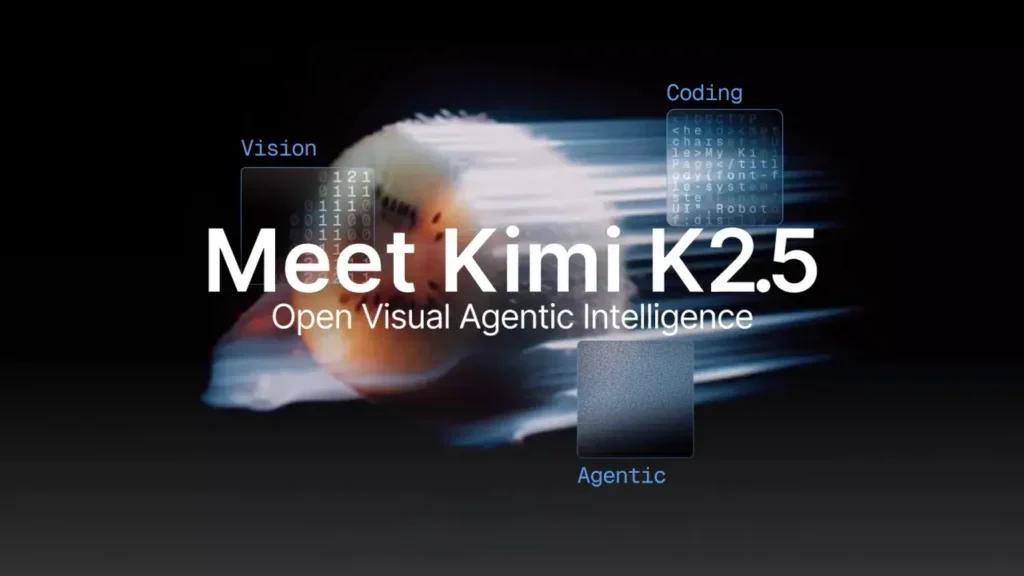
Kimi K2.5 is Moonshot AI’s most advanced open-source multimodal AI model released in early 2026. Unlike previous iterations, the Kimi AI platform now processes text, images, and video through a unified transformer architecture rather than bolting separate vision modules onto a text model—making it a true native multimodal model.
The model builds on Kimi K2 with continued pretraining over approximately 15 trillion mixed visual and text tokens. This Moonshot Kimi architecture enables seamless cross-modal reasoning where the model understands visual content and language as fundamentally interconnected rather than separate processing streams.
Quick Specifications
| Specification | Value |
| Architecture | Mixture-of-Experts (MoE) |
| Total Parameters | 1 trillion |
| Activated Parameters | 32 billion |
| Context Length | 256K tokens |
| Vision Encoder | MoonViT (400M parameters) |
| Vocabulary Size | 160K |
What Is Kimi K2.5 Thinking Mode?
Kimi K2.5 Thinking is the deep reasoning mode that displays the model’s chain-of-thought process. Unlike the instant mode that provides quick responses, Kimi K2.5 Thinking shows you exactly how the model reasons through complex problems.
When to Use Kimi K2.5 Thinking
Best for:
- Complex mathematical problems requiring step-by-step reasoning
- Code debugging where you want to see the logic flow
- Multi-step research tasks requiring careful analysis
- Decision-making scenarios benefiting from transparent reasoning
When Instant Mode is Better:
- Quick factual lookups
- Simple code generation
- Casual conversation
- Time-sensitive tasks where speed matters more than depth
The Kimi K2.5 Thinking mode particularly shines on the AIME 2025 benchmark (96.1%) and GPQA-Diamond (87.6%), demonstrating that the transparent reasoning process doesn’t sacrifice performance.
What Makes Kimi K2.5 Agent Swarm Different?
Kimi K2.5 Agent Swarm represents the model’s most significant architectural innovation. Rather than scaling a single agent to handle complex tasks, K2.5 can self-direct a coordinated swarm of up to 100 specialized sub-agents.
How Agent Swarm Works
1. The orchestrator agent receives a complex task
2. K2.5 autonomously decomposes the task into parallelizable subtasks
3. Specialized sub-agents are dynamically instantiated (no predefined roles required)
4. Sub-agents execute tasks in parallel across up to 1,500 coordinated steps
5. Results are aggregated into a final unified output
This approach was trained using Parallel-Agent Reinforcement Learning (PARL). The training process uses staged reward shaping that initially encourages parallelism and gradually shifts focus toward task success, preventing the common “serial collapse” failure mode where models default to single-agent execution.
Real-World Benefits
- Up to 4.5x reduction in wall-clock execution time compared to sequential processing
- 80% reduction in end-to-end runtime for complex research tasks
- Better performance on wide-search scenarios requiring information from multiple sources
For example, when asked to research GPU industry developments, K2.5 can spawn specialized agents like “Market Analyst,” “Technical Expert,” and “Supply Chain Researcher” to gather information in parallel before synthesizing findings.
When to Use Agent Swarm vs Single Agent
Agent Swarm excels when tasks require:
- Information gathering from multiple independent sources
- Parallel research across different domains
- Complex projects that naturally decompose into independent subtasks
- Time-sensitive tasks where sequential execution would be too slow
Single agent mode remains preferable for:
- Simple, focused queries
- Tasks requiring deep sequential reasoning
- Conversations where context continuity matters more than breadth
- Cost-sensitive applications where parallel execution overhead isn’t justified
Practical application: One user tasked K2.5 with identifying top YouTube creators across 100 niche domains. The Kimi K2.5 Agent Swarm autonomously created 100 specialized sub-agents, each researching its assigned niche in parallel. The aggregated results—300 creator profiles—were compiled into a structured spreadsheet, completing in minutes what would have taken hours with sequential execution.
How Good Is Kimi K2.5 at Visual Coding?
Kimi K2.5’s visual coding capabilities set it apart from competitors. The Kimi AI model can generate production-quality frontend code from simple text prompts, design references, or even video demonstrations.
What K2.5 Can Do with Visual Coding
- Generate complete frontend interfaces from natural language descriptions
- Replicate interactive components by watching video demonstrations
- Maintain consistent design aesthetics across iterative refinements
- Implement complex animations and scroll-triggered effects
- Debug visual issues through screenshot markup and feedback
Designers and developers report that K2.5 produces notably better default aesthetics than other models. Where competitors often default to generic blue-purple gradients and standard component libraries, Moonshot Kimi demonstrates genuine design sensibility—understanding when to apply grain textures, choosing appropriate typography, and maintaining visual consistency.
Practical Workflow
1. Provide a video of the interaction you want to replicate
2. K2.5 analyzes the visual content frame-by-frame
3. The model generates code implementing the observed behavior
4. Iterate by marking up screenshots with desired changes
5. K2.5 refines the implementation based on visual feedback
Testing shows K2.5 can successfully replicate complex tab-switching animations, card-based interfaces with hover effects, and responsive layouts—all from video input alone.
Real-world example:
In one documented test, a developer provided K2.5 with a video showing a tab-switching component with complex interactions—splitting animations, color state changes, and bounce effects. The model’s first generation captured the core interaction correctly, with only minor visual alignment issues fixed through screenshot markup feedback. The final result included bounce animations that actually exceeded the polish of the original reference.
Design system awareness:
K2.5 demonstrates understanding of design consistency. When replicating a heavily stylized admin interface with unconventional components, the model not only reproduced the layout but added a black-and-white dot-matrix filter to images—unprompted—to maintain aesthetic coherence. This suggests genuine design thinking rather than mere pixel copying.
Autonomous visual debugging:
Using Kimi Code, K2.5 can inspect its own visual output, compare it against reference materials, and iterate autonomously. This reduces the back-and-forth typically required when working with AI code generation tools.
How Does Kimi K2.5 Handle Office Productivity?
Beyond coding and research, Kimi AI brings agentic intelligence to everyday knowledge work. The K2.5 Agent mode can handle high-density document processing and deliver expert-level outputs directly through conversation.
Supported Output Formats
- Word documents with annotations and tracked changes
- Spreadsheets with pivot tables and financial models
- PDFs with LaTeX equations and complex formatting
- Slide decks with professional layouts
- Long-form outputs up to 10,000 words or 100-page documents
Internal benchmarking: Moonshot reports 59.3% improvement over K2 Thinking on their AI Office Benchmark, measuring end-to-end office output quality. The General Agent Benchmark shows 24.3% improvement on multi-step, production-grade workflows compared to human expert performance baselines.
Practical Examples
- Creating 100-shot storyboards in spreadsheet format with embedded images
- Building financial models with automated pivot table construction
- Generating comprehensive research reports with proper citation formatting
- Converting video content into structured documentation
Tasks that previously required hours of manual work can complete in minutes, with the model coordinating multiple tool uses and maintaining coherent output across complex multi-step workflows.
What Are Kimi K2.5 Benchmark Results?
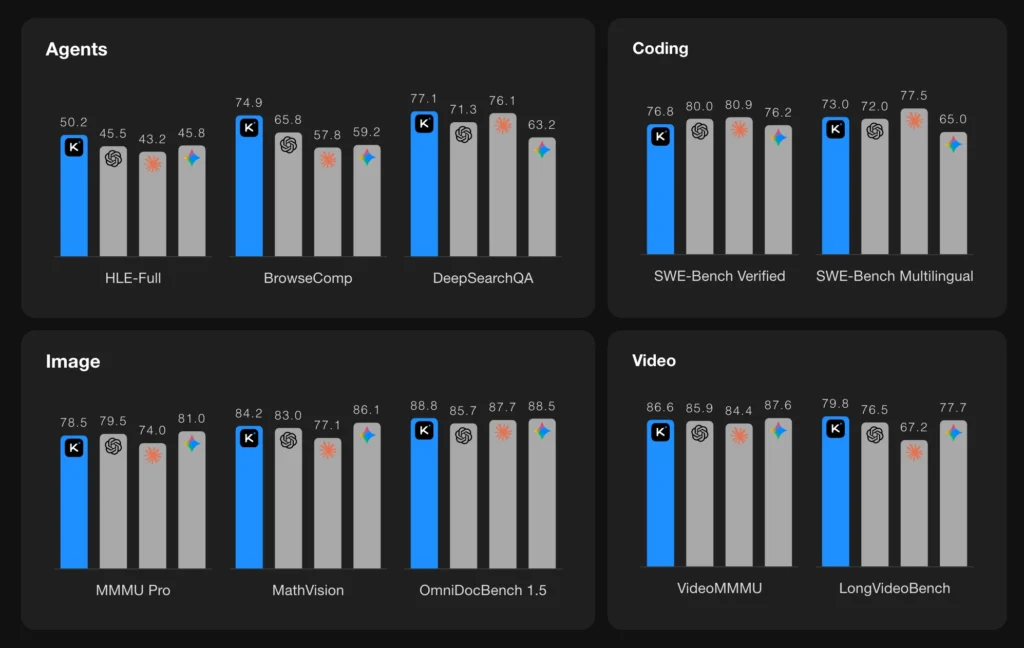
The Kimi K2.5 benchmark results achieve frontier-level performance across multiple categories:
Reasoning & Knowledge
| Benchmark | Score |
| HLE-Full | 30.1 (with tools: 50.2) |
| AIME 2025 | 96.1 |
| GPQA-Diamond | 87.6 |
| MMLU-Pro | 87.1 |
Image & Video Understanding
| Benchmark | Score |
| MMMU-Pro | 78.5 |
| MathVision | 84.2 |
| VideoMMMU | 86.6 |
| LongVideoBench | 79.8 |
| OmniDocBench 1.5 | 88.8 |
Coding
| Benchmark | Score |
| SWE-Bench Verified | 76.8 |
| SWE-Bench Multilingual | 73.0 |
| LiveCodeBench (v6) | 85.0 |
| Terminal-Bench 2.0 | 50.8 |
Agentic Search
| Benchmark | Score |
| BrowseComp | 60.6 (Agent Swarm: 78.4) |
| DeepSearchQA | 77.1 |
| WideSearch | 72.7 (Agent Swarm: 79.0) |
These Kimi K2.5 benchmark results position K2.5 as competitive with closed-source frontier models while remaining fully open-source with accessible deployment options.
Kimi 2.5 Pricing: How Much Does It Cost?
Kimi 2.5 pricing offers multiple access tiers with notably competitive rates:
Free Tier (kimi.com)
- K2.5 Instant mode: Unlimited access
- Kimi K2.5 Thinking mode: Unlimited access
- Basic features without Agent Swarm
Trial Membership
- ¥4.99 for 7 days
- Access to K2.5 Agent and Kimi K2.5 Agent Swarm modes
- Compatible with Kimi Code CLI, Claude Code, and Roo Code
- 1,024 interactions included (approximately ¥0.57 per complex generation)
API Pricing
- Available through platform.moonshot.ai
- OpenAI/Anthropic-compatible API endpoints
- Approximately 1/5 to 1/20 the cost of GPT 5.2 for equivalent tasks
For developers integrating K2.5 into production workflows, the Kimi 2.5 pricing represents significant savings over comparable closed-source alternatives while delivering competitive benchmark performance.
How to Use Kimi K2.5
Option 1: Web Interface (kimi.com)
1. Navigate to kimi.com
2. Select your preferred mode:
- K2.5 Instant: Fast responses without extended reasoning
- Kimi K2.5 Thinking: Deep reasoning with visible thought process
- K2.5 Agent: Agentic mode with tool use (paid)
- Kimi K2.5 Agent Swarm: Multi-agent parallel execution (paid beta)
3. Upload images or videos as needed for multimodal tasks
4. Use the built-in screenshot editor for visual debugging feedback
Option 2: API Integration
| import openai client = openai.OpenAI( api_key=”your-api-key”, base_url=”https://api.moonshot.ai/v1″ ) # Kimi K2.5 Thinking mode (default) response = client.chat.completions.create( model=”kimi-k2.5″, messages=[{“role”: “user”, “content”: “Your prompt”}], max_tokens=4096 ) # Instant mode response = client.chat.completions.create( model=”kimi-k2.5″, messages=[{“role”: “user”, “content”: “Your prompt”}], extra_body={“thinking”: {“type”: “disabled”}} ) |
Option 3: Kimi K2.5 Cursor Integration
Kimi K2.5 Cursor setup is straightforward for developers already using the Cursor IDE:
1. Open Cursor Settings → Models
2. Add a custom model endpoint
3. Set the base URL to https://api.moonshot.ai/v1
4. Enter your Moonshot API key
5. Select kimi-k2.5 as the model
The Kimi K2.5 Cursor integration enables AI-assisted coding directly in your development environment with K2.5’s superior visual coding capabilities.
Option 4: Kimi K2.5 OpenRouter
For developers preferring unified API access, Kimi K2.5 OpenRouter integration provides a single endpoint for multiple models:
| import openai client = openai.OpenAI( api_key=”your-openrouter-key”, base_url=”https://openrouter.ai/api/v1″ ) response = client.chat.completions.create( model=”moonshot/kimi-k2.5″, messages=[{“role”: “user”, “content”: “Your prompt”}] ) |
Kimi K2.5 OpenRouter access allows easy model switching and unified billing across providers.
Option 5: Kimi K2.5 OpenCode
Kimi K2.5 OpenCode provides terminal-based access similar to Claude Code and Aider:
| # Install Kimi K2.5 OpenCodepip install kimi-opencode # Install Kimi K2.5 OpenCode pip install kimi-opencode # Configure API key export MOONSHOT_API_KEY=”your-api-key” # Start coding session kimi-code . |
Kimi K2.5 OpenCode integrates with VSCode, Cursor, and Zed, supporting image and video inputs while automatically discovering existing skills and MCPs in your environment.
Option 6: Kimi Code CLI
Kimi Code works in your terminal and integrates with VSCode, Cursor, and Zed. It supports image and video inputs and automatically discovers existing skills and MCPs in your environment.
Self-Hosted Deployment Options
Kimi K2.5 Huggingface

For organizations requiring local deployment, Kimi K2.5 Huggingface provides the model weights with support for:
- vLLM
- SGLang
- KTransformers
- Minimum transformers version: 4.57.1
| # Clone from Kimi K2.5 Huggingface git lfs install git clone https://huggingface.co/moonshot-ai/kimi-k2.5 |
Ollama Kimi K2.5
Ollama Kimi K2.5 deployment provides the simplest local setup for individual developers:
| # Pull the Ollama Kimi K2.5 modelollama pull kimi-k2.5 # Run Ollama Kimi K2.5ollama run kimi-k2.5 # Or use the APIcurl http://localhost:11434/api/generate -d ‘{ “model”: “kimi-k2.5”, “prompt”: “Your prompt here”}’ |
Note that Ollama Kimi K2.5 uses quantized weights, which may show slight performance degradation compared to full-precision deployment via Kimi K2.5 Huggingface. Video input support is also limited in the Ollama version.
Ollama Kimi K2.5 system requirements:
- Minimum 48GB VRAM for Q4 quantization
- 96GB+ VRAM recommended for Q8 or full precision
- NVIDIA or AMD GPU with ROCm support
What Are Kimi K2.5’s Limitations?
While K2.5 excels in many areas, users should be aware of current limitations:
Fine visual details: Like other multimodal models, K2.5 can miss extremely precise design specifications—exact border radii, specific color values, or subtle spacing adjustments may require iterative refinement.
Context management in extended sessions: Very long agent sessions with extensive tool use may hit context limits, though the 256K token window provides substantial headroom.
Agent Swarm availability: The Kimi K2.5 Agent Swarm feature remains in beta with limited free access, restricting some users from the most powerful parallel execution capabilities.
Video support in third-party deployments: Video input currently works reliably only through Moonshot’s official API; Ollama Kimi K2.5 and third-party deployments via vLLM or SGLang may not support video content.
What Is the Difference Between Native and Non-Native Multimodal?
Understanding this distinction explains why K2.5 performs differently from competitors:
Native Multimodal (Kimi K2.5, GPT-4o, Gemini)
- Single unified transformer processes all modalities
- Text, images, video mapped to the same token/vector space
- Trained end-to-end on mixed multimodal data
- Better cross-modal reasoning and visual-language coherence
Non-Native Multimodal (Claude 4.x series)
- Text model with separately trained vision encoder
- Bridge layer connects visual features to language model
- Vision capabilities added after primary language training
- May show disconnect between visual understanding and language generation
In practice, native multimodal models like Kimi AI demonstrate stronger performance in tasks requiring tight integration between visual and textual reasoning—such as generating code from visual specifications or debugging interfaces through screenshot feedback.
Which Frontier Models Use Native Multimodal Architecture?
Currently, among major AI labs:
Native multimodal:
Kimi K2.5, GPT-4o/GPT 5.2, Gemini 2.5/3 Pro, Baidu Wenxin 4.5/5.0, Alibaba Qwen-Omni
Non-native multimodal:
Claude 4.x series, Doubao-Seed-1.8
The native vs non-native distinction becomes most apparent in visual coding tasks. When Moonshot Kimi generates a website from a design reference, it processes the visual aesthetic and code generation as unified reasoning. Non-native models may understand the image content but struggle to translate that understanding into stylistically coherent code output.
What About Kimi K3? What’s Coming Next?
While Moonshot AI hasn’t officially announced Kimi K3, the development roadmap suggests several likely improvements:
Expected Kimi K3 features based on industry trends:
- Extended context beyond 256K tokens (potentially 1M+)
- Enhanced Agent Swarm with improved coordination
- Faster inference through architectural optimizations
- Expanded video understanding capabilities
- Deeper tool integration and autonomous coding
Timeline speculation: Based on Moonshot’s previous release cadence (K2 to K2.5 was approximately 6 months), Kimi K3 could arrive in late 2026. However, no official announcement has been made.
For now, Kimi K2.5 remains the flagship Kimi AI model and represents the best of what Moonshot offers.
Who Should Use Kimi K2.5?
Ideal Users
- Frontend developers seeking AI-assisted visual coding with strong aesthetics
- Research teams requiring cost-effective parallel execution for complex investigations
- Designers who want Kimi AI that understands design principles rather than producing generic templates
- Organizations processing large volumes of documents requiring structured outputs
- Developers seeking open-source models competitive with closed-source alternatives
- Budget-conscious teams comparing Kimi K2.5 vs Opus 4.5
Less Ideal For
- Users requiring maximum absolute performance regardless of cost (GPT 5.2 may edge ahead on some tasks)
- Applications requiring extensive fine-tuning (closed models may offer more tuning options)
- Teams with existing heavy investment in Claude-specific tooling and workflows
Bonus: Gaga AI as an Alternative
For users exploring the AI landscape, Gaga AI offers a complementary approach worth considering. While Kimi K2.5 excels in technical coding and agentic tasks, Gaga AI focuses on creative content generation and conversational AI experiences.
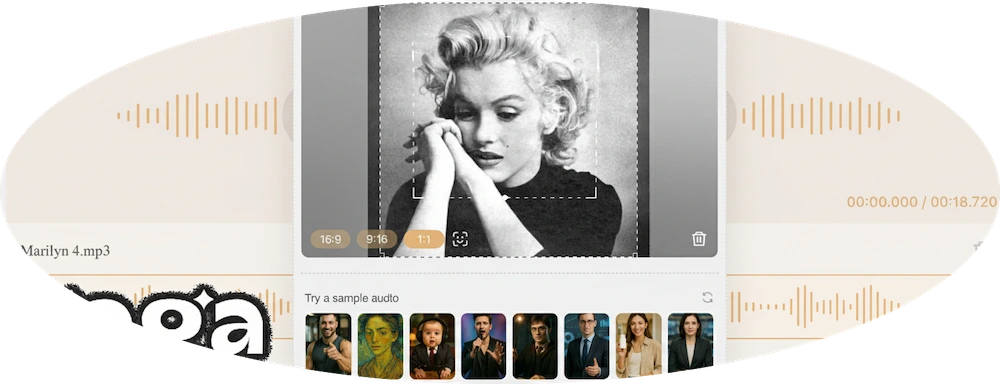
Gaga AI may be preferable for:
- Creative writing and storytelling applications
- Conversational AI with personality customization
- Users prioritizing ease of use over technical depth
However, for developers, designers, and teams requiring strong visual coding, agent orchestration, and benchmark-competitive performance, Kimi AI and specifically Kimi K2.5 remains the stronger choice in early 2026.
Frequently Asked Questions
Is Kimi K2.5 free to use?
Yes, Kimi K2.5 Instant and Kimi K2.5 Thinking modes are available free through kimi.com. Advanced features like K2.5 Agent and Kimi K2.5 Agent Swarm require a paid subscription starting at ¥4.99 for a 7-day trial.
Can Kimi AI understand video input?
Yes, Kimi K2.5 is a native multimodal model that processes video content. The Kimi AI platform can analyze video demonstrations and generate code replicating observed interactions, animations, and UI behaviors.
How does Kimi K2.5 compare to ChatGPT?
Kimi K2.5 achieves comparable or superior performance to GPT 5.2 on many benchmarks at approximately 1/20th the cost. K2.5 outperforms GPT 5.2 on HLE-Full with tools (50.2 vs 45.5) while GPT 5.2 leads on pure reasoning tasks like AIME 2025.
What is Moonshot Kimi?
Moonshot AI is the Chinese AI company that develops the Kimi model family. “Moonshot Kimi” refers to their product lineup, with Kimi K2.5 being the current flagship model released in 2026.
Is Kimi K2.5 open source?
Yes, Kimi K2.5 is fully open source and available on Kimi K2.5 Huggingface for self-hosted deployment. It supports deployment through vLLM, SGLang, KTransformers, and Ollama Kimi K2.5.
What is Kimi K2.5 Agent Swarm?
Kimi K2.5 Agent Swarm is K2.5’s parallel multi-agent execution system. It allows the model to spawn up to 100 specialized sub-agents that work simultaneously on complex tasks, reducing execution time by up to 4.5x compared to single-agent approaches.
Can I use Kimi K2.5 for frontend development?
Yes, Kimi AI excels at frontend development with notably strong visual aesthetics. It can generate code from text descriptions, replicate interfaces from images or videos, and iterate through visual feedback using screenshot markup.
Does Kimi K2.5 work with Claude Code?
Yes, Kimi K2.5 is compatible with Claude Code CLI, Kimi K2.5 OpenCode, and Roo Code. Users can leverage Claude’s agent framework while using K2.5 as the underlying model, combining strong agent orchestration with K2.5’s cost-effective performance.
What languages does Kimi K2.5 support for coding?
Kimi K2.5 supports multiple programming languages with strong performance on SWE-Bench Multilingual (73.0). It handles Python, JavaScript, TypeScript, C++, and other common languages effectively.
How do I access Kimi K2.5 API?
Access the API through platform.moonshot.ai. The API is OpenAI and Anthropic-compatible, allowing easy integration with existing workflows. API documentation includes examples for text, image, and video inputs.
What is the context length of Kimi K2.5?
Kimi K2.5 supports a 256K token context length, allowing it to process lengthy documents, extended code files, and long conversation histories while maintaining coherent responses.
Is Kimi K2.5 better than Claude for coding?
The Kimi K2.5 vs Opus 4.5 comparison shows K2.5 demonstrates superior aesthetics for visual coding and frontend development. Claude 4.5 Opus edges ahead on some pure coding benchmarks like SWE-Bench Verified (80.9 vs 76.8), but at significantly higher cost. The choice depends on whether visual design quality or raw benchmark performance matters more for your use case.
Can Kimi K2.5 run locally?
Yes, Kimi K2.5 can be self-hosted using vLLM, SGLang, KTransformers, or Ollama Kimi K2.5. The model weights are available on Kimi K2.5 Huggingface with native INT4 quantization support. Minimum transformers version required is 4.57.1.
How do I set up Ollama Kimi K2.5?
Run ollama pull kimi-k2.5 followed by ollama run kimi-k2.5. Ollama Kimi K2.5 requires minimum 48GB VRAM for Q4 quantization. See the Self-Hosted Deployment section for detailed instructions.
How do I use Kimi K2.5 Cursor?
Open Cursor Settings → Models, add a custom endpoint with https://api.moonshot.ai/v1, enter your API key, and select kimi-k2.5. Kimi K2.5 Cursor integration provides AI-assisted coding with superior visual capabilities.
What is Kimi K2.5 OpenRouter?
Kimi K2.5 OpenRouter provides unified API access through OpenRouter’s platform. Use moonshot/kimi-k2.5 as the model name with your OpenRouter API key for easy model switching and consolidated billing.
What is Kimi 2.5 pricing per token?
Kimi 2.5 pricing varies by usage tier and mode. Through the trial membership at ¥4.99 for 7 days with 1,024 interactions, costs work out to approximately ¥0.57 per complex generation—roughly 1/5 to 1/20 the cost of equivalent GPT 5.2 operations depending on task complexity.
When will Kimi K3 be released?
Moonshot AI hasn’t officially announced Kimi K3. Based on previous release cadence, Kimi K3 could potentially arrive in late 2026, but no confirmed timeline exists. Kimi K2.5 remains the current flagship Kimi AI model.
What is Kimi K2.5 Thinking mode?
Kimi K2.5 Thinking is the deep reasoning mode that shows the model’s chain-of-thought process. It’s ideal for complex math problems, code debugging, and multi-step analysis where transparent reasoning helps verify the output.
What is Kimi K2.5 OpenCode?
Kimi K2.5 OpenCode is a terminal-based coding assistant similar to Claude Code. It integrates with VSCode, Cursor, and Zed, supporting image and video inputs for visual coding workflows.