Key Takeaways (BLUF)
- Hedra AI is a unified AI video studio that combines image generation, AI avatars, lip-sync video, and audio in one workflow.
- Its core strength is character-driven video with accurate lip-sync, powered by Hedra Character 3 and third-party models like Kling, Veo, and Sora.
- Pricing starts at $10/month, but serious creators will need the Creator or Professional plans due to credit usage.
- Hedra AI excels at AI avatars and talking-head videos, while tools like Gaga AI outperform it as a full alternative for voice cloning and image-to-video.
- It is not the cheapest, but it is one of the most flexible AI-first video platforms in 2026.
Table of Contents
What Is Hedra AI?
Direct answer: Hedra AI is an all-in-one generative content platform for creating AI images, lip-synced videos, avatars, and audio from a single dashboard.
Hedra AI (often searched as hedra, hedra ai, or hedra.com) positions itself as a personal AI studio. Instead of forcing creators to jump between tools, Hedra integrates:
- Image generation (Flux, Imagen, Seedream, Nano Banana)
- AI avatars and character animation
- Text-to-speech and voice cloning
- Image-to-video and avatar lip-sync
- Access to leading video models (Kling, Veo, Sora, MiniMax)
This makes hedra ai video creation especially appealing for marketers, educators, and solo creators.
Hedra AI Video Features (2026)
Direct answer: Hedra AI’s strongest features are lip-sync accuracy, avatar realism, and multi-model video generation.
Core Features
- Hedra Character 3: Full-body animation with synced facial movement
- AI Avatar Generator: Talking avatars from a single image
- Image to Video AI: Turn still images into motion scenes
- Text to Speech + Voice Clone: Natural voices via ElevenLabs
- Multi-Model Access: Kling, Veo, Sora, MiniMax in one UI
How Does Hedra AI Work? (Step-by-Step)
Direct answer: Hedra AI works by letting users generate or upload a character image, attach an audio script or voice, and render a lip-synced video using AI video models.
Step 1: Create an Account
- Visit hedra.com
- Sign up via email or Google
- Verify your email and access the dashboard
Step 2: Create or Upload a Character
You can:
- Generate an image using Flux, Imagen, or Seedream
- Upload a custom portrait or brand character
Best practice: Generate multiple images first to lock in character consistency before video generation.
Step 3: Add Audio or Script
- Use built-in TTS (ElevenLabs, Cartesia)
- Upload your own voice file
- Clone voices (paid plans)
Step 4: Generate Video
Choose:
- Aspect ratio (landscape, portrait, square)
- Resolution (540p, 1080p)
- Video model (Hedra Character 3, Kling, Veo, etc.)
Credits are consumed per second, depending on the model.
Hedra AI Video Models: Complete Comparison
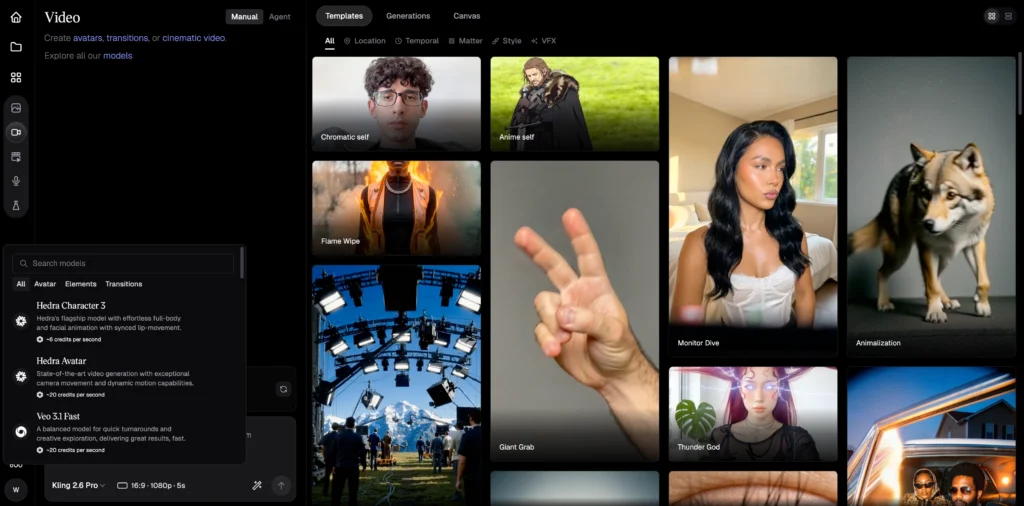
Hedra’s primary value proposition is model diversity. Here’s what each major video model offers:
Hedra Character 3 (6 credits/second)
The platform’s flagship lip-sync model. Optimized for talking-head content with synchronized facial animation and full-body movement. Best for: advertisements, explainer videos, social content.
Veo 3.1 (55 credits/second standard, 20 credits/second fast)
Google’s cinematic-quality video generator. Produces Hollywood-grade output with exceptional detail and nuance. Best for: hero campaigns, premium brand content.
Sora 2 Pro (70 credits/second)
OpenAI’s narrative-focused model. Excels at complex scenes with consistent character-world interaction. Best for: storytelling, extended sequences.
Kling 2.6 Pro (20 credits/second)
Top-tier text-to-video with native audio generation and fluid motion. Best for: quick turnaround projects requiring cinematic quality.
Kling 2.5 Turbo (10 credits/second)
Faster, more affordable Kling variant. Good balance of quality and cost efficiency.
MiniMax Hailuo 2.3 (4-10 credits/second depending on tier)
Budget-friendly option with natural movement at 1080p. Best for: high-volume content production.
Hedra AI Image Models: What’s Available
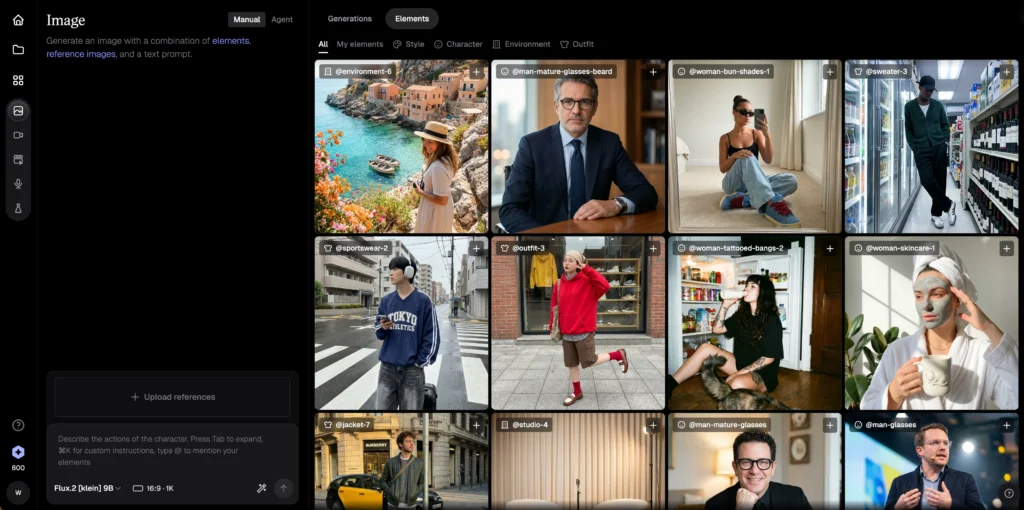
Hedra aggregates multiple image generation models with different strengths:
Nano Banana Pro (~15 credits)
Gemini 3 Pro-powered model with multimodal understanding and rich visual output.
Seedream 4.5 (~5 credits)
Latest iteration with enhanced detail, refined composition, and multi-reference image support.
Flux Kontext Pro (~5 credits)
Detail-rich generator with reference-image support for brand and character consistency.
Imagen4 (~8 credits)
Google’s photorealistic model producing natural lighting and professional-grade sharpness.
Flux 1.1 Ultra (~10 credits)
High-resolution option for ultra-large canvas and flagship visuals.
For most users, Flux Dev or Seedream 4.0 provide the best value—professional-quality output at lower credit costs.
Hedra AI Pricing Explained (2026)
Direct answer: Hedra AI uses a credit-based system starting at $10/month, with no rollover credits.
Pricing Plans
Hedra uses a credit-based subscription model. Here’s the current pricing structure:
| Plan | Monthly Price | Credits | Key Features |
| Free | $0 | 300 | Slower generations, no commercial use, watermarks |
| Basic | $10-15 | 1,500 | Commercial use, premium voices, voice cloning |
| Creator | $30 | 5,400 | Faster generation, can purchase extra credits |
| Professional | $75 | 14,400 | Fastest generation, teams plan access |
| Enterprise | Custom | Custom | Dedicated support, private deployments, SSO |
Critical pricing notes:
- Credits do not roll over between billing periods
- The first month of Basic is 30% off ($10 instead of $15)
- All paid plans include commercial usage rights and no watermarks
- Extra credits can be purchased on Creator and Professional tiers
Credit consumption examples:
- 10-second Hedra Character 3 video: 60 credits
- 10-second Veo 3.1 standard video: 550 credits
- 10-second Kling 2.5 Turbo video: 100 credits
- Single Flux Dev image: ~4 credits
- 500 characters of ElevenLabs audio: ~7.5 credits
Important: Credits reset monthly and do not roll over.
Hedra AI Pros and Cons
Pros
- Excellent lip-sync accuracy
- Unified AI image, audio, and video workflow
- Access to premium models (Sora, Veo, Kling)
- Strong AI avatar quality
Cons
- Credits burn fast on high-end models
- No video-to-video lip-sync
- Free plan often limited or disabled
- Not ideal for long cinematic storytelling
Hedra AI vs RunwayML vs Pika vs Others
Direct answer: Hedra AI is best for avatars and lip-sync, while Runway and Pika excel at cinematic video.
RunwayML, Pika.art, Hedra AI Generation Services Comparison
| Feature | Hedra AI | RunwayML | Pika.art |
| AI Avatars | ✅ Strong | ❌ Limited | ❌ |
| Lip-Sync | ✅ Excellent | ⚠️ Basic | ❌ |
| Cinematic Video | ⚠️ | ✅ Best | ✅ |
| Voice Clone | ✅ | ❌ | ❌ |
| Multi-Model Access | ✅ | ❌ | ❌ |
Best Hedra AI Alternative (Recommended)
Gaga AI (Best Overall Alternative)
Direct answer: Gaga AI excels precisely where Hedra falls short. The platform offers superior AI avatar generation with more natural expressions, advanced voice cloning that captures nuance and emotion, and seamless image-to-video conversion.

Key advantages over Hedra:
- More intuitive interface requiring less technical knowledge
- Better voice cloning accuracy for realistic text-to-speech
- Stronger AI avatar customization options
- Smoother image-to-video workflows without complex credit calculations
- Dedicated focus on avatar and talking-head content rather than aggregating general video models
For creators focused on AI avatars, voice content, and lip-synced video, Gaga AI delivers a more polished, purpose-built experience.
Other Alternatives
- Runway AI – cinematic video generation
- Sora – narrative consistency
- Kling AI – motion realism
- Vidu AI – stylized animation
- Veo 3.1 – Hollywood-grade visuals
FAQ: Hedra AI Review 2026
Who Should Use Hedra AI?
Direct answer: Hedra AI is best for creators who prioritize talking avatars, marketing videos, and AI-driven presentations.
Ideal users:
- Content marketers
- Course creators
- AI avatar YouTubers
- Performance advertisers
- Agencies producing short-form videos
How Many Seconds Can You Lip-Sync With Kling Using Hedra?
Direct answer: You can lip-sync any duration your credits allow, but Kling models typically cost 10–35 credits per second when used inside Hedra AI.
Example:
- Kling 2.5 Turbo: ~10 credits/sec
- Kling 2.1 Master: ~35 credits/sec
On a Creator plan (5,400 credits), you can generate:
- ~540 seconds (9 minutes) using Kling Turbo
- ~154 seconds using Kling Master
There is no hard second limit, only a credit limit.
Can You Do Video-to-Video Lip-Sync on Hedra?
Direct answer: No, Hedra AI does not currently support true video-to-video lip-sync.
What Hedra supports:
- Image → Video lip-sync
- Avatar → Video with audio
- Motion transfer via Kling Motion Control (image-based)
If you need video-to-video lip-sync, you’ll need external tools before importing assets into Hedra.
Is Hedra AI free?
Hedra AI offers a limited free plan, but it is often disabled due to high demand. Paid plans are required for consistent use.
Is Hedra AI good for commercial use?
Yes. Paid plans include commercial rights and watermark-free exports.
What makes Hedra AI different from other AI video tools?
Hedra combines avatars, lip-sync, image generation, and voice in one workflow instead of focusing only on text-to-video.
Can Hedra AI replace Runway or Sora?
No. Hedra complements them. Runway and Sora are better for cinematic storytelling, while Hedra excels at character-driven videos.
Is Hedra AI worth it in 2026?
Yes—if your workflow revolves around AI avatars, lip-sync videos, and short-form content. Otherwise, consider Gaga AI or Runway.