The digital world is experiencing an avatar revolution. From social media profiles to professional presentations, personalized digital characters have become essential for anyone looking to stand out online. Whether you’re a content creator, educator, marketer, or simply someone who wants to express themselves creatively, finding the right avatar maker online free can transform how you communicate in virtual spaces.
But here’s the problem: most traditional avatar makers offer static, lifeless images. They lack personality, emotion, and the dynamic qualities that make digital content truly engaging. You’re left with cartoon-style characters that can’t speak, express emotions, or interact naturally. Limited customization options mean your avatar looks like everyone else’s, and creating something unique requires expensive software or advanced design skills.
Enter Gaga AI—an advanced AI video generator that revolutionizes avatar creation. Unlike conventional tools, Gaga AI doesn’t just help you make an avatar; it brings your characters to life with cinematic-quality video, natural voice acting, perfect lip-sync, and authentic emotional expressions. In this comprehensive guide, you’ll discover how to create stunning, animated avatars for free, learn advanced customization techniques, and explore creative possibilities you never thought possible.
Table of Contents
What is an Avatar Maker
An avatar maker is a digital tool that allows you to create a visual representation of yourself or a character for use in online environments. These digital avatars serve as your virtual identity across various platforms, helping you establish a recognizable presence while maintaining privacy or adding creative flair to your content.
Use Cases of Avatar Maker
Modern avatar creators have evolved far beyond simple profile pictures. Today’s applications span multiple industries and use cases.
1. Content creators use avatars to produce engaging videos for YouTube, TikTok, and Instagram Reels without appearing on camera themselves.
2. Businesses leverage professional avatars for training videos, customer service interactions, and marketing campaigns. Educators create animated instructors to make learning more engaging.
3. Gamers design unique characters that represent their in-game personas.
4. Even in virtual meetings and metaverse platforms, avatars help people connect while maintaining a comfortable level of anonymity.
Understanding how to make an avatar starts with recognizing the fundamental difference between static and dynamic avatar creation. Traditional tools produce single images—headshots or full-body illustrations that never move or change. While these work for profile pictures, they can’t deliver the engaging, personality-driven content that modern audiences expect.
How to create an avatar that truly resonates requires more than just visual design. The best avatar creater tools now incorporate animation, voice synthesis, and emotional expression capabilities. This is where AI-powered platforms like Gaga AI distinguish themselves, transforming the avatar creation process from static design into dynamic video production. Instead of settling for a motionless cartoon character, you can generate a lifelike digital avatar that speaks, emotes, and interacts naturally—all through an intuitive interface that requires no technical expertise.
Traditional Avatar Makers vs. AI-Powered Avatar Creation
Most character maker online free tools follow a similar formula: choose a face shape, pick hairstyles from limited options, select clothing from predetermined categories, and export a static image. These traditional platforms serve their purpose for basic profile pictures, but they come with significant limitations that become apparent when you need more sophisticated content.
Traditional Avatar Makers
Traditional avatar makers restrict you to preset templates and styles. If you want a specific look that isn’t available in their library, you’re out of luck. They typically offer only 2D outputs, meaning your avatar lacks depth and realism. Animation capabilities, when available, are usually limited to simple movements like blinking or basic head tilts. Most importantly, these characters remain silent—they can’t speak, express emotions through voice, or deliver dialogue in a way that feels authentic.
Avatar maker free online full body tools often promise comprehensive customization but deliver inconsistent results. The characters might look acceptable as still images, but they lack the fluid movement and natural expressions needed for video content. Many character maker online free no download platforms run in browsers but sacrifice quality for convenience, producing low-resolution outputs that look unprofessional in finished projects.
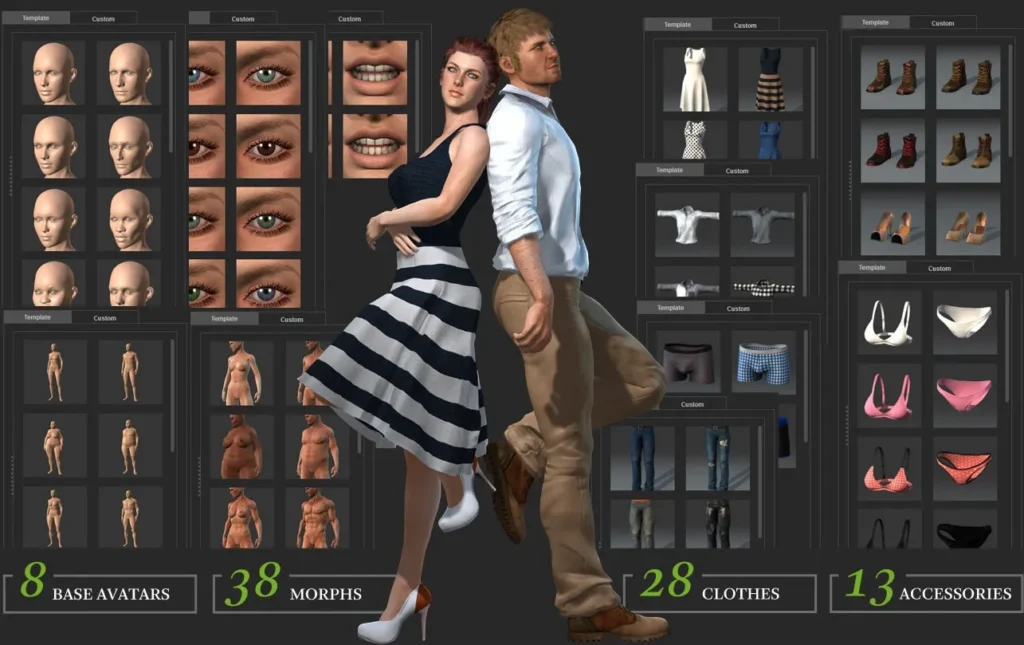
Avatar maker free online game platforms add another dimension by focusing on stylized, gaming-aesthetic characters. While these work well for gaming communities, they rarely translate effectively to professional or educational content where realism and credibility matter.
AI-Powered Avatar Creation
AI-powered avatar creation fundamentally changes this landscape. Instead of selecting from limited presets, AI analyzes your input—whether a photo, description, or reference image—and generates a unique character tailored to your specifications. The technology behind Gaga AI creates avatars that don’t just look realistic; they behave realistically.
Advanced AI delivers lifelike facial expressions that respond naturally to emotional context. The voice synchronization achieves broadcast-quality lip-sync in multiple languages, something traditional tools simply cannot accomplish. Your avatar can convey subtle emotions through micro-expressions, tone variations, and body language. The audio-visual co-generation means dialogue, facial movements, character voice, and environmental sounds all work together seamlessly, producing cinematic-quality results in a single generation.
Perhaps most significantly, AI eliminates the technical barriers that previously required animation expertise, voice acting skills, and expensive production software. With the right avatar designer online powered by AI, anyone can create professional-grade animated content in minutes rather than hours or days.
How to Create Your Perfect Avatar with Gaga AI
Creating a stunning, lifelike avatar with Gaga AI involves three essential steps that transform a simple idea or photo into a fully animated, speaking character. Let’s walk through each phase of the creation process.
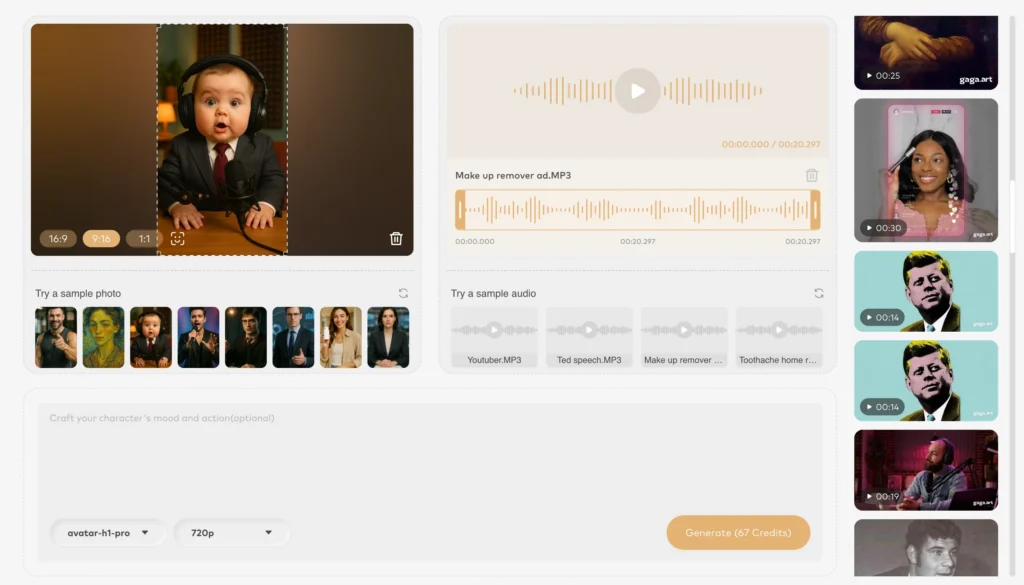
Step 1: Creating Your First Frame
The foundation of any great AI-generated avatar starts with a high-quality first frame. This initial image determines the overall quality, stability, and realism of your final video. When you make avatar from photo online free using Gaga AI, the quality of your source material directly impacts the results.
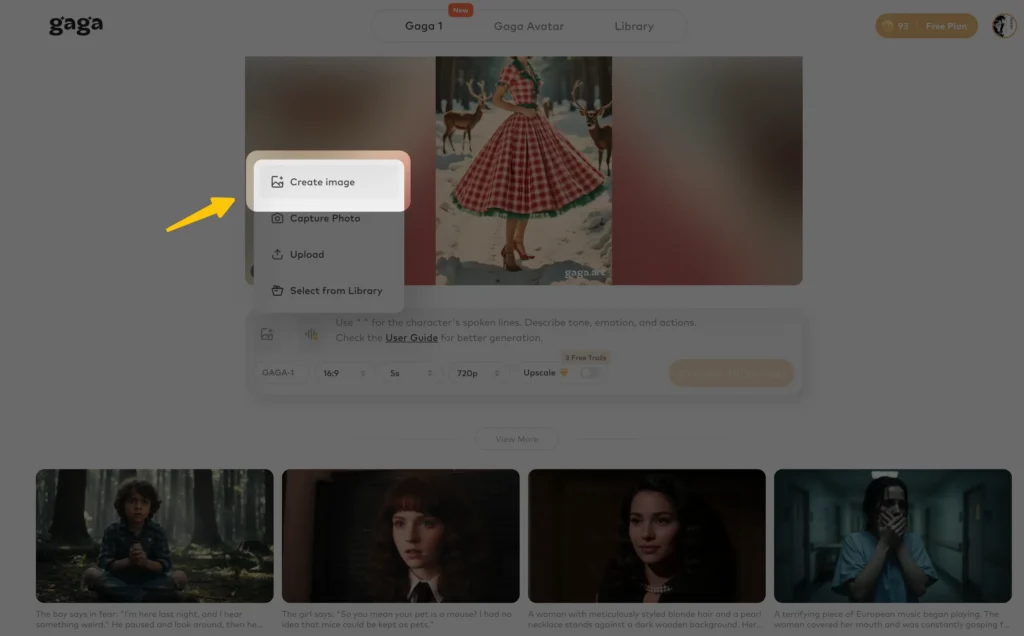
Why the First Frame Matters
Think of the first frame as the blueprint for your entire avatar video. A high-quality image ensures video stability and generates realistic, natural-looking results. Conversely, a low-quality image can lead to unusable videos where the character appears distorted or unstable, and even multiple generation attempts may not fix the fundamental problems.
Best Practices for Your Source Image
Gaga AI is optimized for realistic human characters, so focus on photorealistic images with clear, visible faces. For best results, use images with a resolution of 1280×720 pixels or higher. The system works exceptionally well with upper-body shots—frames from the chest or waist up—because these compositions allow the AI to focus on facial expressions and lip movements that bring characters to life.
Ensure facial features are clear and unobstructed. Avoid images where hair, glasses, or shadows obscure important details like eyes, nose, and mouth. For the most natural lip movements and consistent appearance throughout your video, select images where teeth are visible. This small detail significantly improves how the AI renders speech.
Pay attention to your background. Clean, simple backgrounds work best because complex or cluttered backgrounds can negatively impact video quality and may cause visual artifacts or distortions. If you’re creating scenes with two characters for a couple avatar maker online free project, ensure both characters are clearly defined with distinct appearances.
What About Non-Realistic Styles?
While Gaga AI is optimized for photorealistic styles, you can still experiment with different aesthetics. Just remember that heavily stylized, cartoonish, or abstract images may produce unexpected results. For the most natural expressions and lifelike performances, realistic visual styles deliver the best outcomes.
Don’t Have the Perfect Image?
If you don’t have a suitable photo, Gaga AI’s built-in image generator can create the perfect first frame based on your text descriptions. This feature proves invaluable when you need specific character types that you don’t have existing photos for.
Step 2: Customizing Your Avatar’s Voice
Voice brings personality to your avatar in ways visual elements alone cannot achieve. Gaga AI offers two approaches to voice customization, giving you flexibility based on your project needs.
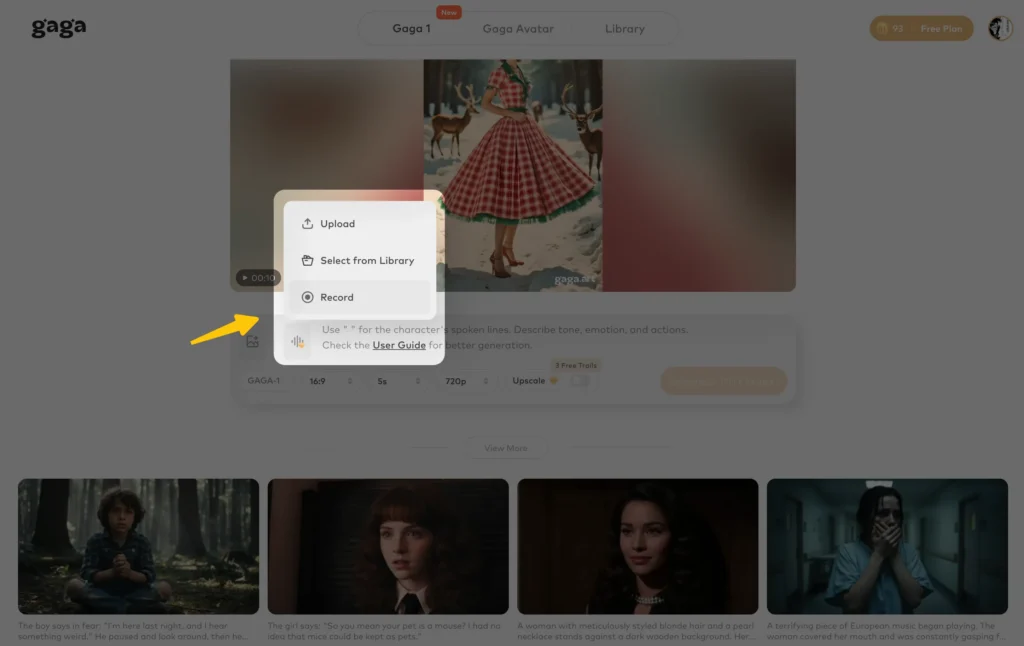
Reference Voice Feature for Consistency
If you’re creating multiple videos and want your character to maintain a consistent voice across all content, use the Reference Voice feature. Simply upload a short audio clip that serves as your character’s “voice anchor.” The AI analyzes the vocal characteristics—tone, pitch, rhythm, speaking pace—and applies these qualities to your avatar’s performance.
Audio Upload Requirements:
- Gaga AI analyzes only the first 10 seconds of your audio file
- Ensure your clip features a single, clear voice with no background noise or music
- Supported formats include AAC, FLAC, MP3, and WAV
- Your uploaded audio automatically saves to your asset library for future projects
Automatic Voice Generation
If you’re creating a standalone video or don’t have a specific voice in mind, don’t worry. Gaga AI automatically generates a natural, high-quality voice that fits your character perfectly. The AI considers the character’s appearance, the emotional context of the scene, and the dialogue content to create an appropriate voice.
The voice acting capabilities achieve what Gaga AI calls “Oscar-worthy performance”—the AI-generated voices capture personality with flawless consistency across scenes, delivering emotionally rich performances that rival professional voice actors. This includes subtle vocal nuances like emphasis, pacing variations, and emotional inflections that make dialogue feel authentic.
Step 3: Bringing Your Avatar to Life with Prompts
Prompts are instructions that guide your avatar’s performance. Even simple prompts produce impressive results, but understanding prompt structure unlocks Gaga AI’s full potential.
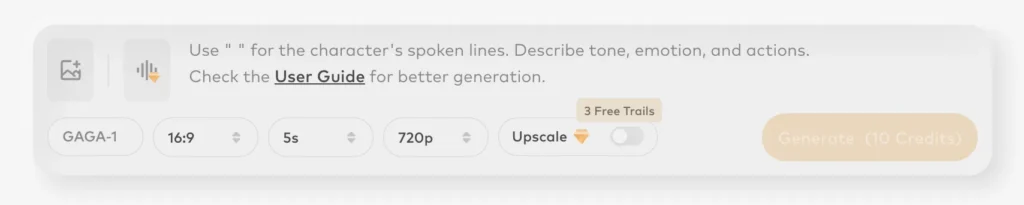
Basic Single-Character Prompt Template
For a straightforward avatar speaking to the camera:
Character + Dialogue
Example: “A confident businesswoman in her 30s says, ‘Innovation isn’t about having all the answers—it’s about asking better questions.’”
Two-Character Interactions
Creating scenarios with two characters requires slightly more structure but opens up dynamic possibilities for dialogue-driven content. This approach is perfect for couple avatar maker online free projects or any scenario requiring interaction between two people.
Character 1 + Dialogue, Character 2 + Dialogue
Example: “A man wearing a blue jacket says, ‘Have you considered the alternative approach?’ A woman with long brown hair says, ‘That’s actually worth exploring.’”
Gaga AI’s Dynamic Duo Interactions feature generates seamless back-and-forth dialogue with synchronized emotional expressions, making conversations feel genuine and believable.
Advanced Complex Scene Prompts
For maximum control over your avatar’s performance, use this comprehensive prompt structure:
Background Sound (Optional) + Character (Required) + Action (Optional) + Facial Expression (Optional) + Emotion (Optional) + Vocal Delivery (Optional) + Dialogue (Required)
Breaking Down Each Element:
- Background Sound: Describe music or environmental audio
- Music attributes: “Melancholic piano music playing softly”
- Sound effects: “Rain tapping against windows, distant thunder”
- Character: Specify appearance for visual consistency
- “A male detective in his 40s with tired expression, short brown hair”
- Action: Describe physical movements (keep simple for best results)
- “Nodding slowly,” “turning his head to the left”
- Facial Expression: Detail nuanced expressions
- “Deep gaze, slight smile, lips slightly parted”
- Emotion: Define the emotional state
- “Deeply disappointed,” “cautiously optimistic”
- Vocal Delivery: Specify how dialogue is spoken
- “Speaking in a questioning tone,” “a confident shout”
- Dialogue: The exact words your character speaks
- “Do you really think you can challenge me?”
Example Complex Prompt: “Gentle acoustic guitar music. A woman in her 50s with greying hair, wearing glasses. Looking directly at the camera with a warm expression. Feeling nostalgic and grateful. Speaking slowly and thoughtfully: ‘Sometimes the moments we treasure most are the ones we didn’t plan.’
Advanced Avatar Customization Techniques
Once you’ve mastered the basics of avatar creation, these advanced techniques help you achieve professional-level results and handle specialized creative challenges.
Creating Anime-Style Avatars
Many users search for avatar maker online free anime options. While Gaga AI is optimized for photorealistic styles, you can still create anime-inspired content by starting with high-quality anime character images or AI-generated anime artwork as your first frame. The key is maintaining image quality and clarity—anime images with sharp lines, clear facial features, and simple backgrounds work best.
Keep in mind that highly stylized anime aesthetics may produce varied results since the AI excels with realistic human features. For the most consistent anime avatar results, consider using semi-realistic anime art styles that retain natural proportions and detailed facial features.
Dialogue and Timing Optimization
Matching dialogue length to video duration prevents awkward pauses and creates a more polished viewing experience.
For Short Dialogue (under 10 words): Use a 5-second video duration. This prevents long silences after the line is delivered, maintaining engagement.
Example: “Ready to begin?” works perfectly in 5 seconds.
For Medium Dialogue (10-25 words): Choose a 10-second video duration. This accommodates natural speaking pace and allows for realistic pauses before or after dialogue.
Example: “I’ve been thinking about what you said yesterday, and I believe you might be right about the direction we should take.” fits naturally in 10 seconds.
Creating Natural Pauses in Speech
Real conversations include pauses for emphasis and natural breathing. You can incorporate these into your avatar’s dialogue using two methods:
Method 1: Ellipsis “Spring is almost over. The flowers are blooming beautifully… but they’ll wither in the end.”
Method 2: Action Beats “Spring is almost over. The flowers are blooming beautifully.” She paused. “But in the end, they will wither.”
Describing Character Actions and Movement
To make your avatar move naturally, describe actions directly in your prompt:
“Man says: ‘Are you really sure?’ His arms move naturally as he speaks.”
Important caveat: avoid large or overly complex movements. Simple, clear gestures like nodding, turning the head, or subtle hand movements generate the smoothest, most realistic results. Overly ambitious movement descriptions can lead to unstable or unnatural animations.
Expressing Emotional Changes
The most compelling avatar performances showcase emotional evolution within a single scene. Describe these shifts explicitly in your prompts:
“The man says calmly: ‘Are you really sure?’ He pauses for a moment and, with heightened emotion, says: ‘You’re really not going to reconsider!?’”
This technique creates dramatic performances that keep viewers engaged by showing character development and emotional depth.
Building Atmosphere with Background Sound
Environmental audio transforms good videos into immersive experiences. Subtle audio elements bring scenes to life by enhancing realism and depth.
Music Integration: Describe musical attributes—atmosphere, rhythm, and key instruments:
- “Epic orchestral music with driving rhythm”
- “Melancholic piano playing softly in the background”
Sound Effects: Specify exact ambient sounds that match your scene:
- “Birds chirping on a sunny afternoon”
- “Distant voices and footsteps echoing in a hallway”
- “A flowing river with occasional bird calls”
Example with integrated sound: “She is sitting on a park bench on a sunny afternoon. The gentle sound of birds chirping is audible throughout the scene. She says, ‘It’s a beautiful day, isn’t it?’”
Multilingual Avatar Creation
Gaga AI’s True Multilingual Performance feature breaks language barriers with native-level lip-sync and authentic emotional expression. The system is fine-tuned for Mandarin, English, Japanese, and Korean, ensuring the most consistent and highest-quality results in these languages.
To create multilingual avatars, simply write your dialogue in the target language. The AI automatically adjusts lip movements, vocal characteristics, and emotional expressions to match the linguistic and cultural nuances of each language. This capability proves invaluable for creating content for international audiences or language learning applications.
Ensuring Accurate Pronunciation
AI can sometimes mispronounce unique proper nouns or stumble over long, complex sentences. Improve pronunciation accuracy with these techniques:
Break Up Long Sentences: Insert commas at natural pauses to help the AI process rhythm and intonation correctly.
Spell Out Tricky Words Phonetically: For difficult names or technical terminology:
Original: “The analyst Anaïs presented her findings on psychometrics.” Improved: “The analyst, An-nah-ees, presented her findings on sigh-koh-met-ricks.”
Generating Static Expressions
Sometimes you want an avatar that displays an expression without speaking. To prevent unwanted lip movement, avoid keywords related to speech like “mouth,” “speaking,” or “says” in your prompts. Instead, focus on describing physical and emotional states:
“A friendly gaze, looking toward the other person, occasionally nodding, natural blinking.”
This approach allows Gaga AI to produce natural, static facial expressions free from unintended mouth motion—perfect for reaction videos, contemplative moments, or establishing shots.
Use Cases: What You Can Create with Your AI Avatar
The versatility of AI-generated avatars extends far beyond simple profile pictures. Here are compelling applications across different industries and creative pursuits.
Content Creation for Social Media
Digital content creators constantly need fresh, engaging material for platforms like TikTok, YouTube Shorts, and Instagram Reels. AI avatars solve multiple challenges simultaneously: you can create unlimited content without appearing on camera, maintain consistent posting schedules without filming fatigue, and experiment with different characters and personalities to find what resonates with your audience.
- Business and Professional Applications
- Entertainment and Creative Projects
- Educational Content
- Personal and Nostalgic Projects
Create viral celebrity memes featuring AI-generated versions of public figures delivering humorous commentary. Produce educational content where an avatar explains complex topics in accessible language. Develop serialized storytelling where your avatar character takes viewers on episodic adventures. The 9:16 and 16:9 aspect ratio support ensures your content looks perfect on every platform.
Gaga AI’s Unique Advantages
Understanding what sets Gaga AI apart from other avatar creation tools helps you appreciate the technology’s capabilities and maximize your results.
Audio-Visual Co-Generation: One-Step Creation
Traditional video production requires multiple stages: recording dialogue, animating lip movements, matching voice to character, adding sound effects, and compositing everything together. Gaga AI’s Audio-Visual Co-Generation streamlines this entire process into a single, efficient step.
The system simultaneously generates dialogue, perfectly synchronized lip movements, and character-matched voices tailored to your scene. It integrates comprehensive environmental and motion sound effects, producing a final, cinematic-quality video directly from the model. This approach saves countless hours while ensuring all elements work together harmoniously—no desynchronization, no mismatched audio, no separate editing required.
Oscar-Worthy Performance Quality
The voice acting quality achieves what Gaga AI calls “Oscar-worthy performance”—a bold claim backed by impressive technology. The AI-generated voices capture each character’s personality with flawless consistency across scenes. They deliver natural, emotionally rich performances comparable to professional voice actors.
Combined with perfect lip-sync and subtle facial nuances—micro-expressions, eye movements, slight head tilts—the result is a stunningly lifelike and captivating character. The emotional authenticity makes viewers forget they’re watching AI-generated content, creating genuine connection and engagement.
Dynamic Duo Interactions
While many avatar tools focus solely on single-character content, Gaga AI excels at creating lifelike scenes with two characters interacting naturally. The model generates seamless back-and-forth dialogue with synchronized emotional expressions, making conversations feel genuine and believable.
This capability opens creative possibilities for dialogue-driven storytelling, interviews, debates, romantic scenes, and any scenario where character interaction drives the narrative. The technology ensures both characters’ expressions and reactions coordinate appropriately—when one speaks, the other listens with appropriate facial responses.
True Multilingual Performance
Language shouldn’t limit creativity. Gaga AI breaks language barriers with native-level lip-sync and authentic emotional expression in any language. The system is specifically fine-tuned for Mandarin, English, Japanese, and Korean, ensuring the most consistent and highest-quality results in these languages.
This multilingual capability isn’t just about translation—it’s about cultural authenticity. The AI adjusts not only pronunciation but also emotional expression patterns, conversational rhythms, and non-verbal communication styles to match each language’s cultural context. Create content for global audiences without compromising quality or authenticity.
Limited-Time Free Trial
Accessibility matters. Gaga AI offers a limited-time free trial that removes barriers to entry. Create videos up to 10 seconds in length with generation times typically under 5 minutes. Output resolution reaches up to 1080p Full HD, and both 16:9 and 9:16 aspect ratios are supported—perfect for YouTube, TikTok, Instagram Reels, and other platforms.
The character maker online free no download approach means you can start creating immediately through your desktop or mobile browser. No software installation, no complicated setup, just instant access to professional-grade avatar creation tools.
Getting Started: Your Free Avatar Creation Journey
Ready to transform your ideas into lifelike AI avatars? Getting started with Gaga AI is straightforward, even if you’ve never created animated content before.
Step 1: Access the Platform
Visit Gaga AI through your desktop browser for the best experience, though mobile browsers also work. No download or installation required—the entire creation process happens in your browser, making it a true character maker online free no download solution.
Step 2: Prepare Your First Frame
Gather a high-quality image (1280×720 or higher) that will serve as your avatar’s base. This could be a photo of yourself, a stock image, or an AI-generated character. Alternatively, use Gaga AI’s built-in image generator to create the perfect first frame from text descriptions.
Step 3: Craft Your Prompt
Start simple with basic character descriptions and dialogue. As you become more comfortable, incorporate advanced elements like emotional direction, vocal delivery specifications, and environmental sounds. Remember: even simple prompts produce impressive results.
Step 4: Customize Voice (Optional)
If you have a specific voice in mind, upload a reference audio clip. Otherwise, let the AI automatically generate an appropriate voice for your character.
Step 5: Generate and Refine
Click generate and wait typically under 5 minutes for your video. Review the results, and don’t hesitate to experiment with different prompts if the first attempt doesn’t perfectly match your vision. The free trial allows for experimentation without financial commitment.
Tips for Success:
- Start with shorter videos (5-10 seconds) to learn the system
- Experiment with different prompt structures to understand what works best
- Save successful prompts as templates for future projects
- Join the Gaga AI community to see examples and get inspiration from other creators
The beauty of this avatar maker online free approach is the freedom to experiment without risk. Try different character types, emotions, scenarios, and dialogue until you discover what resonates with your creative vision or professional needs.
Final Thoughts
The evolution from static avatar makers to AI-powered video avatars represents a fundamental shift in how we create digital content. Traditional tools served their purpose for profile pictures and simple graphics, but the modern demand for engaging, personality-driven content requires more sophisticated solutions.
Gaga AI bridges the gap between professional-quality animation and accessible creation tools. Whether you’re searching for an avatar maker online free for personal projects, a professional avatar designer online for business applications, or simply want to experiment with cutting-edge AI technology, the platform delivers results that were previously available only through expensive production studios.