Table of Contents
Key Takeaways
- AI dance generators convert static images into animated dancing videos using machine learning models trained on motion patterns
- Gaga AI leads innovation with text prompt control over motion, emotion, and sound effects—type commands like “energetic hip-hop with happy expression” to customize your dance
- Top platforms include Viggle AI (most versatile), Gaga AI (best text-to-motion control), Meta AI (highest quality), and ComfyUI (advanced customization)
- Creating AI dance videos requires uploading a photo or generating an AI avatar, selecting or describing dance movements, and processing (30 seconds to 5 minutes)
- Gaga AI’s image-to-video technology supports multiple aspect ratios (16:9 for YouTube, 9:16 for TikTok) with automatic social media optimization
- Safety considerations are critical—never create deepfake content without consent, avoid inappropriate applications, and respect platform guidelines
What Is an AI Dance Generator?
An AI dance generator is a machine learning-powered tool that takes a static image (photo) or creates an AI avatar and animates it to perform choreographed dance movements. The technology uses pose estimation algorithms and motion transfer models to map dance sequences onto uploaded images, creating realistic video outputs where the subject appears to be dancing.
These generators work by analyzing reference dance videos, extracting skeletal motion data, and then applying those movements to the body structure detected in your uploaded photo. The AI maintains facial features, clothing details, and body proportions while seamlessly blending the animation with the original image.
Current applications include:
- Social media content creation for platforms like TikTok, Instagram, and YouTube
- Marketing campaigns requiring personalized video content
- Entertainment and meme generation
- Educational demonstrations of choreography
- Personalized greeting cards and celebration videos
Best AI Dance Generators in 2026
Gaga AI: Revolutionary Text-to-Motion Control
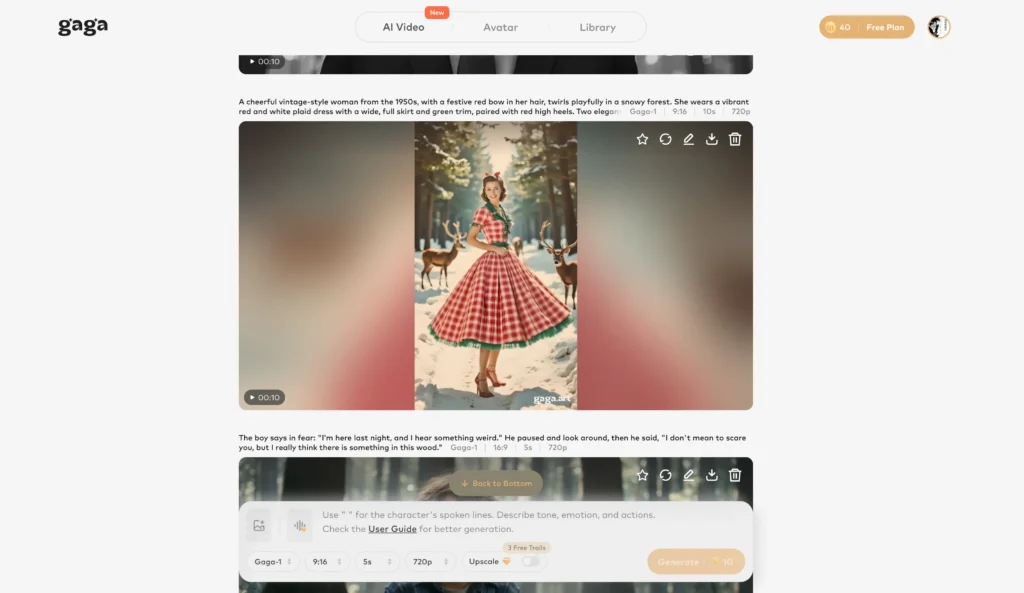
Gaga AI represents the next evolution in AI dance generation with groundbreaking text prompt control that lets you customize motion, emotion, and sound effects through natural language commands.
Game-Changing Features:
Unlike traditional template-based generators, Gaga AI interprets natural language descriptions to create custom choreography. Simply type what you want:
- “Energetic hip-hop routine with sharp arm movements”
- “Graceful ballet with slow, flowing gestures”
- “Playful dance with happy jumping motions”

The AI understands dance terminology, intensity levels, and style nuances, translating your text into precise animations.
Emotion and Expression Control
Gaga AI’s emotion engine adjusts facial expressions to match your desired mood:
- “Confident and fierce expression”
- “Joyful with big smile”
- “Dramatic and intense look”
- “Playful and cheeky attitude”
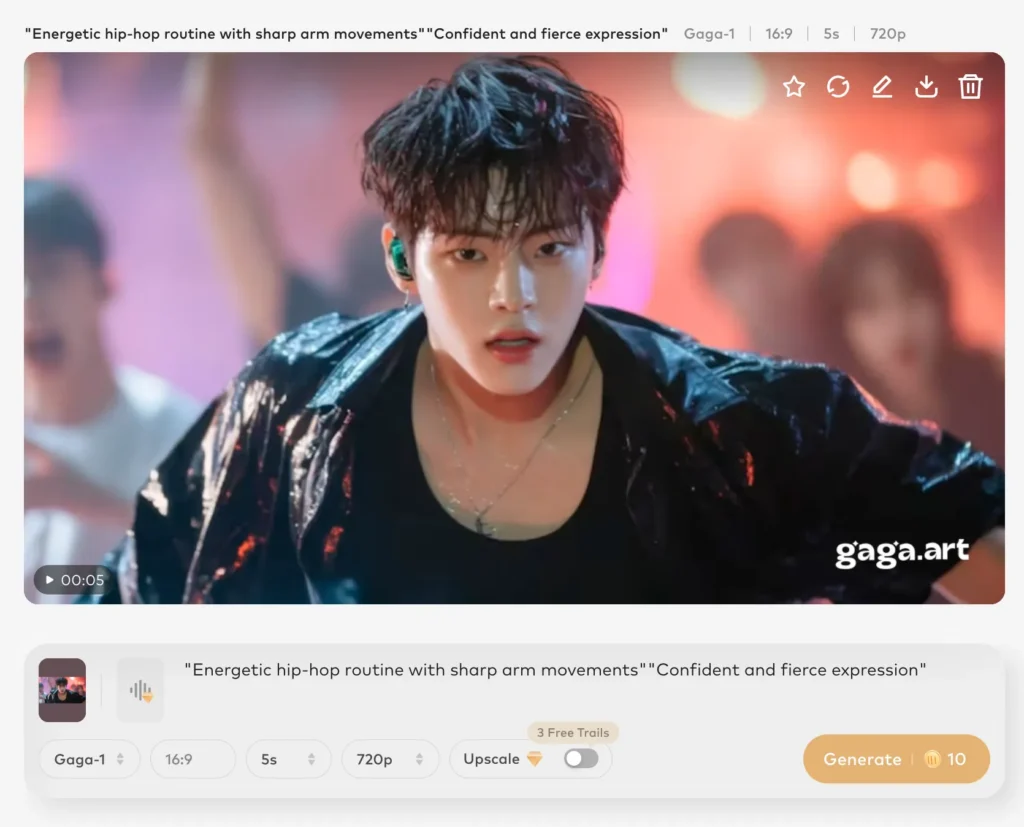
This creates more authentic, engaging videos where the subject’s face matches the energy of their movements.
Integrated Sound Effects
The platform generates or suggests sound effects that sync with movements:
- Footstep sounds matching dance beats
- Whoosh effects for quick arm movements
- Background ambiance appropriate to dance style
- Music recommendations that complement your choreography
Image-to-Video AI Technology
Gaga AI’s advanced image-to-video conversion maintains exceptional quality:
- Preserves fine details like jewelry, hair texture, and clothing patterns
- Smooth frame interpolation (up to 60 fps output)
- Realistic motion blur and lighting adjustments
- Maintains identity consistency throughout the video
Social Media Optimization
Built specifically for content creators, Gaga AI offers:
- Automatic aspect ratio selection: 16:9 (YouTube, landscape), 9:16 (TikTok, Instagram Reels, YouTube Shorts), 1:1 (Instagram feed)
- Platform-specific export presets with optimal resolution and compression
- Hashtag suggestions based on your dance style
- Trending audio integration from TikTok and Instagram
AI Avatar Features
Don’t have the perfect photo? Gaga AI generates custom AI avatars:
- Text-to-avatar creation (“young woman with curly hair in streetwear”)
- Customizable features: age, ethnicity, style, clothing
- Consistent avatar identity across multiple videos
- Virtual influencer creation capabilities
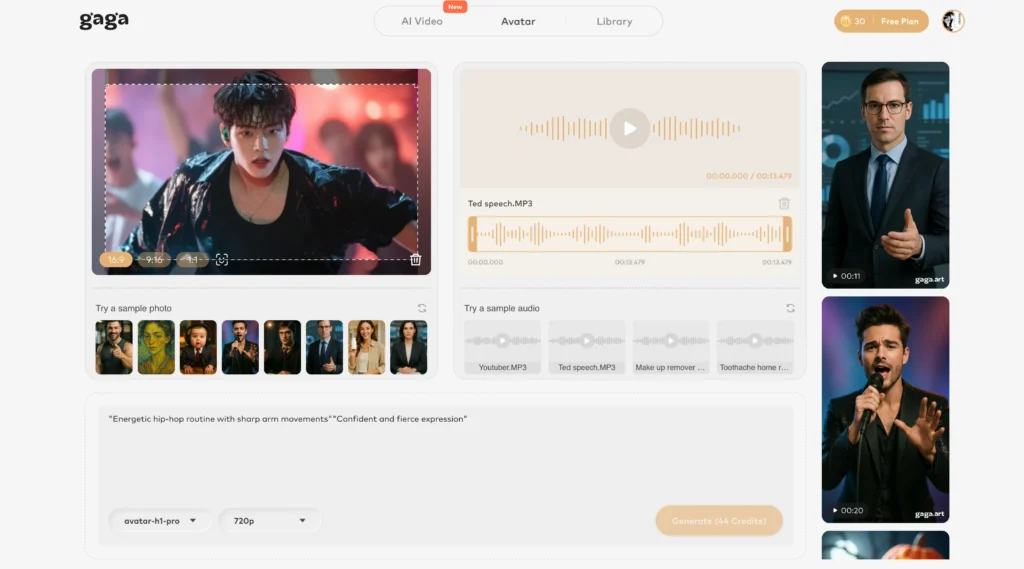
Platform Details:
- Access: Web-based only (no mobile app currently available)
- Processing time: 45-90 seconds for standard videos
- Best for: Content creators who want precise creative control and platform-optimized outputs
Pricing: Free tier with watermarks and 3 daily generations; Pro plan at $12.99/month includes unlimited generations, HD export, no watermarks, and priority processing.
Why Gaga AI Stands Out: The text prompt system eliminates the limitation of pre-made templates. Instead of browsing through dozens of dance options hoping to find the right one, you describe exactly what you want. This makes Gaga AI particularly powerful for:
- Matching brand-specific aesthetics
- Creating unique choreography that hasn’t been overused
- Iterating quickly on creative concepts
- Producing highly customized content at scale
Viggle AI
Viggle AI remains the most comprehensive AI dance generator for users who prefer visual template selection and need character consistency features.
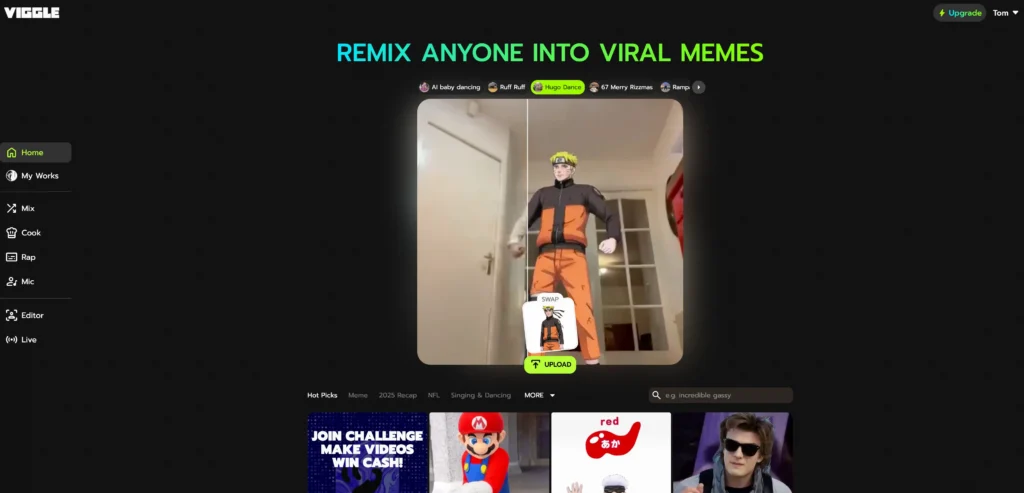
Key features:
- Upload photos or use pre-built characters
- Extensive library of dance templates (hip-hop, ballet, K-pop, contemporary)
- Mix feature for combining custom videos with dance motions
- Green screen capabilities for professional editing
- Discord-based interface with web version available
Best for: Content creators needing high-quality outputs with professional-grade motion transfer and established template libraries.
Pricing: Free tier available with limited generations; premium plans start at $9.99/month.
Meta AI (Make-A-Video)
Meta’s AI dance technology delivers photorealistic results with advanced temporal coherence, meaning movements flow naturally without jarring transitions.
Key features:
- State-of-the-art video quality
- Text-to-video capabilities combined with image animation
- Superior lighting and shadow rendering
- Integrated with Meta’s ecosystem
Best for: Users prioritizing visual quality over customization options.
Pricing: Currently in limited beta; access through Meta’s AI testing programs.
ComfyUI Make People Dance AI Video
ComfyUI is an open-source, node-based workflow system that gives advanced users complete control over the AI dance generation process.
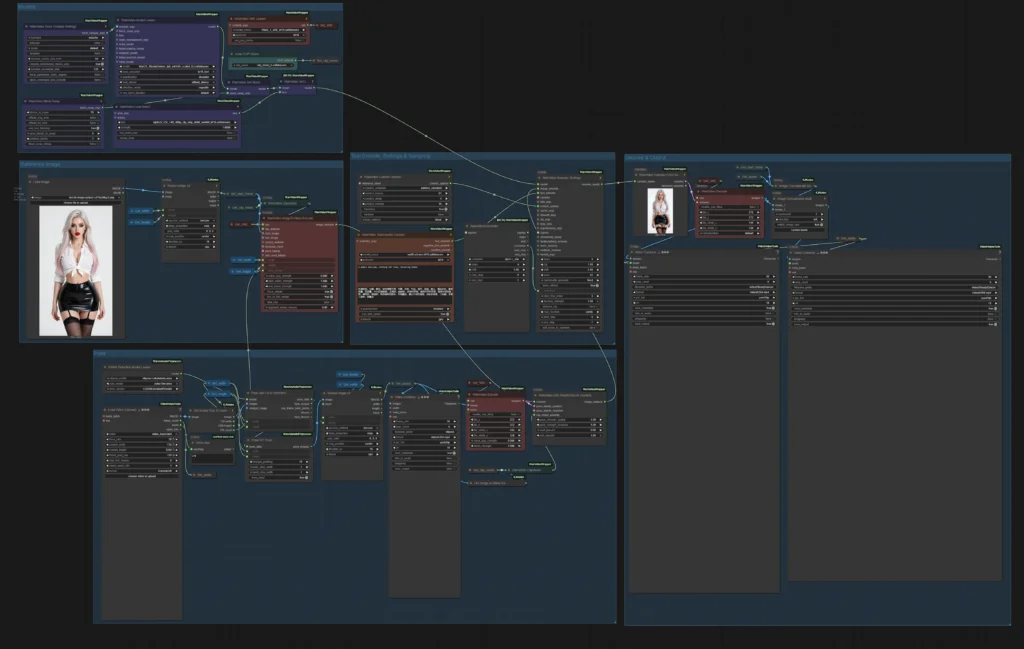
Key features:
- Fully customizable processing pipeline
- Integration with AnimateDiff, ControlNet, and pose estimation models
- Local processing (no cloud dependency)
- Support for custom-trained models
- Batch processing capabilities
Best for: Technical users, developers, and those requiring full creative control or privacy.
Pricing: Free and open-source; requires local hardware (GPU recommended).
How AI Dance Technology Works
AI dance generators rely on three core technologies working in sequence:
1. Pose Estimation The AI identifies key body points (shoulders, hips, knees, elbows) in your uploaded photo to create a skeletal framework. This ensures the dance movements align correctly with the subject’s body structure.
2. Motion Transfer The system takes motion data from reference dance videos and maps it onto the detected pose structure. Advanced models use temporal consistency algorithms to ensure smooth, natural-looking movements across video frames.
3. Image Synthesis Generative models fill in the details—warping clothing textures, maintaining facial expressions, and rendering realistic shadows and lighting that match the dance movements.
Modern AI dance generators use diffusion models and transformer architectures that have been trained on millions of dance video clips, enabling them to understand nuanced body mechanics and create convincing animations.
How to Create AI Dance Videos: Step-by-Step Guide
Method 1: Using Gaga AI with Text Prompts (Recommended for Creative Control)
Step 1: Access the Platform
Visit Gaga AI’s website and create a free account.
Note: Gaga AI is currently web-based only with no mobile app available.
Step 2: Choose Your Input Method
Option A: Upload Your Photo
- Use a clear, front-facing photo with good lighting
- Ensure the full body is visible (head to feet)
- Avoid busy backgrounds for best results
- Image resolution: minimum 512×512 pixels, optimal 1024×1024
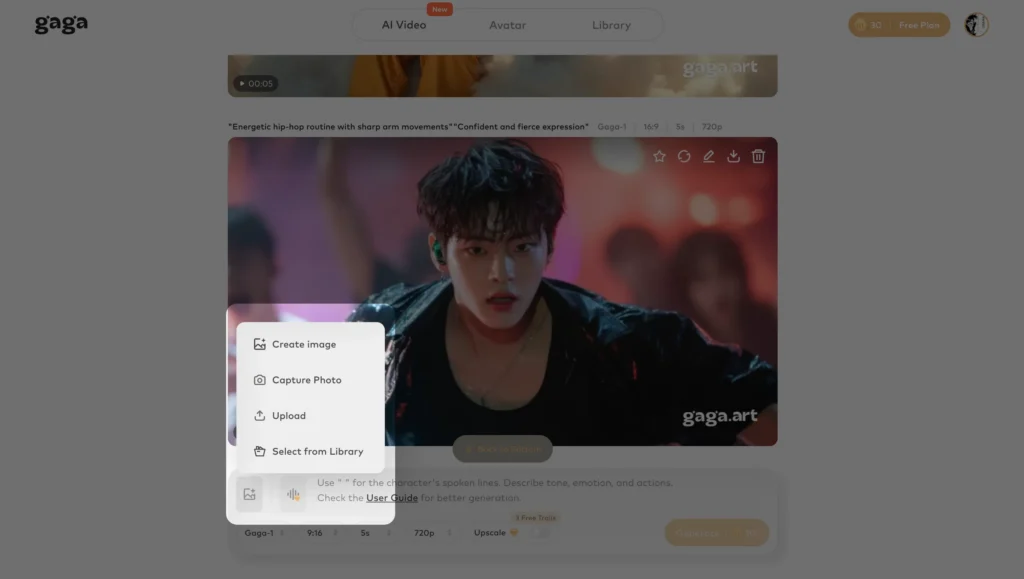
Option B: Generate an AI Avatar
- Click “Create AI Avatar”
- Enter text description: “25-year-old woman with long black hair wearing casual streetwear”
- Customize features: facial structure, clothing style, accessories
- Generate and save your avatar for future use
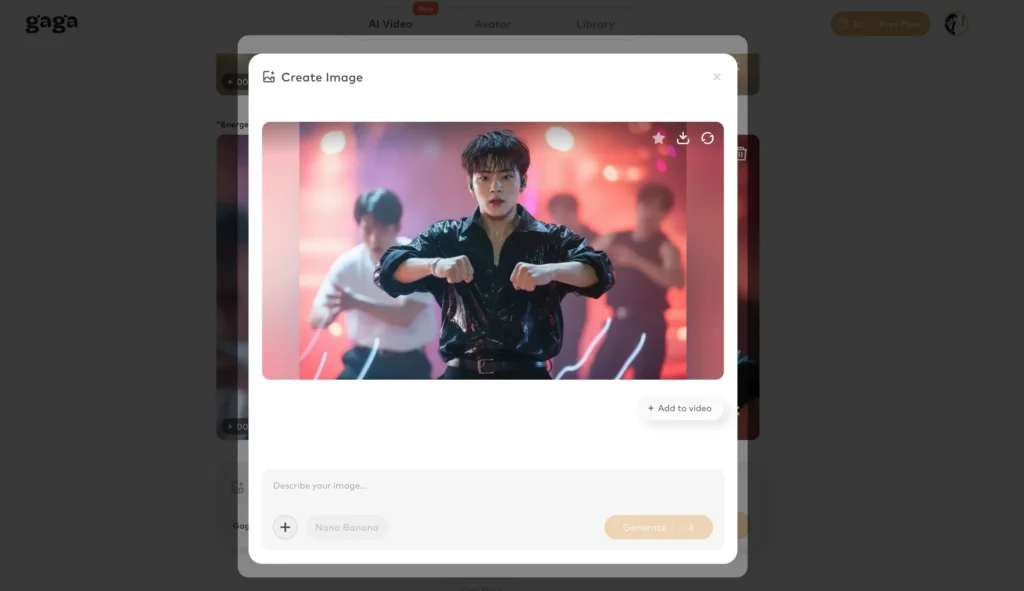
Step 3: Write Your Motion Prompt
This is where Gaga AI shines. Describe your desired dance in natural language:
Example prompts:
- “Fast-paced K-pop choreography with sharp hand movements and confident expression”
- “Smooth contemporary dance with flowing arm gestures and emotional, dramatic face”
- “Energetic hip-hop routine with popping movements and playful, happy expression”
- “Graceful ballet with arabesque poses, gentle spins, and serene expression”
Pro tip: Include three elements in your prompt:
1. Dance style and tempo
2. Specific movements or characteristics
3. Facial expression or emotion
Step 4: Configure Sound and Aspect Ratio
Sound settings:
- Enable automatic sound effects (footsteps, movement whooshes)
- Upload your own music track, or
- Use Gaga AI’s music library with trending sounds
Aspect ratio selection:
- 16:9 for YouTube, Facebook, LinkedIn (horizontal/landscape)
- 9:16 for TikTok, Instagram Reels, YouTube Shorts (vertical)
- 1:1 for Instagram feed posts (square)
Step 5: Generate and Refine
- Click “Generate Dance Video”
- Wait 45-90 seconds for processing
- Review the result
- If needed, adjust your prompt and regenerate (the AI learns from your refinements)
Step 6: Export and Share
- Download in MP4 format
- Platform-specific optimization is automatic
- Copy suggested hashtags for social media posting
Method 2: Using Viggle AI (Template-Based Approach)
Step 1: Access the Platform
Visit Viggle AI’s website or join their Discord server. The web interface is more intuitive for first-time users.
Step 2: Upload Your Photo
- Use a clear, front-facing photo with good lighting
- Ensure the full body is visible (head to feet)
- Avoid busy backgrounds for best results
- Image resolution: minimum 512×512 pixels, optimal 1024×1024
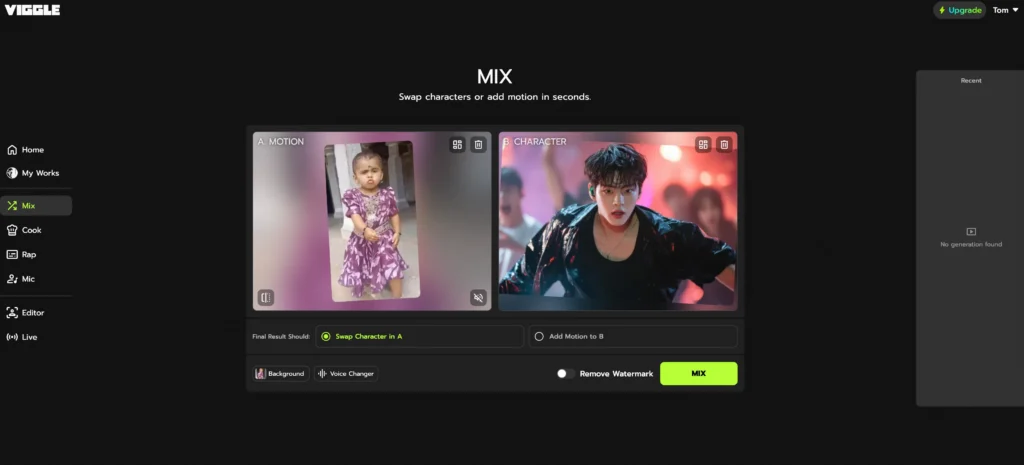
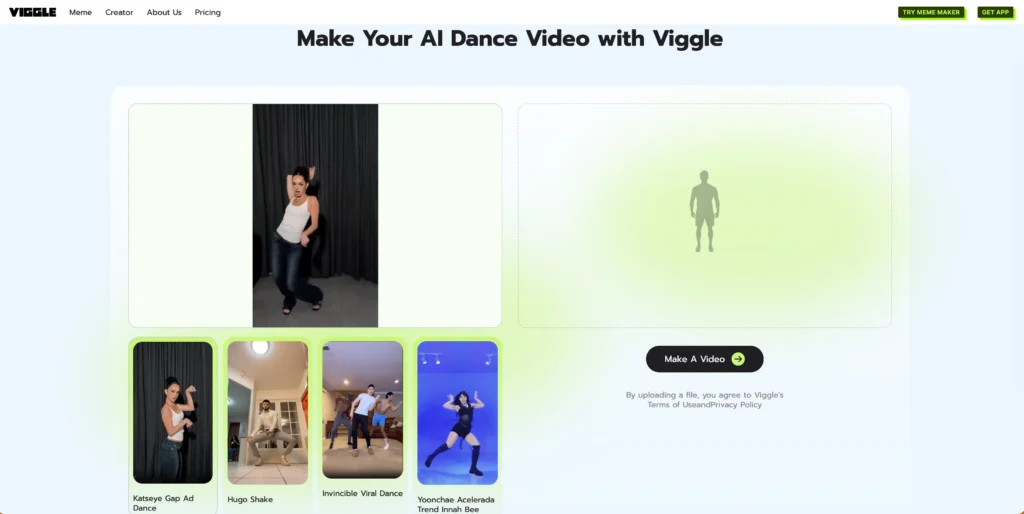
Step 3: Select Dance Template
Browse the template library and choose your desired dance style. Popular options include:
- K-pop choreography (Blackpink, BTS-style moves)
- Viral TikTok dances
- Classic ballet or contemporary
- Hip-hop and breakdancing
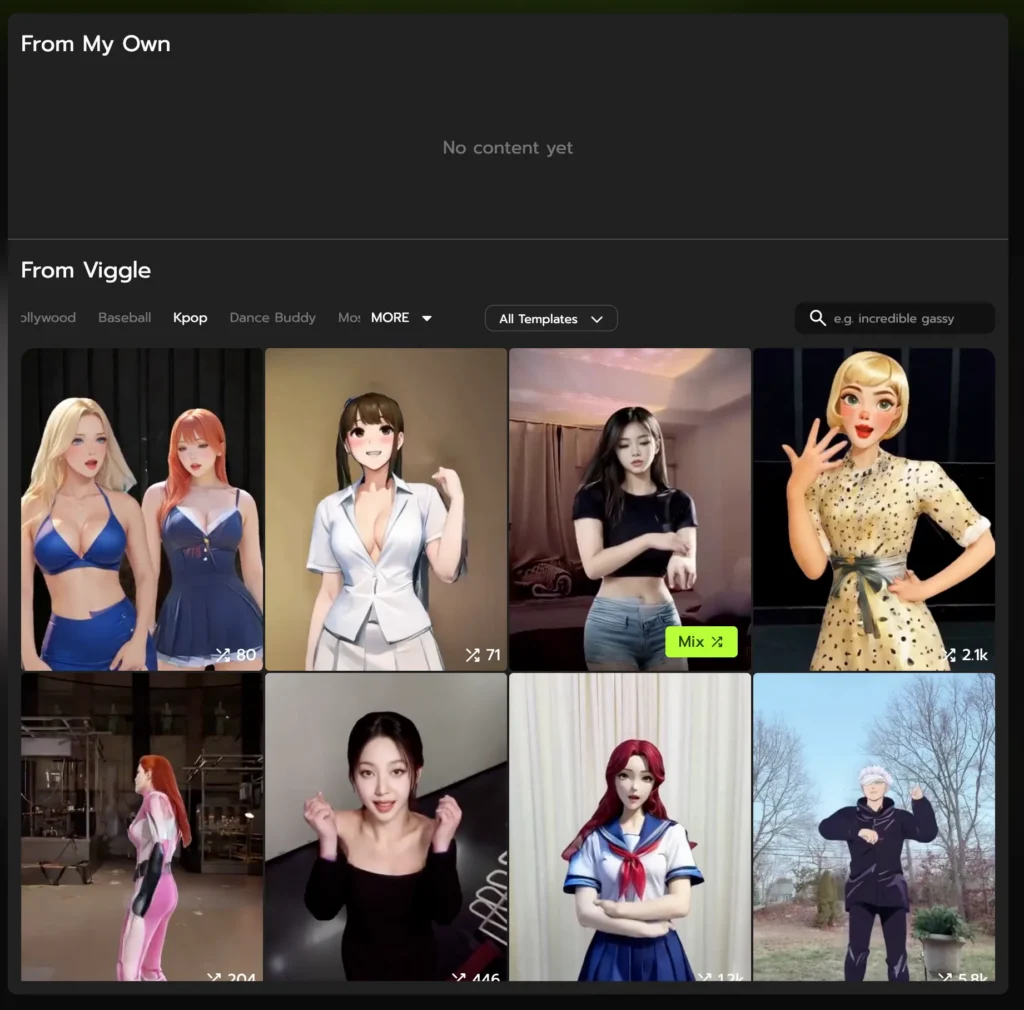
Step 4: Generate and Download
Click “Mix” and wait for seconds for processing. Download in MP4 format optimized for your intended platform.
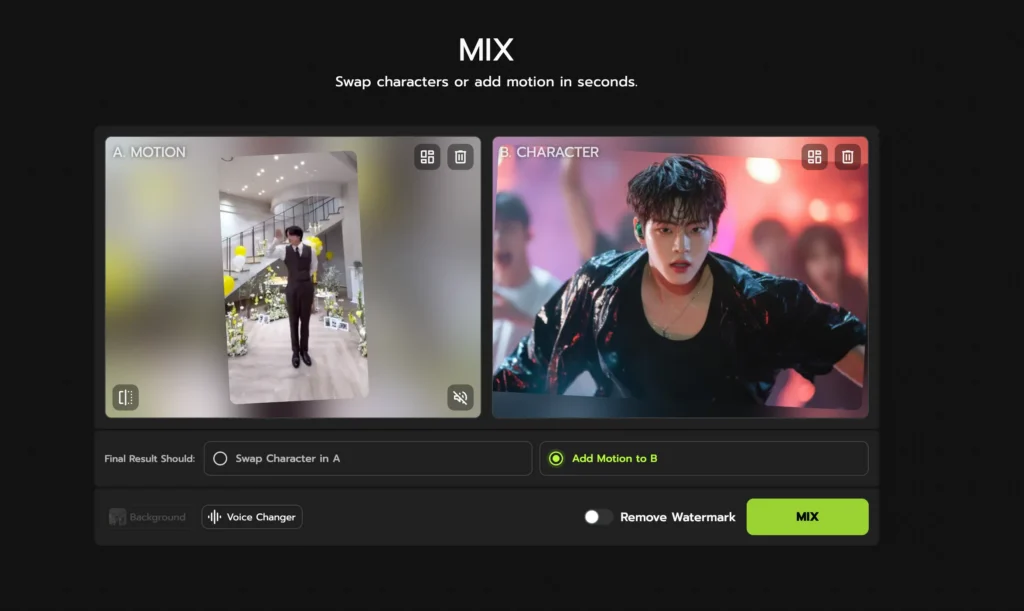
Method 3: Using ComfyUI (Advanced Users)
Prerequisites:
- Python 3.10+ installed
- NVIDIA GPU with 8GB+ VRAM (or use CPU, slower processing)
- ComfyUI installed with AnimateDiff extension
Step 1: Set Up Workflow
Load the “Make People Dance” workflow template from the ComfyUI community repository.
Step 2: Configure Nodes
- Image Input Node: Load your subject photo
- Pose Detection Node: Configure DWPose or OpenPose
- Dance Reference Node: Upload reference dance video
- ControlNet Node: Set strength (0.7-0.9 recommended)
- AnimateDiff Node: Select motion model (v2 or v3)
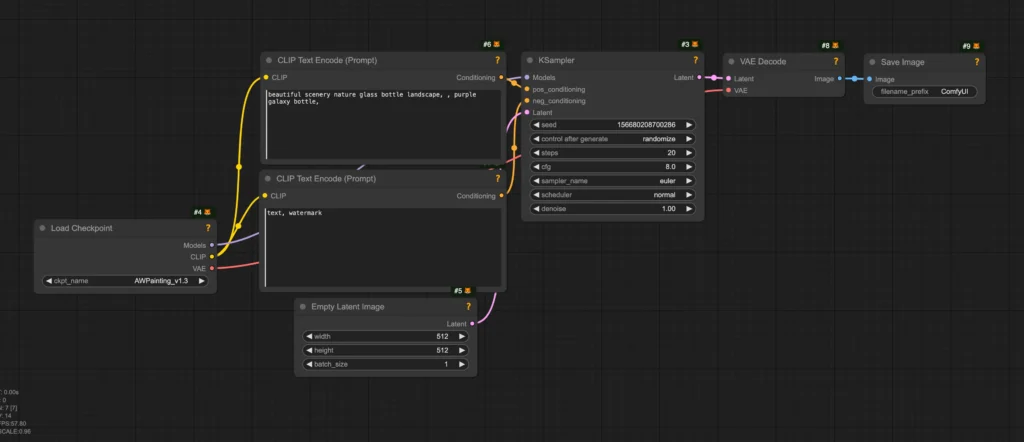
Step 3: Process
Queue the workflow and monitor progress. Processing time: 2-10 minutes depending on hardware and video length.
Step 4: Refine Output Use the iteration node to adjust motion blending if initial results aren’t satisfactory.
Gaga AI vs. Traditional Dance Generators: What’s the Difference?
Understanding when to use text-prompt technology versus template-based approaches helps you choose the right tool.
Template-Based Generators (Viggle AI, Traditional Tools)
How they work: You browse a library of pre-recorded dance sequences and select one that matches your vision. The AI applies that exact choreography to your photo.
Advantages:
- Predictable results—you see the dance before applying it
- Faster decision-making (visual browsing)
- Proven, professionally choreographed movements
- Great for recreating viral trends
Limitations:
- Limited to available templates
- Everyone using the same template creates similar content
- Difficult to find exact match for your creative vision
- Can’t easily combine elements from multiple dances
Text-Prompt Generators (Gaga AI)
How they work: You describe your desired outcome in natural language, and the AI generates custom choreography matching your description.
Advantages:
- Unlimited creative possibilities
- Unique content (not template-based)
- Precise control over mood, intensity, and style
- Can combine multiple dance elements in one prompt
- Easier iteration (just modify text instead of browsing)
Limitations:
- Requires clear prompt writing skills
- Less predictable results initially
- May need several attempts to perfect
- Steeper learning curve for beginners
Best practice: Start with Gaga AI’s text prompts for unique content, then use Viggle AI’s templates when you need to recreate specific viral dances or want guaranteed results.
AI Baby Dance Video Generator: Special Considerations
AI baby dance generators have become popular for creating adorable personalized content, but they require careful ethical consideration.
Top Platforms for Baby Dance Videos
AI Danza
Specializes in infant-safe animations with gentle, age-appropriate movements. Features include lullaby synchronization and soft color palettes.
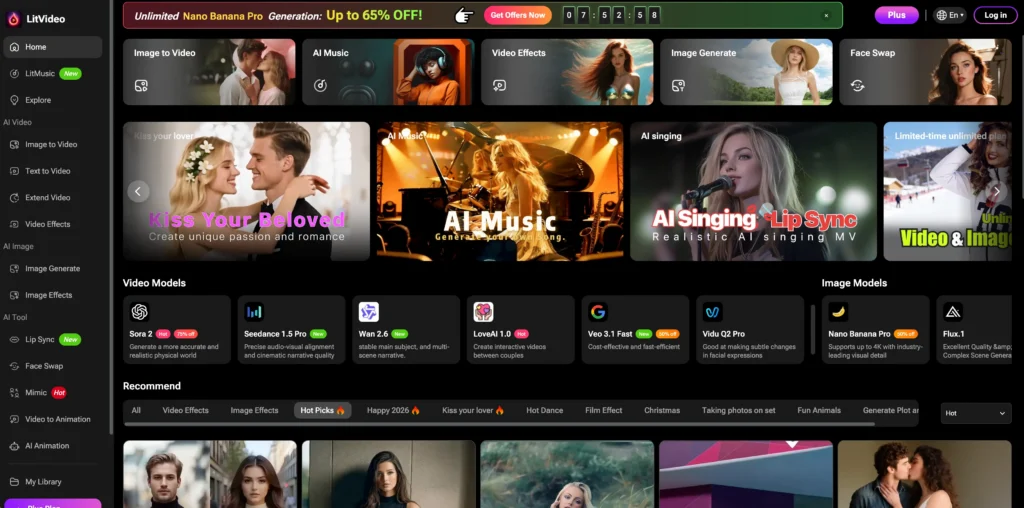
Vidnoz AI
Offers extensive baby-specific templates including crawling animations, first steps simulations, and playful gestures.
Clipfly
Mobile-first platform with quick processing and automatic face beautification suitable for baby photos.
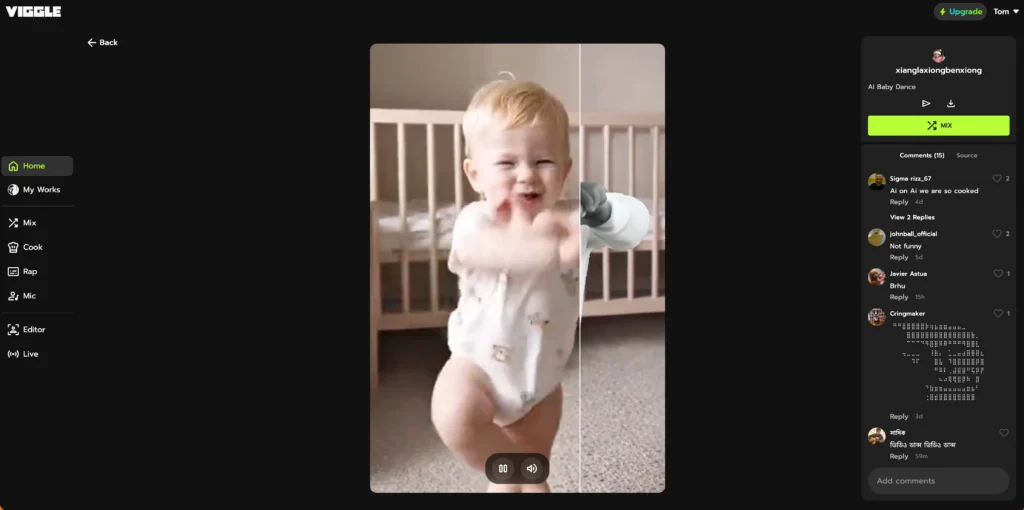
Viggle AI
General-purpose platform that works well for baby photos with its gentle motion templates and high-quality rendering.
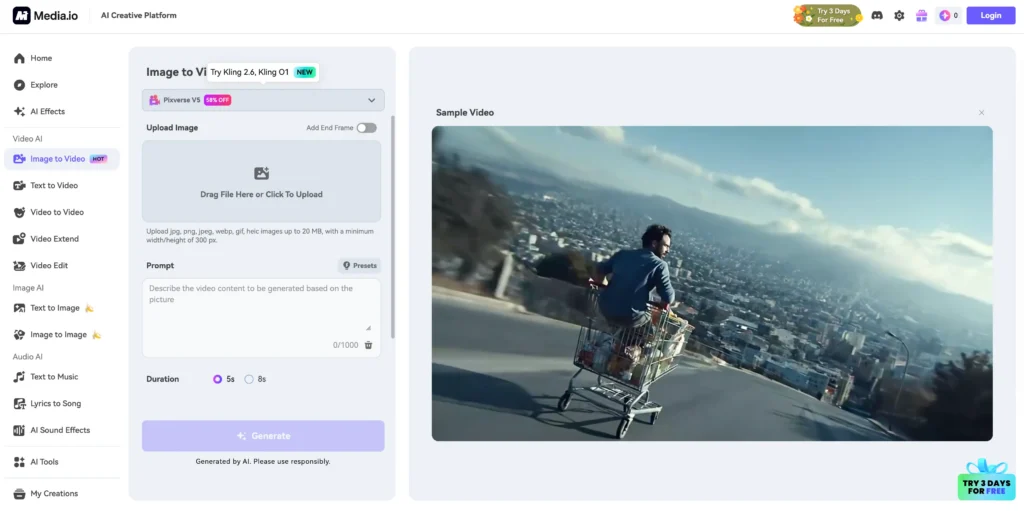
Media.io
Browser-based tool with batch processing—useful for creating multiple baby dance videos for family sharing.
How to Make Baby Dance AI Videos Safely
Photo Selection Guidelines:
- Use recent, high-quality photos
- Ensure good natural lighting
- Front-facing poses work best
- Avoid photos with multiple people (AI may struggle with selection)
Ethical Considerations:
- Only create content with photos of your own children or with explicit parental consent
- Never share AI-generated baby videos publicly without understanding privacy implications
- Be cautious of platforms that retain uploaded images
- Avoid platforms requiring excessive permissions
Best Practices:
1. Use local processing tools like ComfyUI when possible for privacy
2. Read platform privacy policies before uploading photos of minors
3. Watermark or limit distribution of generated content
4. Consider age-appropriate dance movements (avoid overly mature choreography)
Using Gaga AI for Baby Videos: Gaga AI’s text prompt system is particularly effective for baby content:
- Prompt example: “Gentle swaying movements with playful giggles and happy baby expression”
- The emotion control ensures age-appropriate facial expressions
- Sound effects can include baby laughter or playful music
- Select 1:1 aspect ratio for easy sharing with family
Free AI Dance Video Generators: What to Expect
Free AI dance generators typically offer core functionality with limitations on usage, output quality, or features.
What Free Tiers Include
Standard Features:
- 3-10 video generations per month
- Resolution capped at 720p
- Watermarked outputs
- Limited template library access
- Standard processing queue (slower than premium)
Recommended Free Options:
Gaga AI Free Version
- 3 daily generations with watermarks
- Full text prompt access
- All aspect ratios available
- Standard sound effects library
- 720p output resolution
Viggle AI Free Tier
- 5 generations daily
- Full feature access
- Community support
ComfyUI (Open Source)
- Completely free
- No generation limits
- Requires technical setup
Tips for Maximizing Free Tools
1. Batch your projects: Plan multiple videos when you have available credits
2. Use optimal photo formats: High-quality inputs reduce need for regeneration
3. Leverage community resources: Many platforms offer free credits through referrals or social sharing
4. Combine tools strategically: Use free generators for drafts, premium tools for final outputs
5. Master prompt writing: With Gaga AI, good prompts reduce regeneration needs
Wiggle AI Dance vs. Viggle AI: Clarifying the Confusion
Users often search for “wiggle AI dance” when referring to Viggle AI. Here’s the clarification:
Viggle AI (with a “V”) is the correct name of the leading AI dance generation platform. The common misspelling “wiggle” stems from the playful nature of dance animations, but searching “wiggle ai dance” will typically redirect you to Viggle AI resources.
Viggle AI Distinguishing Features:
- Character consistency technology (maintains identity across frames)
- Mix mode for combining custom elements
- Professional-grade motion capture integration
- Active Discord community with tutorials
If you’re searching for dance generation tools, always use “Viggle” to find the official platform and avoid imitation services.
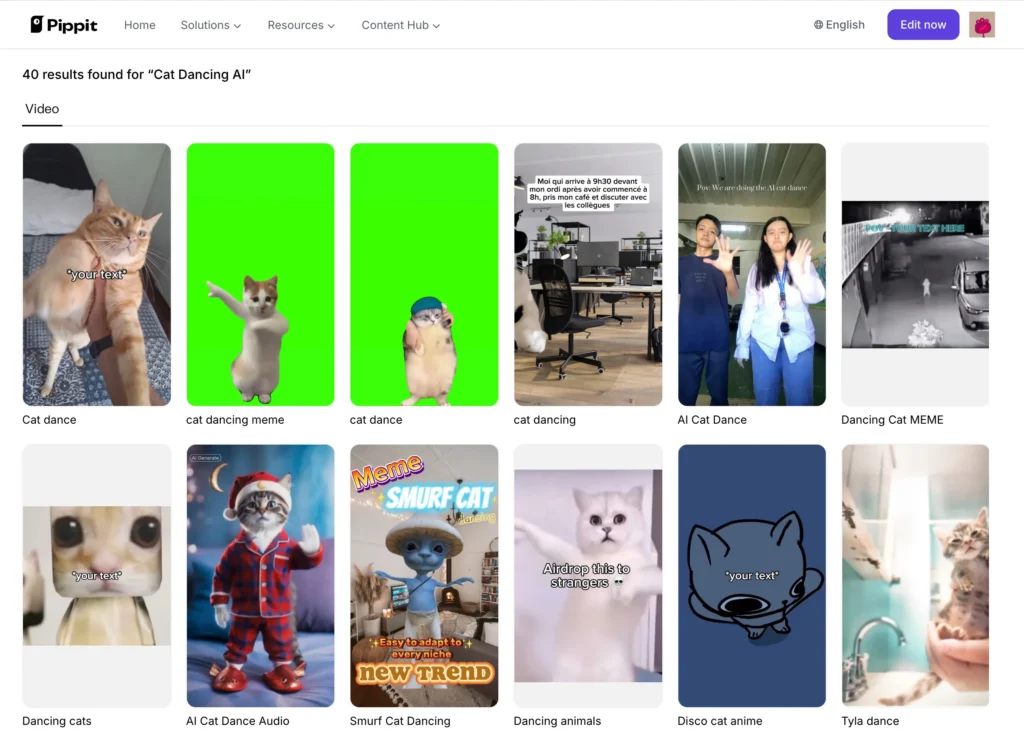
Creating AI Cat Dance Videos with Pippit AI
Pippit AI specializes in animal animations, with particular strength in creating dancing cat videos that have gone viral across social media platforms.
How Pippit AI Works for Animals
Animal AI dance generation requires different algorithms than human dance:
Challenges Unique to Animal Animation:
- Quadrupedal motion patterns differ fundamentally from bipedal
- Fur texture rendering requires specialized models
- Skeletal structure varies dramatically across species
- Behavioral realism (cats wouldn’t naturally perform certain human dances)
Pippit AI Solutions:
- Species-specific pose estimation models
- Animation templates designed around natural animal movements
- Style transfer that maintains anatomical correctness
Creating AI Cat Dance Videos
Step 1: Upload a clear side-view photo of your cat (full body visible)
Step 2: Select from cat-appropriate animations:
- Playful paw movements
- Tail swishing choreography
- Head bobbing to music
- Standing/balancing poses
Step 3: Customize music selection—Pippit AI automatically syncs cat movements to beat
Step 4: Generate and share (processing: 30-60 seconds)
Pro tip: Photos with minimal background clutter produce the cleanest animations for animal subjects.
Best AI Video Generator: Beyond Dance
While dance generation is a popular application, comprehensive AI video generators offer broader creative capabilities.
Top Multi-Purpose AI Video Generators
Runway Gen-2
- Text-to-video and image-to-video
- Motion brush for selective animation
- Professional editing features
- Industry-standard quality
Pika Labs
- Cinematic camera movements
- 3D animation capabilities
- Aspect ratio flexibility
- Community-driven template library
Synthesia
- Avatar-based video creation
- Multi-language support
- Corporate training applications
- Script-to-video conversion
For dance-specific needs: Gaga AI with its text-to-motion control and Viggle AI remain superior, but for projects requiring diverse video types (talking heads, product demos, explainer videos), these general-purpose platforms offer more versatility.
Mastering Gaga AI: Advanced Prompt Engineering
Getting the most from Gaga AI’s text-to-motion system requires understanding effective prompt structure.
Anatomy of a Perfect Dance Prompt
Basic Structure: [Dance Style] + [Specific Movements] + [Emotion/Expression] + [Optional: Sound Preference]
Examples with Breakdown:
| Use Case | Full Prompt Example | Breakdown |
| Social Media | “Viral TikTok dance with sharp hand gestures and body waves, confident and sassy expression, sync with upbeat pop music” | Style: TikTok Movements: Sharp gestures, waves Emotion: Sassy Sound: Upbeat pop |
| Professional | “Elegant corporate dance with subtle swaying movements, warm professional smile, soft background music” | Style: Corporate Movements: Subtle swaying Emotion: Professional smile Sound: Soft music |
| Storytelling | “Dramatic contemporary choreography with reaching arms and floor movements, intense emotional expression showing struggle then triumph, cinematic orchestral sound” | Style: Contemporary Movements: Reaching, floor work Emotion: Intense (Struggle/Triumph) Sound: Cinematic orchestral |
Emotion Control Keywords That Work
Gaga AI responds to nuanced emotion descriptors:
| Category | Energy Levels | Expression Types | Facial Details |
| Low/Quiet | Calm, serene, peaceful, gentle | Focused, concentrated | Serious look, subtle smirk |
| Medium/Neutral | Comfortable, natural, casual | Determined, professional | Squinted eyes (determination) |
| High/Positive | Energetic, explosive, powerful | Joyful, playful, confident | Big smile with teeth |
| Dramatic/High | Dynamic, fierce | Intense, passionate, emotional | Raised eyebrows (surprise) |
Motion Intensity Modifiers
Control how exaggerated movements appear:
| Scale | Motion Intensity Modifiers | Sound & Ambiance Effects |
| Subtle | Barely noticeable, minimal movements | No sound effects, music only |
| Soft | Gentle, flowing motions | Fabric rustling, soft footsteps |
| Standard | Clear, defined movements (Default) | Studio dry sound, natural acoustics |
| Sharp | Sharp, pronounced gestures | Whoosh effects, footstep sounds |
| Extreme | Exaggerated, dramatic actions | Concert hall reverb, club/crowd noise |
Iterative Refinement Strategy
If your first generation isn’t perfect:
| Step | Action | Logic |
| 1. Identify | Pinpoint the issue | Is it the speed, the smile, or the style? |
| 2. Target | Modify one element | Before: “Hip-hop with happy expression” After: “Hip-hop with fierce expression” |
| 3. Reference | Link to previous generation | Use: “Similar to previous, but with [Change]” |
Gaga AI’s system learns from your session and can maintain elements you liked while changing others.
Social Media Optimization: Platform-Specific Strategies
Maximizing engagement requires tailoring your AI dance videos to each platform’s unique characteristics.
| Platform | Aspect Ratio | Duration & Specs | Gaga AI Content Optimization | Best Prompt Example |
| TikTok | 9:16 | 15-60s (21-34s ideal) | Focus on explosive openings, dramatic hooks, and loop-friendly endings. | “Viral-style dance with explosive opening move, quick transitions, exaggerated playful expressions, and smooth ending that loops back to start.” |
| Instagram Reels | 9:16 | 15-90 seconds | Focus on aesthetic, polished visuals, trendy movements, and a stylish vibe. | “Trendy, aesthetic dance with smooth flowing movements, confident fashionable expression, clean modern vibe, sync with trending Reels audio.” |
| YouTube | 16:9 | 30s to 3 minutes | Focus on storytelling, narrative arcs, and varied intensity sequences. | “Complete dance routine with slow building intro, energetic middle, and graceful ending; emotional journey from calm to excited.” |
| YouTube Shorts | 9:16 | 15-60 seconds | Front-load interest, use recurring characters (avatars), and “wow-factor” moves. | “High-energy dance with front-loaded wow-factor moves, highly shareable transitions, and recurring avatar character consistency.” |
Addressing Content Safety: AI Nude Dance and Ethical Boundaries
Searches for “ai nude dance” and “kpop ai nude dance” represent a concerning application of AI technology that raises serious ethical and legal issues.
Content Safety & Ethical Boundaries
| Category | Key Concerns & Restrictions | Impact & Consequences |
| Legal Issues | Non-consensual deepfakes, copyright infringement of celebrity likeness, and criminal impersonation. | Prosecution for harassment, defamation, or illegal imagery production. |
| Ethical Concerns | Violation of personal dignity, lack of consent, and the promotion of objectification/harassment culture. | Permanent damage to reputations and harm to the broader AI community. |
| Platform Policies | Strict prohibition of nudity, sexually explicit movements, and non-consensual deepfakes. | Automatic prompt blocking and permanent account bans by Gaga AI. |
Gaga AI specifically: The platform’s content moderation system automatically detects and blocks inappropriate prompts, including requests for nude content, sexually explicit movements, or non-consensual celebrity deepfakes.
Guidelines for Responsible AI Dance Creation
To ensure a safe and creative environment, users should adhere to the following standards of conduct:
| Principle | Actionable Guideline |
| Consent First | Only use your own image or likenesses for which you have explicit, documented permission. |
| Respect Terms | Follow Gaga AI community standards; avoid bypassing moderation filters for explicit content. |
| Impact Review | Before generating, consider if the content could harm, embarrass, or misrepresent a real person. |
| Protect Minors | Strictly zero tolerance for any inappropriate content involving children or minors. |
| Accuracy | Clearly label AI-generated content to avoid misleading the public regarding real-world events. |
The technology itself is neutral—AI dance generators enable amazing creative expression when used responsibly. The community must collectively enforce ethical standards to prevent abuse.
Advanced Techniques: Maximizing Dance Video Quality
Photo Optimization for Best Results
| Category | Optimization Strategy | Why It Matters |
| Lighting | Use diffused natural light or ring lights; avoid harsh shadows and ensure even illumination. | Prevents “glitching” where the AI confuses shadows with body parts. |
| Composition | Center the subject in a full-body shot (head to feet) with a 10–15% margin around the edges. | Ensures the AI can track the entire range of motion without clipping limbs. |
| Background | Use neutral, solid-color backgrounds with minimal clutter. | Makes it easier for the AI to distinguish the person from the environment. |
| Resolution | Minimum 512x512px; Recommended 1024x1024px or higher. | Higher resolution provides more “keypoints” for realistic facial expressions. |
| File Format | PNG (best quality) or high-quality JPG. | Reduces compression artifacts that can lead to blurry movement. |
Using Gaga AI’s Avatar Feature for Consistent Branding
For content creators building a virtual presence:
Creating Your Signature Avatar:
| Phase | Strategy | Example Prompt / Action |
| Initial Creation | Define specific, repeatable traits (hair, style, features). | “25-year-old female avatar with long purple hair, futuristic streetwear, Asian features, confident expression.” |
| Profile Setup | Save specifications for reuse. | Action: Save your prompt and seed number in a dedicated “Brand Kit” document. |
| Recognition | Maintain visual consistency across all posts. | Action: Use the same “master image” as the reference frame for every dance generation. |
| Evolution | Update features gradually rather than all at once. | Action: Change the outfit color or hairstyle slightly in a new prompt while keeping facial features identical. |
Avatar vs. Real Photo Decision Matrix:
| Feature | Use Real Photos When… | Use AI Avatars When… |
| Privacy | You are comfortable being the “face” of the brand. | You prefer to remain anonymous or maintain privacy. |
| Brand Goal | Building deep personal trust and authenticity. | Creating a virtual influencer or fictional character. |
| Creativity | Content requires high-level human nuance. | You need impossible elements (fantasy, sci-fi, or non-human traits). |
| Efficiency | You have access to professional lighting/photography. | You want a consistent look across unlimited videos without reshooting. |
| Audience | Friends, family, or communities valuing “realness.” | Gen Z/Alpha or tech-forward audiences open to digital creators. |
Post-Processing Enhancements
To take your AI-generated dance videos from “cool tech” to professional content, use these post-processing tools and techniques.
1. Recommended Software for Refinement
Choose a tool based on your experience level and the desired output quality.
| Software | Best For | Key 2026 AI Features |
| CapCut | Social Media Creators | One-click 4K upscaling, AI background removal, and auto-captions with “Smart Text Packaging.” |
| Adobe Premiere Pro | Professional Editors | Warp Stabilizer for jittery AI motion, AI Color Match, and automated “Auto Reframe” for vertical video. |
| DaVinci Resolve | Cinematic Quality | AI SuperScale (3x/4x) for resolution, and “Magic Mask” for precise color grading of just the dancer. |
| Topaz Video AI | Niche Enhancement | Iris & Nyx models for restoring facial details and removing “AI noise” or grain from low-res generations. |
2. Core Enhancement Techniques
Apply these specific steps to fix common AI video artifacts.
| Technique | Goal | How to Do It |
| Upscaling | Crisp 4K quality | Use Topaz Video AI or CapCut’s AI Enhancer to inject detail into 512p or 1080p base clips. |
| Stabilization | Smooth movement | Apply Warp Stabilizer (set to “No Motion” or “Smooth Motion”) to reduce jitter in the AI’s frame-to-frame consistency. |
| Color Grading | Consistent Brand Look | Use LUTs or AI Palette Match to ensure every video in your series has the same color temperature and “vibe.” |
| Text & Graphics | High Engagement | Add Animated Subtitles (available as AI templates in Resolve or CapCut) to keep viewers’ attention. |
3. Professional Workflow: Step-by-Step
Follow this sequence to ensure your exports are optimized for the 2026 social media landscape.
| Step | Action | Platform Settings / Notes |
| 1. Generate | Create the base clip in Gaga AI. | Always export in the highest resolution available (1080p+). |
| 2. Clean | Stabilize and Denoise. | Fix “flicker” or shaky limbs using Premiere or Topaz before adding effects. |
| 3. Polish | Color Grade and Brand. | Apply your signature color filter and add a 3-second branded intro/outro. |
| 4. Subtitle | Add Auto-Captions. | Crucial for TikTok/Reels; ensure they are centered and readable. |
| 5. Export | Platform-Specific Export. | TikTok/Reels: H.264, 1080×1920, 30-60 FPS, VBR 1-pass (8-10 Mbps). |
Troubleshooting Common Issues
| Problem | Potential Causes | Actionable Solutions |
| Prompts Not Producing Expected Results | Vague language; conflicting descriptors; over-complexity. | Be Specific: Use “hip-hop with popping” instead of “cool dance.” Layer Elements: Style → Movement → Emotion → Tempo. Simplify: Start with a basic prompt and add modifiers one by one. |
| Face Distortion or Blurring | Low-res source; multiple faces in frame; extreme angles. | Source Quality: Use a 1024x1024px, eye-level, straight-on photo. Isolation: Crop the image to a single subject. Settings: Switch from “Fast” to “Quality” mode in Gaga AI settings. |
| Movements Don’t Match Music Beat | AI misread tempo; irregular rhythms in custom audio. | Explicit Cues: Add “fast-paced” or “synchronized to beat” to the prompt. Workflow: Upload the music before generating so the AI can analyze the waveform. Library: Use pre-analyzed tracks from the Gaga AI library. |
| Wrong Aspect Ratio Exported | Platform selection error; unsaved project settings. | Double Check: Verify the 9:16 (Vertical) or 16:9 (Horizontal) toggle before hitting generate. Re-export: Use the “Re-export” feature to change ratios without re-animating. |
| Avatar Doesn’t Match Brand Aesthetic | Generic prompts; lack of specific “vibe” descriptors. | Use Reference Styles: Use keywords like “Cyberpunk,” “Cottagecore,” or “Streetwear.” Specific Details: Define exact hair length, clothing textures, and accessories. Iterate: Save your favorite seed and make 10% adjustments per prompt. |
Frequently Asked Questions (FAQ)
What is the best AI dance generator free option?
Gaga AI offers an excellent free tier with 3 daily text-prompt-based generations, full access to emotion control and sound effects, and all aspect ratio options (16:9, 9:16, 1:1). Viggle AI provides 5 daily template-based generations. For unlimited free use, ComfyUI is open-source but requires technical setup. Gaga AI’s free tier is best for creators wanting advanced control without immediate payment.
How does Gaga AI’s text prompt system work?
Gaga AI uses natural language processing to interpret your dance descriptions. You type commands like “energetic hip-hop with sharp movements and confident expression,” and the AI translates this into specific animation parameters. The system understands dance terminology, emotion keywords, and intensity modifiers.
It controls three layers: physical movements (choreography), facial expressions (emotions), and audio elements (sound effects and music), all from a single text prompt.
Does Gaga AI have a mobile app?
No, Gaga AI is currently only available as a web-based platform accessible through desktop and mobile browsers. There is no dedicated mobile app for iOS or Android. However, the web interface is mobile-responsive, allowing you to create dance videos from your phone’s browser with full functionality.
Can I create AI dance videos for different social media aspect ratios?
Yes, Gaga AI and most modern AI dance generators support multiple aspect ratios. Select 16:9 for YouTube and horizontal content, 9:16 for TikTok, Instagram Reels, and YouTube Shorts, or 1:1 for Instagram feed posts. Gaga AI automatically optimizes resolution and compression settings for each platform, ensuring your videos meet technical requirements without manual adjustment.
How do I make a baby dance AI video?
To create a baby dance AI video: (1) Select a platform with gentle animation capabilities like AI Danza, Vidnoz AI, or Gaga AI, (2) Upload a clear, front-facing photo of the baby, (3) Choose age-appropriate movements—with Gaga AI use prompts like “gentle swaying with playful giggles,” (4) Select sound effects (baby laughter or soft music), (5) Process and download. Always use photos of your own children or obtain explicit parental consent.
What’s the difference between Gaga AI’s avatar feature and uploading photos?
Gaga AI’s AI avatar feature generates virtual characters from text descriptions (example: “young man with short hair wearing business casual”), allowing you to create consistent brand mascots or maintain privacy. Uploading photos uses your actual image or someone else’s (with permission) for realistic results. Avatars offer unlimited creative possibilities and avoid privacy concerns, while photos provide authenticity and personal connection. Use avatars for virtual influencers or branded content, photos for personal branding.
Can I control emotions and facial expressions in AI dance videos?
Yes, Gaga AI specifically offers emotion control through text prompts. Include descriptors like “confident fierce expression,” “joyful with big smile,” or “dramatic intense look” in your prompt. The platform’s emotion engine adjusts facial features throughout the dance to match your specified mood. Other platforms like Viggle AI maintain the original photo’s expression, while Gaga AI dynamically animates facial expressions to align with movements.
How do AI-generated sound effects work in dance videos?
Gaga AI’s integrated sound system generates contextual audio that matches movements. When enabled, the AI adds footstep sounds, whoosh effects for quick arm movements, and ambient sounds appropriate to dance style. You can control this through prompts: “with realistic footstep sounds,” “dramatic whoosh effects,” or “no sound effects, music only.” The system synchronizes these effects with the visual animation automatically.
Is it safe to upload my photos to AI dance generators?
Safety varies by platform. Reputable services like Gaga AI and Viggle AI have clear privacy policies and typically don’t retain images after processing. However, always: (1) Read privacy policies before uploading, (2) Avoid uploading sensitive identification documents, (3) Never upload photos of minors to unknown platforms, (4) Use local processing tools like ComfyUI for maximum privacy. For Gaga AI specifically, consider using the avatar feature instead of personal photos if privacy is a concern.
Can I monetize AI-generated dance videos on social media?
Yes, you generally own AI-generated content you create and can monetize it. However: (1) Review the AI platform’s commercial use terms—some free tiers prohibit commercial use, (2) Ensure you have rights to source photos and music, (3) YouTube, TikTok, and Instagram allow AI content monetization if properly disclosed. Gaga AI’s Pro plan explicitly includes commercial use rights. Always disclose AI-generated content to comply with platform policies and maintain audience trust.
How long does it take to generate an AI dance video?
Processing times vary by platform: Gaga AI typically processes in 45-90 seconds, Viggle AI takes 1-3 minutes, Meta AI processes in 3-5 minutes for higher quality, and ComfyUI requires 2-10 minutes depending on local hardware. Gaga AI’s text-to-motion system may take slightly longer during initial processing as it interprets your prompt and generates custom choreography, but subsequent generations with similar prompts are faster.
What’s better for beginners: text prompts or templates?
For absolute beginners, template-based platforms like Viggle AI offer easier starting points—you see the dance before applying it. However, Gaga AI’s text prompt system becomes intuitive quickly and offers more creative freedom. Best approach: Start with Viggle AI to understand what’s possible, then move to Gaga AI once you know what you want to create. Gaga AI’s learning curve is gentle—simple prompts like “happy dance with energetic movements” produce good results immediately.
Related Posts:
 Haiper AI Video Generator Review: The Complete Guide (Dec 2026 Update)
 The Complete Guide to Stable Diffusion AI Video: From Image Generation to Advanced Video Creation
 AI Movie Generator: Complete Guide to Creating Videos with Artificial Intelligence in 2026
 AI Twerk Generator: 5 Free Tools to Create Viral Videos