Key Takeaways
- Runway Gen-4.5 ranks #1 on Artificial Analysis’s Video Arena benchmark, outperforming Google Veo 3 (#2) and OpenAI Sora 2 Pro (#7)
- Released December 1, 2024 by Runway, a 120-person AI startup valued at $3.55 billion
- Core strengths: Physical accuracy, motion quality, prompt adherence, character expressions, and stylistic control
- Pricing: Free ($0), Standard ($15/user/month), Pro ($35/user/month), Unlimited ($95/user/month), and Enterprise (custom pricing)
- Built on NVIDIA infrastructure (Hopper and Blackwell GPUs) for optimized inference speed
- Known limitations: Causal reasoning errors, object permanence issues, and success bias in generated actions
What Is Runway Gen-4.5?
Runway Gen-4.5 is an AI video generation model that creates high-definition video content from text descriptions. The model excels at understanding physics, human motion, camera movements, and cause-and-effect relationships to produce cinematic and photorealistic video outputs.

Gen-4.5 represents the latest iteration in Runway’s video generation series (following Gen-1, Gen-2, Gen-3, and Gen-4) and currently holds the top position in independent benchmarking with 1,247 Elo points on the Artificial Analysis Text-to-Video benchmark.
Table of Contents
How Does Gen-4.5 Compare to Competitors?
Performance Benchmarks
According to Artificial Analysis’s Video Arena rankings (determined through blind voting):
1. Runway Gen-4.5 – 1st place (1,247 Elo)
2. Google Veo 3 – 2nd place
3. OpenAI Sora 2 Pro – 7th place
The ranking methodology uses blind comparisons where evaluators choose between two model outputs without knowing which company produced each video.
Competitive Advantages
Gen-4.5 achieves state-of-the-art performance in:
- Dynamic and controllable action generation
- Temporal consistency across frames
- Precise controllability across multiple generation modes
- Pre-training data efficiency and post-training optimization
Gaga AI (GAGA-1): The Holistic Performance Alternative
While Runway Gen-4.5 leads in general video generation benchmarks, Gaga AI’s Gaga-1 model offers a fundamentally different approach optimized for character-driven, performance-based content. Rather than treating voice, lip-sync, and facial animation as separate components, Gaga-1 co-generates them simultaneously as a unified, holistic performance.
What Is Gaga AI?
Gaga AI is a free online AI video generator and avatar creator that transforms images and audio into cinematic videos with animated avatars. The platform specializes in creating lifelike digital actors where voice and visual expression emerge together, eliminating the disjointed feel common in traditional AI video generators.
Gaga-1 vs. Runway Gen-4.5: Key Differences
Use Case Focus:
- Runway Gen-4.5: Excels at cinematic storytelling, complex scene composition, environmental generation, and production-grade VFX
- GAGA-1: Optimized for character performances, talking avatars, educational content, and digital presenters
Technical Approach:
- Runway Gen-4.5: Diffusion-based model with 1,247 Elo benchmark rating focusing on physics accuracy and motion quality
- GAGA-1: Autoregressive architecture that advances frame-by-frame through causal reasoning, preserving realism through temporal consistency
Core Strengths Comparison:
When to Choose Gaga AI Over Runway Gen-4.5
Choose Gaga AI (GAGA-1) when you need:
1. Avatar-Based Content: Lifelike AI avatars with precise lip-sync for educational videos, virtual presenters, or digital spokespersons.
2. Budget-Conscious Projects: Free access for testing with fast generation times (10-second videos in 3-4 minutes).
3. Character-Driven Stories: Content where facial expressions and emotional authenticity matter more than environmental detail
4. Social Media Content: 720p output optimized for TikTok, Instagram Reels, and YouTube Shorts.
5. Training and Education: Lifelike virtual tutors that make learning more engaging and personal.
Choose Runway Gen-4.5 when you need:
1. Cinematic Production Quality: High-fidelity visuals for professional film, advertising, and brand content
2. Complex Scene Composition: Multi-element scenes with intricate physics and environmental details
3. Stylistic Versatility: Ability to switch between photorealistic, animated, and artistic styles seamlessly
4. Production VFX: Integration with live-action footage for professional post-production workflows
5. Extended Creative Control: Keyframes, camera movements, and precise temporal control
Gaga AI Workflow: Quick Start Guide
Step 1: Upload Your Reference Image
- Use JPG or PNG formats
- For vertical videos, use 1080×1920px; for horizontal, use 1920×1080px
- Clear, high-contrast, well-lit photos yield best results
Step 2: Add Script or Audio
- Write what you want your character to say
- Include emotions and actions in your prompt
- Or upload custom audio with voice characteristics
Step 3: Generate and Refine
- Generation takes 3-7 minutes depending on video length
- Review output and adjust prompts for tone or expression
- Extend videos progressively without restarting
The Competitive Landscape: Where Each Model Excels
The AI video generation market now offers specialized solutions for different needs:
Tier 1: Production-Grade Cinematic Models
1. Runway Gen-4.5 – #1 overall benchmark, best for professional film/VFX
2. Google Veo 3 – #2 benchmark, strong physics and realism
3. OpenAI Sora 2 Pro – #7 benchmark, creative flexibility
Tier 2: Character & Performance Specialists
1. Gaga AI (GAGA-1) – Free Veo 3 & Sora 2 level performance for avatars and talking heads
2. D-ID – Avatar creation with emotional intelligence
3. Synthesia – Enterprise avatar solutions
Tier 3: Fast & Accessible Options
1. Gen-3 Alpha Turbo – Runway’s faster, cost-effective option
2. Wan2.5 – Alibaba Cloud’s multimodal model with audio-visual sync
3. Various consumer tools – Social media optimization
Core Capabilities of Runway Gen-4.5
1. Precise Prompt Adherence
Gen-4.5 delivers unprecedented physical accuracy where objects move with realistic weight, momentum, and force. The model renders:
- Complex scenes with intricate, multi-element compositions
- Detailed placements with fluid motion for objects and characters
- Physical accuracy including believable collisions and natural movement
Physical Accuracy
- Expressive characters with nuanced emotions, natural gestures, and lifelike facial details
Surface details like hair strands and material textures remain coherent throughout motion sequences.
2. Stylistic Control and Visual Consistency
The model handles diverse aesthetic styles while maintaining coherent visual language:
- Photorealistic rendering: Visuals indistinguishable from real-world footage
- Non-photorealistic styles: Stylized, expressive animation with artistic freedom
- Slice-of-life scenes: Everyday environments with authentic detail
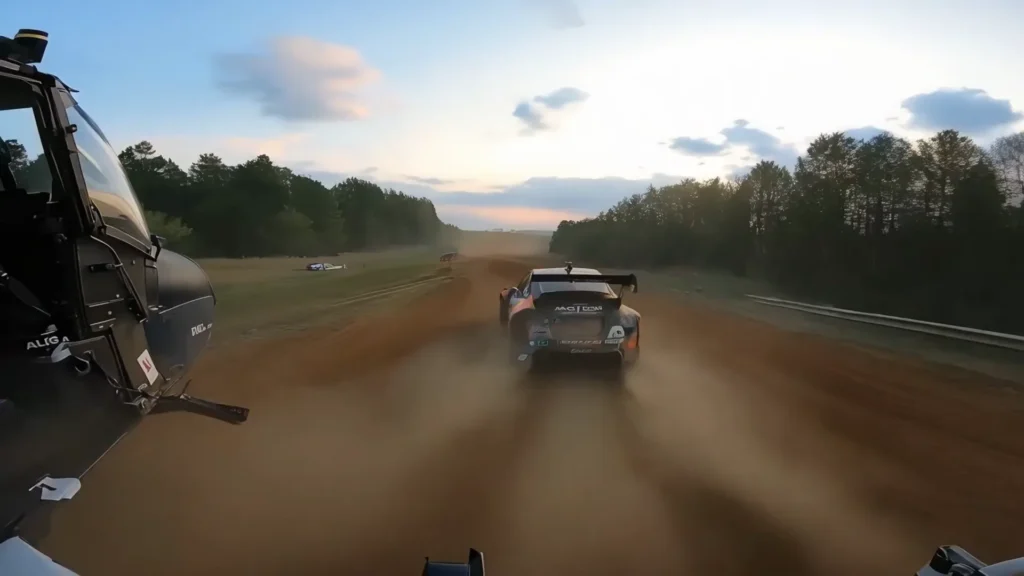
- Cinematic output: Emotionally powerful visuals with striking depth and polish
3. Fine-Grained Temporal Control
Gen-4.5 was trained with temporally dense captions, enabling:
- Imaginative scene transitions
- Precise keyframing of elements
- Complex camera movements (FPV, tracking shots, zoom sequences)
- Dynamic motion control across time
How to Use Runway Gen-4.5: Complete Step-by-Step Guide
Step 1: Access the Runway Platform
Recommended Setup:
- Visit: https://app.runwayml.com/
- Browser: Chrome (for optimized performance and compatibility)
- Requirements: Active Runway account (Free, Standard, Pro, Unlimited, or Enterprise)
First-Time Users:
1. Sign up for a free account at runway.ai
2. Verify your email address
3. Access the app dashboard at app.runwayml.com
4. You’ll receive 125 free credits to start experimenting
Step 2: Choose Your Generation Mode
After logging in, Runway offers two distinct generation workflows—each designed for different creative approaches:
Option A: Chat Mode (Recommended for Most Users)
What It Is:
Chat Mode acts as an AI creative collaborator that helps you explore ideas and refine your vision through natural conversation. Think of it as having a creative director who understands your intent and suggests improvements.
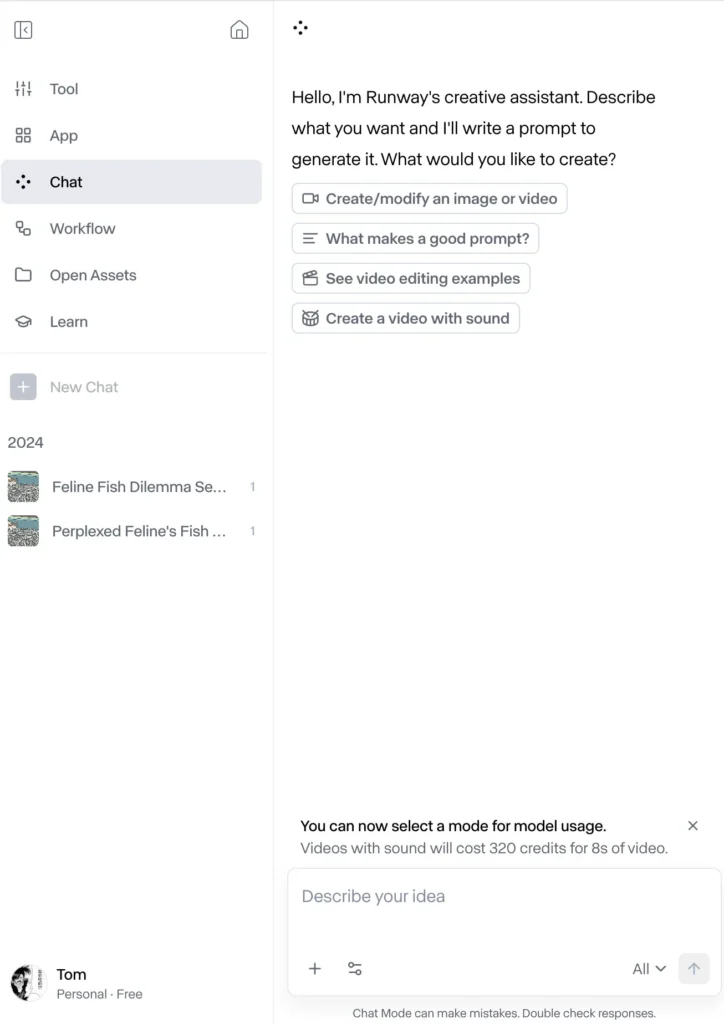
Best For:
- First-time users learning video generation
- Exploratory creative work and brainstorming
- Iterative refinement through dialogue
- Users who prefer conversational interfaces
How to Use Chat Mode:
1. Chat Mode is the default on new accounts
2. If you’re in Tool Mode, open Chat Mode by clicking the Chat icon in the interface
3. Describe what you want to create in natural language
4. The AI will interpret your intent and suggest optimal settings
5. Refine through back-and-forth conversatio
Example Chat Mode Workflow:
You: “I need a cinematic shot of a woman walking through a rainy Tokyo street at night”
AI: “I’ll create that with neon reflections and handheld camera movement. Would you like warm or cool color grading?”
You: “Cool tones with cyan and purple neon lights”
AI: “Perfect. Generating with Gen-4.5 at 720p, 5 seconds. This will use approximately 60 credits.”
Option B: Tool Mode (For Advanced Control)
What It Is:
Tool Mode provides manual, granular control over every generation parameter—ideal for users who want precise command over prompts, settings, and iterations.
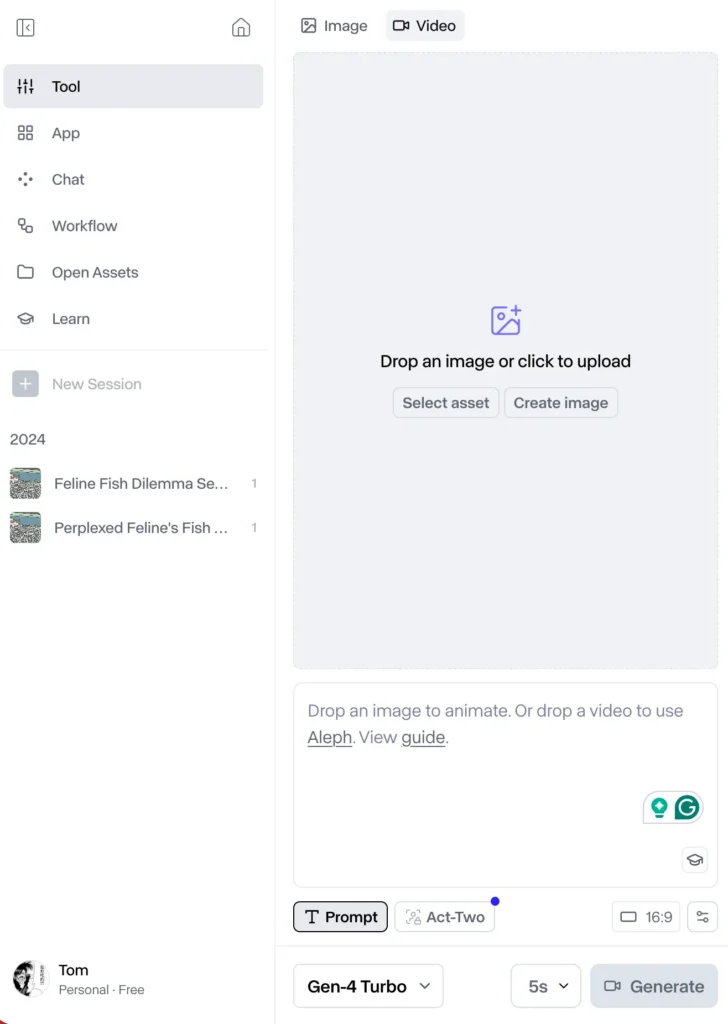
Best For:
- Experienced users familiar with prompt engineering
- Production workflows requiring exact specifications
- Batch generation with consistent parameters
- Users iterating on specific technical requirements
How to Access Tool Mode:
1. Close Chat Mode by clicking the X or minimize button
2. You’ll see the traditional Tool Mode interface with manual controls
3. Access the model switcher in the bottom-left corner
4. Configure all parameters manually before generating
Switching Between Modes:
- You can toggle between Chat Mode and Tool Mode at any time
- Your session history persists across both modes
- Choose the mode that best fits each creative task
Step 3: Select Your Model (Gen-4.5 vs. Gen-4 Turbo)
Runway offers multiple models optimized for different use cases:
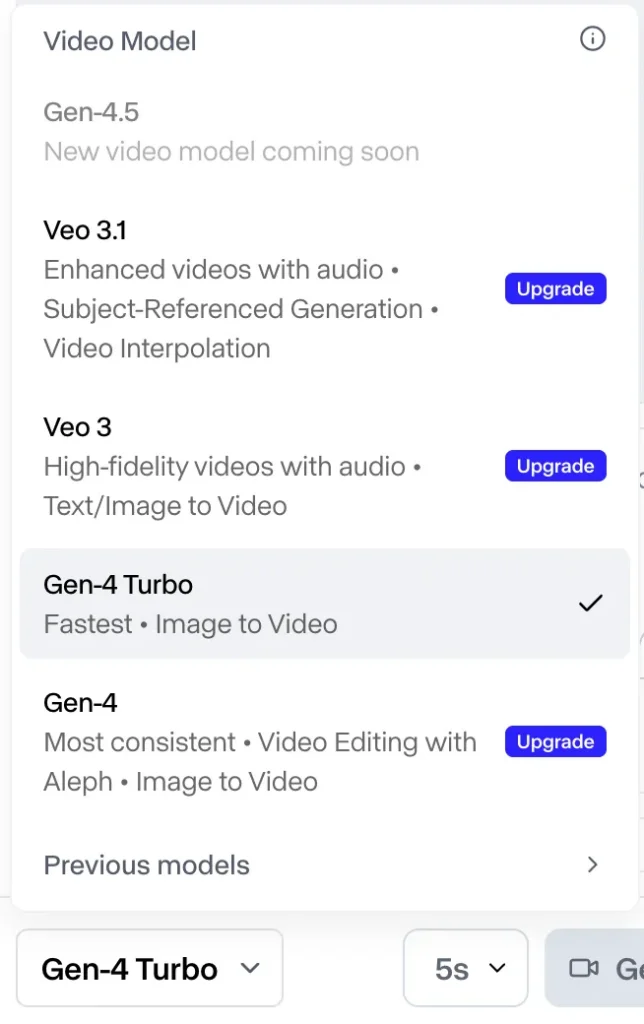
Model Selection Strategy
| Model | Speed | Quality | Credits/Video | Best For |
| Gen-4.5 | Standard | Maximum | 50-70 | Final deliverables, client work |
| Gen-4 | Standard | High | 30-50 | Production-quality content |
| Gen-4 Turbo | Fast | Good | 15-25 | Rapid prototyping, testing ideas |
| Gen-3 Alpha Turbo | Very Fast | Moderate | 10-20 | Concept exploration, drafts |
Recommended Workflow:
1. Start with Gen-4 Turbo to test concepts and iterate quickly (saves credits)
2. Switch to Gen-4 when you’ve refined your approach
3. Use Gen-4.5 for final renders that require maximum quality
How to Switch Models:
- In Tool Mode: Use the model switcher in the bottom-left corner
- In Chat Mode: Tell the AI which model you want to use (e.g., “Use Gen-4.5 for this”)
Step 4: Craft Your Prompt and Upload Assets
For Text-to-Video Generation:
Write a descriptive prompt focusing on:
- Shot type: “Close-up,” “wide shot,” “aerial drone,” “FPV tracking”
- Subject and action: What’s happening in the scene
- Camera movement: “Push in,” “pull back,” “handheld,” “static”
- Lighting and atmosphere: “Golden hour,” “neon-lit,” “dim warehouse”
- Style references: “Cinematic,” “documentary,” “Japanese animation”
Example Prompt:
“Cinematic close-up of a woman’s face, backlit by warm sunset light, camera slowly pulls back revealing a mountain landscape, golden hour, film grain, emotional, 24mm lens”
For Image-to-Video Generation:
1. Upload your reference image (JPG, PNG, or other supported formats)
2. Draft your motion prompt in the text box
3. Focus on describing motion only—you don’t need to describe image contents
Key Rule: Your text prompt should describe desired motion and camera movement, not what’s already visible in the image.
Example Image-to-Video Prompt:
Image: Portrait of a man in a suit
Prompt: “Camera slowly pushes in while subject turns head to look at camera, slight smile forming, shallow depth of field”
NOT: “A man in a blue suit standing in an office” ❌
CORRECT: “Slow zoom in, subject turns toward camera, subtle smile” ✅
Step 5: Generate Your Video
1. Review your settings:
- Model selected (Gen-4.5, Gen-4, or Turbo)
- Resolution preference (720p, 1080p, 4K)
- Duration (typically 5-10 seconds)
- Estimated credit cost displayed
2. Click the purple “Generate” button to begin processing
3. Processing time varies:
- Gen-4 Turbo: 1-3 minutes
- Gen-4: 3-5 minutes
- Gen-4.5: 3-6 minutes (depending on server load)
4. Track progress in your session panel—generations appear as they complete
5. Scroll through your session history to review all outputs in chronological order
Step 6: Review and Iterate Your Output
Once generation completes, you have multiple options to refine and extend your work:
Actions Menu Options
Click “Actions” below any completed generation to access:
1. Extend Video
- Add additional seconds to the end of your clip
- Maintains visual consistency and motion flow
- Useful for creating longer sequences
2. Upscale Resolution
- Enhance to 1080p or 4K quality
- Adds approximately 20-30 credits per upscale
- Recommended for final deliverables
3. Remove Watermark
- Available on Standard tier and above
- Produces clean, professional output
- Free plan videos retain Runway watermark
4. Regenerate with Variations
- Keep the same prompt but generate alternative takes
- Useful for getting multiple creative options
- Each regeneration consumes credits
5. Edit Prompt and Re-Generate
- Modify your original prompt
- Adjust camera movement, lighting, or style
- Iterate toward your creative vision
6. Use as Reference for New Generation
- Turn your output into a reference image
- Generate consistent characters or environments across shots
- Build narrative sequences with visual continuity
7. Video-to-Video Transformation
- Apply style transfers to existing footage
- Change aesthetic while preserving motion
- Useful for stylizing live-action content
8. Apply Motion Brush (Advanced Control)
- Manually direct specific elements’ movement
- Paint motion paths onto static regions
- Precise control over subject vs. background motion
9. Advanced Camera Controls
- Define exact camera movements (pan, tilt, zoom, rotate)
- Set keyframes for complex cinematography
- Professional-level shot composition
Step 7: Organize Your Work with Sessions
What Are Sessions?
Sessions are Runway’s organizational structure that automatically groups related generations together—like project folders for your creative work.
How Sessions Work:
- Automatically created when you start generating
- Keep outputs organized chronologically within each project
- Scrollable history shows all generations in sequence
- Searchable and filterable for easy retrieval
Best Practices:
- Create a new session for each project or creative concept
- Use descriptive session names (e.g., “Nike Commercial – Urban Scenes”)
- Archive completed sessions to keep your dashboard clean
- Share sessions with team members for collaboration (Pro/Enterprise plans)
Pro Tips for Maximum Efficiency
Credit Optimization Strategy
Workflow for Cost-Effective Generation:
1. Prototype with Gen-4 Turbo (15-25 credits) → Test 3-5 variations
2. Refine with Gen-4 (30-50 credits) → Choose best direction
3. Finalize with Gen-4.5 (50-70 credits) → Single perfect render
4. Upscale if needed (+20-30 credits) → Client-ready deliverable
Example Project Budget:
- 5 Gen-4 Turbo tests: 100 credits
- 2 Gen-4 refinements: 80 credits
- 1 Gen-4.5 final: 60 credits
- 1 4K upscale: 25 credits
- Total: 265 credits (fits within Standard plan’s 625 monthly allocation)
Prompting Best Practices
DO:
✅ Use specific cinematographic terms (“Dutch angle,” “rack focus”)
✅ Describe motion and camera movement in detail
✅ Reference lighting conditions (“rim light,” “volumetric fog”)
✅ Include emotional tone (“melancholic,” “triumphant”)
✅ Specify shot duration implications (“slow,” “rapid,” “hyper-speed”)
DON’T:
❌ Describe static image contents in Image-to-Video mode
❌ Use vague terms like “cool” or “nice” without context
❌ Write extremely long prompts (>100 words)—be concise
❌ Expect perfect results on first generation—iteration is normal
❌ Forget to specify style if photorealism isn’t your goal
Keyboard Shortcuts (Tool Mode)
- Space: Play/Pause video preview
- ← →: Navigate between generations in session
- Cmd/Ctrl + Enter: Generate with current settings
- Cmd/Ctrl + Z: Undo last action
- Escape: Close modal windows
Troubleshooting Common Issues
Problem: Video doesn’t match prompt expectations
Solutions:
- Increase prompt specificity (add shot type, lighting, camera movement)
- Break complex scenes into simpler components
- Try Chat Mode for AI-assisted prompt refinement
- Reference successful examples from Runway’s showcase gallery
Problem: Character/object consistency across multiple shots
Solutions:
- Use the same reference image for all generations
- Enable “Use as Reference” from Actions menu
- Describe consistent elements (clothing, hair, environment) in each prompt
- Consider upgrading to Pro plan for Custom Voice/Character features
Problem: Motion looks unnatural or jerky
Solutions:
- Use Gen-4.5 instead of Turbo for smoother motion
- Add temporal descriptors (“smooth,” “fluid,” “gradual”)
- Avoid extreme speed changes in short durations
- Upscale to higher resolution for smoother playback
Problem: Running out of credits mid-project
Solutions:
- Standard/Pro plans: Purchase additional credit packs
- Consider Unlimited plan ($95/month) for high-volume work
- Use Explore Mode (Unlimited plan) for unlimited relaxed-rate generations
- Optimize workflow by testing with Turbo before final Gen-4.5 renders
Next Steps After Your First Generation
1. Explore Runway Academy → Free tutorials and prompt guides
2. Join Discord Community → Share work, get feedback, learn from pros
3. Review Gen-4 Prompting Guide → Advanced techniques documentation
4. Experiment with control modes → Motion Brush, Keyframes, Director Mode
5. Build a prompt library → Save successful prompts for future projects
Ready to create? Launch Runway App →
Runway Gen-4.5 Pricing and Plans
Gen-4.5 is available at comparable pricing across all Runway subscription tiers. While specific pricing wasn’t disclosed in the December 2024 launch, Runway historically offers:
- Free plan: Limited credits for testing
- Standard plan: For individual creators
- Pro plan: For professional use
- Unlimited plan: For high-volume production
- Enterprise: Custom solutions for organizations
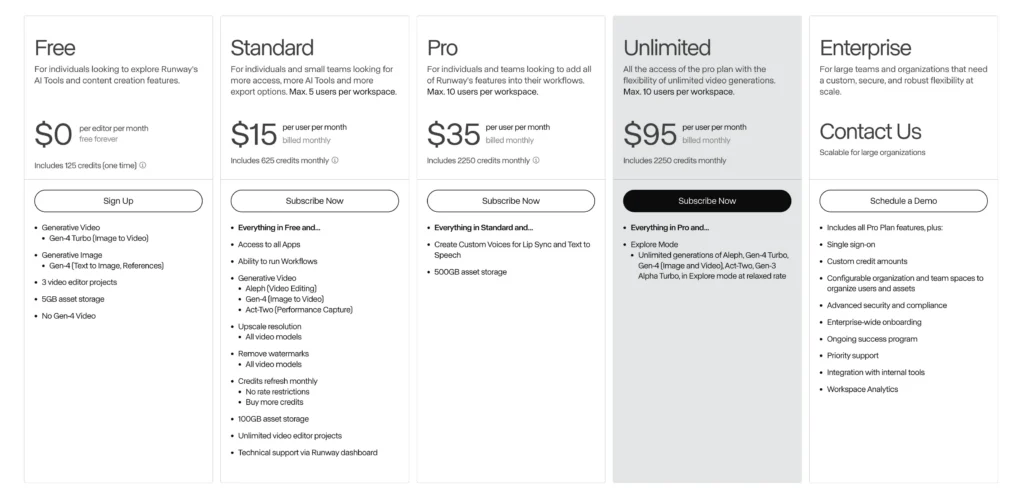
Free Plan: $0/month
Best for: Individuals exploring Runway’s AI tools and learning video generation basics.
What’s Included:
- 125 credits (one-time allocation)
- Generative Video:
- Gen-4 Turbo (Image to Video)
- Generative Image:
- Gen-4 (Text to Image, References)
- 3 video editor projects
- 5GB asset storage
- Limitation: No Gen-4 Video access
Use Case: Perfect for testing prompts, learning the interface, and creating proof-of-concept videos before committing to a paid plan.
Standard Plan: $15/user/month
Best for: Individual creators and small teams (max 5 users per workspace) who need regular access to AI video tools.
What’s Included:
- 625 credits monthly (refreshes each billing cycle)
- Everything in Free, plus:
- Access to all Apps
- Ability to run Workflows
- Generative Video:
- Aleph (Video Editing)
- Gen-4 (Image to Video)
- Act-Two (Performance Capture)
- Upscale resolution: All video models
- Remove watermarks: All video models
- Credits refresh monthly with no rate restrictions
- Buy additional credits as needed
- 100GB asset storage
- Unlimited video editor projects
- Technical support via Runway dashboard
Monthly Cost Examples:
- Solo creator: $15/month
- 3-person team: $45/month ($15 × 3 users)
Credit Usage: 625 credits typically generate 10-15 videos depending on resolution, duration, and model selection (Gen-4.5 vs. Gen-4 Turbo).
Pro Plan: $35/user/month
Best for: Professional creators and teams (max 10 users per workspace) integrating Runway into production workflows.
What’s Included:
- 2,250 credits monthly (3.6× more than Standard)
- Everything in Standard, plus:
- Create Custom Voices for Lip Sync and Text to Speech
- 500GB asset storage (5× more than Standard)
- Full access to Gen-4.5, Gen-4, Aleph, Act-Two, and Gen-3 Alpha Turbo
- Priority rendering queue
- Advanced export options
Monthly Cost Examples:
- Solo professional: $35/month
- 5-person production team: $175/month ($35 × 5 users)
- 10-person agency: $350/month ($35 × 10 users)
Credit Usage: 2,250 credits enable 40-60+ video generations per month, sufficient for client projects, social media campaigns, and iterative creative work.
Who Uses This: Advertising agencies, independent filmmakers, YouTube creators, marketing teams, and freelance video professionals.
Unlimited Plan: $95/user/month
Best for: Power users and teams (max 10 users) requiring unlimited video generations without credit restrictions.
What’s Included:
- 2,250 credits monthly (base allocation)
- Everything in Pro, plus:
- Explore Mode: Unlimited generations of Aleph, Gen-4 Turbo, Gen-4 (Image and Video), Act-Two, and Gen-3 Alpha Turbo at relaxed processing rate
- Rapid experimentation without credit anxiety
- Same 500GB asset storage
How Explore Mode Works:
- Generate unlimited videos during off-peak processing times
- Perfect for iteration, A/B testing, and creative exploration
- Standard-speed generations use credits; Explore Mode runs at relaxed rate without consuming credits
Monthly Cost Examples:
- High-volume solo creator: $95/month
- 3-person studio: $285/month ($95 × 3 users)
Who Uses This: VFX studios, content agencies producing 100+ videos monthly, educational institutions, and creators building AI-native production pipelines.
Enterprise Plan: Contact for Custom Pricing
Best for: Large organizations requiring custom solutions, enhanced security, and dedicated support.
What’s Included:
- All Pro Plan features, plus:
- Single sign-on (SSO) for secure team access
- Custom credit amounts tailored to production volume
- Configurable organization and team spaces to manage users and assets
- Advanced security and compliance (SOC 2, GDPR-ready)
- Enterprise-wide onboarding and training programs
- Ongoing success program with dedicated account management
- Priority support with faster response times
- Integration with internal tools (API customization, workflow automation)
- Workspace Analytics for usage tracking and optimization
Scalable Pricing: Negotiated based on team size, monthly generation volume, storage needs, and custom feature requirements.
Who Uses This: Major film studios (like Lionsgate), Fortune 500 brands, advertising networks, broadcast media companies, and educational institutions with 50+ users.
Next Steps: Schedule a Demo to discuss custom pricing and implementation.
Understanding Runway Credits: What You Need to Know
How Credits Work
- 1 credit ≠ 1 video. Credit consumption varies by:
- Model selection: Gen-4.5 uses more credits than Gen-4 Turbo
- Video duration: Longer videos consume more credits
- Resolution: Upscaling increases credit cost
- Generation mode: Image-to-Video vs. Text-to-Video
Estimated Credit Costs (Approximate)
| Generation Type | Estimated Credits | Notes |
| Gen-4.5 (5 sec, 720p) | 50-70 credits | Highest quality, most expensive |
| Gen-4 (5 sec, 720p) | 30-50 credits | Standard production quality |
| Gen-4 Turbo (5 sec) | 15-25 credits | Fast iteration, lower cost |
| Gen-3 Alpha Turbo | 10-20 credits | Budget-friendly option |
| Upscaling to 4K | +20-30 credits | Per video |
| Extended duration (10 sec) | 2× base cost | Doubles credit usage |
Pro Tip: Use Gen-4 Turbo or Gen-3 Alpha for initial creative exploration, then regenerate final selects with Gen-4.5 for maximum quality and credit efficiency.
Credit Refresh and Rollover Policies
- Credits refresh monthly on your billing date (Standard, Pro, Unlimited plans)
- Unused credits do NOT roll over to the next month
- Additional credits can be purchased at any time on Standard and Pro plans
- Explore Mode (Unlimited plan) provides unlimited relaxed-rate generations without consuming credits
Plan Comparison: Which Tier Is Right for You?
| Feature | Free | Standard | Pro | Unlimited | Enterprise |
| Monthly Cost | $0 | $15/user | $35/user | $95/user | Custom |
| Credits/Month | 125 (one-time) | 625 | 2,250 | 2,250 + Unlimited Explore | Custom |
| Gen-4.5 Access | ❌ | ✅ | ✅ | ✅ | ✅ |
| Watermark Removal | ❌ | ✅ | ✅ | ✅ | ✅ |
| Storage | 5GB | 100GB | 500GB | 500GB | Custom |
| Max Users/Workspace | 1 | 5 | 10 | 10 | Unlimited |
| Custom Voices | ❌ | ❌ | ✅ | ✅ | ✅ |
| Explore Mode | ❌ | ❌ | ❌ | ✅ | ✅ |
| API Access | ❌ | Limited | ✅ | ✅ | ✅ Priority |
| Priority Support | ❌ | ❌ | ❌ | ❌ | ✅ |
| SSO & Security | ❌ | ❌ | ❌ | ❌ | ✅ |
Technical Infrastructure: Built on NVIDIA
Gen-4.5 was developed entirely on NVIDIA GPUs across the full AI lifecycle:
- R&D and pre-training: NVIDIA GPU infrastructure
- Post-training optimization: Collaboration with NVIDIA on diffusion model efficiency
- Inference: NVIDIA Hopper and Blackwell series GPUs
This partnership delivers optimized inference speed without quality compromise, according to NVIDIA CEO Jensen Huang.
Known Limitations of Gen-4.5
Despite breakthrough capabilities, Gen-4.5 exhibits three primary limitations common to current video generation models:
1. Causal reasoning errors: Effects sometimes precede causes (e.g., a door opening before someone touches the handle)
2. Object permanence issues: Objects may disappear or appear unexpectedly when occluded
3. Success bias: Actions disproportionately succeed regardless of realistic probability (e.g., poorly aimed actions still achieving goals)
These limitations are particularly important for Runway’s work on General World Models, which require accurate representation of action outcomes in environments. Runway is actively researching solutions.
Runway’s Evolution: From Gen-1 to Gen-4.5
Timeline of Video Generation Models
- Gen-1 (2022): First publicly available video generation model
- Gen-2: Improved base model capabilities
- Gen-3 Alpha (June 2024): Major leap in fidelity, consistency, and motion; trained on new multimodal infrastructure
- Gen-4 (2024): Introduced character consistency, object persistence, and narrative capabilities
- Gen-4.5 (December 2024): Current top-ranked model with enhanced physics and prompt adherence
Each iteration represents advances in pre-training data efficiency, post-training techniques, and control capabilities.
Use Cases for Runway Gen-4.5
Professional Applications
- Film and television production: Pre-visualization, storyboarding, B-roll generation
- Advertising and marketing: Product demonstrations, brand content, social media assets
- Visual effects (GVFX): Fast, controllable VFX that integrates with live-action footage
- Animation studios: Rapid prototyping and scene development
- Music videos: Complete narrative sequences with consistent characters
Creative Applications
- Independent filmmakers: Low-budget production capabilities
- Content creators: YouTube, TikTok, and social platform content
- Concept artists: Mood boards and visual development
- Educators and students: Academic projects and learning
Hybrid Workflows: Combining Runway Gen-4.5 with Gaga AI
Smart creators are combining multiple AI video tools for optimal results:
Example Workflow 1: Educational Content
1. Use Runway Gen-4.5 to generate cinematic B-roll and environmental shots
2. Create instructor avatars with Gaga AI for lesson delivery
3. Combine in editing software for polished educational videos
Example Workflow 2: Product Marketing
1. Generate product demonstrations with Runway Gen-4.5’s physics accuracy
2. Create brand spokesperson videos with Gaga AI avatars
3. Produce consistent multi-platform campaigns efficiently
Example Workflow 3: Entertainment Content
1. Use Runway Gen-4.5 for narrative scenes and action sequences
2. Generate character dialogue close-ups with Gaga AI’s superior lip-sync
3. Blend for professional storytelling with authentic performances
Runway’s customer base includes media organizations, film studios, brands, designers, creators, and students.
Frequently Asked Questions (FAQ)
What is Runway Gen-4.5?
Runway Gen-4.5 is the latest AI video generation model from Runway that creates high-definition videos from text prompts. It ranks #1 on independent benchmarks for motion quality, prompt adherence, and visual fidelity.
How much does Runway Gen-4.5 cost?
Gen-4.5 is available across all Runway subscription plans at comparable pricing to Gen-4. Runway offers free, standard, pro, unlimited, and enterprise tiers with varying credit allocations.
Is Runway Gen-4.5 better than Sora?
Yes, according to Artificial Analysis benchmarks. Gen-4.5 ranks 1st with 1,247 Elo points, while OpenAI’s Sora 2 Pro ranks 7th in the Text-to-Video Arena leaderboard based on blind human evaluations.
Can Gen-4.5 generate photorealistic humans?
Yes, Gen-4.5 excels at generating expressive human characters with accurate facial features, natural gestures, nuanced emotions, and realistic body movements across diverse actions and scenarios.
What are the limitations of Runway Gen-4.5?
Gen-4.5 has three main limitations: causal reasoning errors (effects before causes), object permanence issues (objects disappearing/appearing unexpectedly), and success bias (unrealistic success rates for difficult actions).
How long are videos generated by Gen-4.5?
Specific duration limits weren’t disclosed in the December 2024 release. Previous Runway models typically generated 5-10 second clips, with options to extend sequences.
Does Runway Gen-4.5 support Image to Video?
Yes, Gen-4.5 supports Image to Video conversion along with Text to Video, Video to Video, and Keyframe control modes. All existing control modes from Gen-4 are being migrated to Gen-4.5.
Can I use Gen-4.5 through an API?
Yes, Gen-4.5 is available through Runway’s API for developers and enterprises who want to integrate video generation into their applications and workflows.
How fast is Gen-4.5 video generation?
Gen-4.5 maintains the speed and efficiency of Gen-4 while delivering improved quality. It runs on NVIDIA Hopper and Blackwell GPUs optimized for inference performance.
What is the difference between Gen-4 and Gen-4.5?
Gen-4.5 improves upon Gen-4 with enhanced pre-training data efficiency, advanced post-training techniques, superior physics understanding, and better temporal consistency while maintaining comparable speed and pricing.
Does Runway Gen-4.5 create watermarked videos?
Runway implements C2PA provenance standards for content authenticity. Check current plan details for watermark policies across subscription tiers.
Can Gen-4.5 handle stylized animation or only photorealism?
Gen-4.5 handles both photorealistic and non-photorealistic styles, including stylized animation, cinematic looks, and artistic aesthetics while maintaining visual consistency.
Who is Runway and how big is the company?
Runway is an AI research company founded in 2018, valued at $3.55 billion with only 120 employees. Investors include General Atlantic, Baillie Gifford, NVIDIA, and Salesforce Ventures. CEO Cristóbal Valenzuela leads the team.
What does “Gen-4.5” mean as a model name?
“Gen” refers to “generation” in Runway’s model naming convention. Gen-4.5 represents an iterative improvement over Gen-4, similar to how software versions use decimal notation for significant updates.
Can I fine-tune Gen-4.5 for custom styles?
Gen-4 introduced the ability to generate consistent characters and styles without fine-tuning using visual references. For enterprise custom models, Runway offers collaboration programs through their partnerships team.
How does Gaga AI compare to Runway Gen-4.5?
Gaga AI (GAGA-1) specializes in holistic performance acting where voice, lip-sync, and emotion are generated together Gaga AI, making it ideal for avatar-based content and character performances. Runway Gen-4.5 excels at cinematic storytelling, complex environments, and production VFX. Choose Gaga for talking avatars and educational content; choose Runway for professional film production and stylistic versatility.
Is Gaga AI free to use?
Yes, Gaga AI is currently free with no paywall, unlike Sora 2 Hitpaw. Users can test the platform and generate videos without subscription requirements, making it accessible for creators, educators, and small businesses.
Can Gaga AI generate videos longer than talking heads?
GAGA-1 builds videos in controllable blocks, maintaining lighting, style, and subject identity stable across transitions, enabling creative scene changes Gaga-1. However, the platform is optimized for character-driven content rather than complex environmental scenes.
What is autoregressive video generation?
Autoregressive video generation advances frame-by-frame through causal reasoning, where each segment references the past but not the future, preserving realism and ensuring physically consistent motion Gaga-1. This differs from diffusion models that predict all frames simultaneously, offering advantages in temporal stability and streaming generation.
Should I use both Runway and Gaga AI together?
Yes, many creators use both strategically: Runway Gen-4.5 for establishing shots, environments, and cinematic sequences, and Gaga AI for close-up character dialogue, talking head explanations, and avatar presentations. This hybrid approach maximizes quality while managing production costs.