Key Takeaways
- Kling O1 is a unified multimodal AI video model that consolidates 18+ video generation and editing tasks into a single platform, eliminating the need to switch between different tools.
- The model accepts any input type—text, images, videos, or multi-angle elements—and interprets them through natural language prompts for precise video generation.
- Video consistency is solved through multi-subject fusion technology that maintains character and prop uniformity across different shots and camera angles.
- Pricing structure: 8 credits/second without video input, 12 credits/second with video input (Pro Mode only).
- Performance benchmarks: 247% win ratio vs. Google Veo 3.1 in image reference tasks, 230% vs. Runway Aleph in transformation tasks.
What is Kling O1?
Kling O1 is the world’s first unified multimodal video generation model developed by Kling AI. The platform integrates video generation, editing, and transformation capabilities into a single AI engine, allowing creators to produce and modify video content using natural language prompts combined with multimodal inputs (text, images, videos, and custom elements).
Unlike traditional video AI tools that require switching between separate models for different tasks, Kling O1 processes all creative workflows—from initial concept to final modifications—within one unified architecture.
Table of Contents
Core Architecture: Multi-modal Visual Language (MVL)
Kling O1 operates on the MVL concept, which merges text semantics with multimodal signals through a Transformer-based architecture. This enables the model to:
- Interpret any uploaded media (images, videos, elements) as contextual prompts
- Perform pixel-level semantic reconstruction based on natural language instructions
- Support long-context processing for temporal storytelling
- Execute Chain-of-Thought reasoning for intelligent scene generation
What Makes Kling O1 Different from Other AI Video Tools?
1. True Unified Model Architecture
Direct Answer: Kling O1 integrates 18 distinct video tasks into one model, while competitors like Runway, Pika, and Google Veo require separate tools or workflows for different functions.
The five major capability categories include:
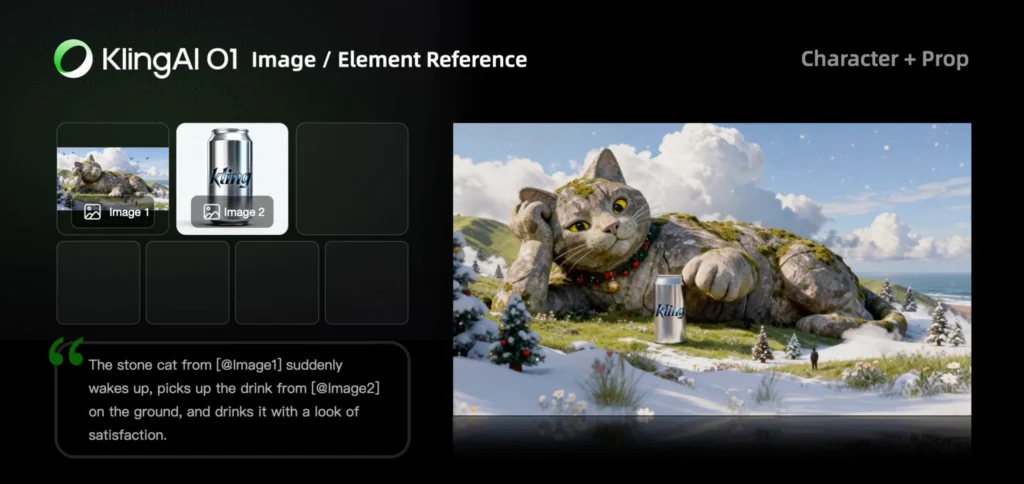
- Image/Element Reference (character and object consistency)
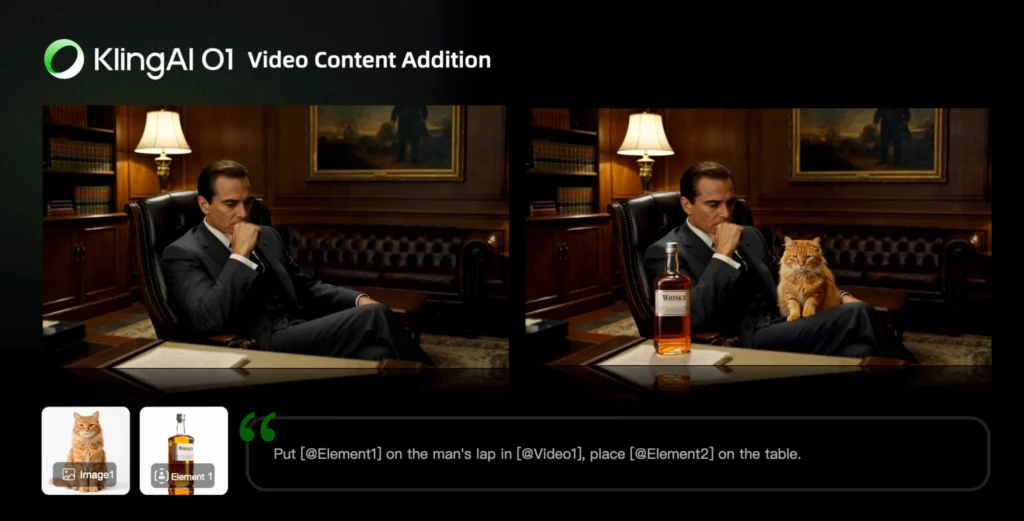
- Transformation (adding, removing, or modifying video content)
- Video Reference (generating previous/next shots)
- Start & End Frames (keyframe interpolation)
- Text-to-Video (pure prompt-based generation)
2. Multi-Subject Consistency Technology
Direct Answer: Kling O1 maintains industrial-grade character and prop consistency across multiple shots, even in complex ensemble scenes.
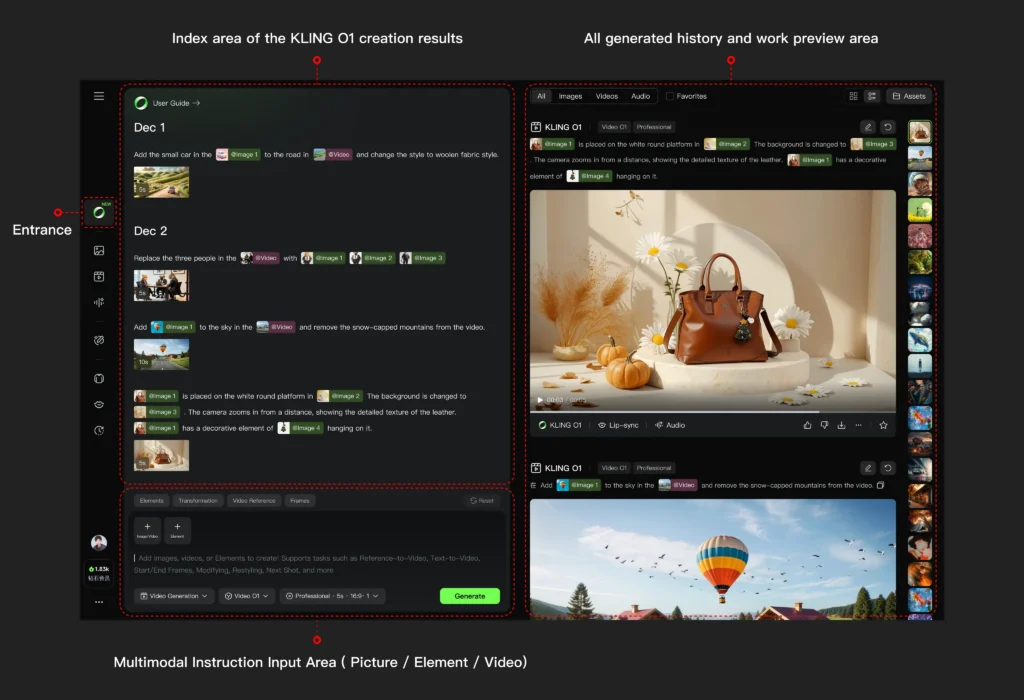
The model can independently lock and preserve the unique features of multiple subjects simultaneously. When you upload reference images or create custom elements from multiple angles (up to 4 images per element), the system remembers these characteristics like a human director would, ensuring frame-to-frame coherence regardless of:
- Camera movement or angle changes
- Lighting variations
- Scene transitions
- Background modifications
3. Conversational Post-Production
Direct Answer: Post-production editing in Kling O1 requires no manual masking, keyframing, or tracking—only natural language prompts.
Example commands that work natively:
- “Remove bystanders in the background”
- “Change daylight to dusk”
- “Replace the main character’s outfit”
- “Make the sky blue”
- “Change the car color to red”
The model performs automatic pixel-level semantic reconstruction based on these instructions.
How to Use Kling O1: Step-by-Step Workflow
Getting Started
Platform Access: Navigate to https://app.klingai.com/global/omni/new
Account Requirement: Pro Mode subscription (required for Video O1 access)
Basic Workflow Structure
1. Define your input type (text only, image reference, video reference, or combination)
2. Upload media to the multimodal prompt input area
3. Write your prompt using structured syntax
4. Set video duration (3-10 seconds)
5. Generate and iterate using combination tasks if needed
Core Skills and Prompt Structures
Skill 1: Image/Element Reference
Use Case: Generate videos with consistent characters, objects, or scenes from static reference images.
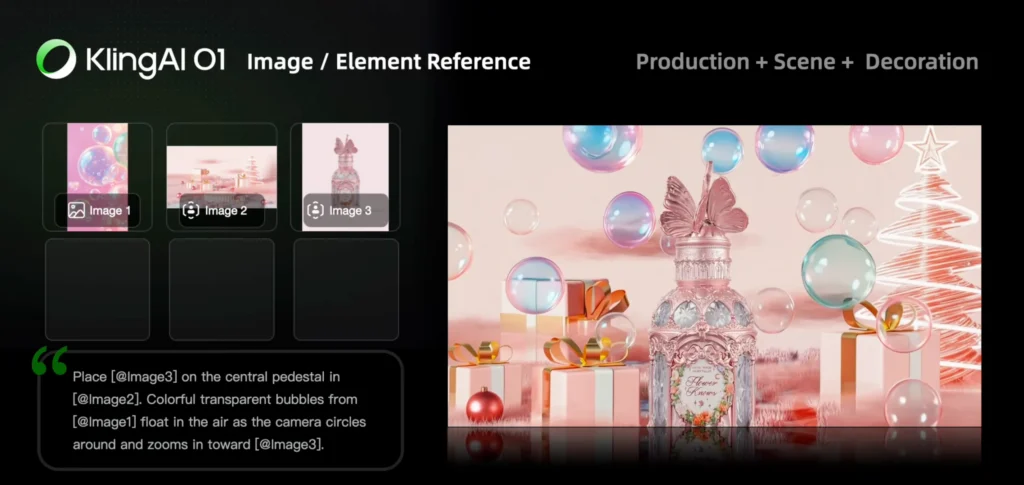
Upload Limits:
- 1-7 reference images (without video input)
- 1-4 images/elements (with video input)
Prompt Structure:
[Detailed description of Elements] + [Interactions/actions between Elements] + [Environment or background] + [Visual directions like lighting, style, etc]
Example:
A young woman in a red dress and a black cat sitting on a park bench. The woman pets the cat gently while looking at the sunset. Urban park setting with trees in the background. Warm golden hour lighting, cinematic composition.
Technical Note: You can create custom “Elements” by uploading up to 4 images of the same subject from different angles, providing the model with comprehensive reference data for maximum consistency.
Skill 2: Transformation (Video Editing)
Direct Answer: Transformation allows you to add, remove, or modify any aspect of existing video content through text and image prompts.
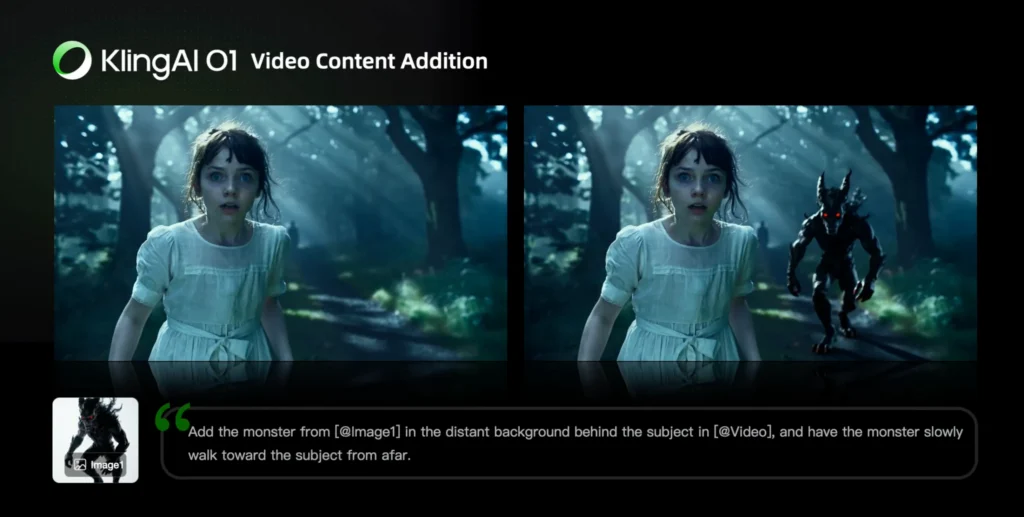
Sub-Task A: Video Content Addition
Prompt Structures:
Add [describe content to add] from [@Image] to [@Video]
Add [@Element] to [@Video]
Add [@Element] and [describe content to add] from [@Image] to [@Video]
Example:
Add a flying drone from [@Image-Drone] to [@Video-CityScene]
Sub-Task B: Video Content Removal
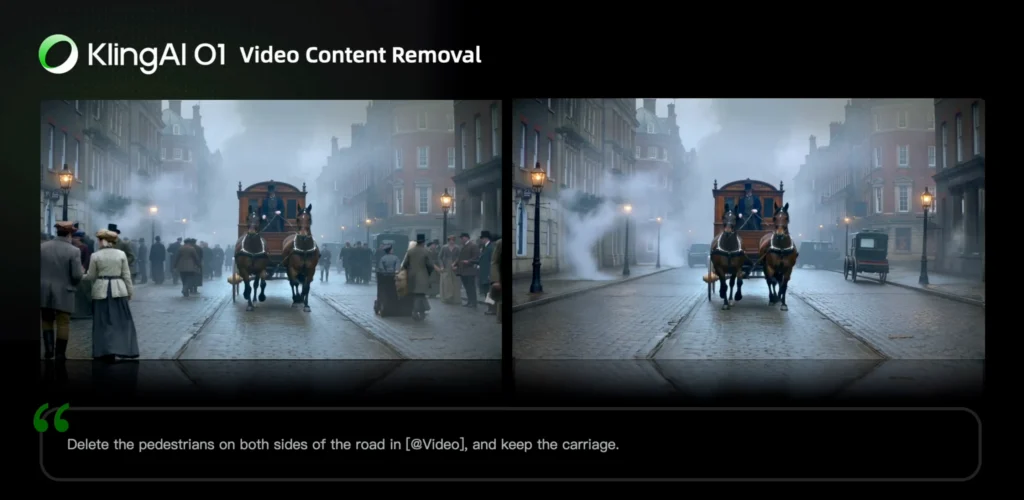
Prompt Structure:
Remove [describe content to remove] from [@Video]
Example:
Remove the cars in the background from [@Video]
Sub-Task C: Modify Subject
Prompt Structures:
Change [describe specified subject] in [@Video] to [describe target subject]
Change [describe specified subject] in [@Video] to [@Element]
Example:
Change the man in the suit in [@Video] to a woman in business attire
Sub-Task D: Modify Background
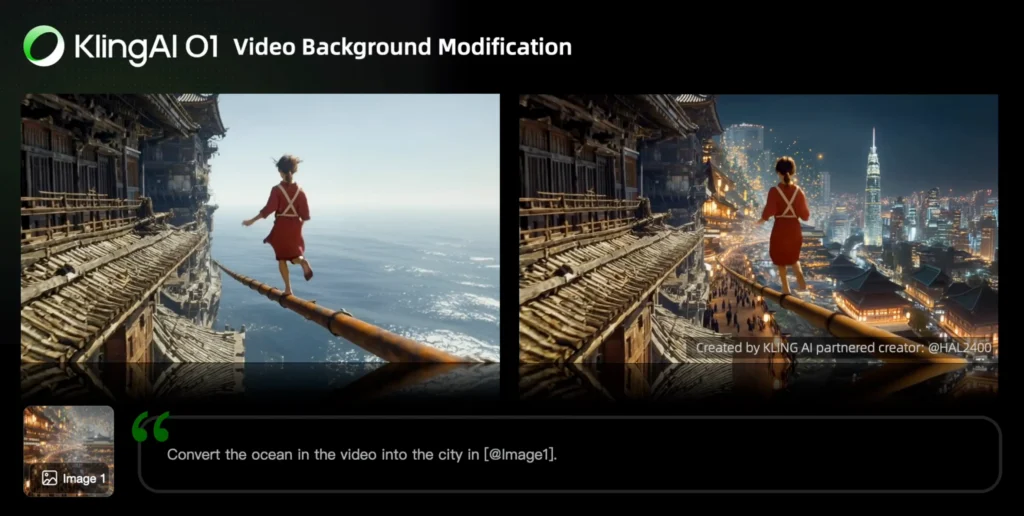
Prompt Structures:
Change the background in [@Video] with [describe specified background]
Change the background in [@Video] with [@Image]
Sub-Task E: Video Restyle
Direct Answer: Apply artistic styles to entire videos while maintaining content structure.
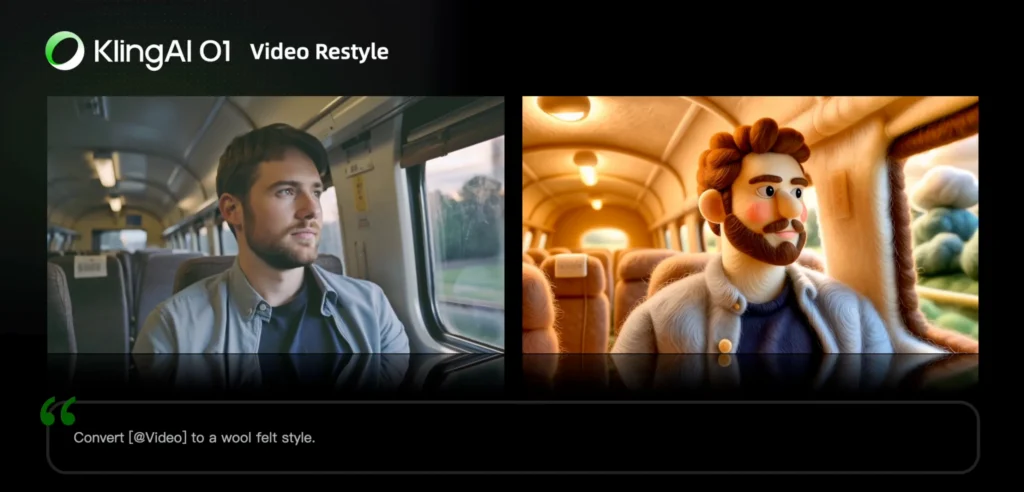
Supported Styles:
- American Cartoon
- Japanese Anime
- Cyberpunk
- Pixel Art
- Ink Wash Painting
- Watercolor
- Clay Style
- Wool Felt
- Monet-inspired
- Oil Painting
- Figure Style
Prompt Structure:
Change [@Video] to [style name] style
Change [@Video] to the style of [@Image1]
Sub-Task F: Recolor Elements
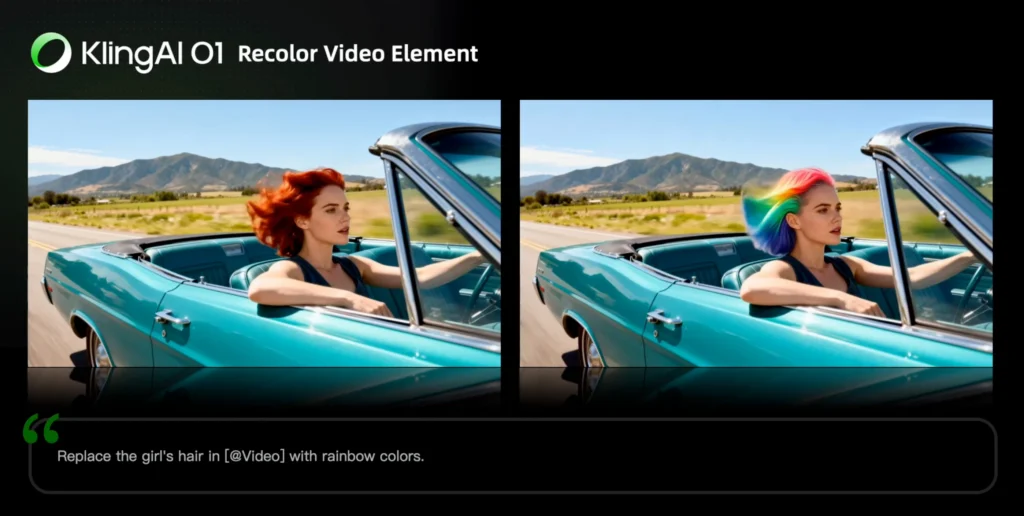
Prompt Structure:
Change the [item] in [@Video] to [color]
Change the [item] in [@Video] to [color] from [@Image]
Sub-Task G: Weather/Environment Modification
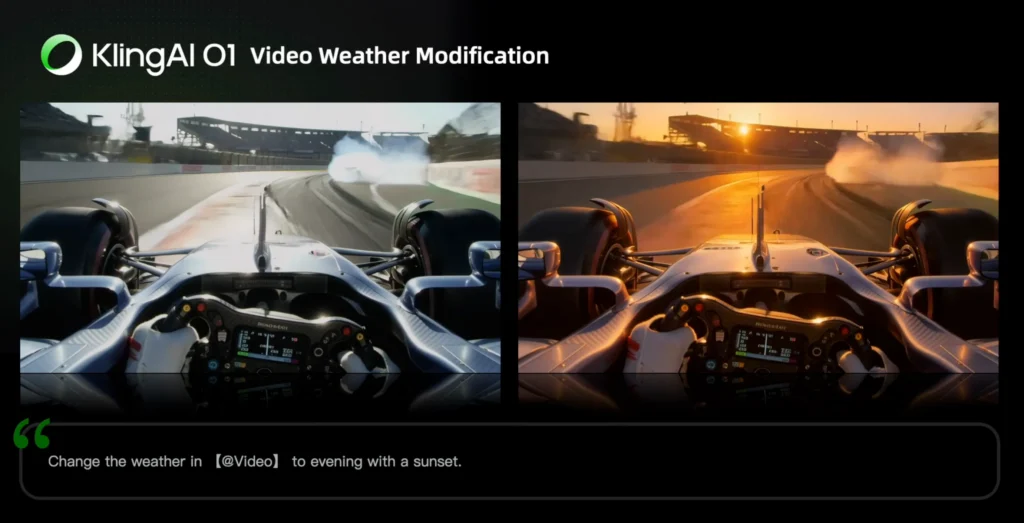
Prompt Structure:
Change [@Video] to [describe weather, like “a rainy day”]
Sub-Task H: Angle/Composition Changes
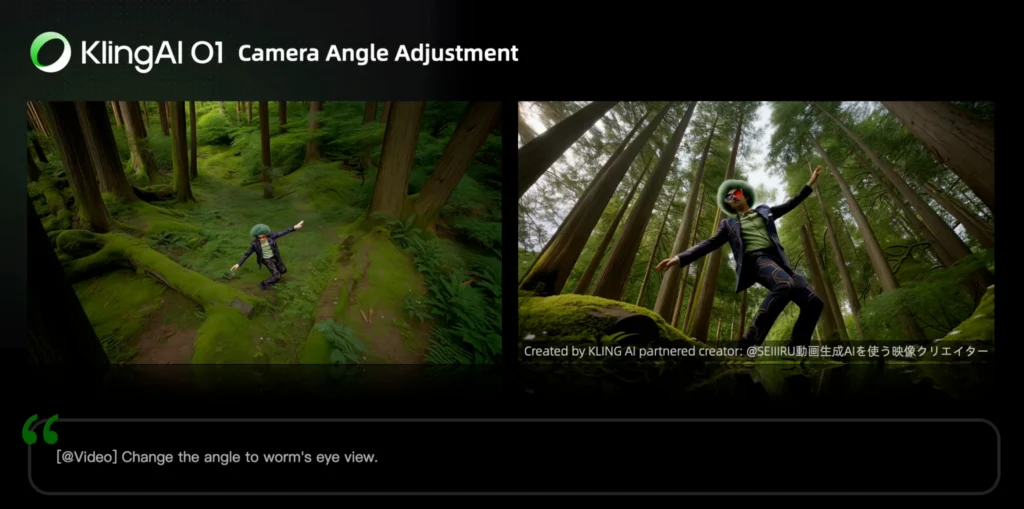
Prompt Structure:
Generate [another angle/composition, e.g., close-up, wide shot] in [@Video]
Sub-Task I: Green Screen Keying
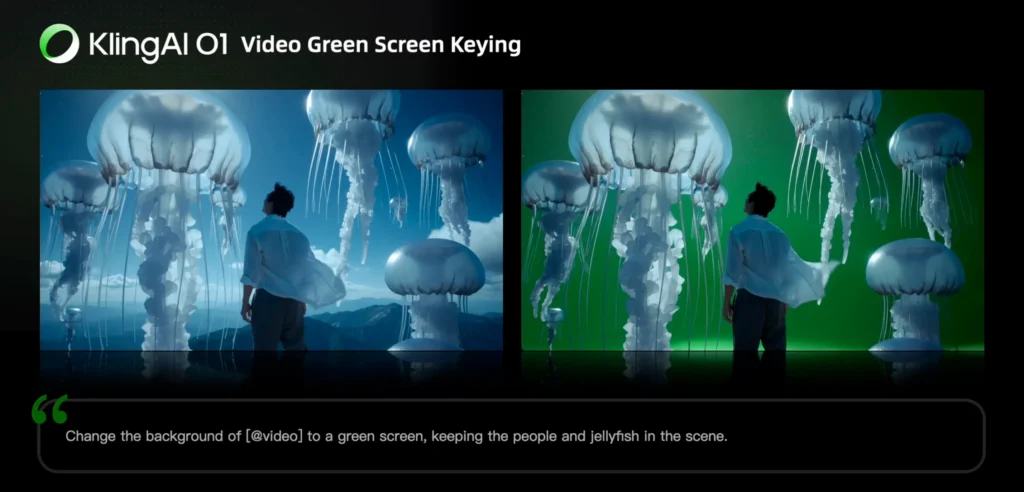
Prompt Structure:
Change the background in [@Video] to a green screen, and keep [describe content to keep]
Skill 3: Video Reference
Use Case: Generate continuity shots (previous or next in sequence) or transfer motion/camera movement to new scenes.
Generate Next Shot
Prompt Structure:
Based on [@Video], generate the next shot: [describe shot content]
Example:
Based on [@video-CarInterior], generate the next shot: from the back seat, show a medium shot of a middle-aged man and a young man in front. They angle slightly apart, forming a tense, restrained opposition as they turn to look out their windows. The background is blurred, and soft natural light creates muted olive-green and brown tones with light film grain.
Generate Previous Shot
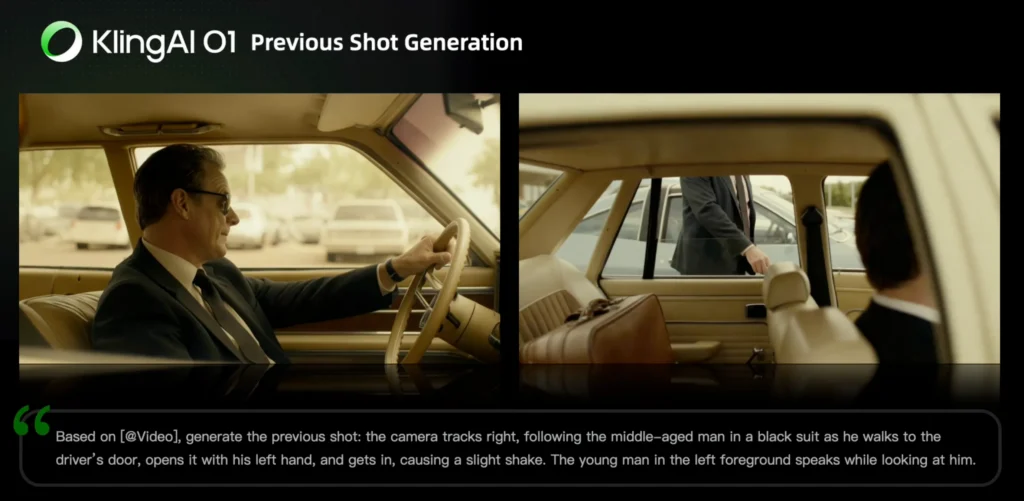
Prompt Structure:
Based on [@Video], generate the previous shot: [describe shot content]
Reference Camera Movement
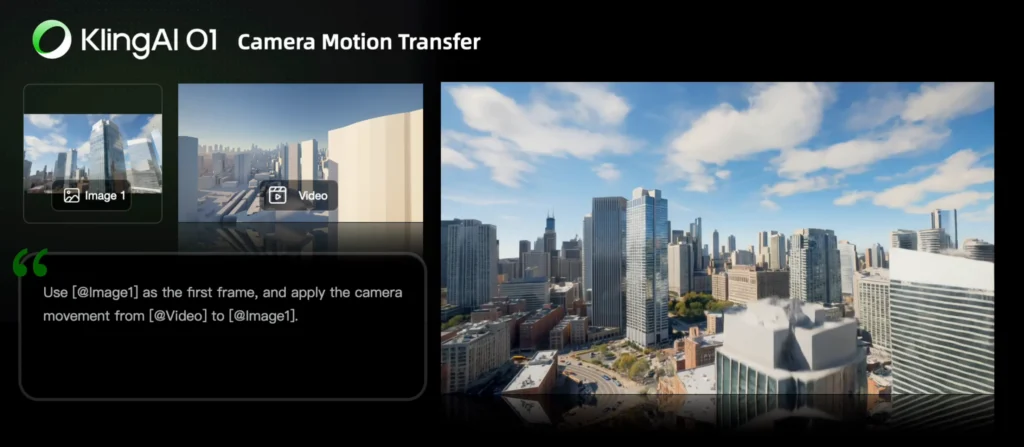
Prompt Structure:
Take [@Image] as the start frame. Generate a new video following the camera movement of [@Video]
Use Case: Transfer a complex camera movement (dolly zoom, tracking shot, crane movement) from one video to a completely different scene.
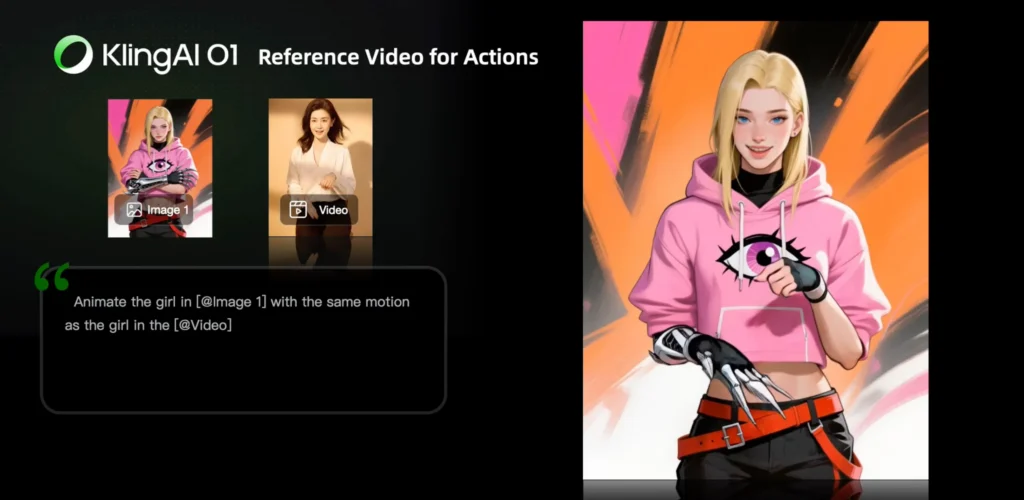
Reference Character Actions
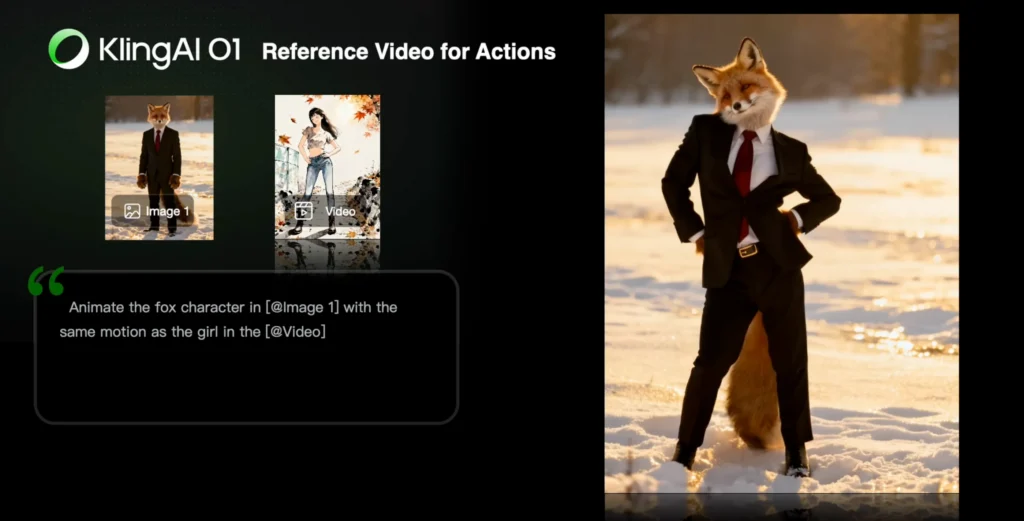
Prompt Structure:
Animate the character in [@Image1] with the same motion as the character in [@Video]
Use Case: Apply specific body movements, gestures, or actions from a reference video to a new character in a different context.
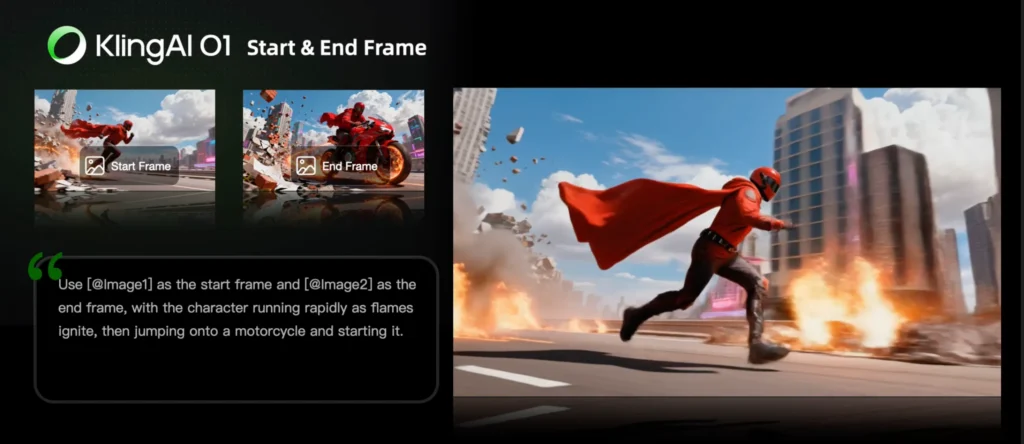
Skill 4: Start & End Frames (Keyframe Interpolation)
Direct Answer: Control video generation by defining the first and last frames, with the model generating smooth transitions between them.
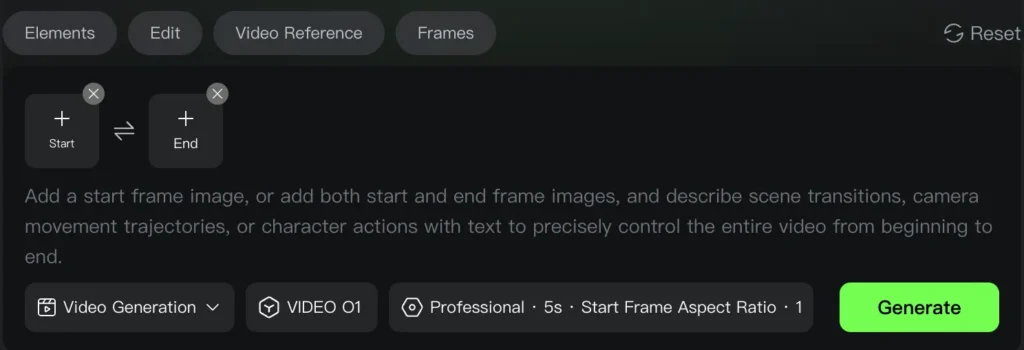
Prompt Structures:
Take [@Image1] as the start frame, [describe changes in subsequent frames]
OR
Take [@Image1] as the start frame, take [@Image2] as the end frame, [describe the changes between start and end frames]
Current Limitation: Generation with only an end frame is not currently supported.
UI Tip: Click the “Start & End Frames” icon to open dedicated upload slots for clearer workflow organization.
Example Application:
Take [@Image-ManStanding] as the start frame, take [@Image-ManSitting] as the end frame, the man walks toward the chair, turns around, and slowly sits down while looking at the camera. Smooth camera tracking follows the movement.
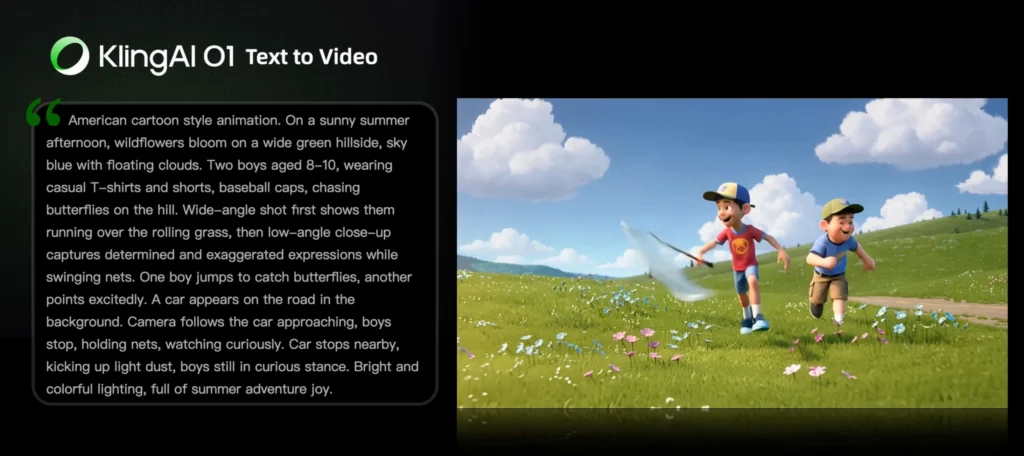
Skill 5: Text-to-Video
Direct Answer: Generate videos from text descriptions alone, without any reference media.
Prompt Structure Formula:
Subject (subject description) + Movement + Scene (scene description) + (Cinematic Language + Lighting + Atmosphere)
Detailed Example:
American cartoon style animation. On a sunny summer afternoon, wildflowers bloom on a wide green hillside, sky blue with floating clouds. Two boys aged 8-10, wearing casual T-shirts and shorts, baseball caps, chasing butterflies on the hill. Wide-angle shot first shows them running over the rolling grass, then low-angle close-up captures determined and exaggerated expressions while swinging nets. One boy jumps to catch butterflies, another points excitedly. A car appears on the road in the background. Camera follows the car approaching, boys stop, holding nets, watching curiously. Car stops nearby, kicking up light dust, boys still in curious stance. Bright and colorful lighting, full of summer adventure joy.
Key Principle: The level of detail in your prompt directly determines the richness and accuracy of the generated video content.
Advanced: Combination Tasks
Direct Answer: Kling O1 supports executing multiple tasks simultaneously in a single generation.
Combination Examples:
1. Element reference + Style modification: “Add [@Element-Character] to [@Video] and change to Japanese anime style”
2. Remove + Add subjects: “Remove the dog from [@Video] and add [@Element-Cat]”
3. Background modification + Add subject + Style change: “Change the background in [@Video] to [@Image-Beach], add [@Element-Surfer], and change to watercolor style”
4. Localized modification + Recolor: “Change the car in [@Video] to a motorcycle and change its color to red”
This combination capability significantly reduces iteration cycles and enables complex creative transformations in one generation.
Industry Applications and Use Cases
Filmmaking and Episodic Content
Problem Solved: Maintaining character and prop consistency across multiple scenes without expensive reshoots or complex VFX workflows.
Kling O1 Solution:
- Create custom Elements for each main character (4 angles per character)
- Generate multiple scenes with guaranteed visual continuity
- Use Video Reference to create shot-to-shot narrative flow
- Lock in props and set pieces through the Element Library
Workflow Example:
1. Build character Elements from concept art or reference photos
2. Define each scene with text descriptions
3. Generate shots sequentially using Previous/Next Shot feature
4. Apply consistent lighting and style across all scenes
Advertising and Product Visualization
Problem Solved: Traditional product video shoots require expensive studios, models, location fees, and lengthy production timelines.
Kling O1 Solution:
- Upload product photos as Elements
- Add model images and background references
- Generate multiple product showcase angles in minutes
- Iterate variations (different lighting, colors, contexts) without reshooting
Example Workflow:
1. Upload: Product image (sneaker) + Model photo + Urban background image
2. Prompt: “Model wearing [@Element-Sneaker] walks confidently through [@Image-UrbanStreet], camera follows with dynamic tracking shot, golden hour lighting, fashion commercial style”
3. Generate: 5-second video
4. Iterate: Change background to gym, beach, or studio with same product consistency
Fashion and Lookbook Videos
Problem Solved: Creating diverse lookbook content requires booking models, locations, and extensive shooting days for multiple outfit combinations.
Kling O1 Solution:
- Upload model photos from different angles (create Model Element)
- Upload clothing/outfit images as separate Elements
- Generate runway-style videos with outfit details preserved
- Create infinite variations (different poses, backgrounds, lighting)
Virtual Runway Workflow:
Take [@Element-Model] wearing [@Element-Outfit1] walking down a minimalist white runway. Camera tracks alongside, then switches to close-up of fabric details. Professional fashion show lighting, high-key aesthetic.
Film Post-Production and VFX
Problem Solved: Traditional post-production requires expensive tracking, rotoscoping, masking, and compositing work.
Kling O1 Solution:
- Natural language commands replace manual masking
- Pixel-level semantic understanding for accurate selection
- Real-time iteration without rendering delays
- Complex scene modifications through simple prompts
Common Post-Production Tasks:
- Sky replacement: “Make the sky blue in [@Video]”
- Crowd removal: “Remove the bystanders in the background from [@Video]”
- Object removal: “Remove the microphone visible in the frame from [@Video]”
- Color correction: “Change the car color to matte black in [@Video]”
- Weather effects: “Change [@Video] to a rainy day with wet streets”
Technical Specifications and Limitations
Input Media Requirements
Images:
- Maximum: 7 images (without video input) or 4 images (with video input)
- Minimum resolution: 300px
- Maximum file size: 10MB per image
- Supported formats: JPG, JPEG, PNG
Videos:
- Maximum: 1 video per generation
- Duration: 3-10 seconds
- Maximum file size: 200MB
- Maximum resolution: 2K
Elements:
- Composition: Up to 4 images from different angles per Element
- Purpose: Provide comprehensive reference data for consistency
- Use case: Characters, props, vehicles, or any object requiring multi-shot consistency
Combined Input Rules:
- With video: Up to 4 images/elements
- Without video: Up to 7 images/elements
Output Specifications
Duration Control:
- Adjustable from 3 to 10 seconds
- User defines exact length for narrative pacing
- Start & End Frames will support 3-10s (feature in development)
Generation Time:
- Varies based on complexity and duration
- Video input generations typically take longer than text-only
Pricing Structure
Model Availability: Pro Mode subscription required (Video O1 not available in free tier)
Credit System:
| Input Type | Cost per Second | 5-Second Cost | 10-Second Cost |
| Without video input | 8 credits/sec | 40 credits | 80 credits |
| With video input | 12 credits/sec | 60 credits | 120 credits |
Cost Optimization Strategy:
- Use text-to-video or image reference for initial concepts (8 credits/sec)
- Reserve video-input transformations for refinement stages (12 credits/sec)
- Combine multiple tasks in one generation to reduce total iterations
Performance Benchmarks and Competitive Position
Image Reference Task Performance
Comparison: Kling AI VIDEO O1 vs. Google Veo 3.1 (Ingredients to Video)
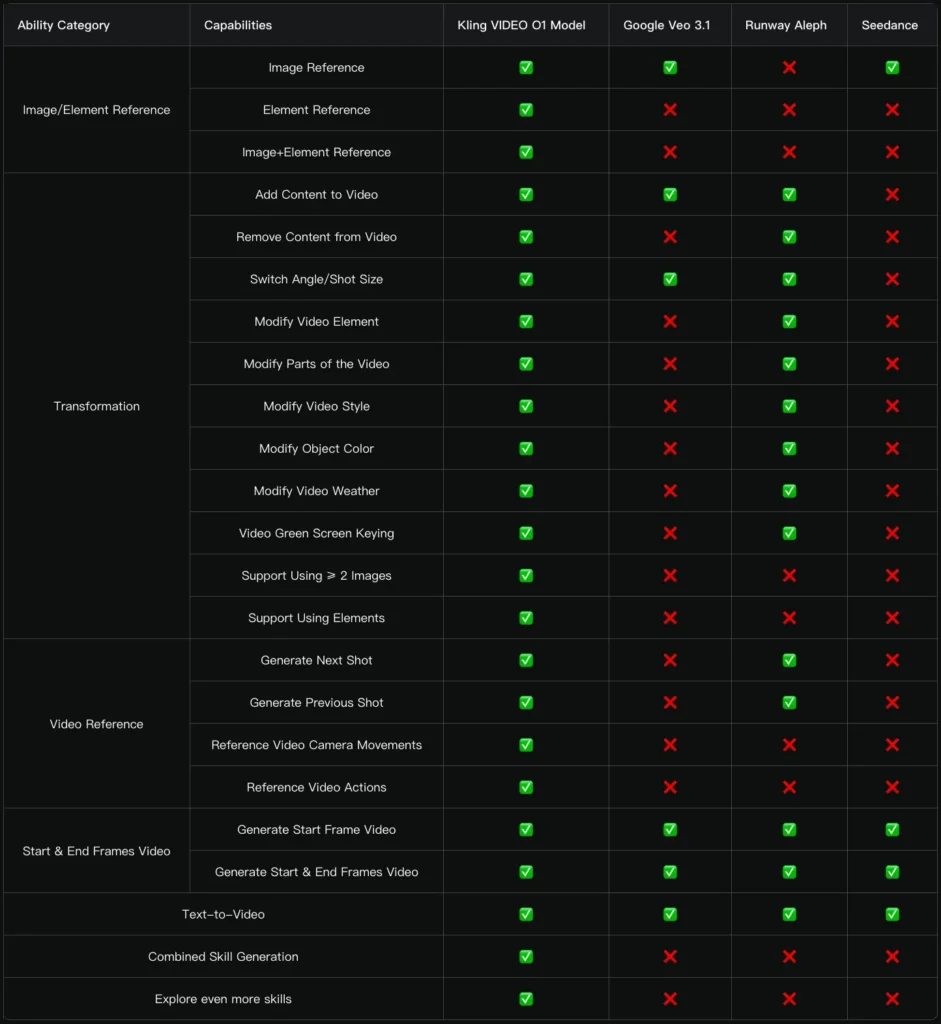
Methodology: Internal evaluation dataset, objective effectiveness assessment across multiple dimensions
Result: 247% performance win ratio
Interpretation: Kling O1 excels in overall performance and specific metrics like reference accuracy, detail preservation, and motion quality.
Transformation Task Performance
Comparison: Kling AI VIDEO O1 vs. Runway Aleph
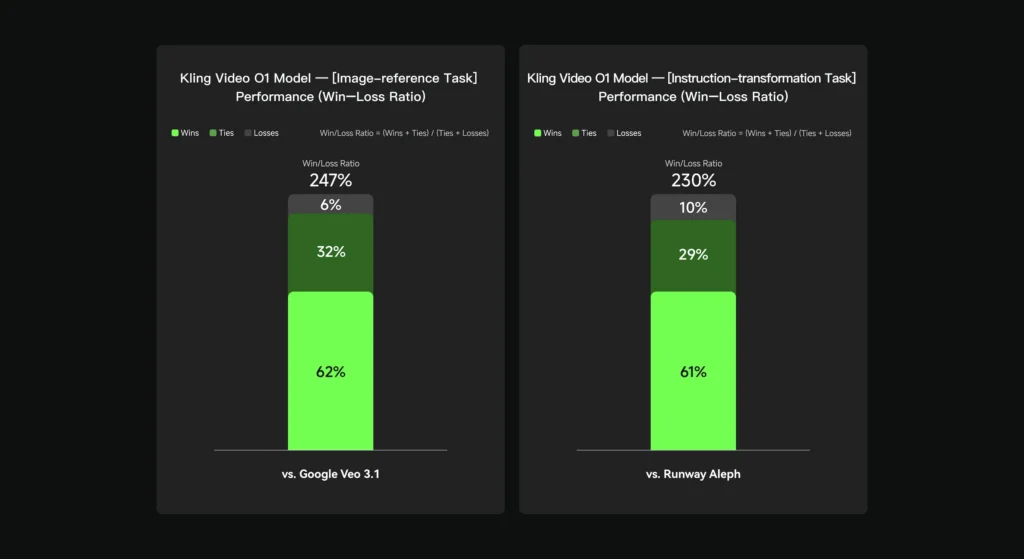
Methodology: Internal evaluation dataset, objective performance assessment
Result: 230% performance win ratio
Interpretation: Superior performance in content modification accuracy, semantic understanding, and pixel-level reconstruction quality.
Competitive Positioning
Kling O1’s Unique Advantages:
1. Task Integration: 18 skills in one model vs. fragmented toolsets in competitors
2. Multi-subject Consistency: Industrial-grade character uniformity across shots
3. Combination Workflows: Execute multiple tasks simultaneously
4. Conversational Editing: Natural language post-production without technical tools
5. Element System: Multi-angle reference for superior consistency
Current Landscape:
- Runway: Strong in transformation but requires separate models for different tasks
- Pika: Excellent text-to-video but limited editing capabilities
- Google Veo: High-quality generation but less flexible multimodal input
- Kling O1: First unified architecture combining all capabilities
Technical Architecture Deep Dive
Multimodal Transformer Foundation
Core Innovation: Kling O1 uses a unified Transformer architecture that processes text, images, and video through a shared embedding space.
Key Benefits:
- Seamless modality fusion without format conversion
- Shared semantic understanding across input types
- Single inference path for all task types
Multimodal Long Context Support
Capability: The model maintains temporal coherence and narrative logic across extended sequences.
Applications:
- Multi-shot storytelling with consistent elements
- Long-form narrative video generation
- Context-aware shot sequencing
Chain-of-Thought Reasoning
Function: The model demonstrates common-sense reasoning and event deduction abilities.
Example Behaviors:
- Understanding implicit cause-and-effect in scene transitions
- Predicting logical next actions based on current state
- Maintaining physical consistency (lighting direction, spatial relationships)
Practical Impact: Generates more coherent, believable sequences without explicit instruction for every detail.
Multi-modal Visual Language (MVL)
Definition: MVL is an interactive medium that deeply merges text semantics with visual signals at the Transformer level.
Technical Advantage: Unlike models that process modalities separately and combine outputs, MVL achieves genuine multimodal understanding, enabling:
- Cross-modal reference (e.g., “the character wearing the outfit from [@Image]”)
- Complex conditional logic (“if the scene is [@Image-Beach], add surfboard, otherwise add skateboard”)
- Pixel-level semantic reconstruction based on language understanding
Troubleshooting and Best Practices
Common Issue: Inconsistent Character Appearance Across Generations
Solution: Create proper Elements with 4 reference images from different angles:
1. Front view
2. Side profile
3. Three-quarter view
4. Back view
Upload these as a single Element rather than individual images.
Common Issue: Generated Video Doesn’t Match Prompt Intent
Diagnosis: Prompt lacks specificity in one or more components.
Solution: Use the complete prompt structure:
[Subject detail] + [Specific movement/action] + [Environment detail] + [Camera language] + [Lighting] + [Style/mood]
Example of Insufficient Prompt:
A woman walking in a park
Example of Optimized Prompt:
A young woman in her 20s with long brown hair, wearing a flowing white dress, walks slowly along a tree-lined path in an urban park. Medium tracking shot follows her from the side. Soft diffused sunlight filters through leaves creating dappled shadows. Serene, contemplative mood, cinematic composition.
Common Issue: Video Transformation Affects Wrong Elements
Diagnosis: Ambiguous object description in transformation prompt.
Solution: Be highly specific about the target element:
Weak: “Change the car in [@Video] to red”
Strong: “Change the blue sedan in the center of the frame in [@Video] to red”
Common Issue: Style Transfer Loses Important Details
Solution: Use combination prompts that preserve specific elements:
Change [@Video] to watercolor style, but keep the character faces photorealistic
Best Practice: Iterative Refinement Workflow
1. Start broad: Generate initial concept with text-to-video
2. Add references: Introduce image Elements for consistency
3. Transform locally: Use specific modification prompts rather than regenerating
4. Combine tasks: Stack multiple edits in one generation to save credits
Best Practice: Duration Selection Strategy
3-5 seconds:
- Quick cuts
- Product showcases
- Action beats
- Reaction shots
6-8 seconds:
- Dialogue scenes
- Establishing shots
- Character interactions
9-10 seconds:
- Complex camera movements
- Scene transitions
- Narrative sequences with multiple actions
BONUS: Gaga AI Video Generator – An Alternative Approach to AI Video Creation
What is Gaga AI?
Direct Answer: Gaga AI is an emerging AI video generation platform that offers a complementary approach to Kling O1, focusing on rapid prototyping, social media content creation, and simplified workflows for non-technical users.
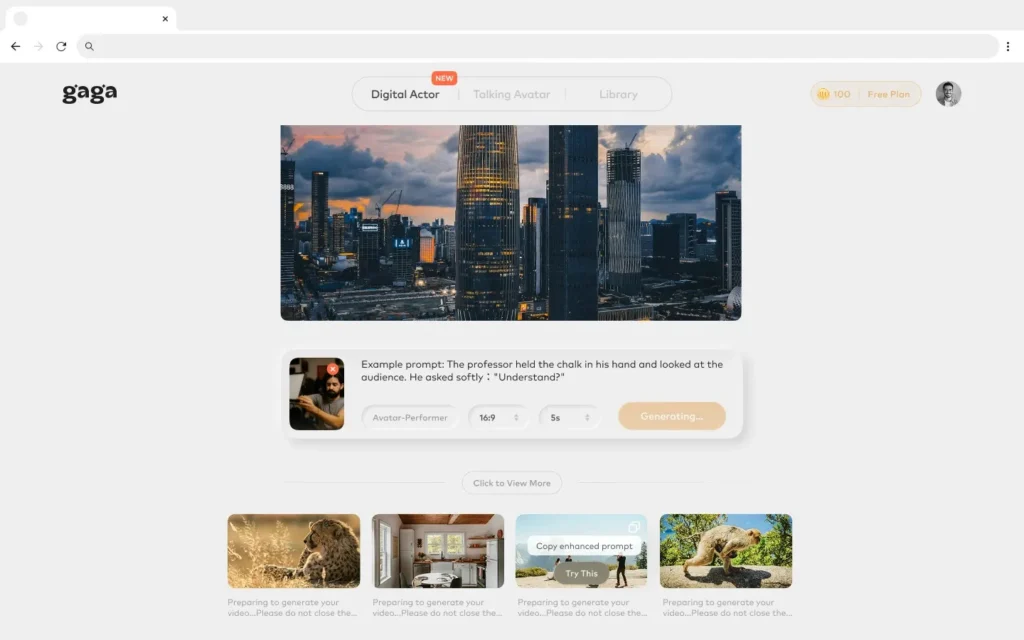
While Kling O1 excels at professional-grade video production with comprehensive multimodal capabilities, Gaga AI positions itself as an accessible entry point for creators who prioritize speed and simplicity over advanced technical control.
Key Differences: Kling O1 vs. Gaga AI
Target Audience:
- Kling O1: Professional filmmakers, advertisers, VFX artists, and content studios requiring industrial-grade consistency and advanced editing capabilities
- Gaga AI: Social media creators, marketers, small businesses, and beginners seeking quick video generation without extensive technical knowledge
Workflow Philosophy:
- Kling O1: Unified multimodal architecture with 18 integrated skills, supporting complex combination tasks and iterative refinement
- Gaga AI: Streamlined single-task workflows optimized for speed, with preset templates and style options
Technical Depth:
- Kling O1: Deep semantic understanding, multi-angle Element system, pixel-level reconstruction, Chain-of-Thought reasoning
- Gaga AI: Simplified prompt processing, template-based generation, focus on aesthetic presets over granular control
When to Choose Gaga AI Over Kling O1
Use Gaga AI if you need:
1. Rapid Social Media Content: Generate short-form videos (typically under 5 seconds) optimized for platforms like TikTok, Instagram Reels, or YouTube Shorts without extensive prompt engineering.
2. Template-Based Creation: Work with pre-designed templates for common use cases (product reveals, text animations, transition effects) rather than building from scratch.
3. Lower Learning Curve: Begin creating immediately with intuitive interfaces that don’t require understanding complex prompt structures or multimodal input syntax.
4. Budget-Conscious Projects: Access lower-tier pricing or free trial options suitable for hobbyists or small-scale projects (pricing models vary by platform).
5. Style-Focused Generation: Prioritize aesthetic presets and trending visual styles over precise technical control of camera movements, lighting, or editing operations.
When Kling O1 is the Better Choice
Choose Kling O1 if you need:
1. Character Consistency: Maintain the same character, prop, or object across multiple shots or scenes with industrial-grade uniformity.
2. Advanced Video Editing: Perform complex transformations like selective object removal, background replacement, localized modifications, or green screen keying through natural language.
3. Professional Production: Create content for film, television, high-budget advertising, or any project requiring broadcast-quality output.
4. Combination Workflows: Execute multiple creative tasks simultaneously (e.g., add character + change background + apply style) in a single generation.
5. Video-to-Video Operations: Transform existing video content, generate sequential shots (previous/next), or reference camera movements and character actions from uploaded videos.
6. Precise Duration Control: Define exact video lengths from 3-10 seconds to match specific narrative pacing requirements.
Complementary Workflow Strategy
Hybrid Approach for Maximum Efficiency:
Many professional creators use both platforms in complementary workflows:
1. Rapid Prototyping with Gaga AI: Generate multiple quick concept variations to explore visual directions, test ideas, or present options to clients.
2. Production Refinement with Kling O1: Once a direction is approved, recreate the concept in Kling O1 with full technical control, character consistency, and advanced editing capabilities.
3. Content Diversification: Use Gaga AI for high-volume social media content that prioritizes quantity and speed, while reserving Kling O1 for flagship content that requires premium quality and brand consistency.
Example Workflow:
Day 1: Generate 20 product showcase concepts in Gaga AI (2 hours)
Day 2: Client selects 3 favorite concepts
Day 3: Recreate selected concepts in Kling O1 with product Elements, precise brand colors, and custom backgrounds (4 hours)
Day 4: Use Kling O1’s transformation tools to create multiple versions with different messaging overlays
Gaga AI Key Features Overview
Text-to-Video Generation:
- Simplified prompt input without complex syntax requirements
- Preset duration options (typically 3-5 seconds)
- Library of trending styles and effects
Template Library:
- Pre-designed video templates for common use cases
- Customizable placeholders for logos, products, or text
- One-click style application
Social Media Optimization:
- Automatic aspect ratio formatting (vertical, square, horizontal)
- Platform-specific export presets
- Integrated caption and subtitle generation
Collaborative Features:
- Team workspaces for shared projects
- Comment and feedback tools
- Version history tracking
Pricing Models (varies by platform):
- Free tier with watermarks and limited generations
- Subscription tiers based on monthly video output
- Pay-per-video options for occasional users
Technical Limitations of Gaga AI Compared to Kling O1
Consistency Across Generations:
- Gaga AI typically does not maintain character or object consistency across separate generations
- No equivalent to Kling O1’s multi-angle Element system
- Each generation is treated as an independent task
Video Editing Capabilities:
- Limited or no support for video-to-video transformations
- Cannot perform selective object removal, background replacement, or localized modifications
- No natural language post-production editing
Multimodal Integration:
- May support image-to-video but with less sophisticated understanding
- Limited ability to combine multiple reference inputs
- No advanced video reference capabilities (previous/next shot generation)
Duration and Control:
- Typically limited to shorter durations (3-5 seconds most common)
- Less control over pacing, camera movements, and timing
- Preset options rather than frame-level control
Output Quality:
- May prioritize generation speed over output resolution
- Potentially lower consistency in physics, lighting, and motion quality
- Less suitable for professional broadcast or cinema use
Recommendation Matrix
| Your Need | Recommended Platform | Reasoning |
| Maintaining same character across 10+ scenes | Kling O1 | Multi-angle Element system ensures consistency |
| Creating 50 social media posts per week | Gaga AI | Speed and template system optimize high-volume output |
| Editing existing footage (remove objects, change backgrounds) | Kling O1 | Advanced transformation capabilities with natural language |
| Testing multiple visual concepts quickly | Gaga AI | Faster iteration for exploration phase |
| Film or TV production | Kling O1 | Professional-grade quality and technical control |
| Small business marketing on limited budget | Gaga AI | Lower cost entry point for basic needs |
| Generating previous/next shots in a sequence | Kling O1 | Video reference capabilities unique to platform |
| Creating branded content with strict style guidelines | Kling O1 | Precise control over colors, styles, and brand elements |
| Quick product showcase for e-commerce | Gaga AI | Templates and speed suitable for inventory content |
| Complex multi-task combinations (add + modify + restyle) | Kling O1 | Only platform supporting simultaneous task execution |
Future Convergence Trends
Industry Direction: As AI video generation technology matures, expect increasing convergence between simplified platforms like Gaga AI and advanced systems like Kling O1.
Emerging Features to Watch:
- Cross-platform integration: APIs allowing workflows that start in one platform and finish in another
- Tiered modes: Single platforms offering both “Quick Mode” (Gaga-style) and “Pro Mode” (Kling-style) workflows
- Collaborative ecosystems: Tools that allow team members with different skill levels to contribute using appropriate interfaces
- Standardized prompt formats: Common syntax across platforms to reduce learning curves
Strategic Recommendation: Evaluate both platforms based on your specific project requirements rather than choosing one exclusively. The most efficient creators maintain accounts on multiple platforms and select the optimal tool for each task’s technical and budgetary constraints.
FAQ
What is Kling O1 and how is it different from other AI video generators?
Kling O1 is the world’s first unified multimodal video model that integrates 18 different video generation and editing tasks into a single platform. Unlike competitors like Runway, Pika, or Google Veo that require switching between different tools or models for various tasks, Kling O1 handles everything from text-to-video generation to complex video transformations through one interface using natural language prompts combined with multimodal inputs.
How much does Kling O1 cost?
Kling O1 requires a Pro Mode subscription and uses a credit-based pricing system. Without video input, generation costs 8 credits per second (40 credits for 5 seconds, 80 for 10 seconds). With video input for transformation tasks, the cost is 12 credits per second (60 credits for 5 seconds, 120 for 10 seconds).
Can I maintain consistent characters across multiple video generations?
Yes, this is one of Kling O1’s core strengths. Create custom Elements by uploading up to 4 images of a character from different angles. The model then maintains industrial-grade consistency of that character across all subsequent generations, regardless of camera angles, lighting changes, or scene variations. You can even use multiple Elements simultaneously for ensemble scenes.
What file formats and sizes does Kling O1 support?
For images: JPG, JPEG, or PNG formats, minimum 300px resolution, maximum 10MB file size, up to 7 images (or 4 when combined with video). For videos: 3-10 second duration, maximum 200MB file size, maximum 2K resolution, one video per generation.
Can I edit existing videos with Kling O1?
Yes, Kling O1’s Transformation capabilities allow comprehensive video editing through natural language. You can add or remove objects/characters, change backgrounds, modify colors, alter weather conditions, switch camera angles, apply artistic styles, and perform localized modifications—all without manual masking or keyframing. Simply upload your video and describe the desired changes in text.
How long does it take to generate a video?
Generation time varies based on complexity, input types, and video duration. Simple text-to-video generations typically complete faster than complex multi-element transformations with video input. The platform does not publish specific timing benchmarks, as processing time depends on current server load and job complexity.
What makes Kling O1’s video consistency better than competitors?
Kling O1 uses multi-subject fusion technology combined with the MVL (Multi-modal Visual Language) architecture to independently lock and preserve unique features of multiple characters and props simultaneously. The model can understand subjects from multiple angles (up to 4 reference images per Element) and maintain their characteristics across different shots, achieving what the company describes as “industrial-level feature uniformity.”
Can I combine different tasks in a single generation?
Yes, Kling O1 supports task combination in one prompt. For example, you can simultaneously add a character while modifying the background and changing the style: “Add [@Element-Character] to [@Video], change the background to [@Image-Beach], and apply watercolor style.” This reduces iteration cycles and saves credits.
What is the maximum video length Kling O1 can generate?
Kling O1 currently supports generation between 3 and 10 seconds, giving you control over pacing for different narrative needs. The Start & End Frames feature will also support 3-10 second durations (currently in development).
Does Kling O1 work for commercial projects?
While the technical capabilities support commercial use cases (filmmaking, advertising, fashion, post-production), users should verify licensing terms and commercial usage rights in their Pro Mode subscription agreement. The platform documentation focuses on capabilities rather than licensing specifics.
How does Kling O1 compare to Runway Gen-3 or Google Veo?
Based on internal benchmarks, Kling O1 shows a 247% performance win ratio versus Google Veo 3.1 in image reference tasks and 230% versus Runway Aleph in transformation tasks. The key differentiator is unified architecture—Kling O1 consolidates 18 skills in one model while competitors typically require separate tools or models for different functions.
Can I generate videos without any reference images?
Yes, Kling O1 supports pure text-to-video generation. Simply enter a detailed text prompt without uploading any media. The quality and accuracy of the output directly correlates with the specificity of your prompt—include subject descriptions, movements, scene details, camera language, lighting, and atmospheric elements for best results.
What is an “Element” in Kling O1?
An Element is a custom reference object created by uploading up to 4 images of the same subject from different angles (front, side, three-quarter, back). This provides comprehensive reference data, allowing the model to maintain perfect consistency of that character, prop, or object across multiple generations and different camera angles.
Can Kling O1 generate the previous shot in a sequence?
Yes, using the Video Reference feature, you can upload a video and prompt: “Based on [@Video], generate the previous shot: [describe shot content].” This is useful for creating narrative continuity or building sequences in reverse order during the editing process.
Does Kling O1 support green screen replacement?
Yes, Kling O1 includes a dedicated green screen keying capability. Use the prompt structure: “Change the background in [@Video] to a green screen, and keep [describe content to keep].” This is particularly useful for preparing footage for further compositing in traditional video editing software.