Key Takeaways
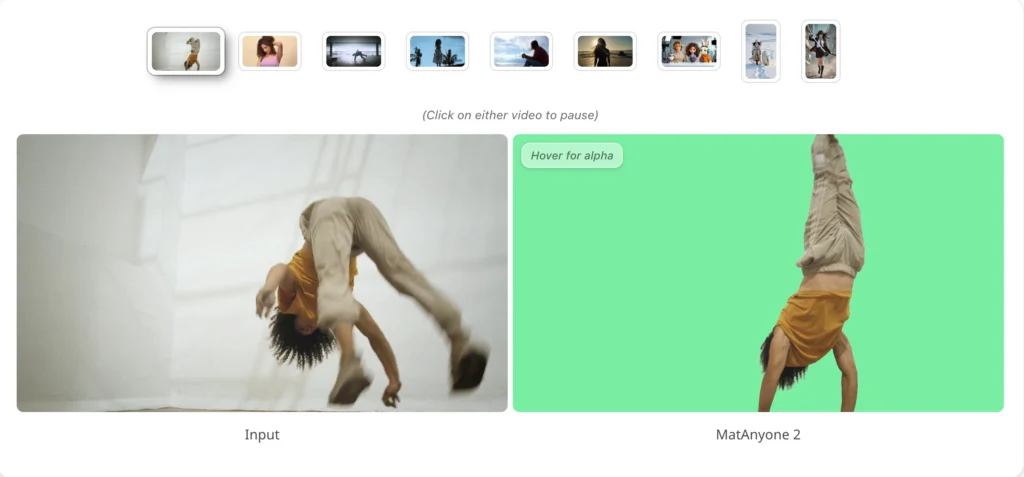
- MatAnyone 2 is a CVPR 2026 paper and open-source framework from NTU S-Lab + SenseTime Research. It performs state-of-the-art human video matting — no green screen required.
- The breakthrough is a learned Matting Quality Evaluator (MQE): a DINOv3+DPT network that outputs a pixel-wise error map to guide training and automate data labelling.
- It introduced VMReal — 28,000 real-world clips, 2.4 million frames — the largest video matting dataset ever, built automatically via a dual-branch MQE pipeline.
- On the CRGNN real-world benchmark, MatAnyone 2 cuts MAD by −26% and gradient error by −24.5% vs. MatAnyone 1. It sets SOTA on all three standard benchmarks.
- A reference-frame training strategy + patch dropout extends temporal context beyond the local window, making it robust to large appearance changes in long videos.
- Setup: Python 3.10 + conda + SAM2 first-frame mask. Model auto-downloads on first run. No-install option: Hugging Face Gradio demo.
- Bonus at the end: How Gaga AI extends MatAnyone 2 output into a full production — image-to-video, audio infusion, AI avatars, and voice cloning.
Table of Contents
What Is MatAnyone 2?
MatAnyone 2 is a practical human video matting framework, accepted at CVPR 2026, that preserves fine details by avoiding segmentation-like boundaries while delivering enhanced robustness under challenging real-world conditions — without a green screen or manual annotation.
The full title: “Scaling Video Matting via a Learned Quality Evaluator.” The evaluator — the MQE — is the architectural innovation that didn’t exist in the original MatAnyone and is responsible for every quality improvement in version 2.
Authors and institutions:
- Peiqing Yang — NTU S-Lab, Nanyang Technological University
- Shangchen Zhou — NTU S-Lab (project lead †)
- Kai Hao — NTU S-Lab
- Qingyi Tao — SenseTime Research, Singapore
The model is designed specifically for human subjects in real-world conditions: cluttered backgrounds, challenging or backlit lighting, fine hair strands, motion blur, and semi-transparent fabric. It builds directly on MatAnyone 1 (CVPR 2025) and Cutie, with the matting dataset infrastructure adapted from RVM.
Where to find it:
- 📄 arXiv paper 2512.11782 — published December 2025
- 💻 GitHub: pq-yang/MatAnyone2 — 275 stars, MIT-adjacent NTU S-Lab License 1.0
- 🤗 Hugging Face demo — browser-based, no setup
- 🎥 Project page with video comparisons
Why Video Matting Is Still a Hard Problem
Background removal in still images is essentially solved. Video matting — consistent, fine-detail alpha extraction across hundreds of frames — is not.
According to the MatAnyone 2 paper, two problems have blocked progress in the field:
1. Scarcity of large-scale real-world training data.
The previous largest video matting dataset, VM800, contained approximately 320,000 frames — built mostly from artificially composited footage. Artificial compositing introduces lighting mismatches, unnatural edge sharpness, and synthetic noise. Models trained on it generalise poorly to real camera footage. The gap between lab performance and real-world performance was a known but unsolved problem.
2. Segmentation supervision produces segmentation-like mattes.
When alpha-matte ground truth is unavailable, the common workaround is to train on binary segmentation masks (where alpha ∈ {0,1} only). The problem: the alpha values that actually matter — the ambiguous α ∈ (0,1) pixels at hair strands, fabric edges, and motion-blurred transitions — receive no meaningful training signal. The model learns to make confident, hard decisions everywhere. The result: mattes that look like cutouts, not natural extractions.
MatAnyone 2 solves both simultaneously. The MQE provides pixel-level boundary feedback without needing ground-truth alpha mattes. The VMReal pipeline uses that MQE to curate 2.4 million real-world frames at annotation quality neither manual nor single-model methods could produce.
The Core Innovation: Matting Quality Evaluator (MQE)
The MQE is a U-Net-shaped neural network with a DINOv3 encoder and DPT decoder that accepts a predicted matte and outputs a pixel-wise error probability map — without needing ground-truth alpha mattes to do so.
This is the single architectural invention that enables everything else: tighter training supervision, automated real-world data curation, and the VMReal dataset.
What the MQE Takes as Input
The MQE receives three inputs simultaneously:
- I_rgb — the RGB input frame
- α̂ — the predicted alpha matte from the matting network
- M_seg — a hard binary segmentation mask
From these, it outputs P_eval(x,y) — the probability that each pixel (x,y) in the predicted matte is erroneous. Thresholding P_eval at δ = 0.2 yields a binary reliability mask M_eval used to control the training loss.
The MQE itself is trained on image matting data with ground-truth alphas available (P3M-10k), using a composite pseudo-target based on Mean Absolute Difference (MAD, weighted 0.9) and gradient difference (Grad, weighted 0.1). It uses focal loss + Dice loss to handle the severe class imbalance between reliable and erroneous pixels.
How MQE Is Deployed: Two Modes
Mode 1 — Online feedback during matting network training.
While the matting network trains, the MQE continuously scores its predictions. The training loss has two components:
- Masked matting loss (L_mat^M): applied only over reliable pixels (where M_eval = 1), composed of masked L1 loss, masked multi-scale Laplacian pyramid loss, and masked temporal consistency loss
- Evaluation penalty (L_eval): the L1 norm of P_eval — pushes the network to reduce per-pixel error probability everywhere
The combined objective: L_total = L_mat^M + 0.1 × L_eval
This is fundamentally tighter than computing loss indiscriminately over all pixels — the network learns only from pixels it can actually get right, while being penalised globally for uncertainty.
Mode 2 — Offline dual-branch data curation to build VMReal.
For each unlabelled real-world video, two annotation branches run in parallel:
- Branch B_V (video matting model, e.g. MatAnyone 1) → α_V: temporally stable but boundary-soft
- Branch B_I (image matting model MattePro + per-frame SAM2 masks) → α_I: fine boundary detail but temporally inconsistent
The MQE evaluates both outputs, producing reliability masks M_V_eval and M_I_eval. A fusion mask M_fuse identifies pixels where B_V fails but B_I succeeds:
M_fuse = M_I_eval ⊙ (1 − M_V_eval)
α_fused = α_V ⊙ (1 − M_fuse) + α_I ⊙ M_fuse
The fused annotation preserves B_V’s temporal stability everywhere B_V is reliable, and patches in B_I’s fine boundary detail exactly where B_V falls short. The result is the VMReal dataset: 28,000 clips, 2.4 million frames — the largest real-world video matting corpus ever built, at annotation quality neither model alone could produce.
MatAnyone 2 vs. MatAnyone 1: Benchmark Results
MatAnyone 2 outperforms MatAnyone 1 on every benchmark across every metric — with the most significant gains on real-world footage.
| Benchmark | Metric | MatAnyone 1 | MatAnyone 2 | Improvement |
| VideoMatte 512×288 | MAD ↓ | 5.15 | 4.73 | −8.2% |
| VideoMatte 512×288 | Grad ↓ | 1.18 | 1.12 | −5.1% |
| YouTubeMatte 512×288 | MAD ↓ | 2.72 | 2.30 | −15.4% |
| YouTubeMatte 512×288 | Grad ↓ | 1.60 | 1.45 | −9.4% |
| CRGNN (19 real videos) | MAD ↓ | 5.76 | 4.24 | −26.4% |
| CRGNN (19 real videos) | Grad ↓ | 15.55 | 11.74 | −24.5% |
The CRGNN results — real-world test videos — show the biggest gains. This is where training on VMReal pays off most visibly. MatAnyone 2 isn’t just incrementally better; on real footage, it reduces gradient error by nearly a quarter.
Additionally, applying VMReal training data to other matting backbones (e.g. RVM) yields a MAD reduction of 0.76 — confirming that the dataset quality, not just the architecture, is a standalone contribution.
What’s New in MatAnyone 2 vs. v1: Feature Summary
| Feature | MatAnyone 1 (CVPR 2025) | MatAnyone 2 (CVPR 2026) |
| Training data | Synthetic composites (VM800, ~320K frames) | VMReal: 28K real clips, 2.4M frames |
| Boundary supervision | Segmentation-based (α ∈ {0,1} only) | MQE pixel-wise error feedback (α ∈ [0,1]) |
| Supervision masking | Loss over all pixels | Loss masked to reliable pixels only |
| Temporal handling | Local window (Cutie backbone) | Local window + long-range reference frames |
| Appearance variation handling | Limited on long clips | Reference-frame strategy + patch dropout |
| Real-world benchmark (CRGNN MAD ↓) | 5.76 | 4.24 (−26%) |
| Real-world benchmark (CRGNN Grad ↓) | 15.55 | 11.74 (−24.5%) |
| Edge artifacts | Segmentation-like cutouts | Fine hair, smooth semi-transparency |
| Dataset construction | Manual / compositing-based | Automated dual-branch MQE-guided fusion |
| Demo | Hugging Face (MatAnyone) | Same Space, MatAnyone 2 is default model |
| GitHub stars (Mar 2026) | — | 275 ⭐ |
| Publication venue | CVPR 2025 | CVPR 2026 |
Who Should Use MatAnyone 2?
MatAnyone 2 is built for anyone who needs professional-grade human video matting and can set up a Python/conda environment. For everyone else, the no-install Hugging Face demo covers most use cases.
Strong fit:
- Video editors and VFX artists — clean RGBA mattes for compositing without green screen infrastructure
- Content creators at scale — talking-head, explainer, or presenter content with background replacement
- AI pipeline developers — embedding high-quality, open-source background removal into automated workflows
- Researchers — building on CVPR 2026 SOTA matting baselines; VMReal dataset release forthcoming
Also note: the GitHub repo’s TODO list shows what’s coming:
- Training codes for the video matting model
- Checkpoint + training codes for the MQE quality evaluator model
- VMReal dataset public release
These releases will make MatAnyone 2 a complete research infrastructure — not just an inference tool.
Poor fit:
- Users who need one-click, no-setup operation. MatAnyone 2 requires conda + Python 3.10 + a first-frame segmentation mask. For instant results, the Hugging Face Gradio demo requires zero installation and works from any browser.
How to Install and Run MatAnyone 2: Step-by-Step
MatAnyone 2 runs via a Python 3.10 conda environment. A first-frame segmentation mask is required — the easiest source is the SAM2 interactive demo (a few clicks, no coding). The model weights download automatically on first inference.
What You Need
- Conda (Miniconda or Anaconda)
- Python 3.10 (specified in the official README)
- CUDA-compatible GPU (recommended; CPU inference possible but much slower)
- FFmpeg (required for video I/O — install via conda install ffmpeg or your system package manager)
- Git
Step 1 — Clone the Repository
git clone https://github.com/pq-yang/MatAnyone2
cd MatAnyone2
Step 2 — Create the Conda Environment and Install Dependencies
# Create and activate a new conda env
conda create -n matanyone2 python=3.10 -y
conda activate matanyone2
# Install core dependencies
pip install -e .
If you plan to run the local Gradio demo, also install:
pip install -r hugging_face/requirements.txt
Step 3 — Download the Pretrained Model
Two options:
Option A — Manual download (recommended for offline use): Download matanyone2.pth from the GitHub Releases page and place it in pretrained_models/.
Option B — Auto-download on first run: If no checkpoint is found in pretrained_models/, the script downloads the weights automatically during the first inference call. No extra step required.
Expected directory structure either way:
pretrained_models/
└── matanyone2.pth
Step 4 — Prepare Your Input
MatAnyone 2 takes two inputs per clip:
- Your video — as an .mp4, .mov, or .avi file, or as a folder of sequentially named frame images
- A first-frame segmentation mask — a binary PNG mask of the target person(s) in frame 0
How to get your first-frame mask (the official recommendation): Use the SAM2 interactive demo. Upload your first frame, click on your subject, export the mask as a PNG. The mask does not need pixel-perfect edges — SAM2’s rough click-to-segment output is sufficient as a starting point.
Note on multi-person matting: If you want to matte multiple subjects simultaneously, include all target persons in a single mask (or provide separate masks and let the model handle multi-subject propagation).
Expected input layout (matches the GitHub inputs/ folder structure):
inputs/
├── video/
│ ├── test-sample1/ ← folder containing all frames
│ └── test-sample2.mp4 ← .mp4, .mov, or .avi
└── mask/
├── test-sample1.png ← mask for target person(s) in frame 0
└── test-sample2.png
Step 5 — Run Inference
These are the exact commands from the official README:
Video folder input:
python inference_matanyone2.py -i inputs/video/test-sample1 -m inputs/mask/test-sample1.png
MP4 file input:
python inference_matanyone2.py -i inputs/video/test-sample2.mp4 -m inputs/mask/test-sample2.png
All available flags:
| Flag | Description |
| -i / –input | Path to input video file or frame folder |
| -m / –mask | Path to first-frame segmentation mask PNG |
| –save_image | Also save results as per-frame image sequences |
| –max_size N | Downsample if min(width, height) > N. No default limit — set this if you hit VRAM errors on high-res input |
Tip: The provided inputs/ folder in the repo already contains test samples. Run inference on those first to verify your installation before using your own footage.
Step 6 — Find Your Results
Outputs are saved in the results/ folder:
- Foreground output video — RGBA clip of the subject on transparent background
- Alpha output video — grayscale matte showing per-pixel transparency values
Inspect the alpha output first. Hair edges, semi-transparent fabric, and motion-blur transitions should appear as smooth gradients rather than hard cutoffs. If edge quality is insufficient, refine your first-frame mask in SAM2 and re-run.
Step 7 (Alternative) — Use the Interactive Gradio Demo
The Gradio demo eliminates the need to prepare a segmentation mask separately — you assign the mask interactively by clicking on the subject inside the demo UI itself.
Browser-based (Hugging Face Space):
- Go to huggingface.co/spaces/PeiqingYang/MatAnyone
- Drop your video or image into the interface
- Click on the target subject(s) to assign masks — no external tool needed
- MatAnyone 2 is the default model — confirm in the Model Selection dropdown
- Run inference and download the matted result
No local install, no GPU required on your end.
Run the demo locally instead (uses your own GPU, faster for longer clips):
cd hugging_face
# Install demo dependencies if not already done
pip install -r requirements.txt # FFmpeg required
python app.py
Note: The same Hugging Face Space hosts both MatAnyone 1 and MatAnyone 2. The Model Selection dropdown lets you switch between them for direct side-by-side comparison on your own footage.
Common Problems and How to Fix Them
The Boundary Looks Like a Hard Segmentation Cutout
Cause: This is the exact problem MatAnyone 2’s MQE was designed to address in training data — but if your first-frame mask is too coarse, the propagation starts from a poor signal.
Fix: Re-generate the SAM2 mask with a finer click pattern, particularly around hair and fabric edges. Include fine detail regions deliberately in the mask — the model refines from there, but needs the initial coverage.
Subject Drifts or Loses Identity in a Long Clip
Cause: Large appearance changes — lighting shifts, clothing changes, full re-entry after occlusion — can exceed what the reference-frame mechanism handles over very long durations.
Fix: This is a known limitation noted by the authors. Split the video into segments at natural scene transitions. Process each segment with its own first-frame mask. Rejoin the alpha mattes in your editing software.
Out of Memory on High-Resolution Input
Cause: MatAnyone 2 sets no default resolution limit (as confirmed in the README: “by default, we don’t set the limit”). 4K or high-bitrate footage can exceed GPU VRAM.
Fix: Add –max_size 1080 to your inference command. The video will be automatically downsampled when min(width, height) exceeds 1080 pixels:
python inference_matanyone2.py \
-i inputs/video/clip.mp4 \
-m inputs/mask/clip.png \
–max_size 1080
Gradio Demo Queue Times Are Long
Cause: The Hugging Face Space runs on shared public compute. High-traffic periods increase queue times.
Fix: Launch the demo locally with python app.py inside the hugging_face/ directory. Your own GPU processes the clip directly — no queue.
FFmpeg Not Found Error
Cause: FFmpeg is required for video I/O and may not be installed or on PATH.
Fix:
# Via conda (recommended)
conda install -c conda-forge ffmpeg
# Or via system package manager (Ubuntu/Debian)
sudo apt install ffmpeg
MatAnyone 2 vs. Other Video Matting Tools
MatAnyone 2 is the strongest open-source option for real-world human video matting. Its main trade-off is that serious use requires local setup.
| Tool | Real-World Quality | Edge Detail | Ease of Use | Cost | Best For |
| MatAnyone 2 | ⭐⭐⭐⭐⭐ | ⭐⭐⭐⭐⭐ | ⭐⭐⭐ | Free / Open-source | Researchers, VFX artists, developers |
| MatAnyone 1 | ⭐⭐⭐⭐ | ⭐⭐⭐⭐ | ⭐⭐⭐ | Free / Open-source | Lighter workloads, comparable setup |
| Background Matting V2 | ⭐⭐⭐ | ⭐⭐⭐⭐ | ⭐⭐⭐ | Free / Open-source | Requires background plate |
| RunwayML | ⭐⭐⭐⭐ | ⭐⭐⭐⭐ | ⭐⭐⭐⭐⭐ | Per-credit | Cloud-first creatives, no-code teams |
| Adobe Premiere (AI BG Remove) | ⭐⭐⭐ | ⭐⭐⭐ | ⭐⭐⭐⭐⭐ | CC subscription | Editors already in Adobe ecosystem |
| CapCut Auto Remove BG | ⭐⭐ | ⭐⭐ | ⭐⭐⭐⭐⭐ | Free / Pro | Quick social content, low fidelity needs |
The clearest head-to-head is RunwayML vs. MatAnyone 2. RunwayML wins on convenience (no setup, browser-based). MatAnyone 2 wins on output fidelity — particularly on fine hair, semi-transparent regions, and real-world footage with complex backgrounds.
The CRGNN benchmark gap (−24.5% gradient error) is not incremental. It reflects the fundamental advantage of training on 2.4 million real-world frames with MQE-guided boundary supervision vs. synthetic composites with segmentation-only loss.
Built on: MatAnyone 2 acknowledges its foundations: built upon MatAnyone 1 and Cutie (memory-propagation backbone), with matting dataset files adapted from RVM. The interactive demo leverages SAM and SAM2 for segmentation. These acknowledgements from the official README are worth citing if you use MatAnyone 2 in a research context.
MatAnyone 2 in a Modern AI Video Pipeline
MatAnyone 2 produces clean RGBA foreground footage. That output is the ideal input for the next stage of an AI content pipeline.
The separation of concerns is precise: MatAnyone 2 handles who is in the frame. Everything else — where they appear, what they say, what you hear — is handled downstream.
Source Footage
↓
MatAnyone 2 ── Precise human foreground extraction (RGBA)
↓
AI Background Generator ── Synthetic or generated environment
↓
AI Audio Tool ── Ambient sound, music, narration
↓
AI Avatar / Voice Layer ── Presenter synthesis or voice localization
↓
Final Video ── Ready to publish
This is where Gaga AI enters the picture.
Bonus: Complete Your Video with Gaga AI
Gaga AI is an all-in-one AI video creation platform that picks up exactly where MatAnyone 2 leaves off — adding motion, audio, synthetic presenters, and voice to your clean footage.

The four Gaga AI modules that pair most directly with a MatAnyone 2 workflow:
Image-to-Video AI
Gaga AI animates a still image — including a single clean frame from your MatAnyone 2 RGBA output — into a full motion video clip, driven by a text prompt.
Example: take a clean foreground frame, pair it with a new AI-generated background, and prompt “subject turns and walks toward camera in slow motion.” The image-to-video engine outputs a photorealistic motion clip. No re-shoot needed.
Best for: Extending existing footage, creating motion from stills, rapid prototyping of scene concepts.
Video and Audio Infusion
Gaga AI analyzes your video and generates synchronized audio — ambient sound, music beds, environmental effects — matched to the visual content of each scene.
After MatAnyone 2 extracts your subject and you composite it onto a new background (forest, city, studio), Gaga AI’s audio infusion engine reads the scene and generates matching sound. The audio is context-generated, not a generic stock track.
Best for: Creators producing at volume who need audio-visual coherence without a dedicated sound design step.
AI Avatar
Gaga AI generates a photorealistic lip-synced talking-head avatar from a reference photo, driven by any audio input.
Provide a reference photo of your presenter, input the audio or script, and Gaga AI outputs a lip-synced avatar with natural head motion and facial expression. Composite this transparent-background avatar over your MatAnyone 2 environment using the same RGBA pipeline.
Best for: Training content, explainers, multilingual localization, and any case where on-camera shooting isn’t feasible.
AI Voice Clone + TTS
Gaga AI clones a speaker’s voice from a short reference recording and generates natural-sounding narration from text in that cloned voice.
Workflow:
- Record 30–60 seconds of your subject speaking naturally
- Upload to Gaga AI’s voice cloning module
- Paste any script as plain text
- Download narration audio in the original speaker’s voice — in any language
Combine with the AI avatar for fully AI-generated presenter videos without the speaker ever re-recording.
Best for: Multilingual content series, large-scale narration, AI influencer content, brand consistency across markets.
The Full Pipeline: MatAnyone 2 + Gaga AI
Original Footage
↓
MatAnyone 2 ── Clean RGBA foreground (CVPR 2026 quality)
↓
Gaga AI Image-to-Video ── Animate the subject or extend the clip
↓
Gaga AI Audio Infusion ── Environment-matched audio generation
↓
Gaga AI AI Avatar + Voice Clone ── AI presenter with cloned voice
↓
Final Video ── Studio-quality output, no studio required
Frequently Asked Questions
What is MatAnyone 2?
MatAnyone 2 is a practical human video matting framework accepted at CVPR 2026, developed by Peiqing Yang, Shangchen Zhou, Kai Hao (NTU S-Lab) and Qingyi Tao (SenseTime Research). It extracts precise per-frame alpha mattes from video without a green screen, using a learned Matting Quality Evaluator (MQE) for pixel-level boundary supervision. The arXiv paper is 2512.11782.
Does MatAnyone 2 require a green screen?
No. MatAnyone 2 processes real-world footage with any background — cluttered, outdoors, backlit, or dynamically lit. It requires only a first-frame segmentation mask of the target person, which can be generated in seconds using the SAM2 interactive demo.
What is the Matting Quality Evaluator (MQE) in MatAnyone 2?
The MQE is a U-Net network with a DINOv3 encoder and DPT decoder. It takes an RGB frame, a predicted alpha matte, and a segmentation mask as input, and outputs a pixel-wise error probability map — identifying which pixels in the predicted matte are likely wrong. This map drives both the masked training loss and the automated VMReal data curation pipeline. Critically, it works without ground-truth alpha mattes.
What is VMReal, and why does it matter?
VMReal is a large-scale real-world video matting dataset built by the MatAnyone 2 team using MQE-guided automated dual-branch annotation. It contains 28,000 clips and 2.4 million frames — approximately 35 times larger than the previous largest dataset (VM800, ~320K frames). Using real-world training data instead of synthetic composites is the primary reason for MatAnyone 2’s gains on real-footage benchmarks.
How does MatAnyone 2 compare to MatAnyone 1 in benchmarks?
On CRGNN (19 real-world videos): MatAnyone 2 achieves MAD 4.24 vs. 5.76 (−26.4%) and Grad 11.74 vs. 15.55 (−24.5%). On VideoMatte: MAD 4.73 vs. 5.15 (−8.2%), Grad 1.12 vs. 1.18 (−5.1%). On YouTubeMatte: MAD 2.30 vs. 2.72 (−15.4%), Grad 1.45 vs. 1.60 (−9.4%). MatAnyone 2 is SOTA across all three benchmarks.
Is MatAnyone 2 free to use?
Yes. MatAnyone 2 is open-source under the NTU S-Lab License 1.0. Code, pretrained weights, and the Hugging Face Gradio demo are all free to use. The Gradio demo requires no account or setup.
What Python version and environment does MatAnyone 2 require?
Python 3.10 via a conda environment. Install dependencies with pip install -e .. FFmpeg is also required for video I/O. The README specifies conda as the environment manager.
How do I get the first-frame segmentation mask?
Use the SAM2 interactive demo — upload your first frame, click your subject, export the mask PNG. Alternatively, use any segmentation tool. For the Gradio demo, you click directly inside the interface — no external mask preparation needed.
Can I try MatAnyone 2 without installing anything?
Yes. The Hugging Face Space at huggingface.co/spaces/PeiqingYang/MatAnyone runs MatAnyone 2 (default model) in the browser. Drop in your video, click to assign the mask interactively, and download the result. MatAnyone 1 is also accessible via the Model Selection dropdown for comparison.
What does the reference-frame training strategy do?
MatAnyone 2 occasionally provides the matting network with “reference” frames drawn from beyond the standard local processing window (default 8 frames). This extends temporal context and improves robustness when a subject changes appearance significantly over long video clips. Patch dropout (zeroing 0–3 boundary and 0–1 core patches in both RGB and alpha) prevents the model from overfitting to reference content.
Can I use MatAnyone 2 for non-human subjects?
MatAnyone 2 is specifically designed and optimised for human video matting. The paper, dataset (VMReal), and benchmarks are all human-centric. Performance on animals or objects is not evaluated by the authors and is not guaranteed.
How do I cite MatAnyone 2 in a research paper?
Use the BibTeX from the official project page:
@InProceedings{yang2026matanyone2,
title = {{MatAnyone 2}: Scaling Video Matting via a Learned Quality Evaluator},
author = {Yang, Peiqing and Zhou, Shangchen and Hao, Kai and Tao, Qingyi},
booktitle = {CVPR},
year = {2026}
}
What are the three main technical contributions of MatAnyone 2?
- The MQE — a learned quality evaluator providing pixel-wise semantic and boundary feedback without ground-truth alpha mattes, deployed both online (training loss masking) and offline (data curation).
- VMReal — 28,000 clips, 2.4 million real-world frames, built via automated dual-branch MQE-guided fusion of video and image matting models. A 35× scale-up over prior datasets.
- Reference-frame training strategy with patch dropout — extends temporal context beyond the local window for robust handling of large appearance changes in long videos.
References & Official Resources
| Resource | Link |
| Project Page (visuals + abstract) | pq-yang.github.io/projects/MatAnyone2 |
| GitHub Repository | github.com/pq-yang/MatAnyone2 |
| arXiv Paper (2512.11782) | arxiv.org/abs/2512.11782 |
| Hugging Face Demo | huggingface.co/spaces/PeiqingYang/MatAnyone |
| Demo Video (YouTube) | youtube.com/watch?v=tyi8CNyjOhc |
| EmergentMind Technical Analysis | emergentmind.com/topics/matanyone-2 |
| Contact (author) | peiqingyang99@outlook.com |