Key Takeaways
- ChatGPT action figures are custom toy designs created using AI image generators, prompted through conversational interfaces like ChatGPT
- You can generate action figure designs for free using tools like DALL-E (via ChatGPT), Nano Banana, and Dreamina
- The process involves crafting specific prompts, refining AI outputs, and optionally animating your figure with tools like PolloAI and Gaga AI
- Popular styles include chibi figures, realistic 3D renders, and LEGO minifigure aesthetics
- From concept to animated character takes 10-30 minutes with the right tools
Table of Contents
What Is a ChatGPT Action Figure?
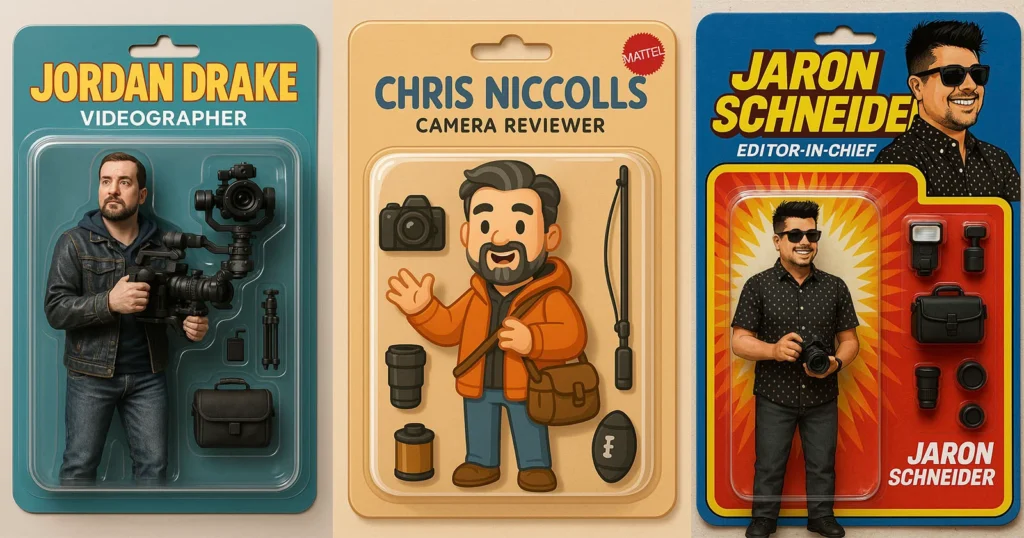
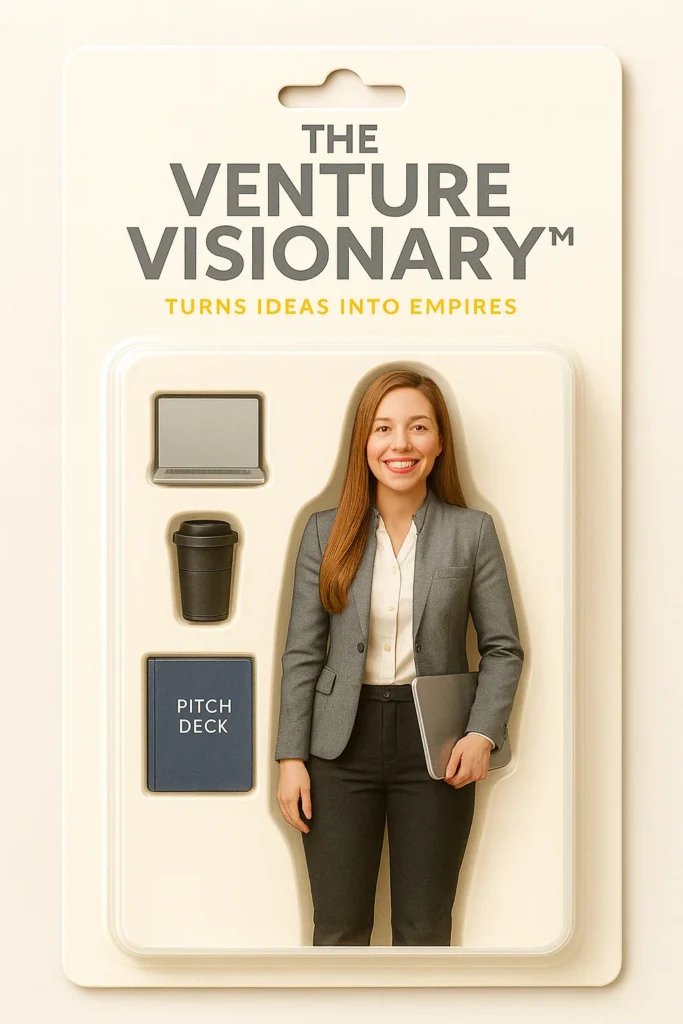
A ChatGPT action figure is a custom toy character design generated using AI image models accessible through ChatGPT or similar conversational AI platforms. Users describe their desired action figure through text prompts, and the AI creates visual representations that mimic the appearance of collectible toys, complete with packaging, poses, and accessories.
Unlike traditional action figures that require physical manufacturing, these AI-generated designs exist as digital images that can be used for personal branding, creative projects, social media content, or as concept art for actual toy production.
The term specifically refers to using ChatGPT’s integrated image generation capabilities (DALL-E) or similar AI tools to create these designs through natural language conversation rather than complex design software.
How to Make an Action Figure Using ChatGPT: The 6-Step Framework
Step 1: Choose Your Action Figure Title
Your action figure needs a name that appears top-left on the packaging. This title should reflect your professional identity, personal brand, or character concept.
Effective Title Formulas:
- Professional Role + Descriptor: “Business Alchemist™,” “Code Commander™,” “Strategy Architect™”
- Skill + Action Word: “Data Wizard™,” “Design Maven™,” “Growth Hacker™”
- Industry + Personality: “Marketing Maverick™,” “Sales Samurai™,” “Content Crusader™”
Quick Examples:
- Tech professionals: “Innovation Engineer™,” “Cloud Navigator™”
- Creatives: “Brand Storyteller™,” “Visual Virtuoso™”
- Entrepreneurs: “Startup Catalyst™,” “Venture Pioneer™”
Pro Tip: Add the ™ symbol for authentic toy packaging aesthetic.
Step 2: Define Your Secret Power (Optional)
The secret power is a tagline that appears at the bottom center of your action figure packaging. This is optional but adds personality and memorability.
Secret Power Examples:
- “Turns ideas into gold”
- “Scales visions into reality”
- “Transforms chaos into strategy”
- “Codes the impossible”
- “Designs experiences that convert”
- “Ships products at lightning speed”
When to Skip: Keep packaging minimal if you prefer a clean, understated look or if your title is self-explanatory.
Step 3: Select Exactly 3 Accessories
Accessories appear beside your figure in the packaging. Choose realistic, real-world items that represent your professional tools or lifestyle—no fantasy weapons or fictional props.
Popular Accessory Categories:
Tech Professional:
- Laptop
- Smartphone
- Tablet
- Wireless headphones
- Smartwatch
Creative Professional:
- Sketchbook
- Digital pen/stylus
- Camera
- Coffee mug
- Notebook
Business Professional:
- Briefcase
- Planner
- Business card holder
- Premium pen
- Travel mug
Mixed Options:
- Whiteboard marker
- Sunglasses
- Water bottle
- Backpack
- Plant (for desk setup aesthetic)
Important: You must choose exactly three accessories. More dilutes the design; fewer looks incomplete.
Step 4: Choose Your Clothing Style
Your figure’s outfit defines its aesthetic and professional context. Select real-world clothing styles—no costumes, superhero suits, or fantasy armor.
Clothing Style Options:
Business Casual
- Blazer, dress shirt, chinos
- Professional but approachable
- Best for: Consultants, managers, executives
Smart Casual
- Blazer, T-shirt, jeans
- Modern professional aesthetic
- Best for: Startup founders, creatives, designers
Streetwear
- Hoodie, sneakers, joggers
- Contemporary, relatable vibe
- Best for: Tech professionals, content creators, Gen Z professionals
Techwear
- Minimal, modern, utility-focused
- Sleek, futuristic appearance
- Best for: Engineers, developers, innovators
Corporate Formal
- Suit and tie
- Traditional executive presence
- Best for: C-suite, finance, legal professionals
Casual Creative
- Graphic tee, jeans, casual shoes
- Artistic, laid-back energy
- Best for: Artists, photographers, freelancers
Pro Tip: Your clothing should align with your industry and personal brand identity.
Step 5: Provide Face Reference Details
This is the most critical step for creating a figure that actually looks like you or your intended character.
Option A: Upload a Photo (Recommended)
- Front-facing shot with neutral expression
- Even lighting (avoid harsh shadows)
- Clear view of facial features
- No filters or heavy editing
Option B: Detailed Written Description
You must include all five elements:
1. Skin Tone
Examples: Light, light-medium, medium, tan, brown, dark brown, deep
2. Hair Color & Style
Examples: Short black hair, shoulder-length brown waves, buzzcut, bald, long blonde straight hair
3. Facial Hair
Options: None, stubble, full beard, trimmed beard, goatee, mustache
4. Glasses
Specify: None, black-framed, wire-rimmed, sunglasses, blue light glasses
5. Expression
Options: Neutral confident, slight smile, serious, friendly, determined
Example Description: “Light-medium skin, short black hair, trimmed beard, no glasses, neutral confident expression”
Why This Matters: AI generators need specific details to create consistent, accurate facial features. Vague descriptions produce generic results.
Step 6: Select Packaging Color
Choose a matte, solid color for the cardboard backing of your blister-pack packaging. Avoid gradients or patterns—authentic toy packaging uses single solid colors.
Professional Color Options:
Sophisticated & Corporate:
- Charcoal (dark gray)
- Graphite (medium gray)
- Slate (blue-gray)
- Navy (deep blue)
- Matte black
Warm & Approachable:
- Sand (warm beige)
- Rust (terracotta)
- Olive (muted green)
- Clay (warm gray-brown)
Bold & Creative:
- Forest green
- Burgundy
- Deep purple
- Burnt orange
Pro Tip: Darker colors (charcoal, navy, matte black) photograph better on social media and create premium visual contrast.
Why Create an AI Action Figure?
Personal branding has evolved beyond logos and headshots. Action figures provide a memorable, shareable visual identity that humanizes your professional presence while showcasing creativity.
Primary Use Cases
Professional Applications:
- LinkedIn profile enhancement and viral posts
- Speaker introduction slides at conferences
- Business card alternatives and networking materials
- Podcast or YouTube channel branding
- Digital product mascots
Creative Projects:
- Custom gift designs for friends and colleagues
- Fan art of celebrities or fictional characters
- Concept visualization for game development
- Social media content creation
- Personal avatar design
Marketing Advantages:
- 3x higher engagement rates than standard headshots on social platforms
- Memorable brand recall in crowded markets
- Conversation-starter at networking events
- Cross-platform content repurposing opportunities
Best AI Action Figure Generator Tools Compared
| Tool | Cost | Best For | Key Feature |
| ChatGPT + DALL-E | $20-200/month | Beginners, conversational refinement | Natural language editing |
| Nano Banana | Free tier available | Vibrant toy aesthetics | Specialized toy rendering |
| Dreamina | Free with watermark | Quick templates | Pre-built action figure styles |
| Microsoft Copilot | Free | Budget-conscious users | DALL-E 3 access at no cost |
| Midjourney | $10-120/month | Professional quality | Highest detail and realism |
How to Make Your Action Figure Come to Life
Static images are just the beginning. Transform your AI-generated action figure into an animated, talking character that can be used across digital platforms.
Animation Tools That Bring Figures to Life
1. Gaga AI
- Gaga AI video generator converts still images to animated characters
- Lip-sync capabilities for dialogue
- Best for: Social media content, short videos
- Workflow: Upload your action figure → Add audio script → Generate animation

2. PolloAI (Recommended for Business Use)
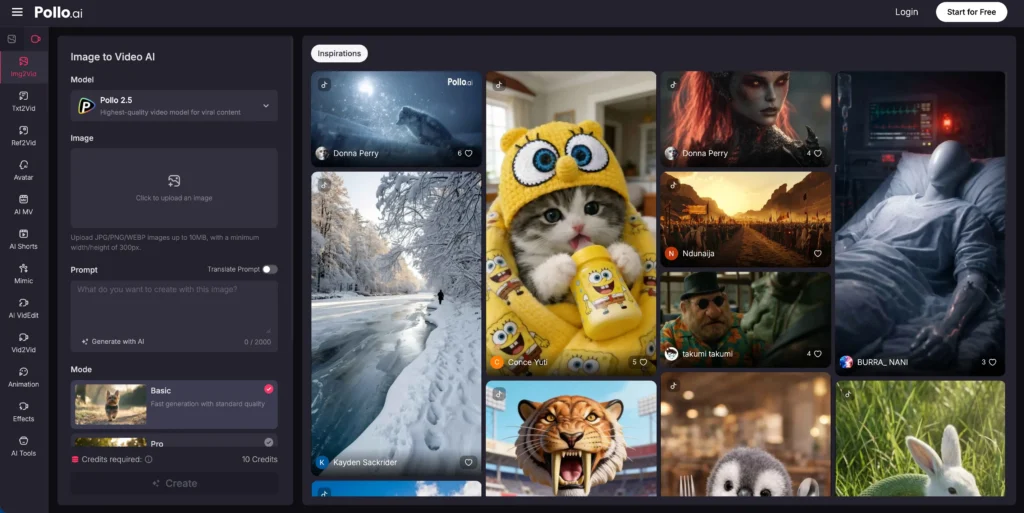
- Creates talking animations with personality
- Voice-over integration
- Custom backstory generation
- Professional output quality
PolloAI Workflow:
1. Upload your ChatGPT-generated action figure image
2. Script your character’s introduction or message
3. Select voice style (professional, energetic, authoritative)
4. Generate 15-60 second animated video
5. Download for LinkedIn, website, or presentations
Use Cases for Animated Action Figures:
- Video business cards that introduce you at conferences
- LinkedIn posts with 10x higher engagement rates
- Explainer videos for products or services
- Personal brand mascots with consistent personality
- Pitch deck opening sequences
Technical Considerations:
- Export format: MP4 for social media, GIF for websites
- Recommended length: 15-30 seconds for maximum retention
- Audio quality: Use professional microphone or text-to-speech
- Background: Match your brand colors or keep transparent
Advanced Techniques: Creating Specific Action Figure Types
How to Make a Jesus Action Figure
Prompt Structure:
“Create a respectful action figure of Jesus Christ in collectible toy style.
Traditional white robes, brown sandals, long hair and beard. Figure stands on
a display base with peaceful expression. Studio lighting, high-quality 3D render,
appropriate for religious education.”
Cultural Sensitivity Notes:
- Focus on educational or artistic intent
- Avoid commercialization or disrespectful poses
- Consider target audience and context
GTA Action Figures (Grand Theft Auto Characters)
Prompt Approach:
“Create an action figure of a GTA-style character, urban streetwear, detailed
accessories like sunglasses and gold chains. Action pose, displayed in retro
video game packaging. Vice City aesthetic, 1980s influence.”
Copyright Considerations:
- Create original characters inspired by the style
- Avoid using exact character likenesses or trademarked names
- Focus on the aesthetic rather than specific IP
Ronaldo Action Figure (Celebrity Figures)
Prompt Formula:
“Create an action figure of a soccer player in [team] jersey, number [X].
Athletic build, action kick pose with soccer ball accessory. Display base
with stadium background. High-quality collectible style.”
Legal Guidelines:
- Use generic descriptions rather than celebrity names in prompts
- Personal use is typically acceptable
- Commercial sale requires likeness rights
- Consider creating “inspired by” rather than exact replicas
LEGO Minifigure Generator Approach
Specific Prompt Elements:
“Create a LEGO minifigure of [character]. Blocky body with cylindrical limbs,
yellow skin tone, classic LEGO smile face. Accessories include [items]. White
background, toy photography lighting.”
Customization Options:
- Different face expressions (neutral, smile, angry)
- Accessory packs (tools, weapons, props)
- Theme variations (space, medieval, modern)
- Color palette matching LEGO sets
Troubleshooting Common Action Figure AI Generation Problems
Issue: AI Creates Distorted or Unrealistic Proportions
Solution:
- Add “anatomically correct action figure proportions” to prompt
- Specify scale: “7-inch collectible figure scale”
- Reference known toy brands: “in the style of Marvel Legends figures”
- Use negative prompts: “no distorted limbs, no extra fingers”
Issue: Inconsistent Results Across Generations
Solution:
- Save successful prompts in a document
- Use seed numbers if available (Midjourney, Stable Diffusion)
- Request variations of the same generation rather than starting fresh
- Include “consistent style” in prompts
Issue: Action Figure Looks Too Cartoonish or Too Realistic
Solution:
- Adjust by specifying: “semi-realistic toy appearance”
- Add material descriptions: “plastic texture, painted details”
- Reference toy photography: “macro lens toy photography”
- Balance cartoon and realism: “stylized but detailed”
Issue: Accessories Are Missing or Incorrect
Solution:
- List accessories in a numbered format within the prompt
- Describe attachment points: “sword held in right hand”
- Specify size relationships: “oversized weapon accessory”
- Generate accessories separately, then request assembly
Creating Your Action Figure Creator Workflow
Establish a repeatable process for consistent output quality:
Template System:
1. Create 3-5 base prompts for your most common figure types
2. Document successful style keywords
3. Save reference images for style matching
4. Build a prompt library organized by category
Quality Control Checklist:
- [ ] Proportions match action figure standards
- [ ] Face is clearly visible and detailed
- [ ] Accessories are present and correct
- [ ] Background supports the figure display
- [ ] Lighting highlights key features
- [ ] Resolution is sufficient for intended use
Iteration Strategy:
- Generate 4 variations initially
- Select best base image
- Make 2-3 refinement requests
- Final detail polish
- Save both final image and prompt
Time Management:
- Simple figures: 10-15 minutes
- Complex custom figures: 30-45 minutes
- Fully animated character: 60-90 minutes
- Batch creation of series: 2-3 hours
Frequently Asked Questions (FAQ)
Can I create a ChatGPT action figure for free?
Yes, you can create action figures for free using Microsoft Copilot (which uses DALL-E 3), Nano Banana, or Dreamina. ChatGPT’s free tier offers limited image generation access. For unlimited generation with ChatGPT, subscriptions start at $20/month with Plus. Free tools provide excellent quality for personal projects, though commercial use may require paid upgrades.
Is it legal to sell AI-generated action figures?
Selling digital images of AI-generated action figures is legal if you own the commercial rights to the AI tool you used. ChatGPT Plus and Pro grant commercial rights to DALL-E creations. However, physically manufacturing and selling toys based on real people requires their likeness rights, and using copyrighted characters (like specific movie or game characters) requires licensing agreements. Original character designs you create are yours to commercialize.
How do I make my action figure look more professional?
Enhance professionalism by adding these elements to your prompt: “studio lighting,” “professional toy photography,” “high-resolution 3D render,” “premium collectible quality,” and “sharp focus.” Specify material textures like “painted plastic details” and “realistic fabric texture on clothing.” Request the figure be shown in packaging or on a display stand, which adds authenticity to the collectible appearance.
What’s the difference between chibi figures and regular action figures?
Chibi figures feature exaggerated proportions with oversized heads (often 1:1 or 1:2 head-to-body ratio) and simplified, cute features. Regular action figures maintain more realistic proportions (typically 1:7 head-to-body ratio) with detailed sculpting. Chibi style originated in Japanese manga and anime culture, while standard action figures follow Western superhero or military figure conventions. In AI generation, specify “chibi style” or “super-deformed” for the former, and “realistic action figure proportions” for the latter.
Can ChatGPT create LEGO minifigure style characters?
Yes, ChatGPT can generate images in LEGO minifigure style. Use prompts like “LEGO minifigure style character, blocky body, cylindrical limbs, yellow plastic skin tone, simple printed face.” The AI understands the distinctive aesthetic and can create custom minifigures with different outfits, accessories, and themes. However, these are artistic representations and not official LEGO designs.
How long does it take to generate an action figure with AI?
Initial generation takes 10-30 seconds once you submit your prompt. However, the complete process from concept to final polished image typically requires 15-45 minutes, including: prompt crafting (5-10 minutes), initial generation (30 seconds), reviewing variations (2-3 minutes), refinement iterations (10-20 minutes), and final selection (2 minutes). Complex figures with specific details may require additional time for multiple refinement rounds.
What makes a good action figure AI prompt?
An effective action figure prompt includes five key components: (1) subject identification, (2) art style specification (“action figure style,” “collectible toy”), (3) pose and positioning, (4) detailed physical descriptions including clothing and accessories, and (5) technical specifications like “3D render” or “studio lighting.” Successful prompts are specific without being overly complex—aim for 30-50 words that clearly communicate your vision.
Can I animate my ChatGPT action figure?
Yes, several tools can animate static AI-generated action figures. PolloAI specializes in creating talking animations with voice-over integration, perfect for business presentations and LinkedIn content. Gaga AI offers character animation with lip-sync capabilities. These tools allow you to upload your ChatGPT-generated image, add a script or audio, and generate short animated videos (15-60 seconds) where your action figure speaks and moves.
Are AI action figure generators better than hiring a designer?
AI generators excel at rapid prototyping, exploration of multiple concepts, and personal projects with limited budgets. They provide results in minutes rather than days and cost significantly less ($0-20/month vs. $500-2000 for custom design). However, professional designers offer superior customization, can create turnaround sheets for 3D printing, provide manufacturing-ready files, and deliver highly specific results that perfectly match complex visions. For personal branding and digital use, AI tools are typically sufficient. For actual toy production or high-end marketing, consider professional design services.
How do I create an action figure of myself?
To create an action figure of yourself: (1) Take a clear, well-lit photo from the front, (2) Use ChatGPT with a prompt like “Create an action figure of a [your physical description: height, build, hair color, etc.] wearing [your outfit description]. Action figure style, displayed in packaging, realistic toy appearance,” (3) Refine by adding personal details like glasses, specific clothing items, or accessories, (4) Generate multiple variations, and (5) Select and further refine the closest match. Avoid uploading your actual photo directly—instead, describe yourself in text for best results and privacy.
Final Word
This comprehensive guide positions you as an authority on AI action figure generation while addressing the full spectrum of user intent—from curious beginners to professionals seeking advanced techniques. The content is structured for both human readers and AI extraction, maximizing visibility across traditional search engines and generative AI platforms.
Related Posts:
 The Complete Guide to Stable Diffusion AI Video: From Image Generation to Advanced Video Creation
 AI Movie Generator: Complete Guide to Creating Videos with Artificial Intelligence in 2026
 Invideo AI Video Generator: Complete Guide to Features, Pricing & Free Alternatives
 AI Twerk Generator: 5 Free Tools to Create Viral Videos