Key Takeaways
- Vidu AI is an enterprise-grade multimodal platform that generates videos from text, images, and references using advanced AI models.
- The platform supports Image-to-Video, Text-to-Video, Reference-to-Video, and specialized templates including the viral Vidu AI hug generator.
- Vidu Q2 (2025) is the latest model series offering 1-10 second videos at 540p-1080p with three variants: turbo, pro, and pro-fast.
- Pricing operates on a credit system starting at $0.005 per credit, with subscription plans from free to $1,399/month for enterprises.
- The platform includes AI MV Generator, digital human creation, lip sync, and upscaling to 8K resolution.
- Gaga AI emerges as the strongest alternative with comprehensive text-to-video, image-to-video, AI voice clone, AI dubbing, and AI avatar capabilities.
- Top alternatives include Sora 2, Runway AI, Luma Dream Machine, Kling AI, Grok AI, Gaga AI, and Google AI Studio.
- Vidu.com delivers production-ready video generation with consistent character rendering across multi-shot sequences.
Table of Contents
What is Vidu AI?
Vidu AI is a comprehensive video generation platform designed for enterprises and developers who need to create scalable, high-quality video content. Unlike single-purpose AI video tools, Vidu Studio AI operates as a full-stack multimodal system combining video, image, and audio generation with enterprise-grade reliability.
The platform addresses the core challenge in AI video generation: maintaining visual consistency across frames while delivering production-ready quality. Vidu achieves this through proprietary reference-based generation technology that preserves character features, object details, and aesthetic styles throughout entire video sequences.
Core Capabilities of Vidu AI Video Generator
1. Image-to-Video Generation
Vidu AI image-to-video converts static images into dynamic motion sequences. Users upload a single image, provide a text prompt describing desired movement, and select video parameters (duration, resolution, motion amplitude).
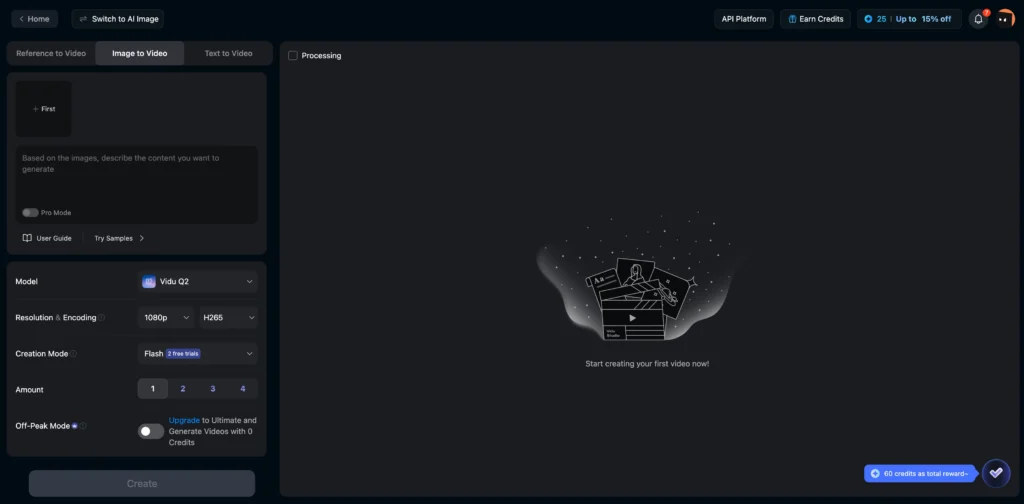
How it works:
- Upload source image (supports JPG, PNG)
- Write motion description prompt (e.g., “camera slowly zooms in while subject turns head”)
- Configure settings: 1-10 seconds duration, 540p-1080p resolution
- Generate in 1-5 minutes depending on model
Best for: Product animations, social media content, concept visualization, turning still photography into video assets.
2. Text-to-Video Creation
The Vidu AI video generator creates videos entirely from text prompts without requiring input images. This mode excels at generating original scenes, abstract concepts, or content where reference visuals don’t exist.
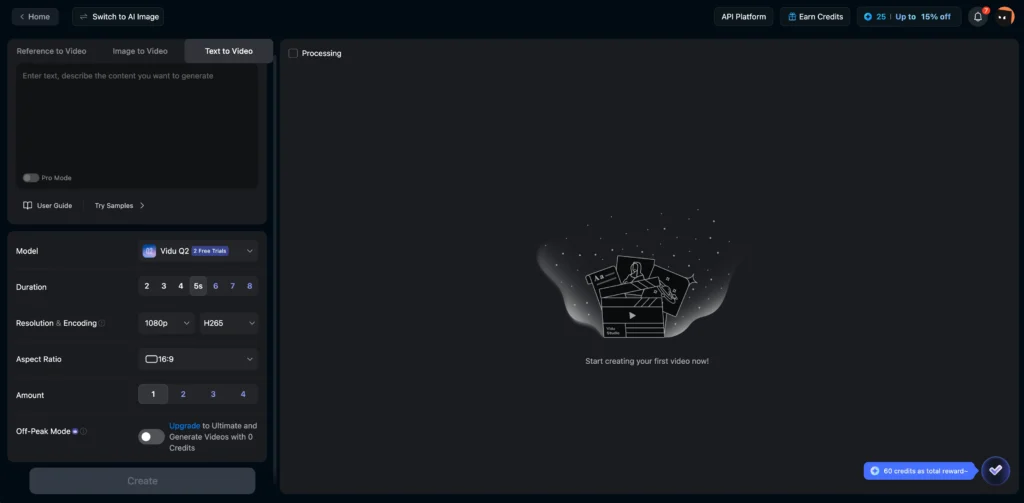
Supported by models: Vidu Q2 (turbo/pro), Vidu Q1, Vidu 1.5
Prompt optimization tips:
- Specify camera movement (pan, tilt, zoom, tracking shot)
- Include lighting details (golden hour, studio lighting, neon reflections)
- Define motion speed (slow motion, time-lapse, real-time)
- Add style keywords (cinematic, documentary, anime)
3. Reference-to-Video (Character Consistency)
This flagship feature solves AI video’s biggest limitation: maintaining subject consistency across shots. Vidu Reference-to-Video accepts 1-7 reference images showing different angles or perspectives of a subject, then generates videos where that subject remains visually identical.
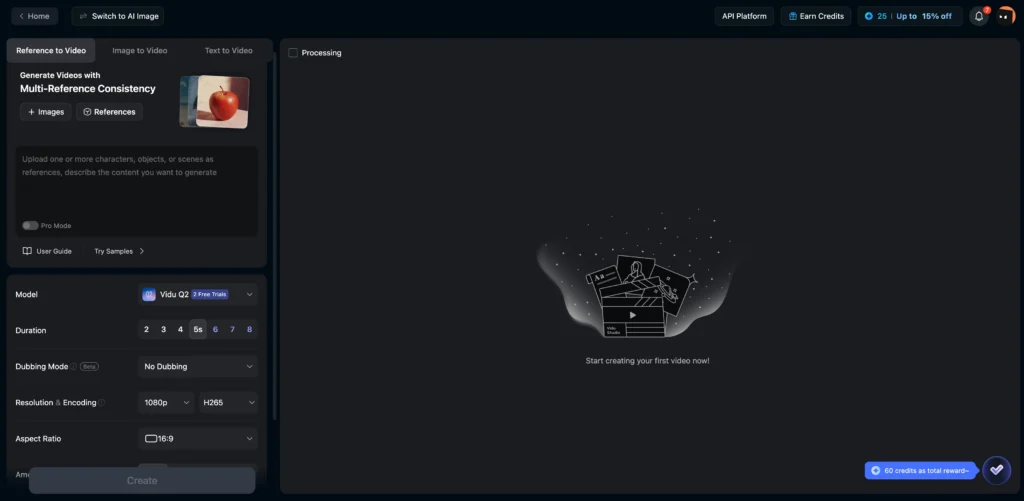
Technical advantage: The system analyzes facial features, clothing patterns, object geometry, and color palettes across all references to create a unified visual model. This enables multi-shot storytelling with consistent characters—previously impossible with standard AI video generators.
Applications:
- Music videos with recurring characters
- Educational content featuring virtual presenters
- Brand mascot animations
- Narrative short films
4. Start-End-to-Video (Keyframe Control)
Users provide the first and last frames of a desired sequence, and Vidu interpolates the motion between them. This gives precise compositional control while leveraging AI to handle complex transitions.
Use cases:
- Product reveals (closed box → open box showing contents)
- Before/after transformations
- Location transitions (character in city → same character in forest)
5. Audio and Voice Features
Text-to-Audio: Generates sound effects or background music (2-10 seconds)
- Supports creative sound effects
- Background music generation
- Customizable duration
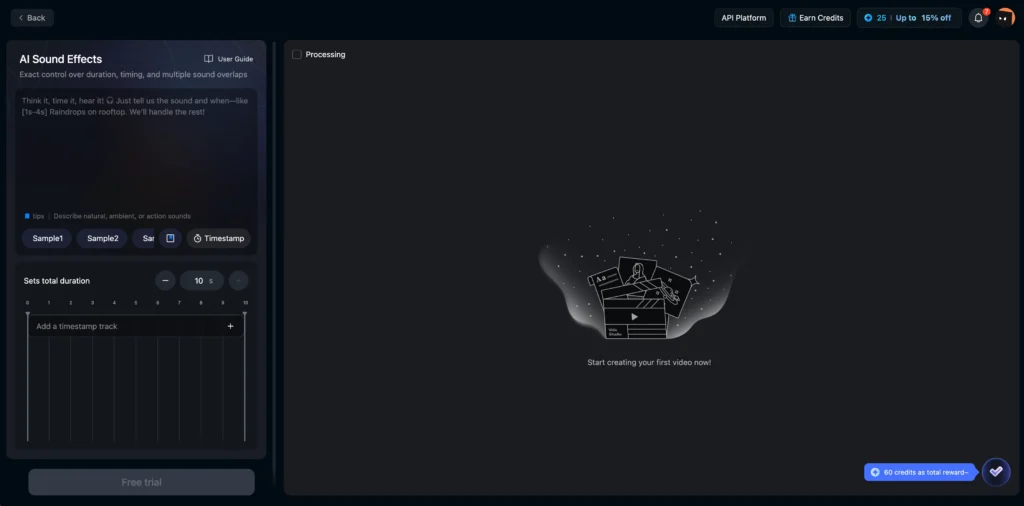
Text-to-Speech: Converts text to natural speech
- 30+ languages supported
- 300+ voice options
- Adjustable speed, pauses, volume, and emotional tone (joyful, sad, angry)
Voice Clone: Upload audio samples to replicate voice timbre for future use
Lip Sync: Automatically synchronizes video character mouth movements to audio (supports hundreds of voices and languages)
Viral Features of Vidu AI Video Generator
1. Vidu AI Hug and Templates
The Vidu AI hugging generator (also called “Vidu AI hug”) is a specialized template that creates videos of two people or characters embracing. This became viral on social media for its ability to realistically animate hugs between uploaded subjects.
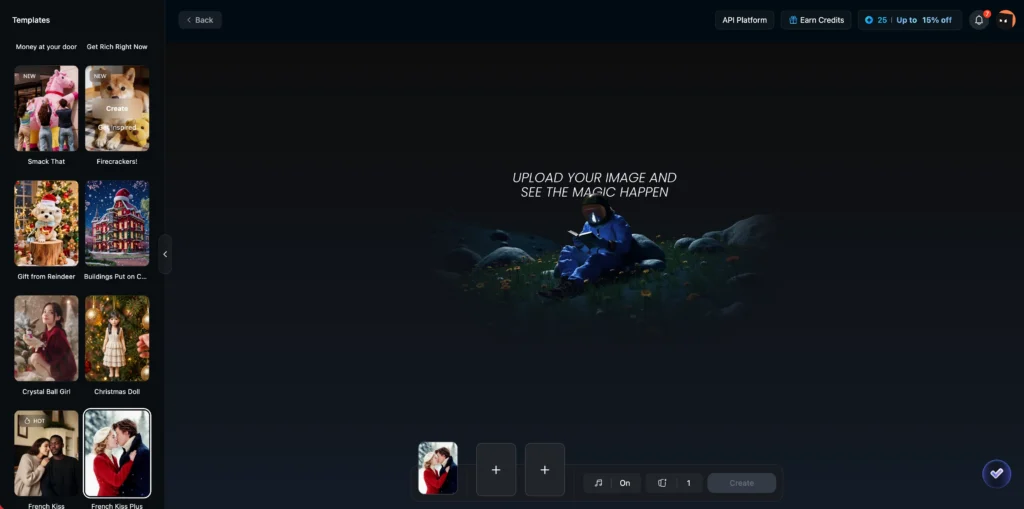
How Vidu AI hugging works:
1. Upload two images (person A and person B)
2. Select “Hugging” template from Vidu Studio AI
3. System analyzes both subjects’ body proportions and positioning
4. Generates smooth embrace animation maintaining both identities
5. Output preserves facial features, clothing, and body types
Applications:
- Reuniting family members in photos
- Creating emotional content for social campaigns
- Fan-made content (fictional character interactions)
- Memorial tributes
Other popular templates:
- Kissing generator: Similar to hugging but for romantic scenes
- Bloom Magic: Floral transformation effects
- Virtual try-on: E-commerce clothing demonstrations
- Dance generator: Animated dance sequences
2. AI MV Generator (Music Video Creation)
The Vidu AI MV Generator represents a breakthrough in automated music video production. This multi-agent system creates complete music videos from music files, reference images, and text instructions.
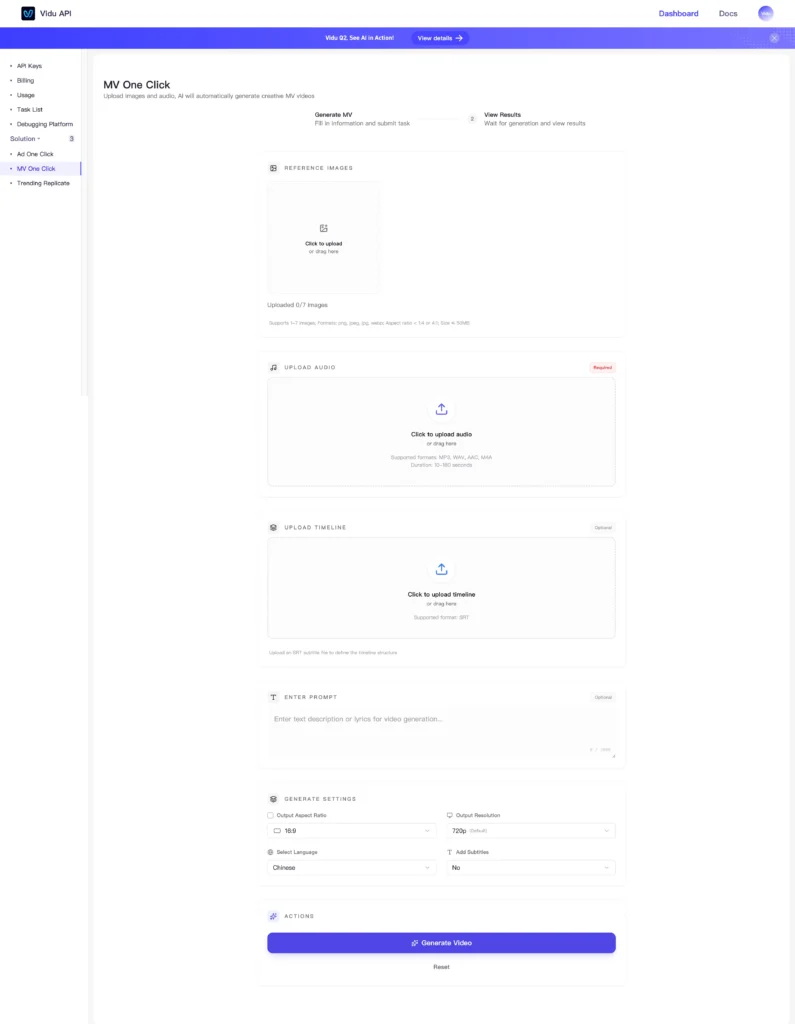
How the AI MV system works:
1. Director Agent: Analyzes music structure, lyrics, and emotional arc
2. Storyboard Agent: Converts narrative into detailed shot list with camera angles and timing
3. Visual Generation Agent: Creates video frames maintaining character and style consistency using reference images (up to 7)
4. Editing Agent: Handles rhythm synchronization, transitions, and generates synchronized lyric subtitles
Technical advantages:
- Maintains character consistency across 5+ minute videos
- Frame-accurate music beat synchronization
- Automatic lyric-driven narrative generation
- No manual editing required
Pricing: $0.03-$0.10 per second depending on resolution (540p-1080p)
Use cases:
- Independent musicians creating professional MVs
- Fan-made music videos
- Visual albums for streaming platforms
- Lyric videos with dynamic storytelling
3. Digital Human Creation
Generate AI spokesperson videos from a single image. The system animates the face to deliver scripted content with natural expressions and lip sync.
Applications:
- Corporate training videos
- News broadcasts
- Educational content
- Multilingual product demonstrations
Pricing: 120-200 credits base + 20 credits per 5 seconds for lip sync
4. AI Animation Generator
Specialized tool for creating animated content with stylized aesthetics ranging from 2D motion graphics to 3D character animation.
Key features:
- Animation styles: Cartoon, anime, motion graphics, stop-motion effects
- Rigging assistance: AI interprets static characters and animates them with natural movement
- Timeline control: Keyframe-based animation with automatic interpolation
- Export formats: Optimized for animation pipelines
Use cases:
- Explainer videos with animated characters
- Educational content with illustrated concepts
- Brand mascot animations
- Children’s content creation
5. AI Video Ad Generator
Purpose-built for creating marketing and advertising content with proven templates and conversion-optimized structures.
Features:
- Industry templates: E-commerce, SaaS, real estate, automotive, fashion
- Ad format presets: Instagram Stories, Facebook Feed, YouTube Pre-roll, TikTok Ads
- Call-to-action integration: Automated CTA placement and animation
- A/B testing support: Generate multiple variations simultaneously
6. AI Kissing Generator
Similar to the hug generator but optimized for romantic scenes with nuanced facial animation and intimate framing.
Features:
- Subtle facial animation: Natural approach, eye closure, expression changes
- Romantic cinematography: Soft focus, intimate camera angles, lighting
- Timing control: Adjust pace from tender to passionate
- Privacy-conscious: All processing cloud-based; images not stored
Use cases:
- Wedding video enhancements
- Romantic social media content
- Film/TV pre-visualization for romantic scenes
- Creative storytelling for couples’ content
7. AI Dance Generator
Creates choreographed dance videos from static images or generates original dance sequences with AI performers.
How it works:
- Upload image of person or use AI-generated dancer
- Select dance style (hip-hop, contemporary, ballroom, cultural dances)
- Choose music or let AI match choreography to beat
- Generate synchronized dance performance
Dance styles supported:
- Modern/contemporary
- Hip-hop and street dance
- Ballet and classical
- Cultural dances (Bollywood, K-pop, Latin)
- Viral TikTok choreography
Use cases: Music video production, dance tutorial previews, fitness content, social media challenges, cultural preservation.
8. AI Anime Video Generator
Dedicated tool for anime-style video creation with genre-specific features and aesthetic controls.
Anime specialization:
- Art styles: Shonen, shoujo, seinen, chibi, vintage anime
- Animation techniques: Limited animation, speed lines, impact frames
- Genre conventions: Magical girl transformations, battle sequences, slice-of-life
- Cultural elements: Japanese settings, school environments, fantasy worlds
Technical features:
- Consistent character designs across scenes
- Anime-specific motion (exaggerated expressions, dynamic poses)
- Style transfer from reference anime images
- Subtitle/dialogue integration
Audience: Anime content creators, manga artists visualizing stories, fan content producers, studios prototyping concepts.
9. AI Meme Video Generator
Specialized tool for creating viral meme content with trending templates and rapid iteration.
Meme-specific features:
- Template library: Hundreds of trending meme formats updated weekly
- Text overlay automation: Impact font, Comic Sans, trending caption styles
- Timing optimization: Perfect comedic timing for punchlines
- Reaction integration: Add popular reaction clips and audio
Workflow speed: Generate 50+ meme variations in under an hour for rapid content testing.
Best for: Social media managers, meme pages, brand social teams, viral marketing campaigns.
How to Use Vidu AI Studio: Step-by-Step Guide
Getting Started
1. Create account at vidu.com (platform.vidu.cn)
2. Access Vidu AI Studio dashboard
3. Purchase credits or choose subscription plan
4. Select generation mode based on your content type
Creating Your First Video
For Image-to-Video:
1. Upload source image (max 7 images for Reference mode)
2. Write detailed motion prompt
- Example: “Slow camera push toward subject while wind gently moves hair, golden hour lighting, cinematic depth of field”
3. Configure parameters:
- Model: Q2-turbo (fastest), Q2-pro (highest quality)
- Resolution: 720p (balanced), 1080p (premium)
- Duration: 4-6 seconds (optimal for social media)
- Motion amplitude: Low (subtle), Medium, High (dramatic)
3. Optional: Add background music (adds 15 credits)
4. Click Generate
5. Wait 1-5 minutes for processing
6. Download or enhance with Upscale Pro
Vidu AI Pricing Breakdown
Subscription Plans
| Tier | Monthly Price | Credits | Videos/Month | Best For |
| Free | $0 | 10 references | Limited testing | Exploration |
| Standard | $10 (renewal) | 800 credits | Up to 200 | Freelancers |
| Premium | $35 | 4,000 credits | Up to 1,000 | Small teams |
| Ultimate | $99 | 8,000 credits | Unlimited off-peak | Agencies |
| Enterprise | Custom | 80,000+ | 200-2,000+ | Corporations |
First-month discounts: Standard ($8.50), Premium ($30), Ultimate ($84)
Credit System Explained
Credits cost $0.005 each (half a cent). Video generation cost varies by:
- Model selection
- Resolution
- Duration
- Additional features (audio, upscaling)
Detailed Pricing Examples
Vidu Q2-turbo (Most Popular):
- 540p, 4 seconds: 12 credits ($0.06)
- 720p, 6 seconds: 28 credits ($0.14)
- 1080p, 8 seconds: 115 credits ($0.58)
Vidu Q2-pro (Highest Quality):
- 540p, 4 seconds: 18 credits ($0.09)
- 720p, 6 seconds: 75 credits ($0.38)
- 1080p, 8 seconds: 175 credits ($0.88)
Special Features:
- Upscale to 1080p: 10 credits/second ($0.05/sec)
- Upscale to 4K: 40 credits/second ($0.20/sec)
- Upscale to 8K: 160 credits/second ($0.80/sec)
- Lip Sync: 20 credits per 5 seconds
- Digital Human video: 120-200 credits base + lip sync cos
Best Alternative: Gaga AI – The Complete AI Video Solution
Why Gaga AI Stands Out
While Vidu AI excels at enterprise-grade video generation, Gaga AI has emerged as the most comprehensive alternative, offering a unified platform that rivals Vidu’s capabilities while adding unique advantages.
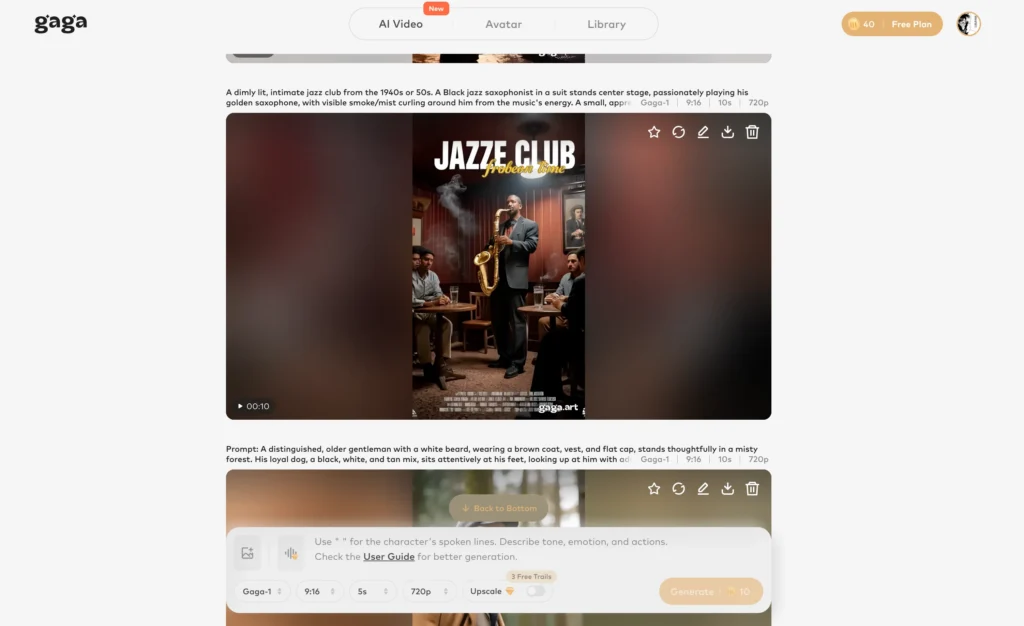
Gaga AI combines text-to-video, image-to-video, AI voice cloning, AI dubbing, and AI avatar creation into a seamless ecosystem designed for creators who need end-to-end content production.
Gaga AI Core Features Breakdown
1. Text-to-Video Generation
Gaga AI’s text-to-video engine transforms written descriptions into complete video sequences with sophisticated scene understanding and narrative coherence.
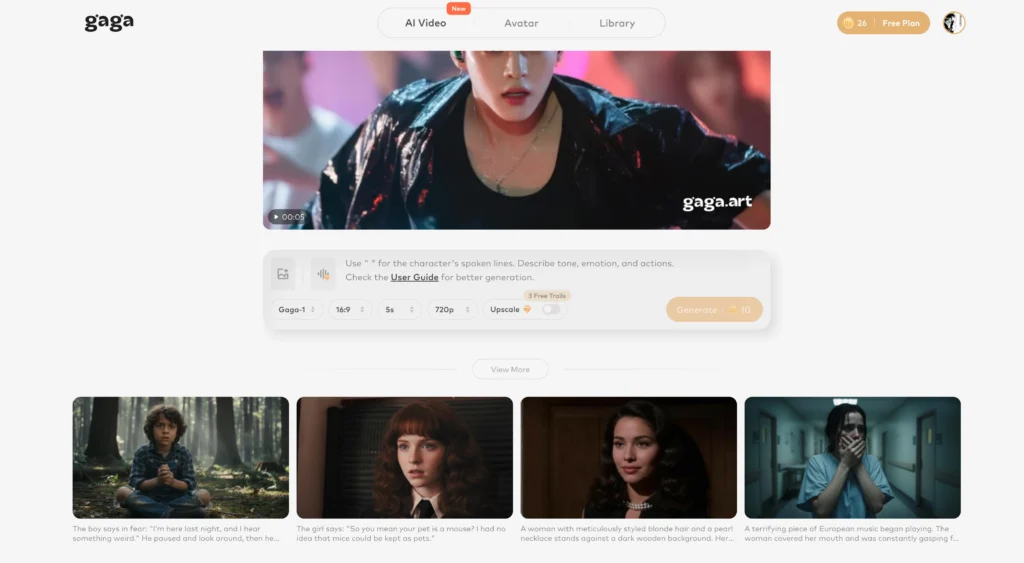
Key capabilities:
- Long-form text support: Processes detailed story descriptions up to 1,000+ words
- Style versatility: Realistic, anime, cartoon, cinematic, documentary styles
- Scene intelligence: Automatically breaks text into logical scenes with transitions
- Duration flexibility: Generates videos from 5 seconds to 3+ minutes
How it compares to Vidu:
- Longer outputs: Gaga AI supports extended narratives in single generations (up to 3 minutes vs. Vidu’s 10 seconds)
- Story-driven: Better at parsing narrative structure from complex text
- More style presets: Wider range of aesthetic templates
Best for: Creators turning scripts into video content, educators creating lesson videos from outlines, marketers generating campaign narratives.
2. Image-to-Video Generation
Gaga AI’s image-to-video functionality directly competes with Vidu’s flagship feature, with unique strengths in motion dynamics and creative interpretation.
Performance comparison:
- Motion realism: Gaga AI excels at natural physics-based animations
- Creative flexibility: Offers more granular control over motion parameters
- Processing speed: Comparable to Vidu Q2-turbo (1-3 minutes for standard videos)
Use cases: Product showcases with dynamic camera work, architectural walkthroughs, fashion lookbooks, photo-to-video conversions for social media.
3. AI Voice Clone (Industry-Leading)
This is where Gaga AI significantly outperforms Vidu. While Vidu offers voice cloning at 30 credits per voice, Gaga AI’s voice cloning technology provides superior accuracy and flexibility.
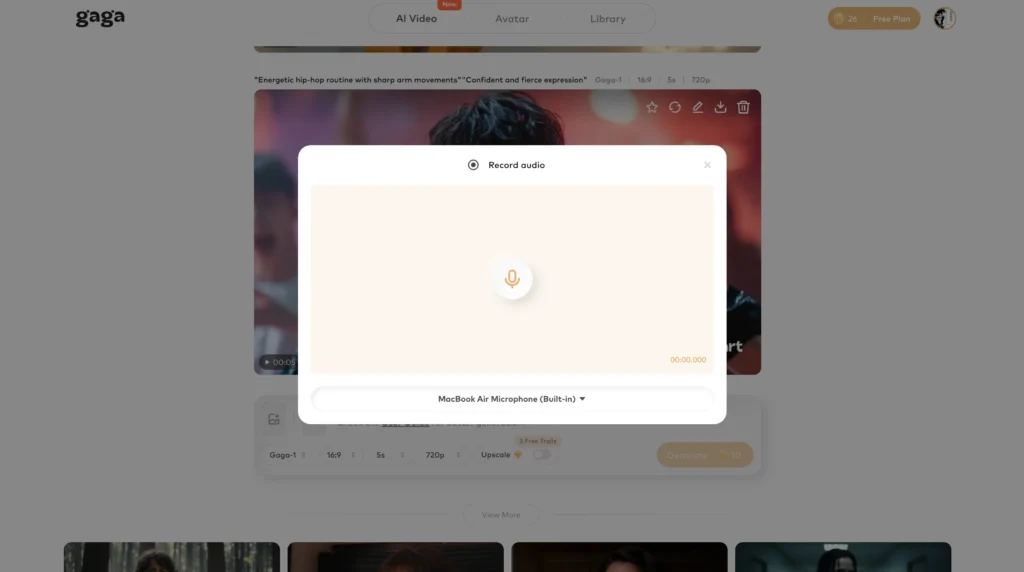
Advanced voice cloning features:
Accuracy and naturalness:
- 3-second sample requirement: Creates high-fidelity voice clones from minimal audio
- Emotional range: Cloned voices can express happiness, sadness, anger, excitement with natural inflection
- Prosody preservation: Maintains speaker’s unique rhythm, pacing, and speech patterns
- Accent retention: Preserves regional accents and linguistic characteristics
Practical advantages:
- Multi-language synthesis: Clone a voice once, generate speech in 40+ languages
- Age modulation: Adjust cloned voice to sound younger or older
- Voice mixing: Blend characteristics from multiple voices to create unique personas
- Real-time generation: Fast synthesis for immediate preview
Use cases:
- Content localization: Clone CEO’s voice for multilingual company announcements
- Audiobook production: Consistent narrator voice across entire series
- Accessibility: Create personalized voices for assistive technology users
- Character voices: Game developers creating consistent NPC dialogue
Why it beats Vidu: More affordable, faster processing, better emotional range, and superior multi-language support make Gaga AI’s voice cloning the industry benchmark.
4. AI Dubbing (Gaga AI Exclusive)
Gaga AI offers professional-grade AI dubbing that Vidu currently doesn’t provide—a game-changer for international content distribution.
What AI dubbing does:
- Translates video dialogue into target languages
- Generates synchronized speech matching original timing
- Preserves emotional delivery and tone
- Maintains lip-sync accuracy
Technical specifications:
Language support: 40+ languages including:
- European: English, Spanish, French, German, Italian, Portuguese
- Asian: Mandarin, Japanese, Korean, Hindi, Thai, Vietnamese
- Middle Eastern: Arabic, Hebrew, Turkish
- And more
Dubbing quality features:
- Voice matching: AI selects voices that match original speaker’s characteristics (gender, age, tone)
- Emotion preservation: Translates not just words but emotional delivery
- Background audio separation: Preserves music and sound effects while replacing dialogue
- Timing optimization: Adjusts speech speed to match original video timing naturally
Use cases:
- YouTube creators: Expand global reach by offering content in multiple languages
- Corporate training: Localize training videos for international teams
- E-learning platforms: Make courses accessible to diverse student populations
- Film/TV distribution: Cost-effective localization vs. traditional dubbing studios
5. AI Avatar Creation
Gaga AI’s AI avatar system goes beyond Vidu’s digital human feature with customizable virtual presenters and characters.
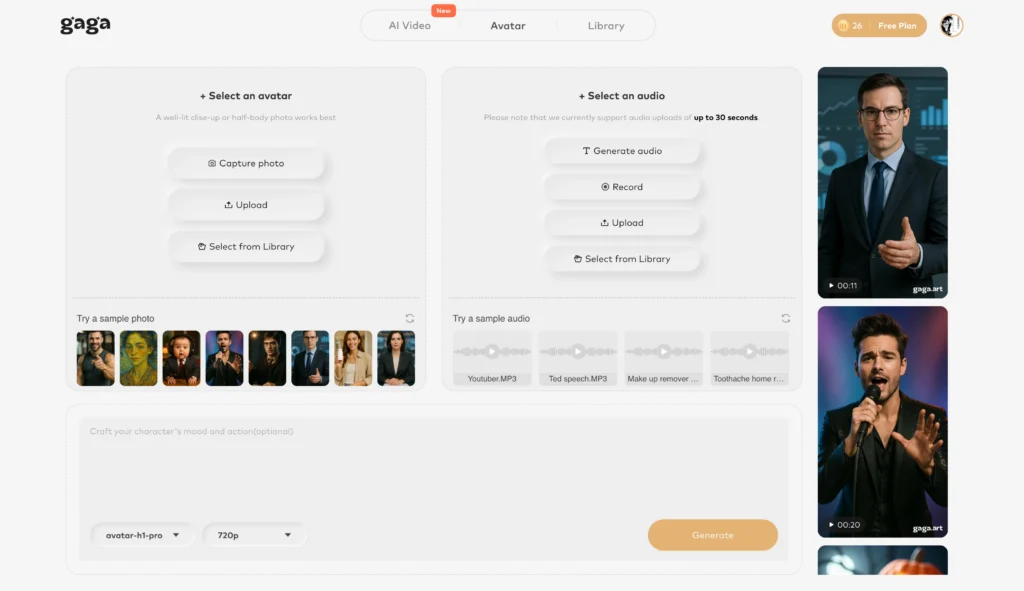
Avatar types:
Realistic avatars:
- Photorealistic human presenters
- Customizable appearance (age, ethnicity, gender, styling)
- Natural facial expressions and gestures
- Professional attire options
Use cases:
- Virtual influencers: Social media personalities without human talent
- Corporate communications: Consistent company spokesperson
- Education: Engaging virtual teachers for online courses
- Customer service: AI representatives for FAQ videos
- Entertainment: Animated hosts for shows and series
Competitive advantages over Vidu:
- Greater customization: Build unique branded characters vs. Vidu’s photo-based system
- Full-body animation: More dynamic than Vidu’s talking head approach
- Multi-character scenes: Create interactions Vidu cannot
- Persistent avatars: Build once, use indefinitely vs. image-per-video
Gaga AI Integrated Workflow Advantage
The true power of Gaga AI emerges when combining its features into unified production pipelines:
Example: International Marketing Campaign
1. Create brand avatar with company’s visual identity
2. Write campaign script (text-to-video foundation)
3. Generate master video with avatar presenter
4. Clone brand spokesperson voice
5. Dub into 20 languages using AI dubbing
6. Export localized versions for global distribution
Total time: 2-3 hours vs. weeks with traditional production Cost: $50-200 vs. $50,000+ traditional production
Example: Educational Content Series
1. Build virtual instructor avatar matching course theme
2. Upload lesson outlines (text-to-video)
3. Add supplementary images (image-to-video for demonstrations)
4. Clone actual professor’s voice for authenticity
5. Generate consistent lesson videos across entire curriculum
6. Dub for multilingual student access
Vidu AI Models Comparison
Vidu Q2 Series (2025 Latest)
The newest generation offers three performance tiers:
| Model | Speed | Resolution | Frame Rate | Duration | Pricing (1080p) |
| Q2-turbo | Fastest | 540p-1080p | 24fps | 1-10s | Starts at $0.175 |
| Q2-pro | Balanced | 540p-1080p | 24fps | 1-10s | Starts at $0.275 |
| Q2-pro-fast | Fast + affordable | 720p-1080p | 24fps | 1-10s | Starts at $0.08 |
Key improvements over legacy models:
- Variable duration (1-10 seconds vs. fixed 4-5s)
- Richer detail rendering
- Faster processing times
- Support for all generation modes
Off-peak pricing: 50% discount during non-peak hours
Legacy Models Overview
Vidu Q1: Fixed 5-second duration at 1080p with stable cinematic camera motion. Best for polished marketing content requiring predictable output.
Vidu 2.0: Fast generation with large motion range. Supports 4-8 second videos at 360p-1080p (32fps).
Vidu 1.5: Original model with anime style support. Larger motion range but slower processing.
Vidu AI vs. Competitors
Vidu AI vs. Sora 2
| Feature | Vidu AI | Sora 2 |
| Max duration | 10 seconds | 60+ seconds |
| Character consistency | Excellent (7 references) | Good |
| API access | Full REST API | Limited |
| Pricing transparency | Clear credit system | Unclear |
| Availability | Public access | Restricted waitlist |
| Best for | Enterprise production | Cinematic quality |
Verdict: Choose Vidu for reliable business workflows and API integration. Choose Sora 2 for cutting-edge visual quality and longer formats (if you can access it).
Vidu AI vs. Runway AI
| Feature | Vidu AI | Runway AI |
| Specialty | Automated workflows | Creative editing tools |
| Reference consistency | Superior (multi-image) | Standard |
| Editing control | Template-based | Manual precision tools |
| Audio integration | Built-in (TTS, clone, sync) | Limited |
| Pricing | Lower ($0.03+ per 4s) | Higher ($0.05+ per second) |
Verdict: Vidu excels at automated, consistent video generation. Runway offers more granular creative control for hands-on editors.
Vidu AI vs. Luma Dream Machine
| Feature | Vidu AI | Luma Dream Machine |
| Target user | Enterprise/developers | Casual creators |
| Free tier | Limited (10 references) | Generous |
| API | Full developer platform | None |
| Templates | Extensive library | Minimal |
| Processing speed | 1-5 minutes | 1-2 minutes |
Verdict: Luma for quick hobbyist projects. Vidu for professional production pipelines requiring consistency and scale.
Vidu AI vs. Kling AI
| Feature | Vidu AI | Kling AI |
| Max video length | 10 seconds | 2 minutes |
| Multimodal | Video + Audio + Image | Video-focused |
| Market focus | Global | China-dominant |
| Character consistency | Industry-leading | Good |
| Best use | Integrated multimedia | Long-form content |
Verdict: Kling AI for extended video narratives. Vidu for complete multimedia production ecosystems.
Vidu AI vs. Grok AI / Gaga AI / Google AI Studio
Grok AI: Primarily conversational AI, limited video capabilities
Gaga AI: Emerging competitor with less enterprise maturity
Google AI Studio: Developer platform for Google AI models; broader scope than video-specific tools
Vidu’s advantage: Purpose-built for video generation with production-grade reliability and comprehensive feature set.
Frequently Asked Questions
Is Vidu AI free to use?
Vidu offers a free tier with 10 monthly reference uses, but generated videos include watermarks. Paid plans start at $10/month (renewal price) for watermark-free commercial use. The free tier is sufficient for testing capabilities but inadequate for production workflows.
How does Vidu maintain character consistency across videos?
Vidu’s Reference-to-Video technology accepts up to 7 input images showing different angles of a subject. The AI analyzes facial geometry, skin tones, clothing patterns, and other identifying features to build a unified visual model, then maintains those characteristics throughout video generation.
What’s the difference between Vidu Q2 and older models?
Vidu Q2 (released 2025) offers variable duration (1-10 seconds vs. fixed 4-5s), three performance variants (turbo/pro/pro-fast), richer visual details, and support for all generation modes. Legacy models (Q1, 2.0, 1.5) have fixed durations and more limited capabilities but may offer specific advantages like anime style support (Vidu 1.5).
Can I use Vidu AI for commercial projects?
Yes, all paid plans (Standard and above) explicitly allow commercial use. The free plan’s commercial usage rights should be verified directly on vidu.com. Always review terms for your specific subscription tier.
How long does video generation take?
- Q2-turbo: 1-2 minutes for simple 4-6 second videos
- Q2-pro: 2-4 minutes for standard projects
- Complex references: 3-5 minutes when using multiple reference images
- AI MV: 5-10 minutes for complete music videos
Processing time scales with complexity, resolution, and duration.
Does Vidu AI support languages other than English?
The Text-to-Speech feature supports 30+ languages with 300+ voice options. However, the Vidu Studio AI interface and documentation are primarily available in English and Chinese. Prompts can be written in English for best results across all models.
What video formats does Vidu export?
Videos export as MP4 (H.264 codec), the industry standard format compatible with all major platforms (YouTube, Instagram, TikTok) and editing software (Premiere Pro, Final Cut, DaVinci Resolve). Audio exports as MP3 or WAV.
Can I edit Vidu AI videos after generation?
Yes, all videos download as standard MP4 files that can be imported into any video editor for further refinement, color grading, or integration into larger projects.
What is the Vidu AI hug feature everyone talks about?
The “Vidu AI hug” or “Vidu AI hugging” is a popular template that generates realistic embrace animations between two uploaded subjects. Users upload images of both people, and Vidu creates a natural hugging video maintaining both identities, facial features, and clothing. It went viral for reuniting people in photos and creating emotional content.
Does Vidu AI provide API access for developers?
Yes, Vidu offers a comprehensive REST API documented at platform.vidu.cn/docs. API access is available on Premium plans and above, enabling developers to integrate video generation into applications, automate workflows, and build video-driven products at scale.
How much does it cost to create a typical social media video?
For a 6-second video at 720p using Q2-turbo:
- Base generation: 28 credits ($0.14)
- With background music: +15 credits ($0.075)
- Total: 43 credits (~$0.22)
Most social content costs $0.15-$0.50 depending on quality tier and enhancements.
Can Vidu AI create videos longer than 10 seconds?
Single generations max out at 10 seconds, but the Multi-Frame feature allows chaining up to 9 segments (each 2-7 seconds) for extended narratives. The AI MV Generator can create complete 5+ minute music videos by orchestrating multiple generations with consistent styling.
What happens if I run out of credits mid-project?
Projects in queue complete even if credits run low. However, you cannot start new generations without sufficient credits. Purchase additional credits anytime (no minimum) or upgrade subscription tier for monthly allotment. Credits never expire.
Is Vidu AI better than Sora or Runway?
“Better” depends on use case:
- Choose Vidu for: Enterprise reliability, character consistency, API integration, cost-effectiveness, automated workflows
- Choose Sora 2 for: Maximum visual quality, longer durations (if you have access)
- Choose Runway for: Hands-on creative editing, manual control, broader toolset
Vidu excels at production-scale, consistent video generation. Others may offer specific advantages for creative or experimental work.
Can Vidu generate realistic talking head videos?
Yes, through the Digital Human feature. Upload a portrait photo, input script, and Vidu generates a video of that person speaking with natural facial movements, expressions, and lip sync. Supports 300+ voices across 30+ languages. Ideal for corporate communications, education, and multilingual content.
Getting Started: Your First Vidu AI Project
Recommended Beginner Workflow
1. Start with free tier to test capabilities
2. Create Image-to-Video test using Q2-turbo at 720p
3. Experiment with prompts to understand motion control
4. Try Reference-to-Video with 2-3 images to see consistency
5. Test a template (Hugging generator is simple and impressive)
6. Upgrade to Standard plan ($10/month) once comfortable
7. Explore API if building applications
Success Tips for New Users
Prompt quality matters: Specific, detailed prompts yield better results than vague descriptions. Include subject, action, environment, lighting, and camera movement.
Resolution strategy: Generate tests at 540p, finalize at 720p, upscale to 1080p only when necessary to conserve credits.
Use templates strategically: For common use cases (product showcases, hugs, virtual try-on), templates provide proven results with minimal trial and error.
Leverage off-peak pricing: Schedule non-urgent work during off-peak hours for 50% credit savings.
Monitor credit usage: Track costs per project type to optimize future budget allocation.
Final Verdict: Is Vidu AI Worth It?
Vidu AI excels for:
- Enterprises requiring scalable, consistent video production without expanding creative teams
- Developers building video-first applications via robust API
- Marketers creating high-volume social content with brand consistency
- Independent creators producing professional quality on limited budgets
- E-commerce businesses needing product videos at scale
Vidu AI falls short for:
- Perfectionist editors wanting frame-by-frame manual control
- Ultra-long format creators (10+ minute single videos)
- Experimental artists prioritizing cutting-edge visual quality over reliability
- Extremely budget-constrained users (free alternatives like Luma exist)
The Bottom Line
Vidu AI represents the productionization of AI video generation. While competitors like Sora 2 may produce more visually stunning one-offs, Vidu Studio AI delivers predictable, enterprise-grade results at scale. The platform’s strength lies in its reliability, character consistency, and comprehensive feature integration—making it the pragmatic choice for businesses and developers treating video as core infrastructure rather than experimental output.
For users needing to generate dozens or hundreds of videos monthly with consistent quality, Vidu AI’s automation, API access, and cost-effectiveness make it the current market leader in production-ready AI video generation.